Skip to content
Tech

Review: The skinny on the iPad mini—it’s not the size that counts

The display is a different story—one that could be the deciding factor.

Jacqui Cheng | 188
Credit: Jacqui Cheng
Story text

Former Apple CEO Steve Jobs famously trashed 7″ tablets as being “dead in the water” in 2010. Two years later, under the reign of new CEO Tim Cook, Apple has released its own miniature tablet—one that has a diagonal screen measurement of 7.9″, which Apple considers vastly different from what’s offered by similar small tablets.

“Apple has done extensive user testing on user interfaces over many years, and we really understand this stuff,” Jobs said in 2010. Indeed, Apple believes the new iPad mini is superior in every way to its 7″ competition, yet still offers the full iPad experience—just in a smaller package. “Every inch an iPad,” reads Apple’s product page for the iPad mini.

But is it really? In the weeks leading up to the iPad mini’s release, Ars readers from all walks of life made it overwhelmingly clear that their main concern is the device’s usability as it compares to the full-sized iPad. How’s the screen? What are apps like when shrunken down? How long can you hold it without fatigue? Is it really a high-quality iPad experience, like that of the third- or fourth-generation iPad?

As such, those iPad-centered usability experiences are what I focused on most when writing this review. Ars readers were also curious about the iPad mini compared against some of the more popular Android alternatives (namely the Nexus 7 and Kindle Fire). Those tablets didn’t play a dominant role in my evaluation of the iPad mini, but they are part of the discussion when appropriate. It’s also important to note this review is slightly different from past iPad reviews, because the iPad mini’s internal specs are so similar to that of the iPad 2, which we reviewed in 2011.

So, what is the iPad mini really like to use in everyday life? Let’s go through some of the technical details of the $329 Wi-Fi-only iPad mini first, then dive into the usability experience of a tablet that is “every inch an iPad,” but smaller.
Physical design

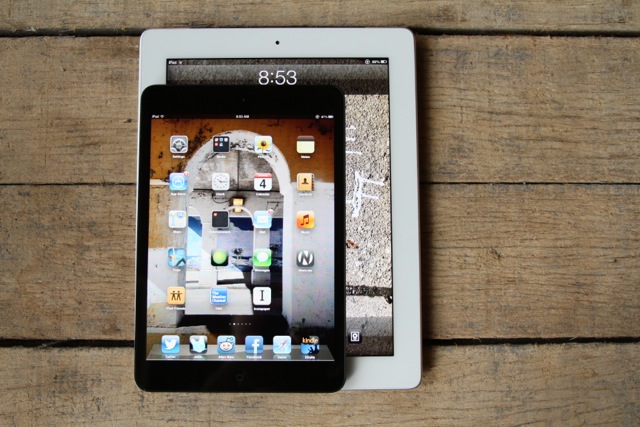
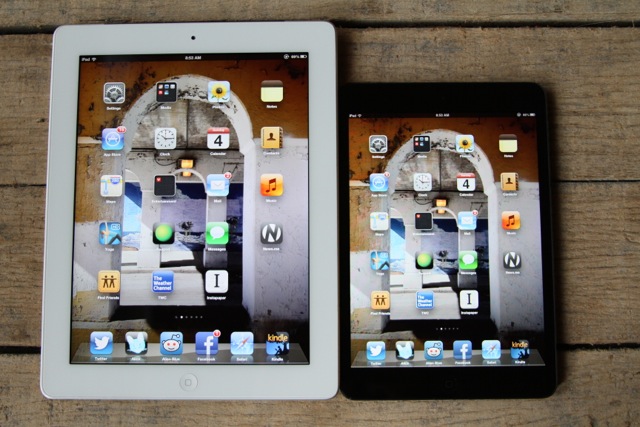
Third-gen iPad on the left, iPad mini on the right.

Apple’s party line is that the iPad mini is indeed a small iPad, but it’s certainly no 7″ tablet. Tim Cook recently said on the company’s fourth quarter conference call that the iPad mini is “not a compromised product like the 7-inch tablets.” He’s consistently implied the iPad mini is much more—not only because it is technically larger than 7″ tablets, but because its functional usability is different.

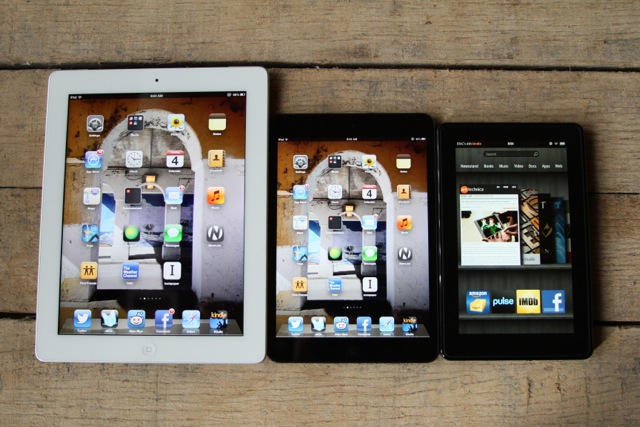
I’ll get to the usability later, but for now let’s focus on measurements and specs. Again, the iPad mini is technically not a 7″ tablet like the Kindle Fire HD or a Nexus 7. But it runs in the same crowd: its dimensions are 7.87″ x 5.3″ x 0.28″ (or 0.29″ for Wi-Fi + Cellular). By comparison, the Kindle Fire HD 7″ is 7.44″ x 4.72″ x 0.45″ and the Nexus 7 is 7.81″ x 4.72″ x 0.41″. If you want to compare against a full-sized iPad, the fourth-generation iPad is 9.5″ x 7.31″ x 0.37″.

When put into perspective, this makes the iPad mini almost the same height as a Nexus 7, but almost a half-inch wider and about 2/3 the thickness of the Nexus 7. This is almost the same for the Kindle Fire HD 7″, except that device is a bit shorter—the iPad mini is almost a half-inch taller when making this comparison.

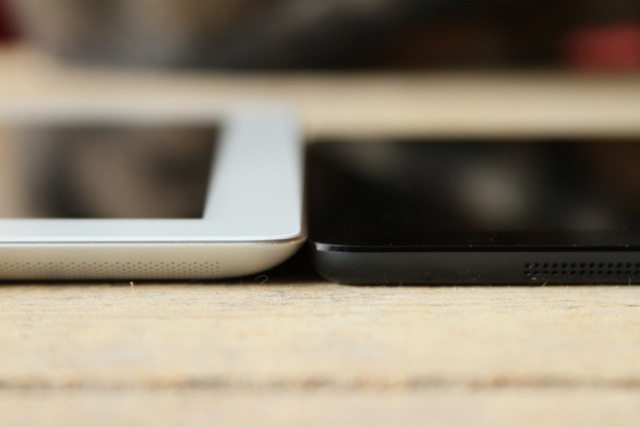
Third-gen iPad on the left, iPad mini on the right
When comparing against other Apple products, iPad mini is the thinnest tablet the company has made yet. The iPad mini is thinner than even the iPhone 5, but the iPod touch wins out as thinnest iOS device on the market.
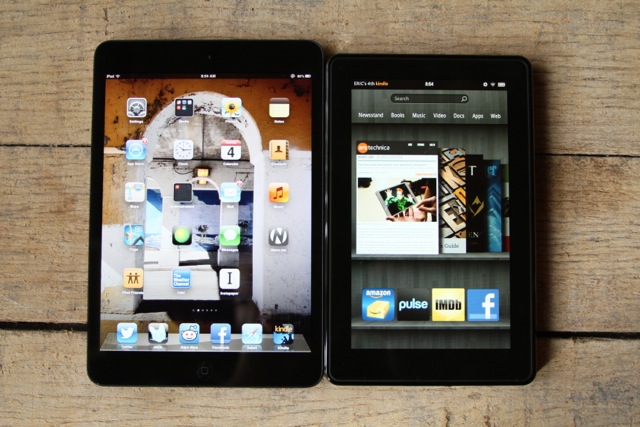
iPad mini on the left, Kindle Fire on the right.

Apple likes to brag that part of the reason the iPad mini is superior to similarly-sized tablets is its screen real estate. The iPad mini has roughly 35 percent more screen real estate than other 7″ tablets, and Apple claims the usable area is 50 to 67 percent larger. This point may seem like nitpicking until you look at the iPad mini next to a competing device (in my case, a Kindle Fire). The point is really driven home here—although the UIs are obviously different, the iPad mini’s screen does have a good amount more real estate than 7″ tablets. (Keep in mind that some 7″ tablets do sport higher-density displays; more on that below.)

In terms of weight, the iPad mini competes well. The Wi-Fi version is 0.68 pounds (308g), while the Wi-Fi + Cellular version is 0.69 pounds (312 grams). This is less than both the Nexus 7, which comes in at 0.75 pounds (340g), and the Kindle Fire HD 7″, which is nearly 0.87 pounds (395g). And of course, it’s quite a bit less than the full-sized iPad: the fourth-generation device is 1.44 pounds (652g), making the iPad mini less than half the weight. This certainly plays into its long-term “holdability,” which I’ll address more directly in the usability part of this review.

Left to right: Third-gen iPad, iPad mini, Kindle Fire

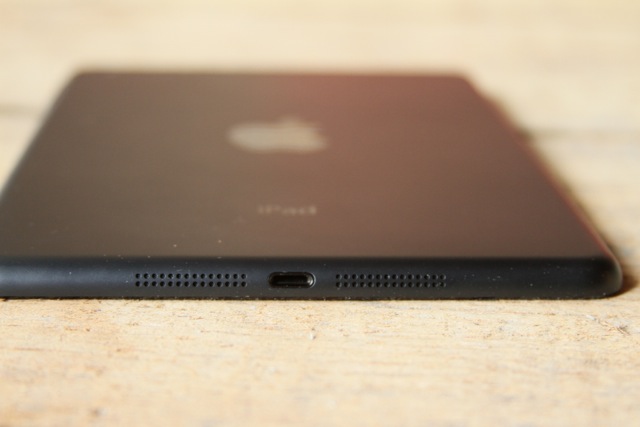
But overall, the iPad mini is still just an iPad. It has stereo speaker grilles on the bottom along with a new Lightning port. The volume button is on the right side, along with the mute/screen lock switch. The top has the lock button and a headphone jack. Contrary to constant rumors, Apple still included the Home button on the front of the device (though it does seem to travel a little more when you click it, compared to other iOS devices).

Display

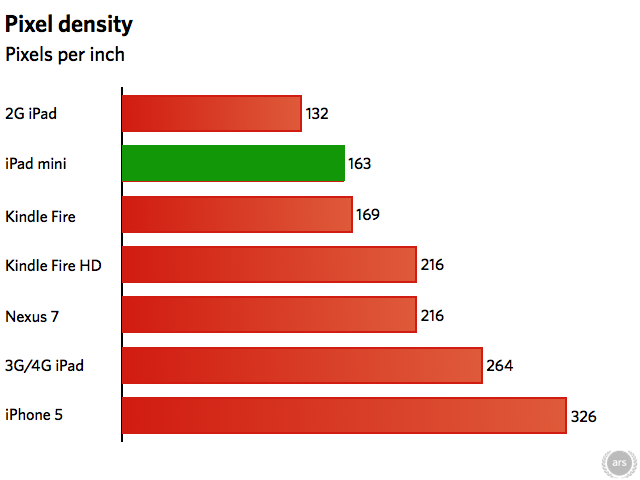
As I wrote in my Q&A about the iPad mini, the device’s display runs at a resolution of 1024×768, just like the iPad 2. This is not the same “retina” quality resolution Apple brags about with nearly all of its other devices (iPhones, third- and fourth-generation iPads, and even the iPod touch all have retina displays), which is arguably one of the more controversial aspects of the iPad mini. But unlike the iPad 2, the iPad mini’s screen is only 7.9 inches, making its pixel density slightly higher and therefore, slightly less grating to the eye.

As you can see, the iPad mini’s pixel density is roughly the same as the original Kindle Fire, but it sits pretty low on the list overall. This means images and text aren’t as crisp as they are on devices with a higher number of pixels per inch, like that of the third- or fourth-generation iPad (or 7″ tablets like the Nexus 7 or Kindle Fire HD).

Thanks to iFixit’s recent teardown of the iPad mini, we also know that the front glass is still a separate piece from the touchscreen display panel. As we wrote in our analysis, Apple fuses the display and front glass in the iPhone and iPod touch, in addition to its Retina MacBook Pros and iMacs, to make these devices even thinner. That’s not the case with the iPad mini—a move that’s undoubtedly a cost-saving measure on Apple’s part. This makes images and text appear slightly separated from the front of the glass, which can add to the perception that the display isn’t quite as nice as what’s included in Apple’s other products. And if you’re used to looking at something with much higher ppi—such as an iPhone or retina iPad—you’ll notice the difference.

I wrote previously that the maximum brightness of the iPad mini’s screen seems to go just beyond that of the third-generation iPad, and the display is just a hair bluer (but not particularly discernible if the two devices aren’t side-by-side). Colors appear to be largely similar as well; I can tell some difference in side-by-side photos, but I don’t foresee everyday users noticing much of a change.

Usability

Specs are all well and good, but what is it like to read books on the iPad mini? How’s the typing situation? Is it a one-handed device? Does the software look or work different from on the iPad jumbo? In short: what is it like to use?

Reading

Reading content on the iPad mini’s screen was at the top of everyone’s list of questions when asked for feedback. Whether Web pages, e-books, PDFs, or even just text within apps, people wanted to know if the smaller, relatively low-res screen was tolerable enough to justify a purchase.

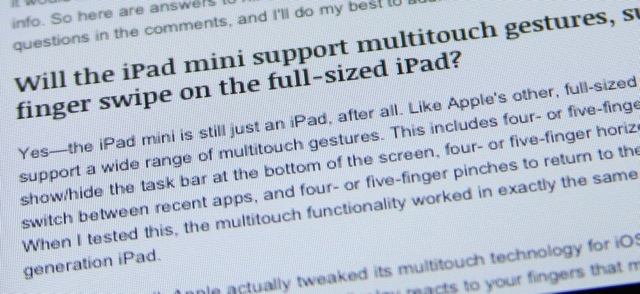
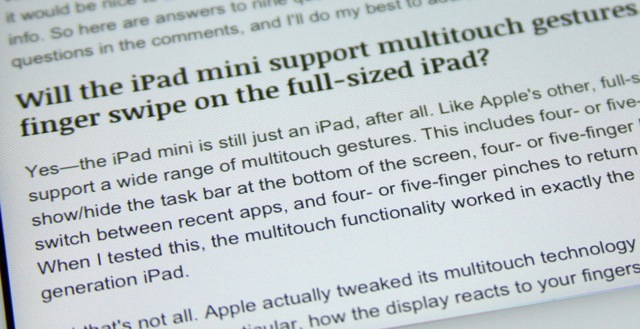
Text up close on the iPad mini.
The display on the third- and fourth- generation iPad is much more smooth thanks to the retina display.

As I mentioned earlier, the iPad mini does not have a “retina” class display like that included in the third- and fourth-generation iPad, iPhone 4/4S/5, or the fifth-gen iPod touch. In fact, when it comes to pixels per inch, it’s slightly lower than other small tablets like the Nexus 7 or Kindle Fire HD (though those devices also don’t quite measure up to the aforementioned Apple products in the ppi area). Basically, the iPad mini’s display is almost the exact same as what’s currently in the iPad 2, but with slightly more ppi—163ppi in the iPad mini versus 132ppi in the iPad 2.

What does this mean for reading? If you’re used to looking at a retina screen, which it turns out many Apple product users are, the differences will be noticeable. I really didn’t want this to be true when going into this review—I like my retina displays and all, but I also think they’re a hair overrated when it comes to everyday use—but I cannot tell a lie. When I was reading on the iPad mini, practically all I could see were jagged edges and pixels. It was distracting, particularly when I was really concentrating on the text, like when reading e-books or PDFs.

More general usage like Twitter or Web surfing was less annoying in this area, but differences in text smoothness were certainly noticeable. And I’m not the only one who feels this way; numerous Ars readers have said the same thing to me, and a number of other high-profile reviewers seem to agree.

It’s a disappointing discovery. I believe one of Apple’s goals with the iPad mini is to create a (relatively) low-cost device, which is why it’s so similar to the iPad 2 (another low-cost iPad). I thought the display wouldn’t matter much to me, and that some other reviewers who had nitpicked the lack of retina display were just being precious. But now I’m on the dark side; I can’t help but feel like the iPad mini would have a much wider audience if Apple would release a retina-display version. Perhaps it could be sold side-by-side with the non-retina version, as a “premium” option.

Pixels aside, reading on the iPad mini was otherwise a dream. The iPad mini is much more “holdable” than the full-sized iPad—not just because of its shape and size, but its weight as well. The full-sized iPad can be a bear to read with for long periods of time, but the iPad mini is basically an (e-ink) Kindle with iOS installed. I didn’t feel the screen size impacted my ability to read at all—the text on e-books, PDFs, and Web pages wasn’t so small that it would require zooming, at least when compared against a full-sized iPad.

Even “horrible, non-reflowable” PDFs (as one Ars reader called them) were fine on the iPad mini for me. Again, the screen size on the device is not that much smaller than a full-sized iPad, though this is more of a subjective matter of taste. I’d compare it to something like the 11″ MacBook Air versus the 13″ MacBook Air (not an exact analogy, but hang with me). The 11″ MacBook Air is perfectly usable, but not everyone likes it. Some people just plain like a larger screen, while others value the reduction in weight and footprint.

So what’s my overall assessment of the iPad mini’s usability for reading? If your concern is that your eyesight is bad and you’ll be squinting too much, I wouldn’t worry. But if your concern is that you’ve already been spoiled for life by a retina-class display in your other mobile devices, then you may indeed have an issue. The lack of text smoothness, and occasional jagged edges, are just annoying enough to constantly pop out at you even after long periods of use. It may actually be the single limiting factor for many potential buyers.

Hold me

One of the changes Apple made when redesigning the iPad for a 7.9″ screen was to reduce the size of the bezel surrounding the display. On the full-sized iPad, the bezel largely serves as a place to rest your hands or fingers when interacting with the touchscreen. As such, when Apple made the iPad mini with an extra-skinny bezel around the right and left sides, some were left worried about how easy it would be to hold the device.

For me, the thinner bezel was not a problem, despite the fact that I think a thicker one is necessary on the 9.7″ iPad. As I wrote in my Q&A:

I find the change doesn’t offer too many challenges, because of the shape, size, and weight of the iPad mini. With the full-size iPad being as “heavy” as it is, you often find yourself holding it with your thumb firmly gripped to the front bezel. But the iPad mini is significantly lighter, at 0.68 pounds, while the full-sized iPad is more than twice that weight at 1.44 pounds. Because of this weight difference, it’s much easier to rest the iPad mini on your palm/fingers with one hand, with your thumb only lightly wrapped around the edge for balance. During my initial usage, I didn’t find my thumb needing to grip around the front like I do with the full-sized iPad.

As most iPad owners are well aware, the full-sized version can be a bit heavy to hold one-handed for long periods of time. I don’t usually hold my third-gen iPad with one hand at all when using it for more than a minute—I usually rest it against something if I’m going to be there for a while. I didn’t find this to be the case with the iPad mini, though. It was comfortable to hold with one hand (or occasionally two, because I was thumb-typing) for many hours at a time while I was performing my battery life tests.

This certainly isn’t the case with my larger iPad, so it was a nice change. People who like to read in bed would appreciate this: even when compared against the Kindle Fire HD or the Nexus 7, the iPad mini weighs the least, meaning less fatigue on the hands. I have an original Kindle Fire on hand, and by comparison, it feels like a ton of bricks.

Typing

As I’ve written several times now about the iPad mini, I don’t find typing on the shrunken screen to be much different from typing on a full-sized iPad. There is one key difference however. The iPad mini—at least for me—allows me to type easily with both thumbs when holding the device in portrait mode, similar to how you might type on an iPhone or some other smartphone. It may even be easier to type on the iPad mini this way (compared to a smartphone) because the keyboard can be small in portrait mode on an iPhone.

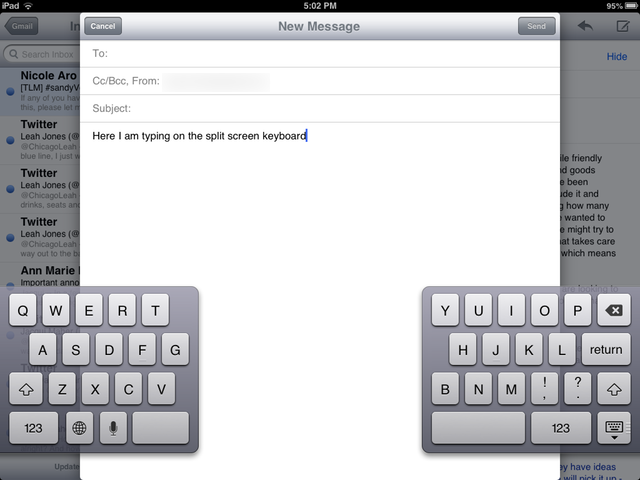
Landscape mode is a different matter—I have to lay down the iPad mini on a lap or desk to type in the traditional (home row) way. The iPad mini does do split-screen keyboards, though, just like its big brother:

I am not a huge fan of typing on the split screen keyboard, personally—I find it to be a challenge and I tend to type slower this way. But many Ars readers asked me about this, indicating that there are a decent number of users who do type this way. One thing to keep in mind when using the split-screen keyboard in landscape mode: the keys shrink quite a bit. They’re not nearly as large as they would be if you were using the traditional keyboard layout. So, if you’re worried about fat-fingering some keys while typing, this might end up being more of a concern for you.

The full keyboard in landscape mode has keys that are about 3/4 the size of that on the full-size iPad. I don’t find it to be difficult to hit the keys when typing this way. It’s a little more cramped because of the smaller screen, but otherwise I felt the experience was largely the same as what iPad owners would already be used to.

One Ars reader specifically requested I discuss what it’s like to use a Bluetooth keyboard with the iPad mini, and whether the mini is suitable for use this way. I have done this before on the full-sized iPad, performing an entire workday without touching a “real” computer. When doing the same thing on the iPad mini, I didn’t feel that it was significantly different except that small text can begin to get hard on the eyes when the device is further away from you with a keyboard in between.

Again, because the iPad mini’s display resolution is the same as that of the iPad 2, they are functionally similar when it comes to running various writing apps, IMing, sending e-mail, etc. It’s really just a matter of preference when it comes to text and UI elements being just-slightly smaller and possibly squint-worthy. For me, I didn’t feel that way, but there are people who don’t like to work the way I work. Still, I would probably not use the iPad mini this way, but I also don’t see it being a problem if I were forced to get some work done on it. It’s absolutely doable, but likely not my first choice.

Multitouch

Like Apple’s other, full-sized iPads, the iPad mini does support a wide range of multitouch gestures. This includes four- or five-finger vertical swipes to show/hide the task bar at the bottom of the screen, four- or five-finger horizontal swipes to quickly switch between recent apps, and four- or five-finger pinches to return to the home screen from an app. When I tested this, the multitouch functionality worked in exactly the same way as it does on my third-generation iPad.

That’s what I wrote in the early Q&A about multitouch on the iPad mini. I’ve been using the iPad mini for several days now and I don’t find these multitouch functions to be hindered by the shrunken size of the screen—not everyone uses multitouch gestures on their iPads, but those who do shouldn’t be worried.

Apple’s implementation of multitouch has also been tweaked a bit for the iPad mini. If a finger is resting on the edge of the display, it no longer disrupts the OS’s ability to perform other actions. For example, if your thumb is touching the display on the left side but you’re trying to scroll a Web page with your right hand, this might have caused problems under a previous version of iOS. But now, apparently just for the iPad mini, Apple has made it so iOS can detect those resting fingers, then choose to ignore them so you can perform other actions. This plays into the holdability of the device and reduces concerns over the shrunken bezel.

Apps and fat fingers

Several Ars readers asked me if apps were any different on the iPad mini versus the full-sized iPad. This was my response:

The iPad mini runs apps at the same resolution as the full-sized iPad 2. Both devices run at 1024×768—it’s just that the iPad 2 has a 9.7-inch screen while the iPad mini’s screen is only 7.9 inches. Because Apple is still selling the iPad 2 as a current-but-discounted device to new iPad owners, both it and the iPad mini basically run the exact same apps from the App Store. As such, the UI on apps will appear smaller, but not functionally different from on the iPad 2.

Third-party developers aren’t prompted to discern between a full-sized iPad and an iPad mini—they only develop apps for “retina” resolutions (third- and fourth-generation iPads) or not (iPad 2 and iPad mini). So, any app that you might run on a full-sized iPad 2 will be identical in features when run on the iPad mini. But if you’re comparing between the iPad mini and, say, a fourth-generation iPad, there might be some differences, because the latter may be running an app that has been updated for the retina display.

This being said, although the UI elements are technically smaller, they are not difficult to use in my experience. The tap area of most buttons is still large enough to be comfortable for most users. This may not quite be the case for some Web pages, though. I sometimes find sites that have near-untappable elements even on larger screened tablets, so there may be some zooming to be had when surfing the Web on the iPad mini.

And although all iPad 2 apps will run on the iPad mini in pretty much the same way, I’ve already seen some chatter among developers about how the iPad mini should warrant a UI reconsideration. We’ll see what the next six months bring—it’s possible some will begin to design apps with the iPad mini’s smaller screen in mind.

Battery Life

The iPad mini comes with a 16.3-watt-hour battery, which Apple says should last “up to” 10 hours when surfing the Web or watching video. As I’ve written in other recent reviews, Apple’s marketing claims in recent years are not far off from reality based on our testing here at Ars, and it’s not uncommon for us to see battery life times that actually exceed what Apple advertises on its site. As usual, however, your own mileage will vary depending on how you use the device. Our experiences shouldn’t be taken as the letter of the law—they’re more of a subjective guideline.

I performed the two main battery life tests that I do for all my iOS device reviews: an Internet-surfing test and a video test. For the Internet-surfing test, I used the device over Wi-Fi while leaving all push alerts on, screen brightness at 50 percent, and speaker volume at 50 percent. I did a mixture of surfing the Web, reading (and responding to) Twitter, watching occasional YouTube videos, reading an e-book, responding to e-mail, and sending/receiving iMessages.

This is a typical use case for me on a normal day, though your own ratios of activities will undoubtedly differ. Still, when performing these activities, I was able to squeeze an almost surprising 12 hours of solid Internet-surfing time out of the iPad mini before it needed a recharge

Next came the video test. For this, I left the settings largely as they were: with Wi-Fi and push notifications turned on, screen brightness at 50 percent, and volume at roughly 3/4 the max. I played a movie on loop I purchased from iTunes in the built-in Videos app, and timed how long it would last.

The results from this test were even longer than the Internet-surfing test: 13 hours and 30 minutes. I often get more life out of watching video than active use of the Internet, so this wasn’t a huge shock. The iPad mini didn’t get warm at all during this test either (something my third-gen iPad does when I watch video), and I feel confident saying one could last through a few domestic flights (or at least one across-the-ocean journey) on a single iPad mini charge.

One hot topic that has come up regarding the iPad mini’s battery is its recharge time. The device is bundled with the same 5-watt power adapter that comes with the iPhone—not the 12-watt adapter that comes with full-sized iPads (or the 10-watt adapter that was previously shipped with the iPad). This has led some to worry about the iPad mini taking forever to charge back up, which has been a lingering concern since the appearance of the iPad 2 in 2010.

Using the included charger, it took me about 5.5 hours to recharge the iPad mini from near-death. I typically only charge my devices overnight, so this doesn’t affect my life much. But it does begin to border on the longer side, especially when the iPad jumbo can take from 6 to 8 hours to charge its own massive battery on its 12-watt charger.

Processor and camera: like the iPad 2, but not

Aside from display resolution, the other major element the iPad mini has in common with the iPad 2 is its processor. Both devices have a dual-core A5 processor (two 900MHz Cortex A9s) with a PowerVR SGX 543 MP2 GPU, and both devices have 512MB of RAM, as found by iFixit. You can visit our iPad 2 review from 2011 for more details about the A5, as nothing has changed in that department between the two devices.

Because the processor is no different from what we’ve already seen, we didn’t put it through vigorous testing. In real world use, the device seems perfectly fine speed-wise when it comes to most kinds of content consumption, like reading, listening to music, watching videos, and so on. But if you were dissatisfied with the graphics performance of your iPad 2 when it comes to gaming, you’re not likely to be blown away by the iPad mini either.

Keep in mind this is basically targeting the e-reader and 7″ tablet market—a high-powered GPU isn’t Apple’s highest priority here. This may come as a disappointment to some mobile gamers, but to be fair, it doesn’t appear to be a significant sticking point for “regulars” at all. It’s barely a sticking point for even the geek crowd, based on an informal survey of the questions and comments I’ve received from Ars readers. Those who are really into iPad gaming are largely looking elsewhere; I don’t think the iPad mini is targeted toward that demographic at all.

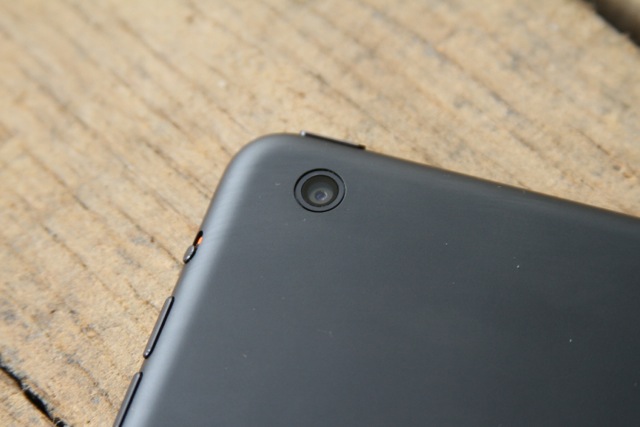
But what the iPad mini has over its big brother iPad 2 are much improved cameras. The iPad 2 originally came with an 0.7MP rear-facing camera and 640×480 front-facing camera. By contrast, the iPad mini has a FaceTime HD camera in the front that can take photos up to 1.2MP, while the rear-facing camera can take 5MP shots.

This is not the highest resolution camera that Apple’s iOS devices carry—at the moment, the iPhone 5 has an 8MP camera. However, the recently released fifth-gen iPod touch also has a 5MP rear-facing camera, which makes the iPad mini very similar to the iPod touch and iPad 3 in this sense. Chris Foresman wrote more about the new iPod touch’s camera in September, so I recommend checking out that write-up for more details.

This doesn’t mean, however, that I think taking photos with any kind of iPad (mini or jumbo) is something people will do often. I still think including a rear-facing camera in an iPad is a somewhat strange decision, and is largely targeted at a specific group of users. Namely, family types who might FaceTime chat with each other using the front-facing camera, but may want to turn the camera around to show their chatting buddies what’s going on during Christmas, vacation, and so on.

Admittedly, I have seen a few tourists using iPads to take photos at several Chicago landmarks this year, so perhaps my feeling on this is becoming more and more wrong. Certainly, the iPad mini’s relative size makes it slightly less cumbersome to use as a camera than, say, the full-sized iPad. But your smartphone camera is likely to provide equal—if not better—results in the camera department.

Miscellaneous questions

There were several other questions that Ars readers had about the iPad mini that I didn’t feel warranted their own sections. However, these are still worth addressing:

How about those stereo speakers? Are they louder at max volume than the retina iPad?

The iPad mini is the first in Apple’s tablet line to include stereo speakers, but keep in mind they’re still speakers built into a smallish mobile device. As such, you’re not going to get anything like a surround-sound movie watching experience. But to answer the volume question, yes. When I cranked up the volume on both devices to the max and watched a few music videos on each one, the volume on the iPad mini was much (much) louder than that on the third-generation iPad. For a sensitive listener such as myself, it might have even been too loud at max volume, while the iPad 3 was only just loud enough at max volume.

Does the iPad mini send AirPlay streams at 720p or 1080p, or just its own screen resolution?

Just like other iOS devices, the iPad mini can either mirror its own display over to an Apple TV, or it can stream AirPlay audio/video to a compatible device. When mirroring the iPad mini’s display, it mirrors in the device’s native resolution. But if you’re streaming a 1080p video, for example, the stream received by the Apple TV will play in whatever is your Apple TV’s supported resolution. The second-generation Apple TV will play back the video in 720p, and the third-generation Apple TV will play it back in 1080p.

What’s up with the lack of GPS? Apple seems to advertise geotagged photos…

The Wi-Fi version of the iPad mini doesn’t come with GPS, but the cellular version will when it ships later this month. Many users who care about GPS find this to be a disappointment, but those people will have to wait until the cellular version comes out.

But is it pocketable!?

For some reason, this appears to be extremely important to a segment of Ars readers. I wrote in my Q&A that the iPad mini didn’t fit into any of my pockets, and it still doesn’t. If you’re a cargo pant wearer, then it seems highly likely that the iPad mini will fit into your pockets. As for coat pockets, it really depends on the size of the pocket—if you have a Nexus 7 or Kindle Fire HD and either of those do fit into your pockets, the iPad mini might also. But the iPad mini is also about a half-inch wider than those two devices. If it’s a snug fit on your Nexus 7, then maybe not on the iPad mini. Your mileage may vary.

The downgrade debate

I didn’t really want to like the iPad mini as much as I did before I reviewed it for several days. I didn’t want to dislike it, but as a third-gen iPad owner, I couldn’t see the iPad mini having any purpose in my life. But as I began to wrap up this review and laid off on my requirement to use the iPad mini over my iPad 3 at all times, something changed. I found myself voluntarily reaching for the iPad mini over my full-sized iPad when it came time to relax on the couch or read in bed.

I can’t help but feel like my preference for the mini when entering into “iPad mode” is almost entirely due to its Kindle-like shape and weight. It’s just that much easier to hold and carry around. Picking up my third-gen iPad feels like lead after spending days on end with the mini. And the iPad mini’s screen isn’t actually that mini—the experience is largely the same. Again, it reminds me of the 11″ versus 13″ MacBook Air—and I happen to prefer the 11″ for the same reason.

I also didn’t want to be one of those people wishing for a retina display in the iPad mini. I didn’t consider it to be an absolute requirement for the mini before its launch, and I understand Apple is aiming for a more “affordable” price point. But again, after having used it (and after becoming used to other Apple products with retina displays), I realized—yep, I’m one of those people. Adding a retina display would undoubtedly add to the cost of the iPad mini, but I wish the option was there. This might be a deal breaker for some buyers.

That conflict is what makes it hard for me to answer my most common reader question: is it worth it to “downgrade” from a full-sized iPad (particularly third- and fourth-gen)? Between the iPad 2 and mini, the answer almost entirely lies on what screen size you prefer. But between an iPad 3/4 and a mini, the question is more nuanced: it’s not just about screen size, it’s about crispness of images and sharpness of text too. How those priorities rank may differ from person to person. For me, the difference is noticeable (and annoying), but I’m still beginning to lean in the iPad mini’s direction.

But even when it comes to the iPad 2, comparisons won’t last long. The iPad mini may share the same screen resolution and processor, but it has a much better camera (if that’s your thing), newer connector (Lightning), stereo speakers, and even Siri support. The two seem similar enough for the time being, but as the mini and maxi iPad lines continue to be updated, I think the mini will continue to emerge as its own segment targeted toward different users.

As for those who are considering the mini against other platforms, it really comes down to which operating system does it for you. The iPad mini is functionally an iPad in practically every way, so if you like iOS but have been averse to Green Giant-sized (see, I’m thinking that way already) tablets, the mini may be a good fit. If you’re a diehard Android person and iOS cannot possibly satisfy you, then the iPad mini won’t offer you much different from what you’ve already seen in the iPad.

So am I selling my third-generation iPad yet? I’m still not sure. I’ll probably hang onto them both for a while to see if I can get a feel for what really serves me best. If the iPad mini had a retina display, the answer would likely be much easier.

The Good:

  • Size, weight, and shape are all great. It’s what the full-sized iPad can’t be
  • Screen size is technically smaller than the iPad, but real world use doesn’t make it feel that way
  • Good battery life means I’m not having panic attacks when I’m not near a wall plug

The Bad:

  • Gamers who are unimpressed with the iPad 2’s performance will remain unimpressed with the iPad mini
  • May feel more cramped when typing on-screen in landscape mode

The Ugly:

  • The pixels! The jagged text! The iPad mini needs a retina display option

Listing image: Jacqui Cheng

Photo of Jacqui Cheng
Jacqui Cheng Editor at Large
Jacqui is an Editor at Large at Ars Technica, where she has spent the last eight years writing about Apple culture, gadgets, social networking, privacy, and more.
188 Comments