Skip to content
Tech

Review: iPad 4 has processing power to spare

Benchmarks show plenty of speed, but many apps don’t yet take advantage.

Chris Foresman | 78
The new, fourth-generation iPad looks just like the previous generation. Credit: Chris Foresman
Story text

Apple surprised us by announcing it was launching a fourth-generation iPad just seven months after it rolled out the Retina display-equipped third-generation iPad in March. Though externally it remains almost identical to the third-gen iPad—save its new Lightning connector, which replaces the 30-pin Dock connector—internally Apple has revved up its processor. The company claims the iPad 4 packs both double the computing performance and double the graphics performance over the previous model.

We spent the weekend with an iPad 4 and iPad 3 in the Orbiting HQ, benchmarking the new processor and spending time in various apps to see if Apple’s performance claims held up. Overall, it seems as though we can take Apple at their word. But depending on the apps you use, you may not notice a tons of improvement until developers learn to better exploit the A6X processor’s power.

This iPad looks very familiar

Look closely—can you tell which iPad is which?
Look closely—can you tell which iPad is which? Credit: Chris Foresman
Specs at a glance: Apple iPad (4th-gen)
Screen 2048×1536 9.7″ (264 ppi), “Retina” touchscreen
OS iOS 6
CPU 1.4-1.7GHz Apple A6X
RAM 1GB DDR3
GPU ImageTech SGX554MP4
Storage 16, 32, or 64GB NAND flash
Networking 802.11a/b/g/n, Bluetooth 4.0
Ports Lightning connector
Size 9.50×7.31×0.37″ (241.2×185.7×9.4 mm)
Weight 1.44 lbs (652 g)
Battery 43 Whr
Starting price $499
Price as reviewed $599
Sensor Ambient light sensor, Accelerometer, Gyroscope, Magnetometer
Other perks 12W charger

Again, the iPad 4 is, from the outside, nearly identical to the last-generation iPad before it. It shares a similar aluminum unibody shell, with a flat bottom and sloping edges; the headphone jack, buttons, volume rocker all appear identical; even the 5MP autofocus camera at the rear is the same. There’s not really much new to say about the design, except that Apple has swapped out the aging 30-pin Dock connector for its new Lightning connector, which is being phased in as the standard connector for all its mobile devices.

(With this change, only legacy devices still have the 30-pin Dock connector, including the iPad 2, iPhone 4S, iPhone 4, and iPod classic.)

Like the iPad 3, the revised iPad 4 measures 9.50×7.31×0.37 inches (241.2×185.7×9.4 mm), weighs 1.44 lbs (652 g), and is covered on top by a large piece of fingerprint-resistant Gorilla Glass. Given the devices are so similar on the outside, we’re even going to quote from our iPad 3 review:

“We don’t mind the design—the iPad has already seen wild success in its previous forms, and this one is certainly functional and attractive. Apple tends to lean toward the conservative side when it comes to radical cosmetic redesigns in immediate succession to one another.”

The one discernible difference between third- and fourth-gen iPads is the connector on the bottom. The newest iPads (top) feature the new Lightning connector.
The one discernible difference between third- and fourth-gen iPads is the connector on the bottom. The newest iPads (top) feature the new Lightning connector. Credit: Chris Foresman

This iPad could not be more conservative when it comes to design. If you’re looking for something different, you’ll have to consider the iPad mini. Its design more closely mirrors the newest iPod touch, and we expect design cues from those devices to show up in a future full-size iPad. For now, this is exactly what you have seen on store shelves for the last seven months.

It’s what’s on the inside that counts

The real differences in this newer iPad are on the inside. The front-facing camera has been upgraded to a 1.2MP still, 720p video FaceTime HD camera. The LTE radios in “Wi-Fi + Cellular” models have been updated to newer Qualcomm chips that have wider compatibility outside North America, and Apple has replaced the A5X processor with a new A6X design. Apple promises “up to twice as fast” Wi-Fi performance, but as our friend Glenn Fleishman noted, Apple’s claim is based on theoretical performance never achieved in real-world scenarios.

Our review unit is an off-the-shelf 32GB Wi-Fi model. LTE-equipped models aren’t shipping for “a few weeks” in the US, according to Apple. (But we don’t expect that LTE performance would really be any different from the previous model.) While the newer Qualcomm baseband chips are more power-efficient, our testing with the iPad 3 suggested the LTE chip didn’t use very much power relative to the 2048×1536 pixel Retina display. We don’t think there will be much impact for US users.

International users, however, will likely see real improvement. The older LTE chips in the iPad 3 were only compatible with LTE networks in the US and Canada. Users in other countries were limited to HSPA+ speeds. This particularly riled users in Australia and Sweden, where Apple ended up facing some sanctions for calling the devices “Wi-Fi + 4G.” Though the newer LTE chip makes the iPad 4 compatible with carriers in most countries with LTE service, you can see why Apple switched to the more generic “Wi-Fi + Cellular” name for cellular-equipped iPads.

The upgraded FaceTime camera is functionally the same as the one in the iPhone 5 and fifth-gen iPod touch. It uses a backside illumination design, so it takes better images and video in low light. The resolution is much improved for both stills and video, though you may not always see it in FaceTime video chats depending on bandwidth limitations. For taking the requisite Facebook profile pics or snapshots of friends out on the town, however, it certainly suffices. It’s not a mind-blowing change, but welcome nonetheless.

We expect Ars readers are probably more interested in the A6X processor. This new high-powered mobile processor combines two custom-designed ARMv7s-compatible cores, just as in the A6 processor in the iPhone 5. However, Apple has significantly boosted its graphics processing power.

The A5X in the iPad 3 has 4 Imagination Technologies SGX543 GPU cores clocked at 250MHz. For the A6, Apple combined three of these cores with a slight clock boost, to 300MHz, to give the A6 a boost in graphics power—roughly on par with the A5X.

To achieve twice the performance of the A5X, however, Apple did more than boost clock speed, as we expected. Instead, Apple apparently employs four SGX554 cores, which have double the number of arithmetic logic units compared to the SGX543 cores. Along with a streamlined memory access design and a slight clock increase over the A5X GPU cores, Apple was able to achieve a promised 2x performance boost.

Apple was able to use the larger SGX554 cores thanks to a switch to Samsung’s 32nm process from the 45nm used for the A5X. With plenty of die space available, Apple was able to essentially add more GPU hardware to the mix. As we’ll see shortly, in terms of raw performance the change has paid off.

Show me the money

Let’s get right to the numbers.

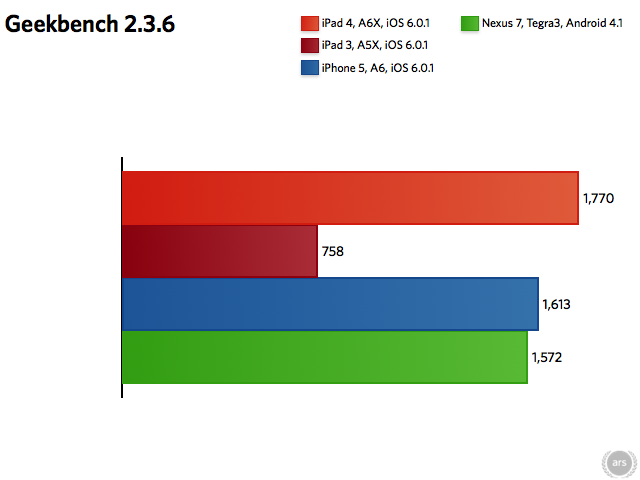
Longer bars are better.

Using Geekbench, we can see the overall performance of the A6 core is indeed well over Apple’s 2x claim. The A5X-powered iPad 3 manages a respectable 758 overall score running at 1GHz. The A6X trounced it, turning in an overall 1,770 running at 1.4GHz. Like the A6 in the iPhone 5, the A6X can dynamically change its core frequency to use more or less power as needed. Anandtech reports the “Swift” core can run as fast as 1.7GHz, though we never measured it going that high in our testing.

What’s perhaps a bit surprising is the dual-core A6X can more than keep up with the ARM-based quad-core Tegra3 (such as found in the Google Nexus 7 or Microsoft Surface). The “Swift” core is using a slightly revised design similar in some respects to the Cortex A9 in the A5X and Tegra3. It uses an optimized memory architecture that moves data in, out, and around the cores much faster than most ARM-based mobile processors. The end result is that Apple’s processors seem to be getting more performance from two slightly faster clocked cores than other devices running four cores.

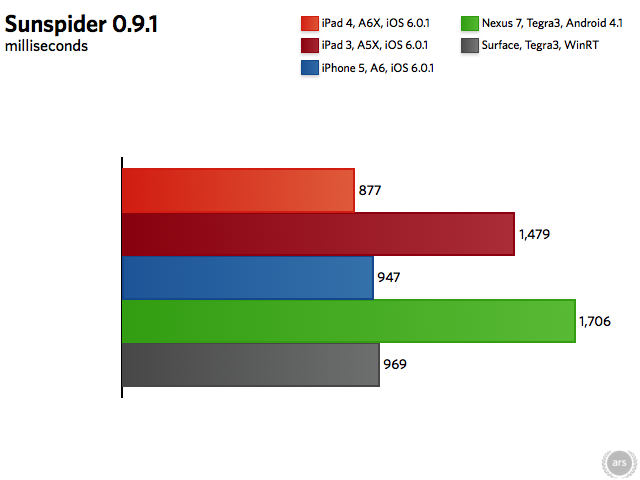
Shorter bars are better.
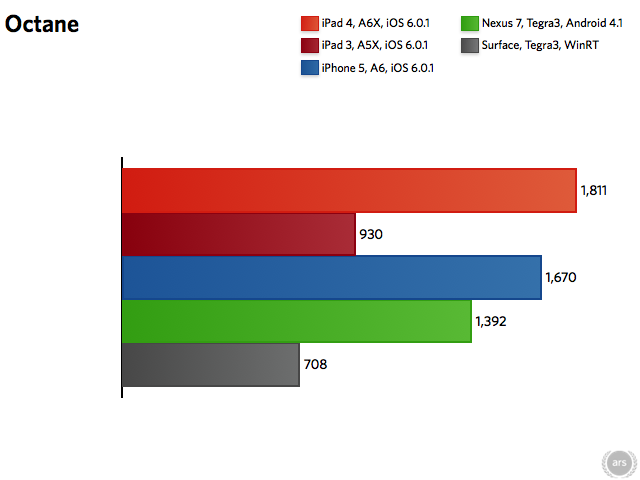
Longer bars are better.

Looking at some JavaScript benchmarks, we see not only does A6X deliver improved performance, but that iOS’s Safari browser seems to make the iPad browsing experience the one to beat in the tablet space. In the Sunspider benchmark, the iPad 4 easily bested the iPad 3. It also trounced the Nexus 7, and managed to beat out the Tegra3-based Microsoft Surface. (Note the Surface fares far better than the Nexus 7 in this test, which is heavily dependent on a platform’s JavaScript engine.)

The iPad 4 also scored very well on Google’s own Octane JavaScript benchmark. It runs twice as fast as it does on the iPad 3, but also beats out the Nexus 7 by a wide margin. For comparison, Surface did not manage a great score on this test when we reviewed it recently.

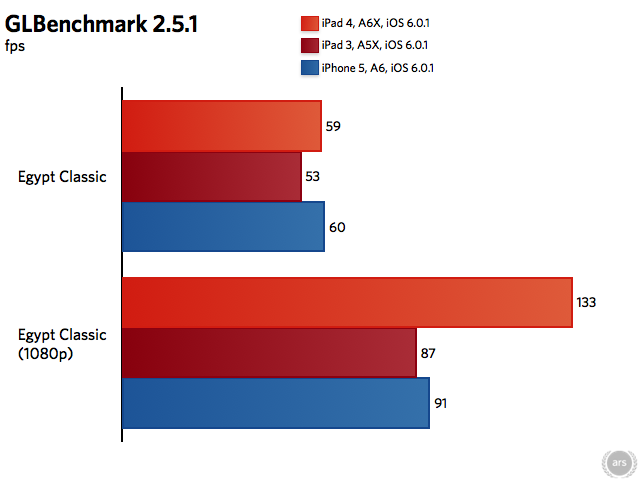
Digging into the A6X’s graphics abilities, we turn to GLBenchmark. We ran both the older Egypt Classic test and the newer, higher-quality Egypt HD test, both on- and off-screen. The off-screen test renders to a 1080p resolution, and is not limited to a device’s display refresh rate—typically 60 fps max. This gives us an idea of the GPU’s raw power. The on-screen tests show just how well the GPU can pump out pixels to a device’s actual display. After all, the 2048×1536 pixel Retina display has over three million pixels to update.

Longer bars are better.

On the Egypt Classic test, the A6X’s four SGX554 cores pretty much hit the max at 59 fps. When allowed to run free at just 1080p resolution, the GPU chews through 133 fps. That’s over 50 percent more than the A5X’s four SGX543 cores could handle on the same test.

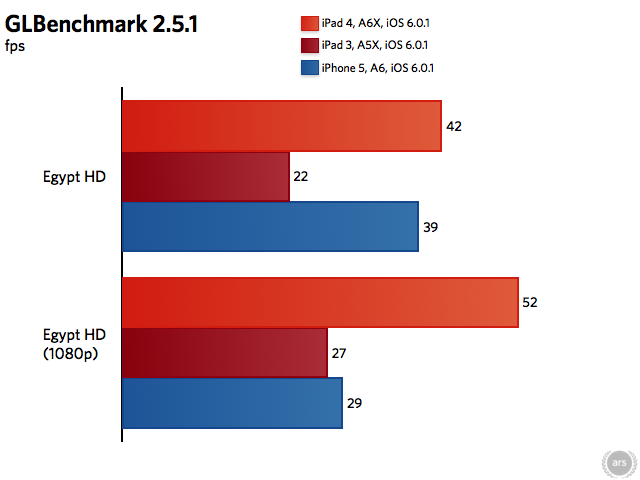
Longer bars are better.

Given a more demanding scene to render, we see the A6X shine even more. It managed 42 fps on this benchmark, nearly double the A5X’s 22 fps. At 1080p, it still runs twice as fast as the A5X, and nearly twice as fast as the A6 in the iPhone 5.

Even compared to the Nexus 10, which runs the next-generation Exynos5 processor from Samsung, the iPad 4 easily holds its own. Our own Nexus 10 is still undergoing testing deep within the Ars Orbiting HQ, but Anandtech benched the Nexus 10’s Mali T604 GPU well behind the A6X’s SGX554-based design. Rendering at the Nexus 10’s high 2560×1600 resolution, it only manages about 26 fps on the Egypt HD test. Rendering offscreen at 1080p, it still only managed about 33 fps.

Tell me, how does it feel?

With all these extra compute and graphics resources, is the iPad 4 experience twice as good as the iPad 3? In most cases, no. Browsing a variety of websites on both tablets seemed identical. Scrolling long lists seems just as fast and smooth on both devices. Launching apps seems no faster, nor does downloading and installing apps, syncing or backing up data over Wi-Fi, or running productivity software. For a large majority of tasks that most users will face, using an iPad 4 is just like using an iPad 3.

Even more surprising, perhaps, is the much improved GPU seemed to have no noticeable effect on 3D games. I played Asphalt 7 and Infinity Blade II for long stretches, and the area of the back of the iPad where the processor is located got about as warm as the iPad 3. I honestly didn’t notice one iota of improved performance, graphics quality, or frame rates.

3D gameplay felt identical on both recent iPad generations, despite the 2x performance advantage of Apple’s latest A6X mobile processor.
3D gameplay felt identical on both recent iPad generations, despite the 2x performance advantage of Apple’s latest A6X mobile processor. Credit: Chris Foresman

It seems many games just don’t tax the GPU to its fullest potential. A contact at Rockstar Games confided there is a lot more that can be done with the A6X’s hardware, but it may be some time before a game that really shines on the iPad 4 makes it in to the App Store.

For these reason, we feel most current iPad 3 owners don’t need to rush out and upgrade to an iPad 4; at least, not just to have the latest, fastest processor or GPU.

That isn’t to say the A6X doesn’t provide some tangible benefits. In particular, any app where you are stuck wanting for a spinner, that wait will be reduced on the iPad 4, sometimes significantly. I spent a fair amount of time editing photos in iPhoto and video in iMovie. Overall, the apps feel pretty much the same as they do on an older iPad. But rendering operations are definitely faster.

Another area where the iPad 4 definitely has a subtler, but noticeable improvement, is in certain user interface operations. Dragging and manipulating UI controls or objects absolutely appears to animate much smoother. I found this was true across all of Apple’s “iLife” applications, including iPhoto, iMovie, and GarageBand. There were also subtle improvements in higher end software such as Nik Snapseed and Alien Skin Alt Photo.

If you spend a good amount of time editing photos or video, or recording or mixing audio, an upgrade to the iPad 4 would be worth the money. iPads tend to hold a fair bit of value on the used market, and you might be able to upgrade for a cost differential of around $200 or so.

Battery life: still long

A short word on battery life: Apple kept the same 43Whr battery for the iPad 4 as used in the iPad 3. While the processor is made on a more power-efficient 32nm process, Apple used the opportunity to increase performance while maintaining a similar power envelope as the A5X. Apple still promises up to 10 hours of wireless browsing performance, and my own tests exceeded that significantly.

At home, I tend to keep the display brightness quite low, at roughly 25-30 percent brightness. At this setting, I could surf the Web and read e-books for 11.8 hours. Taxing the processor, and ramping up the brightness a bit more, I ran the GLBenchmark Egypt HD scene on an endless loop at 50 percent brightness. I was able to get 5.6 hours at these more extreme settings. I suspect if you are playing high-end 3D games for that long at a stretch, your fingers will tire before your battery does. For general tasks, you should easily get a full day of use or more.

In this respect, the iPad 4 is again identical to the iPad 3.

However, Apple now includes a 12W charger, an improvement over the older 10W iPad charger. This can charge an iPad slightly faster than the 10W charger can, though you will still likely need to plug it in overnight for a full charge. It’s a tiny perk, but we’ll take it.

Parting thoughts

In many ways, the iPad 4 is a subtle refinement of the previous iPad 3. The processor is at least twice as fast, as Apple claims, though in real-world use you may not notice that much. If you tend to run more demanding apps, particularly for graphics, video, or audio creation, the extra oomph pays off. Gaming doesn’t seem to benefit too much from the improvements just yet, but we don’t doubt game developers are upgrading their respective bags of OpenGL ES tricks to find new ways to push the hardware.

If you want a better FaceTime experience, Apple have you covered with the FaceTime HD camera. And it claims faster Wi-Fi performance, but we didn’t experience this even with a newer AirPort Extreme base station. These things are nice, but we don’t recommend dumping your iPad 3 for these “improvements.”

The LTE improvements are a different matter. As we mentioned, if you live outside the US in an area with LTE coverage, you’ll likely want to upgrade when the LTE-equipped models start shipping in the next couple months. If you don’t live anywhere near an LTE-network, this is probably worth skipping—you won’t get faster network speeds.

If you own an older iPad and skipped the iPad 3 because performance wasn’t any better, now may be as good a time as any to pull the trigger. Not only should you experience improved performance, you will also see the benefits of a Retina display. If you own an older iPad and skipped on the iPad 3 because of the increased weight, you might consider an iPad mini or just wait and see what Apple has next year.

If you were waiting to see how the iPad would stack up against the latest Android and Windows tablets, it’s clear that the iPad can easily hold its own with respect to performance and battery life. The Nexus 10 is so far the only device that appears as though it can compete when it comes display quality, and it certainly is a bit cheaper. But, no surprise, Apple doesn’t play the race to the bottom game when it comes to pricing, and the company seems to be happy with its performance in that respect. Even at $499 to start, the iPad is still a great value overall.

The Good

  • It’s an iPad, only faster
  • Retina display is still sharp and nice to look at
  • Expanded LTE coverage a real benefit to international users
  • FaceTime HD is a nice improvement

The Bad

  • Even with the new 12W charger, still takes ages to top up the 43 Whr battery
  • Still quite thick and heavy compared to other tablet options
  • No built-in USB or HDMI connectors, or SD card slots (though Apple will happily charge you $29 extra if you want them)
  • You might have just spent $500 or more on an iPad 3 in the last six months

The Ugly

  • Apple could very well have a new and improved iPad 5 sometime in the first half of 2013

Listing image: Chris Foresman

Chris is an Associate Writer at Ars Technica, where he has spent the last five years writing about Apple, smartphones, digital photography, and patent litigation, among other topics.
78 Comments