Dell gave its XPS laptop an overhaul last year, but 2019 is all about refinement. Announced at CES, this year’s XPS 13 laptop looks largely the same as the 2018 model, but it has a few new and improved features that attempt to right some of the wrongs of the previous generation.
The “wrong” that we’ve harped on the most since the XPS line arrived was its up-nose webcam. That strange webcam placement became a mainstay on the XPS 13 for years—even when other Dell laptops didn’t have it. Finally, Dell has done away with that and managed to stick a custom-made, minuscule webcam inside the top, thread-thin bezel of the XPS 13’s display.
Those who don’t use laptop webcams may roll their eyes at this change, but it’s an important one to call out especially when discussing Dell’s newest edition of its flagship laptop. With that change and others, Dell is hoping it has created a near-perfect Ultrabook. But how close has the company actually gotten to achieving that goal?
Look and feel
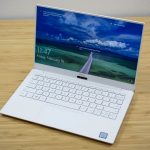
We’ll discuss the new webcam and its location in a bit—but first, let’s take a look at the mostly unchanged exterior of the XPS 13. We reviewed the new alpine-white model with a frost-colored lid, which features the same woven fiberglass palm rest as last year’s model. The device also comes in a black carbon-fiber model and a new white model with a rose-gold lid.
However, all models have the same general design. Most striking is the palm-rest area that has an almost basket-weave pattern to it. The texture of it is most pronounced on the white models, giving it a pleasant tactile feel that’s just smooth enough to not interrupt your daily use of the machine.
| Specs at a glance: Dell XPS 13 laptop (2019) | |||
|---|---|---|---|
| Worst | Best | As reviewed | |
| Screen | 13.3-inch FHD (1920 x 1080) Infinity Edge non-touch display | 13.3-inch 4K UHD (3840 x 2160) Infinity Edge touchscreen | 13.3-inch 4K UHD (3840 x 2160) Infinity Edge touchscreen |
| OS | Windows 10 Home, 64 bit | ||
| CPU | Intel Core i3-8145U | Intel Core i7-8565U | Intel Core i7-8565U |
| RAM | 4GB LPDDR3 | 16GB LPDDR3 | 16GB LPDDR3 |
| HDD | 128GB PCIe SSD | 2TB PCIe SSD | 512GB PCIe SSD |
| GPU | Intel UHD Graphics 620 | ||
| Networking | Killer 1435 802.11ac 2×2, Bluetooth 4.1 | ||
| Ports | 2 Thunderbolt 3 ports (PowerShare DC-In, DisplayPort, 4 lanes of PCI Express Gen 3), 1 USB Type C 3.1 port (PowerShare DC-In, DisplayPort), headset jack, Noble lock slot, microSD card slot | ||
| Size | 11.9 x 7.8 x 0.46 in (302 x 199 x 11.6 mm) | ||
| Weight | 2.7 pounds | ||
| Battery | 52Whr | ||
| Warranty | 1 year | ||
| Price | $899 | $2,309 | $1,709 |
| Other perks | Fingerprint sensor on power button, four mics (Cortana use), Dell Cinema (Color, Sound, Stream), Dolby Vision support | ||
Dell XPS 13 (9380)
Dell may use satin metallic finishes on the lid of the XPS 13 (like so many OEMs are doing now), but I appreciate the understated flare that the woven fiberglass gives the XPS 13. It’s unique to Dell’s premium line, and it prevents the machine from looking like just another metal slab. I’m still a bit cautious about the alpine-white models, because they could be susceptible to dirt and grime over time. But Dell still outfitted these versions with stain-resistant coatings that should prevent increasing dinginess.




 Loading comments...