
Dell XPS 13 2019 review: Small and mighty, now with a proper webcam

Post content hidden for low score. Show…

narfice

Wise, Aged Ars Veteran
172
We use XPS-15s for dev work and because we're spread across the country, a bit of video-conferencing too. The one XPS-15 has the nose-cam, and that placement is definitely something that needs fixing (which they've done for this).

Other than that why OH WHY are they still selling laptops with 4GB of RAM? Especially flagship devices! Don't think it was ever an issue on the XPS-13, but on the XPS-15 the hybrid-drive setup was just silly.
 
Upvote
64 (65 / -1)

binaryvisions

Ars Praetorian
497
Subscriptor
When you have to spend 3 paragraphs explaining why webcam location is important, it's not that important.

The XPS 13 is my go-to recommendation for family and friends who want a small laptop, but it's always with the caveat: do you use the webcam a lot? If so, you may want to reconsider, or consider that you might want to buy an external webcam and deal with the hassle of carrying it.

Ars may not be the biggest target area for people who video chat, but it's important to a lot of people. And the previous webcam placement was seriously poor for people who use it a lot.

Can't plug in a bog standard thumb drive without an adapter? Next.

There are plenty of USB-C thumbdrives now. Or you can just slap an adapter semi-permanently on your drive. I think we're past the time when this is a serious ding on a device: more adoption will mean more availability of accessories on the market.

I don't long for the days of PS/2 devices, either, even if I did have to use a USB-to-PS/2 adapter for a while.
 
Upvote
77 (86 / -9)

esg11

Smack-Fu Master, in training
92
A bit underwhelmed with the 2018 model I purchased for my student daughter. The thing failed after 3 months and Dell had it for 2 months telling me parts (for their flagship laptop) were unavailable and I should be happy with a refurb. Eventually, and only because I got fed up with daughter using my laptop, we folded and that's what we had to do.

It's a pukka bit of kit when it works but it looks like I'll have to spring for a extended warranty - something I have never before done for a laptop.
 
Upvote
21 (23 / -2)
Post content hidden for low score. Show…
Very nice device, but as others stated QC issues stops most from buying (or keeping the device for too long). Hopefully Dell can address these issues, I get that manufacturing is hard but they’ve had this build style and design for several generations and it’s a little funny that they still haven’t seemed to improve QC. Usually over time with a product as iterative as this one things get better, not stay the same.


Oh and thank you for including 16:9 in the bad. 13 inch laptops are way too small to be putting widescreen displays on imo. I’d be happy with a 16:10 but a 3:2 would make this device an incredible proposition.
 
Upvote
25 (29 / -4)

Statistical

Ars Legatus Legionis
55,715
Why mix TB3 and regular usb-c? TB3 is a superset of usb. Having TB3 and usb 3 share the same usb-c connector is confusing enough as it is why mix both on one device. The device would be better with the usb 3.1 type c replaced with a type a.

In 2019 there is absolutely no downside to that. If Dell is hell bent of exorcising the usb-a port I would prefer just four TB3 ports. "Plus the dock into the usb-c port. No not that usb-c port the other identically shaped usb-c port on the other side".
 
Upvote
34 (41 / -7)

Statistical

Ars Legatus Legionis
55,715
There are plenty of USB-C thumbdrives now. Or you can just slap an adapter semi-permanently on your drive. I think we're past the time when this is a serious ding on a device: more adoption will mean more availability of accessories on the market.

And if your other computer doesn't have usb-c? Or if your coworker has a usb-a thumbdrive. Saying you could just keep an adapter installed is another way of saying it would make more sense as a usb-a port.

I don't think anyone is asking for 4+ usb-a ports but right now a single usb-a port for legacy purposes combined with 2 (or ideally 4*) TB3 ports is a good mix.

* There are # of PCIe lane issues if the device also has discrete GPU but that doesn't apply for the XPS 13.
 
Upvote
10 (27 / -17)
Wow, the configuration options for this are super dumb.

The cheap model allows you to bump the processor and go to Windows 10 Pro. I would have preferred this model with 8GB of RAM.

So the next tier up is $300 more, comes with 8GB of RAM and a larger drive, allows you to bump the processor, but for some reason doesn't give you the option of Windows 10 Pro.

Then the next tier is $50 more, still 8GB of RAM with an option for 16, doesn't let you bump the processor. Still no Windows 10 Pro.

The highest end tier is $400 more, same processor, 16GB of RAM, but also allows you to pay an exorbitant amount for a new SSD. But at least you can get Windows 10 Pro.

The RAM is soldered, which is probably why you can't customize it, but I don't understand why Windows 10 Pro isn't an option on every tier. I guess they didn't want to make images for all the configurations?
 
Upvote
51 (52 / -1)

Boskone

Ars Legatus Legionis
13,125
Subscriptor
Can't plug in a bog standard thumb drive without an adapter? Next.

Can't even plug in my preferred external mouse. As the owner of a 9343 looking for an upgrade (mine only had 4GB RAM), the extra mm of height wouldn't bother me.
Especially if paired with a larger battery in some of that extra volume.
 
Upvote
7 (8 / -1)

jonah

Ars Tribunus Angusticlavius
6,616
Why mix TB3 and regular usb-c? TB3 is a superset of usb. Having TB3 and usb 3 share the same usb-c connector is confusing enough as it is why mix both on one device. The device would be better with the usb 3.1 type c replaced with a type a.

In 2019 there is absolutely no downside to that. If Dell is hell bent of exorcising the usb-a port I would prefer just four TB3 ports. "Plus the dock into the usb-c port. No not that usb-c port the other identically shaped usb-c port on the other side".
Exactly. The "don't plug that thing into that port, even though it fits perfectly there. Instead plug it into the other side where there's no earthly reason you should know the difference."

It's bullshit, and it's not unique to Dell.

OEMs also did this bullshit years ago with USB-A ports. Some were "super speed" or whatever bullshit designation they had, where some were normal. It was fucking dumb then and it's fucking dumb now.

For a work laptop, I'd really want a USB-A port, if only to plug in an external mouse receiver or thumb drive. For person use TB3 is fine.
 
Upvote
41 (45 / -4)

janol

Wise, Aged Ars Veteran
173
Subscriptor
This eliminating-versatility-for-a-bit-of-extra-thinness trend is awful. I have an ASUS Zenbook i7-7500U for work, with the perfect combination of ports (3 USB-A, 1 USB-C, HDMI, SD), with replaceable memory, SATA HDD and even an m.2 port for booting, that's slim and light. Sadly, the new ones they are selling are following this trend and have soldered RAM and non-replaceable storage, so for the new people at the office we are considering a 15" Inspiron, which weigh a bit more :(
 
Upvote
14 (16 / -2)
Is upgradability the same as the previous model, so SSD yes, RAM no? So get as much RAM as you need and swap in a third party drive if you need it

http://www.myfixguide.com/manual/wp-con ... mbly-6.jpg


Edit: On the other hand, is that one of the best random 4kb read scores ever from a laptop SSD? Could you check what model drive that is Valentina?
 
Upvote
6 (6 / 0)
How is the new ASUS Zenbook 13 not on the comparison list at all?

The $850 version is running the i5-8265U, over Dell's i3 for that price point.

As for this: "I still wish Dell included one USB-A port, but the dimensions of the laptop make that simply impossible." The Zenbook managed 2 in roughly the same case dimensions.

If it didn't end up as the preferred pick is one thing, but did Dell pay to leave ASUS off this review entirely?
 
Upvote
-6 (9 / -15)

haozz

Seniorius Lurkius
13
I recommended the XPS13 to a family member, and the laptop had a swollen battery issue which pushed up the trackpad. Replacing the battery with a third party one (ifixit) was a debacle. With Apple, you can just take it into the store.

I'm also not as impressed with the metal sandwiching plastic construction compared with unibody aluminum on the macs.
 
Upvote
0 (10 / -10)

Statistical

Ars Legatus Legionis
55,715
I recommended the XPS13 to a family member, and the laptop had a swollen battery issue which pushed up the trackpad. Replacing the battery with a third party one (ifixit) was a debacle. With Apple, you can just take it into the store.

I'm also not as impressed with the metal sandwiching plastic construction compared with unibody aluminum on the macs.

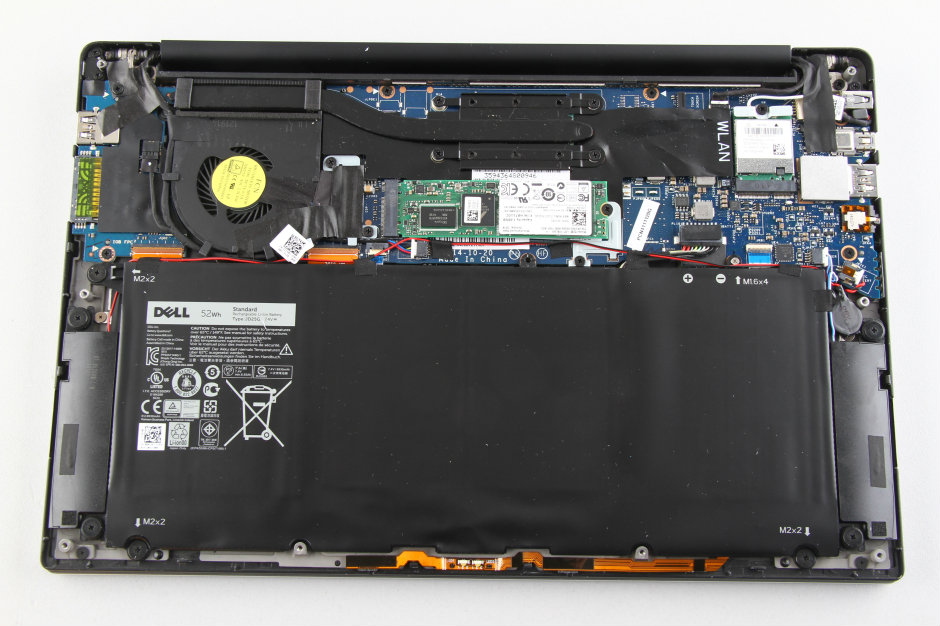
Replacing the battery was a debacle? As in remove six screws from the back, pull off cover, remove battery and replace?

dell-xps-13-9343-disassembly-6.jpg


For all Dell's other faults the one thing I love about them is they use screws not glue and they make service manuals available online.

On edit: note this photo is of the 9360. Haven't seen any teardown photos of the 9380 yet. The 9380 is very similar but has soldered wifi instead of a wifi card.
 
Upvote
44 (46 / -2)

haozz

Seniorius Lurkius
13
I recommended the XPS13 to a family member, and the laptop had a swollen battery issue which pushed up the trackpad. Replacing the battery with a third party one (ifixit) was a debacle. With Apple, you can just take it into the store.

I'm also not as impressed with the metal sandwiching plastic construction compared with unibody aluminum on the macs.

Replacing the battery was a debacle? As in remove six screws from the back, pull off cover, remove battery and replace?

dell-xps-13-9343-disassembly-6.jpg


For all Dell's other faults the one thing I love about them is they use screws not glue and they make service manuals available online.

Yes. The battery refused to charge, and the computer shut off immediately when unplugged. Maybe it's a bit of user error, but you have to be very careful with the battery connection.

Not everyone is super tech savy, and there was no help from Dell because the warranty was past. My impression was that the battery connector was in, but it took several reseatings.
 
Upvote
-4 (5 / -9)

amyklai

Ars Tribunus Militum
2,061
I recommended the XPS13 to a family member, and the laptop had a swollen battery issue which pushed up the trackpad. Replacing the battery with a third party one (ifixit) was a debacle. With Apple, you can just take it into the store.

I'm also not as impressed with the metal sandwiching plastic construction compared with unibody aluminum on the macs.
As long as Macs have those Butterfly keyboards, anything else is better automatically.
 
Upvote
6 (19 / -13)

psarhjinian

Ars Praefectus
3,726
Subscriptor++
I recommended the XPS13 to a family member, and the laptop had a swollen battery issue which pushed up the trackpad. Replacing the battery with a third party one (ifixit) was a debacle. With Apple, you can just take it into the store.

I'm also not as impressed with the metal sandwiching plastic construction compared with unibody aluminum on the macs.

Replacing the battery was a debacle? As in remove six screws from the back, pull off cover, remove battery and replace?

dell-xps-13-9343-disassembly-6.jpg


For all Dell's other faults the one thing I love about them is they use screws not glue and they make service manuals available online.

Loving that socketed SSD. Is the RAM user- replaceable?

I'd still take the Latitude 7290 over this (USB A, real Ethernet jack, LTE) but I do wish I could get a display like this instead of the 7290's 1366x768 enterprise procurement department special.
 
Upvote
7 (9 / -2)

Statistical

Ars Legatus Legionis
55,715
I recommended the XPS13 to a family member, and the laptop had a swollen battery issue which pushed up the trackpad. Replacing the battery with a third party one (ifixit) was a debacle. With Apple, you can just take it into the store.

I'm also not as impressed with the metal sandwiching plastic construction compared with unibody aluminum on the macs.

Replacing the battery was a debacle? As in remove six screws from the back, pull off cover, remove battery and replace?

dell-xps-13-9343-disassembly-6.jpg


For all Dell's other faults the one thing I love about them is they use screws not glue and they make service manuals available online.

Loving that socketed SSD. Is the RAM user- replaceable?

I'd still take the Latitude 7290 over this (USB A, real Ethernet jack, LTE) but I do wish I could get a display like this instead of the 7290's 1366x768 enterprise procurement department special.

The RAM is replaceable (SODIMMs) on the XPS 15. It is not on the XPS 13 (soldered on). So if you ever want 16GB on an XPS 13 then buy one with 16GB. It also makes the 4GB model a hard pass regardless of usage.
 
Upvote
21 (21 / 0)

amyklai

Ars Tribunus Militum
2,061
I recommended the XPS13 to a family member, and the laptop had a swollen battery issue which pushed up the trackpad. Replacing the battery with a third party one (ifixit) was a debacle. With Apple, you can just take it into the store.

I'm also not as impressed with the metal sandwiching plastic construction compared with unibody aluminum on the macs.

Replacing the battery was a debacle? As in remove six screws from the back, pull off cover, remove battery and replace?

dell-xps-13-9343-disassembly-6.jpg


For all Dell's other faults the one thing I love about them is they use screws not glue and they make service manuals available online.

Loving that socketed SSD. Is the RAM user- replaceable?

I'd still take the Latitude 7290 over this (USB A, real Ethernet jack, LTE) but I do wish I could get a display like this instead of the 7290's 1366x768 enterprise procurement department special.

The RAM is soldered. If you want a small machine with expandable RAM, take a look at the Thinkpad T480s.
 
Upvote
10 (11 / -1)
How is the new ASUS Zenbook 13 not on the comparison list at all?

Perhaps you should ask your bosses to send one to ars for a review?

I actually looked at the Zenbook as a potential replacement, but the reports of a glitchy touchpad put me off.
Har har. I just happen to own one - but only after a long, long look at the XPS 13.

Pretty much is the whole reason i checked out the article, was curious if maybe Dell had made some big upgrade to compete with the new Zenbook. Honest curiosity. It seemed insane that it wasn't even a single mention in the entire article.

I haven't had any trouble with the track pad.
 
Upvote
0 (4 / -4)

binaryvisions

Ars Praetorian
497
Subscriptor
And if your other computer doesn't have usb-c? Or if your coworker has a usb-a thumbdrive. Saying you could just keep an adapter installed is another way of saying it would make more sense as a usb-a port.

Saying that you could use an adapter is me acknowledging that there are a lot of USB-A ports out there, but that USB-C has advantages in size and future-proofing, so maybe we should accept a transition period as inevitable.
 
Upvote
7 (13 / -6)
There is a terribly important sentence in the conclusion part of this review:

"The biggest drawbacks to the XPS 13 are common among Ultrabooks available today: limited USB-A ports (or in this case, none) and noisy fans."

I returned a 9370 because of noisy fan(s)...the device (like the 9380) has two and one of them, I think, was 'vibratey' from Day One. So I returned it and did lots of looking around--yes the 9370 had fan issues but even those 9370s that worked 'properly' were still, to my ears, noisy to, at times, an objectionable level.

I really really really wanted to like the 9370...and I want to like the 9380 as well.

My sense of things is that the 9360 is a tad quieter than either of the newer models.

My two cents.
 
Upvote
5 (6 / -1)