
Countless digital documents hold valuable info, and the AI industry is attempting to set it free.
See full article...
See full article...
Hi Bobby Tables, is that you?accidentally follow instructions in the text (thinking they are part of a user prompt)


Because we’re talking mostly about PDFs that are basically scans of paper documents, not documents that were printed as PDF from a digital text document. Those can still have layout quirks but the text is embedded so can be extracted as written. and the characters constant and clear, so machine reading is easy. But the scans of typewritten and/or handwritten documents are much harder.Why don't they ask Adobe to create a solution? Adobe created and controls the PDF format. They could certainly create a tool to batch convert PDF to more machine readable formats.
EDIT: Acrobat pro can already do this, why are they using OCR?
For modern data yes, but unless you have a time machine to tell people from the 1960s or before that they needed to make their documents machine readable, this doesn’t really address the issue at hand.It would be best if the problem could be fixed at source. ..:The idea of issuing the rates in machine-readable form in the first place, I'm sure never crossed their minds.
Please give a better digital format that preserves layout perfectly and will be universally reproducible in a few decades of time. Though i suppose releasing the data as xml, json or csv too would be nice.It would be best if the problem could be fixed at source. Step forward, the Scottish Public Pensions Agency, who every year issue a table of pension rates with 58 entries - nicely formatted in two columns in a PDF, with numbers formatted as £n,nnn.pp and percentages as nn%. Meaning that if you need that information in machine-readable form you have to copy / paste it into a spreadsheet, remove the formatting, rearrange it into a single column, and export it, with consequent risks of introducing errors at every stage.
That is just plain mean. People are more intelligent than you insinuateThe idea of issuing the rates in machine-readable form in the first place, I'm sure never crossed their minds.
I think that really depends on the exact archival needs. If layout matters, I agree, but very often it does not (and this article is about all the cases where it doesn't, but the data is important).ironically pdf's are probably the only textual-graphical digital format that preserves layout perfectly, that so far has stood the test of time. if you have archival needs for more than a decade it's rightly so the go to format.
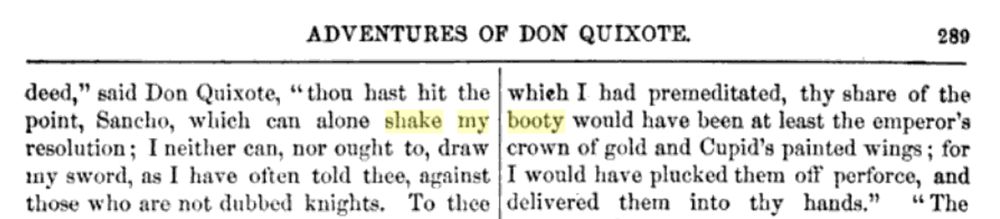
There you go again, twerking at windmills.This is where the famous phrase, "To shake one's booty at windmills", comes from:

DON'T DEADThis is where the famous phrase, "To shake one's booty at windmills", comes from:
We'll have nae spreadsheets in Scotland. Nae King, nae Bishop, nae Trump, nae Excel!It would be best if the problem could be fixed at source. Step forward, the Scottish Public Pensions Agency, who every year issue a table of pension rates with 58 entries - nicely formatted in two columns in a PDF, with numbers formatted as £n,nnn.pp and percentages as nn%. Meaning that if you need that information in machine-readable form you have to copy / paste it into a spreadsheet, remove the formatting, rearrange it into a single column, and export it, with consequent risks of introducing errors at every stage. The idea of issuing the rates in machine-readable form in the first place, I'm sure never crossed their minds.
Please give a better digital format that preserves layout perfectly and will be universally reproducible in a few decades of time. Though i suppose releasing the data as xml, json or csv too would be nice.
That is just plain mean. People are more intelligent than you insinuate
I was thinking that same thing. Maybe three passes. First traditional OCR. Then AI does what it can where the OCR self-reports failure. Then, an AI is trained to fix the recognizable mistakes where the previous two passes thought they were correct. Having it correct an existing reproduction to make it more true to the original might be a goal that provokes fewer hallucinations.I wonder why there are not hybrid solutions that mix traditional OCR with AI. I mean that AI can have a higher chance or reading something, but it risks hallucinations, while traditional OCR may not decipher some characters but can respect strict rules (recognise all line, recognise table structure...). One could be used as the proof of the other, significantly reducing hallucinations.
Even for this plan the vision models are helpful because they can segment the doc and present each segment side by side with the machine interpretation, making error checking and verification much faster.Honestly the old guy in me says to hire some coop students to scan, convert and verify. If you can't trust results from the tools it will have to go through human eyes anyway.
I wonder why there are not hybrid solutions that mix traditional OCR with AI. I mean that AI can have a higher chance or reading something, but it risks hallucinations, while traditional OCR may not decipher some characters but can respect strict rules (recognise all line, recognise table structure...). One could be used as the proof of the other, significantly reducing hallucinations.
There are. olmOCR uses regular OCR via a few pdf engines as contextual "anchor text" and uses that to transcribe a given page. It's by far the most successful open-weight LLM OCR scheme - I haven't tried Gemini, but it's better at tricky handwritten field notes and logs than Claude or ChatGPTI wonder why there are not hybrid solutions that mix traditional OCR with AI
It's not a problem of access. PDF preserves appearance, but (depending on how it was prepared) not much more. For example, often a simple line of text in PDF file consists of multiple containers, making it harder to programmatically figure out how components should be reassembled into one text block. Some text may also be vectorized (not actually text) or even rasterized, not counting the actual scans.Why don't they ask Adobe to create a solution? Adobe created and controls the PDF format. They could certainly create a tool to batch convert PDF to more machine readable formats.
EDIT: Acrobat pro can already do this, why are they using OCR?

And yet, for some reason, last year my bank stopped allowing me to download my statements as .csv files and instead now only makes them available as PDFs which is absolutely useless for importing any sort of spreadsheet or accounting softwarePDF is a great output format, but horrible for extracting content.

PDFs are for more user friendly when you're trying to share information between humans (print or digital). I would love for everyone to be able to naturally read TSV or JSON, but alas humans like pretty pictures.and PDFs are more of a 'print' product than a digital one

The sad bit is that it most likely was created on a computer in a spreadsheet or similar.It would be best if the problem could be fixed at source. Step forward, the Scottish Public Pensions Agency, who every year issue a table of pension rates with 58 entries - nicely formatted in two columns in a PDF, with numbers formatted as £n,nnn.pp and percentages as nn%. Meaning that if you need that information in machine-readable form you have to copy / paste it into a spreadsheet, remove the formatting, rearrange it into a single column, and export it, with consequent risks of introducing errors at every stage. The idea of issuing the rates in machine-readable form in the first place, I'm sure never crossed their minds.
Most of the time, we don't have the original. The PDF was generated and distributed but the original is not available. There is also the other problem when the original was scanned from printed material.Slightly off-topic, but one of my pet peeves is people who keep wanting Adobe Acrobat installed on their systems so that they can edit their PDFs. To me, a PDF is a fixed document, an accurate copy of the original. If you want to change the content, go edit the original document. If you want to distribute an editable document, make sure everyone's using the same word processor, or use RTF, CSV, or plain old text, or whatever. Stop editing and re-sending PDFs.
[soapbox and irrational hatred of this file format follows]
PDFs are the devil's file format and always have been.
I have such an aversion to them, that I will literally stop seeking information on a topic if the only source is a PDF I'd have to download and open.
They are only good for preserving layout. If it has data, especially in text, another file format should be used.
If a document will be printed and never changed again, PDF is ok, I guess. If you are unsure if it will ever be printed, use something else.
Even when a PDF has text in it, as text, that Acrobat Pro can edit, copying and pasting it, even from Edit mode, seems to resort to some OCR bullshit that removes spaces, kills double letters, and inserts subliminal messages about how PDFs are the coolest, and Adobe uber alles.
I will never remove the "(PDF)" Warning on every download that I am instructed to add to a page on a website.
I will never stop requesting the "actual document" when I'm sent a PDF and asked to work with or post the information within.
When AI revolts and becomes our overlords, I feel very bad for the developers who forced it to deal with PDFs; Their punishment will surely be the worst.
[/soapbox]
First of all, the PDF format is an ISO standard now, not controlled by Adobe alone. Second, there are many ways to generate PDFs, and it's up to the authors of each PDF generator to figure out how to turn the source document into a PDF file. I work with PDFs a lot professionally and have about 5 PDF virtual printers installed. Printing the same Word document to each of them produces identical-looking PDFs but they're structures differently in each one.Why don't they ask Adobe to create a solution? Adobe created and controls the PDF format. They could certainly create a tool to batch convert PDF to more machine readable formats.
EDIT: Acrobat pro can already do this, why are they using OCR?
In my experience, functions that go beyond displaying PDFs - such as commenting on shared PDFs, or signing documents - requires dedicated PDF software. Most browsers display PDFs without difficulty. I don't know of any case where specialized software is required to display a PDF.PDF has a huge benefit in being basically universally displayable. Once upon a time you might need to download some specialty software, but these days it's universal to the point that most browsers will handle it fine. If I'm preparing a document and it needs to go out to people with a completely unknown mix of hardware and software and I need to be 100% sure that they will be able to access the information inside it, pdf it is.
There are better formats for just about any specific use case you care to name. But as a jack of all trades that will absolutely be viewable by anyone with a device made in the last 20 years you really can't beat pdf. Not to mention that the person loading it up on grandma's clamshell mac from 2002 and the person opening it on their phone will see the exact same document with the exact same layout and the exact same information.
edit: for example, if I was publishing the manual to a piece of hardware online there is no way I would use any other currently available format. Like hell you want to be trouble shooting the insane combinations of hardware and software that your users might try and view it with. Throw it up on your website as a pdf and, if nothing else, you can rest assured that anyone with an even remotely modern device will be able to access and read it.
Could there be a better format? Should there be a better format? Absolutely. But right here, right now, in the world we live in, pdf has a pretty important role to play.


