Skip to content
Tech

Retina, round two: Apple’s 15-inch 2013 Retina MacBook Pro reviewed

Graphics performance takes a step back even as everything else strides forward.

Andrew Cunningham | 154
Apple's 15-inch Retina MacBook Pros have gotten more appealing with time. Credit: Andrew Cunningham
Story text

2013 is bringing the Retina MacBook Pro to the mainstream.

Well, as mainstream as high-end Macs can be, anyway. When the first Retina MacBook Pro was released back in 2012, it came with great hardware and a beautiful screen, but only Apple’s applications had been upgraded to really take advantage of it. It was also very expensive—it started at $2,199—and the non-Retina versions were refreshed with the same CPUs and GPUs and sold for a much lower price. It was an attractive notebook, but it was an early adopter’s trinket that came with as many caveats as virtues.

Fast forward 16 months. Third-party developers have had time to update their applications. The cost has come down to a still-high-but-not-for-a-MacBook-Pro starting price of $1,999. And, of course, the 15-inch non-Retina Pro has been dropped from the lineup, survived by its awkward, un-refreshed, smaller counterpart. If you’re looking for a 15-inch MacBook Pro, the Retina version is now a more appealing option, but it’s also your only option. Let’s take a look at how it stacks up.

Body, build quality, and Thunderbolt 2

Specs at a glance: 15-inch 2013 Apple Retina MacBook Pro
Screen 2880×1800 at 15.4″ (220 PPI)
OS OS X 10.9.0 “Mavericks”
CPU 2.0GHz Intel Core i7-4750HQ (Turbo up to 3.2GHz)
RAM 8GB or 16GB 1600MHz DDR3L (non-upgradeable)
GPU Intel Iris Pro 5200 (integrated)
HDD 256GB solid-state drive
Networking 802.11a/b/g/n/ac (up to 1.3Gbps), Bluetooth 4.0
Ports 2x USB 3.0, 2x Thunderbolt 2, card reader, HDMI, headphones
Size 14.13″ × 9.73″ × 0.71″ (358.9 mm × 247.1 mm × 18.0 mm)
Weight 4.46 lbs (2.02 kg)
Battery 8625 mAh
Warranty 1 year
Starting price $1,999.99
Price as reviewed $1,999.99
Other perks Webcam, backlit keyboard, dual integrated mics

The short version: The design, size, and weight of the 15-inch Retina MacBook Pro are virtually unchanged from last year. It takes some cues from the MacBook Air, but Apple’s largest laptop has more in common with the MacBook Pros of yore than with the Airs. Thunderbolt 2 is the only interface upgrade.

The long version: While the 13-inch model has been made a little thinner and a little lighter than it was in 2012, the chassis of the 15-inch Retina MacBook Pro is identical to its predecessor. Our notes about the 2012 model’s design are still applicable now, but since it’s far more likely that you’ll be coming to the Retina MacBook Pro from an older, non-Retina version, we’ll go over it again in brief.

All of Apple’s laptops share the same broad strokes: backlit Apple logo on the lid, aluminum unibody construction, a nice stiff hinge, backlit chiclet keyboards with reasonable key travel, and big, accurate, responsive multi-touch trackpads. Apple has been selling MacBook Pros that fit this description for the better part of five years.

The Retina MacBook Pro fits in the same mold, but it’s infused with just a hint of MacBook Air. It loses the optical drive and the user-serviceable parts that older Pros used to have, but it gets just a little thinner and lighter and moves to all solid-state storage. It has a pound-and-a-half of weight on the largest MacBook Air, and you’ll feel that difference in your bag, but it’s not some monstrous barely mobile workstation either.

Like the Airs, the Retina MacBook Pro has given up its wired Ethernet port, but it comes with a few others to help earn it that “Pro” label. In addition to two USB 3.0 ports, an SD card reader, and a combination headphone/headset jack, it includes a full-size HDMI port and two Thunderbolt ports that power users can count on to get their wired Ethernet and FireWire ports back if they really need them.

Apple’s keyboard and trackpad remain unchanged, and that’s just fine by us. The speaker grilles on either side produce a nice, full sound with a reasonable amount of bass for a laptop.
Apple’s keyboard and trackpad remain unchanged, and that’s just fine by us. The speaker grilles on either side produce a nice, full sound with a reasonable amount of bass for a laptop. Credit: Andrew Cunningham
The MacBook Air (top) and the Pro are about the same thickness at their thickest point, but the Air tapers off, while the Pro is 0.71 inches thick throughout.
The MacBook Air (top) and the Pro are about the same thickness at their thickest point, but the Air tapers off, while the Pro is 0.71 inches thick throughout. Credit: Andrew Cunningham

Those two ports have been upgraded to Thunderbolt 2 courtesy of Intel’s DSL5520 controller, and this is the first shipping Mac that uses the new version of the high-speed interface. The controller includes four Thunderbolt channels, which can provide data bandwidth of up to 20Gbps to each port (or 10Gbps per channel).

The original Thunderbolt used four 10Gbps channels too, but they were separated differently—the controllers provided two sets of 10Gbps channels, and the new ones provide one set of 20Gbps channels. Thunderbolt 2 additionally adds support for the DisplayPort 1.2 spec, which is necessary to support 4K output, though according to Apple’s spec sheet, each Thunderbolt port can only support a single 2560×1600 display at once (for a total of three displays, including the laptop’s). The Retina MacBook Pro provides 4K video output through HDMI—that port supports 3840×2160 displays at 30Hz and 4096×2160 displays at 24Hz.

The Retina MacBook Pro (bottom) picks up a second Thunderbolt port that the MacBook Air doesn’t have.
The Retina MacBook Pro (bottom) picks up a second Thunderbolt port that the MacBook Air doesn’t have. Credit: Andrew Cunningham
It’s got a full-size HDMI port, too.
It’s got a full-size HDMI port, too. Credit: Andrew Cunningham

Because the total amount of bandwidth hasn’t changed, all existing Thunderbolt cables should all be able to run at full Thunderbolt 2 speeds when connected to supported computers and accessories. Actually testing Thunderbolt 2 is a bit out of our hands at the moment since no accessories exist that actually use the standard—the original Thunderbolt hasn’t proven to be very popular aside from in Mac accessories and the odd dock or external hard drive—but 4K display support at least is a tangible feature benefit that video and photo professionals will appreciate as the standard becomes more widespread.

The screen: Better with time (and apps)

The short version: It’s the same 2880×1800 screen, but third-party applications actually take advantage of it now.

The long version: The Retina MacBook Pro’s 15.4-inch 2880×1800 screen is no longer unique. The Chromebook Pixel and an increasing flow of Windows PCs are all beginning to ship with screens in the same density range, and most of them share the Pro’s great viewing angles, good contrast, excellent brightness, and vibrant color. The panel itself is only part of the story, though.

A chunk of the Ars homepage on the 2013 13-inch MacBook Air’s screen. Note the clearly visible pixels.
A chunk of the Ars homepage on the 2013 13-inch MacBook Air’s screen. Note the clearly visible pixels. Credit: Andrew Cunningham
The same stretch of homepage on the Retina display. Our header image and all of this text is Retina-optimized, and it looks nice and smooth.
The same stretch of homepage on the Retina display. Our header image and all of this text is Retina-optimized, and it looks nice and smooth. Credit: Andrew Cunningham

When Apple’s other product lines went Retina, there was a transition period for third-party applications as their developers updated them with scaled-up assets. Non-Retina Macs have been around for much longer than non-Retina iPhones or iPads, though, and of Apple’s entire Mac lineup, only the 13- and 15-inch Pros include the screen at all. You can reasonably expect to use an iPhone or iPad these days without ever running into a non-Retina app, but it still happens with some frequency in OS X.

That said, the people who held off on a Retina MacBook Pro last summer to buy one now will be rewarded for waiting: in the last year and a half, most major applications have gained support for the feature. Most of the programs I use in a normal day—Apple’s built-in apps (no surprise), Microsoft Office (mostly, with the exception of a few icons and dialog boxes), Chrome and Firefox, Tweetbot, Scrivener, and the Limechat IRC client—have all been more-or-less optimized for the high-density screens. Audacity is the only one that remains totally non-Retina, and this is a more common occurrence the further you move away from the beaten path (doubly so for applications that aren’t in active development).

The biggest problem at this point is actually the Web itself. Having Chrome, Firefox, and Safari Retina-optimized means that text looks smooth and sharp regardless of the browser you’re using, but most sites still use lower-resolution images that look soft and vaguely blurry on a Retina screen. This situation should continue to improve now that high-density displays are proliferating in Windows laptops, and Web standards are catching up, but for now browsing is still the least consistent thing about using a Retina Mac.

The CPU: Treading water

When the CPU really gets going, the fan vent near the hinge is where the hot air goes.
When the CPU really gets going, the fan vent near the hinge is where the hot air goes. Credit: Andrew Cunningham

The short version: Haswell is built to sip power, not to blow previous-generation Ivy Bridge chips out of the water. The Retina MacBook Pro’s quad-core CPUs are fast (especially compared to the dual-core CPUs in the 13-inch Pros and the MacBook Airs), but not much more so than last year.

The long version: The 2013 MacBook Air came with a 1.3GHz CPU that, on paper, looked like it might actually be slower than the 1.8GHz one in the 2012 model, but now as ever it’s a bad idea to infer anything about performance from clock speed alone. Haswell’s architectural improvements plus similarly improved Turbo Boost speeds means that the 1.3GHz Haswell chip usually breaks even with, or runs slightly faster than, the 1.8GHz Ivy Bridge one. Intel has simply made the base clock speed on some Haswell CPUs lower to account for the more powerful GPUs that come with those CPUs—mobile Haswell parts either have a higher CPU clock and a weaker integrated GPU or vice-versa.

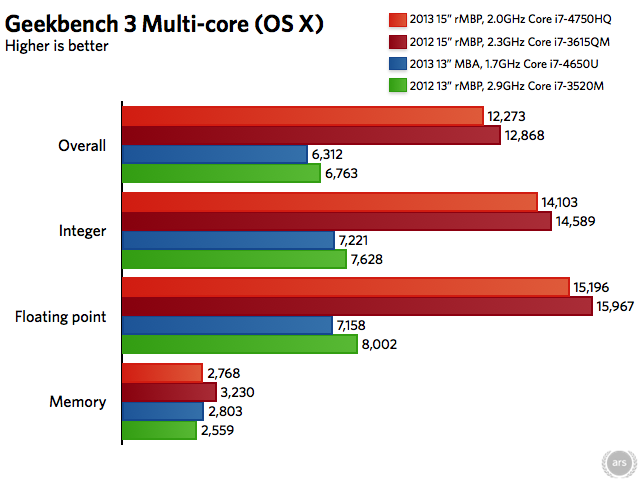
The 2.0GHz quad-core i7-4750HQ CPU in the base model Retina MacBook Pro comes with Intel’s top-end integrated GPU, so its base CPU clock speed is lower than the 2.3GHz i7-3615QM in the 2012 Retina MacBook Pro base model. Like in the Airs, though, the two chips have similar Turbo Boost speeds, and the Haswell chip just manages to edge out the Ivy Bridge one.

2012 Retina MacBook Pro scores pulled from the GeekBench Browser.

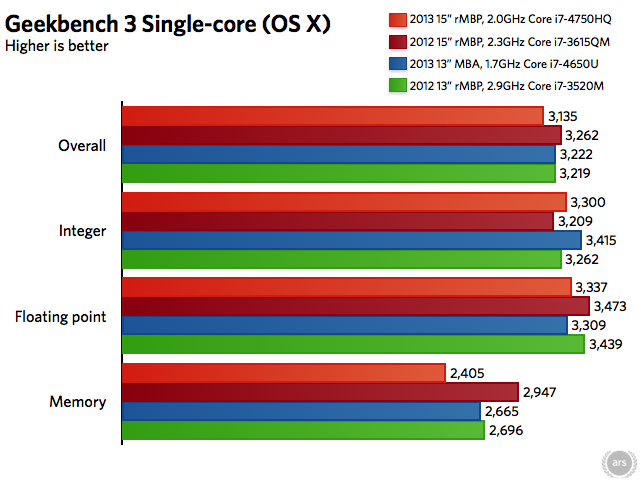
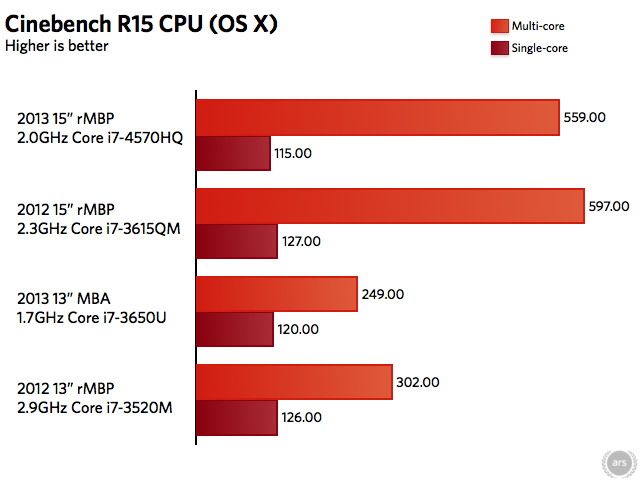
We’ve also pulled some further Geekbench and Cinebench results from various other 2012 and 2013 MacBook Pros and Airs around the Ars virtual office to give the 2013 Retina MacBook Pro scores some extra context. The results are as expected: quad-core CPUs are a big upgrade over dual-core ones when you need to get heavy-duty work done. If you bought a 15-inch Retina MacBook Pro last year and went for one of the CPU upgrades (in this case, a 2.6GHz i7-3720QM), your laptop will still be a little bit faster than the 2013 base model.

The relative flatness of all of these single-core bars drives home the architectural similarities of Ivy Bridge and Haswell and just how little the base CPU clock speed says about performance in many cases.

Even when all four of the CPU cores are going full-tilt, the Pro does a better job of managing heat than the Air. While there have always been areas on the Air that get hot to the touch (the area above the keyboard, namely), the Pro never gets more than warm, even on the bottom of the laptop near where all the silicon is located. The system’s two fans do make noise when the system is under load, but they stop short of the jet-engine whine that you can get from some high-powered laptops.

The GPU: A step back, unless you have an extra $600 on you

The short version: The entry-level Retina MacBook Pro uses Intel’s top-end integrated GPU, the Iris Pro 5200. It drives the Retina display well enough, but 3D performance in the all-integrated models is down slightly from where it was with the GeForce 650M last year. If you want a graphics upgrade, you’ll have to spring for the more expensive machine.

The long version: “Integrated” isn’t quite the dirty word it once was when it comes to GPUs. Yes, upper-midrange and high-end dedicated GPUs still run circles around integrated ones, but Intel and AMD’s progress on this front (combined with a trend toward thin, tightly integrated systems with no room for a dedicated GPU) have essentially obviated the need for low-end dedicated chips. With its top-end Haswell GPUs, Intel is trying to encroach on midrange dedicated GPUs’ territory as well.

We’ve already seen Intel’s Iris Pro 5200 in the 2013 iMac—Apple referred to this as “Crystalwell” in its presentation, the codename for the 128MB of dedicated eDRAM that this particular GPU includes. We came away reasonably impressed with its performance. It didn’t run much faster than the GeForce GT 640M that it replaced, but it didn’t regress anywhere either. It held its own against a year-old, midrange GPU, and that’s pretty impressive, given how laughably bad Intel’s integrated GPUs were even three or four years ago.

Two things to bear in mind when comparing the Pro’s Iris 5200 to the iMac’s: first, the previous-generation Retina MacBook Pro used a faster GeForce GT 650M, not a 640M, so the Iris is going to be facing off against slightly more powerful hardware. Second, the Core i7-4750HQ CPU in the Pro has a 47W TDP, while the Core i5-4570R in the iMac has a TDP of 65W. This means both the CPU and GPU have less thermal headroom to work with in the Pro and that it may have to throttle itself more aggressively to keep from overheating. We ran Cinebench 11.5 on the MacBook and compared it to the numbers from the iMac review to demonstrate, and the GPU in the laptop looks like it’s around 15 percent slower.

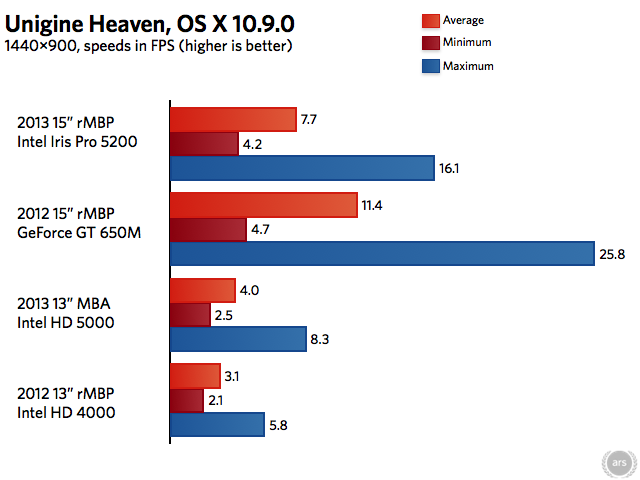
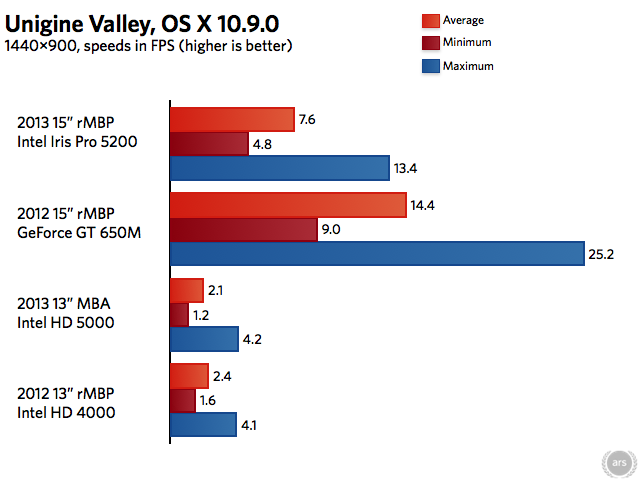
To compare the GPU to Apple’s other laptops, we busted out the newer Cinebench R15 as well as Unigine’s Heaven and Valley benchmarks on the 2013 and 2012 15-inch Retina MacBook Pros, the 2013 MacBook Air, and the 2012 13-inch Retina MacBook Pro just to get an idea of where the Iris Pro 5200 falls on the spectrum (we’ll be spending time with the 2013 13-inch Retina MacBook Pro and its Iris Pro 5100 GPU in a separate review soon).

To break this down: Iris Pro 5200 is always faster than both the HD 4000 in Ivy Bridge-era MacBooks, and it’s always faster than the HD 5000 in the MacBook Airs. It is, however, consistently slower than the Nvidia GeForce GT 650M included in every 15-inch 2012 Retina MacBook Pro. The amount by which it is slower varies from benchmark to benchmark, but it looks like most of the time, you can expect around two-thirds of the performance of the GeForce 650M depending on what you’re doing. Our findings line up with early Iris Pro 5200 reviews like this one from AnandTech, which found that the integrated GPU ran most games about two-thirds as fast as the 650M.

It’s rare that Apple will make a regression like this from generation to generation, but it’s not entirely unheard of. When the MacBook Airs upgraded to Sandy Bridge in 2011, Apple ditched Nvidia’s integrated GPUs in favor of Intel’s. That generation of Airs saw a huge boost in CPU speed, but generally held even or regressed slightly in GPU speed. Apple is willing to go with “good enough,” temporarily, in the pursuit of a larger goal (in both cases, moving toward thinner, lighter, more integrated systems). Using the Iris Pro GPU by itself in the base Retina MacBook Pro implies that Apple is happy with where Intel’s GPU efforts are headed.

In the meantime, people who hop on the 15-inch Retina MacBook Pro train this year may be a little let down by the GPU performance. But Iris Pro is quick enough to run OS X and its apps at the display’s native resolution, and while there’s some occasional stuttering, it’s worth mentioning that I’ve noticed occasional stuttering on my 2013 MacBook Air and my high-end 2012 iMac since upgrading to 10.9.0, so this may not be exclusively Intel’s fault. If you use display scaling to give yourself more usable monitor space, or if you like to work with many windows open on multiple monitors, the rendering definitely gets choppier—Mission Control and other animations were decidedly slower when I had the rMBP hooked up to two external displays (for the record, one 1080p monitor and the 2560×1440 screen of my iMac in Target Display Mode). Iris is good enough for productivity use and even some gaming at lower resolutions (gaming at panel resolution was never an option even with a dedicated GPU), but it’s a small step back when it needs to be a step forward.

We’re testing the entry-level Retina MacBook Pro here, but it’s worth noting that the higher-end $2,599 model comes with a dedicated GeForce GT 750M GPU that should outperform the 650M by a reasonable margin. The 2013 model with dedicated graphics also includes the Iris Pro 5200, and the system can switch between the dedicated and integrated GPUs to save some power depending on how much performance your software is demanding (just as last year’s laptops did with the HD 4000 and GeForce 650M).

The SSD: See you in hell, SATA!

There is only a short version: The entire 2013 MacBook lineup is moving from SATA III SSDs to PCI Express SSDs, and the Retina MacBook Pros are no different. Two of the chipset’s PCI Express lanes are used to provide 8.0Gbps of bandwidth, compared to the 6.0Gbps used by SATA III. The Pros and the Airs are using nearly identical drives and thus are nearly identical in performance.

This is a pretty impressive generational bump, and the difference will be absolutely stunning if you’re coming from one of the older MacBook Pros with a spinning HDD.

802.11ac: Fixed at last

Connected to an AirPort Extreme at 1.3Gbps. Credit: Andrew Cunningham

The short version: Thanks to 802.11ac, the Retina MacBook Pros increase theoretical Wi-Fi transfer speeds to 1.3Gbps, up from the 450Mbps 802.11n in previous versions and 867Mbps 802.11ac in the 2013 MacBook Airs. Actual transfer speeds are slightly higher than the 2013 Airs, but not by much.

The long version: Apple has been rolling faster Wi-Fi out to all of its Macs all year, and the Retina MacBook Pros get their three-antenna, 450Mbps 802.11n setups swapped for faster 1.3Gbps 802.11ac. The 2013 iMac uses the same three-antenna, 1.3Gbps configuration while the MacBook Airs get by with two antennas and max out at a theoretical 867Mbps.

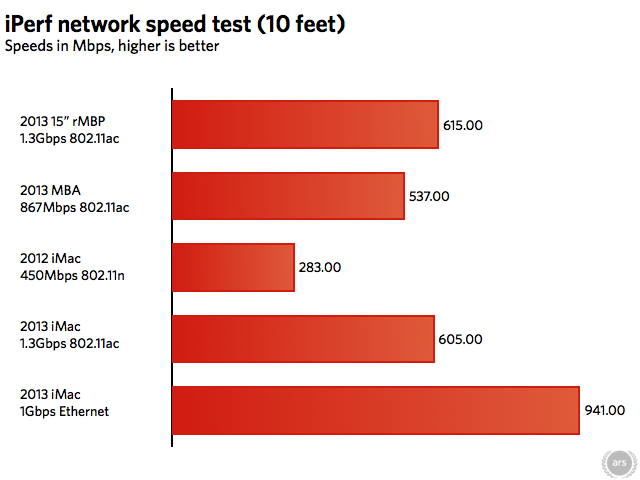
As of Mavericks, all of the problems we noticed with 802.11ac file transfer speeds when we reviewed the Air have been ironed out, so Pro buyers can pick up a laptop and an 802.11ac AirPort Extreme without hesitation. To test throughput, we’ll first look to the iPerf network testing tool, which can give a more realistic idea of the bandwidth you can expect from a given network connection than that connection’s theoretical maximum speed.

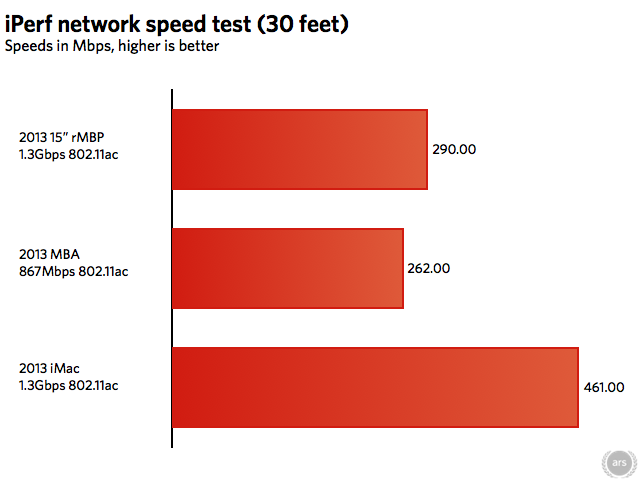
As in the 2013 iMac, adding a third antenna to the Retina MacBook Pro doesn’t get you 33 percent more throughput than the two-antenna 2013 MacBook Air, though it does outspeed the Air by 100Mbps or so. Moving the laptop away from the router and putting a wall between them shows that the Pro’s signal strength falls off at about the same rate as the Air’s, where the iMac’s stronger antenna can hold a better signal at the same distance.

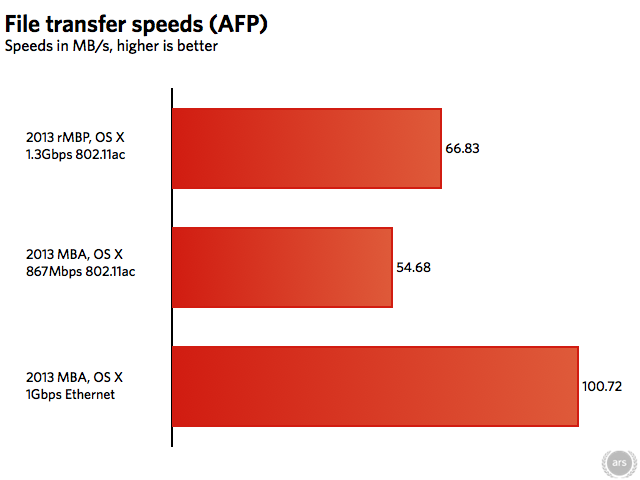
These observations hold true for our file transfer test: the 802.11ac implementation in the MacBook Pro is better than the one in the Air, but not by the degree that one might expect. It remains a very nice improvement over 802.11n, in any case.

Battery life

The short version: If you’re using it lightly, Apple’s battery life numbers for the Retina MacBook Pro are actually a little conservative, and in light browsing, it’s capable of getting into MacBook Air territory. The screen draws a lot of power, though.

The long version: Intel’s biggest ambition for the Haswell architecture was to increase battery life, and nowhere has that ambition been better realized than in the 2013 MacBook Airs. Those devices are rated for (and can often get) nine and 12 hours on a single charge depending on whether you buy the 11-inch or 13-inch model. Even Haswell-based Windows Ultrabooks with similar components can usually only run for seven or eight hours.

Apple is trumpeting less ambitious battery life gains for the Retina MacBook Pro despite the system’s large 8,625mAh battery—it’s rated for eight hours of Web browsing, where the old model was rated for seven.

For light usage patterns, this number can actually be pessimistic. In our light Wi-Fi browsing test, which loops through a set of Web pages at the rate of one every 15 seconds until the computer dies with the screen brightness set to 50 percent and the keyboard backlight disabled, the Pro lasted for 12 hours and 24 minutes. This MacBook Air-esque number is only going to be possible for the lightest of workloads, though—changing the conditions of the test even slightly resulted in big variations. Performing the Web browsing test while looping an MP3, for example, dropped the battery life to 11 hours and 15 minutes, and performing the Web browsing test with the screen brightness cranked to 100 percent delivered seven hours and 40 minutes of runtime. Especially if you’re listening to music, playing videos in the background, or even communicating frequently using e-mail, IM, or Twitter clients, Apple’s eight-hour figure is probably realistic for normal usage with the auto-brightness sensor turned on and doing its thing.

One important thing to note for buyers who upgrade to the dedicated Nvidia GPU: Apple advertises the same battery life ratings on both the entry-level SKUs with integrated graphics and the higher-end models with dedicated graphics. A conversation with an Apple rep during the post-announcement hands-on time last week revealed an interesting wrinkle, though: Apple’s battery life testing figures all involve tasks that rarely, if ever, activate the dedicated GPU, so these battery life estimates don’t account for situations when the GeForce fires up.

It follows that for heavier tasks that activate the dedicated GPU, higher-end MacBook Pros may have worse battery life than the entry-level models. However, depending on the workload, the dedicated GPU may be able to complete the task more quickly, allowing it to spend more time in a power-efficient idle state. Given that the GeForce GT 750M is architecturally pretty similar to the 650M, and they’re built on the same 28nm manufacturing process, the MacBooks with dedicated graphics should have comparable-to-somewhat-improved battery life to last year’s models for heavier workloads.

A better buy, but there’s still room for improvement

The 2013 Retina MacBook Pro is mostly an upgrade over last year, but Intel’s Iris Pro needs another year to catch up with the 2012 model’s Nvidia GPUs.
The 2013 Retina MacBook Pro is mostly an upgrade over last year, but Intel’s Iris Pro needs another year to catch up with the 2012 model’s Nvidia GPUs. Credit: Andrew Cunningham

A Retina Mac is just more pleasant to use now than it was a year ago. The importance of Retina-optimized third-party applications can’t be overstated here, because without them you end up with an operating system that actually looks worse than it would if you were just running it on any old non-Retina display. This was just as true of the 2012 Retina MacBook Pro as it is of the 2013 version, but the 2013 refresh includes battery life improvements, slight CPU performance increases, Thunderbolt 2, and a new Wi-Fi standard that all reward those who refrained from buying one of the first-generation laptops.

The one thing holding the 15-inch Retina MacBook back this year is the GPU in the base model, Intel’s Iris Pro 5200. It’s not a bad GPU, and it’s up to the task of driving the display, but it’s a step back from the performance of the GeForce GT 650M that shipped with all Retina MacBook Pros in the previous generation. Especially during demanding 3D tasks or driving multiple high-resolution monitors, things start to get a little stuttery. Upgrading to the new 750M at purchase mitigates the issue, but it increases the price of the system by $600. That money will also buy you double the RAM and storage and upgrades your CPU from 2.0 to 2.3GHz, but it would be nice to get a GPU upgrade without having to pay for all of that extra stuff if you didn’t want it.

The 13-inch model, which we’ll be taking a closer look at soon, should be more of a slam dunk. The Iris Pro 5100 GPU it uses is weaker than the Iris 5200, but it should easily outpace the Intel HD 4000 in the old model and the HD 5000 in the 2013 MacBook Airs. For years now, Apple’s smaller “professional” laptops just barely came with more graphics horsepower than its ultraportables, but along with the thinner and lighter chassis, the 13-inch Retina laptop should be able to make a better case for itself than the old one.

The good

  • Fast, quad-core Haswell CPU.
  • Great construction, great keyboard, and the only trackpad we prefer to a mouse.
  • Excellent screen that looks even better now that many apps support it.
  • Good battery life (and for some tasks, great battery life).
  • A nice mix of smaller upgrades, including PCIe SSDs, 802.11ac Wi-Fi, and Thunderbolt 2.
  • Lower, albeit still high, $1,999 starting price.

The bad

  • Still no cellular option on any MacBooks, though Apple would probably say that a tethered iPhone is the cellular option.
  • Non-upgradeable RAM and a non-standard SSD make upgrades difficult-to-impossible after purchase.

The ugly

  • The Iris Pro 5200 is a noticeable step back from the GeForce GT 650M in all of the Retina MacBook Pros last year.
Photo of Andrew Cunningham
Andrew Cunningham Senior Technology Reporter
Andrew is a Senior Technology Reporter at Ars Technica, with a focus on consumer tech including computer hardware and in-depth reviews of operating systems like Windows and macOS. Andrew lives in Philadelphia and co-hosts a weekly book podcast called Overdue.
154 Comments