
The new 802.11ac Wi-Fi standard got off to a rocky start in OS X. Apple’s 2013 Macs all have hardware support for the feature, but back in June when the 2013 MacBook Airs shipped, file transfer speeds in OS X 10.8.4 were less than half of what they were when we installed Windows 8 on the same hardware.
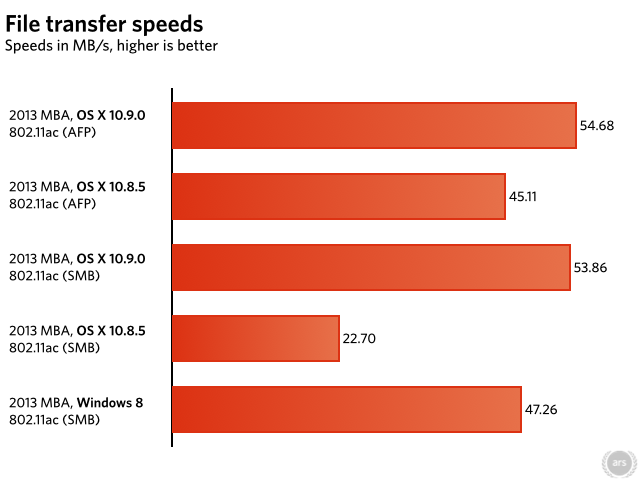
OS X 10.8.5 didn’t entirely fix the problem, but it was a good start. If you were using the Apple Filing Protocol (AFP) to transfer your files and the Mac you were transferring files from or to was also running 10.8.5, transfer speeds more than doubled, bringing them up to near-parity with Windows. However, Server Message Block (SMB) file transfer speeds didn’t show any improvement. It made sense for Apple to fix AFP first since it’s OS X’s default file-sharing protocol—it powers networked Time Machine backups as well as standard file sharing—but we hoped that Apple would get around to fixing SMB in Mavericks. Based on our testing, it has.
We installed OS X 10.9.0 on both a 2013 MacBook Air and our file server and re-ran the same tests one more time. The setup is the same one used throughout our testing—a 2013 MacBook Air capable of 867Mbps 802.11ac speeds connected to an 802.11ac AirPort Extreme router. The two devices are about 10 feet apart, with nothing obstructing the line of sight. The file server is a 2012 Mac Mini running OS X Server and connected to the same AirPort Extreme with a gigabit Ethernet cable. We transferred a single large 3.6GB file from the server to the MacBook and timed the transfer with a stopwatch. We also re-tested our 10.8.5 numbers just to make sure our findings were consistent with those in our last article (and they were).

 Loading comments...
