Skip to content
Tech

The price of progress: 2012 iPod touch reviewed

A huge upgrade over its predecessor, but the $299 iPod touch is no impulse buy.

Andrew Cunningham | 146
The new iPod touch improves on its predecessor in every way, but at $299 it faces stiff competition. Credit: Chris Foresman
Story text

Much has changed since the last time Apple updated the iPod touch. Smartphones have become cheaper and more popular, and free-with-contract models are now available from most manufacturers. Android tablets (and e-readers turned tablets) have been introduced and then reduced in price to the same $200-and-up market the iPod touch caters to. Windows 8 is imminent, and it’s bringing a host of new touch-enabled devices with it.

Few devices aim for the iPod touch’s niche—those people who want the features and approximate size of a smartphone without the added cost of a data plan. Android-based alternatives like the Samsung Galaxy Player and the Sony Walkman F exist, but they haven’t had the same impact as the touch. Most other companies don’t seem interested in fighting Apple for the remains of the dwindling music player market.

So what does the new touch do to justify its existence in the face of omnipresent, ever-cheaper, ever-more-capable smartphones and tablets? Plenty—but it comes at a cost.

The screen

The screen on the iPod touch appears to be identical to the one used in the iPhone 5, unlike the one used in the fourth-generation iPod touch.
The screen on the iPod touch appears to be identical to the one used in the iPhone 5, unlike the one used in the fourth-generation iPod touch. Credit: Chris Foresman
Zooming in further highlights the similarities—any slight differences can be attributed to Apple’s sourcing of displays from different manufacturers.
Zooming in further highlights the similarities—any slight differences can be attributed to Apple’s sourcing of displays from different manufacturers. Credit: Chris Foresman

iPod touches have become less like iPhones as time goes on. The fifth-generation iPod touch is a monster, a jumble of mixed-and-matched parts from across the iPhone and iPod line: it has the same tall 4-inch screen and wireless capabilities of the iPhone 5, the A5 processor of the iPhone 4S, the colors of the iPod nano, and camera hardware most similar to that found in the latest iPad.

The new screen is a standout. The one in the fourth-generation iPod touch used the same resolution as the then-new iPhone 4, but the actual display panel had a lower contrast ratio and comparatively washed-out colors, a move obviously made to cut costs. Thankfully, the new iPod touch’s 1136×640 screen has the same impressive contrast ratio and color as the iPhone 5’s, and the older iPod touch (and the iPhone 4 and 4S, for that matter) pales in comparison.

Contrast in particular is much better on the new iPod touch than on the old one—behold the darker blacks and less-bluish grays.
Contrast in particular is much better on the new iPod touch than on the old one—behold the darker blacks and less-bluish grays. Credit: Andrew Cunningham
The new iPod touch’s IPS display gives it wide viewing angles, which further magnifies the improvements over the previous model.
The new iPod touch’s IPS display gives it wide viewing angles, which further magnifies the improvements over the previous model. Credit: Andrew Cunningham

Since the new iPod touch has the same tall screen as the iPhone 5, it can accommodate a fifth row of application icons on its home screen, and applications that haven’t been updated to take advantage of the screen’s newfound height are letterboxed, just as they are on the iPhone 5.

Thankfully, now that we’re a few weeks past the iPhone 5’s introduction, many major application developers have already gotten on board and issued iOS 6 and iPhone 5-compatible applications, meaning that most can take advantage of the extra space. Plenty of not-all-that-obscure applications haven’t been changed yet, but the situation should be better for early iPod touch adopters than it was for early iPhone 5 adopters.

The hardware

The taller screen meant some changes to the touch’s physical dimensions: it’s slightly taller (4.86 inches, up from 4.4) and about the same width (2.31 inches, down from 2.32), but it’s also a bit thinner (.24 inches, down from .28) and lighter (3.1 ounces, down from 3.56). It’s almost exactly as tall and as wide as the iPhone 5, but slightly thinner and lighter.

The new iPod is ever-so-slightly thinner than the old one, but you’ll notice the reduced weight more.
The new iPod is ever-so-slightly thinner than the old one, but you’ll notice the reduced weight more. Credit: Andrew Cunningham
The iPod is noticeably thinner than the iPhone 5.
The iPod is noticeably thinner than the iPhone 5. Credit: Chris Foresman

As a result, the iPod touch feels noticeably lighter in your hand than the last version, and if you’re coming from an iPhone of any stripe the difference is almost jarring—you’ll definitely notice the device’s height and weight before you notice its thinner profile. The glass-and-aluminum body of the device is solid, with no flexing or creaking—in something this thin, there’s just not much room for that sort of thing—and it feels good in your hands and pockets.

The new iPod also introduces multiple colors to the lineup—you can buy an iPod with a black anodized aluminum matched with a black bezel, or a silver, pink, yellow, blue, or red back matched with a white bezel (we used the blue and red models for this review). Personally, I would like to match the black bezel to one of the colored backs, but at least iPod touch buyers now have a few more options.

The new iPods have colorful aluminum backs that replace the glossy silver of the previous generation. Whether the new model will pick up scuffs as easily as the old one (or the iPhone 5) remains to be seen, but at least it won’t pick up as many smudges.
The new iPods have colorful aluminum backs that replace the glossy silver of the previous generation. Whether the new model will pick up scuffs as easily as the old one (or the iPhone 5) remains to be seen, but at least it won’t pick up as many smudges. Credit: Andrew Cunningham

The back now has a smooth matte texture with a glossy Apple logo, an inversion of the old iPod’s glossy alumnium back and matte white Apple logo. The matte texture doesn’t pick up as many smudges as the old glossy finish did, though it remains to be seen whether it scuffs as easily as its predecessor or the iPhone 5.

The opening for the new camera is much larger than in the previous iPod touch, which is no surprise given the significant bump that the new iPod’s camera brings to the lineup. The improved lens assembly actually protrudes from the back of the device by a noticeable amount, enough to make the device wobble ever so slightly when resting on a flat surface. To the right of the lens is a small microphone hole and an LED flash, both of which are similar (if not identical) to their iPhone 5 counterparts, and there’s also a small black strip in the upper-right corner of the device to allow wireless signals to pass unimpeded.

The new iPod combines the lens assembly of the iPhone 5 with a sensor similar to the one in the iPhone 4, and also adds an LED flash.
The new iPod combines the lens assembly of the iPhone 5 with a sensor similar to the one in the iPhone 4, and also adds an LED flash. Credit: Andrew Cunningham
The camera lens protrudes a bit from the back of the iPod, making it slightly uneven when sitting on a flat surface.
The camera lens protrudes a bit from the back of the iPod, making it slightly uneven when sitting on a flat surface. Credit: Andrew Cunningham
The retractable wrist strap peg normally sits flush against the back of the device.
The retractable wrist strap peg normally sits flush against the back of the device. Credit: Andrew Cunningham
Included color-coordinated wrist straps increase the iPod’s usefulness as a point-and-shoot camera and camcorder.
Included color-coordinated wrist straps increase the iPod’s usefulness as a point-and-shoot camera and camcorder. Credit: Andrew Cunningham

Also new is the presence of a wrist strap peg, accessed by pushing the small button that sits flush against the back of the device. This peg is for use with the included (and color coordinated) camera strap, making the iPod more suitable for use as a point-and-shoot camera, and it’s one of the first iPod touch features that we think needs to migrate to the iPhone (rather than the other way around, as is typical).

Otherwise, the layout of the device is the same as it has been since the first iPhone’s introduction: home button on the front, volume buttons on the left, power button on the top. The bottom of the Touch is consumed by a single small speaker, a headphone jack (on the right side now, rather than on the left as it is in the older model), and the new Lightning connector. The speaker is louder and of better quality than the old iPod touch, which makes it better for watching YouTube videos and other group activities, but you’ll still want to bring real speakers to your next dance party.

For a slightly better listening experience, Apple’s new EarPods are also included in the box, though they lack the remote and integrated microphone of the model Apple is selling for $29 (the version included with the iPhone 5). As for the sound quality of the iPod itself, it will largely depend on your headphones—the new iPod uses the same Cirrus audio codec as the iPhone 5, and things sound just about the same on the new iPod as they do on any other iPhone, iPad, or iPod touch.

The headphone jack, Lightning connector, and speaker are all lined up across the bottom of the device. The iPhone 5 and the iPod touch now finally share the same layout.
The headphone jack, Lightning connector, and speaker are all lined up across the bottom of the device. The iPhone 5 and the iPod touch now finally share the same layout. Credit: Chris Foresman
The iPod touch still uses long oval volume buttons rather than the round ones used in the more recent iPhones.
The iPod touch still uses long oval volume buttons rather than the round ones used in the more recent iPhones. Credit: Andrew Cunningham
Like it or not, Lightning is here to stay.
Like it or not, Lightning is here to stay. Credit: Andrew Cunningham

The one major hardware component still missing from the iPod touch is GPS support, which prevents the new iPod from keeping track of the distance you run in apps like Runkeeper, or from serving as a turn-by-turn navigation system in your car. Oddly, the new iPod touch also seems to lack a lighting sensor for adjusting the screen brightness, a feature present in the fourth-generation model.

The software

The new iPod touch ships with iOS 6 and everything that entails—I’ll point you to our iOS 6 review for a blow-by-blow account of its new features and the changes since iOS 5. Other changes relating to the larger screen, including the black bars that surround those apps which haven’t been updated, the increased amount of reading space in apps like Safari, and slightly stretched-out items like the landscape keyboard, are all the same as in the iPhone 5.

The new landscape keyboard doesn’t use the extra space for more buttons—it just gets wider.
The new landscape keyboard doesn’t use the extra space for more buttons—it just gets wider. Credit: Andrew Cunningham

The new touch does get a number of features absent from the fourth-generation model: Siri is probably the most significant, and in our testing the software understood us about as well as it does on the iPhone 4S. You also gain the 3D Flyover mode in Maps (though not turn-by-turn navigation, because of the aforementioned lack of a GPS), AirPlay Mirroring support, Panorama shooting in the Camera app, and the Offline Reading List feature in Safari.

3D Flyover maps are new to the iPod touch lineup.
3D Flyover maps are new to the iPod touch lineup. Credit: Andrew Cunningham

The new touch is also visibly snappier than the fourth-generation model, where I’ve observed issues with sluggish performance and choppy animations in both iOS 5 and iOS 6. The older touch especially struggles when multitasking—if I try to download updates from the app store and perform other tasks simultaneously, performance becomes much less consistent. The new iPod has none of these problems, courtesy of the same Apple A5 system-on-a-chip (SoC) found in the iPad 2 and the iPhone 4S—we’ll take a look at just how much faster it is a little later on in the review.

The camera

This section authored by Chris Foresman.

Credit: Chris Foresman

The fourth-generation iPod touch—which Apple still sells as a bargain $199 entry-level model—had a barely passable sub-1 megapixel, fixed focus rear-facing camera module, along with a 480p FaceTime camera on the front. The rear camera did a decent job at taking video, but the stills were not very good. In bright light, the images captured could probably be used online; but in low light, the images were a blurry, grainy mess. It was better than nothing, but not much better.

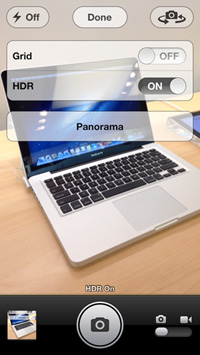
The iPod touch camera UI now matches the experience on the iPhone 5, including HDR and panorama shooting.

Apple has significantly improved the camera hardware for the fifth-generation iPod touch. It features a 5MP, backside illuminated sensor mated to a 33mm equivalent autofocus lens. Apple also added an LED flash. Thanks to the new iPod touch’s dual-core A5 processor, it is also capable of capturing high-dynamic range (HDR) images and utilizing iOS 6’s new sweeping panorama feature.

There’s little new to say about the iPod touch camera software that we haven’t already touched on in our extensive look at the iPhone 5. The Camera app is identical to the version running on the iPhone, and the interface is well-known at this point. The only major difference is the 5MP sensor—so let’s get straight to the image comparisons.

We have previously compared the fourth-gen iPod touch to the 5MP iPhone 4 camera. It was no comparison then, and we saw no reason to subject it to further embarrassment now. Instead we used cameras that could give the new iPod touch a run for its money: the 5MP iPhone 4, the 5MP iPad 3, and the 8MP iPhone 5. For out tests, I snapped a few images in bright outdoor light, as well as in extreme dim light from a 5W nightlight.

In bright light, the iPod touch fares well against its 5MP cousins, including the iPhone 4 and the iPad 3. Here you can see Chicago’s John Hancock Center in bright midday sun.

From left to right: iPod touch, iPhone 5, iPhone 4, iPad 3. The iPod touch does well in bright light, especially now that it can use the HDR option for increased dynamic range.
From left to right: iPod touch, iPhone 5, iPhone 4, iPad 3. The iPod touch does well in bright light, especially now that it can use the HDR option for increased dynamic range. Credit: Chris Foresman

Details are sharp and noise is well controlled. The 5MP sensor appears to be slightly more sensitive to light compared to the iPhone 5’s 8MP sensor, likely due to larger photo diodes. Helping out significantly is the HDR option, which expands dynamic range by combining multiple exposures. (Despite having an A5-class processor and a 5MP autofocus camera, Apple inexplicably does not include HDR or panorama features on the iPad 3.)

The iPod touch’s 5MP sensor (left) doesn’t quite capture the same level of detail as the 8MP iPhone 5 (right), but noise is well controlled.
The iPod touch’s 5MP sensor (left) doesn’t quite capture the same level of detail as the 8MP iPhone 5 (right), but noise is well controlled. Credit: Chris Foresman

Looking at this closeup image of some flowers, the main differences between the sensors in the fifth-gen touch and iPhone 5 are a little more clear. Images tend toward slightly warmer rendering, with slightly more contrast. Curiously, the added contrast does tend to make images from the iPod touch look a bit more “crisp” compared to the iPhone 5, though the 8MP sensor naturally captures more raw detail. I also prefer the non-adaptive, lightly applied noise filtering from the iPod touch—this is similar to all other iOS devices except for the iPhone—but I honestly think this is a completely subjective opinion that won’t matter to most users.

From left to right: iPod touch, iPhone 5, iPhone 4, iPad 3. The iPod touch does seem a bit more contrasty than the iPhone 5 or iPad 3. Rendering is also slightly warmer in comparison. (Note the iPhone 4’s tendency for extreme cool tones.)
From left to right: iPod touch, iPhone 5, iPhone 4, iPad 3. The iPod touch does seem a bit more contrasty than the iPhone 5 or iPad 3. Rendering is also slightly warmer in comparison. (Note the iPhone 4’s tendency for extreme cool tones.) Credit: Chris Foresman

Effectively, for many uses, these differences won’t be obvious. If you plan to use the images for printing or other high-resolution applications, though, the iPhone 5 will obviously have an advantage.

In low light, the iPod touch continues to hold its own. This image of a safety razor was captured with just a dim nightlight. It’s noisy, to be sure, but details remain sharp. Other devices including the iPhone 5 create images that are just as noisy. (The bright specular highlight on the porcelain kept the iPhone 5 from engaging its ISO boost mode, which trades noise for less detail; the iPod touch lacks this option.)

From left to right: iPod touch, iPhone 5, iPhone 4, iPad 3. Again, noise is well controlled, even in low light. The iPhone 5 has a bigger advantage in low light with its ability to capture more detail, however.
From left to right: iPod touch, iPhone 5, iPhone 4, iPad 3. Again, noise is well controlled, even in low light. The iPhone 5 has a bigger advantage in low light with its ability to capture more detail, however. Credit: Chris Foresman

The updated front-facing camera provides sharper video for FaceTime chats and does a decent job of taking low-resolution stills.

Shooting video also works as expected. An improvement from the previous iPod touch, the fifth-gen model now captures full 1080p video. The autofocus lens also makes closer shots much sharper. The digital stabilization works similarly to the iPhone and, even in low light, noise seemed acceptable.

In all, the fifth-gen iPod touch is a suitable photographic device for casual use. All the usual smartphone caveats apply: there’s no optical zoom, there’s no manual adjustment, and the LED flash is no substitute for an honest-to-goodness xenon flash. But the camera makes sharp, well-exposed images in a variety of lighting situations. It doesn’t have the advanced image signal processing built in to the A6 processor in the iPhone 5, and it lacks the iPhone 5’s ability to expand its ISO range up to 3200 using pixel-binning.

With most smartphones now reaching 8MP or higher, 5MP may not seem like much, especially if you want to do more than post everything to Facebook or Instagram. But it’s certainly suitable for casual snapshots of friends or family. And when gear snobs are quick to dismiss such relatively meager hardware, I like to point out the 16×20″ canvas print on our mantle, which was printed untouched straight from my 5MP iPhone 4.

This 16×20″ canvas print gets a lot of compliments from visitors; it was shot with a 5MP iPhone 4.
This 16×20″ canvas print gets a lot of compliments from visitors; it was shot with a 5MP iPhone 4. Credit: Chris Foresman

We’d like some optional manual control, which Apple could add via software (or, alternately, expose to third-party developers via APIs), but that aside, there’s little to criticize about the iPod touch’s imaging abilities.

The fourth-gen device’s camera seemed like a half-hearted attempt to quell complaints about the lack of camera hardware; the fifth-gen iPod touch is an honest attempt to make the camera good.

Internals and performance

The processor: Hello again, A5

As we reported previously, the new iPod touch uses the same Apple A5 processor that we’ve already seen in the iPad 2 and the iPhone 4S. This is the same power-efficient 32nm A5 that first showed up in the revised $399 iPad 2, set to the slightly lower 800MHz clock speed of the iPhone 4S. This should keep temperatures down and battery life up despite the iPod’s small size.

The A5 combines two Cortex A9 CPU cores, a dual-core Imagination Technologies PowerVR SGX543 GPU, and 512MB of RAM, and there is absolutely nothing new about the version in the iPod touch, which our tests will bear out. The A4 in the older iPod touch model uses a single Cortex A8 CPU core, a considerably older PowerVR SGX535 GPU, and just 256MB of RAM, so the A5 should be a sizable step up.

Note: the fourth-generation iPod touch crashes during the Octane test

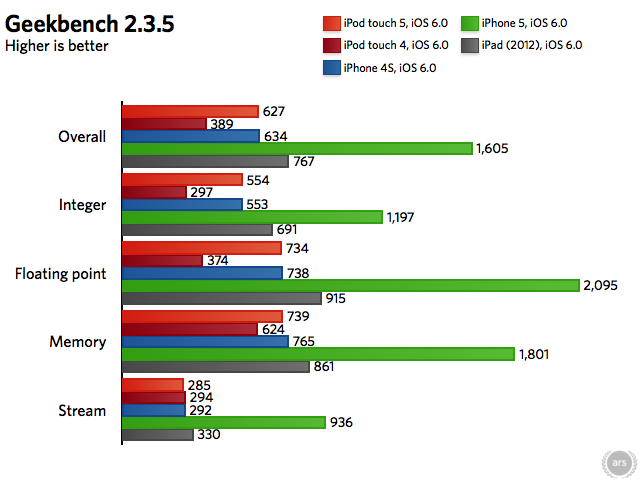
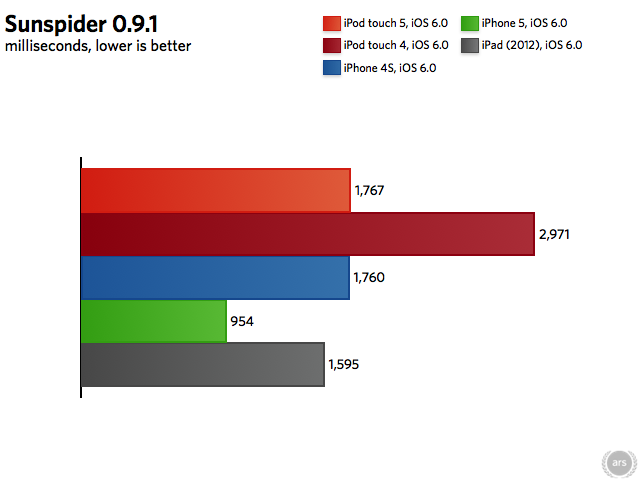
Our CPU and JavaScript benchmarks show no surprises: the new iPod touch performs identically to the iPhone 4S, and is much quicker than its predecessor. The custom-designed A6 SoC in the iPhone 5 is still around twice as fast, of course, but the days when the iPhone and iPod touch both used the same (or even similar) processors are behind us.

Graphics

Note: the fourth-generation iPod Touch crashes during the Egypt HD tests.

The GLBenchmark offscreen tests, which render the same scene at 1080p on each GPU to put them all on the same footing, show that the new iPod touch and the iPhone 4S are indeed identical in performance. The GLBenchmark onscreen tests, which render scenes at the devices’ native resolutions to determine how well-matched a GPU is for a given screen, show where this could be a slight problem: because the new iPod’s screen has more pixels than the screen in the iPhone 4S, the graphics performance may actually be a bit slower, at least in games that are really pushing the GPU (see the Egypt HD scores, which are 14 percent lower on the iPod than the 4S). In less punishing games, however, you won’t notice the difference (see the Egypt Classic scores, which are both basically maxed out).

Networking

The iPhone 5 and the new iPod touch are the first products in their respective lines to include dual-band 802.11n, which should improve wireless speeds and give users an alternative to the congested 2.4GHz wireless band. To test the improved networking hardware in the fifth-generation iPod touch, we fired up the Speedtest.net app and ran it on some different hardware. These tests were each run within about a ten minute period late at night, when our local cable network was less likely to be congested, and each test was run several times to reduce the possibility of anomalies.

Note: the 5GHz iPod touch results hit our Internet bandwidth cap. Higher transfer speeds may be possible with additional bandwidth. Tests performed using a dual-band Netgear WNDR3700 router.

Even if you only have a 2.4GHz wireless network, the new iPod touch could be noticeably quicker to download files, photos, and webpages than the previous model. If you have a dual-band router, you’ll see at least twice the performance. This will vary, of course, depending on your Internet bandwidth—as you can see by the roughly equal upload speeds across the board, people with lower-speed connections shouldn’t see much of a difference.

Battery life

Despite all of this new hardware, Apple promises eight hours of battery life while in general use and 40 hours of battery life during music playback, a slight bump from the previous iPod touch’s seven hours of general use and 40 hours of music playback. To provide slightly better battery life for substantially faster hardware, the iPod’s battery capacity has been bumped to 1030mAh, up from 930mAh in the previous model (though the more power-efficient internals and lack of cellular still keep it smaller than the identically performing iPhone 4S’s 1430mAh battery).

In our testing with Wi-Fi and Bluetooth enabled and the screen at half brightness, the new iPod lasted for almost exactly seven-and-a-half hours on a full charge, which is slightly under Apple’s estimates, though you may get more (or less) depending on your settings and the apps you’re using. We spent this time browsing the Web and checking e-mail, streaming music and video via Spotify and Netflix, and playing a few games. In most cases, you should be able to get at least a full work day out of the new iPod between charges.

Performance conclusions

The performance bump that the new iPod touch brings to the lineup is very welcome, and it completely eliminates the occasional stuttering and jerkiness that I’ve experienced on the fourth-generation iPod touch as its hardware ages.

Gamers, especially, should get a lot of mileage out of the beefier GPU—the old A5 isn’t nearly as fast as the A6, but it’s miles ahead of the A4 in the poky fourth-generation iPod touch. New dual-band Wi-Fi helps keep the hardware current with the new iPhone and with competing smartphones and tablets, and the slightly larger battery helps keep the battery life about even with the previous model. These are all big steps up for the touch, even if this is all well-trodden ground for other iOS devices.

About the price…

Credit: Andrew Cunningham

The new iPod Touch continues to be the cheapest way to buy into the iOS ecosystem, and it’s still a great product if you’re looking for the convenience and features of a smartphone without the added overhead of an expensive data plan. The faster hardware, the bigger and better-quality screen, Siri, and other features help the iPod touch stay current, even if it’s not quite as fast as the iPhone 5.

The updated camera adds a major new bullet point; the old iPod’s camera was, frankly, terrible for anything but the simplest of outdoor shots, but the upgraded sensor and lens and the added LED flash makes the iPod touch into a more-or-less credible point-and-shoot replacement.

Wi-Fi and the App Store make the touch the only iPod that can go beyond your iTunes library for music and video, a feature whose absence is making the rest of the iPod lineup look a bit like products from another era.

All of this is marred by one thing: fifth-generation iPods start at $300. This isn’t too bad if you consider its 32GB starting capacity—a Nexus 7, for example, can be had for $200, but the 16GB price is $249 and a 32GB version isn’t (yet) available. Still, the absence of a $199 or $249 16GB model is keenly felt. This is especially true given that the slower hardware, inferior screen, and laughable camera in the fourth-generation iPods are still being sold as entry level models. If you don’t need or want that 32GB of storage, you either have to go with a slower model, a competing product, or just suck it up and pay.

Pricing issues aside, the new iPod touch is an excellent upgrade over the previous model; it’s just too bad to see it priced out of that lucrative $200 “impulse buy” zone.

The good

  • Better screen, better performance, better camera, similar battery life—the newest iPod touch is in every way a substantial upgrade over its two-year-old predecessor
  • Impressive IPS screen is of the same quality as the one used in the iPhone 5
  • Camera peg and LED flash cement its position as a usable (if basic) point-and-shoot camera
  • New colors add a hint of iPod-style personality that the black-and-white iPhone and iPad lines don’t have

The bad

  • Still no GPS sensor
  • Ambient light sensor is inexplicably absent

The ugly

  • At a starting price of $299, the newest iPod is competing with just about every smartphone and tablet worth owning, and it’s priced well out of the impulse-buy zone

Listing image: Chris Foresman

Photo of Andrew Cunningham
Andrew Cunningham Senior Technology Reporter
Andrew is a Senior Technology Reporter at Ars Technica, with a focus on consumer tech including computer hardware and in-depth reviews of operating systems like Windows and macOS. Andrew lives in Philadelphia and co-hosts a weekly book podcast called Overdue.
146 Comments