
If you really want to install the update now, you'll have to unplug your drives.
Read the whole story
Read the whole story
Perhaps it's a combination of "discovered at the last minute" and the "whoops, there went your files" issue that hit with the October 2018 update. Better to be faced with this than people livid that Windows was installed on the wrong drive because of the drive letter shuffle.
 /windows/
Does "Windows 10 May 2019 update blocked for anyone using USB or SD storage." sound familiar? (It's the title of this article which you are posting to.)Quote: "The reason for blocking the update is that it appears to be prone to shuffling the drive letters assigned to USB and SD storage devices. In other words, while your USB drive might show up as "
I have a better workaround -- eliminate drive letters, which date back to DOS and at the very least represent an embarrassment in modern times. The presence of drive letters in Windows 10 only tells us how old the oldest code in Windows is. Drive letters are to a modern operating system what a disfiguring congenital birthmark would be in a person.
No other modern operating system recognizes, or relies on, drive letters. Before anyone mentions OS/2, I emphasize that I specified "modern operating system".
I can't tell you how many times I've heard from Windows 10 end users who cannot reliably back up their systems because some external storage devices are automatically assigned one drive letter, some another, with no predictable pattern or reliability. What Windows won't do is assign or accept a *user-defined name* for a storage device, which would solve this issue once and for all.
This is how Linux/Unix deals with this issue. Just saying.
It amazes me how *nix zealots pretend drive letters are such a major problem but can literally give zero concrete reasons why it's a problem other than it's not how *nix does it.
I'd love to review an example of what you consider to be an extra-pedestrian Linux kludge.First of all, Skippy, the codebase for *nix defacto dates back to 1969, so let's not pretend it's all that modern. How *nix handles everything as a file isn't all that special in the scheme of things and in some cases it's a huge detriment and there's kludges in the Linux kernel to get around that that make Microsoft's userland kludges for legacy software look pedestrian.
Or you install the May 2019 Windows patch?Once drive letters are set on permanently and semi-permanently connect drives Windows assigns the same ones every reboot unless something drastic happens like, you know, functionally reinstalling the operating system.
WinNT architecture dates to the mid-1990s and was a near total rewrite of how Windows works with no legacy DOS code. (In fact, it's my understanding WinNT is closer to VMS and OS/2 than DOS.) The quality of Microsoft's implementation of WinNT can be debated, but the underlying theoretical framework is an impressive technical feat.
The difference is security updates. I'm still accepting those, I just don't want the "feature" updates, because every freaking one breaks something and wastes my time trying to figure out how to fix it. And all I get in return is a feature I never wanted, that sometimes replaces a perfectly good feature with a worse one.So what you're saying is...I can just delay the update indefinitely by plugging in a USB drive?
It’s weird. Your witty comment on how to regain control over the updates gets “all the upvotes”, yet posts about Win7 users that don’t want auto-updates get “all the downvotes”.
In the end, I’m glad we all agree on one thing: MS QA is horrid.
I don't really care how often they push updates as long as they don't break shit. Google pushes updates to Chrome (and Chrome OS) more often flawlessly. The difference in complexity is obvious but it's more philosophical than that.So a few times in my period as the business partner in charge of hiring / orchestrating the IP people in a former job, I had to be in charge of roll out and testing of a major Windows "SP" update that was the equivalent of a full OS update. W2K SP4 and XP SP2 & 3.
The IP guys were careful in testing these with all our custom software. On each occasion we had to go to the software guys for some customization to fix things that broke with the SP update.
I've been saying for years that having Windows 10 on a cadence to push the equivalent of that kind of OS update, again the essential basics of which would be in inplace OS upgrade, twice a year is just too fucking much.
Every time. Every damn time there is something. And with Windows home users completely helpless to prevent it, its getting a little old. They need to dial it back to once a year and give themselves a full 6 months of testing so that these updates are perfect every time.
Maybe you should just upgrade your internal storage?So I bought the cheapest HP windows laptop available 1.5 years ago with 32 GB internal memory. Works fine for the simple tasks we give it. Not to long ago I had to buy a USB stick so that I could download and install the last Windows update because internal storage was insufficient to make it all work, even with very limited software installed. I hope they fix this glitch so I can access patches etc relatively soon!
The difference is security updates. I'm still accepting those, I just don't want the "feature" updates, because every freaking one breaks something and wastes my time trying to figure out how to fix it. And all I get in return is a feature I never wanted, that sometimes replaces a perfectly good feature with a worse one.So what you're saying is...I can just delay the update indefinitely by plugging in a USB drive?
It’s weird. Your witty comment on how to regain control over the updates gets “all the upvotes”, yet posts about Win7 users that don’t want auto-updates get “all the downvotes”.
In the end, I’m glad we all agree on one thing: MS QA is horrid.
Example anecdote: last one screwed up my audio config (my microphone just stopped working completely...turned out for some reason all applications were suddenly forbidden from accessing it in security settings)...and two of my friends also had audio problems on that update. But each one of us had a different audio problem. And AFAIK we all have simple setups, just stereo speakers and a headset (and generally just switching between them depending on the situation), so it's not like we're some weird edge-case.
But Windows 7 doesn't really have much in the way of feature updates, it's mostly bug fixes and security updates. Avoiding those is a different story.
I assumed you meant Windows 7 users that disable Windows Update because they don't want any automatic updates (because I have certainly seen those around in the comments section too).The difference is security updates. I'm still accepting those, I just don't want the "feature" updates, because every freaking one breaks something and wastes my time trying to figure out how to fix it. And all I get in return is a feature I never wanted, that sometimes replaces a perfectly good feature with a worse one.So what you're saying is...I can just delay the update indefinitely by plugging in a USB drive?
It’s weird. Your witty comment on how to regain control over the updates gets “all the upvotes”, yet posts about Win7 users that don’t want auto-updates get “all the downvotes”.
In the end, I’m glad we all agree on one thing: MS QA is horrid.
Example anecdote: last one screwed up my audio config (my microphone just stopped working completely...turned out for some reason all applications were suddenly forbidden from accessing it in security settings)...and two of my friends also had audio problems on that update. But each one of us had a different audio problem. And AFAIK we all have simple setups, just stereo speakers and a headset (and generally just switching between them depending on the situation), so it's not like we're some weird edge-case.
But Windows 7 doesn't really have much in the way of feature updates, it's mostly bug fixes and security updates. Avoiding those is a different story.
I meant Win7 users that avoid win10 due to the forced updates. I can’t imagine anyone ignoring security updates regardless of the platform.
[url=https://www.microsoft.com/en-ca/windowsforbusiness/end-of-windows-7-support:27eh3eew said:Microsoft[/url]":27eh3eew]After January 14, 2020, Microsoft will no longer provide security updates or support for PCs running Windows 7.
Maybe you should just upgrade your internal storage?So I bought the cheapest HP windows laptop available 1.5 years ago with 32 GB internal memory. Works fine for the simple tasks we give it. Not to long ago I had to buy a USB stick so that I could download and install the last Windows update because internal storage was insufficient to make it all work, even with very limited software installed. I hope they fix this glitch so I can access patches etc relatively soon!
Unless its embedded (in which case you can't do it at all and you should just stop reading), it should be a completely trivial upgrade. Find the service manual for the laptop (easily available on HP's support site, and for laptops far older than that), determine what type of drive it is (m.2 SATA, m.2 NVME, mSATA, or 2.5" SATA), buy a replacement with more capacity from Amazon, Newegg, or similar (likely at $50 or less for ~500GB), and you will never need to worry about that issue again.
I have always maintained that you will pay a given minimum amount for tech purchases.Maybe you should just upgrade your internal storage?So I bought the cheapest HP windows laptop available 1.5 years ago with 32 GB internal memory. Works fine for the simple tasks we give it. Not to long ago I had to buy a USB stick so that I could download and install the last Windows update because internal storage was insufficient to make it all work, even with very limited software installed. I hope they fix this glitch so I can access patches etc relatively soon!
Unless its embedded (in which case you can't do it at all and you should just stop reading), it should be a completely trivial upgrade. Find the service manual for the laptop (easily available on HP's support site, and for laptops far older than that), determine what type of drive it is (m.2 SATA, m.2 NVME, mSATA, or 2.5" SATA), buy a replacement with more capacity from Amazon, Newegg, or similar (likely at $50 or less for ~500GB), and you will never need to worry about that issue again.
If they bought the 'cheapest hp windows laptop' with 32 GB NAND, it's probably a hp stream 11 or 13, which not only had the NAND soldered onto the motherboard, it adds insult to injury by using eMMC instead of a SATA or NVMe protocol.
I don't really care how often they push updates as long as they don't break shit. Google pushes updates to Chrome (and Chrome OS) more often flawlessly. The difference in complexity is obvious but it's more philosophical than that.So a few times in my period as the business partner in charge of hiring / orchestrating the IP people in a former job, I had to be in charge of roll out and testing of a major Windows "SP" update that was the equivalent of a full OS update. W2K SP4 and XP SP2 & 3.
The IP guys were careful in testing these with all our custom software. On each occasion we had to go to the software guys for some customization to fix things that broke with the SP update.
I've been saying for years that having Windows 10 on a cadence to push the equivalent of that kind of OS update, again the essential basics of which would be in inplace OS upgrade, twice a year is just too fucking much.
Every time. Every damn time there is something. And with Windows home users completely helpless to prevent it, its getting a little old. They need to dial it back to once a year and give themselves a full 6 months of testing so that these updates are perfect every time.
Internally, Microsoft can work on a feature update as long as they want. They should focus on extensive regression testing against as many targets as they can and spend time divorcing that update from other bits of code (refactor!). Hell, they can "shadow install" updates on active Windows install in the wild just to see if that process craps out (don't give it actual authority!).
And at the end of the day, when the features work feel free to ship twice per year. Or hell, with the monthly security patch. If shit doesn't break, why not upgrade all the time?
To be fair, the things that break typically don't impact the experience of the vast majority of end users, and they are often fixed in the next update (which breaks something else, which is also unlikely to affect the vast majority of end users).I don't really care how often they push updates as long as they don't break shit. Google pushes updates to Chrome (and Chrome OS) more often flawlessly. The difference in complexity is obvious but it's more philosophical than that.So a few times in my period as the business partner in charge of hiring / orchestrating the IP people in a former job, I had to be in charge of roll out and testing of a major Windows "SP" update that was the equivalent of a full OS update. W2K SP4 and XP SP2 & 3.
The IP guys were careful in testing these with all our custom software. On each occasion we had to go to the software guys for some customization to fix things that broke with the SP update.
I've been saying for years that having Windows 10 on a cadence to push the equivalent of that kind of OS update, again the essential basics of which would be in inplace OS upgrade, twice a year is just too fucking much.
Every time. Every damn time there is something. And with Windows home users completely helpless to prevent it, its getting a little old. They need to dial it back to once a year and give themselves a full 6 months of testing so that these updates are perfect every time.
Internally, Microsoft can work on a feature update as long as they want. They should focus on extensive regression testing against as many targets as they can and spend time divorcing that update from other bits of code (refactor!). Hell, they can "shadow install" updates on active Windows install in the wild just to see if that process craps out (don't give it actual authority!).
And at the end of the day, when the features work feel free to ship twice per year. Or hell, with the monthly security patch. If shit doesn't break, why not upgrade all the time?
A nit to pick...
If you're using the Chrome example in earnest, you clearly fit into at least one of the following groups:
- People who use a very small and fairly unchanging list of websites
- People who do not have web development as part of their job description
- People who do not notice when things change adversely, but still work (think cosmetic/rendering changes)
- People who don't know what "flawlessly" means
- Unicorns
Why?
Every. Single. Chrome. Update. breaks something, somewhere.
Just because you haven't encountered it or haven't noticed it doesn't mean it's not a thing.
To be fair, the things that break typically don't impact the experience of the vast majority of end users, and they are often fixed in the next update (which breaks something else, which is also unlikely to affect the vast majority of end users).I don't really care how often they push updates as long as they don't break shit. Google pushes updates to Chrome (and Chrome OS) more often flawlessly. The difference in complexity is obvious but it's more philosophical than that.So a few times in my period as the business partner in charge of hiring / orchestrating the IP people in a former job, I had to be in charge of roll out and testing of a major Windows "SP" update that was the equivalent of a full OS update. W2K SP4 and XP SP2 & 3.
The IP guys were careful in testing these with all our custom software. On each occasion we had to go to the software guys for some customization to fix things that broke with the SP update.
I've been saying for years that having Windows 10 on a cadence to push the equivalent of that kind of OS update, again the essential basics of which would be in inplace OS upgrade, twice a year is just too fucking much.
Every time. Every damn time there is something. And with Windows home users completely helpless to prevent it, its getting a little old. They need to dial it back to once a year and give themselves a full 6 months of testing so that these updates are perfect every time.
Internally, Microsoft can work on a feature update as long as they want. They should focus on extensive regression testing against as many targets as they can and spend time divorcing that update from other bits of code (refactor!). Hell, they can "shadow install" updates on active Windows install in the wild just to see if that process craps out (don't give it actual authority!).
And at the end of the day, when the features work feel free to ship twice per year. Or hell, with the monthly security patch. If shit doesn't break, why not upgrade all the time?
A nit to pick...
If you're using the Chrome example in earnest, you clearly fit into at least one of the following groups:
- People who use a very small and fairly unchanging list of websites
- People who do not have web development as part of their job description
- People who do not notice when things change adversely, but still work (think cosmetic/rendering changes)
- People who don't know what "flawlessly" means
- Unicorns
Why?
Every. Single. Chrome. Update. breaks something, somewhere.
Just because you haven't encountered it or haven't noticed it doesn't mean it's not a thing.
Except for that time that a Chrome update broke CSS entirely and I was browsing the web like it was 1995.
Except by the time it was in a canary build, it's likely Google would have already caught a bug like this. This build has been through the Microsoft equivalent of a canary and test build and it's headed to a preview ring. That's several stages of development further.To be fair, the things that break typically don't impact the experience of the vast majority of end users, and they are often fixed in the next update (which breaks something else, which is also unlikely to affect the vast majority of end users).I don't really care how often they push updates as long as they don't break shit. Google pushes updates to Chrome (and Chrome OS) more often flawlessly. The difference in complexity is obvious but it's more philosophical than that.So a few times in my period as the business partner in charge of hiring / orchestrating the IP people in a former job, I had to be in charge of roll out and testing of a major Windows "SP" update that was the equivalent of a full OS update. W2K SP4 and XP SP2 & 3.
The IP guys were careful in testing these with all our custom software. On each occasion we had to go to the software guys for some customization to fix things that broke with the SP update.
I've been saying for years that having Windows 10 on a cadence to push the equivalent of that kind of OS update, again the essential basics of which would be in inplace OS upgrade, twice a year is just too fucking much.
Every time. Every damn time there is something. And with Windows home users completely helpless to prevent it, its getting a little old. They need to dial it back to once a year and give themselves a full 6 months of testing so that these updates are perfect every time.
Internally, Microsoft can work on a feature update as long as they want. They should focus on extensive regression testing against as many targets as they can and spend time divorcing that update from other bits of code (refactor!). Hell, they can "shadow install" updates on active Windows install in the wild just to see if that process craps out (don't give it actual authority!).
And at the end of the day, when the features work feel free to ship twice per year. Or hell, with the monthly security patch. If shit doesn't break, why not upgrade all the time?
A nit to pick...
If you're using the Chrome example in earnest, you clearly fit into at least one of the following groups:
- People who use a very small and fairly unchanging list of websites
- People who do not have web development as part of their job description
- People who do not notice when things change adversely, but still work (think cosmetic/rendering changes)
- People who don't know what "flawlessly" means
- Unicorns
Why?
Every. Single. Chrome. Update. breaks something, somewhere.
Just because you haven't encountered it or haven't noticed it doesn't mean it's not a thing.
Except for that time that a Chrome update broke CSS entirely and I was browsing the web like it was 1995.
Which is kind of the point of most people, here...
This is a non-issue, because it's getting caught before the vast majority of users will have the chance to encounter it, which means everything is working as planned.
This is sorta like crying that an early release game on steam is buggy before its final release.
Well... Duh...
Except by the time it was in a canary build, it's likely Google would have already caught a bug like this. This build has been through the Microsoft equivalent of a canary and test build and it's headed to a preview ring. That's several stages of development further.To be fair, the things that break typically don't impact the experience of the vast majority of end users, and they are often fixed in the next update (which breaks something else, which is also unlikely to affect the vast majority of end users).I don't really care how often they push updates as long as they don't break shit. Google pushes updates to Chrome (and Chrome OS) more often flawlessly. The difference in complexity is obvious but it's more philosophical than that.So a few times in my period as the business partner in charge of hiring / orchestrating the IP people in a former job, I had to be in charge of roll out and testing of a major Windows "SP" update that was the equivalent of a full OS update. W2K SP4 and XP SP2 & 3.
The IP guys were careful in testing these with all our custom software. On each occasion we had to go to the software guys for some customization to fix things that broke with the SP update.
I've been saying for years that having Windows 10 on a cadence to push the equivalent of that kind of OS update, again the essential basics of which would be in inplace OS upgrade, twice a year is just too fucking much.
Every time. Every damn time there is something. And with Windows home users completely helpless to prevent it, its getting a little old. They need to dial it back to once a year and give themselves a full 6 months of testing so that these updates are perfect every time.
Internally, Microsoft can work on a feature update as long as they want. They should focus on extensive regression testing against as many targets as they can and spend time divorcing that update from other bits of code (refactor!). Hell, they can "shadow install" updates on active Windows install in the wild just to see if that process craps out (don't give it actual authority!).
And at the end of the day, when the features work feel free to ship twice per year. Or hell, with the monthly security patch. If shit doesn't break, why not upgrade all the time?
A nit to pick...
If you're using the Chrome example in earnest, you clearly fit into at least one of the following groups:
- People who use a very small and fairly unchanging list of websites
- People who do not have web development as part of their job description
- People who do not notice when things change adversely, but still work (think cosmetic/rendering changes)
- People who don't know what "flawlessly" means
- Unicorns
Why?
Every. Single. Chrome. Update. breaks something, somewhere.
Just because you haven't encountered it or haven't noticed it doesn't mean it's not a thing.
Except for that time that a Chrome update broke CSS entirely and I was browsing the web like it was 1995.
Which is kind of the point of most people, here...
This is a non-issue, because it's getting caught before the vast majority of users will have the chance to encounter it, which means everything is working as planned.
This is sorta like crying that an early release game on steam is buggy before its final release.
Well... Duh...

I assumed you meant Windows 7 users that disable Windows Update because they don't want any automatic updates (because I have certainly seen those around in the comments section too).The difference is security updates. I'm still accepting those, I just don't want the "feature" updates, because every freaking one breaks something and wastes my time trying to figure out how to fix it. And all I get in return is a feature I never wanted, that sometimes replaces a perfectly good feature with a worse one.So what you're saying is...I can just delay the update indefinitely by plugging in a USB drive?
It’s weird. Your witty comment on how to regain control over the updates gets “all the upvotes”, yet posts about Win7 users that don’t want auto-updates get “all the downvotes”.
In the end, I’m glad we all agree on one thing: MS QA is horrid.
Example anecdote: last one screwed up my audio config (my microphone just stopped working completely...turned out for some reason all applications were suddenly forbidden from accessing it in security settings)...and two of my friends also had audio problems on that update. But each one of us had a different audio problem. And AFAIK we all have simple setups, just stereo speakers and a headset (and generally just switching between them depending on the situation), so it's not like we're some weird edge-case.
But Windows 7 doesn't really have much in the way of feature updates, it's mostly bug fixes and security updates. Avoiding those is a different story.
I meant Win7 users that avoid win10 due to the forced updates. I can’t imagine anyone ignoring security updates regardless of the platform.
But that's literally what staying on 7 gets you in the long-term though (well, not that long at this point):
[url=https://www.microsoft.com/en-ca/windowsforbusiness/end-of-windows-7-support:3ift9kuj said:Microsoft[/url]":3ift9kuj]After January 14, 2020, Microsoft will no longer provide security updates or support for PCs running Windows 7.
Does "Windows 10 May 2019 update blocked for anyone using USB or SD storage." sound familiar? (It's the title of this article which you are posting to.)Quote: "The reason for blocking the update is that it appears to be prone to shuffling the drive letters assigned to USB and SD storage devices. In other words, while your USB drive might show up as "
I have a better workaround -- eliminate drive letters, which date back to DOS and at the very least represent an embarrassment in modern times. The presence of drive letters in Windows 10 only tells us how old the oldest code in Windows is. Drive letters are to a modern operating system what a disfiguring congenital birthmark would be in a person.
No other modern operating system recognizes, or relies on, drive letters. Before anyone mentions OS/2, I emphasize that I specified "modern operating system".
I can't tell you how many times I've heard from Windows 10 end users who cannot reliably back up their systems because some external storage devices are automatically assigned one drive letter, some another, with no predictable pattern or reliability. What Windows won't do is assign or accept a *user-defined name* for a storage device, which would solve this issue once and for all.
This is how Linux/Unix deals with this issue. Just saying.
It amazes me how *nix zealots pretend drive letters are such a major problem but can literally give zero concrete reasons why it's a problem other than it's not how *nix does it.
I'd love to review an example of what you consider to be an extra-pedestrian Linux kludge.First of all, Skippy, the codebase for *nix defacto dates back to 1969, so let's not pretend it's all that modern. How *nix handles everything as a file isn't all that special in the scheme of things and in some cases it's a huge detriment and there's kludges in the Linux kernel to get around that that make Microsoft's userland kludges for legacy software look pedestrian.
Please provide a link to the specific source code.
Or you install the May 2019 Windows patch?Once drive letters are set on permanently and semi-permanently connect drives Windows assigns the same ones every reboot unless something drastic happens like, you know, functionally reinstalling the operating system.
Or you update a device driver, and the system bus topology ordering changes?
Unix originated on PDP mainframes and became popular on Sun and HP-PA hardware, which tended to use OpenFirmware rather than a PC BIOS and almost always exhibited stable system bus topology ordering. (To be fair, EFI in modern PCs could actually do better, but legacy compatibility with the BIOS world makes that complex.)
With x86-based hardware, flavors of Unix/Linux have added either disk-partition based drive labelling, or a UUID-to-device ordering held on the root filesystem, or both. This allows the devices to be enumerated consistently so that /etc/mounts doesn't break.
Should problems with logical assignment be a "thing"?Does "Windows 10 May 2019 update blocked for anyone using USB or SD storage." sound familiar? (It's the title of this article which you are posting to.)Quote: "The reason for blocking the update is that it appears to be prone to shuffling the drive letters assigned to USB and SD storage devices. In other words, while your USB drive might show up as "
I have a better workaround -- eliminate drive letters, which date back to DOS and at the very least represent an embarrassment in modern times. The presence of drive letters in Windows 10 only tells us how old the oldest code in Windows is. Drive letters are to a modern operating system what a disfiguring congenital birthmark would be in a person.
No other modern operating system recognizes, or relies on, drive letters. Before anyone mentions OS/2, I emphasize that I specified "modern operating system".
I can't tell you how many times I've heard from Windows 10 end users who cannot reliably back up their systems because some external storage devices are automatically assigned one drive letter, some another, with no predictable pattern or reliability. What Windows won't do is assign or accept a *user-defined name* for a storage device, which would solve this issue once and for all.
This is how Linux/Unix deals with this issue. Just saying.
It amazes me how *nix zealots pretend drive letters are such a major problem but can literally give zero concrete reasons why it's a problem other than it's not how *nix does it.
And? The drive letter doesn't magically make this happen. It's the logical assignment, which is also a "thing" that breaks in *nix during major updates.
You're walking back your claim, I see.You first.I'd love to review an example of what you consider to be an extra-pedestrian Linux kludge.First of all, Skippy, the codebase for *nix defacto dates back to 1969, so let's not pretend it's all that modern. How *nix handles everything as a file isn't all that special in the scheme of things and in some cases it's a huge detriment and there's kludges in the Linux kernel to get around that that make Microsoft's userland kludges for legacy software look pedestrian.
Please provide a link to the specific source code.
I asked for a single example.You know that literally no one can actually vet the Linux kernel, and an entire distro built on top of that, for even major security flaws much less stuff like this. And that's despite every line of source code being available.
The fact that this problem reached beta testing has been described as "frankly remarkable" by one local author. Not having a system or security update apply should be a major concern.The fact this problem was caught during beta testing should be enough to say it's not a major concern. Shit happens and some of the ugliest fuck-your-system-up-the-exhaust-port-with-a-corn-cob shit I've had happen was while beta testing a Linux distro.
Should problems with logical assignment be a "thing"?Does "Windows 10 May 2019 update blocked for anyone using USB or SD storage." sound familiar? (It's the title of this article which you are posting to.)Quote: "The reason for blocking the update is that it appears to be prone to shuffling the drive letters assigned to USB and SD storage devices. In other words, while your USB drive might show up as "
I have a better workaround -- eliminate drive letters, which date back to DOS and at the very least represent an embarrassment in modern times. The presence of drive letters in Windows 10 only tells us how old the oldest code in Windows is. Drive letters are to a modern operating system what a disfiguring congenital birthmark would be in a person.
No other modern operating system recognizes, or relies on, drive letters. Before anyone mentions OS/2, I emphasize that I specified "modern operating system".
I can't tell you how many times I've heard from Windows 10 end users who cannot reliably back up their systems because some external storage devices are automatically assigned one drive letter, some another, with no predictable pattern or reliability. What Windows won't do is assign or accept a *user-defined name* for a storage device, which would solve this issue once and for all.
This is how Linux/Unix deals with this issue. Just saying.
It amazes me how *nix zealots pretend drive letters are such a major problem but can literally give zero concrete reasons why it's a problem other than it's not how *nix does it.
And? The drive letter doesn't magically make this happen. It's the logical assignment, which is also a "thing" that breaks in *nix during major updates.
Should those problems blacklist OS and/or security updates?
My answers are no and no, respectively.
I previously mentioned two different mechanisms by which persistent logical assignment is handled in Unix. Please point me to patch notes from a 2019 flavor of Unix where having removable storage in use will result in the update/patch not applying?
You're walking back your claim, I see.You first.I'd love to review an example of what you consider to be an extra-pedestrian Linux kludge.First of all, Skippy, the codebase for *nix defacto dates back to 1969, so let's not pretend it's all that modern. How *nix handles everything as a file isn't all that special in the scheme of things and in some cases it's a huge detriment and there's kludges in the Linux kernel to get around that that make Microsoft's userland kludges for legacy software look pedestrian.
Please provide a link to the specific source code.
I asked for a single example.You know that literally no one can actually vet the Linux kernel, and an entire distro built on top of that, for even major security flaws much less stuff like this. And that's despite every line of source code being available.
Stating that "literally no can" review the Linux kernel is not even a plausible excuse. If you actually had an example in mind, kernel.org is a click away.
The fact that this problem reached beta testing has been described as "frankly remarkable" by one local author. Not having a system or security update apply should be a major concern.The fact this problem was caught during beta testing should be enough to say it's not a major concern. Shit happens and some of the ugliest fuck-your-system-up-the-exhaust-port-with-a-corn-cob shit I've had happen was while beta testing a Linux distro.
Look, Windows is a platform and a tool. I'm less interested in throwing stones than I am in setting reasonable expectations and finding sane workarounds for problems.
But I've had to fight with USB settings recently because Windows 10 decided that my external backup drive should no longer be mounted using caching, so backup decided it wasn't reliable enough to keep running backups against. It's fixed again, but it never should have been changed to begin with.
smartctl -a /dev/sdc tells me the drive is a "WDC WD40NMZW-11GX6S1".
With apologies to Monty Python, it would make me sad if Windows decides that sdc is now sdd, and sde would be right out. sdc is the drive letter that WDC via USB thou shalt enumerate, and the drive letter of the counting shall be three. No, C. No, not C:, that's /dev/sda. /dev/sdc is G:, and any alteration will be deemed naughty in My sight.
After being asked to provide an example, you've gone for the trifecta of an ad hominem attack, claiming goalposts have been moved, and that you're out of here.Frankly, you're being an asshole right now and have move the goalpost to the next metro area over. I'm done.
Projection much?I don't give a shit about Linux, and haven't used it for myself for more than testing in close to a decade for a reason. I'm not going to have a religious argument with a zealot with an ax to grind.
Ok question, are software developers becoming more inept? How can they not simply write it so it doesn't shuffle the drive letters around? That does not sound like an insurmountable issue.
It's an operating system, I don't think updates are "simply". Not saying they couldn't ,but I suspect there is some legitimate complexity here.
What the heck is 'mm' as a label for number of something? 1,000? 1,000,000? The customary (and SI) labels would be 'k' and 'M.'Windows is gigantic, with something like 100mm lines of code in all. At that scale, even seemingly inconsequential changes can have some rather chaotic results.Ok question, are software developers becoming more inept? How can they not simply write it so it doesn't shuffle the drive letters around? That does not sound like an insurmountable issue.
As a reminder, folks, always create an empty text file with the filename of "X"-drive in the root folder of any drive you plug in, with X being the drive letter in Windows in your system; that will allow you to quickly map the drive back to the correct location after an update (or hardware repair/replacement/shuffling)
The more esoteric the bugs that block an update the more concerned I am for the future. Apparently this update might scramble USB drive letters, but not hard drives? There are just too many interconnections between the bits of code in Windows that have unforeseeable consequences as changes are applied.
Perhaps instead of adding new features each build, Microsoft should really be focusing on reducing the inter-connections wherever possible or on simplifying the codebase as much as possible. I realize Windows does a lot so a minimum level of complexity is required. But I suspect we're not near that limit.
Microsoft was trying to do just that - clean Windows up, reduce interdependencies, simplify the codebase, etc. - with Project Longhorn, which was ultimately scrapped after several years of development. They ended up cobbling Vista together out of the leftovers of Longhorn and XP.
That was 15+ years ago, to be fair, but I'm not sure Microsoft possesses the ability to re-write Windows from the ground up. I think it has become a larger beast than its creators at this point.
Source: https://medium.com/@benbob/what-really-happened-with-vista-an-insiders-retrospective-f713ee77c239
Not sure I understand the last paragraph, since it WAS caught in testing - with us RP people, the last line of defense. You can crow all you want about how it 'should have' been spotted sooner and fixed, but really, who cares? The vast, VAST majority of Windows 10 users are not in the any of the testing rings, so as long as it's fixed by general release, it doesn't matter.
Now if they STILL dont have this sorted out by the time this update goes live, then you can complain, and rightly so (they are giving us RP basically a month of time - which should be long enough to spot many thing and fix them too).
If it still isn't fix by prime time, then I dont think the problem is really testing/QA as you at Ars generally claim, I have to call into question how the Windows team is currently split up or rather, how they were organized at the last reorg. After all, we talking a "we know about it early enough" bug, and yet there is no news on when the fix will happen (as far as I can see). Perhaps instead its about how they handle the builds and when they go out. How many people back at MS are working on this build VS some future build?
EDIT - "Add another one to the 'how did this get through testing' pile" It didn't, it's still being tested.
Capital 'MM' I would have guessed was millions. I think even the financials industries are moving away from 'M' to denote thousands and have moved (or are moving) to 'kilo-' or 'k.'What the heck is 'mm' as a label for number of something? 1,000? 1,000,000? The customary (and SI) labels would be 'k' and 'M.'Windows is gigantic, with something like 100mm lines of code in all. At that scale, even seemingly inconsequential changes can have some rather chaotic results.Ok question, are software developers becoming more inept? How can they not simply write it so it doesn't shuffle the drive letters around? That does not sound like an insurmountable issue.
Not all domains use SI suffixes. In business and finance, M was traditionally used to denote "thousands" (from the Roman Numeral M), and so millions became "MM". It is still used quite widely in many different industries, particularly in financial contexts.
Out of curiosity, what makes you think this is a permanent situation that will persist for the "rest of your device's life"?I keep a microSD card in my Surface 3 at nearly all times. If I wasn't following tech news and/or wasn't diligent on checking for updates, I could conceivably never learn of this issue and be stuck on 1803 for the rest of my device's life.
I'm flabbergasted that this is a thing.
Microsoft places temporary blocks on specific hardware/software configurations for every feature update. It's part of the process of ensuring a smooth rollout. Eventually, the issues are addressed and the blocks are lifted.
From the MS support article:
"The drive reassignment is not limited to removable drives. Internal hard drives can also be affected."
Yikes... that's definitely a major nuisance for people, like me, who have their OS on an SSD, their files on a HDD, and map their documents/pictures/etc. folder to the HDD.
The typical OS Cdata
My setup, OTOH...
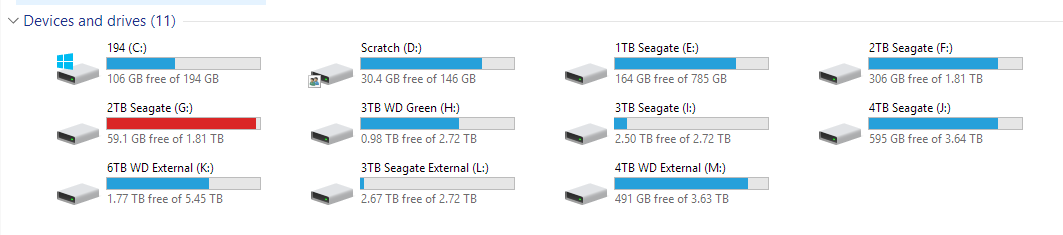
May I introduce you to the concept of a NAS?Agree with removable drives, but:I don't see the problem with drive letters changing. It's not like they're guaranteed to be constant, or even give any expectation to remain constant. After all, if you plug in several USB sticks, they can't all get the same letter. And that letter is likely determined by the order of plugging them in.
Just use the name or serial number of the drive, or the partition / partition table UUID instead if something constant is needed.
That's potentially a problem.From the MS support article:
"The drive reassignment is not limited to removable drives. Internal hard drives can also be affected."
I want the contents of a drive to be accessible when I clone the partitions somewhere else. You cannot tie identification to hardware. I'm good having it tied to a partition ID.I don't see the problem with drive letters changing. It's not like they're guaranteed to be constant, or even give any expectation to remain constant. After all, if you plug in several USB sticks, they can't all get the same letter. And that letter is likely determined by the order of plugging them in.
Just use the name or serial number of the drive, or the partition / partition table UUID instead if something constant is needed.
Agree with removable drives, but:I don't see the problem with drive letters changing. It's not like they're guaranteed to be constant, or even give any expectation to remain constant. After all, if you plug in several USB sticks, they can't all get the same letter. And that letter is likely determined by the order of plugging them in.
Just use the name or serial number of the drive, or the partition / partition table UUID instead if something constant is needed.
That's potentially a problem.From the MS support article:
"The drive reassignment is not limited to removable drives. Internal hard drives can also be affected."
It's also possible that some people are using external USB drives as more permanent drives instead of as removable drives, and would encounter the same problems as internal drives would have (shortcuts not working, programs not finding files where they're expected, etc.).
I want the contents of a drive to be accessible when I clone the partitions somewhere else. You cannot tie identification to hardware. I'm good having it tied to a partition ID.I don't see the problem with drive letters changing. It's not like they're guaranteed to be constant, or even give any expectation to remain constant. After all, if you plug in several USB sticks, they can't all get the same letter. And that letter is likely determined by the order of plugging them in.
Just use the name or serial number of the drive, or the partition / partition table UUID instead if something constant is needed.
. Physical bus topology is nice, then you can identify replaced drives as the-same. File System or Partition UUID is nice for the reason you mentioned, and also being somewhat portable. Drive serial is guaranteed unique. They all have their pros and cons, but unlike drive letters, they are actually meant to be invariant.You wouldn't generally access a drive via it's /dev/ entry in Linux anyways, you'd go to whatever directory it's mounted to (especially if you actually want to use the filesystem on it...).Agree with removable drives, but:I don't see the problem with drive letters changing. It's not like they're guaranteed to be constant, or even give any expectation to remain constant. After all, if you plug in several USB sticks, they can't all get the same letter. And that letter is likely determined by the order of plugging them in.
Just use the name or serial number of the drive, or the partition / partition table UUID instead if something constant is needed.
That's potentially a problem.From the MS support article:
"The drive reassignment is not limited to removable drives. Internal hard drives can also be affected."
It's also possible that some people are using external USB drives as more permanent drives instead of as removable drives, and would encounter the same problems as internal drives would have (shortcuts not working, programs not finding files where they're expected, etc.).
/dev/ files aren't guaranteed to remain consistent across reboots or even during operation for Mac OS X or Linux either. Not even of my internal SSDs or HDDs. (I think their order changes based on the time they happen to take to reply to the kernel when it enumerates devices).
It's no big deal in general operation, since no one cares about those outside admin tasks. If you want something more consistent, you'd use a disk/by-id, disk/by-serial or similar alternative to get a consistent device (I wrote https://github.com/cbreak-black/InvariantDisks to fake the linux mechanism on Mac OS X). And mount the devices where ever you want based on id, serial or similar based on this.
People seem to abuse drive letters as something it never promised to be: An invariant identifier.
You wouldn't generally access a drive via it's /dev/ entry in Linux anyways, you'd go to whatever directory it's mounted to (especially if you actually want to use the filesystem on it...).Agree with removable drives, but:I don't see the problem with drive letters changing. It's not like they're guaranteed to be constant, or even give any expectation to remain constant. After all, if you plug in several USB sticks, they can't all get the same letter. And that letter is likely determined by the order of plugging them in.
Just use the name or serial number of the drive, or the partition / partition table UUID instead if something constant is needed.
That's potentially a problem.From the MS support article:
"The drive reassignment is not limited to removable drives. Internal hard drives can also be affected."
It's also possible that some people are using external USB drives as more permanent drives instead of as removable drives, and would encounter the same problems as internal drives would have (shortcuts not working, programs not finding files where they're expected, etc.).
/dev/ files aren't guaranteed to remain consistent across reboots or even during operation for Mac OS X or Linux either. Not even of my internal SSDs or HDDs. (I think their order changes based on the time they happen to take to reply to the kernel when it enumerates devices).
It's no big deal in general operation, since no one cares about those outside admin tasks. If you want something more consistent, you'd use a disk/by-id, disk/by-serial or similar alternative to get a consistent device (I wrote https://github.com/cbreak-black/InvariantDisks to fake the linux mechanism on Mac OS X). And mount the devices where ever you want based on id, serial or similar based on this.
People seem to abuse drive letters as something it never promised to be: An invariant identifier.
Unfortunately Windows basically uses drive letters the same way as you might use the mount path in Linux. Plenty of parts of Windows itself expect that drive letters will not change, so I'm not sure I buy that they weren't meant to be invariant, at least in some cases (e.g. change your C: drive to anything else and see what happens).
Huh? If you're booting from another partition, you're booting into a different operating system instance. Of course it would have a different mapping, my drives also map differently if I boot into Linux instead of Windows on a dual boot system, but that's not really relevant to anything.You wouldn't generally access a drive via it's /dev/ entry in Linux anyways, you'd go to whatever directory it's mounted to (especially if you actually want to use the filesystem on it...).Agree with removable drives, but:I don't see the problem with drive letters changing. It's not like they're guaranteed to be constant, or even give any expectation to remain constant. After all, if you plug in several USB sticks, they can't all get the same letter. And that letter is likely determined by the order of plugging them in.
Just use the name or serial number of the drive, or the partition / partition table UUID instead if something constant is needed.
That's potentially a problem.From the MS support article:
"The drive reassignment is not limited to removable drives. Internal hard drives can also be affected."
It's also possible that some people are using external USB drives as more permanent drives instead of as removable drives, and would encounter the same problems as internal drives would have (shortcuts not working, programs not finding files where they're expected, etc.).
/dev/ files aren't guaranteed to remain consistent across reboots or even during operation for Mac OS X or Linux either. Not even of my internal SSDs or HDDs. (I think their order changes based on the time they happen to take to reply to the kernel when it enumerates devices).
It's no big deal in general operation, since no one cares about those outside admin tasks. If you want something more consistent, you'd use a disk/by-id, disk/by-serial or similar alternative to get a consistent device (I wrote https://github.com/cbreak-black/InvariantDisks to fake the linux mechanism on Mac OS X). And mount the devices where ever you want based on id, serial or similar based on this.
People seem to abuse drive letters as something it never promised to be: An invariant identifier.
Unfortunately Windows basically uses drive letters the same way as you might use the mount path in Linux. Plenty of parts of Windows itself expect that drive letters will not change, so I'm not sure I buy that they weren't meant to be invariant, at least in some cases (e.g. change your C: drive to anything else and see what happens).
Every time you boot from an other partition, C changes to something else. It's the way windows is designed to work. It's explicitly NOT invariant. My limited observation of that platform indicate that apart from drive letters I assign myself (for smb shares), they are allocated on a first come, first serve basis, starting with C, for some reason, which always happens to be the boot partition that is booted right now.


