VMware support - absolute shit?

MKG

Ars Praefectus
4,434
Subscriptor++
In the long run Dell will be a much better steward for them. Its going to take a few years though and for some that might be too late.

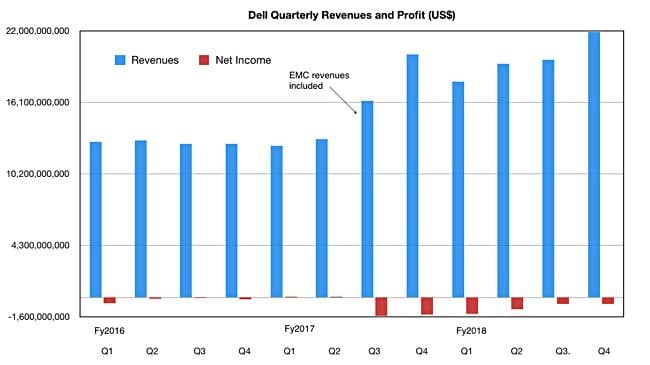
Considering Dell proper is flat out broke and they are contemplating VMware purchasing its now parent company to utilize their publicly shared status to initiate a mega-billion dollar debt offering to pay for the giant con that was Dell purchasing EMC... o_O

Good heavens I think things are going south, fast.
 

w00key

Ars Tribunus Angusticlavius
8,707
Subscriptor
VMware reverse merger has nothing to do with cash flow and income, it's just easier to list with an existing company and changing the name than doing the whole IPO paperwork again and delisting VMware.


Their cash stash grew from 9.4B to 13.9B in a year, and while the EMC purchase might be a bit too leveraged and expensive, Dell is getting closer to profit again.

dell_revenues_to_q4fy2018.jpg
 
They left out critical pieces of information in their upgrade documentation, which I'm assuming is designed to force people to use professional services. It's rather despicable and my opinion has changed towards the company as a result.

With that said, I hope they improve their support/documentation and streamline everything now that they are transitioning to the Photon OS.

What did they miss out?
The requirement to upgrade SRM from 5.8.1 to 6.1.2 then 6.5 as part of the vCenter upgrade to 6.5. And the last answer I received from VMware (after getting 4 different responses) was that yes, you need to upgrade vCenter from 5.5 to 6.0 first in tandem with the SRM 5.8.1 to 6.1.2 upgrade. This apparently has something to do with the required communication between vCenter and SRM when the SRM database gets upgraded, but I still have no idea because I only gleaned this from the SRM upgrade documentation – Vmware never clearly explained why two upgrades were required just to migrate to 6.5.

I have a list of about 20 different things that were discovered that needed to be completed, but the one example mentioned above was the most egregious. Second on the list was the NTFS permissions for the windows temp directory – you have to specifically add the Users group to the ACL otherwise the entire upgrade fails. This was nowhere in the documentation, but I guarantee professional services had everything laid out.

Oh and what about the fact that each part of the upgrade needs to be completed in a specific order (SSO/PSC for everything in the same domain, and then vCenter, then peripheral components), otherwise the entire migration will fail and you have to start from scratch? If a PSC deployment fails, it causes problems with the SSO domain and you have to roll back everything instead of just the one component that failed.

Also, if the migration fails after the external PSC is deployed and added to Active Directory, good luck rolling back to your Windows SSO server without any issues.

One issue that the company had was that they were using the wrong ODBC driver as well, and guess what? You need to uninstall the wrong driver, reinstall the correct SQL Native Client driver and then use the exact same name for the ODBC connection string otherwise the app services won’t start. This one isn’t VMware’s fault, but it would’ve been nice if they had documented this as a potential issue.

Just rebuild new instead of migrating.

 
You mean the information that is in this doc regarding the current SRM release notes that explicitly only gives 6.1 as a valid upgrade source?

https://docs.vmware.com/en/Site-Recover ... 6-5-1.html

Or maybe the upgrade path on the interop matrix which also documents that you can't go directly from 5.8.1 to 6.5?

http://partnerweb.vmware.com/comp_guide ... solution=7


The documentation is there. I'm having a hard time finding fault with VMware because you didn't check the interop matrices and release notes to map out the required path to get current when they provide the detail on their website for the public (you don't even need a support account). Any time you're upgrading multiple software packages, you always have to check documentation like these, and yes, especially when there is more than one product involved, having to do a multi-phase upgrade when you're behind this much is pretty normal.
 
You mean the information that is in this doc regarding the current SRM release notes that explicitly only gives 6.1 as a valid upgrade source?

https://docs.vmware.com/en/Site-Recover ... 6-5-1.html

Or maybe the upgrade path on the interop matrix which also documents that you can't go directly from 5.8.1 to 6.5?

http://partnerweb.vmware.com/comp_guide ... solution=7


The documentation is there. I'm having a hard time finding fault with VMware because you didn't check the interop matrices and release notes to map out the required path to get current when they provide the detail on their website for the public (you don't even need a support account). Any time you're upgrading multiple software packages, you always have to check documentation like these, and yes, especially when there is more than one product involved, having to do a multi-phase upgrade when you're behind this much is pretty normal.
The issue is that you need to upgrade vCenter in addition to SRM - which is completely different than upgrading the SRM software from 5.8.1 to 6.1 then 6.5. The upgrade has no backwards compatibility, so you have to upgrade vCenter twice just because of a single piece of peripheral software. Who thought it was a good idea to make vCenter 6.5 not compatible with multiple backwards SRM versions?
 

Klockwerk

Ars Praefectus
3,757
Subscriptor
They left out critical pieces of information in their upgrade documentation, which I'm assuming is designed to force people to use professional services. It's rather despicable and my opinion has changed towards the company as a result.

With that said, I hope they improve their support/documentation and streamline everything now that they are transitioning to the Photon OS.

What did they miss out?
The requirement to upgrade SRM from 5.8.1 to 6.1.2 then 6.5 as part of the vCenter upgrade to 6.5. And the last answer I received from VMware (after getting 4 different responses) was that yes, you need to upgrade vCenter from 5.5 to 6.0 first in tandem with the SRM 5.8.1 to 6.1.2 upgrade. This apparently has something to do with the required communication between vCenter and SRM when the SRM database gets upgraded, but I still have no idea because I only gleaned this from the SRM upgrade documentation – Vmware never clearly explained why two upgrades were required just to migrate to 6.5.

I have a list of about 20 different things that were discovered that needed to be completed, but the one example mentioned above was the most egregious. Second on the list was the NTFS permissions for the windows temp directory – you have to specifically add the Users group to the ACL otherwise the entire upgrade fails. This was nowhere in the documentation, but I guarantee professional services had everything laid out.

Oh and what about the fact that each part of the upgrade needs to be completed in a specific order (SSO/PSC for everything in the same domain, and then vCenter, then peripheral components), otherwise the entire migration will fail and you have to start from scratch? If a PSC deployment fails, it causes problems with the SSO domain and you have to roll back everything instead of just the one component that failed.

Also, if the migration fails after the external PSC is deployed and added to Active Directory, good luck rolling back to your Windows SSO server without any issues.

One issue that the company had was that they were using the wrong ODBC driver as well, and guess what? You need to uninstall the wrong driver, reinstall the correct SQL Native Client driver and then use the exact same name for the ODBC connection string otherwise the app services won’t start. This one isn’t VMware’s fault, but it would’ve been nice if they had documented this as a potential issue.

Just rebuild new instead of migrating.

As others have said, a majority of that is publicly available. For example, the site recovery manager 6.5 knowledgebase has this page: https://www.vmware.com/support/srm/srm-compat-matrix-6-5.html, which has a section on upgrade paths. These point to http://partnerweb.vmware.com/comp_guide2/sim/interop_matrix.php?#interop&7=&2= and http://partnerweb.vmware.com/comp_guide2/sim/interop_matrix.php?#upgrade&solution=7

Yes, there are products to you have to upgrade twice or more - but you get the same when upgrading Dell BIOS or iDRAC, or any number of other enterprise software. It's a question of validating upgrade points, and/or data transformations they make at those points.
 
That sounds sophisticated. So when they didn't develop the code properly for backwards compatibility, these are "transformations at data points". Right.


We get it. You're upset about the way your upgrade has gone. However, first you claimed it was VMware's fault for withholding information vital to the upgrade process, and we showed you were that information was available to you. Now, to keep up the blame, the new claim is that it wasn't "developed properly" despite very, very few pieces of non-simple software maintaining a single step upgrade process for an arbitrary old version. Just accept that you made a mistake, and learn from it. It will make the next time you need to do something like this much simpler. Now you know, *always* check the supported upgrade paths and don't assume a given version will upgrade to any new version (especially when dealing with multiple, complex heavily tied together software packages). We've all made mistakes, taken our lumps, and learned from it. This is an opportunity to improve your skillset/knowledge, but to do so, you have to learn. Trying to shift the blame will not help you learn.
 

afidel

Ars Legatus Legionis
18,165
Subscriptor
That sounds sophisticated. So when they didn't develop the code properly for backwards compatibility, these are "transformations at data points". Right.


We get it. You're upset about the way your upgrade has gone. However, first you claimed it was VMware's fault for withholding information vital to the upgrade process, and we showed you were that information was available to you. Now, to keep up the blame, the new claim is that it wasn't "developed properly" despite very, very few pieces of non-simple software maintaining a single step upgrade process for an arbitrary old version. Just accept that you made a mistake, and learn from it. It will make the next time you need to do something like this much simpler. Now you know, *always* check the supported upgrade paths and don't assume a given version will upgrade to any new version (especially when dealing with multiple, complex heavily tied together software packages). We've all made mistakes, taken our lumps, and learned from it. This is an opportunity to improve your skillset/knowledge, but to do so, you have to learn. Trying to shift the blame will not help you learn.
Yup, every single piece of complex software is likely to have these types of issues, from OS to financial packages, to SAN switch software to storage array software and the stuff that goes with it (failover management agents etc). Making sure you check prereqs and know your upgrade path is a basic part of IT project management and unless you're working on bespoke code then it's likely the farther you are from current the more steps there will be to get from point A to point B. I learned a valuable term at my last job, IT debt, the less up to date you are the more debt you have accumulated and you have to payoff that debt when it inevitably comes time to get current.
 

akro

Ars Scholae Palatinae
1,309
So I lucked out that my first job where I was really involved in IT and doing real work was highly risk adverse.

We had engineering separate from ops and tested everything before deployment...we had labs and failback plans\procedures and those where tested. I learned to not create RGE's and that a bit of caution and research was always required. Bottom line IT is complicated...
 
That sounds sophisticated. So when they didn't develop the code properly for backwards compatibility, these are "transformations at data points". Right.


We get it. You're upset about the way your upgrade has gone. However, first you claimed it was VMware's fault for withholding information vital to the upgrade process, and we showed you were that information was available to you. Now, to keep up the blame, the new claim is that it wasn't "developed properly" despite very, very few pieces of non-simple software maintaining a single step upgrade process for an arbitrary old version. Just accept that you made a mistake, and learn from it. It will make the next time you need to do something like this much simpler. Now you know, *always* check the supported upgrade paths and don't assume a given version will upgrade to any new version (especially when dealing with multiple, complex heavily tied together software packages). We've all made mistakes, taken our lumps, and learned from it. This is an opportunity to improve your skillset/knowledge, but to do so, you have to learn. Trying to shift the blame will not help you learn.
Yup, every single piece of complex software is likely to have these types of issues, from OS to financial packages, to SAN switch software to storage array software and the stuff that goes with it (failover management agents etc). Making sure you check prereqs and know your upgrade path is a basic part of IT project management and unless you're working on bespoke code then it's likely the farther you are from current the more steps there will be to get from point A to point B. I learned a valuable term at my last job, IT debt, the less up to date you are the more debt you have accumulated and you have to payoff that debt when it inevitably comes time to get current.

Actually that last sentence is only partially true, sometimes it's more like a parabola: after certain age it makes things easier as you simply R&R the long-outdated system altogether...
 

daishi

Ars Legatus Legionis
10,380
Last job I was the Sole Engineer for our VDI cluster and I had pretty good luck with Vmware and their support. Only times something really broke were because the system was under provisioned in design (vcenter SQL database transaction log filled up once) or I did something really stupid and clicked through dialogs too quickly (disconnected storage from a running host before I migrated the VMs off). Support was generally good but honestly most of the time I solved the issues before they got back to me. I think my co-worker who was my backup when I was off and didn't know the system as well as I (he had zero Horizon training but did have Vcenter training) relied on Vmware support a lot more then me to actually fix issues.

I actually kinda miss it even though the job and pay weren't great. Got to play with some pretty expensive toys and learned a ton in the few years I was in charge of the system.
 

Paladin

Ars Legatus Legionis
33,531
Subscriptor
It's funny this thread has kept its title without issue this long. Usually a mod would whack that last word before too long. :D

The mods have a ticket in to get it changed, but the technician it's assigned to keeps asking for more logs to be uploaded first.

Ok, yeah, I snorted.


Let me see if I can get my snort logs and upload them to the ticket. :D
 

Dilbert

Ars Legatus Legionis
34,009
It's funny this thread has kept its title without issue this long. Usually a mod would whack that last word before too long. :D

The mods have a ticket in to get it changed, but the technician it's assigned to keeps asking for more logs to be uploaded first.
That's one tried and true method for 1st tier support to kick the can down the road until the can disappears or is picked up by someone else. The other is to tell you to defrag and run sfc /scannow, and call again if problems. Of course your old ticket will be somehow closed when you call back. ;)
 

Sunner

Ars Praefectus
4,818
Subscriptor++
It's funny this thread has kept its title without issue this long. Usually a mod would whack that last word before too long. :D

The mods have a ticket in to get it changed, but the technician it's assigned to keeps asking for more logs to be uploaded first.
That's one tried and true method for 1st tier support to kick the can down the road until the can disappears or is picked up by someone else. The other is to tell you to defrag and run sfc /scannow, and call again if problems. Of course your old ticket will be somehow closed when you call back. ;)

Our local support has a much better solution. Every time someone calls them about something, instead of fixing that they screw something else up so you're left with two issues. Case in point, at one point I needed an AD password reset but the reset site was having some manner of issues. So I called support, and instead of either helping me with the reset or saying "Yeah the reset site will be up in X minutes" they screwed up my callback credentials as well to make sure I couldn't auth with the reset site if it came back online.

So most people don't call them to begin with out of fear of more breakage.
 
This forum post needs new life, because things have not changed at VMware. We are getting the same song and dance about buying premium support in order to get even decent support. We can spend $500,000 on VMware products but we get crappy support? This makes no sense to me and other vendors like Cisco do not operate this way. Just how much does a customer have to spend on VMware products and licensing to get top-tier support? The answer is no amount is enough. You can spend millions, but if you don't buy into the premium support contact your support cases will pretty much be a waste of time and a butt load of frustration. I love VMware products, but what's been going on over the years should cause organizations to consider alternate solutions to their business needs. It's too critical to business and the cost is high enough in procurement already that decent/good support should be included. There should not be another level of support you must pay for in order to get adequate support. Bad business model.

Spend some of your billions to provide every customer with a good support experience. We deserve it and have already paid for it.
 

schizrade

Ars Tribunus Militum
2,299
Subscriptor++
I have. EMC has shown a gradual decline in overall support quality (Although the Cork and Western US centers are still absolutely wonderful). The techs on a Sev 1 ticket don't care if you have two hosts or two thousand.

Yes you can get bad techs, but you can always as it be escalated or the case owner changed.


Also, much like HyperV, Microsoft's support is just as awful.


VMWare has plenty of room to improve, but they are literally the best technically, usability, and support wise.

+1 for this. Their support has always been top notch, and if I get a bum I just request another person, problem solved. I don't have thousands of HV hosts either. Just a 5 node vSan cluster, a 4 node ESXi cluster and 2 stand alone ESXi hosts in branch offices. Most issues I have are vCenter related, but they always get sorted out by myself or with an engineer.
 

jbee

Ars Centurion
225
We have business critical support with a dedicated contact. Like with everything, there are good and bad days. I usually get a call/email back very quickly, and in most cases, I get a solution or at least an acknowledgement that there is indeed a problem/bug with the software and a workaround very quickly. But there were a couple cases where the case got stuck after the "send logs" phase and I ended up finding a solution via google/blogs before getting a solution from support. Overall, I would say it is something like B+.
 

mtist

Seniorius Lurkius
1
We are a VMware IT Academy where I teach. We have a very nice VMware playground with all the software included. That being said, VMware support is just bad. I have dealt with good vendors willing to do whatever for the end user but to even get an English speaking person on the opposite end of a ticket with VMware is next to impossible. I have heard from large users (such as Government), of VMware that they get premier support included with such large purchases and annual contracts. For small tickets or education, VMware has it's eyes on a bigger prize. Although, it is the leading platform for virtualization and I will continue to use it until another player can do what it does. Hyper-V is just another thread in the Microsoft tentacles. Some other virtualization platforms will be interesting to watch. Check VMUG, VMware Users Group, Advantage Program as well.
 
Speaking of EMC support, I called recently for a Symmetrix to be shut down and was very pleased that the voice on the other end still had an unmistakable Boston accent.

I'm surprised. We are currently evaluating who we are going to switch to. EMC support has been horrible the past 2 years. we have 2-250Fx, 2 vmax400k, and 4 XIO's. Had a drive failure on the vmax. support came out to replace the drive and took the whole array down. then when it came back up said they there probably corruption in these 100TB of TDEV's hope your backups are good. good luck. XIO couldn't even get anyone on the phone for performance issues. Finally just moved VDI off the array. I might get overruled, but i have no intention of having a an EMC block array on site by the end of next year.

VMware support has been a steady meh for years, although we do pay for BCS as well.
 

MKG

Ars Praefectus
4,434
Subscriptor++
- Hundreds of hosts (ELA)
- VMAX 450AF
- Many G1 XIOs
- Many G2 XIOs
- Unity AFs
- Multiple DD clusters in geographic disbursement
- Mission critical support on everything available

- Day 1, support is good.
- Day 2, support is ok but “this would be so much easier on a PowerMax” :mad:
- Day 3, support doesn’t understand your issue and won’t escalate until they do

It’s basically hit or miss at every junction and I spend as much time calling L1-L2 Dell Executive contacts who miraculously always end up finding an available, excellent support person.

o_O
 
- Hundreds of hosts (ELA)
- VMAX 450AF
- Many G1 XIOs
- Many G2 XIOs
- Unity AFs
- Multiple DD clusters in geographic disbursement
- Mission critical support on everything available

- Day 1, support is good.
- Day 2, support is ok but “this would be so much easier on a PowerMax” :mad:
- Day 3, support doesn’t understand your issue and won’t escalate until they do

It’s basically hit or miss at every junction and I spend as much time calling L1-L2 Dell Executive contacts who miraculously always end up finding an available, excellent support person.

o_O

Have you needed to use the data efficiency guarantee that they're offering on the all flash arrays? If so, what's your experience been?