Help me end this tyranny of choice (Pro? Neo? iMac? Ultra?!)

Hi Mac Achers,

Long time no see. But I need some help – since the friends I tend to bother with this stuff are all ghosting me now.

I am the happy(ish?) user of an M4 14" MacBook Pro with a nano-texture display. Amazing machine. But a bit chunkier than I'd like. The MBP replaced a MacBook Air at the beginning of last year. I had always been an Air guy, and a 12" MacBook guy and 12" PowerBook G4 guy before that; so, a small laptop guy, but the Pro's display turned my head too far. Now I'm a nano-texture – so it's a source of grave frustration for me that the Air doesn't have it as an option.

But now there's the Neo. No nano-texture, no a lot of things, but it's small. I could trade in my Pro for a Neo with a mere £34 difference to pay, and at the same time bring a boxed-up M1 iMac out of storage as a complementary machine; although yes, this would be an appalling waste of the money I spent not two years ago on the Pro, and although yes, I switched to the Pro in part because I was bored of needing to manage two computers.

Amid all this nonsense comes also the rumours of a "MacBook Ultra" – and I can't help but wonder and hope whether one of those may have a 12.X" display. Isn't there a market for premium ultraportables any longer? Paired with an Apple Studio Display?

You people, who are my people, tell me what to do.

S.
 

Vincent Hanna

Ars Scholae Palatinae
1,404
You’re being silly. Keep the machine you have.

The Neo is only barely smaller than the Air, while being thicker and just as heavy. And downgrading to it plus an M1 iMac would a huge loss of power and screen quality while simultaneously introducing the hassle of maintaining two machines. If you want extra screen real estate, pair your existing MBP14 with an external display.

If Apple ever releases a true ultra portable laptop again you can consider that at the time. But the brand new Neo’s existence I think makes that very unlikely anytime soon.
 

Mhorydyn

Ars Legatus Legionis
10,218
Subscriptor
But now there's the Neo. No nano-texture, no a lot of things, but it's small. I could trade in my Pro for a Neo with a mere £34 difference to pay, and at the same time bring a boxed-up M1 iMac out of storage as a complementary machine; although yes, this would be an appalling waste of the money I spent not two years ago on the Pro, and although yes, I switched to the Pro in part because I was bored of needing to manage two computers.
The obvious solution is to go ahead with this plan, but to sell that MBP to me for the trade-in value Apple is offering instead.
 

Galvanic

Ars Praefectus
3,604
Subscriptor
since the friends I tend to bother with this stuff are all ghosting me now.
I feel there's an interesting backstory here.

(Sell the M1 iMac, keep the MBP, buy a Neo. You can balance the cost of the Neo pretty well with the iMac sale, and you can go back to the MBP when you discover, as you will, just how compromised the Neo is for anyone who posts on the MacAch)
 

ant1pathy

Ars Tribunus Angusticlavius
6,951
(Sell the M1 iMac, keep the MBP, buy a Neo. You can balance the cost of the Neo pretty well with the iMac sale, and you can go back to the MBP when you discover, as you will, just how compromised the Neo is for anyone who posts on the MacAch)
Yep. Sell the iMac, use the funds to offset the Neo, hook the MBP up as a laptop-desktop and use the Neo around the house.

[edit] Apologies, I wanted to address the last sentence in the quote: I comment on Ars. I work a software development job on my work provided Windows laptop. At the end of my work day, I close Bad Laptop and open Good Laptop... my WalMart Special base model M1 8GB MBA. And it does 100% of what I ask of it, silently, with excellent battery life, and it doesn't roast my legs if I have it out on the couch. I find there is a massive overestimation of what performance is needed for basic browser, email, office suite, and video watching tasks that covers more than 90% of typical computer usage.
 
Last edited:

Numfuddle

Ars Tribunus Militum
2,541
Subscriptor
Selling a less than two year old MacBook Pro for the Apple trade in value means that you'll be throwing away several hundred pounds. For example my 4 year old MacBook Air M2 has a trade in value at Apple of €450, third party resellers will still offer me €800+ and on e-bay or online classifieds I'd probably get a little bit more than that.

My recommendation would be to not sell it at all but if you do at least don't trade it in because it will mean that you probably get about a MacBook Neo chunk of money less by trading it in at Apple than by selling it yourself.
 
  • Like
Reactions: Pods

Louis XVI

Ars Legatus Legionis
12,296
Subscriptor
Now that Pods has reached a decision, would it be OK for me to hop in and ask a similar question?

I have an M4 iPad Pro w/Magic Keyboard and a 14" M1 Pro MBP (and also a watch and iPhone, but that's not really relevant). I prefer using the iPad for pretty much everything, and only drag the MBP out when I need to work with a bunch of windows at once.

The problem is the Magic Keyboard! I don't like the current version as much as the previous one, as I'm constantly hitting the power button when trying to backspace. Worse, they've proven to be terribly unreliable. I had one break about a year ago, and its replacement just conked out. None of the authorized Apple repair places on Crete have any idea what to do with an iPad Pro's Magic Keyboard (I finally found a downside to living on a Greek island!), so repair isn't an option. New ones cost 400 euros and take a month to deliver, so I'd really rather not buy one every damned year. Which leaves me thinking...

What about a new MacBook Air? The main thing I don't like about the MBP is how big and clunky it is relative to the iPad. A 13" Air would be smaller and lighter, though it would lack the iPad's touch screen and access to some apps, and it's screen isn't quite as good as either the iPad's or MBPs. My main questions are, 1) will the base M5 offer a significant speed boost over the M1 Pro, and 2) is the difference in screen quality particularly noticeable in real life? Anything else I should be thinking of?

What do y'all think?
 
  • Like
Reactions: Pods

Neill78

Ars Tribunus Militum
1,508
Subscriptor
Now that Pods has reached a decision, would it be OK for me to hop in and ask a similar question?

I have an M4 iPad Pro w/Magic Keyboard and a 14" M1 Pro MBP (and also a watch and iPhone, but that's not really relevant). I prefer using the iPad for pretty much everything, and only drag the MBP out when I need to work with a bunch of windows at once.

The problem is the Magic Keyboard! I don't like the current version as much as the previous one, as I'm constantly hitting the power button when trying to backspace. Worse, they've proven to be terribly unreliable. I had one break about a year ago, and its replacement just conked out. None of the authorized Apple repair places on Crete have any idea what to do with an iPad Pro's Magic Keyboard (I finally found a downside to living on a Greek island!), so repair isn't an option. New ones cost 400 euros and take a month to deliver, so I'd really rather not buy one every damned year. Which leaves me thinking...

What about a new MacBook Air? The main thing I don't like about the MBP is how big and clunky it is relative to the iPad. A 13" Air would be smaller and lighter, though it would lack the iPad's touch screen and access to some apps, and it's screen isn't quite as good as either the iPad's or MBPs. My main questions are, 1) will the base M5 offer a significant speed boost over the M1 Pro, and 2) is the difference in screen quality particularly noticeable in real life? Anything else I should be thinking of?

What do y'all think?
I bought a Logi MX Keys mini to use with my MacBook Air m2 (work) and MacBook Air m1 (home) and my desktop PC, and it's fantastic. It's similar but better than the M2's keyboard. I think it would be a very good replacement for an Apple Magic Keyboard and probably about 1/4 the price.
 
  • Like
Reactions: Louis XVI
I used to be a big believer in logitech combo touch products and am currently using one, but as the thing is falling apart way earlier than the iPad I bought it with I realized I'm done with directly attachable keyboards:

  • Too expensive & bulky
  • Works only when attached to the iPad
  • Too single-purpose
  • Non-standart layouts
  • Mushy typing

Instead, I'm getting a cheap full body enclosure for the iPad and a third party mechanical bluetooth keyboard that I can use with any other device as well for less dineros overall.
 

cateye

Ars Legatus Legionis
12,727
Moderator
We have a Logitech Pebble keyboard that lives in our kitchen junk drawer just for when one of the household iPads needs a keyboard. For like $35, it's well built, smol and light but easy to type on, pairs with up to three devices, and takes AAA batteries which is convenient especially since we don't use it very often.
 
I switched to the Pro in part because I was bored of needing to manage two computers.

I go between three computers - a Mac mini M4 at work that I use three days a week, a Mac mini M2 Pro that I use at home 2 days a week, and an old 2019 MBP15 that I use about once a month.

I’ve never had any problems or juggling of files.

I have an iCloud drive 2TB for £9 a month that I share with family (we all have independent accounts, they can’t see my stuff and I can’t see theirs) which is currently only 50% full. I also have an M365 / Sharepoint account that my employer pays for, for workplace files.

All my files are in place on all my computers. I open my laptop, a few seconds later all my desktop & Finder files are there & updated, even if I haven’t opened the laptop in several months. It literally is seamless from work to home to laptop. All are identical.

(I will admit that SharePoint was a pain until I got it set up in Mac OS Finder properly. Now my team SharePoint files show up in Finder and are auto updated between all three machines.)
 

Numfuddle

Ars Tribunus Militum
2,541
Subscriptor
Now that Pods has reached a decision, would it be OK for me to hop in and ask a similar question?

I have an M4 iPad Pro w/Magic Keyboard and a 14" M1 Pro MBP (and also a watch and iPhone, but that's not really relevant). I prefer using the iPad for pretty much everything, and only drag the MBP out when I need to work with a bunch of windows at once.

The problem is the Magic Keyboard! I don't like the current version as much as the previous one, as I'm constantly hitting the power button when trying to backspace. Worse, they've proven to be terribly unreliable. I had one break about a year ago, and its replacement just conked out. None of the authorized Apple repair places on Crete have any idea what to do with an iPad Pro's Magic Keyboard (I finally found a downside to living on a Greek island!), so repair isn't an option. New ones cost 400 euros and take a month to deliver, so I'd really rather not buy one every damned year. Which leaves me thinking...

What about a new MacBook Air? The main thing I don't like about the MBP is how big and clunky it is relative to the iPad. A 13" Air would be smaller and lighter, though it would lack the iPad's touch screen and access to some apps, and it's screen isn't quite as good as either the iPad's or MBPs. My main questions are, 1) will the base M5 offer a significant speed boost over the M1 Pro, and 2) is the difference in screen quality particularly noticeable in real life? Anything else I should be thinking of?

What do y'all think?
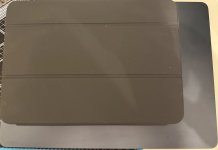
Just to give you an idea I’ve taken two comparisons of my 11 inch iPad Pro and my 13 inch MacBook Air.

IMG_0161.jpegIMG_0162.jpeg

The iPad with keyboard is about as thick as the Air and not that much smaller
 

benwiggy

Ars Scholae Palatinae
1,244
I switched to the Pro in part because I was bored of needing to manage two computers.
I use Resilio Sync to synchronise the Documents folders of my Mini and my MBP. (Other sync products are available.) It syncs 'reactively', so as soon as a file is changed, it gets copied; and it works when the lid is down, and when the laptop is somewhere else. No cloud server involved.

It's worked brilliantly for years.
 
  • Like
Reactions: Bonusround
I use Resilio Sync to synchronise the Documents folders of my Mini and my MBP. (Other sync products are available.) It syncs 'reactively', so as soon as a file is changed, it gets copied; and it works when the lid is down, and when the laptop is somewhere else. No cloud server involved.

It's worked brilliantly for years.
Thank you for this tip. I just use iCloud. When I said "bored of needing to manage two computers," what I meant was the software updates, the always-changing fine-tuned settings, etc.

For those who'd like an update! I've settled on keeping my MacBook Pro, waiting to see what comes with the MacBook "Ultra"; and as for an external display, I've purchased a used (in great condition, apparently) LG UltraFine 5K IPS LED display to mount on my office desk. The Studio Display asking price is just too high – in particular as it received almost no updates! – and the other 5K 27" displays on the market right now have mixed reviews with poor macOS software integration. The LG seems like an almost-Apple product and was a third of the price of the Studio Display...
 

Louis XVI

Ars Legatus Legionis
12,296
Subscriptor
Now that Pods has reached a decision, would it be OK for me to hop in and ask a similar question?

I have an M4 iPad Pro w/Magic Keyboard and a 14" M1 Pro MBP (and also a watch and iPhone, but that's not really relevant). I prefer using the iPad for pretty much everything, and only drag the MBP out when I need to work with a bunch of windows at once.

The problem is the Magic Keyboard! I don't like the current version as much as the previous one, as I'm constantly hitting the power button when trying to backspace. Worse, they've proven to be terribly unreliable. I had one break about a year ago, and its replacement just conked out. None of the authorized Apple repair places on Crete have any idea what to do with an iPad Pro's Magic Keyboard (I finally found a downside to living on a Greek island!), so repair isn't an option. New ones cost 400 euros and take a month to deliver, so I'd really rather not buy one every damned year. Which leaves me thinking...

What about a new MacBook Air? The main thing I don't like about the MBP is how big and clunky it is relative to the iPad. A 13" Air would be smaller and lighter, though it would lack the iPad's touch screen and access to some apps, and it's screen isn't quite as good as either the iPad's or MBPs. My main questions are, 1) will the base M5 offer a significant speed boost over the M1 Pro, and 2) is the difference in screen quality particularly noticeable in real life? Anything else I should be thinking of?

What do y'all think?

Welp, after spending several days using my MBP as my primary device, and just using the iPad for stuff that I didn't need a physical keyboard for, I decided....I really prefer using an iPad! So instead of getting a MacBook Air, I bit the bullet and ordered up a replacement Magic Keyboard for the iPad. Maybe it'll break yet again, but I reckon I could buy three of them for the price of an Air. Here's hoping it arrives relatively soon.
 

dspariI

Wise, Aged Ars Veteran
164
Thank you for this tip. I just use iCloud. When I said "bored of needing to manage two computers," what I meant was the software updates, the always-changing fine-tuned settings, etc.

For those who'd like an update! I've settled on keeping my MacBook Pro, waiting to see what comes with the MacBook "Ultra"; and as for an external display, I've purchased a used (in great condition, apparently) LG UltraFine 5K IPS LED display to mount on my office desk. The Studio Display asking price is just too high – in particular as it received almost no updates! – and the other 5K 27" displays on the market right now have mixed reviews with poor macOS software integration. The LG seems like an almost-Apple product and was a third of the price of the Studio Display...
If you can, try to find out how old the monitor is. They were on sale for nine years, and I have one from release at late 2016 that has really bad image retention now. I also have a newer one from 2024 that has a slightly different model number that appended a B to it so that's a less accurate way to tell. I'm not sure if there's actually any spec difference between them. I tried to look into that, but I couldn't find anything definitive.

Although speaking of the price, the full retail price was actually not that much lower than the ASD, $1300 versus $1600. They were also the "official" option when the 2016 MBP came out which is why they seem "almost-Apple". I think the panel itself was the same as in the 27" iMac.
 

dal20402

Ars Tribunus Angusticlavius
7,578
Subscriptor++
If you can, try to find out how old the monitor is. They were on sale for nine years, and I have one from release at late 2016 that has really bad image retention now. I also have a newer one from 2024 that has a slightly different model number that appended a B to it so that's a less accurate way to tell. I'm not sure if there's actually any spec difference between them. I tried to look into that, but I couldn't find anything definitive.

Although speaking of the price, the full retail price was actually not that much lower than the ASD, $1300 versus $1600. They were also the "official" option when the 2016 MBP came out which is why they seem "almost-Apple". I think the panel itself was the same as in the 27" iMac.
The LG 5K was always a batch product. There were several batches, and they are different.

The original model number was 27MD5KA/B. These were produced in 2015 and early 2016, and are the ones that have the shielding issue that can cause them to fail or show interference when the MacBook is physically close and sending data via Wi-Fi. They also from all reports have highly variable panel quality and durability. I would not buy one of these.

The second batch from later in 2016 was labeled 27MD5KB/B. These allegedly solved the Wi-Fi issue but still seem to be highly prone to panel quality issues.

Then there were multiple batches labeled 27MD5KL/B, starting in 2017 and going through at least 2021. (I own one with a 2019 production date and another one with a 2021 production date.) These are much, much better from everything I've been able to tell. One of mine was bought new at a discount from an unauthorized reseller, while the other was bought used after one month of use. They are excellent and have worked flawlessly, except for one bizarre episode just this year where the 2019 version's camera started returning noise instead of a picture. The problem disappeared the next day and hasn't returned.
 
  • Like
Reactions: Pods
Welp, after spending several days using my MBP as my primary device, and just using the iPad for stuff that I didn't need a physical keyboard for, I decided....I really prefer using an iPad! So instead of getting a MacBook Air, I bit the bullet and ordered up a replacement Magic Keyboard for the iPad. Maybe it'll break yet again, but I reckon I could buy three of them for the price of an Air. Here's hoping it arrives relatively soon.
I go thru Apple keyboards roughly every 2 years. They don't last long now-days in my opinion but I haven't found anything else I like either. I still have my Mac II ADB extended keyboard that still works but everyone around me gripes at the noise.
 
I go thru Apple keyboards roughly every 2 years. They don't last long now-days in my opinion but I haven't found anything else I like either. I still have my Mac II ADB extended keyboard that still works but everyone around me gripes at the noise.
I’ve settled on the Apple A1314 2-battery mini wireless keyboard. I love them, and being narrow they don’t take much space and give me more room to use my mouse.

At this point I own four or five of them. One is dead and being used for spare parts, one or two are at home, and two are at work.

Getting another one is cheap, they are only about £20-30 at this point.

I went through a difficult time with them when I moved to Apple Silicon and some kind of MacOS on Silicon bug was making them drain their batteries within a couple of weeks. Bug is years old at this point and I think Apple has quietly implied it won’t be fixed.

I moved to USB-C rechargeable lithium-ion AAs (from Paleblue) at 1.5v fixed instead of my previously trusty 1.3v eneloops and that seems to have fixed the drain issue.
 
The LG 5K was always a batch product. There were several batches, and they are different.

The original model number was 27MD5KA/B. These were produced in 2015 and early 2016, and are the ones that have the shielding issue that can cause them to fail or show interference when the MacBook is physically close and sending data via Wi-Fi. They also from all reports have highly variable panel quality and durability. I would not buy one of these.

The second batch from later in 2016 was labeled 27MD5KB/B. These allegedly solved the Wi-Fi issue but still seem to be highly prone to panel quality issues.

Then there were multiple batches labeled 27MD5KL/B, starting in 2017 and going through at least 2021. (I own one with a 2019 production date and another one with a 2021 production date.) These are much, much better from everything I've been able to tell. One of mine was bought new at a discount from an unauthorized reseller, while the other was bought used after one month of use. They are excellent and have worked flawlessly, except for one bizarre episode just this year where the 2019 version's camera started returning noise instead of a picture. The problem disappeared the next day and hasn't returned.
Thank you for this – very helpful. I am concerned that I bought an older one: even if the seller says it works very well. But there is an L/B on eBay, so I bought that too, and now I need to try to bounce back or sell the original. What a mess I've made for myself!
 
Thank you for this – very helpful. I am concerned that I bought an older one: even if the seller says it works very well. But there is an L/B on eBay, so I bought that too, and now I need to try to bounce back or sell the original. What a mess I've made for myself!
I actually lucked out (or in? for the sake of less hassle?) in that the L/B unit on eBay was in fact not available. I will receive the A, which is on the way, and well see if it's ok!