
You are using an out of date browser. It may not display this or other websites correctly.
You should upgrade or use an alternative browser.
You should upgrade or use an alternative browser.
Cheap, functional, upgradeable: HP’s Stream and Pavilion Mini desktops reviewed
- Thread starter JournalBot
- Start date
sphenodont
Ars Tribunus Militum
[url=http://meincmagazine.com/civis/viewtopic.php?p=28494925#p28494925:1380bxub said:evan_s[/url]":1380bxub]If I bought one of these I'd grab the stream and immediately add a second 2gb stick and install the 64gb ssd from her current system in it so a single 2gb stick is perfect.
Keep in mind that the Stream Mini uses an M.2 interface for the SSD, so at the very least you'd need some sort of adapter to repurpose your existing drive. I don't believe that there's enough room for a full-size SSD, though.
Upvote
0
(0
/
0)
You missed the second part. I am going to buy a separate dedicated file server either way. All I am doing to make it an HTPC is installing some free software and moving it into the living room. And maybe $10 for an IR receiver.[url=http://meincmagazine.com/civis/viewtopic.php?p=28495315#p28495315:1efbg9z6 said:theoilman[/url]":1efbg9z6]you'd rather build a computer than buy a $50 smartphone to keep by the couch?[url=http://meincmagazine.com/civis/viewtopic.php?p=28495297#p28495297:1efbg9z6 said:pavon[/url]":1efbg9z6]Since none of the 20 people who voted you down had the decency to say why they disagreed with you. Here is why I prefer having an HTPC.
I don't want to walk over to another computer and load up a program to watch something on my TV. I don't want to buy a smartphone for every member of my family, nor have a dedicated one to keep by the TV just to use as a glorified remote. Then there's the unfixable security vulnerabilities in chromecast that allow some bored teenager to takeover my TV screen. The price of chromecast is great, everything else about it is a clumsy hack.ginsuchikara":1efbg9z6 said:....then plug a Chromecast into your TV, open Plex on your phone/tablet/laptop/desktop/toaster and cast that shit.
That is exactly what my HTPCs are; dedicated servers. I don't need some big-ass rack-mount computer to act as a simple home file server. I want something that has low power use and is relatively affordable. Most of those are small devices that sit nicely in a entertainment cabinet, so why not put them there and get a better interaction model than chromecast provides?HTPCs are pointless...Run Plex on your desktop (or better, a dedicated server) and get a Chromecast.
Upvote
6
(6
/
0)
Just a question, since you have good information.on this, if you have the recovery disk made, and you delete the WIMBOOT partition, will you be able to restore a working system with the recovery disk? Or will it give you a standard install? I have a stream 11 (MS special edition) coming ( replacing a Chromebook) and would like to try Windows 10 pre release and even Ubuntu out on it, but I'd like to be able to go back to stock. Id also want to completely overwrite the disk and restore to original state if I ever EBay it.[url=http://meincmagazine.com/civis/viewtopic.php?p=28492551#p28492551:23p4carg said:MeateaW[/url]":23p4carg]"Windows 8.1 comes with a "Create a recovery drive" feature that will copy that partition to an external USB drive; once you've done that, you should be able to delete the local partition and regain the space."
DON'T DO THIS. (Edit: bolded the part you shouldn't do)
Windows on extremely small drives is installed using a method called WIMBOOT, this method reduces the standard Windows 8+ install from a typical 16-32 gigabytes, to approximately 6 or 7 gb.
The main reason this is the worst advice I have ever read, is the actual Windows files are left in the install.wim found in the recovery partition.
Deleting that partition is like deleting Windows, it will get you back space, but you'll just create a paper weight.
My god, be careful with the advice you give in articles Ars please!!!
Upvote
2
(2
/
0)
The Tick077
Smack-Fu Master, in training
[url=http://meincmagazine.com/civis/viewtopic.php?p=28495315#p28495315:11t6tf8i said:theoilman[/url]":11t6tf8i]you'd rather build a computer than buy a $50 smartphone to keep by the couch?[url=http://meincmagazine.com/civis/viewtopic.php?p=28495297#p28495297:11t6tf8i said:pavon[/url]":11t6tf8i]Since none of the 20 people who voted you down had the decency to say why they disagreed with you. Here is why I prefer having an HTPC.
I don't want to walk over to another computer and load up a program to watch something on my TV. I don't want to buy a smartphone for every member of my family, nor have a dedicated one to keep by the TV just to use as a glorified remote. Then there's the unfixable security vulnerabilities in chromecast that allow some bored teenager to takeover my TV screen. The price of chromecast is great, everything else about it is a clumsy hack.....then plug a Chromecast into your TV, open Plex on your phone/tablet/laptop/desktop/toaster and cast that shit.
That is exactly what my HTPCs are; dedicated servers. I don't need some big-ass rack-mount computer to act as a simple home file server. I want something that has low power use and is relatively affordable. Most of those are small devices that sit nicely in a entertainment cabinet, so why not put them there and get a better interaction model than chromecast provides?HTPCs are pointless...Run Plex on your desktop (or better, a dedicated server) and get a Chromecast.
For me, I use my HTPC as my PVR via OTA. Last time I checked, Plex can't do that. So there is no way a chromecast/plex combo can replace my HTPC.
Upvote
6
(6
/
0)
[url=http://meincmagazine.com/civis/viewtopic.php?p=28495359#p28495359:1qps8g9j said:sphenodont[/url]":1qps8g9j][url=http://meincmagazine.com/civis/viewtopic.php?p=28494925#p28494925:1qps8g9j said:evan_s[/url]":1qps8g9j]If I bought one of these I'd grab the stream and immediately add a second 2gb stick and install the 64gb ssd from her current system in it so a single 2gb stick is perfect.
Keep in mind that the Stream Mini uses an M.2 interface for the SSD, so at the very least you'd need some sort of adapter to repurpose your existing drive. I don't believe that there's enough room for a full-size SSD, though.
They specifically said in the review that they all use the same case and support both M.2 and a 2.5inch drive. The only catch currently is that the Mini doesn't come with the proprietary sata/power cable needed to actually hook up a 2.5 inch drive and it isn't currently available.
Upvote
1
(1
/
0)
[url=http://meincmagazine.com/civis/viewtopic.php?p=28493871#p28493871:3e2tnmjd said:JustQuestions[/url]":3e2tnmjd]Yeah it's to a point where it is almost comical. I would either hide the USB ports and logos and try to convince house guests that it was an expensive piece of postmodern art, or just put it in a cardboard box that was spray-painted black with holes cut out for the ports.
I mean, if it looks worse than a spray-painted cardboard box, then you failed to meet what I would call the minimum requirements.
[url=http://meincmagazine.com/civis/viewtopic.php?p=28494201#p28494201:3e2tnmjd said:sonolumi[/url]":3e2tnmjd]I also quite like the look of it, but aesthetics are a personal thing. Since it can be dismantled easily there's nothing stopping motivated folks from re-casing it into something they prefer. In fact, I would not be surprised if it attracted some attention from custom builders.
Y'all are making it hard for me to not buy one and design a custom case to show the way things ought to be.

Upvote
1
(1
/
0)

[url=http://meincmagazine.com/civis/viewtopic.php?p=28495781#p28495781:2q06t2qx said:CppThis[/url]":2q06t2qx][url=http://meincmagazine.com/civis/viewtopic.php?p=28493871#p28493871:2q06t2qx said:JustQuestions[/url]":2q06t2qx]Yeah it's to a point where it is almost comical. I would either hide the USB ports and logos and try to convince house guests that it was an expensive piece of postmodern art, or just put it in a cardboard box that was spray-painted black with holes cut out for the ports.
I mean, if it looks worse than a spray-painted cardboard box, then you failed to meet what I would call the minimum requirements.
[url=http://meincmagazine.com/civis/viewtopic.php?p=28494201#p28494201:2q06t2qx said:sonolumi[/url]":2q06t2qx]I also quite like the look of it, but aesthetics are a personal thing. Since it can be dismantled easily there's nothing stopping motivated folks from re-casing it into something they prefer. In fact, I would not be surprised if it attracted some attention from custom builders.
Y'all are making it hard for me to not buy one and design a custom case to show the way things ought to be.
Do it. DO IT. /poke /poke
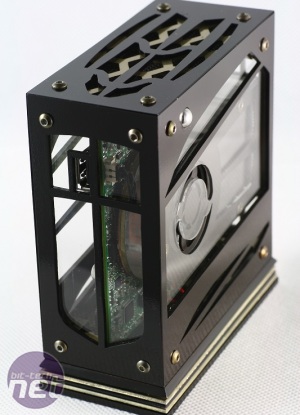
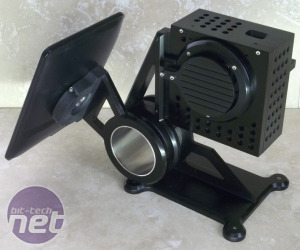
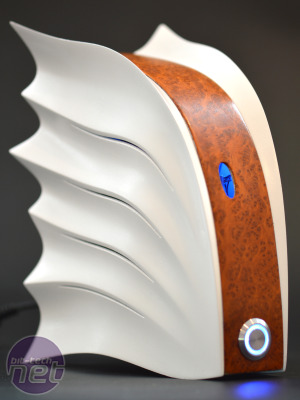
Source: Bit-Tech.net NUC competition
Upvote
4
(4
/
0)
[url=http://meincmagazine.com/civis/viewtopic.php?p=28495371#p28495371:1nqeq3h6 said:conan77[/url]":1nqeq3h6]Just a question, since you have good information.on this, if you have the recovery disk made, and you delete the WIMBOOT partition, will you be able to restore a working system with the recovery disk? Or will it give you a standard install? I have a stream 11 (MS special edition) coming ( replacing a Chromebook) and would like to try Windows 10 pre release and even Ubuntu out on it, but I'd like to be able to go back to stock. Id also want to completely overwrite the disk and restore to original state if I ever EBay it.[url=http://meincmagazine.com/civis/viewtopic.php?p=28492551#p28492551:1nqeq3h6 said:MeateaW[/url]":1nqeq3h6]"Windows 8.1 comes with a "Create a recovery drive" feature that will copy that partition to an external USB drive; once you've done that, you should be able to delete the local partition and regain the space."
DON'T DO THIS. (Edit: bolded the part you shouldn't do)
Windows on extremely small drives is installed using a method called WIMBOOT, this method reduces the standard Windows 8+ install from a typical 16-32 gigabytes, to approximately 6 or 7 gb.
The main reason this is the worst advice I have ever read, is the actual Windows files are left in the install.wim found in the recovery partition.
Deleting that partition is like deleting Windows, it will get you back space, but you'll just create a paper weight.
My god, be careful with the advice you give in articles Ars please!!!
I actually don't have that good a handle on how it has been implemented, I have only seen it once.
(Windows installed on a 16gb built in disk on one of those portable Intel-HDMI-Baytrail sticks - 10 gigabytes usable! unheard-of!)
but I found a great Forum post from another user regarding his HP Stream 7 which should answer your question (and is an example of precisely what I am warning people about)
http://forums.windowscentral.com/hp-stream-7/331878-recovery-image.html
Basically, he says he made a recovery USB, deleted his recovery partition and it "breaks the boot".
He restored using the Recovery image and it was all working.
Given the Stream7 has relatively little to no disk space, I am willing to bet the recovery disk recovered it to the same partition and installation method as release.
Edit: fix link.
Edit2:
Thought I'd add if you want to try to install an alternative Windows version (I don't know if windows 10 will work...) but you can try to use WimBoot yourself!
This is the Microsoft Technet article that goes through the full process of creating a wimboot partition, installing drivers and optimising it. It is obviously intended for System OEM's to go through, so it is all about creating a clean image that has never been run before. (That is what all the Sysprepping is about), but you could probably skip some of the steps as needed to save effort.
Also my windows 8.1 version of DISM doesn't have the optimize image commands, so I'm windows updating!
Upvote
4
(4
/
0)
[url=http://meincmagazine.com/civis/viewtopic.php?p=28495359#p28495359:2235be3f said:sphenodont[/url]":2235be3f][url=http://meincmagazine.com/civis/viewtopic.php?p=28494925#p28494925:2235be3f said:evan_s[/url]":2235be3f]If I bought one of these I'd grab the stream and immediately add a second 2gb stick and install the 64gb ssd from her current system in it so a single 2gb stick is perfect.
Keep in mind that the Stream Mini uses an M.2 interface for the SSD, so at the very least you'd need some sort of adapter to repurpose your existing drive. I don't believe that there's enough room for a full-size SSD, though.
There is enough room for a 2.5 SSD drive. but you will need an adaptor of some kind. I put a 120gb M.2 drive and 16gb of RAM in mine.
Upvote
1
(1
/
0)
[url=http://meincmagazine.com/civis/viewtopic.php?p=28497405#p28497405:17fjaa8l said:Ge0ph[/url]":17fjaa8l][url=http://meincmagazine.com/civis/viewtopic.php?p=28495359#p28495359:17fjaa8l said:sphenodont[/url]":17fjaa8l][url=http://meincmagazine.com/civis/viewtopic.php?p=28494925#p28494925:17fjaa8l said:evan_s[/url]":17fjaa8l]If I bought one of these I'd grab the stream and immediately add a second 2gb stick and install the 64gb ssd from her current system in it so a single 2gb stick is perfect.
Keep in mind that the Stream Mini uses an M.2 interface for the SSD, so at the very least you'd need some sort of adapter to repurpose your existing drive. I don't believe that there's enough room for a full-size SSD, though.
There is enough room for a 2.5 SSD drive. but you will need an adaptor of some kind. I put a 120gb M.2 drive and 16gb of RAM in mine.
I'm not planning to do this any time soon, if at all, so I don't need a solution right now but the article indicates you'd just need the correct cable which I expect will be available sooner or later.
Once those three screws have been removed, lift straight up and the whole base of the computer comes off easily. This exposes a 2.5-inch drive caddy—in the Pavilion Mini, this will of course be filled up with the system's hard drive. In the Stream Mini, it's empty. That 2.5-inch drive can be replaced with any other drive you want, whether it's an SSD or an HDD.
Unfortunately, it uses a proprietary ribbon cable to provide SATA power and data, and the Stream Mini doesn't come with one—you'll have to wait for this cable to start showing up on eBay or HP's parts shop before you can add a 2.5-inch drive to the Stream.
Upvote
1
(1
/
0)
My employer is pretty ridiculous about squeezing every bit of functionality out of devices. Well, really ridiculous. Stupidly ridiculous...[url=http://meincmagazine.com/civis/viewtopic.php?p=28494635#p28494635:2afcnj2c said:thehardcard[/url]":2afcnj2c][url=http://meincmagazine.com/civis/viewtopic.php?p=28492253#p28492253:2afcnj2c said:Boskone[/url]":2afcnj2c]I keep trying to get work to buy me one to eval, but they won't. :|
"Why would we buy one of these when we have 10-year-old PCs you can use?"
Seems like the reduced electricity costs would pay for one of these inside of two years, if not sooner. Not to mention my smartphone is faster than a 10-year-old PC.
Upvote
0
(0
/
0)
[url=http://meincmagazine.com/civis/viewtopic.php?p=28492437#p28492437:25bs1bts said:sunflower[/url]":25bs1bts]Wanting an inexpensive mini PC with dual gigabit ethernet ports to build a pfsense firewall. Can't seem to find one?
You will probably have to build your own as dual Ethernet is just not something you are gonna find on ULV builds, its really aimed at servers more than anything.
Your best bet would probably be the AMD socket AM1, since all you are running is pfsense the Sempron dual will be fine, grab a board with single gb Ethernet (they have several to choose from for around $35) and then add a second gb Ethernet with the PCIe x4 slot that comes standard with AM1. Finally add in a cheapo "VCR style" case, grab one with a built in PSU and don't worry about how typically weak the PSUs in those are as the AM1 board will only be drawing around 20w running full blast.
All told you are looking at around $130-$150 just depending on whether you find anything on sale or not, but you simply aren't gonna find dual Ethernet on these sub $500 mini units, AFAIK there isn't a single company that offers it even as an option.
Upvote
4
(4
/
0)
These days I don't see the point of plex or a PVR when everything can just be streamed.[url=http://meincmagazine.com/civis/viewtopic.php?p=28495401#p28495401:29yksdg1 said:The Tick077[/url]":29yksdg1][url=http://meincmagazine.com/civis/viewtopic.php?p=28495315#p28495315:29yksdg1 said:theoilman[/url]":29yksdg1]you'd rather build a computer than buy a $50 smartphone to keep by the couch?[url=http://meincmagazine.com/civis/viewtopic.php?p=28495297#p28495297:29yksdg1 said:pavon[/url]":29yksdg1]Since none of the 20 people who voted you down had the decency to say why they disagreed with you. Here is why I prefer having an HTPC.
I don't want to walk over to another computer and load up a program to watch something on my TV. I don't want to buy a smartphone for every member of my family, nor have a dedicated one to keep by the TV just to use as a glorified remote. Then there's the unfixable security vulnerabilities in chromecast that allow some bored teenager to takeover my TV screen. The price of chromecast is great, everything else about it is a clumsy hack.....then plug a Chromecast into your TV, open Plex on your phone/tablet/laptop/desktop/toaster and cast that shit.
That is exactly what my HTPCs are; dedicated servers. I don't need some big-ass rack-mount computer to act as a simple home file server. I want something that has low power use and is relatively affordable. Most of those are small devices that sit nicely in a entertainment cabinet, so why not put them there and get a better interaction model than chromecast provides?HTPCs are pointless...Run Plex on your desktop (or better, a dedicated server) and get a Chromecast.
For me, I use my HTPC as my PVR via OTA. Last time I checked, Plex can't do that. So there is no way a chromecast/plex combo can replace my HTPC.
Upvote
-15
(0
/
-15)
For me the huge advantage this has over the ASUS chromebox is the ability to have a normal 2.5" SATA drive, in addition to M.2 SSD. Now if only they would include that cable in the Stream, for those of us who need more of storage but not more processing power...[url=http://meincmagazine.com/civis/viewtopic.php?p=28492657#p28492657:2v58wopl said:rodalpho[/url]":2v58wopl]If you want to run linux as a HTPC with Kodi/Plex, the haswell celeron chromeboxes (of which the Asus is generally considered the best) are a better option as they're quite a bit cheaper. I got mine for $125. You can install windows on the chromeboxes, but the HDMI audio doesn't work, and you will need a USB audio adapter. The asus model also comes with 5Ghz wifi, which is actually critically important if you live in an urban environment and don't have ethernet running to your TV.
The HP stream mini is thus interesting primarily if you want to run windows on your HTPC, or of course if you're not setting up a HTPC at all and want a super-cheap windows desktop. It does have twice the storage, but 16GB is plenty for a base linux or certainly openELEC client install, with all your media on NAS.
For all the people asking, linux and openELEC both work perfectly well on the HP stream mini. But why not save yourself a bit of money and get that Asus Chromebox instead? It is the premiere Kodi and OpenELEC platform today, and is extremely well supported in the Kodi forums. I have one myself and am very satisfied.
Upvote
0
(0
/
0)
[url=http://meincmagazine.com/civis/viewtopic.php?p=28495315#p28495315:19s9b5xu said:theoilman[/url]":19s9b5xu]you'd rather build a computer than buy a $50 smartphone to keep by the couch?[/quote:19s9b5xu said:One doesn't have to build anything, and HTPCs can be bought for less than $50. While some might argue that it's not a "PC", the Amazon Fire TV stick is considered an HTPC, runs Kodi/XBMC, Plex, and pretty much any Android-based media player, comes with a remote, all for $40.
For $35 I got a device called the MK808B Plus (not to be confused with the very different MK808 or MK808B), and it has a small AMLogic S805 ARM chip inside that can even do HEVC videos. It can run Android or linux, and Kodi works perfectly on it.
The Raspberry Pi 2 only requires a power source and an mSD card (if your TV has CEC, which is highly likely, then you don't even have to buy a remote), then you have another fantastic HTPC-based solution for under/near $50.
Upvote
3
(3
/
0)
Thanks for the pointers...it will be interesting when the win10 upgrade comes out--will there be a seamless way to substitute it, or will it basically have no room left on the HD due.to the new win10 install and the legacy recovery partition.[url=http://meincmagazine.com/civis/viewtopic.php?p=28497325#p28497325:2dbc4vnu said:MeateaW[/url]":2dbc4vnu][url=http://meincmagazine.com/civis/viewtopic.php?p=28495371#p28495371:2dbc4vnu said:conan77[/url]":2dbc4vnu]Just a question, since you have good information.on this, if you have the recovery disk made, and you delete the WIMBOOT partition, will you be able to restore a working system with the recovery disk? Or will it give you a standard install? I have a stream 11 (MS special edition) coming ( replacing a Chromebook) and would like to try Windows 10 pre release and even Ubuntu out on it, but I'd like to be able to go back to stock. Id also want to completely overwrite the disk and restore to original state if I ever EBay it.[url=http://meincmagazine.com/civis/viewtopic.php?p=28492551#p28492551:2dbc4vnu said:MeateaW[/url]":2dbc4vnu]"Windows 8.1 comes with a "Create a recovery drive" feature that will copy that partition to an external USB drive; once you've done that, you should be able to delete the local partition and regain the space."
DON'T DO THIS. (Edit: bolded the part you shouldn't do)
Windows on extremely small drives is installed using a method called WIMBOOT, this method reduces the standard Windows 8+ install from a typical 16-32 gigabytes, to approximately 6 or 7 gb.
The main reason this is the worst advice I have ever read, is the actual Windows files are left in the install.wim found in the recovery partition.
Deleting that partition is like deleting Windows, it will get you back space, but you'll just create a paper weight.
My god, be careful with the advice you give in articles Ars please!!!
I actually don't have that good a handle on how it has been implemented, I have only seen it once.
(Windows installed on a 16gb built in disk on one of those portable Intel-HDMI-Baytrail sticks - 10 gigabytes usable! unheard-of!)
but I found a great Forum post from another user regarding his HP Stream 7 which should answer your question (and is an example of precisely what I am warning people about)
http://forums.windowscentral.com/hp-stream-7/331878-recovery-image.html
Basically, he says he made a recovery USB, deleted his recovery partition and it "breaks the boot".
He restored using the Recovery image and it was all working.
Given the Stream7 has relatively little to no disk space, I am willing to bet the recovery disk recovered it to the same partition and installation method as release.
Edit: fix link.
Edit2:
Thought I'd add if you want to try to install an alternative Windows version (I don't know if windows 10 will work...) but you can try to use WimBoot yourself!
This is the Microsoft Technet article that goes through the full process of creating a wimboot partition, installing drivers and optimising it. It is obviously intended for System OEM's to go through, so it is all about creating a clean image that has never been run before. (That is what all the Sysprepping is about), but you could probably skip some of the steps as needed to save effort.
Also my windows 8.1 version of DISM doesn't have the optimize image commands, so I'm windows updating!
Upvote
0
(0
/
0)
[url=http://meincmagazine.com/civis/viewtopic.php?p=28493599#p28493599:18t9nlt6 said:theoilman[/url]":18t9nlt6]Personally I don't get people still making HTPCs these days when a chromecast or similar can do the same job without clunky keyboard or IR remote setups. I guess people just like what they're used to.
Something like this might still be good for a NAS tho
Bluetooth (or some other form of RF) remotes have existed at least for the last 10 years. Most of them even have a USB dongle that is seen as a "keyboard" so that there are no special drives to install. There are zero keyboards in front of the 4 HTPCs I have.
Upvote
1
(1
/
0)
Remotes are just as bad as keyboards. Phones/tablets are infinitely easier to use to setup content.[url=http://meincmagazine.com/civis/viewtopic.php?p=28498121#p28498121:11hil3rn said:nedscott[/url]":11hil3rn][url=http://meincmagazine.com/civis/viewtopic.php?p=28493599#p28493599:11hil3rn said:theoilman[/url]":11hil3rn]Personally I don't get people still making HTPCs these days when a chromecast or similar can do the same job without clunky keyboard or IR remote setups. I guess people just like what they're used to.
Something like this might still be good for a NAS tho
Bluetooth (or some other form of RF) remotes have existed at least for the last 10 years. Most of them even have a USB dongle that is seen as a "keyboard" so that there are no special drives to install. There are zero keyboards in front of the 4 HTPCs I have.
Upvote
-16
(0
/
-16)
[url=http://meincmagazine.com/civis/viewtopic.php?p=28498365#p28498365:2t5eui8e said:theoilman[/url]":2t5eui8e]
Remotes are just as bad as keyboards. Phones/tablets are infinitely easier to use to setup content.
I beg to differ. While there are a lot of nice things about controlling media using a phone or tablet interface (browsing youtube is a great example), it's not the kind of thing that is easily controlled without looking right at it. I think both control types have a place, but for most home theater users a remote with real physical buttons buttons that give tactile feedback, is essential.
I'd also rather the kids lose a cheap remote than a phone, even a $50 phone.
Regardless of people's preference, I certainly wouldn't say a typical remote is as bad as a keyboard in the living room. In the case of Kodi, setting up a remote is normally plug-and-play. Play button plays, directional keys move around, all that jazz. My parents know how to use a remote control, but they struggle with using the iPad to do such things (I've actually tried to get them to use the iPad remote app for Comcast, as it's actually very pleasant to select a TV channel from the TV guide screen). It's hard to argue that remotes aren't universally understood and usable by most people. At least, assuming we're not talking about monster remotes like this: https://farm1.staticflickr.com/112/2891 ... b65a2e.jpg
Upvote
5
(6
/
-1)
Look at phone. Hit cast button. Watch TV. My whole point is that the idea of having the software interface on the TV at all is outdated. The TV should be purely for content.[url=http://meincmagazine.com/civis/viewtopic.php?p=28498403#p28498403:qrv2lkm5 said:nedscott[/url]":qrv2lkm5][url=http://meincmagazine.com/civis/viewtopic.php?p=28498365#p28498365:qrv2lkm5 said:theoilman[/url]":qrv2lkm5]
Remotes are just as bad as keyboards. Phones/tablets are infinitely easier to use to setup content.
I beg to differ. While there are a lot of nice things about controlling media using a phone or tablet interface (browsing youtube is a great example), it's not the kind of thing that is easily controlled without looking right at it. I think both control types have a place, but for most home theater users a remote with real physical buttons buttons that give tactile feedback, is essential.
I'd also rather the kids lose a cheap remote than a phone, even a $50 phone.
Regardless of people's preference, I certainly wouldn't say a typical remote is as bad as a keyboard in the living room. In the case of Kodi, setting up a remote is normally plug-and-play. Play button plays, directional keys move around, all that jazz. My parents know how to use a remote control, but they struggle with using the iPad to do such things (I've actually tried to get them to use the iPad remote app for Comcast, as it's actually very pleasant to select a TV channel from the TV guide screen). It's hard to argue that remotes aren't universally understood and usable by most people. At least, assuming we're not talking about monster remotes like this: https://farm1.staticflickr.com/112/2891 ... b65a2e.jpg
Upvote
-10
(0
/
-10)
[url=http://meincmagazine.com/civis/viewtopic.php?p=28498463#p28498463:1n2atpcv said:theoilman[/url]":1n2atpcv]Look at phone. Hit cast button. Watch TV. My whole point is that the idea of having the software interface on the TV at all is outdated. The TV should be purely for content.[url=http://meincmagazine.com/civis/viewtopic.php?p=28498403#p28498403:1n2atpcv said:nedscott[/url]":1n2atpcv][url=http://meincmagazine.com/civis/viewtopic.php?p=28498365#p28498365:1n2atpcv said:theoilman[/url]":1n2atpcv]
Remotes are just as bad as keyboards. Phones/tablets are infinitely easier to use to setup content.
I beg to differ. While there are a lot of nice things about controlling media using a phone or tablet interface (browsing youtube is a great example), it's not the kind of thing that is easily controlled without looking right at it. I think both control types have a place, but for most home theater users a remote with real physical buttons buttons that give tactile feedback, is essential.
I'd also rather the kids lose a cheap remote than a phone, even a $50 phone.
Regardless of people's preference, I certainly wouldn't say a typical remote is as bad as a keyboard in the living room. In the case of Kodi, setting up a remote is normally plug-and-play. Play button plays, directional keys move around, all that jazz. My parents know how to use a remote control, but they struggle with using the iPad to do such things (I've actually tried to get them to use the iPad remote app for Comcast, as it's actually very pleasant to select a TV channel from the TV guide screen). It's hard to argue that remotes aren't universally understood and usable by most people. At least, assuming we're not talking about monster remotes like this: https://farm1.staticflickr.com/112/2891 ... b65a2e.jpg
I guess it depends a lot on the situation. What content are you watching? How many people do you have in your house?
If you are watching channel from cable, OTA, etc, controlling a dvd/bluray player or other typical things I think a remote is the preferable option. It can easily be used one handed and based on touch. It's much easier to grab a remote and pause something, change a channel, mute the sound or any other number of common things. I never have to worry about waking up or unlocking a remote or charging it.
If you are primarily focusing on streaming as a "cord cutter" I could see phone and then cast being preferable to a lot of the remote based UIs. At best, they are pretty good for navigating a prepopulated queue or premade categories, suggestions, whats hot, etc. They are pretty much universally bad for finding anything once it doesn't fit in to a reasonable sized list. Scrolling through a large list, typing something in to search. Those can definitely be done better on a phone or tablet.
Upvote
5
(5
/
0)
Your point at best is personal preference. Do you also feel that the only source of stats in a game should be on the game pad? Or do you also believe smartphones should also replace all game controllers, keyboards, and mice too? I have no use or desire for a Chromecast. In my view it is inferior to the Android stick in my TV.[url=http://meincmagazine.com/civis/viewtopic.php?p=28498463#p28498463:3klf84qa said:theoilman[/url]":3klf84qa]Look at phone. Hit cast button. Watch TV. My whole point is that the idea of having the software interface on the TV at all is outdated. The TV should be purely for content.[url=http://meincmagazine.com/civis/viewtopic.php?p=28498403#p28498403:3klf84qa said:nedscott[/url]":3klf84qa][url=http://meincmagazine.com/civis/viewtopic.php?p=28498365#p28498365:3klf84qa said:theoilman[/url]":3klf84qa]
Remotes are just as bad as keyboards. Phones/tablets are infinitely easier to use to setup content.
I beg to differ. While there are a lot of nice things about controlling media using a phone or tablet interface (browsing youtube is a great example), it's not the kind of thing that is easily controlled without looking right at it. I think both control types have a place, but for most home theater users a remote with real physical buttons buttons that give tactile feedback, is essential.
I'd also rather the kids lose a cheap remote than a phone, even a $50 phone.
Regardless of people's preference, I certainly wouldn't say a typical remote is as bad as a keyboard in the living room. In the case of Kodi, setting up a remote is normally plug-and-play. Play button plays, directional keys move around, all that jazz. My parents know how to use a remote control, but they struggle with using the iPad to do such things (I've actually tried to get them to use the iPad remote app for Comcast, as it's actually very pleasant to select a TV channel from the TV guide screen). It's hard to argue that remotes aren't universally understood and usable by most people. At least, assuming we're not talking about monster remotes like this: https://farm1.staticflickr.com/112/2891 ... b65a2e.jpg
The advantages for me are as follows:
It is fairly expandable. I can add capability as I chose. If I did not like the sound I can add a USB sound card. I wanted it to have Ethernet so I added it. If I wanted to I could plug a hard drive with all my content into it and not have to bother with a media server.
Because it is wired to my router it is not using up my WiFi bandwidth. I see no point in wasting WiFi on a stationary AC powered device that likely never be moved for the remainder of its life unless it is the only practical option.
It supports a far wider range of codecs than Chromecast does.
It gives me my choice of controllers. My first one was a combination air mouse mini keyboard. I knew keyboards and mice were supported in Android but I did not expect the media buttons to work too let alone the volume controls but they all did. Hell I was even able to play Dead Trigger with it, badly, but I was able to make it past level 1. The manufacturer of my Android stick was nice enough to make apps to control it with smartphones and tablets. Not that I would even if I had a smartphone or tablet. Stationary physical buttons that respond immediately in a remote whose battery life is measured in months is a good user experience for me and my family. It is however not necessarily good for anybody else.
P.S. A good chunk of those $50 phones are still running gingerbread.
Upvote
7
(7
/
0)
So we're back to the same point. IMO cable and blue rays are outdated too. Unless it's the odd occasion I want a live sports game, why on earth would I want to pay out the ass for live TV when streaming is on demand? Why would I want to pay for blue rays for a movie I'll watch once on a player I also have to pay more for? And why would I want to do any of that with a remote? None of it makes sense in this day and age. Even most of the sports I watch offer streaming packages and/or are available on OTA TV.[url=http://meincmagazine.com/civis/viewtopic.php?p=28498515#p28498515:3l3ngblt said:evan_s[/url]":3l3ngblt][url=http://meincmagazine.com/civis/viewtopic.php?p=28498463#p28498463:3l3ngblt said:theoilman[/url]":3l3ngblt]Look at phone. Hit cast button. Watch TV. My whole point is that the idea of having the software interface on the TV at all is outdated. The TV should be purely for content.[url=http://meincmagazine.com/civis/viewtopic.php?p=28498403#p28498403:3l3ngblt said:nedscott[/url]":3l3ngblt][url=http://meincmagazine.com/civis/viewtopic.php?p=28498365#p28498365:3l3ngblt said:theoilman[/url]":3l3ngblt]
Remotes are just as bad as keyboards. Phones/tablets are infinitely easier to use to setup content.
I beg to differ. While there are a lot of nice things about controlling media using a phone or tablet interface (browsing youtube is a great example), it's not the kind of thing that is easily controlled without looking right at it. I think both control types have a place, but for most home theater users a remote with real physical buttons buttons that give tactile feedback, is essential.
I'd also rather the kids lose a cheap remote than a phone, even a $50 phone.
Regardless of people's preference, I certainly wouldn't say a typical remote is as bad as a keyboard in the living room. In the case of Kodi, setting up a remote is normally plug-and-play. Play button plays, directional keys move around, all that jazz. My parents know how to use a remote control, but they struggle with using the iPad to do such things (I've actually tried to get them to use the iPad remote app for Comcast, as it's actually very pleasant to select a TV channel from the TV guide screen). It's hard to argue that remotes aren't universally understood and usable by most people. At least, assuming we're not talking about monster remotes like this: https://farm1.staticflickr.com/112/2891 ... b65a2e.jpg
I guess it depends a lot on the situation. What content are you watching? How many people do you have in your house?
If you are watching channel from cable, OTA, etc, controlling a dvd/bluray player or other typical things I think a remote is the preferable option. It can easily be used one handed and based on touch. It's much easier to grab a remote and pause something, change a channel, mute the sound or any other number of common things. I never have to worry about waking up or unlocking a remote or charging it.
If you are primarily focusing on streaming as a "cord cutter" I could see phone and then cast being preferable to a lot of the remote based UIs. At best, they are pretty good for navigating a prepopulated queue or premade categories, suggestions, whats hot, etc. They are pretty much universally bad for finding anything once it doesn't fit in to a reasonable sized list. Scrolling through a large list, typing something in to search. Those can definitely be done better on a phone or tablet.
Also just to note, I've never had a problem with codes on chromecast, and competitive devices might soon have better support anyway.
Upvote
-11
(0
/
-11)
gijames1225
Ars Praefectus
[url=http://meincmagazine.com/civis/viewtopic.php?p=28498365#p28498365:iy0w0cdk said:theoilman[/url]":iy0w0cdk]Remotes are just as bad as keyboards. Phones/tablets are infinitely easier to use to setup content.[url=http://meincmagazine.com/civis/viewtopic.php?p=28498121#p28498121:iy0w0cdk said:nedscott[/url]":iy0w0cdk][url=http://meincmagazine.com/civis/viewtopic.php?p=28493599#p28493599:iy0w0cdk said:theoilman[/url]":iy0w0cdk]Personally I don't get people still making HTPCs these days when a chromecast or similar can do the same job without clunky keyboard or IR remote setups. I guess people just like what they're used to.
Something like this might still be good for a NAS tho
Bluetooth (or some other form of RF) remotes have existed at least for the last 10 years. Most of them even have a USB dongle that is seen as a "keyboard" so that there are no special drives to install. There are zero keyboards in front of the 4 HTPCs I have.
One has to wonder if you've ever used a keyboard after a statement like that (it actually is the most probable conclusion).
Upvote
6
(6
/
0)
[url=http://meincmagazine.com/civis/viewtopic.php?p=28493593#p28493593:e2zwxodd said:Amasa[/url]":e2zwxodd]Pretty well anything I want to do at a work level will run on one of these. Which is nice, but ...
... games? Cutting to the quick, how many frames will I get running Skyrim?
More than you would think.
Even the Stream 7, with its sad little Z3735G chip, gigabyte of memory and 1280x800 screen, does a surprisingly good job of running Skyrim although it's a little jerky at a bit over 20 fps. It's nowhere near the smooth experience of a full desktop, but it's still quite playable. (True Believers(tm) may say that anything less than 60 fps at 1920x1080 is blasphemy, but I disagree). The Stream Mini's 2957U is a step up from that and benchmarks show around 22 fps for Skyrim, with similar or better results for other modern games.
It's certainly not as _nice_ as what you would get from a more serious gaming system, but it's playable. If you want more performance you can enable in-home streaming and use Steam to stream to the Stream which will seem... um... like ice cream. Or something. Since all of the rendering and processing is done elsewhere the only limit is the ability to decode an play high definition video which the Stream mini has no problems with. As usual, you can stream video of someone streaming video to see how well that works.
Upvote
2
(2
/
0)
I don't know if those posts are worth replying to.[url=http://meincmagazine.com/civis/viewtopic.php?p=28502659#p28502659:3f20y67h said:gijames1225[/url]":3f20y67h][url=http://meincmagazine.com/civis/viewtopic.php?p=28498365#p28498365:3f20y67h said:theoilman[/url]":3f20y67h]Remotes are just as bad as keyboards. Phones/tablets are infinitely easier to use to setup content.[url=http://meincmagazine.com/civis/viewtopic.php?p=28498121#p28498121:3f20y67h said:nedscott[/url]":3f20y67h][url=http://meincmagazine.com/civis/viewtopic.php?p=28493599#p28493599:3f20y67h said:theoilman[/url]":3f20y67h]Personally I don't get people still making HTPCs these days when a chromecast or similar can do the same job without clunky keyboard or IR remote setups. I guess people just like what they're used to.
Something like this might still be good for a NAS tho
Bluetooth (or some other form of RF) remotes have existed at least for the last 10 years. Most of them even have a USB dongle that is seen as a "keyboard" so that there are no special drives to install. There are zero keyboards in front of the 4 HTPCs I have.
One has to wonder if you've ever used a keyboard after a statement like that (it actually is the most probable conclusion).
Upvote
0
(1
/
-1)
[url=http://meincmagazine.com/civis/viewtopic.php?p=28492309#p28492309:1rer0nru said:spztoid[/url]":1rer0nru]They use lower-end processors and have lower specs all around, but they include a Windows license and even a keyboard and a mouse.
To a lot of people, this is more like a required 'tax' than a feature. To me, Ubuntu and/or Kodi, not to mention a wealth of servers to run in a home closet are more important than having an 'included' Windows License and its fee.
You don't understand what "Windows 8.1 with Bing" is, do you?
It is a free (as in beer) edition of Windows 8.1 that has only one requirement - that the OEM not change the default search engine or browser before selling the system to an end-user. Once sold, the buyer is free to change either the default search engine or browser.
See: https://msdn.microsoft.com/en-us/librar ... 13856.aspx and here: http://www.pcworld.com/article/2158665/ ... blets.html
It is a zero-cost edition of Windows 8.1, and when MS releases it, it will be upgradeable to Windows 10 for free also.
The so-called "Microsoft Tax" on this system is exactly $0 .
Upvote
8
(8
/
0)
[url=http://meincmagazine.com/civis/viewtopic.php?p=28491945#p28491945:gl3tzrxa said:tjones2[/url]":gl3tzrxa]Any idea if the Stream Mini (the $180 model) makes a decent HTPC? Or is its CPU and RAM too limited?
The celeron is more than enough for decoding any video streams you throw at it and 2GB of RAM is enough for a PLEX media server. What holds it back from being a viable option is the absolutely terrible WiFi module. It is 1x1 and there isn't even any wireless 802.11ac.
Upvote
1
(1
/
0)
for a single movie or show title, sure, I'll say a physical keyboard isn't worth the bulk or hassle. we're not talking about writing a novel here.[url=http://meincmagazine.com/civis/viewtopic.php?p=28502659#p28502659:fus3sj76 said:gijames1225[/url]":fus3sj76][url=http://meincmagazine.com/civis/viewtopic.php?p=28498365#p28498365:fus3sj76 said:theoilman[/url]":fus3sj76]Remotes are just as bad as keyboards. Phones/tablets are infinitely easier to use to setup content.[url=http://meincmagazine.com/civis/viewtopic.php?p=28498121#p28498121:fus3sj76 said:nedscott[/url]":fus3sj76][url=http://meincmagazine.com/civis/viewtopic.php?p=28493599#p28493599:fus3sj76 said:theoilman[/url]":fus3sj76]Personally I don't get people still making HTPCs these days when a chromecast or similar can do the same job without clunky keyboard or IR remote setups. I guess people just like what they're used to.
Something like this might still be good for a NAS tho
Bluetooth (or some other form of RF) remotes have existed at least for the last 10 years. Most of them even have a USB dongle that is seen as a "keyboard" so that there are no special drives to install. There are zero keyboards in front of the 4 HTPCs I have.
One has to wonder if you've ever used a keyboard after a statement like that (it actually is the most probable conclusion).
Upvote
-3
(0
/
-3)
[url=http://meincmagazine.com/civis/viewtopic.php?p=28492047#p28492047:2p5jvbqo said:bthylafh[/url]":2p5jvbqo]The cheaper of the two would never have existed were it not for Microsoft needing a competitor for Chrome OS.
Yeah... ain't Free-Market competition great?
Upvote
0
(0
/
0)
[url=http://meincmagazine.com/civis/viewtopic.php?p=28516527#p28516527:10qw9cud said:greenmr[/url]":10qw9cud][url=http://meincmagazine.com/civis/viewtopic.php?p=28492047#p28492047:10qw9cud said:bthylafh[/url]":10qw9cud]The cheaper of the two would never have existed were it not for Microsoft needing a competitor for Chrome OS.
Yeah... ain't Free-Market competition great?
Why would Microsoft want to compete with Android/ChromeOS? It gets patent fees for each installed instance of those 'free' competitors...
http://www.fosspatents.com/2014/10/sams ... n.html?m=1
Upvote
-2
(0
/
-2)
[url=http://meincmagazine.com/civis/viewtopic.php?p=28506351#p28506351:qom7pf28 said:Anticrawl[/url]":qom7pf28][url=http://meincmagazine.com/civis/viewtopic.php?p=28491945#p28491945:qom7pf28 said:tjones2[/url]":qom7pf28]Any idea if the Stream Mini (the $180 model) makes a decent HTPC? Or is its CPU and RAM too limited?
The celeron is more than enough for decoding any video streams you throw at it and 2GB of RAM is enough for a PLEX media server. What holds it back from being a viable option is the absolutely terrible WiFi module. It is 1x1 and there isn't even any wireless 802.11ac.
There's plenty of USB slots so pick up a cheap 802.11ac USB adapter - they have worked fine for me instead of lousy 2.4 GHz 802.11n on some laptops I use around the house.
Upvote
0
(0
/
0)

[url=http://meincmagazine.com/civis/viewtopic.php?p=28494623#p28494623:3m3y0f5l said:Ostracus[/url]":3m3y0f5l][url=http://meincmagazine.com/civis/viewtopic.php?p=28493797#p28493797:3m3y0f5l said:robert.walter[/url]":3m3y0f5l]Man oh man, if form followed functionality, this device would be in big trouble.
It is SO ugly.
You're suppose to compute with it, not date it.
Something similar was said by the designer of every ugly car ever made.
Upvote
0
(0
/
0)
[url=http://meincmagazine.com/civis/viewtopic.php?p=28506351#p28506351:3h85cmyb said:Anticrawl[/url]":3h85cmyb][url=http://meincmagazine.com/civis/viewtopic.php?p=28491945#p28491945:3h85cmyb said:tjones2[/url]":3h85cmyb]Any idea if the Stream Mini (the $180 model) makes a decent HTPC? Or is its CPU and RAM too limited?
The celeron is more than enough for decoding any video streams you throw at it and 2GB of RAM is enough for a PLEX media server. What holds it back from being a viable option is the absolutely terrible WiFi module. It is 1x1 and there isn't even any wireless 802.11ac.
How many streams do you think it could transcode at once? The worst case scenario for me would be three transcodes at the same time, but that would likely never happen. Most likely we would only be doing one at a time, even then I would prefer to transcode in advance but sometime I have to make do in a pinch when reception is bad. I am not concerned about the WiFi limitations, for me if its AC powered it gets Ethernet.
P.S. Do you think this would also work for Media Browser 3 (if you are as versed in it as you are in Plex)?
Upvote
0
(0
/
0)
[url=http://meincmagazine.com/civis/viewtopic.php?p=28491969#p28491969:14tmo7nz said:Zak[/url]":14tmo7nz][url=http://meincmagazine.com/civis/viewtopic.php?p=28491927#p28491927:14tmo7nz said:csand[/url]":14tmo7nz]Just don't mistake it for a tupperware container and try to cram your lunch in it
Awful visual design.
Like someone stated in another comment - you're using it to compute - you're not dating it!
Upvote
0
(0
/
0)
I created an account here just to thank Andrew for writing this review. It appealed to the tweaker in me (cracking open a PC and making nominal upgrades), as well as the "just get the job done" type of user in me. I was questioning whether I truly wanted to make the purchase for the Pavilion Mini, and this article was the clincher. So others are aware, I made the memory upgrade (added 4 GBs) and the SSD upgrade (a bit more complex due to transferring Windows licenses via USB stick), and now this little machine is quick, snappy, and responsive. Type of use: primarily I use it as a HTPC but I'm also the controller for a mid-sized company and do a lot on it with very large spreadsheets, and after the upgrades it handles everything just fine. I've never noticed any noise from the unit, and it keeps itself quite cool. I also purchased a white Samsung external USB BluRay optical drive and the two get along swimmingly with no issues. A few things I DON'T like about it is the sound driver is DTS+, which will send discreet surround sound and all that, but I can't find a simple way to tailor loudness leveling, equilization, etc. I also don't care for the included keyboard and mouse - very cheap - but there are alternatives out there which are not too expensive that would work better. I haven't yet made the plunge for a new set, but I will. What you get with the Pavilion is nothing shy of incredible for what you pay - I bought mine with a $50 coupon direct from the HP website for $277 USD with free shipping. The extra 4 GBs of RAM was only $20, and the 256 GB SSD was $120. I didn't find the need to upgrade Wi-Fi since I'm a strong proponent of WAN/LAN use.
Upvote
0
(0
/
0)
Okay, if anyone out in the wilds of the interwebs catches this reply, hopefully this helps:
1. I have the Pavilion, not the Stream.
2. I made the RAM upgrade - it was super easy. HP uses pokayoke to make putting the memory chip in there absolutely fool-proof.
3. The SSD was easy to install as well. I didn't have a spare screw to hold it down, so I did as suggested here and used one of the four screws for the HDD, so the HDD only has three now, but it still seems solidly attached.
4. No need for wifi upgrade since I'm a fierce WAN/LAN user whenever possible.
The trick for me was the desire to keep the 500 GB platter drive as a secondary drive, and booting to the SSD for the OS. I tried installing the SSD with the active HDD, but Windows just went to the HDD to boot, and used my SSD as a secondary drive. That's NOT what I wanted. I wanted it the other way around. Eventually I figured it out. It took a few hours, but here's the procedure I followed and it worked well for me:
1. Make the Windows 10 upgrade to the stock HDD. This will also give you a valid Win10 license code.
2. Back up the upgraded system to a 32GB USB 3.0 flash drive. I have one on a key chain.
3. Open the PC back up, and disconnect the HDD. Don't remove the drive; just let the (proprietary) ribbon connector dangle.
4. Install the SSD per above.
5. I recommend leaving the bottom of the unit off for all this. It will still run, just remember to reconnect the bluetooth dongle for the mouse/keyboard.
6. While the unit is still off, insert the USB stick into one of the four USB 3.0 slots, and hit the power button.
7. You don't need to go into the HP BIOS at all - it will detect the new SSD, see that there's no boot sector, and then look for other drives. Since your HDD is disconnected, it will run over to the USB drive.
8. Sit back, and let the system put Win10 onto the SSD. It takes a while. Be sure to remove the USB stick as the PC is attempting its first reboot so it doesn't go back into setup mode.
9. After Win10 is set up, reboot one more time for good measure. You'll also have a clean Win10 installation with no HP bloatware.
10. At this point, Win10 is installed to a new C: drive, and it is your SSD.
11. Now the scary part. Shut down the PC,then reconnect the HDD.
12. Leaving the cover still off, start it up again.
13. When Windows comes up, I was expecting it to boot from the HDD, sending me back to the drawing board, but it didn't. It booted to the SSD, changed the drive letter for the HDD to \, and everything was fine.
14. The only problem though is that it still has a version of Win10 on the HDD and all supporting partitions and files from before, and all that takes up space that isn't needed anymore.
15. I tried everything I could to format and get rid of the data on the HDD natively in Windows 10 with no luck. It recognizes those partitions as manufacturer-installed software and won't let you touch them.
16. So I downloaded Partition Magic, unmounted the drive, deleted it, merged it with the other partitions on that drive, then formatted it. Worked like a charm.
17. Then I installed a few applications for good measure, inserted the USB drive I made, erased the old bootable OS on it and replaced with a crisp and clean sparkling new Windows 10 image.
18. So now I have a HP Pavilion Mini with 8 GB RAM, a 256 GB SSD, and now a 500 GB platter drive as well for backup or storage or whatever.
To those who buy the Mini - the RAM and SSD upgrades make Win10 load in maybe five seconds start to finish, everything is snappy and quick, and it is noticeably better than it was running off single channel 4 GB RAM with the stock HDD. IMO, it's worth the money and the time to make the upgrades.
1. I have the Pavilion, not the Stream.
2. I made the RAM upgrade - it was super easy. HP uses pokayoke to make putting the memory chip in there absolutely fool-proof.
3. The SSD was easy to install as well. I didn't have a spare screw to hold it down, so I did as suggested here and used one of the four screws for the HDD, so the HDD only has three now, but it still seems solidly attached.
4. No need for wifi upgrade since I'm a fierce WAN/LAN user whenever possible.
The trick for me was the desire to keep the 500 GB platter drive as a secondary drive, and booting to the SSD for the OS. I tried installing the SSD with the active HDD, but Windows just went to the HDD to boot, and used my SSD as a secondary drive. That's NOT what I wanted. I wanted it the other way around. Eventually I figured it out. It took a few hours, but here's the procedure I followed and it worked well for me:
1. Make the Windows 10 upgrade to the stock HDD. This will also give you a valid Win10 license code.
2. Back up the upgraded system to a 32GB USB 3.0 flash drive. I have one on a key chain.
3. Open the PC back up, and disconnect the HDD. Don't remove the drive; just let the (proprietary) ribbon connector dangle.
4. Install the SSD per above.
5. I recommend leaving the bottom of the unit off for all this. It will still run, just remember to reconnect the bluetooth dongle for the mouse/keyboard.
6. While the unit is still off, insert the USB stick into one of the four USB 3.0 slots, and hit the power button.
7. You don't need to go into the HP BIOS at all - it will detect the new SSD, see that there's no boot sector, and then look for other drives. Since your HDD is disconnected, it will run over to the USB drive.
8. Sit back, and let the system put Win10 onto the SSD. It takes a while. Be sure to remove the USB stick as the PC is attempting its first reboot so it doesn't go back into setup mode.
9. After Win10 is set up, reboot one more time for good measure. You'll also have a clean Win10 installation with no HP bloatware.
10. At this point, Win10 is installed to a new C: drive, and it is your SSD.
11. Now the scary part. Shut down the PC,then reconnect the HDD.
12. Leaving the cover still off, start it up again.
13. When Windows comes up, I was expecting it to boot from the HDD, sending me back to the drawing board, but it didn't. It booted to the SSD, changed the drive letter for the HDD to
\, and everything was fine.14. The only problem though is that it still has a version of Win10 on the HDD and all supporting partitions and files from before, and all that takes up space that isn't needed anymore.
15. I tried everything I could to format and get rid of the data on the HDD natively in Windows 10 with no luck. It recognizes those partitions as manufacturer-installed software and won't let you touch them.
16. So I downloaded Partition Magic, unmounted the drive, deleted it, merged it with the other partitions on that drive, then formatted it. Worked like a charm.
17. Then I installed a few applications for good measure, inserted the USB drive I made, erased the old bootable OS on it and replaced with a crisp and clean sparkling new Windows 10 image.
18. So now I have a HP Pavilion Mini with 8 GB RAM, a 256 GB SSD, and now a 500 GB platter drive as well for backup or storage or whatever.
To those who buy the Mini - the RAM and SSD upgrades make Win10 load in maybe five seconds start to finish, everything is snappy and quick, and it is noticeably better than it was running off single channel 4 GB RAM with the stock HDD. IMO, it's worth the money and the time to make the upgrades.
Upvote
0
(0
/
0)
- Status
- Not open for further replies.