Change .URL to open with notepad or disable it entirely

Coleman

Ars Legatus Legionis
16,790
Subscriptor
I'm trying to figure out how to change something that's been annoying me recently. .URL files...there doesn't seem to be a way to force them to open with anything other than a browser, at least not easily. I'm going to look into just editing the registry entries associated with the extension, but on the off chance someone knows how already...

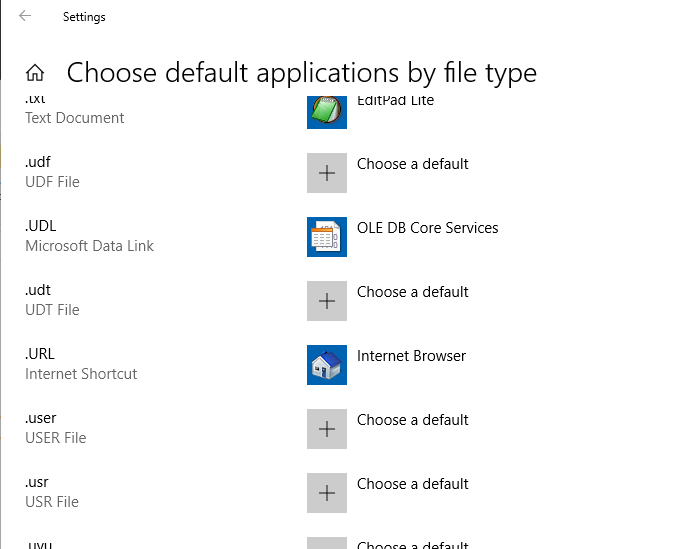
The shift-right-click on a file doesn't give the "open with" option, and the applets for protocols and for associated apps only allow apps registered as web browsers or from the store, which doesn't have any apps with the category "http".

Anyway...if you know how, please let me know.
Thanks!
 

Hat Monster

Ars Legatus Legionis
47,680
Subscriptor
.URL files are renamed .INI files. Here's the Bing.url which ships with Windows10.

Code:
[{000214A0-0000-0000-C000-000000000046}]
Prop3=19,2
[InternetShortcut]
IDList=
URL=http://go.microsoft.com/fwlink/p/?LinkId=255142
IconIndex=0
IconFile=%ProgramFiles%\Internet Explorer\Images\bing.ico

URL in Windows 10 as it's handled by browserbroker.exe.

urlfile.png

This isn't to say you cannot change it, you just can't change it there. Windows 10 only allows either the browser broker or a Windows Store app (which explicitly manifests .URL support, no such thing exists) to handle it using that UI.

If you try to change this in the registry manually or using something that worked in Windows 7, 8, 8.1, etc. (and Windows 10 hasn't changed this, it's the same as Windows 2000 did it) then Windows 10 will see it's not MSFT approved, lie about it being corrupt, then change it back.

You used to be able to pop up a much more powerful UI with
Code:
C:\Windows\explorer.exe shell:::{17cd9488-1228-4b2f-88ce-4298e93e0966} -Microsoft.DefaultPrograms\pageFileAssoc
But this now redirects you to the limited UI.

Windows 10 now has a "UserChoice" subsection of HKCR which is protected by a hash. MSFT has not documented this hash, and if the hash is invalid, the association is nuked.

A little command line util called SetuserFTA does claim to do it.
You'd need to use:
Code:
setuserfta.exe .url txtfile

MSFT says this is to prevent apps hijacking file type associations. This would be good, except that Windows itself doesn't allow users to change it.
 

Entegy

Ars Legatus Legionis
18,134
Side note: Microsoft does allow you to change to any app, by right-clicking a relevant file and choosing open with>Choose default app. There there will be a link to a file browser to pick any Win32 app you want. Store apps still need to have declarations. Why right-clicking a file has the file browser while the Settings app doesn't is beyond me.

However, because shortcuts are special, you don't get the "open with" context menu on .lnk and .url files.