Skip to content
Tech

iPhone 6 and 6 Plus: In deep with Apple’s thinnest phones

Review: Apple finally brings the big-screen love—with some strings attached.

Andrew Cunningham | 345
The iPhone 6 (left) and iPhone 6 Plus (right) have kicked small phones to the curb. Credit: Andrew Cunningham
Story text

Big-screened iPhones are what the people want, and Apple has acquiesced. After months of part leaks and rumors, you can finally buy the newer, bigger, faster iPhone 6 and 6 Plus, and it looks like plenty of people are doing so.

Any review of the new phones needs to spend an extensive amount of time with these screens, since they’re the headlining feature and the one that the most people will notice. We’re going to spend a lot of time with them, too, but there’s a lot more going on here than just big displays—Apple has upgraded the phones’ cameras, expanded their batteries, and replaced last year’s 64-bit A7 chip with the brand-new A8. iOS 8, a large release even if you’re not upgrading your phone this year, has picked up some features (and some challenges) unique to these new phones.

Buckle up, because we’ve gotten our hands on the new phones, and we’ve been torture-testing them during every waking moment since. Wondering what the iPhone 6 Plus’ optical image stabilization does for your pictures? Want to know more about the Apple A8 and which of Apple’s promises about the chip stand up to scrutiny (hint: not all of them)? Need to know what your apps are going to look like and how they’re going to work in this brave new big screen world? Read on, because we’ve got all that and more.

Specs at a glance: Apple iPhone 6
Screen 1334×750 4.7-inch (326PPI) IPS touchscreen
OS iOS 8.0
CPU ~1.4GHz Apple A8
RAM 1GB
GPU Apple A8 GPU,” possibly an Imagination Technologies PowerVR GX6450
Storage 16, 64, or 128GB
Networking 802.11ac Wi-Fi (433Mbps), Bluetooth 4.0, NFC (Apple Pay only)
Ports Lightning, headphones
Camera 8MP rear camera, 1.2MP front camera
Size 5.44″ x 2.64″ x 0.27″ (138.1 x 67.0 x 6.9mm)
Weight 4.55oz (129g)
Battery 1810mAh
Starting price $199 with two-year contract, $649 unlocked
Other perks TouchID fingerprint sensor
Specs at a glance: Apple iPhone 6 Plus
Screen 1920×1080 5.5-inch (401PPI) IPS touchscreen
OS iOS 8.0
CPU ~1.4GHz Apple A8
RAM 1GB
GPU Apple A8 GPU,” possibly an Imagination Technologies PowerVR GX6450
Storage 16, 64, or 128GB
Networking 802.11ac Wi-Fi (433Mbps), Bluetooth 4.0, NFC (Apple Pay only)
Ports Lightning, headphones
Camera 8MP rear camera with OIS, 1.2MP front camera
Size 6.22″ x 3.06″ x 0.28″ (158.1 x 77.8 x 7.1mm)
Weight 6.07oz (172g)
Battery 2915mAh
Starting price $299 with two-year contract, $749 unlocked
Other perks TouchID fingerprint sensor

What’s different?

Since this is a two-fer review, let’s start by outlining the difference between both the new devices. The iPhone 6 and 6 Plus are like the Retina iPad Mini and the iPad Air, or like the 11- and 13-inch MacBook Airs. They’ve got mostly the same insides and design touches, with a handful of differences. Many things in this review will apply to both phones; when they don’t, we’ll be sure to specify which one we’re referencing.

Here’s a list of the major differences between the 6 and the 6 Plus, aside from their physical dimensions:

  • Screen size: iPhone 6 is 4.7 inches and 1334×750, iPhone 6 Plus is 5.5 inches and 1920×1080.
  • Battery: iPhone 6 is 1810mAh, iPhone 6 Plus is 2915mAh.
  • Camera: The iPhone 6 Plus adds optical image stabilization (OIS) to the same camera the iPhone 6 uses.
  • Software: The iPhone 6 Plus’ larger screen lets it do a few things the iPhone 6 can’t, though not without caveats.

Look and feel

Since the first iPhone 6 part leaks began, I’ve thought of the new design as the child of an iPhone 5 and an HTC One. Both of those phones share a mostly metal chassis with strips sliced out of it to let wireless signals through. But the iPhones retain distinctly Apple-esque design touches—symmetrical front bezels with the TouchID-equipped Home button, solid and creak-free construction, and an obsession-to-a-fault with thinness.

In most respects, both new iPhones are worthy of their predecessors. Apple’s build quality is characteristically excellent, and neither phone exhibits even a hint of creaking, flexing, or button-wobbling. The nicest change is that the hard edges of the iPhone 4- and 5-era designs have been expelled in favor of rounded edges that run all the way around the back of the phone. They blend (nearly) seamlessly with the gently curved glass on the front of the phone, making the whole thing comfortable to hold.

Though it’s larger and more curvy, the rest of the design should be pretty familiar if you’ve ever seen an iPhone. The Home button, still ringed by the TouchID fingerprint sensor, remains a mainstay, and this year’s version feels and sounds more rigid and clicky than the version in our 5S. The long rectangular volume buttons on the left edge of the phone under the mute switch resemble those used by the iPhone 5C or iPads rather than the round buttons of the iPhone 4 or 5. The power button has moved to the right edge of the phone, as with many larger Android phones; with devices this big, this placement is easier to hit with one hand than a button on top of the phone might be. The nano SIM tray still sits on the right edge of the phone.

The iPhone 6 design isn’t really doing a whole lot that’s new, not if you’re paying attention to what any of the high-end Android and Windows phone hardware makers have been doing. But Apple takes many individual things that have been done well in other phones—those rounded edges, the curved glass, the larger, higher-resolution displays—and combines them all into one nicely assembled package. We only have two complaints about the new design, compared both to iPhones of past years and to the Android-based competition. And both, I suspect, stem from the aforementioned obsession with thinness.

The first complaint is that, compared to most recent Android handsets, the new iPhones don’t have a particularly good screen-to-bezel ratio. This is due in part to the TouchID button, a genuinely useful feature for which we’d gladly trade a smaller bezel. But especially in the iPhone 6 Plus, there’s plenty of extra bezel around the Touch ID button that feels like it could have been condensed, and Apple’s love of symmetry means any space shaved off of the bottom bezel could automatically be removed from the top bezel as well.

The camera bump on the back is inherited from the fifth-gen iPod Touch.
The power button has migrated from the top of the phone to the right edge, where it can be reached more easily by a finger or thumb while being used one-handed.

The second issue is the protruding camera lens that you’ve probably already read about. It has been described as a “bulge,” though next to any recent Galaxy or high-end Lumia phone it’s a bump at best. It has generated press mostly because Apple is sort of trying to hide it. This is the first time Apple has shipped an iPhone with a lens that hasn’t been flush with the back of the case, but it isn’t the first iOS product to have this design. The fifth-generation iPod Touch, that oft-forgotten member of the iOS family, includes a near-identical camera bump. The new iPhones are each about a millimeter thicker than the iPod Touch, but that device’s slightly rounded edges, camera bump, and general thin-ness mark it as a clear predecessor to the iPhone 6 models.

Because of that bump, both new iPhones wobble a bit if you’re tapping at them while they lie on a hard, flat surface. Putting just about any kind of case on the phones will even things back out, since most cases (including Apple’s own silicone and leather offerings) are thicker than the lens. You’ll only have a problem if you prefer naked phones.

Bigger screens

Time (and size) marches ever onward. From left to right, the iPhone 4S, 5S, 6, and 6 Plus.
Time (and size) marches ever onward. From left to right, the iPhone 4S, 5S, 6, and 6 Plus. Credit: Andrew Cunningham

Screens are the headlining feature of the iPhone 6. Let’s start with the way the screens themselves look, then move on to the way that iOS and its apps accommodate the new displays.

The iPhone 6 uses a 4.7-inch display panel with a 1334×750 resolution, retaining the 326 PPI density introduced with the iPhone 4 in 2010. The phone can show you more content at a time, but the size and sharpness of that content will be exactly the same as it has been for a few years now. High-end Android phones in the same price range have all moved to sharper displays, mostly 1080p displays with pixel densities somewhere in the mid-400s per inch. Still others are creeping up past that line to even more absurd heights.

Our position on the density issue hasn’t shifted much since we first began talking about 1080p phone displays back in 2012. Eagle-eyed users certainly can notice the difference when moving up to and past 400 pixels per inch, but such pixel densities provide diminishing returns even for small text and images. We like a nice 1080p screen, all else being equal, but we’re perfectly happy with the density of phones like the original Moto X or the iPhone 5S, and we suspect most regular people won’t notice a difference day-to-day. Brightness, contrast, viewing angles, color, and even things like light bleed will be more noticeable than additional density improvements, and both new iPhone screens do an excellent job there.

The iPhone 6 Plus makes the jump to 1080p, which at 5.5 inches works out to 401 PPI, comparable in both size and density to last year’s Galaxy Note 3. The screen is appreciably sharper than the one on the iPhone 6 or those on older Retina iPhones (despite some software tricks we’ll discuss later), but it’s not nearly the night-and-day shift as moving from non-Retina to Retina. Both the iPhone 6 and 6 Plus displays look quite similar, though Apple says the contrast ratio on the 6 is just a little better than on the 6 Plus (1400:1, compared to 1300:1). Both screens should be a solid improvement over the iPhone 5’s 800:1 contrast ratio. Our colorimeters peg the iPhone 6’s maximum brightness at 495 nits and the iPhone 6 Plus at 537 nits, compared to 485 nits for the iPhone 5S and 473 nits for the iPhone 4S.

Camera

The iPhone 6 and 6 Plus both have great phone cameras.
The iPhone 6 and 6 Plus both have great phone cameras. Credit: Andrew Cunningham

Apple has kept an 8MP camera in both new phones—offering the same megapixel count its cameras have used since the iPhone 4S in 2011. Megapixel count isn’t everything, though, and Apple has slapped a brand-new camera sensor in both phones and upgraded the image signal processor (ISP) block in the phones’ A8 processor. You won’t see its effects in the shots below, but the phase-detection autofocus is a great feature. My smartphone camera muscle memory has a built-in pause to allow the camera to focus, and at first I thought something was wrong when I couldn’t see the phone adjusting itself. Turns out, that’s just how quick auto-focus is now.

When you look at our test shots below, remember that the iPhone 6 and the iPhone 6 Plus have identical camera hardware, save for the optical image stabilization (OIS) feature built into the 6 Plus.

How does OIS work? Without getting too far into the photography weeds, the simple explanation is that a camera wants to let in as much light as possible. It can get more of this light by opening up the aperture (the size of the opening letting light through the lens) or by extending shot time (holding the shutter open longer) or by increasing the sensitivity of the image sensor (by raising the ISO setting). The first option reduces the focus depth of a shot significantly, especially with nearby objects, while the second can introduce camera shake from the natural motion of the hand and body. The third option increases image noise—significantly as you venture into high ISOs used in low-light situations.

The OIS feature addresses the vibration problem by situating the lens within a housing that moves in opposition to hand tremors and vibration, stabilizing the lens and allowing longer shots with less camera shake. That explains why, in the images below, the iPhone 6 used a shutter speed of 1/15 (0.07 seconds), while the iPhone 6 Plus used a slower a shutter speed of 1/4 (.25 seconds). OIS provides two extra stops of exposure—which, since the iPhone cameras have fixed apertures, is gained by keeping the shutter open longer (or by a combination of adjusting the shutter speed and ISO). Bottom line: better pictures, especially in low light.

iPhone 6 Plus.
iPhone 5S.


iPhone 6 Plus.
iPhone 5S.


iPhone 6 Plus. Note the cleaner lines and reduced noise level enabled by the OIS feature.
iPhone 5S.


iPhone 6 Plus.
iPhone 5S.


iPhone 6 Plus.
iPhone 5S.


iPhone 6 Plus.
iPhone 5S.

Finally, the new iPhones both increase the framerate at which video can be captured. Standard 1080p video goes from 30fps to 60fps, while slo-mo video goes from 120fps to 240fps. We’ve recorded some sample footage below. Note just how dark the indoor scenes shot at 240fps are—the sample with the water being poured into the glass was shot in a well-lit room, but everything remains exceedingly dim and noisy. Slo-mo mode wants as much light as it can get—remember that when you’re shooting footage.

Running Slo-Mo mode through its paces. Edited by Jennifer Hahn.

Software: What iOS 8 does with more space

The iPhone 6 and 6 Plus both launch with iOS 8, so all the stuff we talked about in our review of that software holds true here. However, changing the display size on an iPhone necessitates further changes to the software, so there are even more things to talk about here than on an iPhone 5 or 5S running the same operating system.

The first major difference you’ll encounter is something called Display Zoom, a feature that both phones offer as part of the first-time setup process. While the default view focuses its extra space to display extra content, the zoomed view shows less but is able to make it larger and more easily visible.

Turning on Display Zoom makes your phone’s screen display the same amount of data as the next smallest iPhone. Using it on the iPhone 6 Plus lays out its home screen layout, text, and apps as they would appear on a standard iPhone 6. Using it on an iPhone 6 makes the display resemble an iPhone 5’s.

Standard zoom on the 6 and 6 Plus.
Again with Display Zoom mode turned on.

This will be a nice accessibility feature for those with poor eyesight. Older iPhones supported variable font sizes but didn’t scale images along with them. Individual apps could also choose not to respect the system font setting, displaying onscreen elements basically however they wanted. The new method just blows up the entire screen, making everything larger regardless of what an app officially supports.

There’s no question that this looks better on the iPhone 6 Plus than the iPhone 6, both because of its increased pixel density and for other reasons we’ll discuss in a minute. Onscreen elements are larger but still sharp enough that the naked eye can’t really discern the difference. The iPhone 6 is basically scaling the 4-inch iPhone 5 display up to fill a 4.7-inch screen, and images and text are predictably fuzzy and blurry.

One final note about Display Zoom is that by “converting” your display view down to a smaller one, you give up some of the benefits of moving to larger screens in the first place. Enabling Display Zoom on the iPhone 6 Plus disables the special landscape view on the Home screen and removes several buttons from the special landscape keyboard; enabling it on the iPhone 6 completely removes the new sixth row of application icons and disables special landscape views altogether. I’d rather have Display Zoom available as an option, but keep this in mind when you turn it on.

Reachability

Both new iPhones include a feature called “Reachability” to help with one-handed use. From any screen, if you double-tap the TouchID button without pressing it, the contents of your screen will slide down to within thumb’s reach. Sometimes just tapping an onscreen button or text field is enough to exit Reachability mode, but sometimes we had to tap the TouchID button again or swipe up on the screen to get back to “normal” mode. It’s Apple’s solution to a new UI problem: many iOS apps use labels in the top corners of windows for navigation, and those buttons are suddenly out of reach if both your hands aren’t available.

When using Reachability the contents of your screen slide down a little less than halfway on the iPhone 6…
…and a little more than halfway on the iPhone 6 Plus.

As we said after our initial hands-on session with the phones, Reachability in practice is kind of awkward. The action that enables it is awfully close to the established action for pulling up the multitasking switcher and the recent contacts list. In the cases where it was absolutely necessary to use my phones one-handed, I was glad Reachability was there, but especially with the Plus I found myself simply defaulting to two-handed use.

Landscape mode

As Apple showed onstage at the iPhone 6 reveal, the larger screens give Apple and developers some extra wiggle room when laying out applications. The biggest change comes in the form of new landscape-mode view for certain applications, which take advantage of the extra pixels and physical space to display a more iPad-like view of whatever it is you’re looking at.

The iPhone 6 supports this alternate landscape view in Safari, and that’s about it. The iPhone 6 Plus supports many more, a complete list of which you can see in the screenshots below.

Folders with multiple pages give you a partial view of more of them.
The landscape keyboard on the 6 Plus.

Most commonly, landscape view just enables a small sidebar to the left of the “main” app view that makes for easier navigation, while the larger pane to the right contains the data you’ll actually be working with. In some cases (Mail, Notes) the right pane can be expanded to take up the whole screen if you need more space. Some built-in apps, including Music and Podcasts, have no dedicated landscape views, but that can always change.

Our one request would be that the iPhone 6 pick up more of the landscape mode views that the iPhone 6 Plus has. Obviously there are some apps—Mail is a big one—without enough horizontal space to display two readable, usable panes side-by-side. But many others, including Notes and Settings, could fit more things on the standard iPhone 6 screen as well as on the 6 Plus.

Using older apps

In these early days, you’re going to run into a whole bunch of apps that don’t support either the iPhone 6 or the 6 Plus resolutions natively. As with the Retina transition and the move from 3.5-inch to 4-inch screens, there’s going to be a period of a few weeks or months where developers are playing catchup. In the meantime, existing apps will stretch themselves out to fill the entire screen.

The results are honestly not too awful-looking, certainly not as fuzzy and pixelated as non-Retina apps looked on Retina displays. Existing, Retina-ready assets are big enough and have enough detail that blowing them up doesn’t completely ruin them. The worst part is low information density, particularly on the 6 Plus; the second-worst part is trading in the new, roomier software keyboard and using a blown-up version of the one from the iPhone 4 and 5.

Other apps developed with Apple’s auto-layout tools look nice and sharp on the new displays but have some conspicuous-looking swaths of empty space that weren’t a problem on smaller screens. Downcast is one of the few third-party apps on my phone that was ready for the transition, and many of its screens are just kind of empty looking. Instapaper, on the other hand, is very reading-focused and makes effective use of the space by just filling it with extra words.

Some apps that work correctly with the new screens just have a bunch of empty space.
Others expand to fill the available space more naturally.

If you’ve been an iPhone user for a while, you know these are temporary problems that will mostly be gone within a month or two. Developers are usually quick to follow Apple’s lead on stuff like this—the chance to land on that “Apps and Games for iPhone 6” list in the app store is too tempting to ignore—and before long we should get new updates that look better on the larger screens.

Just for good measure, find an iOS app developer and give him or her a hug this week. Many of them already put a bunch of work into adopting some of iOS 8’s new APIs, and now they’ve got to turn right around and support two brand-new screen sizes, create new, higher-resolution assets for the iPhone 6 Plus, and start thinking about how they might make the best use of the screen space in Landscape mode. It’s a lot to take in all at once.

“3x” mode, and explaining the iPhone 6 Plus’ display scaling

The iPhone 6 retains the same 326 PPI density as the iPhone 5, so while it can fit more things on screen at a time those things are typically the same size and sharpness that they would be on an iPhone 5 or even an iPhone 4. Developers will need to update their apps to take up the extra space, but they won’t actually need to create new assets.

The iPhone 6 Plus is different. To explain, let’s go back four-ish years to the advent of the first Retina iPhone. Apple kept the iPhone 4’s screen the same physical size as previous phones but quadrupled the number of pixels. To take advantage of this newfound sharpness, Apple doubled the resolution of icons, text, and other onscreen elements, and developers could distinguish Retina assets from non-Retina assets with a “2x” in the filename. Non-Retina screens use unlabeled or “1x” assets, while Retina screens use “2x” assets.

For the iPhone 6 Plus, Apple has introduced even larger “3x” assets that are three times the size of things on non-Retina devices. This helps keep things visible on the larger, denser screen without making buttons and other tap targets too small to work with, and without stretching 2x assets out and making them blurry (though in these early days, most apps will be a little blurry anyway). To balance size with sharpness, Apple is doing something a little weird here. Rather than displaying things at the phone’s native 1080p resolution, the iPhone 6 Plus is actually rendering a 2208×1242 image and downscaling it to 1080p.

In practice, you can’t tell the difference between the iPhone 6 Plus screen and the native 1080p on any given Android phone. Even small text is sharp enough to be readable. The effect is not unlike what happens when you scale the display of a Retina MacBook Pro—yes, images and text won’t be quite as pristine as they are when being displayed at the panel’s native resolution, but visually the difference ends up being academic.

The problem comes when you begin rendering 3D images—there’s going to be some overhead involved in pushing those extra pixels. Occasionally you’ll catch animations jerking or dropping frames in a way that doesn’t happen on the iPhone 6 or iPhone 5S. Safari’s tab-loading animation is one spot where the hiccup is regularly noticeable, though you can occasionally catch it just by zooming in and out of apps on the home screen. We’ll put a numerical value on this problem later on in our performance section.

Internals and performance, and meeting the Apple A8

Apple only ever speaks in general terms about its ARM processors, which is too bad because for the last few years they’ve consistently been the only part of an iPhone launch that Apple has kept totally secret before the announcements. The problem is that most of the details remain a secret after the announcement, too, leaving us to guess at all but the vaguest of high-level details. Here’s what we can tell you.

The Apple A8 is Apple’s second 64-bit chip, and the first of Apple’s SoCs to be built using TSMC’s still-new 20nm manufacturing process. There’s still a lot of confusion about the benefits of 64-bit in a phone—at least right now, it’s not so much about the 4GB memory limit that helped drive the 64-bit transition in desktops, though obviously that could become a serious concern before very long and it’s going to be important for the coming wave of ARM server chips. The real draw here is the ARMv8 instruction set, which cleans up the architecture, adds more and wider registers, and introduces compatibility for 64-bit apps (AArch64) while maintaining broad compatibility with older, 32-bit ARMv7 apps (AArch32). If you’d like a little more information on ARM’s 64-bit transition, you can start with this whitepaper from ARM itself or this piece by sometime Ars contributor David Kanter.

Depending on the type of work being done, 64-bit apps running on an ARMv8 chip like the Apple A7 or A8 pick up a nice speed boost compared to 32-bit apps running on the same chip; our benchmarks from last year show an average boost of around 30 percent. Last year when Apple said the A7 could be as much as twice as fast as the A6, it was conditional—it could be twice as fast as the A6, but only if your apps had also made the jump to 64-bit. iOS itself and all of Apple’s built-in apps made the leap on the day the iPhone 5S was released, though developers are taking longer to climb aboard.

The A8’s CPU performance isn’t a drastic upgrade over the A7—“up to 25 percent,” say Apple’s promotional materials, and our CPU benchmarks more-or-less agree. Our benchmarking tools peg its clock speed at about 1.4GHz, around 100MHz faster than the A7, so some of those gains are coming from a small clock speed bump and others are likely attributable to architectural improvements.

Apple still uses two cores instead of four in its SoCs, so while Qualcomm’s best Snapdragons can compete with Apple chips in heavily threaded tasks, Apple’s single-threaded performance is still significantly better than the competition. Users of 32-bit apps can expect a performance boost, too, though not an especially large one—the 32-bit version of Geekbench says the A8 is around 8 percent faster than the A7, which is incidentally almost exactly the size of the clock speed increase from 1.3GHz to 1.4GHz.

Apple focused more attention this year on powering up the GPU, a smart choice given that bigger panels with more pixels will need more hardware to drive them. Apple’s internal documentation refers to the graphics section of the A8 as an “Apple A8 GPU,” but AnandTech has done some educated guesswork that suggests it’s a six-core Imagination Technologies PowerVR GX6650, an upgrade from the hypothesized quad-core PowerVR G6430 in the A7. Analysis from Chipworks based on die shots of the Apple A8 suggest that the GPU is instead a quad-core PowerVR GX6450, though this is still just an educated best guess. In any case, Apple says that performance should increase by about 50 percent.

The high-level GFXBench 3.0 tests tell us three things. First, the GPU in the iPhone 6 Plus performs just a tiny bit better than the GPU in the iPhone 6. Second, an increase of near 50 percent will be possible under certain circumstances—check the Offscreen scores, which use all GPUs to render a 1080p scene without accounting for the actual display resolution. The T-Rex scores improve by about 50 percent and the Manhattan scores improve by around 40 percent, though the larger screen resolutions eat up a lot of those gains.

Third, as we already mentioned, the iPhone 6 Plus is displaying a 2208×1242 and shrinking it down to 1080p rather than using the screen’s native resolution. Look at the 2208×1242 Onscreen scores compared to the 1080p Offscreen scores—the tests run about 20 percent slower when they use the resolution the phone is actually running at. It’s not the end of the world, but obviously this oddball scaling mechanism isn’t ideal.

Full throttle

In the small amount of stage time given to Apple’s chips, it’s important to pay attention to exactly what Apple decides to emphasize. Last year, it was the performance boost combined with the 64-bit transition. Since the A8 isn’t as big a leap, Apple instead chose to play up its power efficiency improvements and talk about a phenomenon we’ve examined before: performance throttling.

A couple decades ago, a CPU or GPU would always be running at the same clock speed no matter what you were doing with it. Now, clock speeds are enormously variable. Most processors have an “idle” clock speed that they’re running at when not busy, and many also have a boosted clock speed they can maintain for a short amount of time. They’re made to minimize power consumption while making sure performance is good when it’s called for, and it works out because most common tasks come in short bursts. When you’re doing intensive work for a longer period of time, speeds get throttled down to a more manageable level so you don’t kill your battery and/or make your device melt in your hands.

Intel and AMD (usually) are up-front in keeping their chips’ maximum clock speed separated from the “base” clock speed that the chip will hit in heavy workloads, but most mobile chip companies are looser with those figures. Qualcomm, for example, might sell you a 2.3GHz Snapdragon 800 that can run at 2.3GHz for 20 seconds or so before dropping down to a dramatically lower speed. Apple doesn’t advertise clock speeds for its chips, but tests show its mobile chips throttle down just like anybody else’s.

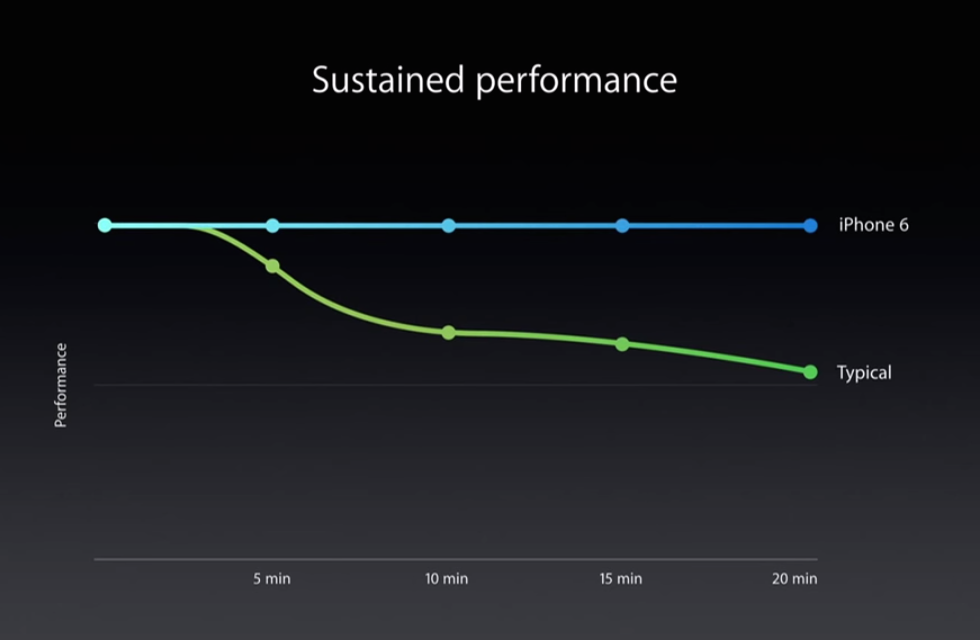
At the iPhone 6 announcement, Apple’s Phil Schiller made a big deal out of the A8’s resistance to throttling. He never said that the chip wouldn’t throttle, but the slide that Apple showed while he talked about throttling looked like this:

Credit: Apple

We don’t know what kind of workload this slide represents, but the implied message is that the A8 didn’t need to throttle down at all. Apple uses a fairly low base clock speed in its chips, so the claim didn’t seem outlandish to us, especially when coupled with the move to a new, more power-efficient manufacturing process.

To put that slide to the test, Primate LabsJohn Poole sent us a beta build of Geekbench with a built-in thermal test, one that runs a subsection of the Geekbench test in a continuous loop while tracking CPU clock speed over time. The test is still a work-in-progress, so you’ll have to forgive the odd timekeeping across the bottom of the chart. The test doesn’t account for different clock speeds across different CPU cores, either, but generally speaking the information here should be accurate. Here’s what real data looks like.

Schiller’s beautiful straight horizontal line only lasts for the first minute or so, though to be fair to Apple the A8 does throttle less aggressively than the A7 did. Both the iPhone 6 and 6 Plus start out at the same clock speeds and the iPhone 6 actually outruns the 6 Plus for a while, but after 15 or 20 minutes both the iPhone 6 and 5S take sharp clock speed dives to keep from overheating. The larger 6 Plus has headroom to run at higher speeds for longer. At its lowest speeds, the A8 runs at around 900MHz, about 150MHz faster than the A7 in the iPhone 5S at its slowest. Most Snapdragon 800 and 801 phones end up throttling down to somewhere between 1.0GHz and 1.2GHz (we tested a Nexus 5, Galaxy S5, and a new Moto X to confirm), but remember that while this clock speed is higher, Apple still manages a much higher number of instructions per clock.

To be clear: CPU throttling is completely normal, and it’s something that virtually all modern mobile chips do. Phones aren’t typically called on to perform these kinds of workloads, except when gaming or perhaps when doing media editing or exporting. It’s not a big deal that the A8 chips in the new iPhones throttle when loaded, and they sustain higher performance than the A7 even when fully loaded. Just don’t imply that your chips don’t have to throttle when it’s not that difficult to prove that they definitely do.

1GB of RAM and 64-bit memory usage

Apple talks even less about RAM in its iDevices than it does about the other internals, and it wasn’t until people like iFixit began tearing the phones apart last week that we could confirm that the iPhone 6 and 6 Plus come with 1GB of DDR3L RAM, the same amount as the iPhone 5, 5C, and 5S.

We were surprised that Apple didn’t decide to boost this to 2GB this year, but we aren’t worried about this being a problem today. iOS is aggressive enough about memory management (and Apple puts strict enough limits on the amount of memory developers can use for things like apps and extensions) that performance shouldn’t be a problem. The single biggest sign of RAM limitations in iOS is the dreaded Safari tab reload, where you return to a tab a few minutes after opening it only to discover that the browser needs to open the page again.

What we are worried about is what this means for the iPhone 6 two-or-so years from now, especially as more applications go 64-bit. According to AnandTech’s findings in last year’s iPad Air review, memory overhead for 64-bit apps on iOS increases performance but also generally increases memory overhead by 20 or 30 percent. We haven’t run into memory-related problems yet because, for the most part, developers have continued shipping 32-bit code for most of the last year. Here’s a list (arranged in no particular order) of some common applications I compiled in May to see how the 64-bit transition was going, alongside a re-check of the same applications on September 22 to see if anything had changed.

App Status in May 2014 Status in September 2014
Dropbox 32-bit 64-bit
Google Chrome
32-bit 32-bit
Google Drive 32-bit 32-bit
Google Sheets
32-bit 32-bit
Google Docs
32-bit 32-bit
Gmail 32-bit 32-bit
Google Maps 32-bit 32-bit
YouTube 32-bit 32-bit
Google 32-bit 32-bit
Office Mobile
32-bit 32-bit
OneNote 32-bit 32-bit
Twitter 32-bit 32-bit
Tweetbot 3
64-bit 64-bit
Downcast 32-bit 64-bit
Facebook 32-bit 32-bit
Kindle 32-bit 32-bit
Spotify 32-bit 32-bit
Netflix 32-bit 32-bit
Hulu 32-bit 32-bit
Amazon Instant Video
32-bit 32-bit
Bugshot 64-bit 64-bit
Vesper 64-bit 64-bit
Vine 32-bit 32-bit
Slack 32-bit 64-bit
Amazon 32-bit 32-bit
Fandango 32-bit 32-bit
Instagram 32-bit 32-bit
Mailbox 32-bit 32-bit
Fleksy 64-bit 64-bit
Untappd 32-bit 32-bit
Instapaper 32-bit 64-bit

The first developers to transition to 64-bit were usually those with more of an investment in Apple’s platforms specifically—Marco Arment’s Bugshot, John Gruber and Q Branch’s Vesper, and TapbotsTweetbot 3. It’s only now, a year after the introduction of the A7, that big mainstream applications are beginning to make the jump to 64-bit. Most still haven’t. We may be worrying about nothing, but once most of the applications on your device are 64-bit by default, we hope that having 1GB of RAM doesn’t prove to be a bottleneck like the 512MB of RAM in older iPhones and iPads is becoming today.

And the rest

The iPhone 6 and 6 Plus make a few other upgrades worth mentioning, namely the move from 100 to 150Mbps LTE speeds courtesy of Qualcomm’s MDM9625M modem and the upgrade from 150Mbps 802.11n Wi-Fi to 433Mbps 802.11ac. Apple lagged behind the Android OEMs by about a year on both of these upgrades, and while neither will make a night-and-day difference to most iPhone users, we aren’t going to argue with either one.

Apple has increased the amount of storage available in the middle and top tiers to 64GB and 128GB, respectively, but storage in the base model remains a paltry 16GB. We noted in the iOS 8 review that the new operating system takes up a bigger slice of that storage than ever, and it seems odd not to bump the entry model up in capacity along with the other two. The cynic in me says that Apple is just trying to protect its average selling prices—it’s pretty easy to fill 16GB of space up with apps and music and pictures without even trying, but 32GB is enough for people who don’t need to carry their entire media libraries around with them at once. Keeping the base model at 16GB means that more people are going to do the “well-just-in-case-I-need-it” upgrade to a more expensive model, and even more storage at those price points makes the upgrade even easier to justify psychologically.

Apple’s built-in motion sensor has also been upgraded. The M7 in the iPhone 5S is now the M8, and it gets a couple of other handy features that developers of fitness apps can access. The M7 can track step count and distance, but the M8 adds elevation tracking to the list of things the phone can do without bothering other, more power-hungry chips. You can see all of this stuff in the Health app in iOS 8, and that data will be accessible to new HealthKit-compatible apps as soon as Apple works the bugs out.

The final internal upgrade is the addition of a near-field communications (NFC) chip, something rumored for every iPhone since the 4S. We can’t do anything to test it right now, since the NFC chip isn’t available to developers. Right now it only works with Apple Pay, and Apple Pay isn’t going to arrive until sometime in October.

Hopefully Apple will open NFC up at some point in the future, as it just did with TouchID in iOS 8. I wouldn’t mind throwing out my MetroCard in favor of scanning my iPhone to get on the train one day.

Battery life and charging

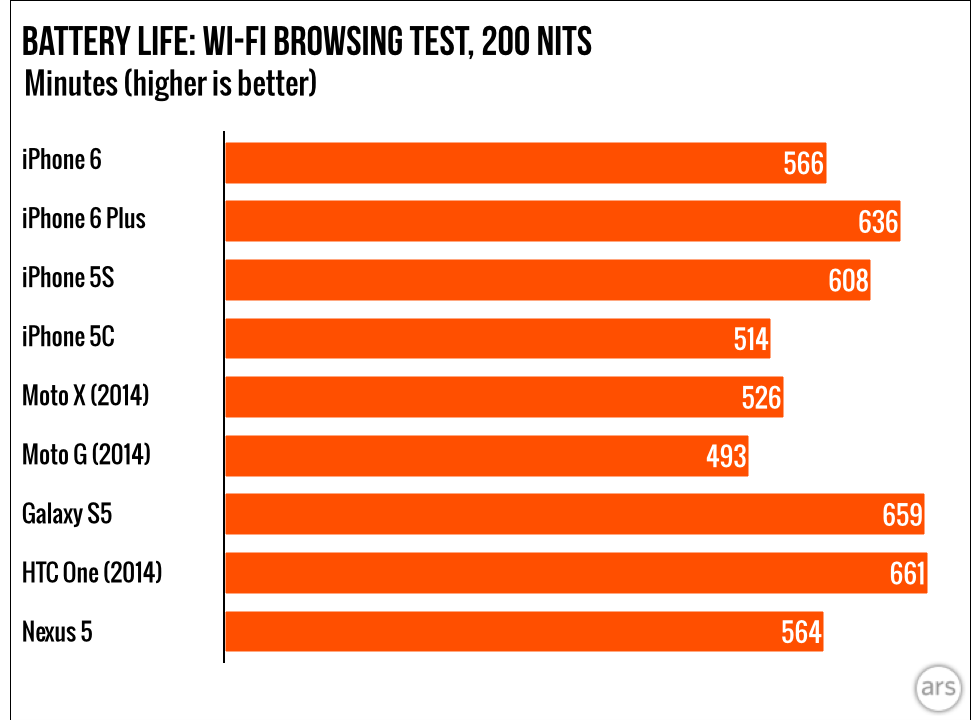
Apple says that both new iPhones should maintain or slightly improve upon the battery life of the 5S, which our Wi-Fi browsing test only partially confirms. With both screens set to 200 nits, the iPhone 6 comes in a little under our previously recorded time for the iPhone 5S, and the iPhone 6 Plus outdoes both of them.

In practice, I found that the iPhone 6 felt around the same as my iPhone 5S. I could last an entire day if I was just doing typical smartphone-y things with it, but I’d need to grab a charge if I was going to do a lot of tethering or GPS-heavy tasks. The iPhone 6 Plus was a different story; I forgot to plug it in one night and woke up to see that it still had a 60 percent charge. I then used it for the rest of the day, only plugging it in on the second night. Granted, I wasn’t using the 6 Plus to do tethering and other battery-intensive tasks, but anecdotally I can report that other iPhone 6 Plus owners on the Ars staff are also impressed with the phone’s battery life.

Chalk it up to something our Wi-Fi test can’t really measure—Apple is pretty good at tamping down idle power usage, at least when your signal is good. I’ve had an iPhone 6 Plus sitting on my desk all day, buzzing at me only sporadically as new Twitter and Messages notifications come in. It’s been sitting at a 90 percent charge for at least the last two hours, and I haven’t had it plugged in since eight hours ago. That’s the kind of battery life we wish that more smartphones would aim for—to date, most have aimed to hold a charge for a waking day, but moving to two or even three days without a charge would be a great goal to set now that performance isn’t jumping as much as it once did between generations.

Finally, a note on charging. Both new phones come with the standard cube-ish 5W charger that has shipped with iPhones for years, but that adapter isn’t necessarily the best one to use. Reports came out late last week saying that the new phones supported faster charging with different adapters, so we dug out a 10W iPad charger to test how quickly the phones could pick up a full charge.

It didn’t make much of a difference for the standard iPhone 6, which has a battery not much bigger than that in the 5S. With the 5W charger (and the screen off), the phone drew a maximum of 6.3 watts and took two hours and five minutes to fully recharge. With the 10W charger, it drew a maximum between 6.5 and 7.0W and took one hour and 55 minutes to fully charge.

The iPhone 6 Plus is another story. With the included 5W adapter, the phone drew around 6.4W of power at most and took a full three hours to charge all the way up. With the 10W adapter, it drew a maximum of around 11.3W and charged in just two hours. So if you’re frustrated with the amount of time it takes to charge your 6 Plus, all you need to do is grab a higher-capacity power adapter. It’s too bad that Apple isn’t including one in the box, though.

So which one is for me?

The iPhone 6 Plus (top) supports features like landscape mode and OIS that are absent from the iPhone 6 (bottom).
The iPhone 6 Plus (top) supports features like landscape mode and OIS that are absent from the iPhone 6 (bottom). Credit: Andrew Cunningham

The real question here for iPhone buyers is: which size do you get? It’s a question that only you can really answer, but we can at least try to steer you in the right direction.

If you’re worried about using something larger than the iPhone 5, or if you’re upset that Apple is leaving iPhone 5-ish sizes behind in favor of these new, larger phones, you really should give the regular iPhone 6 a chance. Yes, it’s larger. But look at this iPhone 5S sitting on top of the iPhone 6.

The iPhone 5S is a little smaller than the iPhone 6, but it’s not such a huge difference.
The iPhone 5S is a little smaller than the iPhone 6, but it’s not such a huge difference. Credit: Andrew Cunningham

The difference in width is around a quarter of an inch, an increase that’s actually masked to some extent by the new phone’s great, easy-on-the-hands contours. It’s more impressive because the iPhone 6’s screen is more than a quarter inch wider than the iPhone 5’s screen, so the amount of display you’re getting is greater than the amount of width you’re adding. The difference in height (of both phone and screen) is around half an inch, a more noticeable but still not drastic change.

For many people, the larger iPhone 6 is well within “you’ll get used to it” territory. It’s certainly larger, but after a couple of days your hands will have adjusted, and going back to an iPhone 4 or iPhone 5 screen is going to make that screen seem tiny. We really liked the original Moto X because its 4.7-inch screen made it a holdable, pocketable phone in a sea of giants, and the iPhone 6 hits many of the same notes.

Now, let’s talk about the iPhone 6 Plus.

The iPhone 6 Plus is undeniably huge.
The iPhone 6 Plus is undeniably huge. Credit: Andrew Cunningham

Don’t kid yourself: this is not Apple’s special version of a big, Galaxy Note-esque phone, something that’s going to take the (ugh) “phablet” and make it palatable to an audience that isn’t already interested in them. This is just a big iPhone. It’s a little taller and a little slimmer than the Note 3, but the two are cut from the same cloth. It’s got a fundamentally different feel than the iPhone 5S, one that most current iPhone users won’t just get used to.

That’s not to say it’s a bad phone, but you should actively want an iPhone this big to really appreciate an iPhone this big. Strong sales of the Galaxy Note series show that there are people who are interested in this kind of thing, but we wouldn’t be surprised to hear tales of unpleasant surprise from people who decide to order the 6 Plus sight unseen.

We suspect that the 4.7-inch iPhone 6 will end up being the “normal” version of the phone that most buyers go with, while the 5.5-inch 6 Plus will be the option for people who already know that they want the biggest phone they can get. What’s frustrating is that the 6 Plus gets some major, useful improvements—OIS in the camera, landscape mode for most apps, a sizable increase in battery life—that the standard iPhone 6 isn’t privy to. If you want to get the “best” iPhone available, you have to make room in your life (and in your pockets) for a gigantic phone.

These gripes aside, both the iPhone 6 and the 6 Plus are major upgrades over their predecessors that should keep most current iPhone buyers happy while also tempting people who wanted to use iOS but weren’t willing to settle for smaller screens. The only losers here are the people who prefer smaller phones exclusively, but the small high-end phone is rapidly going the way of the physical keyboard. If you’re in this group, your only choices are to get used to something different or to keep using the (still decent, still available) iPhone 5S—and hope that Apple’s future plans include an iPhone 6 Minus.

The good

  • Solid and attractive new design incorporates the big screens that so many people have been asking for.
  • Great-looking screens with better contrast and brightness than past years.
  • Display Zoom is a great accessibility feature.
  • Good cameras with improved low-light performance, especially in the 6 Plus.
  • Alternate landscape views for certain apps is a neat idea that makes good use of the extra space.
  • Apple’s A8 is a good performer, even if it throttles more than Apple said it did.
  • Battery life in the 6 Plus is excellent in a way not fully conveyed in our standard test.

The bad

  • The iPhone 6 Plus fits in exclusive features we’d like to see in both phones.
  • Weird screen scaling tricks on the 6 Plus don’t visibly impact sharpness, but do affect GPU performance.
  • 1GB of RAM seems like it could be a bottleneck a couple of years from now.
  • Awkward app scaling will be a problem until developers get on board.

The ugly

  • If you like smaller phones, too bad for you.
  • 16GB of storage in the base model is beginning to pinch.

Looking for more about iOS 8, which comes bundled with the new iPhones? Check out our 17,000 word review.

Listing image: Andrew Cunningham

Photo of Andrew Cunningham
Andrew Cunningham Senior Technology Reporter
Andrew is a Senior Technology Reporter at Ars Technica, with a focus on consumer tech including computer hardware and in-depth reviews of operating systems like Windows and macOS. Andrew lives in Philadelphia and co-hosts a weekly book podcast called Overdue.
345 Comments