
By now, you’ve likely heard that passwordless Google accounts have finally arrived. This alternative for passwords is known as “passkeys.”
There are many misconceptions about passkeys, both in terms of their usability and the security and privacy benefits they offer compared with current authentication methods. That’s not surprising, given that passwords have been in use for the past 60 years, and passkeys are so new. The long and short of it is that with a few minutes of training, passkeys are easier to use than passwords, and in a matter of months—once a dozen or so industry partners finish rolling out the remaining pieces—using passkeys will be easier still. Passkeys are also vastly more secure and privacy-preserving than passwords, for reasons I’ll explain later.
What is a passkey anyway?
This article provides a primer to get people started with Google’s implementation of passkeys and explains the technical underpinnings that make them a much easier and more effective way to protect against account takeovers. A handful of smaller sites—specifically, PayPal, Instacart, Best Buy, Kayak, Robinhood, Shop Pay, and Cardpointers—have rolled out various options for logging in with passkeys, but those choices are more proofs of concept than working solutions. Google is the first major online service to make passkeys available, and its offering is refined and comprehensive enough that I’m recommending people turn them on today.
First, it helps to know exactly what a passkey is and how it works. Apple provides a helpful description here of the technical underpinnings of passkeys:
Passkeys are built on the WebAuthentication (or “WebAuthn”) standard, which uses public key cryptography. During account registration, the operating system creates a unique cryptographic key pair to associate with an account for the app or website. These keys are generated by the device, securely and uniquely, for every account.
One of these keys is public, and is stored on the server. This public key is not a secret. The other key is private, and is what is needed to actually sign in. The server never learns what the private key is. On Apple devices with Touch ID or Face ID available, they can be used to authorize use of the passkey, which then authenticates the user to the app or website. No shared secret is transmitted, and the server does not need to protect the public key. This makes passkeys very strong, easy to use credentials that are highly phishing-resistant. And platform vendors have worked together within the FIDO Alliance to make sure that passkey implementations are compatible cross-platform and can work on as many devices as possible.
The FIDO specs require that whatever syncing mechanism a user elects (be it from Apple, Microsoft, Google, or a third party) it provide end-to-end encryption the way iCloud Keychain and password syncing with browsers currently do (on Chrome, the E2EE password syncing must be turned on). This means that the private key is unknown to the cloud provider. The private key resides on the device and can only be accessed by unlocking the device using either a unlock PIN, a fingerprint or face scan. The private key never leaves the trusted user devices, except as an E2EE blob synced through one of the big three or, soon, a third party such as 1Password.
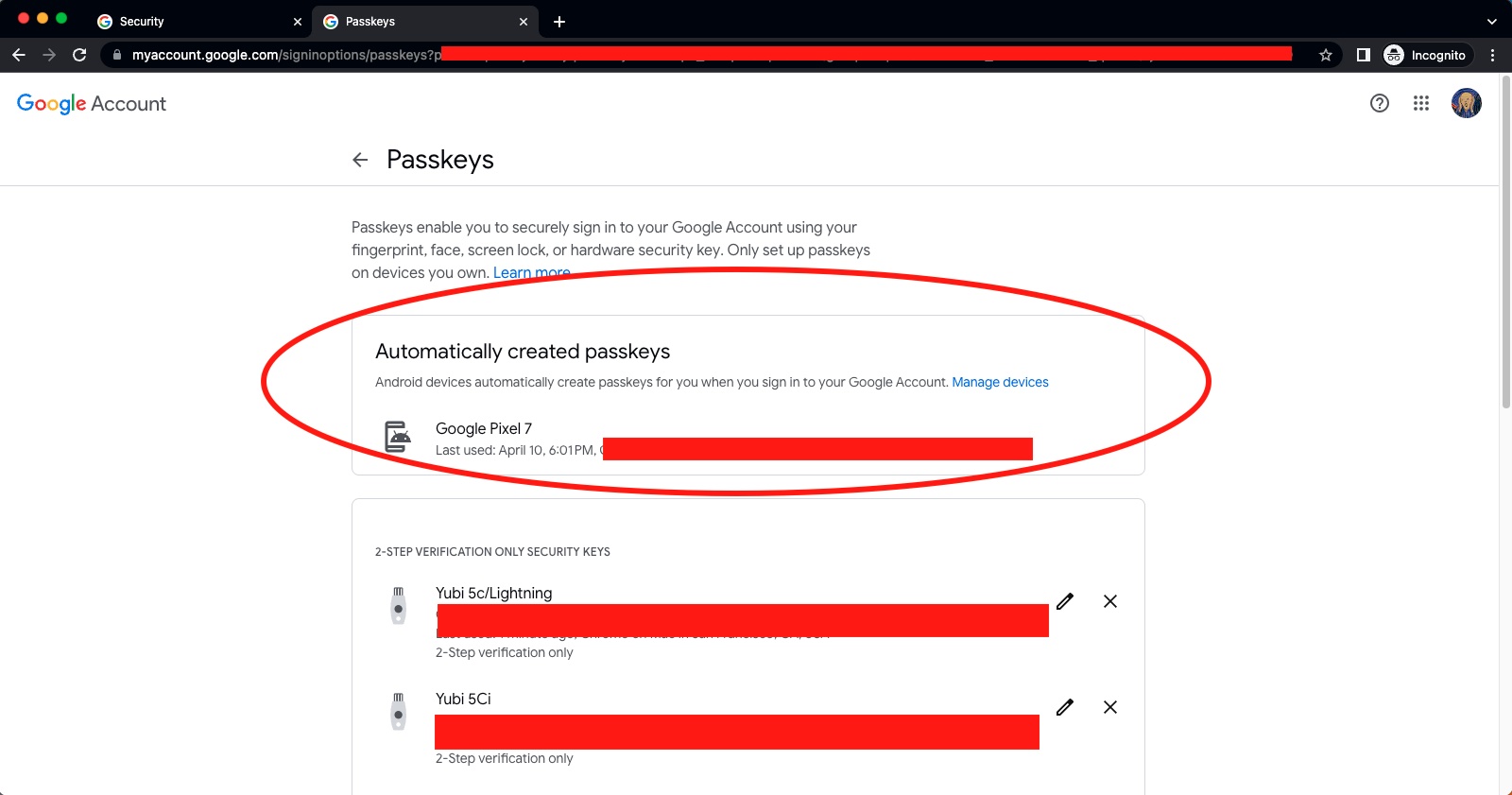




For my Google account, I've re-registered my YubiKeys I was using as 2FA to be passkeys. With 2FA, the authentication was Google password + FIDO U2F hardware key. With passkeys, it's FIDO2 hardware key + key's FIDO2 PIN.
I would strongly recommend learning how passkeys work. Each of your assertions is incorrect.
Or, as we’ve seen in both recent thread, a group of people who read something scary about WebAuthn and didn’t verify the technical details but didn’t let that stop them from repeating the same falsehoods in every story. When you have a W3C standard implemented by most of the industry and recommended by almost all actual security experts, it’s probably not the case that someone randomly confabulating in a message board has uncovered a fatal drawback everyone else missed.
No, it’s not. You’re still easily phishable (yeah, I know you think otherwise. Lots of people make that mistake.) and that’s the most popular way to compromise people.
Passkeys are much, much easier to use so I don’t think this qualifies as fatal.
None of the “big three” tech companies will be getekeepers to your passkeys. Passkeys are held on a device. If you don’t want to sync your passkey via some sort of service then put the same passkey on multiple devices. You only have one device And now it’s gone? That is the same problem as password managers without sync. In the end you will have to reauthenticate with different services just like you would in any similar case of being locked out. Most people will sync their passkeys like they do their passwords. And no, if Google shuts down your account they can’t disable the passkeys you already have on your devices. You’ll lose their sync service but you could then start using another one instead.
Passkeys can’t be phished, can’t be forgotten, can’t be gotten through data leaks, and are inherently unique and secure. Those are really big improvements. They are also easier to use because once they are on your device authentication is simple.
You kinda understand why a majority of Ars readership no longer reads the comments.
I'm using a Yubikey for this, not Android or iOS. This means that I am not beholden to Google/Apple to be able to manage my key, nor do I have to worry about my account getting compromised and thus leaking the passkey.
As a point of comparison to the Google Account login, I have also been using this Yubikey to access my Microsoft account for a while now.
Microsoft works across all of the major browsers on desktop (except Safari on MacOS last time I checked). Google seems to need Chrome.
Microsoft has an option below the username field to sign in a different way, then you select Windows Hello or Security Key, put the key into a USB port, enter the PIN, and press the button on top. It will then ask you which account (if you have multiple accounts saved), and you are logged straight in. You don't even need to remember your username/email address.
Google requires you to enter your username/email, then it asks for the key to be inserted. You then need to enter the PIN, and it logs you in.
From a usability perspective, Microsoft is better in that you don't need to remember your email. For the Ars crowd, this is probably a negative. But if you are supporting 70 year old grandparents, the less things they need to remember, the better. I haven't confirmed, but a downside to the MS system is that the Yubikey only supports a specific number of stored credentials, whereas from what I could see in my research, the Google method basically has the Yubikey generate a private key specifically to that site based on an internal private key, your PIN, and some information provided by the site and the browser, every time it needs to run the authentication. Both of them seem to use an internal private key specific to the Yubikey, your PIN, some information about the domain provided by the browser, and specific information provided from the site you are visiting to perform the handshake, which prevents MITM attacks from being successful as they can't spoof all of that data.
I'm not sure what is missing in Firefox for the Google implementation vs the Microsoft one, why it doesn't support the new passkey system. Or is it just Google not requesting the passkey because Firefox hasn't implemented the Bluetooth portion, which has the side-effect of not supporting Yubikeys/hardware tokens because Firefox isn't being asked for it by the Google login site.
--
If you lose the passkey and do not have a backup passkey, the security fallback is to log in the way you were logging in before the passkey. So usually password + OTP. While this means the site does support a less secure authentication system, one advantage is that you aren't using the password on a regular basis, so it is less likely to be leaked or intercepted by a phishing/MITM attack.
--
From a security perspective, you can view passkeys as a password wallet with limited site support. If using a Yubikey, the wallet is a hardware device in your pocket, protected by a PIN. If using the Android/iOS passkey, the wallet is synced in a cloud system and protected by your account password + biometrics. If you lose the device, it is similar to losing the password file.
Once they get all of the kinks figured out, this has the potential to change a lot of things in the security landscape, as non-security-conscious individuals will no longer be resisting secure password requirements or having to figure out how to properly use a password wallet, and how to access/sync it across multiple devices. By basically becoming a password wallet, the passkeys generate really secure, really random passwords for every site they are used on, and are built with phishing-resistance in mind.
Well, think about what filling in a password actually means. If you don’t use a password manager, you have to remember and type in a password – and since each site has different rules about things like rotation, you have to periodically memorize new ones. If you use a password manager, you don’t have to remember the password but you do have to deal with various auto fill bugs and when changing passwords you have to adjust the more secure password generated by your manager to whatever weakening rules most sites enforce, and make sure that you save the updated password everywhere and don’t end up with multiple copies or problems around failed update workflows. For example, I use 1Password and not infrequently hit something like where I save a new password but the site had different validation rules than their form claimed so I have to edit it but 1P doesn’t pick up the change & save it unless I manually edit its database. You can also get similar problems with big companies migrating around so the password I have saved for www.bigcorp.com is wrong and I have to pick www2 until I manually merge that entry or delete the old one.
In contrast, here’s what a passkey is like to register or use:
1. Hit enter or tap to confirm I want to use my passkey on that site
It’s who, not what on the front page. No love for Google on the front page, such that their support has turned the crowd against an industry standard.
It’s silly.
Again, readers, don’t pay these commenters any attention.
Using a passkey on - or adding a passkey to a new device via - a verified device requires a re-auth. Whether it's via biometrics or device unlock code or Yubikey PIN. It's not just "if passkey, account permanently unlocked."
In the (common) case where the password manager is unlocked via biometrics, there is no secondary authentication, beyond what a passkey would also require.
Nothing here reads as qualitatively different to me except in (significantly inconvenient) edge cases.
OK, to be clear. You only need an additional device to basically provision a new device with its own passkey. Once that has been done, you will not need the secondary device again, but will instead use whatever cryptographic unlock the new device offers.
This is kind of ridiculous. How else would you authenticate to an existing service in order to update your authentication mechanism? Aside from the already-discussed QR-and-bluetooth method. And while the attack surface on the server side isn't necessarily reduced by enabling rather than requiring passkey login, it significantly reduces the attack surface client-side, as you're strictly engaging in a key exchange, enabled by OS-level authentication. And that's a win for everyone.
If you're to the point that you can't trust any of your OS's security features, you might as well just throw your computing devices away and go live on a tropical island or something. At some point some level of trust has to be given to some bit of software.
It's not just dumped on people - this is an update to FIDO2, itself the second version of the standard. U2F was FIDO1; this is CTAP 2.2 ([edit: Corrected from my WAG of 2.4 that was wrong, thanks Still Incorrect!]), part of FIDO2/WebAuthn. This is really nothing complicated as that goes.... they've loosened up the Authenticator requirements so that the private key can be (must be...) copied securely, and added some Javascript features to make life easier. Passwordless logins? Always been possible with FIDO2. That's the neat part of it - FIDO1 could only be MFA. Adding a private key to your browser stored in the TPM or secure element? Always been possible, and was previously implemented in Chrome, Firefox and Safari. What's new is that it can be synced, and accessed via the BT/QR rigmarole. Previously, it was referred to (and flagged to web sites) as "platform specific keys", as opposed to the portable ones which were hardware devices. Now it's PassKeys.
Your points #1, #2, and #10 are just wrong – ask anyone who works in tech support how often they have to do password resets because someone forgot their password, left their caps lock key on (or mispositioned their hand on the keyboard), or fudge-fingered it enough times to get locked out. Yeah, yeah, I know you personally always hammer it out perfectly but trust me, anyone who gets helpdesk calls has a … less optimistic … view of humanity. I'll also add that I support a lot of blind users and password entry massively sucks for them because many sites have complexity requirements which are hard for screen reader users and if you aren't a proficient touch-typist saying it out loud isn't great. That's a niche but it's one that many people building authentication systems are legally required to support well, too, and it's one of the reasons why I'm interested in the technology since “Do you want to login with your passkey?” “Yes” is at least one order of magnitude faster and easier than any form of password + MFA for many those users.
Point #3 is true of WebAuthn MFA but always passkeys – something like a Yubikey works anywhere you have USB/NFC but you might need to set a PIN or use their biometric series keys for passkey implementers like Google.com which require more than a simple tap.
Points #5, #6, #7, and #8 are also true of all forms of WebAuthn – both MFA and passkeys. Point #4 is true except for the first time you enroll a device when synchronizing an existing key. After the first time you've synchronized your keys, you don't need a network connection. If you don't want to sync, you can also buy a couple Yubikey biometric keys which again work fully offline anywhere you have USB or NFC.
That leaves #9, which is bad practice and should be avoided if at all possible. Modern systems have things like role-based authentication, where people never share passwords but multiple people are allowed to assume a given role, or things like legacy or delegated accounts where you again never share passwords but give one or, even better, multiple people required in combination the ability to do something like reset your password or gain control of your files.
Just because something is new and you haven't learned how it works doesn't mean it's bad or to be avoided. Passkeys are a big change for most of us – .gov excepted since PIV/CAC goes back to the previous century there even if few other places adopted it – but they have a number of usability improvements in addition to the security benefits, and there's a clear path for building out some of the missing parts (e.g. I really want the ability to sync an Apple / Google passkey to a Yubikey so I could drop it in my safe just in case).
The private key is not accessible. Why not look it up instead of repeating a falsehood over and over.
And now I’m more confused than I was before I started - I’ve forwarded the article to my CS major/better half to explain things but that may not be enough.
Passwords are easily digested. 2FA is easy to explain. Passkeys kind of make sense, but just when I think I might get it, I read the next paragraph and get more lost.
Heaven help my siblings and parents.
1Password has gone as far as to say that passkeys are "the future of authentication": https://www.future.1password.com/passkeys/