Skip to content
mid-range mix-up

Intel’s Core i5 is the best bargain in CPUs right now, but which should you get?

We test and compare the i5-13400 to other Core i5 and Ryzen CPUs.

Andrew Cunningham | 176
An Intel Core i5-13400 processor in a black computer motherboard.
Intel's Core i5-13400. Credit: Andrew Cunningham
Story text

Fancy, expensive processors are fun, but for most people who just want to build a decent middle-of-the-road PC for gaming (and anything else), the best advice is usually to buy a Core i5 or Ryzen 5 for somewhere in the $200–$250 range and pair it with the fastest graphics card you can afford.

Intel’s Core i5-13400 (and the graphics-less 13400F) caught our eye when Intel announced it because it was adding a cluster of four E-cores to the Core i5-12400, which was one of Intel’s best mid-range desktop CPUs in years. E-cores don’t matter much for games, but they can help when you’re trying to run background tasks behind your game, and they can also provide a decent boost to heavily multithreaded CPU workloads like video encoding or CPU-based rendering.

This is nominally a review of the Core i5-13400, which is a good CPU and (when considered together with the cost of a motherboard and RAM) one of the better bargains you’ll find if you’re building a PC right now. The problem is that Intel sells a lot of very similar 12th- and 13th-generation Core i5 chips, and the prices are constantly bouncing around in that $160–$250 band. The one you should usually get depends on what you’re doing and which one happens to be the cheapest at the moment you’re buying.

Pricing and value

Current pricing Cores/threads Clocks (Base/Boost) Total cache (L2+L3) TDP
Core i5-13400 (F) $240 ($209) 6P/4E/16t 2.5/4.6 GHz (P-cores) 29.5MB (9.5+20) 65 W PL1/154 W PL2
Core i5-12600K (KF) $240 ($224) 6P/4E/16t 3.7/4.9 GHz (P-cores) 29.5MB (9.5+20) 125 W PL1/150 W PL2
Core i5-13500 $250 6P/8E/20t 2.5/4.8 GHz (P-cores) 35.5MB (11.5+24) 65 W PL1/154 W PL2
Ryzen 7 7600 $229 6c/12t 3.8/5.1 GHz 38MB (6+32) 65 W (88 W PPT)
Ryzen 7 7600X  $249 (no fan) 6c/12t 4.7/5.3 GHz 38MB (6+32) 105 W (142 W PPT)
Core i5-12400 (F) $183 ($159) 6P/12t 2.5/4.4 GHz 25.5MB (7.5+18) 65 W PL1/117 W PL2

The prices in the table above will fluctuate and may already be out of date as you’re reading this, but the point is that the 13400 might not always be the best CPU to buy at any particular moment. The Core i5-12600K is architecturally identical and a little faster (not a lot, but enough to make a difference). And the i5-13500 has a higher clock speed and has four additional E-cores. The GPU-less i5-13400F and i5-12600KF are in that range, too. If the Core i5-13400 is the cheapest when you’re buying, it’s a good one to go with. If it’s around the same price as the i5-12600K or the i5-13500, buy those instead.

And there’s always the last-generation i5-12400, which is missing the E-cores but has almost the same P-cores as the i5-13400. Without a GPU, it can go as low as $160, about $50 less than the i5-13400F.

The latest Ryzen 5 processors also look competitive here, but it still costs more to assemble a socket AM5 PC. A decent AM5 motherboard with built-in Wi-Fi and Bluetooth, the MSI Pro B650M-A Wi-Fi, currently runs $153, compared to $100 for a Gigabyte B660M DS3H AX. A 16GB kit of DDR5-5200 costs $59 (AMD says DDR5-6000 is the ideal speed, and it’s what we use for testing; you’ll pay $33 more for the extra bump) compared to about $34 for a kit of DDR4-3200.

At current pricing, that adds up to around $100 extra, giving you a small boost to gaming performance in some situations but mostly breaking even in non-gaming tasks. In a budget build, that money might be better spent on a bigger SSD, better power supply, or faster GPU.

That said, Intel’s LGA1700 socket is likely nearing the end of the line, and AM5 will be supported until at least 2025. If you’re the kind of person who upgrades CPUs every couple of years, you can spend a little more now and maybe save some money later when it’s time to step up to (an entirely theoretical) Ryzen 5 9600. I’d still go with the Intel build in this price range, but there’s a good argument to be made either way.

CPU architecture

When we reviewed the i5-13600K and i9-13900K, we detailed a handful of architectural tweaks Intel had made compared to the 12th-gen CPUs. Those improvements mostly came down to clock speed boosts and increased power limits (more on that in a moment), but Intel also added a bit more L3 cache.

That extra cache doesn’t trickle down to non-K-series 13th-gen Core i5 and i3 processors. For all intents and purposes, an i5-13400 is architecturally identical to an i5-12600K, with slightly different default clock speeds and power settings. Bear this in mind when choosing between the chips—in this case, the 13th generation is no newer than the 12th.

A note on power limits

We’ve written a few times about processor power limits and how important they can be to system performance. The two most important settings for an Intel CPU are Power Level 1 (PL1), the amount of power a CPU is allowed to draw when all cores are under sustained load, and Power Level 2 (PL2), the amount of power the CPU can draw when it just needs to run as fast as possible for a short stretch. On Intel’s Ark product pages, PL1 generally corresponds to Base Power, and PL2 corresponds to Turbo Power.

The situation is similar on AMD’s side, though there’s some fuzziness to the numbers. Though AMD advertises thermal design power (TDP) numbers, the company’s TDP isn’t comparable to Intel’s Base Power/PL1 number. To compare an AMD TDP to Intel’s Base Power, multiply AMD’s TDP by about 1.35 (the value is also known by yet another acronym, PPT, or package power tracking).

Frankly, the whole situation is a mess because motherboard makers each include their own default PL1 and PL2 settings, sometimes far in excess of the defaults Intel lists on its spec sheets. But there are benefits. Power limits can be changed on any motherboard, not just overclocking-capable Z690 and Z790 boards, so in theory, it’s possible to “overclock” or “undervolt” any modern Intel or AMD desktop CPU by simply allowing it to consume more or less power.

The downsides to increasing the power limit are that a CPU that uses more power generates more heat, and the performance gain is rarely commensurate with the increase in power usage (drawing twice the power doesn’t get you twice the performance). It also makes them a huge pain to test, as your observed behavior could differ from ours depending on the settings you (or your PC/motherboard maker) choose.

We have generally defaulted to testing all CPUs at the default power limits as stated on Intel and AMD’s product pages. However, in some cases, we have tested with both higher and lower power limits to show how performance and efficiency can differ for the same CPU with different power settings. We’ve labeled the charts so it’s clear what settings we’re using and when.

Testbed

AMD Socket AM5 Intel LGA 1700
CPUs Ryzen 5 7600X, Ryzen 7 7700 Core i5-12400, Core i5-13400, Core i5-12600K, Core i5-13600K
Motherboard ASRock Taichi X670E (provided by AMD) Asus Prime B660-Plus D4
RAM config 32GB G.Skill Trident Z5 Neo (provided by AMD), running at DDR5-6000 64GB Crucial CT2K32G4DFD832A (provided by Crucial), running at DDR4-3200

All tests are run using a fully updated copy of Windows 11 22H2, with the Memory Integrity security feature turned off and Resizable BAR turned on.

When testing higher-end Core i7 and Core i9 processors, we usually put them in a high-end motherboard with DDR5 memory, as people buying those CPUs are also more likely to be willing to spend extra on their motherboard and memory to get better performance. This also makes for a better apples-to-apples comparison with high-end AMD systems, eliminating motherboard quality and memory speed as potential variables.

For these more budget-minded Core i5 processors, though, we’re using an Asus DDR4-equipped motherboard with a cheaper B660 chipset. A lot of Intel’s advantage over AMD in low-end to mid-range gaming PCs right now is a lower total platform cost, since socket AM5 motherboards are still relatively expensive and DDR5 memory still commands a healthy premium over DDR4.

When talking about value-for-money CPUs, then, we think it’s better to test them in the kinds of motherboards people are more likely to use them in. All of these Intel CPUs will be a little faster when paired with DDR5 if that’s how you choose to set up your system, though the degree of difference will depend on the software you’re running and the RAM speed. Testing from multiple outlets shows that the difference is usually in the low to mid single digits, which isn’t worth paying extra for when every dollar counts.

Other parts of our testbed remain the same as in other recent CPU reviews. All testing is done in a Lian Li O11 Air Mini case with an EVGA-provided Supernova 850 P6 power supply and a 280 mm Corsair iCue H115i Elite Capellix AIO cooler. We use an AMD-provided Radeon RX 7900 XTX to help minimize the number of tests that will be restricted by the GPU, but keep in mind that some games may still run faster with an RTX 4090 or even faster next-generation GPUs that haven’t been released yet.

One last thing to note: The Ryzen 5 7600, without an X, is the $229 CPU that you should be considering if you’re thinking about going with AMD for a build like this. We don’t have one of those to test. We did test a 7600X with DDR5-6000, limited to a 65 W TDP. It’s not as good a choice for budget systems because it’s closer to $250, and you’ll need to buy your own CPU fan since it doesn’t come with one. The 7600 will be a bit slower, but the 7600X should be in the same ballpark.

Performance

Right away, it’s easy to see where the Core i5-13400 is (and isn’t) an improvement over the i5-12400. Single-core performance across Cinebench and two versions of Geekbench is virtually identical, which makes some sense given that the P-cores are identical and Intel has only marginally boosted the i5-13400’s peak clock speed. But the extra E-cores give it a solid boost in multi-core performance, improving those benchmark scores and helping it encode our H.264 and H.265 test videos around 15 percent faster. Not bad, given the nearly identical power consumption of the two chips.

In all cases, the i5-12600K can outrun the i5-13400 and i5-12400. In single-core tests, this is mostly because it’s running at a higher clock speed. In multi-core tests, as we’ll explore more momentarily, it’s because the i5-12600K’s default power limits are higher. An i5-13400 with higher power limits will perform more like an i5-12600K, and an i5-12600K with lower power limits will perform more like an i5-13400. That’s why “looking at both and buying the cheaper one” is a safe bet for most people.

The Ryzen 7600X also does well here, outrunning the i5-13400 in most of the single-core and multi-core benchmarks and performing more like the i5-12600K in our encoding tests. That, too, is a function of increased power limits—remember that a Ryzen CPU with a “65 W” TDP is allowed to use up to 88 W of power. This does make the Ryzen CPU more power-efficient than the i5-12600K, but it also means the i5-13400’s deficit isn’t as bad as it looks here.

Meanwhile, the i5-10400 shows its age.

Moving on to game benchmarks, the i5-13400 and i5-12600K perform virtually identically in almost all of our tests—the i5-12600K’s extra single- and multi-core speed in our CPU benchmarks doesn’t show up in our game benchmarks. The Ryzen 7600X, on the other hand, pulls significantly ahead in average frame rates for most of these tests. For a mid-range GPU like an RTX 3060, Intel Arc A750 or A770, or Radeon RX 6650 XT, the i5 will be more than fine—your GPU will still be the performance bottleneck. But if, for whatever reason, you’re trying to build the cheapest system possible to drop a top-end GPU into, AMD’s CPU does have an advantage.

It’s also clear that the i5-12400 is still a viable option if you’re mainly planning to play games and you don’t care as much about productivity performance. It costs 76 percent as much as an i5-13400 while performing something like 96–98 percent as fast in the games we tested (the synthetic 3DMark Time Spy benchmark is an outlier, as it often is).

For the sake of comparison, we’ve also run the i5-13400 against much more expensive and capable CPUs like the Core i9-13900K and Ryzen 7 7800X3D, just to show you what more money gets you. (The i9-13900K was tested in a Z690 system with DDR5-6000, while the i5-13600K is in the same B660 motherboard we did our other Core i5 testing in.)

In games, at least, it’s clear that spending two or three times as much on your CPU does not get you two or three times the frames per second. These CPUs absolutely have their place in high-end systems, particularly if you need tons more high-performance cores for non-gaming stuff (even the i5-13600K, with its extra cluster of E-cores, outspeeds the i5-13400 and i5-12600K by a fair amount). But in a budget system, the conventional “spend more on your GPU, less on your CPU” wisdom holds firm.

Power efficiency

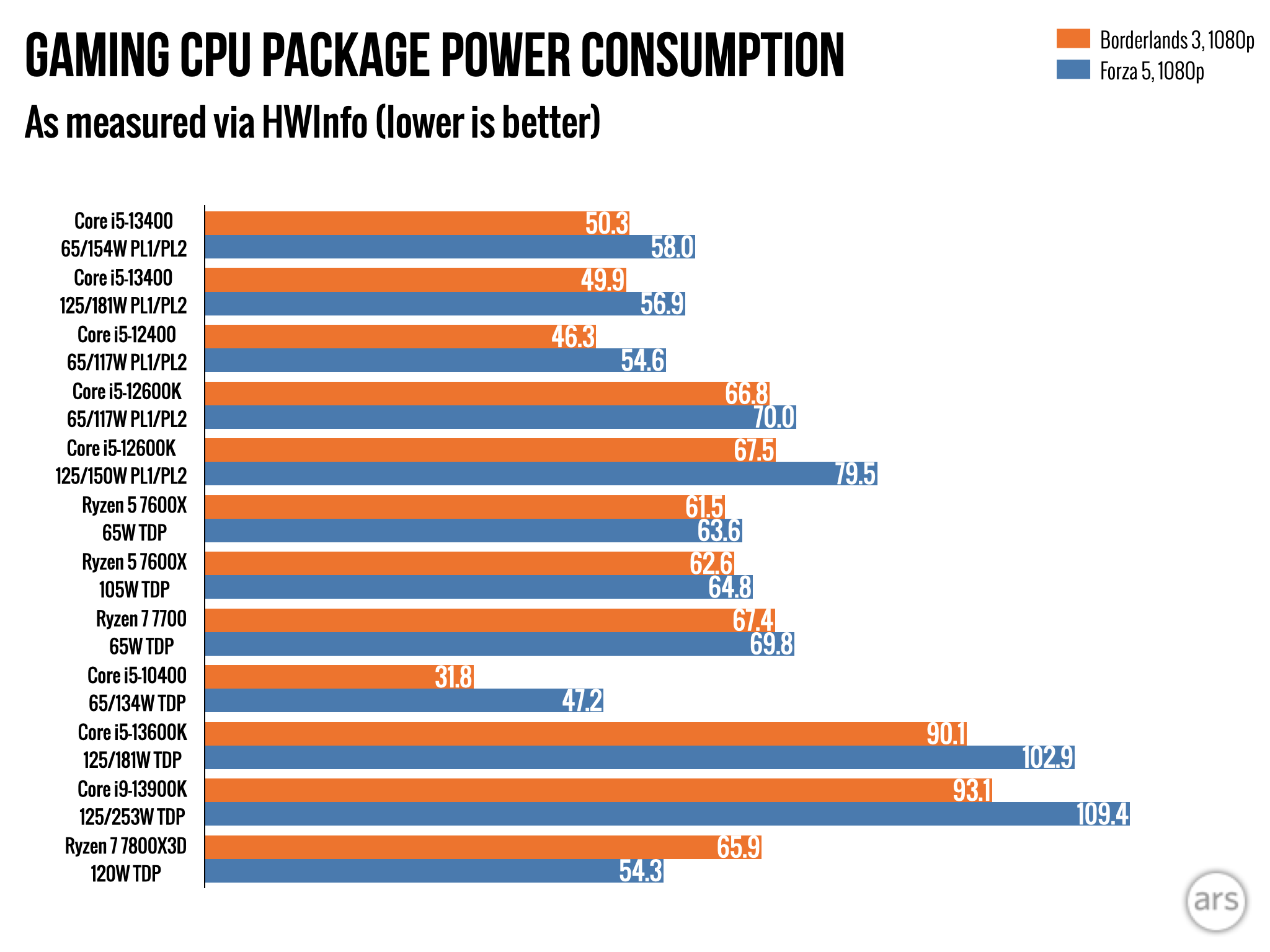
When measuring power consumption, we’re trying to answer two questions: How much power does a CPU use to perform a set amount of work, like encoding the same video file? And how much power does a CPU use continuously when performing an open-ended task, like playing a game?

At its default power settings, the i5-13400 was one of the most power-efficient CPUs in our video encoding test because it works faster than the i5-12400 while consuming roughly the same amount of power. Even when you raise the base power limit from 65 W to 125 W, it’s considerably more efficient than the i5-12600K at the same settings. The eight-core Ryzen 7700 and 7800X3D are even more efficient here, and the i9-13900K is also close—it uses a lot more power, but it finishes the task way faster, so it evens out. The i5-13400 also ran the coolest of any CPU we tested.

Things are a little different when playing games. The i5-13400 consistently uses a smidge more power than the i5-12400, and the i5-12600K and all the Ryzen chips use more than the i5-13400. It’s worth noting that Ryzen chips also give you better performance in those games, while the i5-12600K just uses a little more power to no real benefit.

That’s the one caveat to the “buy-whatever’s-cheaper” rule for the i5-13400 versus the i5-12600K. Even when both CPUs are set to the same 65 W or 125 W base power limit, the i5-12600K consistently consumed more power than the i5-13400 when encoding video and when gaming. The older chip consistently uses a bit more power to hit its higher clock speeds. Given that the two CPUs perform almost identically in games, that’s a small argument in favor of the i5-13400 if the two chips cost exactly the same when you go to buy one. Set the i5-13400 to a 125 W power limit, and you can get almost all the performance of the i5-12600K with consistently lower power usage and temperatures.

A close call

With so many similar CPUs in such close proximity to each other, it’s hard to say, “This is the one you ought to buy!”

But we can at least make some helpful recommendations. If you’ll mostly be gaming and you want the best performance for the least amount of money, there’s no beating the Core i5-12400. If you want a more well-rounded CPU that will give you a small boost to game performance and a larger increase in multithreaded multitasking performance, all else being equal, the relatively low power usage and cool temperatures of the i5-13400 give it the edge over the i5-12600K. That’s just barely true, but it’s true.

But if all else isn’t equal, and the i5-12600K is cheaper than the i5-13400 or the i5-13500 is the same price as the i5-13400, buy one of those instead. I like to buy the non-F versions with integrated GPUs so I can still use the motherboard’s video outputs and Intel’s video encoding features, but it can save you around $30 for most of these chips if that’s not something you care about (most dedicated GPUs include their own video-encoding hardware, anyway).

On AMD’s side, the Ryzen 5 7600 will run games a bit better than any of the Core i5s and come close to a Core i5-13400 in multithreaded tasks, too. But you should only buy it if you’re OK with spending an extra $100 or more solely for the sake of future-proofing your system, because you know you’ll want to buy another AM5 CPU upgrade in the next two to three years. I don’t think that’s something most people worry about, but it’s common enough to bear mentioning.

The big takeaway, if you compare any of these CPUs to the three-year-old Core i5-10400, is that any modern midrange CPU can give you a huge performance bump no matter what kind of work you’re doing. And while we test with a top-end GPU to try to avoid having our results affected by CPU bottlenecks, the difference between a new CPU and a 3- to 4-year-old CPU is big enough that you might even start to feel it with upper mid-range cards like a GeForce RTX 4070 or Radeon RX 6800 XT.

GPUs aside, it’s a great time to upgrade the rest of your PC right now. Good CPUs are cheap, RAM is cheap (except for DDR5, though it’s cheaper than it was six months or a year ago), and SSDs are dirt-cheap. Even if you keep using your current GPU, it could be a good time to upgrade the system around it so you’re ready the next time there’s an affordable GPU you want to get.

Ars Technica may earn compensation for sales from links on this post through affiliate programs.

Listing image: Andrew Cunningham

Photo of Andrew Cunningham
Andrew Cunningham Senior Technology Reporter
Andrew is a Senior Technology Reporter at Ars Technica, with a focus on consumer tech including computer hardware and in-depth reviews of operating systems like Windows and macOS. Andrew lives in Philadelphia and co-hosts a weekly book podcast called Overdue.
176 Comments