Skip to content
Tech

HTC One M9 review: HTC’s flagship feels like an afterthought

A design from 2013 and a heavily throttled SoC make for a disappointing update.

Ron Amadeo | 110
Credit: Ron Amadeo
Credit: Ron Amadeo
Story text

When we reviewed the HTC One M8 last year, our primary complaint was how little it was changed from the M7. HTC basically recycled the M7 design with the M8. Apple gets away with updating its designs every other year because it’s a market leader. HTC is definitely not a market leader though, so we think it’s fair to expect it to be nimbler and faster than its bigger rivals—that’s really the only path to success when you aren’t winning.

Now, HTC is back with a new flagship—the HTC One M9. While the M7 to M8 transition was underwhelming, with the M9, HTC has slowed down to nearly a standstill, as the design is nearly identical to the HTC M8. The Snapdragon 810 SoC—meant to give the M9 a speed boost over the M8—has been throttled so much that the M9 is at best equal to the M8, and in some cases slower. The other small improvements HTC tried to make—relocating the power button and an upgraded camera—didn’t work out well, either.

The (dated) design

The back has the same brushed aluminum look as the M8, but it has been treated so much that it doesn’t feel like aluminum anymore.
The top has a speaker, sensor cluster, and 4MP “Ultrapixel” camera.

Have you seen an M8? If so, you’re most of the way there. HTC has tweaked things a bit by giving the side of the device a ridge—imagine if the back of the exterior was sized about 2 percent bigger than the front and the edges weren’t flush. It serves as a way to tell the M8 and M9 apart, but isn’t really functional or good looking.

The back of the phone is still aluminum, but HTC has given it a finish that diminishes most of the premium feel you would normally get. It thankfully isn’t as glossy as the M8, but we greatly preferred the finish of the M7. Aluminum is a great material; there is really no need to overcomplicate things. The odd stair step on the side of the M9 delineates the aluminum from the plastic front, which forms the speaker grills and the side bezel of the device.

Our biggest complaint with the M8 remains in the M9: the front of the phone still wastes a lot of space. Thanks to the top and bottom speakers and a bar dedicated solely to the HTC logo, this 5-inch phone is almost as tall as the 5.5-inch LG G3. And other vendors, namely Motorola, have proven that it’s possible to fit decent-sounding front-facing speakers without taking up as much space as HTC’s BoomSound speakers do.

One complaint about the M8 that HTC did try to address was the location of the power button. HTC put it on the top edge of the M8, and on such a tall phone that made it hard to press. To try to fix this, HTC put the power button on the side of the phone, right next to the volume up and down keys. The problem is that they are all the same shape and right next to each other.

The three similarly shaped buttons make it basically impossible to tell where your finger is by touch. If you put your finger on the side of the phone and feel an oval button, it could be any of three buttons. After a week of use, I still can’t remember which button is which and have never gotten the power button on the first try. I’ve taken to just running my finger across all three buttons when I need to use the power button. Thankfully this still has tap-to-wake, which means the poorly designed buttons are only an issue for adjusting the volume. It’s amazing that stuff like this makes it into production when, after spending five minutes with it, you instantly know it’s a bad idea. The M8 used a single long volume rocker rather than separate buttons—keeping this and adding a smaller, separate power button would have been a wiser choice.

HTC Sense: The wrong kind of software differentiation

While we don’t really like software differentiation from Android OEMs, we’ve come to the conclusion that there are good and bad kinds of differentiation. The good kind is something like Samsung’s multi-window support, which is genuinely useful and is something that only an OEM can add at the OS level. There are also things like Motorola’s always-on voice technology, which is software that works with specialized hardware.

Then there’s the bad kind. One type is “change for change’s sake,”—an OEM favorite—which offers the user a functionally identical interface that is “branded” and therefore inconsistent with other Android apps. This is getting especially bad in the Material Design era, where Google and third-party apps all have one design language, and OEM interfaces all stick out like a sore thumb.

Another bad software differentiation decision—and one of HTC’s favorites—is to use your hardware as an excuse to do app development. On the M9, for instance, HTC will say “we have a really great gallery app.” We don’t know if the company has noticed, but there are thousands of gallery apps on the Play Store from companies whose sole job is make a great gallery app. If a user wants a good gallery app, then they should go to the Play Store and download one. This should not be an OEM responsibility. 

The goal of differentiation—which we think OEMs sometimes forget—is to sell hardware. Software differentiation only matters if it affects the core of the device, either via a complicated OS change (like multiwindow) or some combination of hardware and software. Even if HTC succeeded at making a great gallery app, it’s not meaningful differentiation because it’s just an app. Every other gallery app would immediately copy whatever the cool feature is, and anyone considering an HTC phone because of the awesome gallery app could just download basically the same thing from the Play Store. OEMs that do app development are wasting everyone’s time and their own resources on something that will never be a selling point.

The smart home screen widget, which changes icons based on your location. You can manually change it, too.
HTC’s Notification panel, Quick Settings, and Settings screens—change for change’s sake.

The M9 comes with Android 5.0 Lollipop with a heavy coating of HTC Sense on it. Sense is another example of the wrong kind of software differentiation. It’s change for the sake of change—everything works the same but has been “branded” to remind you you’re using an HTC phone. There are lots of tall, skinny fonts, blue headers, and white backgrounds.

To the left of the main home screen page is the HTC-standard “Blinkfeed” screen, a social network/news feed that has been integrated with the home screen. It’s basically Flipboard, which makes it one of the bad kinds of OEM software—it’s not a selling point. If you like Flipboard, go download it.

For version 7 of Sense, HTC came up with a “smart home screen” that changes icons based on your location. The icons that change live in a home screen widget, basically an open folder that has modes for home, at work, and “out.” The idea is that for home you have stuff like games and social networks, for work you display icons for e-mail and calendar, and for “out” it would show Google Maps and Yelp. It also tries to suggest apps to download based on your usage. Again though, this isn’t really a selling point, as it’s just a home screen widget that any app developer could duplicate easily. It also means if you don’t like it, it’s easily removed.

Also in Sense 7 is a theme engine and a theme store, one of the good kinds of software differentiation, since it can’t just be added with an app. Past versions of HTC Sense have been skinnable to some extent, but now HTC is hosting a Xiaomi-like store where users can submit themes that are shared with the rest of the HTC community. Users can change the wallpaper, icons, sounds, fonts, and parts of the system UI, like the on-screen buttons. The Xiaomi theme store is great because there are tons of people making compatible themes. So far about 90 percent of the content in HTC’s store seems to be made by HTC. It’s early for the store, but given HTC’s small market share, it’s hard to imagine it becoming very popular.

One thing we have to give HTC’s software team credit for: a lot of this stuff is removable or at least can be disabled. You can turn off Blinkfeed by removing the page from your home screen. As mentioned, the smart home feature is easily removed, too. HTC changed the Overview screen (formerly called Recent Apps) to a 3×3 grid of thumbnails, but there’s an option to disable it in favor of the Lollipop Overview screen. If you have to change things, giving the user a choice to revert is always a great idea. One missed opportunity, though—HTC went through the trouble of making a theme store, but there’s no “stock” Android skin. We guess someone could make one, but a professionally done one would make a lot of users happy. Even if you grab the Google Now launcher, you’ll still be looking at all of HTC’s icons and menus.

Other than that, the rest of the software is HTC going crazy with its aspirations to be an app developer. There are custom-built apps for the usual built-in stuff like the gallery, music, clock, etc., but also HTC Zoe, a media-focused social network that HTC makes available to non-HTC phones, a photo editor, a car dock, and a note taking app called “Scribble.” There’s also an app called “HTC Print Studio” which supposedly lets you make greeting cards, but it isn’t even finished yet. There’s an app icon, but the “app” just loads a “coming soon” splash screen with a link to an unlaunched app in the Play Store. Are we all supposed to be greatly anticipating HTC’s greeting card app?

For every example above, there are better options in the Play Store, making the whole thing a huge waste of HTC’s time and resources. No one is going to buy an HTC phone for an app that they can get somewhere else. It’s very confusing given that HTC’s recycled hardware design seems to indicate a lack of resources. We think the company would be much better served if it dumped the app development idea and focused those resources on making a good, modern piece of hardware.

Camera

HTC’s gimmicky Duo Camera is dead! The M8 had a second camera on the back that added a fake depth-of-field effect to the photos, but shortly after launch Samsung, Google, and everyone else replicated the feature in software. HTC also dumped the “Ultrapixel” rear camera, which took a low-megapixel, high-pixel size approach to photography. This year it’s just a standard 20MP sensor.

The HTC One M9 does a fine job in sunlight. Sunlight makes everything look good!
But don’t tell that to the M8, which turns our stump a purpley hue.
The iPhone 5s.
The Note 4.
Here the M9 is noticeably darker than the best Android camera in our shootout, the Note 4.
The One M8’s 4MP picture means there is almost no detail in this picture.
The Note 4 is brighter and better looking than everything else.
The iPhone 5s.
Yikes. The One M9’s low light performance is… not good.
It’s definitely a step back from the One M8.
Both pale in comparison to the Note 4, though.
And here’s the iPhone 5s.
Here’s an indoor lighting shot with the HTC One M9. There’s actually not too much separation here. They’re all fine.
The One M8.
The Note 4.
The iPhone 5s.

Performance and heat (lots of heat)

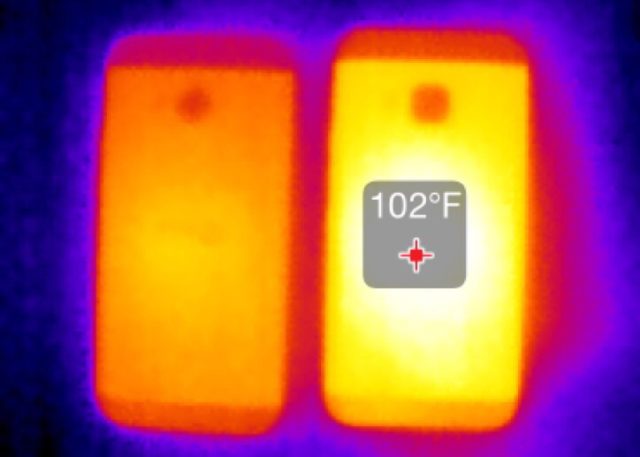
The Seek Thermal Imaging camera for iPhones shows that the M9 (right) runs significantly hotter than the M8 under load.

The M9 is the first Snapdragon 810 device we’ve had a chance to look at, and, at least on this phone, the rumors of the 810s heat issues seem based in reality. The 810 in the M9 was slated to run at 2GHz, but it almost never runs at that speed. It seems to be capped at 1.6 GHz. Even with the speed cap, the One M9 gets hotter than most other phones. HTC is butting right up against the acceptable heat level. It won’t burn you or anything, but it does get toasty.

The heat means there is a lot of throttling going on, so much so that when the Snapdragon 810-powered M9 is warmed up, it will score lower in GeekBench than a Snapdragon 805 or 800. In the GeekBench charts above, we have “cold” and “warm” listings for the One M9. The temperatures are nothing extreme: “Cold” is just running the benchmark after the phone has been left to sit at room temperature. “Warm” is running the benchmark multiple times until the score stops dropping—usually three or four runs. On Geekbench, we saw a whopping 30 percent performance drop when the M9 was warm. Running the same test on an M8 yielded very little change: we saw at most a 6 percent difference between warm and cold.

If you can get over how hot it is, the regular app performance doesn’t seem to suffer much when the phone is warm. 30 percent slower is still fast enough to run a 2D operating system. And despite its relative hotness, the One M9 and the Snapdragon 810 can still roughly double the graphics performance of the M8 and the Snapdragon 801, which will be nice for gamers. Video is a good way to heat up the phone, too, but playback is never affected.

And by the way, HTC definitely “optimizes” the benchmark scores, but as always we disabled all that and made it treat our benchmark apps like every other app.

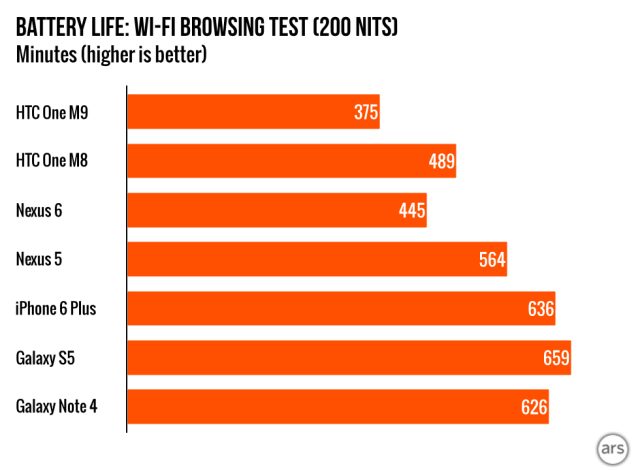
Given how hot the phone is, it’s really no surprise that the battery life is poor. It only lasted six hours and 15 minutes in our test.

HTC stagnates while the competition opens up the lead

The M9’s lack of change is really disappointing, not because we’re advocating change for change’s sake, but because the M8 left a lot of room for improvement. As it stands, the M9’s huge bezels make it look and feel dated and much larger than it needs to be. The One line was to be for premium devices, but recycling the same design doesn’t say “premium.” It says “cheap.”

The One M9 makes us wonder if HTC’s heart is still in this. Lately, it has been trying to reinvent itself as a consumer electronics company. It now makes a camera, a fitness band, a social network, a virtual reality headset, and, oh yeah, smartphones. While many smartphone vendors are also big electronics companies, HTC is a small company, and its move into general electronics seems to have come at the cost of its ability (or a least desire) to make a competitive smartphone. The One M9 feels like an afterthought, like the company was stretched too thin to give the phone the attention it needed.

The smartphone market is a race—you’ve got to come up with better designs and ideas faster than everyone else. If you’re in the back of the pack, you can never catch up to the leader if you’re running slower, and that’s what’s so frustrating about HTC. Its response to losing the race is to move even slower.

Look at what Samsung is doing. The company suffered few bad quarters in the smartphone market, so it revamped everything about the Galaxy S6—new materials, new SoC vendor, less crapware, an eye-catching curved version. That’s what it takes to be competitive. In the smartphone market, HTC’s flagship doesn’t feel like it’s on the path to success; it feels like it’s on the road to irrelevance.

The Good

  • HTC made some good changes to the M9, like getting rid of the gimmicky Duo Camera.
  • Double-tap-to-wake—you can just tap on the screen to wake the device. It’s great since you’ll never find the power button on the first try.
  • You can disable some of the skin features, like Blinkfeed and HTC’s custom Overview screen.
  • A Theme store. Customization is nice.

The Bad

  • The M9 runs hot and performance suffers. Our CPU benchmark showed a 30 percent drop in performance.
  • The design is stale. It’s a new phone that doesn’t feel new and doesn’t solve a lot of the problems we had with the M7 and M8.
  • The size of the phone. This is the bulkiest 5-inch device out there, which contributes to the “new phone that doesn’t feel new” vibe. We’re still insulted by the “HTC bar.”
  • We love aluminum, but this aluminum has been treated so much it doesn’t feel like aluminum anymore.
  • The power and volume buttons… which is which again?
  • Battery life. It’s well below most other flagships.
  • The camera isn’t great, particularly in low light.
  • HTC’s bizarre obsession with becoming an app developer. It won’t make people buy their phones, and there are always better options on the Play Store.

The Ugly

  • HTC’s next earnings report—this phone stands no chance against the tougher-than-ever competition.

Listing image: Ron Amadeo

Photo of Ron Amadeo
Ron Amadeo Reviews Editor
Ron is the Reviews Editor at Ars Technica, where he specializes in Android OS and Google products. He is always on the hunt for a new gadget and loves to rip things apart to see how they work. He loves to tinker and always seems to be working on a new project.
110 Comments