Skip to content
Tech

Not the upgrade we were hoping for: The 2014 Mac Mini reviewed

Removed features and Intel’s convoluted CPU lineup make the Mini less versatile.

Andrew Cunningham | 194
The 2014 Mac Mini looks the same on the outside, but on the inside it regresses in some unfortunate ways. Credit: Andrew Cunningham
Story text
Mid-tier 2014 Mac mini, as reviewed
OS OS X 10.10.0
CPU Dual-core 2.6GHz Intel Core i5-4278U (Turbo Boost up to 3.1GHz)
RAM 8GB 1600MHz LPDDR3 (soldered, upgradeable to 16GB at purchase)
GPU Integrated Intel Iris 5100
Storage 1TB Fusion Drive (128GB PCIe SSD + 1TB 5400 RPM HDD)
Networking Gigabit Ethernet, 802.11ac Wi-Fi, Bluetooth 4.0
Ports HDMI, 2x Thunderbolt 2, 4x USB 3.0, audio line-in minijack (digital/analog), audio line-out/headphone minijack (digital/analog), SDXC card slot
Size 7.7×7.7×1.4″ (19.7×19.7×3.6 cm)
Weight 2.7 lbs (1.22 kg)
Starting price $699 ($499 for base model)
Price as reviewed $899

It’s easy to feel sorry for the Mac Mini. Apple went through all of its Macs last year, updating them with new Intel Haswell CPUs and 802.11ac Wi-Fi adapters and faster SSDs and (sometimes) Thunderbolt 2, while the Mini sat and waited for an upgrade that never came.

Apple quickly announced a new Mini at its media event in October, two years after the 2012 Mac Mini was introduced. Desktops and laptops haven’t advanced a whole lot in the last year, so for the most part the Mini is just getting 2013’s upgrades a year late. If that was all that was happening, the Mac Mini would be a welcome-if-overdue update to the desktop. The 2014 Mac Mini is more interesting than that but unfortunately for people who have been waiting for this refresh, it’s more notable for the stuff it’s missing than its upgrades.

We typically like to review the base models of computers when possible, but in the Mac Mini’s case the upgraded $699 configuration is more interesting, and it’s the one you ought to get if you care about performance (more on that later). We’ll provide benchmarks representative of the $499 Mini, too, but know ahead of time that it uses the same guts as the base-model MacBook Airs and the $1,099 iMac. To evaluate the computer’s SSD performance, we’ve also equipped our review unit with a 1TB Fusion Drive, a $200 upgrade—we won’t be recapping how this feature works, but our deep dive is over here.

What hasn’t changed

Visually, the Mac Mini looks the same as it has since Apple stopped shipping SuperDrive-equipped models back in 2011. It’s an unadorned, flattened aluminum box with sharp edges and rounded corners. The front face is broken up by a small white power LED and an IR receiver, and the sides are perfectly smooth. A separate piece of black plastic on the back of the unit houses the fan vent and a reasonably impressive complement of ports, which has changed only a little from last year.

The FireWire 800 port has finally been jettisoned (the 2012 Mini was the last of the Macs to include the aging interface, though Thunderbolt-to-FireWire dongles still exist), and there’s a second Thunderbolt 2 port in its place. Returning from last year are the gigabit Ethernet jack, HDMI port, four USB 3.0 ports, an SD card reader, and audio in and headphone jacks. It’s still annoying that Apple insists on placing all of the ports for its desktops on the back of the computers. It’s no surprise at all for longtime Mac users, but PC switchers (a group the Mini specifically targets) may need to change their behavior.

Finally, the new Mini is exactly the same size and weight as the old one. If you were hoping for some kind of reduction here, keep hoping.

What has improved

The 2012 Mac Mini on top of the 2014 Mac Mini. Or, wait, is it the other way around?
The 2014 Mini (on the bottom, seriously this time) loses the FireWire 800 port and adds a second Thunderbolt port. Both are Thunderbolt 2 instead of standard Thunderbolt.
The Mac Mini is larger than something like Intel’s NUC, though these smaller mini PCs use external power supplies, and the Mini’s is still internal.
Apple’s packaging is the same, but even the boxes use lighter fonts now.

Delays to high-end Intel CPUs based on the new Broadwell architecture mean that most of the 2014 Mini’s improvements came to every other Mac in the lineup in 2013, so the box’s insides do little to surprise. We’re looking at Intel Haswell CPUs instead of Ivy Bridge, which should reduce power consumption while improving CPU and GPU performance. 802.11ac Wi-Fi bumps the maximum theoretical link speed to 1.3Gbps, roughly three times the 450Mbps 802.11n in the 2012 model.

Thunderbolt 2 raises transfer speeds to 20Gbps, and the included DisplayPort 1.2 spec brings 30Hz 4K display support to the Mac Mini. The HDMI port can also drive 3840×2160 displays at 30Hz and 4096×2160 displays at 24Hz. This Apple document has more information on external display support, but the most important thing you should know is that the Mini does not support multi-stream transport (MST) displays, meaning that 4K output at 60Hz is impossible. The forthcoming DisplayPort 1.3 standard is necessary to drive 60Hz displays using a single connector, and Thunderbolt 2 only includes support for DisplayPort 1.2. Update: Lack of 60Hz 4K support on the 2014 Mini is actually an Intel GPU limitation, not a DisplayPort limitation. This document outlines the resolutions and refresh rates supported by various Intel GPUs.

Of the other substantive improvements, the GPUs and the improved storage speeds are probably the biggest. 2012’s Minis all included Intel’s HD 4000 GPU, the best integrated GPU that shipped with Ivy Bridge processors. The GPU you get in the 2014 Mini depends on the configuration you spring for—the $499 base model includes the Intel HD 5000, the same one you’d get in the 2013 MacBook or the $1,099 iMac. The $699 and $999 models include the Iris 5100, a somewhat faster integrated GPU like what you’d see in a 13-inch Retina MacBook Pro. Unlike the Iris Pro 5200, the 5100 doesn’t include any dedicated eDRAM, which limits its speeds. It’s still probably worth the extra cash if you want the fastest Mini you can get.

A quick note about these charts: the HD 5000 results come from a 2013 MacBook Air with a 1.7GHz Core i5-3317U in it, since we don’t have numbers for the 1.4GHz model on hand. The base Mini will score a little differently, but the numbers should be more-or-less the same.

*: Approximate. Scores from an i7-4650U.

Neither of these new integrated GPUs will turn the Mac Mini into a gaming machine, but they bring the kind of improvements we’d expect in a generational jump. The HD 5000 improves on the HD 4000 by about 50 percent in the GFXBench T-Rex test and about 25 percent faster in the Cinebench R15 GPU test. The Iris 5100 further improves those numbers, beating the HD 4000 by 98 percent in the T-Rex test and about 45 percent in the Cinebench test. Scores in the heavier GFXBench Manhattan test improve as well, though by a much smaller margin—obviously the amount you stand to gain will vary from game to game and task to task.

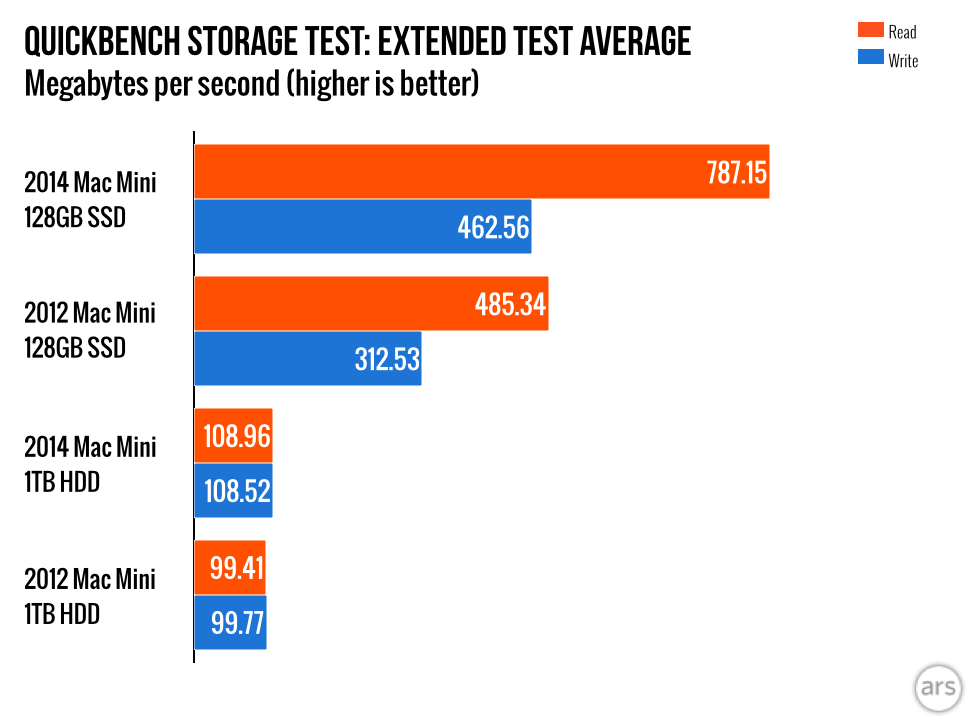
The jump from SATA III to PCI Express-based solid-state drives provides a nice generational performance boost too, the same one we saw when the various iMacs and MacBooks made the same jump in 2013. Both our 2012 and 2014 Minis are equipped with 128GB SSDs from Samsung. The new Mini has 48 percent better write speeds and 62.2 percent better read speeds. These numbers may vary somewhat from unit to unit, since Apple sources SSDs from a variety of manufacturers.

The base model Mini still comes with a spinning 5400RPM HDD by default, and scores improve by a negligible amount. Spring for the Fusion Drive no matter which model you buy—the way the technology works ensures that you’ll usually see the SSD speeds rather than the slow HDD speeds. Saddling a new computer with an HDD in 2014 is cruel to consumer and computer alike.

Finally, the new Mac Mini features improved idle power consumption, likely attributable to both the Haswell CPUs as well as the move from standard DDR3 RAM to LPDDR3. Power consumption under CPU load is much lower, mostly because the 2014 Mini no longer includes a quad-core CPU option. Power consumption under GPU load is a bit higher because of the powerful Iris GPU (we’d expect power consumption numbers for the HD 5000 to be somewhere in between our 2012 and 2014 Minis). Apple says the new Mini is “the world’s most energy-efficient desktop.” We can’t vouch for that claim, but it’s at least an improvement over its predecessor most of the time.

Activity 2014 mid-tier Mac Mini 2012 mid-tier Mac Mini
Off/Hibernate 0.3W 0.3W
Sleep mode 1.2W 1.8W
Idle at desktop 5.1W 9.0W
Watching 1080p YouTube in Safari ~7.0W ~13.0W
100% CPU load ~32.2W ~61.0W
Running GFXBench Manhattan benchmark ~45.0W ~38.0W

What has gotten worse

ENTRY DENIED.
ENTRY DENIED. Credit: Andrew Cunningham

I am now out of good things to say about the 2014 Mac Mini.

Let’s start with the thing that will matter the most to the technically inclined, though perhaps not as much to the Mac Mini’s target audience. Older Minis had a round plastic cap on the bottom. Twisting it off would give easy access to the computer’s two RAM slots, and enterprising techies with a screwdriver and a little knowhow could lift out the rest of the parts and perform further upgrades. Realistically the only other things you could properly upgrade on the most recent Minis were the two 2.5-inch hard drives, but it was still nice to be able to get in there and expand your drive capacity or add an SSD.

The 2014 Mini still has the plastic hatch on the bottom, but it no longer twists off. It’s trivially easy to pry it off with a spudger, but now instead of seeing the Mini’s guts you see yet another metal shield, held in place with Torx Security screws. Remove that shield, and after you pull the entire motherboard out and flip it over you’ll finally see that the new Mac Mini’s RAM is soldered directly to the motherboard. It’s no longer user-upgradeable, so make sure you order all the RAM you need when you buy the computer in the first place.

And that’s not all! One of the two 2.5-inch drive bays inside the new Mini has been removed and replaced with a spot for the small PCI Express SSD cards that the rest of the Macs now use. This is fine for a single-drive or Fusion Drive configuration, but you can no longer install two hard drives and mirror the data for redundancy. As a result, the $999 Mac Mini Server configuration is dead.

These changes could perhaps be forgiven if the 2014 Mini had gotten smaller or something, but Apple really doesn’t give you anything in their place. As we mentioned above, using soldered-in LPDDR3 instead of standard DDR3 uses slightly less power, but small gains like that really aren’t necessary in a desktop computer. Even Intel’s tiny NUC, the base model of which is essentially identical to the $499 Mini’s specs, can fit in standard RAM slots.

Where did my cores go?

It would be bad enough if that was the worst of the new Mac Mini’s sins, but there’s another one that’s even more severe: the 2014 Mini includes no quad-core CPU options. Every single one is a low-power dual-core model like the ones you’d find in high-end Ultrabooks.

Intel and Apple can share equal blame for this change—it’s just as much about Intel’s bewildering matrix of CPU offerings as it is about Apple’s unwillingness to complicate the Mac Mini’s internals. Let’s try to break it down.

Mac Minis always use laptop CPUs. They’re slower and more expensive than equivalent desktop processors, but they usually use less power and are soldered to the motherboard, saving space. Mid- and high-end Ivy Bridge CPUs all use essentially the same GPU, the Intel HD 4000, so you get Intel’s fastest integrated GPU no matter which chip you buy. Dual- and quad-core mobile CPUs all used the same socket, in this case FCPGA988. For Apple, making a quad-core Mini with Ivy Bridge was as simple as dropping in a new processor and making sure there was enough cooling capacity to handle it. The same was true for 2011’s Sandy Bridge architecture.

Now let’s look at Haswell. The M-series dual- and quad-core CPUs Apple likes to use for the Mac Mini now include an HD 4600 GPU, which is (approximately) the fourth-fastest integrated GPU Intel offers. Apple has demonstrated in the $1,099 iMac and elsewhere that it doesn’t like to use these slower GPUs—all current Macs include the HD 5000 or one of the two faster Intel Iris GPUs.

The HD 5000 and Iris 5100 are available in dual-core U-series CPUs, the same kind of chips that are used in both MacBook Airs and the $1,099 iMac. These CPUs use socket FCBGA1168. No quad-core CPUs use this socket. The HQ-series quad-core chips that would fit in the Mini (they have a 47 Watt TDP, about the same as the 45 Watt quad-core chips in the 2011 and 2012 models, and include an Iris 5200 GPU) use socket FCBGA1364. Several dual-core CPUs share this socket, but none include the Intel HD 5000 or Iris 5100 GPU.

So if you’re Apple and you need to work around the holes in Intel’s lineup, you have one of four choices to make. None are optimal.

  • You can continue to offer dual- and quad-core CPU options using one motherboard, but you have to take a slower GPU in some or all cases.
  • You can create two slightly different motherboards for dual- and quad-core Minis. This lets you keep your CPU and GPU power, but it complicates the manufacture of what is almost certainly your least-popular Mac (or second-least-popular; it’s hard to tell how well the Mac Pro sells outside tech circles).
  • You can go with quad-core CPUs and more powerful GPUs across the lineup and accommodate them using one motherboard. However, this will inflate the cost of the price-conscious Mini and potentially cannibalize the iMac.
  • You can go with dual-core CPUs and more powerful GPUs across the lineup, and accommodate them using one motherboard. However, you can’t offer quad-core CPUs.

Apple chose option four. Let’s hope Intel cleans this mess up in its Broadwell and/or Skylake CPU lineups.

*: Approximate. Score from $1,099 iMac with the same i5-4260U CPU.

Looking at our benchmarks, it’s clear that the mid-tier Haswell Mini is a serious step down in CPU power from the mid-tier Ivy Bridge model. Single-core scores stay roughly the same—Haswell performs more instructions-per-clock than Ivy Bridge, but the i5-4278U’s 200MHz lower Turbo Boost speed cancels it out. Multi-core scores are much lower on the Haswell Mini since it’s missing two whole CPU cores.

In real-world use, if you’re not doing CPU-intensive tasks these dual-core CPUs are still more than fast enough for light-to-medium-sized tasks. Our Fusion Drive-equipped 2014 Mini was perfectly zippy—as is the case with most modern computers, an SSD is going to improve your experience far more than a faster CPU will. In apps that aren’t heavily multithreaded, you probably won’t notice a whole lot of difference.

iMovie video exports don’t max out the CPU, and, as you can see, the 2014 Mini doesn’t take much longer to do the same work as the 2012 Mini. The equation changes when you’re using applications that can adequately use all four cores, or if you’re running many tasks at once. Handbrake will gladly use every bit of CPU power you can throw at it, and as a result the 2012 Mini is dramatically faster than the 2014 model.

Bear in mind that these comparisons only apply to the mid-tier and high-end Mac Minis. If you bought an entry-level dual-core model in 2011 or 2012, going to a 2014 Mini isn’t going to slow you down. Replacing a Core 2 Duo-based Mini from 2010 or before with a 2014 Mini will still net you a nice speed boost. But the numbers stand: the new Mac Mini is a decidedly unimpressive performer when it comes to CPU-bound tasks. It’s disappointing to wait two years for a refresh only to get a big performance regression.

A less-versatile, less-appealing Mini

The 2014 Mac Mini.
The 2014 Mac Mini. Credit: Andrew Cunningham

Plenty of people will buy this Mac Mini and be perfectly happy with it—maybe even more happy than before, since the entry-level and midrange machines are $100 cheaper than before. The computer was originally introduced as a sort of “gateway Mac” for people who wanted to replace their PC but didn’t want to spring for an iMac to do it. The 2014 Mac Mini still serves that audience just fine.

The interesting thing about the 2011 and 2012 Minis is that they were a whole lot more flexible than that. Quad-core CPUs made them better media encoding boxes and mini-servers. The second 2.5-inch drive bay allowed for storage mirroring, another important consideration in the server room, and easy-to-upgrade RAM meant you could pay less for a base model and upgrade it later if you needed to. The death of the $999 Mac Mini Server (which has been around since 2009, believe it or not) means that Apple doesn’t sell any kind of server anymore.

In short, the Mac Mini had gotten progressively more versatile and interesting over the last half-decade or so, and the 2014 version nukes most of that progress from orbit.

The worst part is that this loss of functionality isn’t exchanged for anything. The Retina MacBook Pro is less repairable and upgradeable than older non-Retina versions, but in exchange you get a lighter laptop and better battery life. The 2012 iMac took away RAM upgrades for the 21.5-inch model, but in exchange you get a thinner, quieter computer with a less reflective screen. The new Mac Mini isn’t smaller or lighter than its predecessor, and all the incremental technology upgrades it brings to the table could certainly have been made without sacrificing quad-core CPU options or that second drive bay.

Intel’s confusing matrix of CPU options may be partially to blame here, but either way the 2014 Mini can be much slower than the 2012 model was. The Mac Mini may have gotten an update, but unfortunately that isn’t the same thing as getting an upgrade.

The good

  • Better storage, Wi-Fi, and graphics performance than last year.
  • Significantly lower idle power consumption, thanks to Haswell.
  • Dual-core models should be faster than 2012’s dual-core model, though not by much.
  • Two Thunderbolt 2 ports for external expansion.
  • Thunderbolt 2 and HDMI ports support 4K screens at up to 30Hz.
  • $100 price cut in low end and midrange models.

The bad

  • The second 2.5-inch drive bay is gone.
  • The Mac Mini Server configuration is also gone.
  • RAM is soldered to the motherboard, and the desktop is generally much harder to open up and work on.
  • No 60Hz 4K support.

The ugly

  • No quad-core CPU option, which limits performance in midrange and high-end models.

Recommended add-ons

  • 8GB or more of RAM, since it can no longer be upgraded after purchase ($100 for 8GB in base model, standard in mid- and high-end models).
  • A 1TB Fusion Drive or better, since 5400RPM HDDs are pretty slow all by themselves ($250 in base model, $200 in midrange model).

Listing image: Andrew Cunningham

Photo of Andrew Cunningham
Andrew Cunningham Senior Technology Reporter
Andrew is a Senior Technology Reporter at Ars Technica, with a focus on consumer tech including computer hardware and in-depth reviews of operating systems like Windows and macOS. Andrew lives in Philadelphia and co-hosts a weekly book podcast called Overdue.
194 Comments