Skip to content
Tech

Review: Apple’s Retina iPad mini is the small tablet we wanted a year ago

Great screen and drastically better performance both come at a price.

Andrew Cunningham | 237
Can't sleep. Screen's gonna wake me. Credit: Andrew Cunningham
Story text

You needed to know two things about the first iPad mini. The first thing is that it was, well, mini—it was a 7.9-inch tablet from a company whose CEO once said that users would have to sandpaper their fingers down to comfortably use anything smaller than a full-size iPad. The second was that it didn’t include Apple’s so-called Retina display, the high-density screen that by then had become standard-issue in iPhones and iPads.

How quickly we got used to those high-resolution screens! The first Retina iPad came out in March of 2012, and in our review of the first mini, we already had trouble going back to a non-Retina display. With this year’s iPad mini, Apple addressed our complaints, bestowing upon the tablet a Retina display and removing the single largest roadblock to iPad mini ownership.

How does the new Retina iPad mini stack up compared to excellent, cheap Android tablets like the 2013 Nexus 7? And where does it stand next to Apple’s other thin-and-light tablet, the newly svelte iPad Air?

Body, build quality, and other hardware

Ars Senior Reviews Editor Lee Hutchinson unpacks and spends some quality time with the Retina iPad mini and its display.
Specs at a glance: Apple Retina iPad mini
Screen 2048×1536 7.9-inch (324 PPI) touchscreen
OS iOS 7.0.4
CPU 1.3GHz Apple A7
RAM 1GB DDR3
GPU “Apple A7 GPU” (likely an Imagination Technologies 6-series variant)
Storage 16, 32, 64, or 128GB NAND flash
Networking 802.11a/b/g/n, Bluetooth 4.0
Camera 5MP rear camera, 1.2MP front camera
Ports Lightning connector, headphone jack
Size 7.87″ × 5.3″ × 0.29″ (200 × 134.7 × 7.5 mm)
Weight 0.73 pound (331 g) Wi-Fi, 0.75 pounds (341 g) with cellular
Battery 6471 mAh
Starting price $399
Other perks Charger, Lightning cable

The Retina iPad mini is one of those Apple hardware updates that doesn’t reinvent the wheel when it comes to its physical design. It’s difficult to tell the difference between the new mini and the old one by looking at the two, unless your non-Retina mini happens to be one of the now-retired black models. Even though the old mini continues on at a new $299 price point, it’s now offered in white/silver and black/"space gray” just like the Retina mini, iPad Air, and iPhone 5S.

The new tablet is actually a little heavier and infinitesimally thicker than its predecessor—it doesn’t gain as much weight as the full-size iPad did when it first got its Retina display, but it does go against Apple’s ever-thinner-ever-lighter design trend. The new tablet is 0.29 inches thick (up from 0.28) and weighs 0.73 pounds (up from 0.68; the LTE model weighs 0.75 pounds, up from 0.69). The increase in thickness is barely noticeable and is so slight that the two can share Smart Covers and Smart Cases. The increase in weight is noticeable if you’ve got both tablets to hold in your hands simultaneously to compare, but it is mostly negligible if you’re just using the Retina iPad mini by itself.

Both of its nearest competitors are a little thicker but a little lighter (0.34 inches and 0.64 pounds for the 2013 Nexus 7, 0.35 inches and 0.67 pounds for the Kindle Fire HDX). The size and aspect ratio of the mini’s display makes a difference, though. On the one hand, a 4:3 screen is better suited to use in landscape mode for many use cases. It’s surprising just how much more of the Ars homepage the iPad can show off at once relative to the Nexus 7’s 16:10 screen.

The Retina iPad mini in landscape mode.
The Retina iPad mini in landscape mode. Credit: Andrew Cunningham
The Nexus 7 in landscape mode. Bring up the onscreen keyboard and your page will get even smaller.
The Nexus 7 in landscape mode. Bring up the onscreen keyboard and your page will get even smaller. Credit: Andrew Cunningham

On the other hand, the wider screen makes the tablet more difficult to palm or to fit in a pocket (if pocketing tablets is your thing). I have reasonably large hands, but they strain to palm the iPad mini where they can easily wrap around the Nexus 7. The more natural way to hold the iPad is by its edge, where you rely heavily on iOS’ thumb rejection to ignore the parts of your hands that rest on or near the touchscreen as you use it. iOS is pretty adept at thumb rejection—even if I intentionally pressed around half my thumb down on the right edge of the screen, it in no way altered the touchscreen’s accuracy or responsiveness.

Despite the minor differences (and the high-resolution screen, which we’ll get to in a moment) most of the observations we made last year about actually holding and using the tablet are exactly the same. The physical size of the tablet and of its onscreen elements are substantially identical to last year’s mini. It offers a smaller but still usable version of the full-size iPad experience. Where Android makes a distinction in software between 7-inch and 10-inch tablet interfaces, the iPad doesn’t. Anything that runs on a full-size iPad will look and act the same way on an iPad mini, and you won’t run into anything one can do that the other won’t also do.

From bottom to top: the iPad Air, the Retina iPad mini, the standard iPad mini, and the 2013 Nexus 7. All very thin tablets.
From bottom to top: the iPad Air, the Retina iPad mini, the standard iPad mini, and the 2013 Nexus 7. All very thin tablets. Credit: Andrew Cunningham
The iPad mini (right) looks like a smaller version of the iPad Air (left). Or does the Air look like a bigger version of the mini?
The iPad mini (right) looks like a smaller version of the iPad Air (left). Or does the Air look like a bigger version of the mini? Credit: Andrew Cunningham
Both tablets come in “space gray” (left) and silver (right).
Both tablets come in “space gray” (left) and silver (right). Credit: Andrew Cunningham
The cutout at the top of the tablet is only present on LTE models to let signal through.
The cutout at the top of the tablet is only present on LTE models to let signal through. Credit: Andrew Cunningham

Before we get to the best part of the tablet, there’s a small grab bag of minor features that all bear mentioning even though they’re not worth spending a ton of time on. First, the device’s stereo speakers in our review unit were a fair bit quieter than those in the iPad Air or last year’s iPad mini, but in terms of sound quality and clarity, they’re more or less a match for those in the iPad Air. They’re noticeably less muffled-sounding than the old mini’s speakers (they’ll also still get loud enough to fill a room with OK-sounding music if you’d like).

Next up, you’ve got the cameras, which are identical to those used in the iPad Air (we’ll point you to that review for a few comparison shots). The short version is that the upgraded 1.2MP FaceTime camera is a little better in low-light situations than it was before, and the 5MP rear camera takes pictures that rest somewhere between the iPhone 4 and the iPhone 4S in quality. They’re good enough for Facebook, which is about as good as they have to be.

The Retina iPad mini also picks up dual microphone pinholes, one of which is situated on the top edge of the tablet and the other of which is on the back of the tablet toward the top. As we found in our iPad Air review, these don’t really help much with Siri or any dictation software, but they do help to reduce noise when video chatting.

And finally, there’s the short list of features that aren’t here, namely the fingerprint-reading Touch ID sensor and the iPhone 5S’ gold color option. We’re calling it now: gold will be the killer feature of the Retina iPad mini 2.

The screen you’ve all been waiting for

The Retina mini (left) and the 2013 Nexus 7 (right) have near-identical pixel densities and great screens. Because its LCD and glass layers are fused, color and contrast “pop” just a bit more on the Nexus, but the mini has more screen real estate to offer.
The Retina mini (left) and the 2013 Nexus 7 (right) have near-identical pixel densities and great screens. Because its LCD and glass layers are fused, color and contrast “pop” just a bit more on the Nexus, but the mini has more screen real estate to offer. Credit: Andrew Cunningham

Longtime Apple followers have been through this non-Retina-to-Retina transition in four or five different product lines now, and by this point you know the drill. Text and properly optimized images are hugely improved in the move from the 1024×768, 162 PPI display of the old mini to the 2048×1536, 324 PPI display of the new one. Fine lines and details (like those used all over the place in iOS 7) are cleaner and easier to discern. Retina iPads have been around for almost two years at this point (has it really only been two years?), and it’s hard to find an app that doesn’t benefit in some way from the increased pixel density.

By comparison, the non-Retina mini is like looking at the Retina model through a screen door.
Text throughout the OS is simply more readable on the new screen.

I’m reading on my tablet the vast majority of the time, so nice sharp text was the single feature I was most looking forward to on the new iPad mini. The screen doesn’t disappoint. Whether you’re reading a full-size magazine page, browsing non-mobile websites, or just making the text as tiny as possible in the Kindle app for kicks, things are much clearer and easier to read. It’s possible to go back to the old iPad mini, but the screen looks like a Retina iPad mini with a thin layer of Vaseline smeared on it. Text on the Retina mini looks just as great as it does on the Kindle Fire HDX or 2013 Nexus 7, which have near-identical pixel densities of 323 PPI. Differences in the way each platform renders its fonts is going to have a more substantial impact on your reading experience than differences between the displays.

When watching movies or TV shows, apparent quality is a little more dependent on your source material. Things are unquestionably nice-looking on the Retina iPad mini, though factors like brightness, color accuracy, and contrast will alter your viewing experience more (they’re all good on the mini’s display, though AMOLED fans will miss that display technology’s deeper blacks). Here, the Nexus 7 is a close match for the mini since most video is well-suited to its widescreen aspect ratio, and its wide top and bottom bezels make it very easy to hold in portrait mode. The Kindle Fire HDX provides a similar viewing experience but is more limited in the media libraries it has access to—Apple’s iTunes library is not to be discounted on this front, and the iPads can access the Amazon Video service, while the Fire couldn’t get into the iTunes Store in its wildest dreams.

Compared to the iPad Air, colors on our Retina mini’s screen looked just a bit more muted, but contrast seemed a little better—bear in mind that these observations may or may not apply to the iPad you buy, since Apple usually buys up displays from multiple sources. As in the Air, there’s a slight air gap between the tablet’s front glass and the actual LCD panel itself, making the glass and LCD easier to replace individually if either component breaks but reducing contrast and color saturation compared to fused-glass devices like the iPhone 5S or the 2013 Nexus 7. The problem is exacerbated by direct sunlight.

Finally, there have been rumors that image retention or “ghosting” problems with the screen are limiting supply of the Retina iPad minis. Using Marco Arment’s handy image retention test as directed revealed no such ghosting on our review unit, but other reports from around the Internet (including one from Arment himself) indicate that some units are having problems with it. Note that image retention is temporary, unlike the “burn-in” that some CRT and plasma screens can suffer from. Apple and others have had problems with this sort of thing before—it’s usually worked out as production processes and component supplies improve, but it’s something early adopters should watch out for.

One update, two years of performance advancements

The original iPad mini was notable for its size, but its performance was unexciting—it was essentially an iPad 2, and while its performance wasn’t bad, even in iOS 7 it was much slower than the A6 and A6X chips used in the contemporaneous iPhone 5 and fourth-generation iPad. The Retina model more than ameliorates this by jumping two full hardware generations in one year, from Apple’s aging A5 to the brand-new A7.

All three of Apple’s iOS flagships—the new mini, the iPad Air, and the iPhone 5S—are now using an A7. I say an A7 and not the A7 because it looks like we’re still dealing with two different versions of the chip. One, used by the new iPad mini and the iPhone 5S, runs at a maximum clock speed of 1.3GHz and stacks its 1GB of RAM on top of the main SoC in a package-on-package design. The other, used by the iPad Air, runs at a maximum clock speed of 1.4GHz, and the 1GB of RAM is a separate chip. Compared to the difference between the old A5 and the A6X, the A7’s clock speed difference is a rounding error.

We looked at the performance of the 1.3GHz A7 in the iPhone 5S review, and we checked out the 1.4GHz A7 in the iPad Air review. Our standard benchmark suite showed that in both of its incarnations, the A7 is capable of double the CPU performance of any A6 chip in 64-bit apps, about double the GPU performance of the A6, and anywhere from 15 percent to 75 percent more performance than the A6X (depending on the test). Let’s take a look at those numbers again, paying special attention to how the Retina mini stacks up against the iPad Air and the old mini.

CPU performance

The Retina mini is consistently a bit slower than the Air, but no slower than the 100MHz clock speed difference would imply. Performing the same basic tablet tasks on both—browsing, gaming, reading, sending e-mails, opening apps, and zooming around the UI—feels the same on both tablets. They aren’t quite the same, but the gaping chasm between the performance of the fourth-generation iPad and the original iPad mini has been bridged.

The real upgrade is the jump between last year’s mini and this one—the new tablet is consistently four to five times as fast as the old one, a happy side effect of jumping two CPU architectures forward in a single year. Apple’s products generally don’t feel that much zippier year-to-year anymore, but jumping two years at once results in a tablet that’s tangibly faster in just about every respect.

Benchmarks aren’t bad metrics of performance when you’re talking about small bursts of activity, but how differently do the tablets perform under sustained CPU load? We fired up iMovie on both iPad minis, the iPad Air, and the iPhone 5S and timed an export of the same 20-minute, 720p movie.

The Retina iPad mini completes its export in about a third of the time it takes the original iPad mini, and all three of our A7-equipped devices get the job done in almost exactly the same amount of time. Hooking the iPad mini up to Xcode and observing the tablet’s CPU activity indicates that iMovie isn’t pushing the hardware as hard as it possibly could, probably to balance encoding speed with heat and battery life. However, iMovie’s behavior here suggests that most of the time even heavy content creators won’t notice much of a difference between the Retina mini and the iPad Air.

Graphics

Turning to our GPU benchmarks, it looks like every A7 performs identically in every one of our tests. The chip in the iPhone 5S may need to throttle itself more aggressively in the long run because of the smaller enclosure, but there doesn’t appear to be much of a difference in peak performance.

There are two different comparisons to make with respect to the original iPad mini. Apple claims that the A7 provides eight times the GPU power of the A5, and in certain benchmarks this is true. In GFXBench’s offscreen tests, which make each GPU render the scene at 1080p, the Retina iPad mini is eight times faster than its predecessor in the more challenging T-Rex benchmark. In the older Egypt benchmark, the Retina mini is merely (“merely”) four times faster than the old one.

The onscreen benchmarks are more indicative of real-world performance, since they render each scene at the tablet’s native display resolution (the same as any game you’d play on either tablet). Here, the Retina mini manages to be two to three times faster than the old one despite pushing a display with four times as many pixels. When the first Retina iPad came out, its actual onscreen GPU performance could just about break even with the older iPad 2’s. The Retina iPad mini manages to offer both a better display and a nice graphical upgrade.

When it comes to subjective performance in apps and even in the UI, iOS 7 and the iPads continue to be somewhat less polished than they could be. The Retina iPad mini will sometimes drop frames when scrolling quickly through the multitasking switcher or rotating from portrait to landscape mode, just as the iPad Air will. The fact that the fourth-generation iPad and the original iPad mini both have identical performance problems when completing these same tasks suggests that they may be iOS 7-related rather than hardware related, and that we could yet see them ironed out in future updates. While iOS 7 has now been updated four times since it was released, we’re still waiting on an iOS 7.1-type update to introduce more far-reaching optimizations and fixes.

Wi-Fi

Finally, the Retina iPad mini gets the same Wi-Fi upgrade that the Air did. Its dual-band 802.11n Wi-Fi adapter now uses two antennas, boosting the theoretical throughput speed from 150Mbps to 300Mbps. Theoretical Wi-Fi speeds are never really attainable in normal use, but the iPerf network throughput testing tool shows that the Retina iPad mini almost exactly doubles its predecessor’s wireless performance, whether it was 10 feet from the access point or 30 feet from the access point with a wall in between. The new mini and the Air share similar performance up close, but the Air’s larger enclosure permits it to use bigger antennas that help it keep a stronger signal when farther away from the access point. We’re still hoping for 802.11ac next year, but for now 300Mbps 802.11n is a fine stopgap.

An iPad by any other name…

From a development standpoint, Apple’s strategy with the iPad mini’s internals has been smart. Looking at each tablet’s model identifier demonstrates what Apple is doing here: the original iPad mini was designated “iPad 2,5,” identifying it not as its own unique hardware but as a variant of the iPad 2 (iPad 2,1). That was fitting, since the iPad 2 and iPad mini are substantially identical in CPU and GPU performance.

The Retina mini’s model is “iPad 4,5,” which again identifies it not as its own unique tablet but as a variant of the iPad Air (iPad 4,1). In essence, Apple has designed both minis to be close enough to their full-size counterparts that developers can test against one and, at least in theory, have an app that runs without issue on both. This should be especially helpful for smaller or independent development teams that can’t (or don’t want to) buy two tablets to test against every year.

Power and battery life

These Retina screens require a lot of power, which means a larger battery—this happened in the move from the iPad 2 to the first Retina iPad, and it has happened again here. The new mini includes a 6471 mAh battery, about 50 percent larger than the 4440 mAh battery in its predecessor.

It will take more power to fill this larger battery up, so to combat longer charging times Apple includes a 10W power adapter with the Retina mini rather than the smaller, iPhone-like 5W charger that came with the older tablet (the iPad Air comes with a 12W charger). Using the chargers that came with each tablet, the Retina iPad mini was able to charge to 50 percent in the time it took the standard mini to charge to 38 percent, so the larger charger more than offsets the larger battery. Use a smaller charger and the Retina iPad mini will take longer to charge than its predecessor.

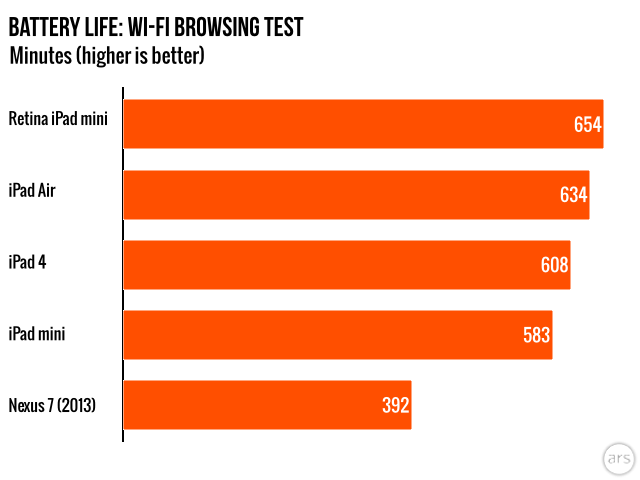
Apple promises about 10 hours of Wi-Fi Web browsing from each of its tablets, and the Retina mini doesn’t disappoint. In our browsing test, the new mini managed to last for 10 hours and 54 minutes, around an hour longer than last year’s mini and a handful of minutes longer than an iPad Air running the same test. Battery life will vary based on screen brightness and usage, but the faster components and superior screen don’t adversely impact the Retina mini’s runtime.

Which to choose?

You’ve got two options, and it might actually be harder to choose this year.
You’ve got two options, and it might actually be harder to choose this year. Credit: Andrew Cunningham

Last year, iPad buyers were faced with a clear-cut choice: buy a heavier-but-powerful tablet with a sharp screen, or buy a more portable and holdable tablet with year-and-a-half-old guts and a less readable, lower-resolution screen. Both the iPad Air and the Retina iPad mini were created to eliminate that trade-off. The iPad Air doesn’t give up “holdability” in exchange for its larger screen, and the Retina iPad mini doesn’t give up performance or screen quality in the pursuit of portability. Pick the big one or the little one. That’s the choice now. Even the starting prices are close enough that cost ceases to be a deciding factor.

The iPad you should go with leans heavily on your particular usage patterns. Do you mostly use your iPad at home, in the living room, in the kitchen, or in front of the TV? Is its primary role to be a laptop replacement? Do you write a lot, particularly in landscape mode with the Smart Cover propping the tablet up? Do you share the screen with others, perhaps to watch TV or movies? Is your eyesight not what it used to be? Go with the iPad Air. It’s still light enough to travel with in the event that you do so, but most of the time you’ll appreciate the larger size.

As for the Retina mini, do you travel frequently? Do you use your tablet on the train, sometimes while standing? Is your usage mostly passive—reading and watching more often than writing or creating? Do you usually use your tablet alongside a laptop rather than as a laptop? If this sounds like you, the Retina iPad mini is hands-down the best small tablet on the market right now. It’s got the screen, it’s got the performance, it’s got a huge library of applications, and it can access just about every source of media available today excepting the Google Play store (which, between Apple’s own store, Amazon’s content library, and the various streaming services available, would be mostly redundant here).

For the first time, iPad minis can also be outfitted with a Smart Case, which adds additional protection to the back of the tablet at the cost of some size and weight. We prefer the Smart Cover, but the option is welcome.
For the first time, iPad minis can also be outfitted with a Smart Case, which adds additional protection to the back of the tablet at the cost of some size and weight. We prefer the Smart Cover, but the option is welcome. Credit: Andrew Cunningham

The one unavoidable fly in the ointment is the tablet’s $399 starting price. We noted in the iPad Air review that the larger tablet’s $499 starting price was within spitting distance of similar tablets from other ecosystems, but if you’re viewing the Retina iPad mini as a Nexus 7 or Kindle Fire HDX competitor, the prices are nowhere near each other. For the price of a 16GB Wi-Fi iPad mini, you can very nearly buy both of those competing tablets.

Apple tries to head these comparisons off at the pass, pointing out that an 8-inch 4:3 screen is preferable to a 7-inch 16:10 screen for many tasks (often true, especially in landscape), that the iPad application and content ecosystems are more robust than Android’s or Amazon’s (sometimes true for Android, very true for Amazon), and that the iPad mini was designed to exist in a different device category than 7-inch tablets (more arguable).

Viewed in the context of something like the MacBook Air line, the pricing strategy makes sense—no one would expect an 11-inch MacBook Air to cost half of what a 13-inch Air costs just because the screen is a couple inches smaller, and that’s precisely because each laptop otherwise offers a broadly similar set of features and capabilities. That said, when your tablet starts at $399 and you charge $100 for storage upgrades that your competitors charge $40 for, some complaints about pricing are perhaps warranted.

If money’s no object, the Retina iPad mini is the best small tablet you can buy today. It might even be the best tablet you can buy today, period. If you passed on the iPad mini last year in hopes of getting a Retina model this year, you made the right call; this is the one you were waiting for. If money is an object, if you’re going to use your tablet mostly as an e-reading, movie-watching device, and if you don’t have a ton invested in Apple’s ecosystem, the 2013 Nexus 7 is there, waiting to accept you into its still-great, much-less-expensive arms.

The good

  • Retina display resolves all of our gripes with the old mini’s screen
  • A7 SoC blows the old mini’s A5 out of the water and nearly runs as quickly as the version in the iPad Air
  • Great battery life, and the battery charges more quickly if you use the included 10W adapter
  • Nice Wi-Fi upgrade, although it’s not 802.11ac
  • Speakers are of better quality than last year, though they are also quieter
  • Access to the full range of apps and media from Apple’s various stores

The bad

  • iOS 7 is still a little rough around the edges on this and every iPad
  • Air gap between glass and LCD keeps screen from being as good as it could be
  • Features like Touch ID will have to wait until next year at the earliest
  • Scattered reports indicate that some screens may suffer from image retention issues

The ugly

  • For better or worse, Apple is fighting against the trend among “small tablets” to also be “inexpensive tablets”

Listing image: Andrew Cunningham

Photo of Andrew Cunningham
Andrew Cunningham Senior Technology Reporter
Andrew is a Senior Technology Reporter at Ars Technica, with a focus on consumer tech including computer hardware and in-depth reviews of operating systems like Windows and macOS. Andrew lives in Philadelphia and co-hosts a weekly book podcast called Overdue.
237 Comments