Bento is the consumer version of popular database software FileMaker Pro. The new iPad version of the software joins the Mac version, currently at version 3, as well as the iPhone version in the growing stable of Bento implementations. At $4.99, the iPad application is 10 percent of the price of its desktop sibling, but the desktop software isn’t necessary in order to make use of it.
Creating a database from scratch in Bento for iPad is simple thanks to the 25 different templates included with the software. These templates are made for people who are looking to track things like recipes, expenses, customers, and inventory. Each template can be edited to meet the needs of a specific user and can be helpful starting points. For those who want to start from scratch, there is also an option to start from a blank slate.
The app can be used in portrait or landscape mode; the only difference between the two views is that landscape mode makes use of a split view, where the left portion of the screen is used to display a list of records inside the current project. From there, you can search through records, alter how records are displayed, set the sort order, open a preexisting library, or add a new library.
The right side of the split view is basically a canvas to display database record, along with a toolbar on top where most of the application’s functionality can be accessed. Unlike the desktop version of the software, which makes use of 10 different themes and has the option of downloading more, the iPad version has only two themes total. The themes include a virtual clipboard and a virtual book, which make for nice eye candy but don’t otherwise add functionality.
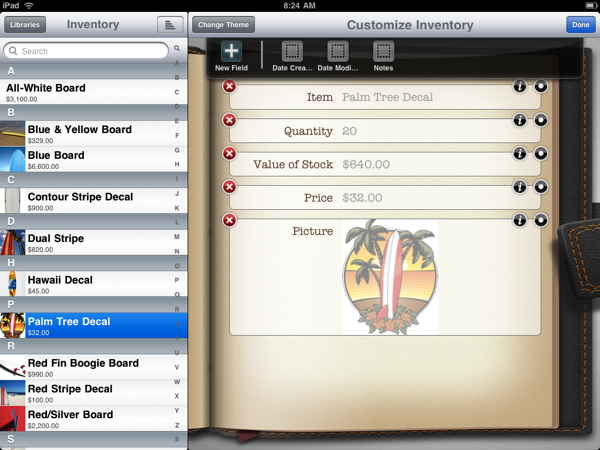
To add a field to a database, simply touch the pencil icon in the toolbar. A small drawer slides down with “date created” and “date modified” fields as options by default. Here, there is also a plus sign for adding additional fields.
 Loading comments...