Skip to content
Tech

Microsoft Zune

The new music and video player from Microsoft aims to knock the iPod from its …

Nate Anderson | 0
Story text

Welcome to the social

Microsoft Zune Player
Manufacturer:
Microsoft (product page)
System requirements: Windows 2000 or Windows XP, PC with USB 2.0 port
Price: $249 (shop for the Zune)

Let’s get one thing clear at the start: the Zune is a beautiful music player and the entire ecosystem trumps anything devised by a PlaysforSure licensee. But Microsoft isn’t satisfied with showing up its own partners; it wants a piece of Apple pie.

The signs are everywhere. The business model was borrowed from Apple, the headphones were borrowed from Apple, and the click wheel doesn’t resemble an iPod scroll wheel for nothing. How far does the copying go? Every Apple product bears the phrase “Designed by Apple in California.” On the back of every Zune, in tiny gray type, Microsoft has their own version of this line. It says: “Hello from Seattle.”

Imitation is the sincerest form of flattery. Now we will destroy you.

How well does the new device stack up to the old favorite? Let’s take a look inside the box.

The out of box experience

Could the Zune come in cooler packaging? Probably, but the sheer hipness of such a thing would blind the average geek.
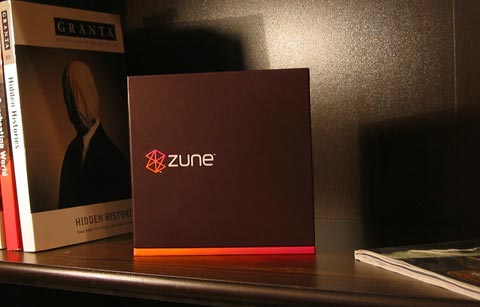
Microsoft has learned all sorts of lessons from Apple, including the importance of the initial “out of box” experience. The Zune packaging is lavish: a superbly designed two-piece cardboard box that feels substantial in the hand and just begs to be pulled open. When it is, the Zune tagline is revealed: “Welcome to the social.”
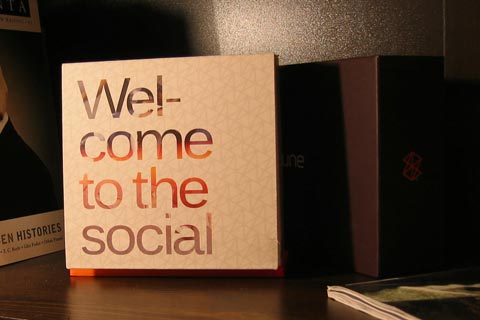
Beneath this lid lies the player itself, along with headphones and a sync cable.
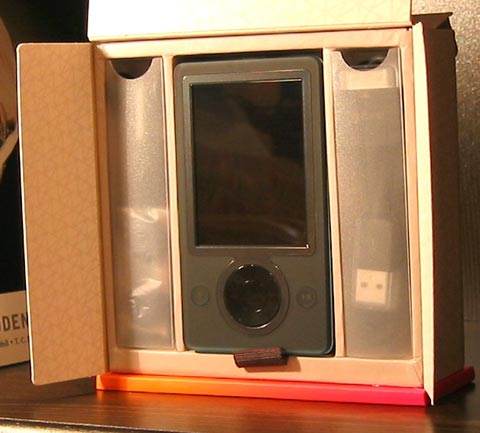
Instruction cards (calling them “manuals” would be an insult to true manuals everywhere), a carrying pouch, and a decal are all included in a separate compartment on the back of the box. For a product targeted squarely at high school and college students, the inclusion of the decal is a curious choice. Where, exactly, do high school and college students stick decals from their portable music players? On their Trapper Keepers™?

“The social” wasn’t as welcoming as I would have liked, though. Upon pulling the Zune out of its cardboard case, lifting it out of its plastic baggie, and peeling the protector from its screen (this thing comes well protected), I did what any self-respecting new gadget owner would do: ditch the manual and fire up the new toy. When that three-inch screen burst to life, I thought to myself, "Self, you have got to give credit to Microsoft for a great out-of-box experience."

And that’s when it crashed. Was it a sign of things to come? Read on to find out…

Test system

  • Athlon 3400+ CPU
  • 1GB RAM
  • 200GB hard drive
  • Windows XP SP2
  • USB 2.0
  • DSL Internet connection

Appearance is everything

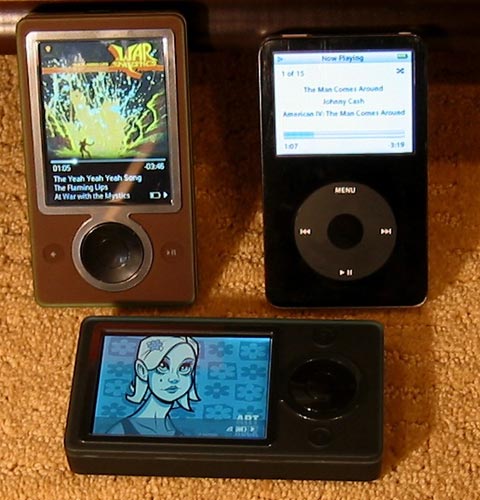
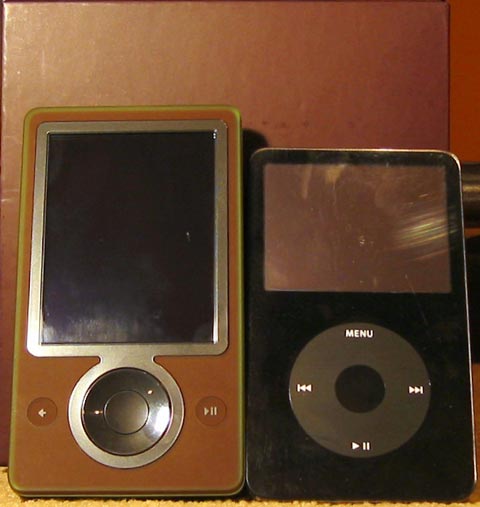
Tastes may vary, but I found the Zune’s looks superb—at least as good as recent iPods, which some say have looked a bit bloated since receiving the wider screens. The player itself comes in white, black, and brown. We’ve been testing the black and brown models in the lab and are happy to report that the black looks sharp and sexy. As for brown? It looks… less sexy, but still quite nice. Dismiss from your mind any playground jokes involving fecal matter. Brown may not be the new black, but it does look attractive, like a suede shoe encased in green plastic.

The plastic coating isn’t obvious in many photos of the Zune, but it delivers the goods when seen first-hand. The players are encased in a thin coating of matte plastic that gives each one an accent color (most visible at the edges of the player). The “black” Zune is actually enclosed in blue plastic, so it doesn’t resemble a black iPod. The brown Zune comes with a translucent green coding that reminds me inescapably of an Andes mint—a candy so delicious, incidentally, that it serves as proof of the existence of a benevolent God. By an act of will, I managed to resist licking the Zune, though I did take repeated snack breaks while using it. Promotional tie-in opportunity for Microsoft?

The biggest benefit to the plastic casing is that the device does not pick up fingerprints, except on the screen. If you have ever had the misfortune to see the shiny silver back of Managing Editor Eric Bangeman’s iPod, you’ll know why this is a good thing.


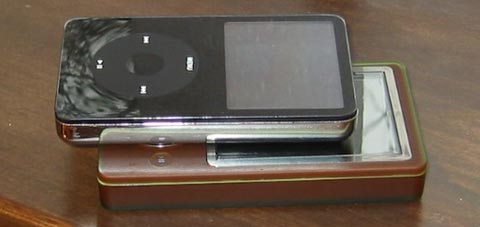
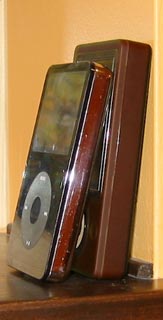
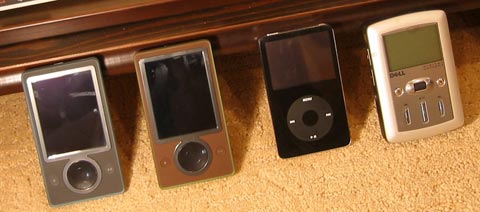
60GB black video iPod and a brown Zune

Both models we tested were attractive units, but small they are not. The Zune is just as wide as the iPod, but you can hold the two units side by side and stick a pen atop the iPod to fill in the gap. The Zune is noticeably deeper than the 60GB iPod, too. It doesn’t feel large or unwieldy in the hand, but be aware that this thing requires some pocket real estate.


Audio player shadow puppets

A gorgeous interface from Microsoft? Someone check hell’s temperature

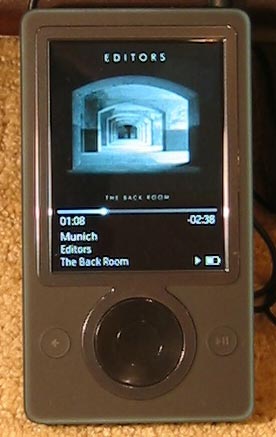
The Zune may be all about “the social,” but it has to deliver the goods as a music player before it can be taken seriously as a mobile file-swapping platform. Fortunately for Microsoft, it delivers the goods. While the interface has some quirks, I find it preferable to the iPod’s—long considered the gold standard in the digital audio player world. In fact, the Zune interface makes the iPod’s look like something invented by, well, Microsoft.

The iPod menus that once looked cool and minimalist, like a piece of modern art, look plain beside the Zune, which uses its enormous screen to great advantage. The Zune displays a background image that zooms and fades to give subtle visual feedback when drilling down into menus. Selecting the “music” menu, for instance, zooms the background slightly; when backing out to the main menu, the process is reversed. It’s a minor thing, but gives a great sense of moving deeper into the menus and is a testament to the thought that went into the player’s design.

The background can be customized, of course, and a gradient is laid across the left side of whatever image is chosen so that the main menu is more visible. This background personalization is a small thing, and at first it felt like a gimmick, but I’ve been converted. It does make the player feel more customized, and Microsoft has done a nice job of making even poor photos look like a slick part of the interface.


Hello from the Orbiting HQ

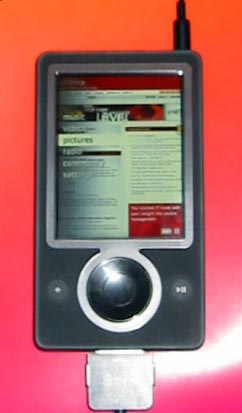
Selecting music is simple. The “wheel” at the base of the player is actually a four-way click pad with a button in the middle. Scroll to the “music” menu and click the button, and up pops a list of all artists on the hard drive. These can be scrolled by holding the click wheel either up or down, and the scrolling accelerates the longer the button is held (letters of the alphabet flash by on the right side of the screen to make navigation easier).

This is all standard stuff, but the Zune uses its click wheel to do something that the iPod can’t. Clicking left or right cycles between albums, artists, songs, genres, and playlists without needing to back up in the menu structure. Searching by albums is most enjoyable—tiny versions of the album art scroll by on the left portion of the screen.

While any song is playing, a click of the center button brings up another menu (and zooms in on the album art, just as the main menu does) that allows users to turn on shuffle and repeat, rate a track, flag it for later, or send it to another Zune.

The interface, which skips along so nicely in most parts of the player, falls down and skins its knee when it comes to album art. Album art is displayed both when browsing by album (tiny) and when listening to tracks (much larger), and it works fine when it’s small. When blown up, however, the pictures lack detail but show an abundance of compression artifacts. It’s a shame, too, because the screen does look sharp, especially at the highest brightness level. Background pictures look excellent; would it really have required so much extra space to let album art do the same?

Play (some of) that funky music

The device plays MP3 and unprotected WMA files, and the included Zune software can handle unprotected AAC and WMA Lossless files. The Zune does not play anything using FairPlay or Windows Media DRM ("PlaysforSure"), a revelation that initially seemed unbelievable. Requiring iPod owners who switch to the Zune to ditch any tracks purchased through the iTunes Store is understandable given Apple’s stance on licensing FairPlay. Would Microsoft really start competing with its own licensees? It seemed so unbelievable that crazy theories were concocted about how Microsoft was going to provide copies of all your protected songs in Zune format. But the answer the question is indeed yes. When we tried to use protected files, the software simply informed us that only files with the proprietary Zune DRM could be played or synchronized (along with non-DRMed tracks).

It was an understandable decision from a business perspective—Microsoft wanted the Zune to inhabit its own, Microsoft-approved ecosystem—but more than a little unfriendly to consumers. The move also served as an example of why DRM is so onerous. Users with large collections of PlayforSure or FairPlay tracks don’t really own the music in the way they do when they purchase a CD. Instead, they own a specific song in a specific format that is controlled by an industry not known for its customer friendliness.

Zune DRM is no less restrictive. Microsoft includes a note in the product guide which explains that Microsoft may include a “revocation list” with any new download that could require users to upgrade their DRM systems at any point in the future. “If you decline an upgrade,” Microsoft says, “you will not be able to access content that requires the upgrade.” What will future “upgrades” include? It’s anyone’s guess.

The sound of silence (and of maximum volume)

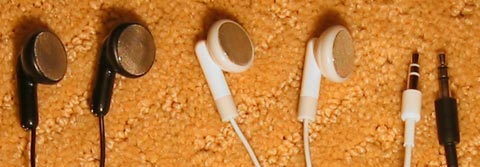
The Zune sounds great, on par with the iPod, but its headphones aren’t quite as good as the white earbuds designed in Cupertino. Using sophisticated reference and monitoring equipment (two human ears, both in reasonably good shape), I put quality to the test by swapping headphones between the Zune and iPod several times. Tracks from both players were crisp and clear, but the iPod headphones delivered a warmer midrange sound. The Zune phones initially sounded great, especially with FM radio, but comparison showed that they sounded “thinner” than the pair that came with the iPod.

Both pairs of phones are comfortable, which is no surprise when you consider their almost identical shape. Although the Zune earbuds aren’t quite as good, they still top most of the included-with-player earbuds I have heard, and they make the pair included with my old Dell DJ sound positively craptacular (especially in bass response).

In a nice touch, the Zune phones each have a strip of silver down the back. The metal is magnetic, and the phones stick back-to-back for storage, the raised “R” on the right side fitting into the depressed “L” on the left.

The Zune also gets loud. Really, really loud. This thing can thunder, which explains the copious warnings about hearing loss in the product guide. Classical music lovers don’t need to worry about hearing quiet passages; the Zune pumped out plenty of volume even on a muted version of Bach’s Goldberg Variations and on the opening notes of Arvo Pärt’s haunting “Litany.”

Radio: not dead yet

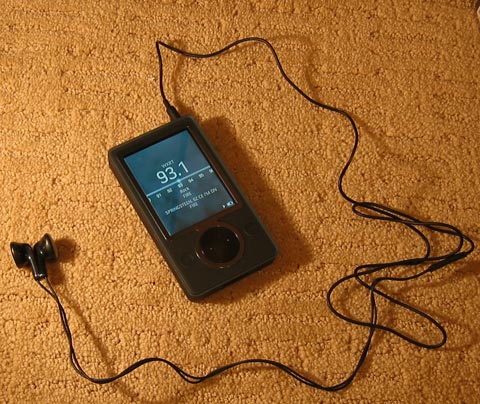
Radio’s still around, and the Zune does a nice job with it. Audio quality is excellent—stations have “punch” and clarity—and the headphones are used as the antenna. But what makes the system cool is that Microsoft reads Radio Data System (RDS) data transmitted by many stations, and can display the station’s call letters along with the name of the current song and the artist performing it. Nice.

The radio is also ready for your worldwide travels; it works in North America, Europe, and Japan.

Moving pictures

The Zune also handles pictures and video clips. The screen rotates automatically whenever video is shown, and the controls do the same—another Nice Touch™ from Microsoft. There have been plenty of pre-release complaints about the Zune’s resolution, which is the same as the iPod’s. “That bigger screen doesn’t matter,” goes the argument, “because it’s all the same resolution anyway.”

Now, obviously the Zune screen can’t be any sharper than the iPod’s, but that extra size does make a surprising difference. My own subjective side-by-side comparison indicated that watching video on the Zune was more fun and easier on the eyes. The iPod can be held closer to the eyes for the same effect, but I find this tiring.

The big problem is that there’s little to watch on the Zune. The Zune Marketplace doesn’t sell any video (yet). And remember all those episodes of The Office that you bought from iTunes? They don’t work, either.

The Zune displays only Windows Media Video (WMV) files, but the software application can transcode both H.264 and MPEG-4. Those who don’t mind violating the DMCA will find it easy enough to rip movies from their DVDs, but many users will find little use for their large screens. What’s really needed for the Zune to take off is a collection of good-quality (but short!) media clips that can be automatically synced to the player. If only Microsoft owned a video-sharing site that could provide such material…

They do, of course—its called Soapbox. It doesn’t compete with YouTube yet, but I’m willing to go on the record with a prediction: Microsoft will add Soapbox integration to the Zune software package within the next year in order to provide a constant stream of free content to users. It’s too good an idea not to happen. In fact, one of the review units here at the Orbiting HQ comes preloaded with Soapbox content already.

Until that happens, however, watching video on the Zune is still difficult for the average consumer. Then there is the fact that it only comes in a 30GB model, making it more difficult to store a the complete music collection and a good video library for road trips or commuting. Future devices will no doubt bump up capacity, but it’s not clear why Microsoft wouldn’t give consumers a choice of sizes from the start, and why they would launch their products with far less capacity than many iPods.

Pictures: what is there to say about pictures? The Zune displays them. They look nice. End of story.

There’s a bit more to say, actually. The Zune allows the music to keep playing while pictures or slideshows are displayed, and it also allows “reverse syncing” of photos. The Zune software does not allow music to be offloaded from the Zune to the PC, but it does allow this for photos. The stock photography industry, apparently, is less concerned with piracy than the music business.

Why WiFi?

If you didn’t know that the Zune has WiFi capability, and that WiFi was the key to “the social,” I’d like to offer you this free coupon for cleaning out the rock you’ve been living under.

WiFi is billed by Microsoft as one of the key Zune features, a potential iPod-slaying axe that the company will use to gash the Cupertino redwood while the sap runs out upon the ground. You might expect that any review of the Zune would therefore include WiFi right upfront and spend a great deal of time discussing it, but you would be wrong. That’s because, in its current incarnation, WiFi support is broken.

Oh, it works as designed; in testing the two Zunes in our lab, we found that swapping songs and pictures was reliable and effortless. Transfers take about 10 seconds per song, while pictures are much faster. Video clips cannot be transferred at all, though Microsoft has already hinted that this may change soon.

No, the problem lies in the way the system was designed. Any song can be shared with any other Zune user, but it expires after three plays or three days, whichever comes first. After that, it has to be purchased.

That’s certainly fair enough, but the Zune takes the restrictions several steps too far. For a system that will welcome you to “the social,” the Zune inexplicably does not allow any retransmission. Microsoft suggests that musicians will want to put demo recordings on their players, which they will then be able to share while out in public. To illustrate just how well this will work, consider the following dialogue:

Scene: a street corner outside Starbucks. Anytown, USA.

Dude on street: "Hey, man, are you in a band?"

Bass player: “Yup. Hey, I see you’ve got a Zune there. How about I shoot you one of our demo tracks?”

DoS: “That would be awesome. I just got paid, and I’m looking to spend thirty bucks on some new music.”

Bass player: “Rawk on.”

Tracks are exchanged. The two part. A friend walks up to the DoS.

Friend: “Heard any new music lately?”

DoS: “Dude, I’ve been checking out a new track from this great band called The White Whale’s Blowhole.”

Friend: “Awesome. Send it to my Zune so we can make ‘the social.’”

DoS: “Err, I’ve listened to it three times. Can’t send it to you.”

Friend: “That sucks. Can you buy it online so I can hear it?”

DoS pulls out laptop.

DoS: “No, man. They’re not in the marketplace.”

Friend: “That sucks. Hey, let’s go get a beer.”

DoS: “Okay.”

The lameness of this dialogue is matched only by the lameness of Microsoft’s decision not to allow retransmission. It’s clear why usage rights on protected content need to expire, but why should that prevent users from sharing it with their friends? This is supposed to be viral how, exactly?

The other problem is that the usage limits are enforced on all music content, protected or not. That means those who want to distribute content free of charge as a way to build visibility are out of luck; it will spread only as far as the people they meet in person. Again, it’s obvious that this was required in order to appease content owners scared that Zuners would redistribute P2P content or songs ripped from their CD collections, but it’s still uncool.

Microsoft also suggests that college students can record lectures on their laptops, then sync the lectures with their Zunes, then redistribute the lecture to a friend who missed class. But who would want to do this? Much easier to simply e-mail the lecture to the friend, who can then keep it for as long as she wants, and listen to it as many times as necessary.

To top it all off, the Zune cannot use WiFi to sync with PCs, and it can’t use WiFi to purchase music directly form the device. Yes, we expect that some variation of these features will be offered in the future, but it’s annoying right now.

Using any of these features requires your friends, neighbors, and drinking buddies to own Zunes, too. Until that happens, don’t count on being able to use WiFi for anything. Microsoft is initially targeting the high school and college market, and with good reason: students are more likely to bump into others with Zunes in a crowded school environment than, say, a suburban mother would be.

The battery: not exploding (yet)

The Zune battery doesn’t hold out as long as we had hoped, but performance is still adequate. Microsoft says that the Zune has a maximum 14-hour battery life, but this is based upon listening to a single 128Kbps album played on repeat with the EQ off and no buttons touched. These are not, it must be said, real-world conditions.

Should you manage to track down another Zune user, switching the WiFi on incurs a 10 percent performance cost. If you want the battery life to drop even further, simply set the screen brightness to maximum, turn on the EQ, start pressing buttons, and see if you can even hit ten hours.

The battery should also cover four hours of video, though we didn’t test that particular claim. It’s something we’ll revisit if the Zune ever gains robust video download and sync capabilities.

Welcome to the jungle, baby

The Zune exists within its own closed ecosystem, a lush world of palm fronds and parrots without any sign of clearcutting, desperate poverty, or the fires burning just out of view. The experience is carefully managed to ensure that everything which happens 1) has no compatibility problems and 2) looks elegant. It succeeds well enough that the failures, when they come, are more jarring in contrast.

Rather than use Windows Media Player as its interface, the Zune comes bundled with its own software program. It looks (surprise!) much like WMP 11, but it won’t handle any protected content except for songs from the Zune Marketplace.

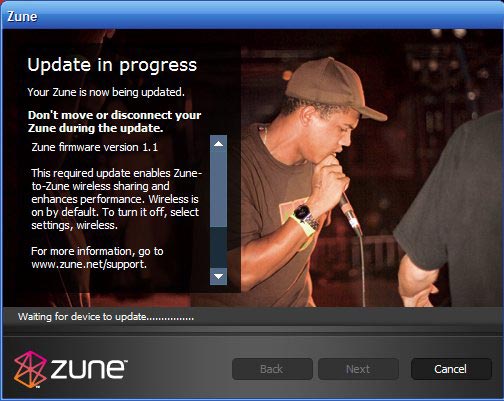
Installation proceeded without problems, though I didn’t expect to install a firmware update the day before the product launch.

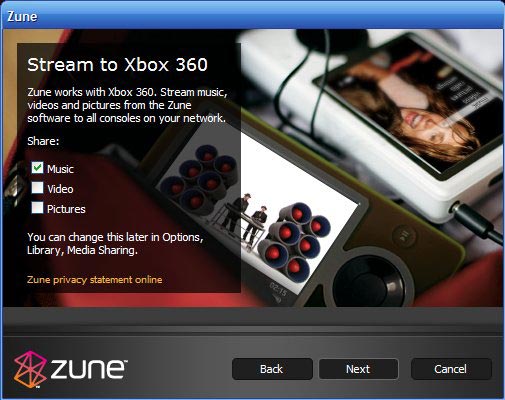
The Zune can also stream media to the Xbox 360, and the install program asks whether you want to set up this capability. After being welcomed to “the social” once again, the software forces you to sign off on a tedious license agreement that no one will ever read outside a courtroom. Once that’s out of the way, the application asks you to register your Zune and give it a name, then forces you to set up on online identity (like a GamerTag on the 360; 360 owners can actually use their GamerTag) that will be used to buy points or subscriptions from the music store. With all the preliminaries done, the main window opens and automatic synchronization of your music collection begins.


Remember when, way back at the beginning of the review, I talked about the unit crashing the very first time a song was played on it? The experience suggested that the Zune might have a few rough edges. That feeling was reinforced when the software failed to automatically synchronize my music collection not just once, but five times.

It started out well enough—the files zipped along over the USB 2.0 connection (one file every 1-1/2 to 2 seconds)—but then stopped, repeatedly, for no discernible reason. If the Zune application was restarted, synchronization would begin again, and more files would be added to the device, but it would always stop without comment or warning 10 or 15 minutes into the process. There may well be some obvious and legitimate reason for this behavior, but it certainly wasn’t apparent, and it took the shine off the whole "out of box" experience in a big way.

It never did work correctly.

The Marketplace

Getting new content onto the Zune is simple enough. It can be ripped from CDs or purchased from non-DRMed stores like eMusic. But those who want access to legal major label downloads for the Zune will find that the Zune Marketplace is their only option.

The Marketplace is always available in a single click from within the Zune application. Unlike iTunes, it offers two different plans: pay-to-download and subscription. Each track will set you back a dollar under the pay-to-download model, but it also requires the purchase of Microsoft Points—the same points used on Xbox Live. They can be purchased in $5.00 increments, which means that popping into the Marketplace to pay for a single song isn’t possible.

The Marketplace looks nice and has more than two million tracks. We tested it by using a monthly subscription to download tracks from Gnarls Barkley and Pink Floyd, and it worked like a music store should, except for one detail—it was dog slow. If iTunes is a greyhound, the Zune Marketplace is a three-legged chihuahua with a paunch and a strained groin.

The site was only launched on Tuesday, which may have accounted for the speed, but in our tests, using the Marketplace felt more like using a particularly slow Web application than a local program. Switching between the main window and the download progress screen, for instance, was glacial, as were most other operations at the store.

Curiously, content that is not even available for download is listed. The Beatles catalog is available with full album art, but trying to download Revolver shows that it is unavailable. While the selection is not as extensive as iTunes, two million tracks is still a lot of music, and it’s nice that Microsoft offers a subscription package for those who want it.

The store also offers editorial features designed to make finding new music easy. One of the best is the selection of curated playlists spanning every genre of music. I downloaded “Arrr… Pirate Songs,” which featured actual songs about pirates. One even incorporated the word “landlubbers.” Interesting, but not impressive. With a subscription, though, there’s no penalty for trying out new material, so even the bizarre playlists are worth at least a casual listen.

Software odds and ends

The Zune software is quite nice when it works. If you like Windows Media Player, you’ll enjoy this, and can use it for all of your playback and library maintenance needs. It can rip, burn, and sync music, but there are a few caveats.

First (and most obviously), it only works with a Zune. Windows Media Player works with all PlaysforSure devices. If you have one of each, be prepared to use both programs.

Second, though both programs function in similar ways, there are differences. Exhibit A is the ripping section of the Zune program; unlike WMP 10 and 11, Zune does not rip variable bit rate WMA files—although it plays them just fine. It rips MP3, constant bit rate WMA, and WMA Lossless only. Why?

Finally, the Zune software can burn tracks to CD, but those with a monthly subscription will find that they have no burn rights unless they buy the files first. Again, it’s understandable but annoying. It rules out both mix CDs that use subscription songs and listening to music from the stereo in my kitchen at home, which has a CD player but no inputs. For your fifteen bucks a month, you get to listen to music on one PC and one Zune. That’s it.

Software, like the other pieces of the Zune ecosystem, has its share of nice touches. One of these is the “inbox” that appears in the top left corner of the screen. Any content received from other Zune owners appears here, where it can easily be found at a later time and purchased from the Marketplace. The inbox also keeps a list of files that a user has “flagged” on the Zune. Flagging is a simply process that tags songs and albums for later use. It’s a great way to mark a group of songs for later inclusion in a playlist, for instance, or to burn to CD when back at the computer.

Conclusion

The Zune is quite a compelling product, but it shows a strange schizophrenia of spirit. The detail work on the device is elegant and illustrates the thoughtful care lavished on the product, but basic functionality is crippled or poorly implemented.

When a device promises “the social” but drastically limits file-sharing, can’t swap video clips, and only works with identical devices, it’s a tough sell in a world dominated by iPods. All Apple has to do is release a model with WiFi and Microsoft’s major advantage is wiped out. And because that “advantage” isn’t used well, the Zune will face an uphill path to broader market adoption.

When the switch to a closed ecosystem means that users will have to forgo all of their DRMed tracks to use the new player, we’d at least expect basics like syncing to work without problems. Isn’t that the point of making the switch in the first place?

When so much attention is spent on gorgeous packaging, but the player locks up in less than 10 seconds of use, it raises questions. To unseat a player like the iPod and to convince users to ditch any PlaysforSure tracks they might own, Microsoft needed to hit a home run on launch day. At best, they knocked a long double off the wall. That’s pretty good, but not when you’re down by six in the eighth inning.

This isn’t to say that the Zune is not a cool product. It is. But much of this is only “potential coolness.” If you’re looking for an attractive music player with a great screen and a fine interface, the Zune is worth a look. If you want a device that makes it simple to watch and share viral video clips, swap music, and put its WiFi to good use, the Zune may disappoint. We do believe that the Zune has potential, but not enough to score it higher than a seven. There are simply too many problems right now.

Microsoft’s legendary tenacity could well mean that the next revision of this product is amazing. Even the current Zune could turn out to be something really special if updates are made to the firmware and software package on the PC. But if we have to judge the Zune as it exists today, it can only be in words more commonly used to describe Greek tragic heroes: flawed, but close to greatness.

The good:

  • Great interface
  • Elegant design
  • FM radio support
  • Well-implemented ecosystem
  • Gorgeous display
  • Zune Marketplace
  • Xbox 360 support

The bad:

  • No variable bit rate encoding support in the Zune software
  • The social isn’t quite here yet—WiFi functionality is lacking
  • Software bugs and sync problems
  • Can’t import music from other music services
  • Can’t use the Zune as a portable hard drive
  • Compression artifacts in album art

The ugly:

  • The realization that the Zune can’t play any of the DRMed music you’ve purchased until now

Epilogue: On Reviewing

Hate is all around
Find it in your heart and every waking sound.
On your way to school
Work or church, you’ll find that it’s the only rule.

"All You Need Is Hate" by The Delgados

Our review of the Zune kicked up a pretty good dust cloud in the discussion thread, much of it fixated on the numerical score, and a few words seem in order about the way that we review products. While some of the comments were clearly fueled by large quantities of Ruby Red Hatorade, many raised valid points. Why did a player that crashed right out the box get a 7? How could we have anything positive to say about an online marketplace that can’t sync podcasts and doesn’t offer video downloads?

I’m glad you asked.

Ars Technica reviews are known for being thorough—and at 4800 words, this one was no exception. We aim to present a product’s pros and cons so you can make your own decision, and we try to do it in a style that’s both informative and entertaining. But at the end of the review, we do give the product a score. Although the content of the review itself must be accurate and objective, scoring a product is necessarily a subjective experience. There simply is no "correct" score; the number will vary depending on the weighting given to each factor.

In evaluating the Zune, here’s what I considered most important: how well it plays music and videos, how well the player interface works, whether the marketplace (and especially the subscriptions) works without problems, and how easy the entire ecosystem is to use. These are the core features. On the first three counts, the Zune exceeded expectations. The interface and the product design are both attractive, and they give the product that elusive quality of being fun to use. To me, this means that the product should score a 6-10. How could I give a 5 or lower to product that is actually a fabulous music and video player with a gorgeous interface? (Those who wonder what the "point" of a gorgeous interface is might consider how many iPods Apple would’ve sold if they had been eggplant purple and shaped like a brick; aesthetics matter.)

Now, the Zune has problems. The crashing issue didn’t bother me; it happened once out of the box, but never again, and only on one player (keep in mind that we have two, not just one). The failure to auto-sync was a bigger problem. As mentioned in the review, synchronization works, but then comes to a halt for no apparent reason after ten minutes. This was a definite point deduction, but it didn’t merit knocking the Zune out of the 6-10 range. That’s because manual syncing worked fine, and I’ve seen no general complaints about the problem. The Zune Marketplace was also slow, but it hardly seems worth knocking several points off the score because the store was sluggish on launch day. More important was that everything worked correctly and that subscription content worked without a hitch.

When it came time to assign scores, then, I didn’t feel comfortable assigning the product a 6 because I truly enjoyed using it. My wife enjoyed using it (and that’s saying something special). Weighing this against the problems found in the current Zune models, I chose a 7; the product is great, but flawed. Seems fair to me.

Plenty of people don’t agree. That’s fine, and that’s why we like the body of our reviews to be so thorough. We trust our readers enough to know that they can make up their own minds about a product if given enough information. If they want the Orbiting HQ take on something, they can consult the score (which is at the end, where it belongs; a review should be far more than a single number).

Thanks for reading.

Nate Anderson

Photo of Nate Anderson
Nate Anderson Deputy Editor
Nate is the deputy editor at Ars Technica. His most recent book is In Emergency, Break Glass: What Nietzsche Can Teach Us About Joyful Living in a Tech-Saturated World, which is much funnier than it sounds.
0 Comments

Comments are closed.