
You are using an out of date browser. It may not display this or other websites correctly.
You should upgrade or use an alternative browser.
You should upgrade or use an alternative browser.
The Splay is a subpar monitor but an exciting portable projector
- Thread starter JournalBot
- Start date

Looks like a versatile piece of gear for a trade-show kit. You'll always have some way to run your promo video no matter what the booth space looks like.
Upvote
73
(73
/
0)

Scipio Africanus
Ars Centurion
Thing is, they actually have portable 24 inch monitors. Unwieldy? Absolutely but they exist and can be had cheap, about $200-$300 USD a fraction of the price of this and I'm guessing much better picture quality.
I didn't see any folding ones yet but that would be a fantastic use case for folding screens.
I didn't see any folding ones yet but that would be a fantastic use case for folding screens.
Upvote
48
(50
/
-2)

ChrisMarshallNY
Ars Praetorian
I don't see any advantage over a standard 24-inch flatscreen (at about 15% the price).
You won't be able to bring a flatscreen as carry-on, but I always used to mail them to the venue, ahead of time, anyway.
I prefer a real projector. Much more versatile, and [usually] able to project much larger images.
I'm not really a fan of pico projectors, but I think some of them are pretty much the same, as far as size goes, and I have a neat little "roll-up" screen, that expands to bigger than this, and is easily carry-on, when rolled up.
I also have a big folded screen, that packs like a T-shirt, and expands to about 8 feet (yeah, I have a bunch of projector stuff -I used to do a lot of presentations).
You won't be able to bring a flatscreen as carry-on, but I always used to mail them to the venue, ahead of time, anyway.
I prefer a real projector. Much more versatile, and [usually] able to project much larger images.
I'm not really a fan of pico projectors, but I think some of them are pretty much the same, as far as size goes, and I have a neat little "roll-up" screen, that expands to bigger than this, and is easily carry-on, when rolled up.
I also have a big folded screen, that packs like a T-shirt, and expands to about 8 feet (yeah, I have a bunch of projector stuff -I used to do a lot of presentations).
Upvote
32
(33
/
-1)
bone_collector
Smack-Fu Master, in training
That is quite an evocative product description:
a housing member having a sliding member aligned on the exterior of the housing member, and sliding along the exterior of said housing member between two operating positions…multiple collapsible members
Upvote
70
(71
/
-1)
I've always thought mini projectors were cool, though I'm pretty sure they're nothing I actually want to use in real life. But... think of the possibilities!
That's typical for patents.
That is quite an evocative product description:
That's typical for patents.
Upvote
21
(21
/
0)

The first thought I had when seeing this is that it'd be a great companion for camping or travelling to remote locations. I would not want to pack a cumbersome and expensive laptop, not even a tablet -- but my phone would always be there, and if this is rugged and light enough, it could easily find a spot in a rucksack; plug in MHL (bonus for wireless HDMI) and Bob's 'yer uncle.
Of course, pico projectors were a thing for a while already, but it's always difficult to find a white wall to project on in a tent or a wooden cabin, which this collapsible "monitor" elegantly solves. Neat!
Of course, pico projectors were a thing for a while already, but it's always difficult to find a white wall to project on in a tent or a wooden cabin, which this collapsible "monitor" elegantly solves. Neat!
Upvote
12
(15
/
-3)
fuzzyfuzzyfungus
Ars Legatus Legionis
By historical standards (no, I'm not bitter about the time spent supporting a school full of 'bulbs that come in cage modules so they don't hurt you when they explode because they got bored of UV-damaging the LCD filters' era projectors; why do you ask?) this sort of thing seems next to witchcraft; but I'm not quite sure how justifiable it is.
Ultra-short throw projectors definitely have their place when you aren't doing some permanent lecture hall/conference room install; but you can just get ultra-short throw projectors designed with portability in mind(probably stay away from the $80 fleabay specials that advertise '4k' because they will technically take a 4k signal and then brutally downscale it to match whatever literally the cheapest DLP module going wants; but $1,300 gets you at least out of the bargain bin whether you want the lower power at-least-briefly-battery-powered options or the more traditional mains powered units.
And, while most monitors sold for home or office use are far too delicate to be readily portable(frail plastic even on the sides that have casings; absolutely nothing on the screen side); the contemporary LED backlight stuff has gotten thin and light enough that, if given a protective case, the only real obstacle to portability is width/height rather than thickness or mass. The version that promises 30+in is starting to enter tempting territory; but 24.5in would basically just be a hard-sided briefcase; and not suck as a monitor.
Ultra-short throw projectors definitely have their place when you aren't doing some permanent lecture hall/conference room install; but you can just get ultra-short throw projectors designed with portability in mind(probably stay away from the $80 fleabay specials that advertise '4k' because they will technically take a 4k signal and then brutally downscale it to match whatever literally the cheapest DLP module going wants; but $1,300 gets you at least out of the bargain bin whether you want the lower power at-least-briefly-battery-powered options or the more traditional mains powered units.
And, while most monitors sold for home or office use are far too delicate to be readily portable(frail plastic even on the sides that have casings; absolutely nothing on the screen side); the contemporary LED backlight stuff has gotten thin and light enough that, if given a protective case, the only real obstacle to portability is width/height rather than thickness or mass. The version that promises 30+in is starting to enter tempting territory; but 24.5in would basically just be a hard-sided briefcase; and not suck as a monitor.
Upvote
16
(16
/
0)
majortom1981@aol.com
Ars Scholae Palatinae
The issue is there are projectors for the same price or cheaper with more lumens and better resolution.
Upvote
7
(8
/
-1)

Or you can get the Anker Nebula Capsule 3 Laser for half the price.
Upvote
20
(20
/
0)
auldancranky
Smack-Fu Master, in training
I really like the idea of this for some reason. Objectively looking at it, it's wildly expensive and looks like something you'd have to launder on a regular basis. I think I just like the steampunk kind of vibe.
Upvote
4
(4
/
0)

$1,300 for what is basically just a $50 photography softbox and a cheap pico‑projector with a customised mount on a $20 tripod? Count me in… (nope)
Upvote
33
(34
/
-1)
spaceminions
Ars Centurion
"Projectors lack the image quality compared to good TVs and monitors, and they’re pretty needy"
It can cost more to get quality out of a projector in some use cases. The room and screen are part of the optical design, but people want it to all be the projector's job which makes things harder. Especially since many of them are trying to replace a full size LCD with a tiny one, a very bright light, and an aspheric lens, and then project onto a matte white wall instead of a fancy retroreflective surface
I got a $45 1080p projector from amazon which was made to mimic the samsung freestyle, those round projectors that can project forwards or upwards. It's clearly a very basic model, with no optical trapezoid adjustment or zoom. But compared to an equal price LCD TV which would be small and probably kind of uneven, it's great as long as you can dim the lights in the room and you have a flat wall or ceiling without strong texture to aim it at. It's easy to use, just plug in power and either a usb drive with movies or a hdmi either from your device or a streaming stick. I use a chromecast so that I can cast from my phone screen. Some have wifi built in using an old android version but I avoided them figuring it would not perform as well.
The middle range home use case (which you are kind of referring to by saying "good" instead of excellent or mediocre) is where projectors don't do as well; getting beyond a certain quality in projectors costs a lot more, and in that price range you can get a large enough plain screen to be satisfied. A way a projector can justify the price is if it does something that a fixed screen wouldn't - like be huge or retract the screen up to the ceiling when not in use. But they can definitely do well on quality if you spend enough; think of movie theaters for example. In fact a lot of the "problems" with projectors are all about the comprimises we've made. A good projector can be in focus from edge to edge, but only if the installation is suitable - if the screen is not well aligned and the throw distance is ultra short, the focal plane is going to be too thin to work.
It can cost more to get quality out of a projector in some use cases. The room and screen are part of the optical design, but people want it to all be the projector's job which makes things harder. Especially since many of them are trying to replace a full size LCD with a tiny one, a very bright light, and an aspheric lens, and then project onto a matte white wall instead of a fancy retroreflective surface
I got a $45 1080p projector from amazon which was made to mimic the samsung freestyle, those round projectors that can project forwards or upwards. It's clearly a very basic model, with no optical trapezoid adjustment or zoom. But compared to an equal price LCD TV which would be small and probably kind of uneven, it's great as long as you can dim the lights in the room and you have a flat wall or ceiling without strong texture to aim it at. It's easy to use, just plug in power and either a usb drive with movies or a hdmi either from your device or a streaming stick. I use a chromecast so that I can cast from my phone screen. Some have wifi built in using an old android version but I avoided them figuring it would not perform as well.
The middle range home use case (which you are kind of referring to by saying "good" instead of excellent or mediocre) is where projectors don't do as well; getting beyond a certain quality in projectors costs a lot more, and in that price range you can get a large enough plain screen to be satisfied. A way a projector can justify the price is if it does something that a fixed screen wouldn't - like be huge or retract the screen up to the ceiling when not in use. But they can definitely do well on quality if you spend enough; think of movie theaters for example. In fact a lot of the "problems" with projectors are all about the comprimises we've made. A good projector can be in focus from edge to edge, but only if the installation is suitable - if the screen is not well aligned and the throw distance is ultra short, the focal plane is going to be too thin to work.
Upvote
8
(8
/
0)
BlinkerFluid
Smack-Fu Master, in training
This seems like it could be perfect for that one DIYperks project of improving an lcd screen to oled levels of blacks.
Obviously, you would be better off just buying a new oled tv, but, if you're in it for the love of DIY and the concept then the relatively small premium over a brand new oled (even if you're buying a brand new lcd for the project) quickly seems to become reasonable.
Obviously, you would be better off just buying a new oled tv, but, if you're in it for the love of DIY and the concept then the relatively small premium over a brand new oled (even if you're buying a brand new lcd for the project) quickly seems to become reasonable.
Upvote
2
(2
/
0)
I'm definitely going to start using "densely decorated" to justify all the gadgets and toys on my desk from now onespecially in small, densely decorated homes like mine

Upvote
22
(22
/
0)
I'm definitely going to start using "densely decorated" to justify all the gadgets and toys on my desk from now on
I mean, I have literally 2000€ worth of built but yet unpainted Warhammer figures collecting dust in my living room, and one wall is basically all bookshelves, stacks of Euroboxes containing more plastic and a sofa, and I still have a wide stretch of white on the wall opposite of the sofa for my projector
Upvote
0
(1
/
-1)
You can get various kinds of portable few hundred lumen class 1080p projectors for under 100$/€, this one looks suspiciously like one of those. A comparison to a similarily priced projector would have been useful, it kinda looks like you are paying a huge amount of money just for the "tent".
Upvote
8
(8
/
0)

Windowsrookie
Smack-Fu Master, in training
It could make sense for work travel if it came will a slightly smaller shroud. A 20-21" screen would be an improvement over most portable monitors (typically 14"-16"). That would also bump the PPI up to over 100 which although not great, would make text much more readable.
The biggest problem is the price. 14-16" portable monitors can easily be purchased for less than $100.
The biggest problem is the price. 14-16" portable monitors can easily be purchased for less than $100.
Upvote
0
(0
/
0)
We sell a neurovisual training system that uses two Splay monitors. They definitely fill a niche. The original system we developed used two LCD monitors. Which we still offer, but has its own drawbacks.
As noted, regular monitors and projectors both can outperform for their intended use. But our customers love having a system that packs up small and light for travel and storage (we fit computer, tripods, monitors, etc etc in a small duffle bag). During use, users set them up on a tripods and position them at a distance from the control CPU. We use wireless HDMI dongles that are powered from the Splays. Battery powered and wireless. Customers love it.
Most of the time they are in monitor mode, but for some training scenarios, they are used in projector mode. They are pretty good as short throw projectors.
Are they a replacement for normal monitors or projectors? No. But for certain uses, like ours, they beat the other stuff out there.
BTW, as an interesting aside, the system we have was developed in cooperation with an expert in brain injury/therapy/training. That dude's work is worthy of an Ars article in its own right. His work on triggering neuroplasticity is used with patients with brain injury AND by athletes to improve visual processing and executive function. And the elderly to reduce cognitive decline. He was able to reduce concussions at a division 1 football team by 80% while improving GPA and win more games. 10 years of data.
My understanding is a new coach thought it was BS, cut the training. Concussion rate went back to where it was before. Restarted the training, concussions dropped low again. Turns out players brains don't process their entire field of view, especially when tired. They see stuff, but the brain ignores it. His training improves visual processing and executive function for the entire game. They don't get as many concussions because they avoid getting hit as much or as hard.
Wild stuff and just the tip of the iceberg on this dude. This was just the easiest story to share.
As noted, regular monitors and projectors both can outperform for their intended use. But our customers love having a system that packs up small and light for travel and storage (we fit computer, tripods, monitors, etc etc in a small duffle bag). During use, users set them up on a tripods and position them at a distance from the control CPU. We use wireless HDMI dongles that are powered from the Splays. Battery powered and wireless. Customers love it.
Most of the time they are in monitor mode, but for some training scenarios, they are used in projector mode. They are pretty good as short throw projectors.
Are they a replacement for normal monitors or projectors? No. But for certain uses, like ours, they beat the other stuff out there.
BTW, as an interesting aside, the system we have was developed in cooperation with an expert in brain injury/therapy/training. That dude's work is worthy of an Ars article in its own right. His work on triggering neuroplasticity is used with patients with brain injury AND by athletes to improve visual processing and executive function. And the elderly to reduce cognitive decline. He was able to reduce concussions at a division 1 football team by 80% while improving GPA and win more games. 10 years of data.
My understanding is a new coach thought it was BS, cut the training. Concussion rate went back to where it was before. Restarted the training, concussions dropped low again. Turns out players brains don't process their entire field of view, especially when tired. They see stuff, but the brain ignores it. His training improves visual processing and executive function for the entire game. They don't get as many concussions because they avoid getting hit as much or as hard.
Wild stuff and just the tip of the iceberg on this dude. This was just the easiest story to share.
Upvote
30
(30
/
0)
You can get laptops with folding screens now. It probably won't be long before somebody makes a folding/rolling display of this size, which might significantly improve their wieldiness, which is the one downside of a traditional monitor.
Upvote
0
(0
/
0)
I got the 24" Splay from kickstarter. Guess I just have a soft spot for weird form factors (regular Liliputing reader). Have to agree with "steampunk kind of vibe" comment. The evolution of displays towards portability Cathode Ray Tube > flat screens > Photon Ray (foldable) Tube just cracks me up :-D (Arovia, you should do a t-shirt)
I don't feel text is nearly as bad as the article says! I haven't tried to do real coding work on it, but with focus slider set right, it's quite OK, each pixel is distinct and reading is easy. I'm typing this now on the wall-pointed Splay:

(jpeg phone photos of a wall in a dim room, may be much worse than what I actually saw on the wall!)
The focus slider has very short travel ~2cm, I'm constantly surprised I'm able to tune it well but somehow I am?
The article's photo with text also shows each pixel distinct, but kinda too few pixels(?) and something is wonky with subpixel font rendering there (especially on the 'a', 'e' letters).
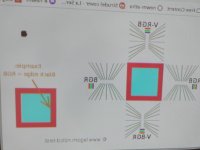
@Scharon, is your resolution actually 1080p? And try tweaking/disabling ClearText? Testing it now, it seems the Splay's subpixel layout is actually BGR, not RGB. And BGR looks best both in projector and screen modes (see attached flipped image, I just toggled the button, was too lazy to assemble it), which is slightly surprising to me:

With the screen attached, the projector is perpendicular to the screen no matter how you turn it, and text can be pretty sharp on the whole screen at once. (IIRC, foo lazy to assemble it now)
OTOH, in portable projector mode, if you don't hold it horizontally/perpendicular to the wall, keystone correction IIUCs digitally re-scales the image, so text sharpness will inevitably worsen. And most times I do hold it angled upwards, as otherwise I'd have to mount it pretty high! BTW, the more keystone cuts off from sides, the more it also cuts off the bottom, I guess to keep proportion.
Even when set up straight, you can't simply turn off keystone correction (you can toggle to screen mode but then image is flipped).
Being angled also means different parts of the wall are at different depth, so I doubt it can keep simultaneous focus on whole image; however I tested now at 45 degrees and AFAICT the best focus position for the top = best focus for bottom! Looks like I'm able to see pixel grid, from top to bottom, simultaneously?! Magic! Perhaps it does correct optically somehow?
I do see minor focus issues: left edge (like 10%) is slightly less focused then everything else, and best position for center focus is slightly different from focus near edges. I can kinda find slider position that's pretty good-ish for both, but that gets really finicky...
I don't feel text is nearly as bad as the article says! I haven't tried to do real coding work on it, but with focus slider set right, it's quite OK, each pixel is distinct and reading is easy. I'm typing this now on the wall-pointed Splay:
(jpeg phone photos of a wall in a dim room, may be much worse than what I actually saw on the wall!)
The focus slider has very short travel ~2cm, I'm constantly surprised I'm able to tune it well but somehow I am?
The article's photo with text also shows each pixel distinct, but kinda too few pixels(?) and something is wonky with subpixel font rendering there (especially on the 'a', 'e' letters).
@Scharon, is your resolution actually 1080p? And try tweaking/disabling ClearText? Testing it now, it seems the Splay's subpixel layout is actually BGR, not RGB. And BGR looks best both in projector and screen modes (see attached flipped image, I just toggled the button, was too lazy to assemble it), which is slightly surprising to me:
With the screen attached, the projector is perpendicular to the screen no matter how you turn it, and text can be pretty sharp on the whole screen at once. (IIRC, foo lazy to assemble it now)
OTOH, in portable projector mode, if you don't hold it horizontally/perpendicular to the wall, keystone correction IIUCs digitally re-scales the image, so text sharpness will inevitably worsen. And most times I do hold it angled upwards, as otherwise I'd have to mount it pretty high! BTW, the more keystone cuts off from sides, the more it also cuts off the bottom, I guess to keep proportion.
Even when set up straight, you can't simply turn off keystone correction (you can toggle to screen mode but then image is flipped).
Being angled also means different parts of the wall are at different depth, so I doubt it can keep simultaneous focus on whole image; however I tested now at 45 degrees and AFAICT the best focus position for the top = best focus for bottom! Looks like I'm able to see pixel grid, from top to bottom, simultaneously?! Magic! Perhaps it does correct optically somehow?
I do see minor focus issues: left edge (like 10%) is slightly less focused then everything else, and best position for center focus is slightly different from focus near edges. I can kinda find slider position that's pretty good-ish for both, but that gets really finicky...
Attachments
Upvote
5
(5
/
0)
You are just using it wrong… ;-)I got the 24" Splay from kickstarter. Guess I just have a soft spot for weird form factors (regular Liliputing reader). Have to agree with "steampunk kind of vibe" comment. The evolution of displays towards portability Cathode Ray Tube > flat screens > Photon Ray (foldable) Tube just cracks me up :-D (Arovia, you should do a t-shirt)
I don't feel text is nearly as bad as the article says! I haven't tried to do real coding work on it, but with focus slider set right, it's quite OK, each pixel is distinct and reading is easy. I'm typing this now on the wall-pointed Splay:View attachment 125077
(jpeg phone photos of a wall in a dim room, may be much worse than what I actually saw on the wall!)
The focus slider has very short travel ~2cm, I'm constantly surprised I'm able to tune it well but somehow I am?
The article's photo with text also shows each pixel distinct, but kinda too few pixels(?) and something is wonky with subpixel font rendering there (especially on the 'a', 'e' letters).
@Scharon, is your resolution actually 1080p? And try tweaking/disabling ClearText? Testing it now, it seems the Splay's subpixel layout is actually BGR, not RGB. And BGR looks best both in projector and screen modes (see attached flipped image, I just toggled the button, was too lazy to assemble it), which is slightly surprising to me:View attachment 125075
With the screen attached, the projector is perpendicular to the screen no matter how you turn it, and text can be pretty sharp on the whole screen at once. (IIRC, foo lazy to assemble it now)
OTOH, in portable projector mode, if you don't hold it horizontally/perpendicular to the wall, keystone correction IIUCs digitally re-scales the image, so text sharpness will inevitably worsen. And most times I do hold it angled upwards, as otherwise I'd have to mount it pretty high! BTW, the more keystone cuts off from sides, the more it also cuts off the bottom, I guess to keep proportion.
Even when set up straight, you can't simply turn off keystone correction (you can toggle to screen mode but then image is flipped).
Being angled also means different parts of the wall are at different depth, so I doubt it can keep simultaneous focus on whole image; however I tested now at 45 degrees and AFAICT the best focus position for the top = best focus for bottom! Looks like I'm able to see pixel grid, from top to bottom, simultaneously?! Magic! Perhaps it does correct optically somehow?
I do see minor focus issues: left edge (like 10%) is slightly less focused then everything else, and best position for center focus is slightly different from focus near edges. I can kinda find slider position that's pretty good-ish for both, but that gets really finicky...
Sorry, but the whole point of it was in the photographic softbox sold with it for backside projection, not for being projected on a wall like any other (usually 3x cheaper and 2x brighter) pico‑projector.
Theoretically, a nice physical keystone correction could easily be done with either a moving lens or a moving DLP chip – called "tilt and shit" in photography lens terms, if pretty expensive compared to purely digital solutions.
But I don't really see why a pico‑projector sold and intended to be used in back‑projection mode inside their own 24" softbox projection screen would even need keystoning or any other perspective corrections, since it's pretty much in the centre of the softbox screen anyway...
Again, this thing looks like a solution in search of a problem, and at $1,300 a pretty dumbly overpriced one.
Last edited:
Upvote
1
(1
/
0)