
OLED vs Mini-LED

JohnCarter17

Ars Praefectus
5,734
Subscriptor++
So there are a bunch of articles around, comparing the two..

https://www.howtogeek.com/3-reasons-why-your-next-monitor-should-be-mini-led/

And that, well, seems to make sense.

Brightness levels that OLED can't touch
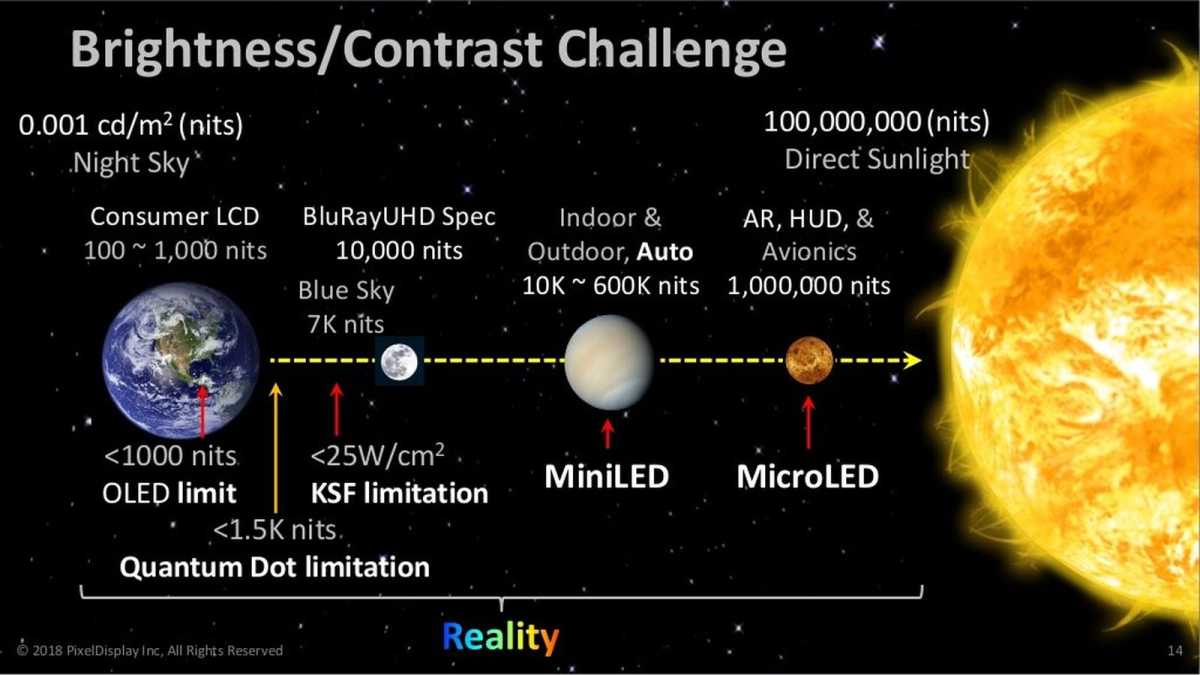
nanobright-color-pixeldisplay.jpg

from https://www.pcworld.com/article/560224/oled-vs-mini-led-the-pc-displays-of-the-future-compared.html


Then I see this about affordable next gen WOLED monitors

https://www.xda-developers.com/2026-will-make-oled-monitors-affordable/

"This year saw multiple hotly anticipated 4th Gen WOLED monitors make it to the market. While Asus debuted its XG27AQWMG for $700, Gigabyte announced the MO27Q28G for just $500. This brings 1440p 27" 280Hz WOLED monitors with primary RGB tandem OLED panels and a TrueBlack 500 rating to a price I don't recall having seen before. "
 

w00key

Ars Tribunus Angusticlavius
8,702
Subscriptor

That article sounds very marketing-y. Mini LED is just LCD with local dimming and more zones, and it very much depends on which monitor exactly you get.

The recommended AOC has this remark on Rtings (score 7.5 for local dimming):

The local dimming feature performs well and has 336 small Mini LED dimming zones. The recommended Local Dimming setting is 'Medium' because the highest setting, 'Strong,' is too aggressive with more blooming and black crush. The 'Medium' setting still has black crush, but it's minimal, and only certain content loses some details, like in a starfield. There's also blooming that's most noticeable when browsing the web, particularly while using a dark mode, but it isn't as bad when watching content. Even subtitles look great, with almost no blooming. However, blooming is more visible when viewing from the sides, but that's the case with most monitors anyway.

The local dimming algorithm keeps up with fast-moving objects well, but sometimes they're slow to turn off after a bright object disappears from the screen, like with subtitles. That said, this is a good overall implementation of local dimming, and it helps improve the picture quality in dark scenes.

It may work on most content, but has drawbacks. It isn't the perfect black, zero blooming of (W)OLED, which can display a photo of a dark sky realistically. Mini LED depends on chunks of image being totally black so it can disable that section.


The brightness advantage is overrated anyway, I use 100 nits as target for work at day and way lower at night, and OLED works just fine for that, ~50-100 average light level and a few times that for highlights. The difference is plenty for a "staring at the sun" effect even on a 6 years old LG C9. Or just look at any recent phone showing HDR content - that's about the same range.
 

w00key

Ars Tribunus Angusticlavius
8,702
Subscriptor
Reminds me of this video from LTT.


View: https://www.youtube.com/watch?v=5FdDUrHl5RE


They tried to make the brightest backlight for an LCD monitor they could. It's quite excessive. :)

Hahahaha awesome. Array of watercooled COB.


But it was "only" 26000 nits. Here's a plot of perceived brightness for a 100, 400, 1200 and 26000 nits screen:

73211.png


CIE Lab Lightness uses the cube root. 100 = my work setting, during day. 200-400 is current OLED SDR real scene brightness, 1200 = OLED HDR peak on something like an LG C5, and 26000 is the LCD that requires eye protection to not burn your retina.


I think we're good lol, doubling it to 2000 nits peak doesn't add that much value.
 

richleader

Ars Legatus Legionis
21,837
I work on social media content and there's nothing worse than having a clip that I did everything industry standard on get sandwiched between videos on people's feeds that are not only in HDR but are clipping white on HDR.

Most often they're by smaller businesses who hire just out of college kids for peanuts who shoot, edit, and produce everything on their phone (since creating HDR content with pro cameras and editing and exporting them on real computers is a special kind of hell). Since they barely know how to use their phones (they're definitely not using the blackmagic app or recording RAW), they'll often just tap-hold on faces to expose for them -- the one move they know how to do -- which makes the background clip white.

Their videos are mostly terrible but god help you if your footage gets placed between two of them: you could have made a trailer for a blockbuster movie shot on IMAX but you won't even be able to see your stuff on your phone because you're blind from what the kids put out into the algorithm on behalf of some gym or bar that's cloning some other video they saw on tiktok.
 

mdrejhon

Ars Praefectus
3,100
Subscriptor
It's a shame that HDR clips quite badly because of bad clips or bad config.

I spent a lot of time programming HDR when I upgraded TestUFO (I'm the creator of TestUFO) to add support for HDR in TestUFO 2.0. And the biggest problem was browser behaviors. Now TestUFO is now at version 3.0 and supports both Rec.2100 PQ and Display-P3, but some browsers need HDR enabled via an experimental browser flag for HDR canvas graphics. It supports both 2D and WebGL modes, and I am adding WebGPU support soon.

One thing I noticed is WebGPU HDR CANVAS support is consistent now (Chrome, Edge, Safari) with more consistent color matching, so hopefully it will be able to educate more users about proper HDR without needing to fiddle with their browsers.
 
^ ok, with all the hugs up there, I wanted to revisit this with more info now that I've moved into the HDR creation process myself:

When you're creating HDR material professionally, you want your brightest non-emissive level to sit below 203 nits, the level where you'd set someone holding a white piece of paper up to the camera (this is what also captions/title cards would sit at). Then the sun would be at 1000 nits. Certain reflective things in the scene could fall between 203 and 1000, but in general, that's best practices.

The problem is that while HDR computer monitors often demand that your screen is set at 100% brightness under windows color management, people's phones don't work that way: the average adult doesn't lay in bed with their phone set to 100.

I suspect (and I can't back it up yet, as I'm new at this still) that apple uses an algorithm of some sort to tamp down HDR if you're below 100% but if you're at 40% brightness, 203 nits SDR might be at 80 nits but 203 nits HDR might be more like 120 because it has to make room for when someone drops 1000 nits on you and it needs to reduce it to 400. So the side by side comparison will make HDR look better, ALWAYS, even if its following the rules. And a lot of people obviously aren't following the rules so they'll have title cards at over 203, etc., just because they want to stand out.

It's basically the music Loudness Wars but with brightness. Releasing anything these days in SDR is a bad choice, even though you have to release in x265 for HDR and Youtube still preserves more detail from X264 uploads than X265 because of how their AV1 encoders supposedly work. Dunno.
 
  • Like
Reactions: SuperDave

continuum

Ars Legatus Legionis
97,602
Moderator
The problem is that while HDR computer monitors often demand that your screen is set at 100% brightness under windows color management, people's phones don't work that way: the average adult doesn't lay in bed with their phone set to 100.
Most leave phones on auto. Hmm. Not sure how much that helps this discussion tho.... in fact I don't think it does. So, uh, carry on.
 
Most leave phones on auto. Hmm. Not sure how much that helps this discussion tho.... in fact I don't think it does. So, uh, carry on.

on apple, there are three different settings, auto for light/dark backgrounds, "auto true-tone" for attempting to preserve accurate colors based on ambient conditions, and a percentage slider. The percentage slider is the only one that's accessible instantly by corner swiping. I have a collection of Android phones that my parents dropped on me but I don't think any of them are new enough for me to be able to use for a test platform, although I definitely should be testing content on them as well...

I don't know why I care about this for local news content when the networks don't and they're making all the big pharma money. But I want to do things right, dammit!

In my regular LED HDR monitor, if I turn on HDR under windows, it locks the OSD HDR brightness to 100 and games looks washed out.

Theoretically, the side by side should look slightly darker for HDR because local dimming gets turned on so the dark sections getting darker compensates for the overall look. That's true on my mini LED monitor but I still don't trust the colors for photoshop work (I can see a cyan shift), even though I'm stuck with it for video work since I'm now outputting HDR content. I guess the new (and more expensive) versions of Spyder can calibrate mini panels but I'd still need two different profiles for images/video.
 

View: https://www.youtube.com/watch?v=FsN4rmcZdMo


I don't know why youtube rec'd that to me since I haven't gamed on a TV in a few years but it convinced me to go back into microsoft HDR calibration and lie to it. Instead of following the directions exactly, I gave much more conservative answers. Especially for the maximum brightness. While there's still a cyan shift, some of it can probably be attributed to VA angular discrepancies and overall the picture is much more reasonable. It's ok to not try to take maximum advantage of being able to go over 1000 nits.
 
  • Like
Reactions: JohnCarter17