
You are using an out of date browser. It may not display this or other websites correctly.
You should upgrade or use an alternative browser.
You should upgrade or use an alternative browser.
This new charger lets all EVs plug in without an adapter
- Thread starter JournalBot
- Start date
Wait, is this “new” new, or like its 2020 and America is kinda embracing chip and pin cards “new”?
Because we’ve had chargers with both connections and a pair of cables here just across the border in BC for years. Not every charger, but most that I’ve had to use are either the dual type, or Tesla superchargers.
So unless I’m missing something due to lack of caffeine this morning, I’m not seeing anything revolutionary here
Because we’ve had chargers with both connections and a pair of cables here just across the border in BC for years. Not every charger, but most that I’ve had to use are either the dual type, or Tesla superchargers.
So unless I’m missing something due to lack of caffeine this morning, I’m not seeing anything revolutionary here
Upvote
181
(183
/
-2)
Post content hidden for low score.
Show…
Glad there is an adapter, more flexibility for charging is great and allows Tesla owners some flexibility in charging, but that looks like an awful lot of weight to hang off the inch and a half or so that goes into a Tesla charging port.
Upvote
12
(16
/
-4)
TheIllustrativeMan
Ars Centurion
"Legally distinct Magic Dock"
Good to see someone else making it happen, but they did it the wrong way around IMO. One of the perks of NACS is the smaller, more elegant handle/plug. This combines all of the bulky negatives of CCS with the added bulk of the adapter.
Good to see someone else making it happen, but they did it the wrong way around IMO. One of the perks of NACS is the smaller, more elegant handle/plug. This combines all of the bulky negatives of CCS with the added bulk of the adapter.
Upvote
63
(70
/
-7)
ShortOrder
Ars Scholae Palatinae
So, just like ChargePoint's old CCS + Chademo except swapping in J3400 for Chademo. HUGE innovation.
/s
/s
Upvote
19
(34
/
-15)
Or we can standardize the charging elements so that an adapter can work while changes and advancements can be utilized. We had enough crap phone chargers to see the waste that creates.
Upvote
31
(34
/
-3)
So, the adapter is built-in to the charging station. When you select which plug you need, then it will either release the charging connector with or without the adapter attached. Not two separate cables. The article doesn't make that very clear.
Upvote
218
(218
/
0)
sbradford26
Ars Scholae Palatinae
There is slightly more to that. Designing a connector to handle the power levels of DC fast charging while also automatically selecting the correct adapter and making it seamless to the user is a pretty big accomplishment.“We put two of them on the same box. Look at how smart and innovative we are.”
Not everything has to be the biggest technological achievement, making something boring, reliable, and intuitive is really what we need to be striving for with charging at the moment.
Upvote
99
(107
/
-8)

Statistical
Ars Legatus Legionis
It isn't but it is a sign that Chargepoint is accepting the NACS future. Going from CCS to dual CCS + NACS and probably in 10 years or so as the CCS connectors wear out slowly start getting rid of them.Wait, is this “new” new, or like its 2020 and America is kinda embracing chip and pin cards “new”?
Because we’ve had chargers with both connections and a pair of cables here just across the border in BC for years. Not every charger, but most that I’ve had to use are either the dual type, or Tesla superchargers.
So unless I’m missing something due to lack of caffeine this morning, I’m not seeing anything revolutionary here
Upvote
45
(45
/
0)

The machine featured in the photo is a level 2 charger and has two charge ports. Moving to have 4 cables on the charging station would likely be confusing to people.Wait, is this “new” new, or like its 2020 and America is kinda embracing chip and pin cards “new”?
Because we’ve had chargers with both connections and a pair of cables here just across the border in BC for years. Not every charger, but most that I’ve had to use are either the dual type, or Tesla superchargers.
So unless I’m missing something due to lack of caffeine this morning, I’m not seeing anything revolutionary here
Upvote
-17
(3
/
-20)
Statistical
Ars Legatus Legionis
It really isn't a big accomplishment. It is nice for users in the transition but Chargepoint has been doing this for a decade now it was just CCS + Chademo. Now it is CCS + NACS. It is smart on the point of chargepoint to skate to where the puck is going and it will be useful for consumers but the pieces were largely already in place they just had to reconfigure them a bit and update the software.There is slightly more to that. Designing a connector to handle the power levels of DC fast charging while also automatically selecting the correct adapter and making it seamless to the user is a pretty big accomplishment.
The bad news for existing users is it makes Chademo die a bit faster.
Last edited:
Upvote
33
(38
/
-5)
randomname19937
Ars Scholae Palatinae
It's about as innovative as a pump with three hoses, for 95, 98 and Diesel.
Upvote
37
(57
/
-20)
Nope, you pull up, open the chargepoint app, say I'm using a CCS or J3400 and when you remove the charging cable it has the right end on it.So, just like ChargePoint's old CCS + Chademo except swapping in J3400 for Chademo. HUGE innovation.
/s
Upvote
66
(69
/
-3)
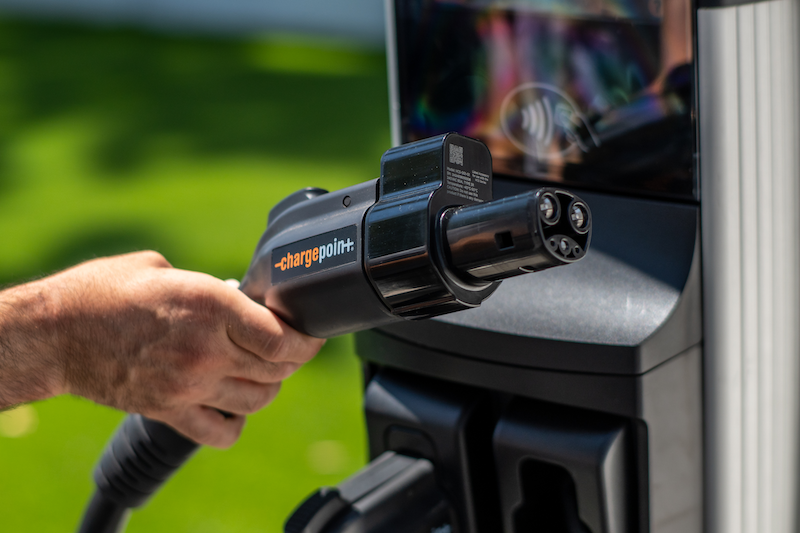
The J1772 connector shown is not really bulky at all. These machines just have a built in dongle for the J3400. So Tesla's won't have to bring their own adaptor.Am I missing something or is that monstrosity in the photo completely missing why we're moving to J3400?!? It's 90% of the bulk of a CCS plug!
Upvote
1
(8
/
-7)
This approach is actually a pretty big deal for those stuck with a Leaf, as it means that chademo plugs can continue to be used.So, just like ChargePoint's old CCS + Chademo except swapping in J3400 for Chademo. HUGE innovation.
/s
Upvote
22
(22
/
0)
Statistical
Ars Legatus Legionis
So, the adapter is built-in to the charging station. When you select which plug you need, then it will either release the charging connector with or without the adapter attached. Not two separate cables. The article doesn't make that very clear.
Yeah the article seems to indicate the exact opposite. It isn't two cables. There are two cables in the photo because it is two charging ports. EACH port is both CCS1 + NACS.
Here is another article with a video.
https://electrek.co/2024/08/08/char...-port-combines-tesla-other-ev-plugs-into-one/
So it is essentially a reverse magic dock. If you want CCS1 it releases just the cable and the adapter stays inside the charger. If you want NACS it releases the cable with the adapter attached.
Upvote
119
(119
/
0)
This new charger lets all EVs plug in without an adapter
Nissan Leaf: Am I a joke to you?
Upvote
39
(40
/
-1)
Honestly, Lightning would be an awesome name for a charging connection.Or we can standardize the charging elements so that an adapter can work while changes and advancements can be utilized. We had enough crap phone chargers to see the waste that creates.
Upvote
9
(9
/
0)
That cable is pretty obviously has a J1772. It is too round to have the two DC prongs of the CCS1 connection.Yeah the article seems to indicate the exact opposite. It isn't two cables. There are two cables in the photo because it is two charging ports. EACH port is both CCS1 + NACS.
Here is another article with a video.
Upvote
-3
(4
/
-7)
Statistical
Ars Legatus Legionis
So, just like ChargePoint's old CCS + Chademo except swapping in J3400 for Chademo. HUGE innovation.
/s
I thought that at first due to the wording of the article but it is actually like a reverse magic dock. EACH cable is both CCS1 + NACS.
Upvote
35
(35
/
0)
I don't understand why people are so against the bulk of the CCS plug. Sure the Tesla is sexier but it's not like I'm carrying the thing around with me all day-- it's attached to the charger.
The biggest thing that needs to happen is to have long enough cables to work for various charging port locations on cars. Charging my Rivian at a Tesla Supercharger requires taking 2 parking spots due to how short the cables are.
The biggest thing that needs to happen is to have long enough cables to work for various charging port locations on cars. Charging my Rivian at a Tesla Supercharger requires taking 2 parking spots due to how short the cables are.
Upvote
18
(32
/
-14)
Longer cord, more copper to steal.
To be constructive, how long will it be before the cords retract into the charger and only release when there is a customer signed in?
To be constructive, how long will it be before the cords retract into the charger and only release when there is a customer signed in?
Upvote
-5
(9
/
-14)
Statistical
Ars Legatus Legionis
That cable is pretty obviously has a J1772. It is too round to have the two DC prongs of the CCS1 connection.
No idea why the ars article is showing the J1772 cable but that would only be l2 charging
They are also upgrading the Fast DC chargers which is likely more important (passive AC only NACS to J1772 adapters are tiny and cheap).
The same cable first in CCS1 mode (without the adapter which remains inside the charger if you select CCS).
Later the same cable but in NACS mode (the CCS1 to NACS adapter remains attached when removing the cable from charger if you select NACS)
Last edited:
Upvote
71
(72
/
-1)

Instead, like Tesla's Magic Dock Superchargers, the Omni Port features a pair of cables. When a driver wants to charge, they'll use the ChargePoint app or the charger's touchscreen to select the right connector type, which is then released for use.
I think this needs to be re-worded, because as it's written it's incorrect. There aren't separate cables, the station either adds the adaptor or not depending on the choice that is picked in the app. It's not like the Magic Dock, which has a separate CCS cable. Edit: Okay dumb mistake on my Magic Dock comment, the article is still incorrect on how the ChargePoint Omni functions.
Last edited:
Upvote
37
(40
/
-3)
They're actually doing it to both types. The one in the photo is a L2 charger, and is a retrofit to a model that I use on a regular basis.It is cool to be confidentially wrong. Why the hell would someone design a dual J1772 & NACS cable.
Did you actually watch the video.
One port both CCS1 & NACS.
https://www.chargepoint.com/businesses/stations/cp6000
They are also doing this for CCS1 as well on the other model.
But the photo is for an L2 station. I have no idea why Ars choose to feature the L2 plug on their article's headline image. Its also in the file name: ChargePoint_Omni_AC-copy.png
Last edited:
Upvote
23
(23
/
0)
Iphtashu Fitz
Ars Tribunus Militum
Not to mention the fact that when CSS demand drops and NACS is ubiquitous then you could just remove the NACS-to-CSS dongle and still have a fully functional charger. If this CSS-to-NACS dongle is lost/damaged then the charger is less useful as NACS usage increases."Legally distinct Magic Dock"
Good to see someone else making it happen, but they did it the wrong way around IMO. One of the perks of NACS is the smaller, more elegant handle/plug. This combines all of the bulky negatives of CCS with the added bulk of the adapter.
Upvote
26
(26
/
0)
Statistical
Ars Legatus Legionis
Not to mention the fact that when CSS demand drops and NACS is ubiquitous then you could just remove the NACS-to-CSS dongle and still have a fully functional charger. If this CSS-to-NACS dongle is lost/damaged then the charger is less useful as NACS usage increases.
By the time that happens you will likely have replaced the charge port a few times already. When they start to phase out CCS1 they will just start replacing broken dual plug capable cables/connectors with a NACS only native ones.
Last edited:
Upvote
16
(16
/
0)

This sounds the same as in Norway (the only place I've used and electric car), where a single charger can have two cables. I don't see the innocation here. Chademo (which I used for my rental car) and CCS.
Then again this comment might not be innovative, as other's have made similar comments
Then again this comment might not be innovative, as other's have made similar comments
Upvote
-4
(5
/
-9)
Statistical
Ars Legatus Legionis
This sounds the same as in Norway (the only place I've used and electric car), where a single charger can have two cables. I don't see the innocation here. Chademo (which I used for my rental car) and CCS.
Then again this comment might not be innovative, as other's have made similar comments
The article worded it very weird. It isn't a charger with two cords. It is one cord which can be used for either CCS or NACS for Fast DC charging. See photos in post above.
Upvote
28
(28
/
0)
Statistical
Ars Legatus Legionis
Magic dock doesn't have a seperate CCS cable hence the "dock" and "magic". This is essentially a reversed magic dock. I do agree though the article either missed the point or it was worded terribly.I think this needs to be re-worded, because as it's written it's incorrect. There aren't separate cables, the station either adds the adaptor or not depending on the choice that is picked in the app. It's not like the Magic Dock, which has a separate CCS cable.
The idea is both NACS and CCS1 charging using a SINGLE cable. The photos show multiple cables because the are chargers to support two cars at the same time.
The charger on the left can be either CCS1 or NACS. The charger on the right can also be CCS1 or NACS.
Upvote
36
(36
/
0)
The description in the article is unclear; what's shown in the photo appears to be an adapter that may or may not be released together with the cable depending on which plug your car has. So you still get two cars per charger, regardless of which of the two connectors they need. That's different from having one Tesla and one CCS connector.
Upvote
9
(9
/
0)
bryanlarsen
Ars Scholae Palatinae
I think this needs to be re-worded, because as it's written it's incorrect. There aren't separate cables, the station either adds the adaptor or not depending on the choice that is picked in the app. It's not like the Magic Dock, which has a separate CCS cable.
Magic Dock does not have a separate CCS cable. Magic Dock uses a single cable with a tethered adapter.
Upvote
5
(5
/
0)
They're doing both, from your link:No idea why the ars article is showing the J1772 cable but that would only be l2 charging. The point is fast DC charging.
Did you actually watch the video?
One port supporting both CCS1 & NACS vehicles.
The same cable first in CCS1 mode (without the adapter which remains inside the charger)
View attachment 87334
later the same exact cable but in NACS mode (the CCS1 to NACS adapter remains attached when removing the cable from charger)
View attachment 87337
Electrek said:ChargePoint says it will begin rolling out Omni Port technology in newly implemented charging piles, but the technology can also be installed on existing CP6000 [...]
The CP6000 is an L2 station.
This aligns with the image at the top of the Ars article, which is very much smaller than the CCS1 adapter from the video.
Upvote
8
(8
/
0)

Man, even for a CCS1 plug that's incredibly bulky. Sheesh.No idea why the ars article is showing the J1772 cable but that would only be l2 charging. The point is fast DC charging.
Did you actually watch the video?
One port supporting both CCS1 & NACS vehicles.
The same cable first in CCS1 mode (without the adapter which remains inside the charger)
View attachment 87334
later the same exact cable but in NACS mode (the CCS1 to NACS adapter remains attached when removing the cable from charger)
View attachment 87337
Upvote
7
(7
/
0)
Statistical
Ars Legatus Legionis
Oof. That is confusing to use the same name for L2 and Fast DC charging. MBAs.They're doing both, from your link:
The CP6000 is an L2 station.
This aligns with the image at the top of the Ars article, which is very much smaller than the CCS1 adapter from the video.
Upvote
6
(8
/
-2)
algebraist
Ars Scholae Palatinae
I was hoping for a cable without an adapter. There are a certain kind of "person" who love unplugging EV's forcibly because they lock the adapter in, rather than the whole plug. Moving to a unified plug stops that little problem.
Looking at you the guy I got on camera in airport parking unplugging my car...
Looking at you the guy I got on camera in airport parking unplugging my car...
Upvote
13
(13
/
0)
Statistical
Ars Legatus Legionis
It is impressively bulky. I guess the latches and circuitry for allowing it to automatically attach and detach the NACS "tip" as needed adds even more bulk.Man, even for a CCS1 plug that's incredibly bulky. Sheesh.
As someone pointed out going with a native NACS cable and a CCS1 adapter on the end would be a lot less bulk.
At the end of the day though more dual capable fast dc chargers is a good thing. The transition to NACS is going to take two decades. I figure in 7-10 years though most chargers will be going NACS only because 95%+ of plugin vehicles on the road are now NACS native. As magic dock and omni plug hardware wears out and breaks it will be replaced with NACS only chargers. I think eventually even J1772 only L2 chargers will be replaced with native NACS chargers. The remaining "legacy" CCS users will just have to use a portable adapter for the next 10 years so so before even those are rare as the vehicles reach end of life.
Last edited:
Upvote
14
(14
/
0)