
With a valid TLS certificate, faux Bravė.com could fool even security-savvy people.
Read the whole story
Read the whole story
Its pure e̶v̶i̶l̶ greed these domains exist. Why isnt ascii enough ? There is no reason why bravè.com bravê.com or bravė.com should point to something else than brave.com
Why isnt ascii enough ?
Well, mainly because the world is a bit more international than ASCII can handle. There's a huge difference for Spanish-speakers between diezaños.com (tenyears.com) and diezanos.com (tenbuttholes.com). I'm sure with other languages there can be even more extreme examples. And that's before we consider non-Latin script users among the world. Accommodating them effectively requires a Unicode derived system which will, in turn, also include Latin diacritics.Its pure e̶v̶i̶l̶ greed these domains exist. Why isnt ascii enough ? There is no reason why bravè.com bravê.com or bravė.com should point to something else than brave.com
In order to download this malware, you'd have to see an ad, which means you'd have to not have AdBlock/uBlock installed. Who browses the internet without an ad blocker? lol
Well, mainly because the world is a bit more international than ASCII can handle. There's a huge difference for Spanish-speakers between diezaños.com (tenyears.com) and diezanos.com (tenbuttholes.com). I'm sure with other languages there can be even more extreme examples. And that's before we consider non-Latin script users among the world. Accommodating them effectively requires a Unicode derived system which will, in turn, also include Latin diacritics.Its pure e̶v̶i̶l̶ greed these domains exist. Why isnt ascii enough ? There is no reason why bravè.com bravê.com or bravė.com should point to something else than brave.com
There are some tools that can sniff out potentially misleading URLs by using a variety of heuristics (e.g. all Latin except for one Cyrillic/Greek letter, and that one is known to be potentially confused with a Latin one). If a browser gets one of these URLs with mixed scripts or diacritics, it might be a good idea to check if it's rather similar to a top 1000 (or 10k, or 100k, etc) domain, and alert the user of a potential phishing attempt in such case.
Why isnt ascii enough ?
Because not every domain is intended for english speakers.
Here's how to set Firefox to show punycode rather than unicode characters. https://www.tenforums.com/tutorials/104 ... ndows.html
https://www.くそ.ఫక్.јебати.لعنتی0.एन एस.org
Mandatory "Firefox has addressed this" note:
https://ma.ttias.be/show-idn-punycode-f ... hing-urls/

That's quite helpful for the few of us who actually USE Firefox, thanks for that.Mandatory "Firefox has addressed this" note:
https://ma.ttias.be/show-idn-punycode-f ... hing-urls/
I can't speak to everyone (obviously), but over the years, and after having come across a lot of disguised URL's that said one thing but led to another place, I developed the habit of hovering to get the URL pop-up at the bottom of the browser before clicking on it.Sadly, there are no clear ways to avoid these threats other than by taking a few extra seconds to inspect the URL as it appears in the address bar.
I thought it was just a security focused browser?In order to download this malware, you'd have to see an ad, which means you'd have to not have AdBlock/uBlock installed. Who browses the internet without an ad blocker? lol
Golly, why would someone go to a website they believed was hosting the download for a browser that was explicitly designed to block ads without an adblocker installed?
Truly it is a mystery for the ages.
I seldom turn off ads. I want to support the sites I visit. I have used an ad blocker just once this year when browsing a site that had auto-play video ads. I uninstalled the adblocker again when I was done.
If you're visiting reputable sites that provide you value, while blocking ads and not subscribing, you're depriving the site if crucial income. Or in simpler words: you're leeching on other people's good work.
Well, mainly because the world is a bit more international than ASCII can handle. There's a huge difference for Spanish-speakers between diezaños.com (tenyears.com) and diezanos.com (tenbuttholes.com). I'm sure with other languages there can be even more extreme examples. And that's before we consider non-Latin script users among the world. Accommodating them effectively requires a Unicode derived system which will, in turn, also include Latin diacritics.Its pure e̶v̶i̶l̶ greed these domains exist. Why isnt ascii enough ? There is no reason why bravè.com bravê.com or bravė.com should point to something else than brave.com
There are some tools that can sniff out potentially misleading URLs by using a variety of heuristics (e.g. all Latin except for one Cyrillic/Greek letter, and that one is known to be potentially confused with a Latin one). If a browser gets one of these URLs with mixed scripts or diacritics, it might be a good idea to check if it's rather similar to a top 1000 (or 10k, or 100k, etc) domain, and alert the user of a potential phishing attempt in such case.
Thanks for giving a meaningful example.
I just think it is a bit too late to leave all of that to the browser without any effort at the registry. Actually my language is one of those with couple special characters and the top level domain for .cz has this disabled on purpose.
I still think that registering domain with similar names as a block could be some form of due diligence on the side of registry. The special characters expands the domain space greatly without any regard to the distance between any 2 domains. Something like this already exists at the end as you say, but it is slapped on the browsers who are expected to fix everything
One thing that can help: Before inputting or downloading anything, watch for the https when double checking site address.

I thought it was just a security focused browser?
I seldom turn off ads. I want to support the sites I visit. I have used an ad blocker just once this year when browsing a site that had auto-play video ads. I uninstalled the adblocker again when I was done.
If you're visiting reputable sites that provide you value, while blocking ads and not subscribing, you're depriving the site if crucial income. Or in simpler words: you're leeching on other people's good work.
One thing that can help: Before inputting or downloading anything, watch for the https when double checking site address.
For the downvoters... not saying this is foolproof (no single check is ever foolproof) - but notice the missing "https" address in both illustrations used in this article. Of course, a fake Brave site can apply for a security certificate too, but chances are it probably wouldn't, risking vetting and trace back:
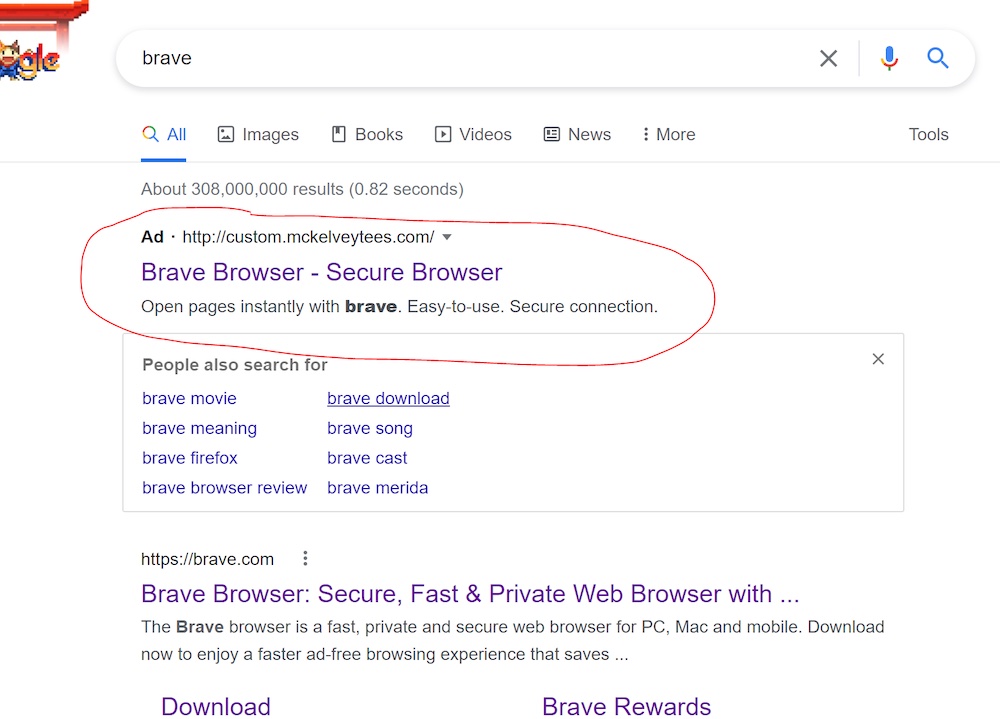
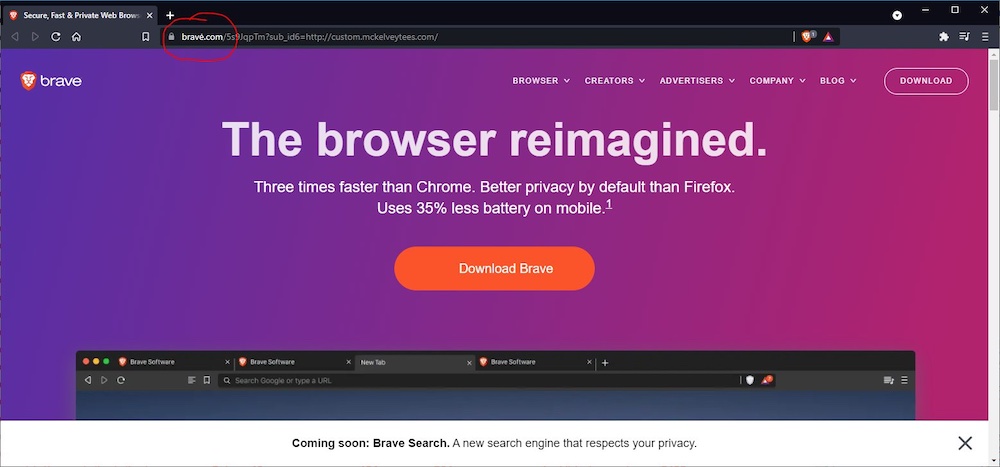
Do you think certs are manually vetted and someone decides if you're worthy of one? They definitely aren't. I have certs for a handful of names I own and one or two people ever make any use of. And they're free. No one is manually vetting me. There's a simple automated system to demonstrate that I own the server that name resolves to and that's it. All you need is an email address, which can certainly be as anonymous as the webserver getting the cert.One thing that can help: Before inputting or downloading anything, watch for the https when double checking site address.
For the downvoters... not saying this is foolproof (no single check is ever foolproof) - but notice the missing "https" address in both illustrations used in this article. Of course, a fake Brave site can apply for a security certificate too, but chances are it probably wouldn't, risking vetting and trace back:
Well, don't ad blockers have a setting to remove malicious ads only? I know my endpoint security suite does.I thought it was just a security focused browser?
I seldom turn off ads. I want to support the sites I visit. I have used an ad blocker just once this year when browsing a site that had auto-play video ads. I uninstalled the adblocker again when I was done.
If you're visiting reputable sites that provide you value, while blocking ads and not subscribing, you're depriving the site if crucial income. Or in simpler words: you're leeching on other people's good work.
Unfortunately, malvertisements can and will strike anywhere. Ad blocking is a security layer.
If you're blocking literally everything, then i think it's a bit of a stretch to call it "security". It feels a bit more like a convenient excuse.
The second image is actually showing an HTTPS URL, it's just hidden and the lock is shown insteadOne thing that can help: Before inputting or downloading anything, watch for the https when double checking site address.
For the downvoters... not saying this is foolproof (no single check is ever foolproof) - but notice the missing "https" address in both illustrations used in this article. Of course, a fake Brave site can apply for a security certificate too, but chances are it probably wouldn't, risking vetting and trace back:
That's quite helpful for the few of us who actually USE Firefox, thanks for that.Mandatory "Firefox has addressed this" note:
https://ma.ttias.be/show-idn-punycode-f ... hing-urls/
I can't speak to everyone (obviously), but over the years, and after having come across a lot of disguised URL's that said one thing but led to another place, I developed the habit of hovering to get the URL pop-up at the bottom of the browser before clicking on it.Sadly, there are no clear ways to avoid these threats other than by taking a few extra seconds to inspect the URL as it appears in the address bar.
Even today, it aggravates me that Google hides the actual URL's within its embedded spy-on-you bullshit links instead of getting a clean link to the site I want to go to (which I typically then type into the address bar instead of using Google's link). But this punycode url spoof still wouldn't have worked very well with me, since I habitually check where I'm going before I click, and check the URL when I arrive.
Seeing the actual punycode in the URL is obviously going to blatantly reveal the scam here, but even if it was the ASCII equivalent with accents and such, I'd notice them every time simply because I look for weird things in links I click. Having taken German in the past, and having a passing familiarity with Spanish, I know when letters aren't in the Latin alphabet, and aren't used in the English language.
I know this doesn't apply to "everyone", but making habits out of routine things (like checking on the links one wants to click) makes it pretty automatic if you do that consistently. Even if you don't want to do it all the time, at least when looking for programs and such that you might want to install, it's always good idea to be certain you're at the correct site before clicking on anything there.
Especially if clicking on an offering from any search.
Do you actually not just click on ads but constantly go and purchase everything you see advertised? You're not doing anyone much good by contributing to lower click through rates. Get off your high horse. If you want to support people who make websites, pay them.I thought it was just a security focused browser?In order to download this malware, you'd have to see an ad, which means you'd have to not have AdBlock/uBlock installed. Who browses the internet without an ad blocker? lol
Golly, why would someone go to a website they believed was hosting the download for a browser that was explicitly designed to block ads without an adblocker installed?
Truly it is a mystery for the ages.
I seldom turn off ads. I want to support the sites I visit. I have used an ad blocker just once this year when browsing a site that had auto-play video ads. I uninstalled the adblocker again when I was done.
If you're visiting reputable sites that provide you value, while blocking ads and not subscribing, you're depriving the site if crucial income. Or in simpler words: you're leeching on other people's good work.
You are not entitled to remove the ads or dictate they alter their business model to something that "suits you". The ethical choice would be to simply not use their services, if you are not prepared to accept whatever business model they have chosen.
Most of such attacks can be detected, it's just companies don't really care that much (to say lightly). Cyrillic symbols used to be quite popular -- you can't really tell difference if it's "e" or "е" in many, _many_ fonts. There are "equivalency" tables. So you can check, if web-site in "equivalent" ascii spelling is already registered and don't let robots issue certificates or even register a web site if organization doesn't match. Tadaaaa, 99.99% of all such phishing attempts will be auto-solved.
Non-ascii domains' only purpose at this stage is to limit who can access them. For any non-native user there is no easy way to type in non-ascii domain. You have to actively look for online keyboard, or copy-paste individual symbols, etc. Incidentally similar problem exists for native users that are outside of their home country. If I have to type in fully Cyrillic domain while using internet kiosk somewhere in UK, it'd be a big pain in the ass.

