Skip to content
Tech

BlackBerry Priv review: Android fixes the OS, but the hardware can’t compete

$700 for a bad keyboard, poor camera, iffy build quality, and old software? No thanks.

Ron Amadeo | 457
Story text
On the top of the phone are slots for a SIM and MicroSD card.
A speaker grill runs along the bottom of the device, but the actual speaker is located just below the back button.

“BlackBerry is still around?”

That’s the most common reaction I get when I show people the “Priv,” BlackBerry’s first Android phone. It’s hard to believe the original iPhone came out more than eight years ago, but only now would we say BlackBerry has something that might compete in the modern smartphone era.

BlackBerry limped along for years with the old-school BlackBerry OS, and the company didn’t come out with a revamped smartphone platform until the 2013 release of BlackBerry 10. By then BlackBerry had already lost the ecosystem war, though, and a new platform from a single manufacturer had no chance of gaining a foothold in the app market. Strategy Analytics recently ranked BB10 fifth in worldwide market share behind Android, iOS, Windows, and even Samsung’s Tizen—ouch. It’s no wonder people are surprised to hear that BlackBerry still exists.

With the Priv, the company finally joins the mobile operating system duopoly by jumping into bed with the only major app ecosystem available to third parties: Android. The Priv runs an old version of Android: 5.1.1 Lollipop, the first of many disappointments the Priv will throw our way. Being a BlackBerry, the Priv of course has a hardware keyboard, but the keyboard isn’t any good. It’s so flat and tiny that it’s awful to type on; we greatly preferred the packed-in software keyboard. Still, the biggest disappointment is the price: a whopping $700. It’s not an unheard of sum for a mobile phone, but build quality issues and a long list of compromises just aren’t worth $700.

BlackBerry’s lack of value makes a lot of sense in the context of the company. Just as it struggled to compete with the smartphone app revolution of the past eight years, it’s now struggling to compete with the high-quality, low-cost Android devices out there. The Priv is priced like an Android flagship from several years ago, and it probably could have competed in the era of janky, plastic flagships like the Galaxy S4 or 5. Today, though, $700 for this level of quality just doesn’t cut it. Even with a “modern” OS, BlackBerry still feels like it’s a few years behind the competition.
Design and Build Quality

SPECS AT A GLANCE: BlackBerry Priv
SCREEN 2560×1440 5.43″ (540ppi) curved AMOLED
OS Android 5.1.1 Lollipop
CPU Six-core Qualcomm Snapdragon 808 (two 1.8 GHz Cortex-A57 cores and four 1.4 GHz Cortex-A53 cores)
RAM 3GB
GPU Adreno 418
STORAGE 32GB plus MicroSD slot
NETWORKING Dual Band 802.11b/g/n/ac, Bluetooth 4.1, GPS, NFC
BANDS FD-LTE 1, 2, 3, 4, 5, 7, 12, 17, 20, 29,30
HSPA+ 1, 2, 4, 5/6, 8Quad band GSM/GPRS/EDGE
PORTS MicroUSB 2.0, 3.5mm headphone jack
CAMERA 18MP rear camera with OIS, 2MP front camera
SIZE 147.0 (184 opened) x 77.2 x 9.4 mm
WEIGHT 192 g
BATTERY 3410 mAh
STARTING PRICE $699
OTHER PERKS Sliding hardware keyboard, hardware convenience key, RGB notification LED, Qualcomm Quick Charge 2.0, Qi and PMA wireless charging, SlimPort

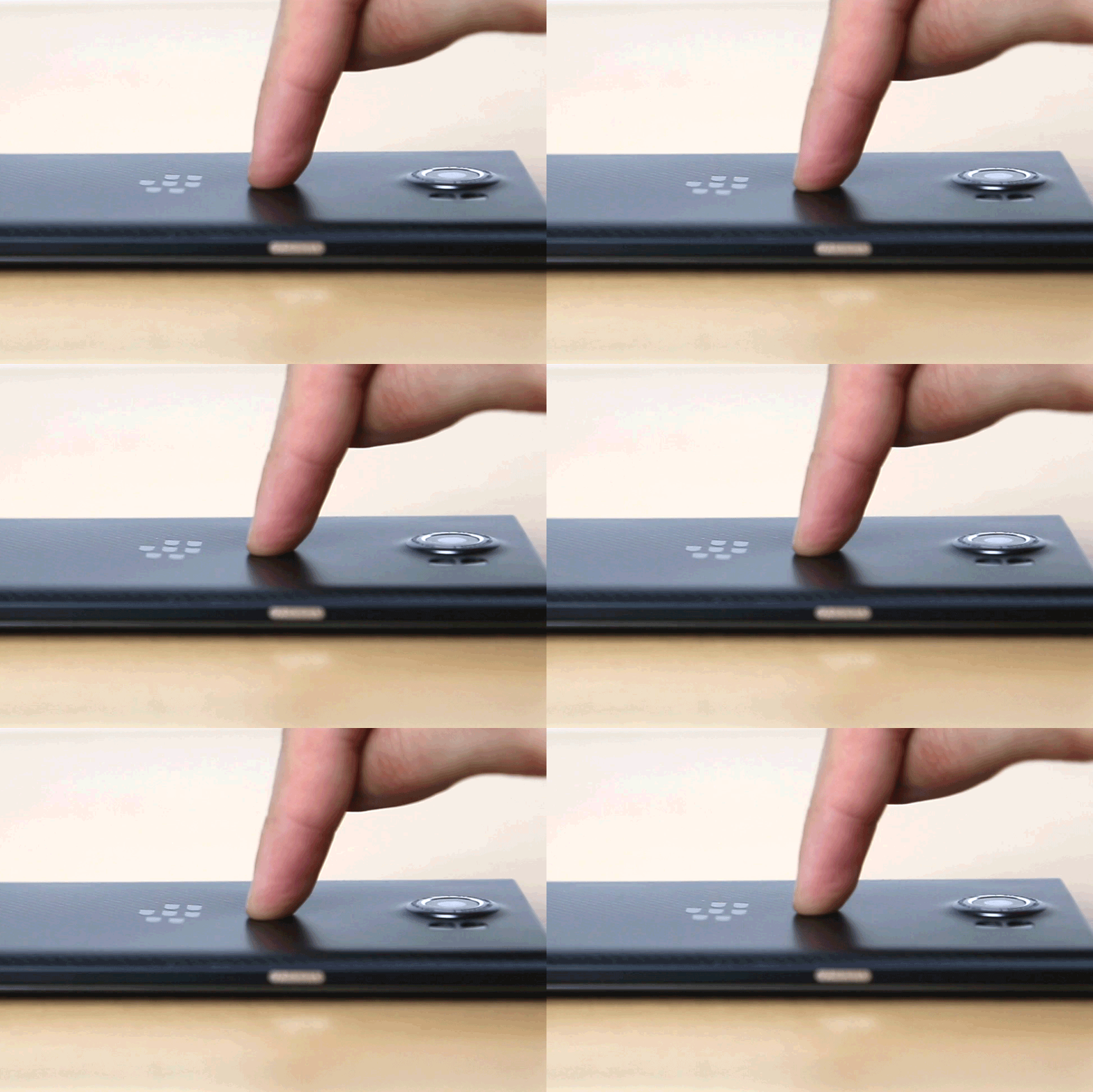
The Priv might not run Marshmallow, but it sure feels like it’s made out of one. Our primary complaint is the rubbery plastic back. BlackBerry isn’t using a solid, hard plastic here; it’s more like a skin that was stretched across a supporting inner shell. It’s squishy and deforms when you press on it, which you can see in the above picture. This wouldn’t be a huge deal for a bargain device, but it’s unacceptable for a $700 phone. The rubber skin is at least very grippy, with a carbon fiber-like weave pattern in it. It looks nice enough.

The display curves down on the left and right side like a Samsung Galaxy S6 Edge. Similar to that phone, the curve is a rather useless gimmick, and it seems out of place on a business phone like the Priv. The display is a plastic AMOLED display, reminding us a lot of what we’ve seen from the LG G Flex. For some colors, the display puts out an uneven color and ends up looking dirty or grainy. It’s not as bad as the G Flex, but it’s still noticeable.

While the display bend isn’t as extreme as the S6 Edge, it does still distort the side of apps. BlackBerry doesn’t try to make use of the curved display much—there’s a menu of app shortcuts you can pull out from the side of the display, and the curve shows charging information while the screen is “off.”

The buttons are plastic with a shiny faux-chrome finish, and the real surprise is that there are four buttons: Power, volume up, volume down, and a button BlackBerry calls “mute.” Pressing the mute switch when the phone is actively making noise will mute the device, but that is the only scenario when the button will do something. A “preemptive” mute with the mute button isn’t possible. Common sense would dictate that pressing the mute button at any point would set the phone volume to silent, but in reality, the mute button won’t do anything unless noise is actually coming out of the phone. Press it at any other point and the volume slider will appear on the screen, but nothing will actually happen. It’s counterintuitive to the point that it seems broken.

A speaker grill runs along the entire bottom “chin” on the phone, but it’s mostly aesthetic. A single front-facing speaker is on the left side, right below the on-screen back button. We’ve got no complaints about the speaker—it’s quite loud. Along the bottom of the phone there’s a headphone jack and a MicroUSB 2.0 port, and on the top is a SIM and—an increasingly rare item on Android phones—a MicroSD slot.

The (vestigial) keyboard

The tall lip for the screen gets in the way of typing.
The keys are flat—really flat.

The slide-out keyboard feels like the Priv’s entire reason for existing, but it just isn’t any good. BlackBerry’s hardware keys might have had a leg up on 3.5-inch devices, but today the keys are microscopic compared to the software keyboard on any 5-inch phone. The tiny keys make it easy to press the wrong button, and typing becomes a cramped, uncomfortable experience.

To fit the keys under the screen, BlackBerry made them almost completely flat. You won’t find the nice raised ridges here like on a classic BlackBerry keyboard. Two edges of each key will be beveled to get a similar look but not the same feel. The keys are backlit and have a good click action, though.

The keys sit at the bottom of a dish formed by the tall, front-facing speaker grill and the bottom edge of the sliding screen. The keys are far enough from the speaker that it doesn’t cause a problem, but it’s easy to have your fingers crash into the bottom edge of the display when using the top row of the keyboard. This is only a four-row keyboard, remember, so access to the top QWERTY row is critical.

We didn’t like BlackBerry’s sliding mechanism, either. We’d want the sliding feature on a $700 phone to glide and be as smooth as butter, but the Priv has a scratchy, friction-filled slider. You can hear plastic scrape against plastic when you open or close the device. Again, there isn’t room for these kinds of compromises on such an expensive phone. Springs do lock the device open or closed, at least.

When open, the Priv becomes nearly the height of a seven-inch tablet. Only the screen of the Priv slides up to reveal the keyboard, leaving most of the weight stationary and in your hands, but it can still be top-heavy, depending on your grip.

The keys are actually touch-enabled, too, allowing you to do swipe gestures across the keyboard. While not typing, the swiping on the keyboard usually acts just like swiping on the screen. On the home screen, swiping left or right across the keyboard will change screens, and in the browser, swiping will scroll up, down, left, or right. While typing, swiping right-to-left will delete the entire previous word. Our favorite functionality kicks in when you tap on the text input box to bring up the draggable text cursor—swiping the keyboard will move the cursor through the text, just like pressing left or right on a keyboard. Hold the shift key and you can even highlight text! This is a lot more accurate than dragging with a finger, which usually covers up the text.

Weirdly, if the keyboard is open and the phone falls asleep, pressing on the keyboard won’t wake it up. This makes sense on a BlackBerry with exposed keys, but not on the Priv, where any “pocket presses” will be protected by the closed phone.

Autocorrect still works on the hardware keyboard, and the standard row of three suggested words shows up on the bottom of the screen. The problem is, the very bottom of the screen is still reserved for the on-screen navigation buttons, so from bottom to top, there’s the hardware keyboard, navigation keys, and keyboard suggestions. Having three buttons, each of which will whisk you away to some other task, wedged in between your keyboard and typing suggestions is… less than ideal.

The autocorrect bar actually counts as a software keyboard, which makes the normal Android back button change from pointing left to pointing down, as if there were a full keyboard open. So with the keyboard open, the first press on the back button will only close the tiny autocorrect bar, which seems kind of silly. You have to press back a second time if you actually want to go back.

Remember, this is a hardware keyboard, so the changing status of the “shift” and “alt” keys can’t be represented by the keyboard buttons. The old-school way to indicate this was to put a triangle on top of the typing cursor for alt and a triangle on the bottom for shift. For some reason BlackBerry only implemented half of this—shift puts a little triangle on the cursor like you would expect, but alt does not. The only indication you’ve pressed the alt key is all the way up at the top of the screen in the status bar. Keep in mind the Priv is about seven inches tall when it’s open, so the status bar is likely out of your field of vision while typing.

There’s also a “sym” key, which will open a full on-screen keyboard of symbols. Along with the hardware keyboard, navigation bar, and auto-correct bar, this works out to nine rows of buttons.

BlackBerry has also included a custom software keyboard that works a bit like the BB10 keyboard and mixes the auto-correct suggestions around in the vertical margins in the keys. So after typing “key,” a suggestion for “keyboard” will appear above the “b” button. Swiping up on the “b” key will select the suggestion, place “keyboard” in the text field, and it’s on to the next word. With the suggestions jumping all around the keyboard as we type (and being partially covered by our fingers), it was hard to ever identify and swipe on a correction faster than just finishing the word.

If we were forced to live with the Priv, we would ignore the hardware keyboard completely and use the software keyboard. Nothing can really match larger keys. Having a hardware keyboard and not wanting to use it seems like the ultimate sign of failure for the Priv, though.

Software

More shortcuts: Swipe up from the home button to bring up three customizable shortcuts.
The tab is called the “productivity tab,” and it offers an overlay of your calendar, contacts, task list, and messages.

BlackBerry doesn’t have any Android update history to speak of, but the Priv does ship right out of the gate with an old version of Android—5.1.1—which isn’t a good sign. The Priv stands for “privacy,” but shipping with 5.1.1 means it’s missing one of the best privacy features to come to Android in some time: Android 6.0’s user-controlled app permissions.

BlackBerry has, at least, committed to Android’s monthly security update program for unlocked devices and to carriers “that have agreed to participate in our regular monthly update program and facilitate rapid approval of our monthly updates for over-the-air (OTA) to subscribers.” Who are those carriers, though? We’ll have to wait and see who gets the next monthly update and when. BlackBerry also says it will provide hotfixes for “some critical Android vulnerabilities.” We’d love to say something like “BlackBerry really seems to be taking Android updates seriously,” but talk is cheap and, again, the company is shipping phones with an old version.

We wouldn’t really call BlackBerry’s Android distribution a “skin,” as most of stock Android has either been left alone or can be restored via the settings. BlackBerry has added a few extra button features, though, which you can use if you like or turn off if you don’t. If you’re going to mess with Android, this is definitely the method we prefer. “Branding” the interface by aesthetically changing things like the icons, settings screen, and notification panel just to be different doesn’t help users.

By default, the biggest core OS feature BlackBerry changed is the Recent Apps screen, which now is an exposé-like tiled interface of variously sized thumbnails. You’re never quite sure what this screen will look like before you open it, as sometimes it will be a bunch of little thumbnails, and sometimes there will be a huge thumbnail that takes up half the screen. We felt like the continually changing layout added a few extra beats to recognizing and selecting a thumbnail.

Head to the settings (the “display” settings, oddly), and you’ll see this Recent Apps mode is called “Masonry.” You can also change to two other Recent Apps interfaces: the stock Android Recents interface, which BlackBerry calls “Rolodex,” or one called “Tiles.” We love that we can restore the stock functionality, and “Tiles” is even pretty good. It’s a simple two-wide grid of thumbnails that you can scroll through, which displays six full thumbnails on the screen plus another half row of apps. It’s simple but effective.

There’s a floating tab on the right side of the screen called the “Productivity Tab.” Pull it out and an overlay will pop up showing your calendar. You can then switch to BlackBerry Hub (the e-mail/text app), a task list, and contacts. We never found it particularly useful, but we could see how some people would like quick access to some of this. The good news is that if you don’t like it, you can turn it off. BlackBerry’s design philosophy seems to be “put shortcuts everywhere”—swiping up from the home button reveals another set of shortcuts, which are three customizable icons.

BlackBerry added app categories to the top of the notification panel. A strip of app icons sits above the notification panel, and tapping on an icon will show notifications for only that app. There’s also iOS-style red badges on the home screen icons when you have a notification.

The Priv comes with a suite of BlackBerry apps. There’s BBM, BlackBerry’s Messaging service, which is available on any Android or iOS device. BlackBerry’s e-mail app is the “BlackBerry Hub,” which also throws text messages and the call log into the inbox. Multiple inboxes can be fed into a single list, making it a one-stop-shop for all your non-proprietary communication needs. You can swipe messages left to delete them or right to snooze them, and overall it seems like a competent e-mail app. The one oddity is that while it will list text messages, it’s not actually a texting app—tapping on a text will kick you out to Hangouts or the stock messaging app.

BlackBerry has an odd new unlock method called “Picture unlock.” You set a lock screen background and pick a number from zero to nine. Then you’re asked to drag your number somewhere on the picture, and that number+location is your unlock code. When the lockscreen kicks in, a random grid of numbers is overlaid on top of the picture, and you have to tap on your correct number and drag it to the correct spot. Because the number grid is random every time, you aren’t able to look at screen smudges to try and guess the unlock pattern. You also get the bonus of a third party having no idea what to even do with a lock screen like this.

The number location is very precise. We first set our picture lock screen by picking the colored square background and remembering “9 on black square” as the password. You have to be nearly pixel-accurate, though, so our mental description wasn’t accurate enough—we ended up failing 10 times and having the phone auto-wipe. You’re better off picking some kind of crosshair to line the number up with. Even then, we found the lock screen to be slow and prone to errors. If all you want to do is protect against smudge reading, a pin lock screen with a randomized keypad would work fine and wouldn’t have these accuracy issues.

Camera

The BlackBerry Priv has an 18MP rear camera with optical image stabilization and phase detection autofocus. It’s bad.

It’s especially bad for a $700 device. In our camera test it was absolutely wrecked by the $380 Nexus 5X, and it fell behind the Moto X Pure and Galaxy Note 5, too. Most shots tended to be very gray and low-contrast. Low light performance isn’t great, either.

This is the best the BlackBerry could do on a bright, sunny day. There’s a blue haze over this picture, for some reason.
Flip to the Nexus 5X and suddenly the world is a bright and colorful place.
The Moto X Pure keeps the colors, but the picture is muddy and lacks detail.
The Note 5 does a decent job, like the 5X.
In indoor lighting the Priv is still washed out and yellow.
The 5X has a lot more contrast going on. The green in particular is a lot deeper, and the white balance is correct.
Again the Moto X lacks detail and is muddy.
The Note 5 does a great job. It captures a good amount of light and is colorful.
It’s hard to tell when the Priv camera does this poorly in low light, but there are some Nintendo plushies in here.
Who turned on the lights?! The Nexus 5X did. (We did not actually change the lighting.)
The Moto X Pure scores an “F.”
The Note 5 picks up more light than the losers but can’t beat the Nexus 5X.

Performance

We saw no surprises from the Priv’s 1.8GHz Snapdragon 808 processor. Performance is similar to what we’ve seen from other 808 devices like the Nexus 5X. Ditto for the 3410mAh battery—it has similar specs to the Nexus 6P and similar performance in our test. The 6P will have a leg up in standby, though, thanks to Marshmallow’s Doze mode. Again, we’re comparing the $700 Priv to $380 and $500 devices.

BlackBerry: better off but still can’t compete

With Google, Motorola, Xiaomi, and OnePlus pumping out high-end devices in the $300-400 range, pricing your Android phone at $700 is a boastful statement that you’ve made a kick-ass, no compromise device. The BlackBerry Priv can’t back up that kind of bragging, though, and that’s why it’s a failure. Other than the subpar keyboard and camera, everything on the Priv is merely passable. It’s a “C” student, but the price demands we grade on a curve that flunks the Priv.

Even at a competitive price of $400-$500, we’d be hard pressed to buy a phone with a hardware keyboard when the hardware keyboard is bad. The keys are small and flat, the keyboard is cramped, and hardware keyboard autocorrect is shoehorned into an operating system layout where it clearly isn’t welcome. Closing the Priv and using the more spacious software keyboard wasn’t just faster, it was a relief. That’s the real deal-breaker for the Priv—the hardware keyboard needed to be spectacular, and it isn’t.

From BlackBerry’s perspective, the company is in way better shape with the Priv than it was with any of its BB10 devices. The Priv can’t stand up to the competitive Android smartphone market, but it is at least a livable smartphone that you could make do with. Maybe BlackBerry will convince some enterprise customers to buy a few Privs for their business, but for normal consumers, there is nothing compelling here. The Nexus 6P has better specs, a better camera, an aluminum body, and stock Android with updates direct from Google. It’s also $200 less than the Priv. There is still no reason to buy a BlackBerry.

Good

  • BlackBerry’s Android distribution sticks very close to stock Android. It mostly only adds extra features, and those extra features can be turned off.
  • A MicroSD slot.
  • Tap to wake! Just double-tap on the screen and it will wake up.

Bad

  • This device isn’t worth $700.
  • The tiny keyboard is cramped, flat, and unpleasant to type on.
  • The camera is gray and colorless.
  • It has a scratchy, friction-filled sliding mechanism.
  • It features a spongy back material that feels like a plastic frame with a rubber skin wrapped around it.
  • Like other flexible PAMOLED displays, some colors show a dirty-looking “grain” pattern instead of a solid color.
  • Android 5.1.1. BlackBerry pushes the “privacy” angle, but shipping with an old version of Android means it’s missing Android 6.0’s great privacy features.
  • The hardware “mute” button doesn’t mute the phone.

Ugly

  • A phone with an awful hardware keyboard? Nope, not buying that at any price.
Photo of Ron Amadeo
Ron Amadeo Reviews Editor
Ron is the Reviews Editor at Ars Technica, where he specializes in Android OS and Google products. He is always on the hunt for a new gadget and loves to rip things apart to see how they work. He loves to tinker and always seems to be working on a new project.
457 Comments