Skip to content
Tech

Review: The new Moto E is the most phone you can get for $150

The first Moto E cut too many corners, but this one can hold its own.

Andrew Cunningham | 88
Credit: Andrew Cunningham
Story text
Old Moto E on the left, new Moto E on right right. It’s not a drastic increase in size.
2015 Moto E, 2014 Moto G, and 2014 Moto X. Different sizes, different prices, similar designs and software.

Motorola’s low-end phone lineup is getting crowded, especially since last-generation models are still available for purchase months after being replaced. There’s the old Moto G, the old Moto G with LTE, the old Moto E, the new Moto G, and now two different flavors of second-generation Moto E. Every single one of them is available for between $100 and $200.

No single low-end Motorola is definitively better than all the others, but the new $150 Moto E with LTE makes a strong case for itself. It’s got more storage than the old one, surprisingly good specs, and a smallish 4.5-inch display that will appeal to people who think the 5-inch Moto G got too big.

Specs at a glance: 2015 Motorola Moto E LTE
Screen 960×540 4.5-inch IPS (244 PPI)
OS Android 5.0.2 (32-bit)
CPU 1.2GHz Qualcomm Snapdragon 410 (quad-core Cortex A53)
RAM 1GB
GPU Qualcomm Adreno 306
Storage 8GB NAND flash, expandable by up to 32GB via Micro SD
Networking 802.11b/g/n, Bluetooth 4.0. US LTE version supports GSM/GPRS/EDGE (850, 900, 1800, 1900 MHz)
UMTS/HSPA+ (850, 1700 (AWS), 1900 MHz)
4G LTE (2, 4, 5, 7, 12, 17)
Ports Micro-USB, headphones, Micro SD slot
Camera 5MP rear camera
Size 5.11″ × 2.63″ × 0.20-0.48″ (129.9 × 66.8 × 5.2-12.3 mm)
Weight 5.11 oz. (145 g)
Battery 2,390mAh
Starting price $149 off-contract and unlocked

On top of all those features, the new Moto E packs in the other things that reviewers and users tend to praise about the Moto phones: a relatively clean load of a modern version of Android, a basic but attractive design, and better build quality than you’d expect. Like other Motos before it, it strives to offer the basics without frills or unnecessary embellishment. While our review of the original Moto E was lukewarm, we like this new one quite a bit better.

Look and feel

At this point, Motorola has established a basic aesthetic for the Moto phones. The Moto E has a curved back with a dimple in it for the logo, a centered camera on the rear, and a gentle curve all the way around the rim.

The major departure here is that while both Motos G and the old Moto E had rear shells that could be popped off and replaced with shells of other colors, the new Moto E uses “bands” to accomplish the same thing (the micro SD and micro SIM slots are both under the band). The back of your phone will always be either black or white, but if you buy a three-pack of bands for $20 you can replace the lining around the edges. “Grip shells” that include a rubberized rim and offer some protection for the back of the phone are available for $20 each.

The Moto E is nice to hold, and, while it’s all plastic, it feels solid—there’s no creaking or flexing in the body of the phone itself, though the bands are flimsy compared to the older Moto phones’ complete shells. The matte finish on the back of the phone and the rough texture on the bands cut down on slipperiness, a common complaint about Samsung’s plastic phones.

The 4.5-inch display is identical in size to the first-generation Moto G, and the two phones are similar in size overall. But the Moto E has a lower 960×540 resolution rather than the Moto G’s 720p, and at 244 PPI its density is just low enough to make things look a little fuzzy. It’s not generally a problem in most apps or on mobile sites, though you’ll lose fine detail on text and images.

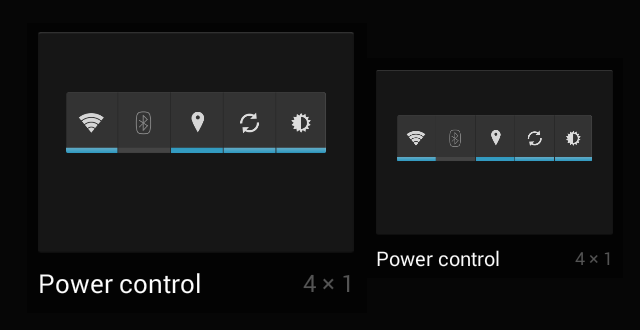
720p on the left, 960×540 on the right. Note the loss of fine detail. Note that these are both widget thumbnails, not the full-size widgets themselves. Credit: Andrew Cunningham
720p on the left, 960×540 on the right. Credit: Andrew Cunningham

The quality of the display panel is still great, which lessens the blow. It’s an IPS panel with good color and viewing angles, and by our colorimeter’s reckoning it’s got a fairly high max brightness of about 360 nits. There’s some brightness shifting if you look at the screen from off-angles, but colors stay about the same and the display remains readable. There’s no backlight bleed around the edges, which hasn’t been the case on older budget Moto models. Display quality on low-end phones, laptops, and tablets is often poor, but it’s not a corner that Motorola has chosen to cut here.

Call quality is fine, on par with other smartphones we’ve used. It sounds like a cell phone—fuzzy but workable. The phone’s speaker is located under the silver bar on the front of the phone, the same place as the earpiece. It gets loud enough for YouTube videos, and it doesn’t distort much, but there’s no bass at all. No surprises here.

Software: 64-bit chip, 32-bit OS

The Moto E runs Android 5.0.2, which is the newest available version. Kind of, for now.

Oddly, even though the Snapdragon 410 and Lollipop both support the 64-bit ARMv8 instruction set, the phone still uses a 32-bit version of Android. We asked Motorola about this, and its answer made sense:

64-bit support in Android is very new and tends to put pressure on memory, and while the Moto E hardware can technically support 64-bit, the software and applications available are still primarily running in 32-bit. To deliver the best end user performance on Moto E, we are currently running 32-bit. We’ll continually monitor the evolution of the ecosystem to 64-bit along with performance optimizations.

In other words, don’t expect widespread 64-bit support for low-end phones until 2GB of RAM becomes a low-end feature. This isn’t something users will notice, but if you’re looking for a cheap 64-bit Android device, the Moto E LTE isn’t it.

As for the software loadout itself, it’s pretty much what you’d get on a Nexus phone: the Google Now launcher is the default home screen, and most of the pre-installed apps belong to Google.

The Moto E’s home screen. Hard to tell apart from a Nexus.
The Moto E’s home screen. Hard to tell apart from a Nexus. Credit: Andrew Cunningham

Motorola includes just a few of its own tools, all updated through the Google Play store: its standard camera app, a migration tool that helps with transfers from dumb phones, iPhones, and other Android phones, the Motorola Connect app that interfaces with the Moto 360 and a handful of other Motorola accessories, and a Moto app that controls the small handful of extra stuff Motorola usually adds to its phones.

The Moto app includes support for Moto Assist, a minor feature that will automatically mute notifications and keep the screen turned off at night. Additionally, it can mute notifications and send automatic replies to certain senders while your calendar app says you’re in a meeting.

Motorola has also included a feature called Moto Display, which has been called Active Display in past phones. It briefly flashes notifications on the screen while the phone is off, turning the screen on briefly and then turning it back off again. It’s not nearly as useful as it is on the Moto X, though. The Moto E’s simplified internals won’t detect when you move the phone or wave your hand over the screen, and the fact that the Moto E uses an IPS display rather than an AMOLED screen means that the entire screen must be powered on to show a limited amount of information. Update: Motorola tells us that the Moto Display feature will light up if you lift or nudge the phone, but in our experience it worked less consistently than it did on either Moto X. In general, larger motions are more likely to wake the screen. Motorola also says you need to wait between five and 10 seconds without moving the phone before moving it will activate the screen.

If you like this feature, we’d suggest looking at Lollipop’s native Ambient Display feature instead. It’s a version of the same idea that shows you more data. On an AMOLED screen this would use more power since it would be lighting up a higher number of pixels, but on the Moto E it doesn’t really make a difference. Update: Motorola points out that nudging or moving the phone to wake the screen and view notifications only works with Moto Display, and not Ambient Display.

Next, let’s talk about typing. This is the first time I’ve used the Android 5.0 keyboard for an extended period of time on a screen this small, and it feels like the Google Keyboard’s Material theme was designed with larger screens in mind. I’ve never been a huge fan of its buttonlessness anyway, but on the Moto E I found myself making more typing mistakes than usual. Switching back to the older “holo” theme in the Google Keyboard preferences gives you your buttons back, and it improved my accuracy on this particular phone.

Finally, we come to Lollipop and Motorola’s software update policy.

Lollipop is still a young OS, and the two minor updates it has received since it was released in November haven’t fixed all of its problems. Using Lollipop still means putting up with occasional app crashes or rendering problems (that bug where the home screen has to redraw itself all the time is my least favorite, personally, but you probably have a pet glitch or two of your own) and memory leakage is apparently a problem.

Motorola has tried to make quick updates a signature feature of the Moto line. When Google does release Android 5.1 or some subsequent version to OEMs and users, Motorola will likely roll an update out relatively quickly. That said, Motorola’s press materials and reviewer’s guide make no mention of a “guaranteed” Android update the way they did when the first-generation Moto E was announced. The first-generation Moto X, G, and E are all still waiting on Lollipop updates, though given the relative bugginess of the release that’s probably not such an awful thing for users.

Point being, we’re still waiting to see how the Lenovo purchase is going to affect Motorola in the long run. Motorola has broken its own sales records based in part on the strength of the Moto lineup, so hopefully Lenovo decides not to upend the formula. If updates don’t continue to be a priority, it’s going to dampen these phones’ appeal somewhat.

Storage space

Games tend to be larger than other apps—consider offloading them to an SD card if you want a lot of them.
The Motorola camera app can choose the SD card as its primary storage target.

The 4GB of storage on the old Moto E was a major problem, because it was incredibly easy to eat up the 2GB of space that was actually usable, and offloading media to an SD card needed to be done manually. The new one comes with 8GB, which is still not a lot but it’s at least workable. You’ll have 4.58GB to use out of the box, which is enough for a reasonably robust selection of apps and a little bit of media.

Light users—people who use their phones primarily to do basic stuff like browsing, texting, and mapping—will probably be fine with this amount of storage. It’s no longer restrictive enough to be an immediate problem. I listen to most music through Spotify and watch most things on Hulu, Netflix, or HBO Go, so the smallish amount of storage space didn’t impact my media consumption habits.

Three kinds of people will want to make sure they pick up a microSD card: people who listen to music and watch movies locally, people who take lots of pictures, and people who install lots of games. Many apps won’t let you move them to the SD card, but games nearly always will. And the Motorola camera app allows you to set the SD card as a storage target, giving you freedom to take as many pictures as you want.

Camera

The camera in the Moto E has been upgraded a little, not a lot. It’s still a 5MP sensor and it still lacks an LED flash, but it has an auto-focus lens rather than the old model’s fixed-focus one. There’s also a 0.3MP front-facing camera on the Moto E now—it’s slow and grainy and has trouble with color and exposure, but for basic video chatting it’s fine.

We took a couple of outdoor shots and a couple of indoor shots with the new Moto E to get an idea of what it was capable of, and it’s a big improvement over the first-generation model even if it still isn’t fantastic.

The old Moto E tended to soften images too much, making everything a smeary mess. Look at the city skyline of the old Moto E, and you’ll see an indistinct grey blur. The new Moto E captures some detail on the buildings and even a few individual snowflakes. That holds true for the indoor shots as well, though you basically won’t be able to get a picture of anything without some kind of external light source. Even the mediocre 8MP camera in the second-generation Moto G captures more detail, but at least the Moto E is a small improvement.

Original Moto E. Much less detail captured.
The 2014 Moto G. We didn’t realize we were shooting in 16:9 at first, but it doesn’t affect the quality of the shot.
First-gen Moto E.
2014 Moto G.
First-gen Moto E.
2014 Moto G.
As is the original Moto E.
The 2014 Moto G probably does the best of all Moto phones in low light, somehow.

CPU, GPU, and LTE performance: Meet Snapdragon 410

The LTE Moto E is the first phone we’ve gotten our hands on that uses the Snapdragon 410, the successor to the Snapdragon 400 in both Motos G and the predecessor of the 415 and 425 SoCs that Qualcomm announced recently. Qualcomm’s product lineup is nearly as convoluted as Intel’s, but 400-series chips are best described as low-end midrange chips. These are above the low-end 200-series but below the high-end midrange 600-series and the high-end 800-series.

Last year’s Moto E used a dual-core Snapdragon 200—jumping all the way to a 410 is a significant boost to performance both because the CPU cores themselves are faster and because there are twice as many of them. The 410 uses four Cortex A53 CPU cores, ARM’s low-end 64-bit architecture. The 400 used the Cortex A7, a low-end 32-bit chip.

The $119 3G version of the 2015 Moto E that Motorola has announced, on the other hand, will be using a quad-core version of the Snapdragon 200. In this case, doubling the CPU core count should mean much better potential performance than the original Moto E, but the older Cortex A7 architecture still won’t be as fast.

As we discussed, the Moto E LTE is running a 32-bit version of Android even though both the 410 and Lollipop are 64-bit compatible—the numbers here may not benefit from all the performance improvements specific to the ARMv8 instruction set.

The Snapdragon 410 doesn’t feel like a high-end chip, but it’s a nice improvement over a Snapdragon 400 running at the same clock speed. Memory performance in the new Moto E is significantly better than in the Moto G, and the overall scores are up by 30 or 40 percent. If you look at the Geekbench sub-scores for both the Snapdragon 410 and the Snapdragon 400, you’ll see that cryptography-related tests (AES, Twofish, SHA1, SHA2) can be up to twice as fast on the 410 as the 400.

The old Moto E can’t even put up a fight here, since it uses an older architecture and half the number of cores. And while we don’t have it to benchmark, remember that the Snapdragon 200 in the $120 second-generation Moto E uses four Cortex A7 CPU cores too—it’s going to perform more like the Moto G than the new Moto E.

In closing, the new Moto E’s CPU performance is within spitting distance of the quad-core Snapdragon S4 Pro used in the Nexus 4 and some other phones. If the Moto G performs like a phone from early 2012, the Moto E LTE performs more like a phone from late 2012. General performance is good overall, but heavy apps or webpages will occasionally make it stutter. A high-end Snapdragon 800-series phone will be noticeably faster and smoother.

The Adreno 306 GPU, on the other hand, is barely an improvement over the Adreno 302 in the last Moto E. The screen’s lowish resolution is helpful here—you need less GPU power to drive games at its native resolution. There aren’t a lot of high-end 3D games on Android that are pushing the limits of what these GPUs can do, so most games are going to be perfectly playable. Just know that this might not be true for the entire usable lifespan of the phone.

To test LTE speeds, we ran the Speedtest.net app on a few different Moto phones. The tests were all performed within a 15-minute span of time on AT&T’s network in Jersey City, and they all pinged the same server. The scores below are the average of two runs.

Phone Download Upload
2014 Moto X (LTE) 57.34 Mbps 15.7 Mbps
2014 Moto G (3G) 15.17 Mbps 1.69 Mbps
2014 Moto E (3G) 12.48 Mbps 1.67 Mbps
2015 Moto E (LTE) 56.04 Mbps 14.72 Mbps

Your mileage will vary depending on your operator and the technology it’s using in your area (the LTE phones are both theoretically capable of 150Mbps down and 50Mbps up under optimal conditions), but this is a good idea of what you can expect in a major metropolitan area with decent coverage.

In the past, we haven’t really knocked any (figurative) points off for low-end phones that don’t support LTE, but now that it’s creeping into all but the lowest of the low-end SoCs we might need to change our policy on that. The $150 Moto E rivals the LTE speed of the $500 Moto X and drastically outstrips the old Moto E and the Moto G. You can definitely feel the difference while you’re out and about.

A new file system and (apparently) optional encryption

Motorola is using the Flash-Friendly File System (F2FS) on the new Moto E, which nets it a respectable boost in storage speeds over last year’s model. F2FS partitions typically post much better numbers than ext4 partitions on the same device. It posts reasonably good numbers in everything but the random write test, which you can feel occasionally as you use the device. Downloading and installing things in the background while trying to do anything else can make the phone choke up a bit.

F2FS is still rare. It wasn’t used in the original Moto E, at least not in KitKat, but we’re beginning to see it more often. Both Motos G and the original Moto X always used it, and our 2014 Moto X switched from ext4 to F2FS when it got its Lollipop update (after updating, we totally reset the phone, though—we’re not sure whether the conversion happened with the update or when the partition was reformatted as part of the reset process). HTC’s Nexus 9 uses F2FS, though the Nexus 6 does not. It’s nice to see Motorola using the file system in more of its devices, especially at the low end where the quality of the flash memory might not be so great in the first place.

The most interesting thing about the Moto E’s storage is that it’s not encrypted, something that was supposed to happen “by default” on all new Lollipop phones. That requirement has been changed, as we cover in more depth here.

Android’s encryption can have a big impact on general performance, but the Moto E handles it better than the old Moto E or either Moto G. Encrypting our second-generation Moto G tanked sequential read and write scores, lowering them by around 75 and 66 percent respectively. By contrast, the Moto E’s sequential read and write scores drop by about 50 and 17 percent (random read and write stays roughly the same on both phones).

Random read and write performance on both phones is basically unaffected—the storage is still the bottleneck there, apparently. Sequential read and write performance goes down when you encrypt your phone, but the Moto G takes a huge dive where the Moto E managed to keep its head above water. The Snapdragon 410’s hugely improved cryptography performance helps encrypt and decrypt all of this data more quickly, alleviating a major bottleneck for older SoCs. This will be useful once Google actually starts requiring encryption on new Android phones.

Battery life

The Moto E has a slightly larger screen and a faster SoC than the old one, but its battery capacity increased by 20 percent, from 1,980 to 2,390mAh. You’ll have no problem making it from one end of the day to the other on a single charge, even with fairly heavy use.

A new low-end contender

The $150 version of the new Moto E does a lot of things very well, especially for the price. Performance is generally good. The LTE speeds are as good as what you’ll get in many high-end phones. Build quality is fine and screen quality is good even if its resolution and pixel density aren’t very impressive. You cut corners to get here—the camera, the storage, and NFC for mobile payments are probably the most noticeable, in that order—but this new Moto E does a better job of covering the basics than the old one did.

The phones that come the closest to matching the Moto E’s bang-for-buck are Microsoft’s Lumia phones, and new additions like the 640 are particularly attractive. However, the fact remains that the Android software ecosystem is larger and more varied, and an Android phone will serve a general smartphone buyer better in the long run.

If you’re dead-set on spending less than $200 on an unlocked phone, we might actually recommend the new Moto E over the second-generation Moto G in some cases. The Moto E has the faster processor and better cellular connectivity, it’s got superior battery life, and it has a 4.5-inch screen that might appeal to fans of smaller phones. If those are the most important things about a phone for you, get the $150 Moto E.

If you prefer a higher-resolution screen, a phone that’s physically larger, or a slightly better camera, the $180 Moto G is the better pick. It’s not as fast, but it’s not so much slower that you’ll end up hating it. It’s too bad that Motorola didn’t do more to upgrade it when it came out, but in the smartphone business the next refresh is only ever a few months away.

With this release, however, we would recommend that you stay away from the old Moto E, which cuts too many corners, and the $120 3G version of the new Moto E. You give up too many things to save that $30. Generally speaking, we’d favor the LTE Moto E over the first-generation Moto G unless you can find it at a pretty deep discount.

Motorola is still making the best budget Android handsets you can get for the money. Lenovo hasn’t screwed that up yet, and hopefully the company doesn’t try to fix what isn’t broken.

The good

  • A solid, well-built phone, especially for the price.
  • The screen isn’t especially sharp, but it’s still nice to look at.
  • Near-stock load of Android 5.0.2, and you’ll probably get at least a couple of Android updates.
  • Snapdragon 410 brings respectable performance, and LTE is a great feature at this price.
  • Enough storage that you won’t use all of your free space in the first 15 minutes of ownership.
  • Excellent battery life.

The bad

  • Camera goes from miserable to workable, but it’s still a weak link.
  • 8GB of space still isn’t a lot, and Android’s SD card management is still inelegant.
  • No NFC, so you’ll miss out on the mobile payments zeitgeist.
  • Only the GSM model is available unlocked as of this writing. Best Buy offers a Sprint or Boost Mobile-locked version for $99, though.

The ugly

  • Cheaper $120 model loses out on many of the $150 model’s best features.
Photo of Andrew Cunningham
Andrew Cunningham Senior Technology Reporter
Andrew is a Senior Technology Reporter at Ars Technica, with a focus on consumer tech including computer hardware and in-depth reviews of operating systems like Windows and macOS. Andrew lives in Philadelphia and co-hosts a weekly book podcast called Overdue.
88 Comments