Skip to content
Tech

Review: The new Moto G doesn’t change much, but still a steal at $179

It’s just the same specs with a bigger screen, but others still can’t compete.

Andrew Cunningham | 70
The new Moto G is mostly just a larger version of the original, and that's fine. Credit: Andrew Cunningham
Story text

We were big fans of the first Moto G, mostly because it was a budget smartphone that didn’t look or act like your typical budget smartphone. Many phones you can buy for around $200 unlocked are still either cheap, underpowered handsets that can never hope to see updates or any additional support from the company you bought them from, or they’re near-end-of-life flagships from years gone by.

Decent, current “midrange” phones from the likes of Samsung, Apple, or HTC can still cost $400 or more without a contract, tying many buyers to two-year agreements with major carriers that subsidize the up-front price but eventually end up charging you more than the phone would have cost in the first place. So a $179 unlocked smartphone that has (so far) gotten prompt updates and features reasonably high-quality hardware was a breath of fresh air. Even nine months past its launch, the original Moto G doesn’t have a lot of competition.

Motorola has had quite a bit of success with these low-cost phones, though, so the company isn’t resting on its laurels. The second-generation Moto G (called simply the “Moto G” in most advertising materials, though with a “2nd generation” tag on the box, Motorola’s site, and the phone’s About panel) is already here. What’s different? What stays the same? And, more importantly, is this still the best Android phone that $179 can buy?

Body and screen

Specs at a glance: Google/Motorola Moto G (2nd generation)
Screen 1280×720 5-inch IPS (294 PPI)
OS Android 4.4.4
CPU 1.2GHz Qualcomm Snapdragon 400 (quad-core Cortex A7)
RAM 1GB
GPU Qualcomm Adreno 305
Storage 8 or 16GB NAND flash, micro SD card up to 32GB
Networking 802.11b/g/n, Bluetooth 4.0. GSM model supports GSM 800 / 900 / 1800 / 1900MHz and UMTS 850 / 900 / 1700 / 1900 / 2100MHz
Ports Micro-USB, headphones
Camera 8MP rear camera, 2MP front camera
Size 5.57″ × 2.78″ × 0.24-0.43″ (141.5 × 70.7 × 6.0-11.0 mm)
Weight 5.26 oz. (149 g)
Battery 2070mAh
Starting price $179 off-contract

A couple weeks ago I described the Kogan Agora 4G as a Moto G for people who liked larger, 5-inch screens. Now the Moto G is a Moto G for people who like larger, 5-inch screens.

There are a few other changes to the new version of the Moto G, but the bigger screen (and the corresponding larger body) is the only one that’s really worth mentioning. Everything else about the display panel is the same as it was back in December—using the same 720p resolution in a larger display leads to a somewhat lower pixel density (294 PPI, compared to 329 PPI in the original), but it’s not so much lower that you really notice when you’re reading e-books or viewing images or browsing the Internet. The screen even retains the same vaguely purplish cast, a less-than-perfect aspect of the panel that you don’t really notice as much in isolation, but you definitely see when the Moto G is sitting next to a Nexus 5 or a Moto X.

The primary casualty here is contrast—looking at a white element on top of a light grey element (the Chrome address bar, for one) on the new Moto G and the new Moto X demonstrates that it’s just harder to tell the difference on the Moto G’s display. Blacks aren’t as black, either, though this is true to some extent for any LCD display competing against an AMOLED display (AMOLED features essentially “infinite” contrast, since black pixels are just switched all the way off; in an LCD panel those black pixels are still lit). Happily, though, our new Moto G doesn’t appear to have the backlight bleed across the top of the screen that the first Moto G did. The screen is still great for the price, it just won’t be mistaken for a high-end IPS panel.

If you’ve seen and held the first-generation Moto G, you know what to expect from this one. It’s got solid all-plastic construction, and our black model came with a curved rubberized back panel that feels nice in the hand. Our hands, already accustomed to relatively large phones like the Nexus 5 and HTC One M8, didn’t find the larger size of the Moto G objectionable, but if you were interested in the phone primarily because of its smaller size you might be disappointed to see it join the 5-inches-and-up club.

Both black Moto Gs share a plastic back with a rubberized texture.
Both Moto Gs feature very similar removable plastic backs.

The back of the phone can still be peeled off with some effort to expose the SIM slot, though the battery remains inaccessible. You can see the cutout for a second SIM slot in our pictures, but you won’t actually find a slot there in US versions of the phone. New to the vanilla Moto G is a micro SD slot that can boost the 8GB of internal storage by up to 32GB. Both the LTE version of the first Moto G and the Moto E support micro SD storage, but the original Moto G didn’t have any—we’d still recommend springing for the 16GB model even if you plan to add an SD card.

The phone can be purchased in either black or white, and the choice you make dictates the color of both the removable backplate and the front face. You can change the color of the backplate by buying $14.95 replacement plates or $29.99 flip covers in any of six colors, just as you could with the original Moto G. It can’t rival the Moto X for sheer customizability, but it’s a cheaper version of the same idea.

Having a removable back makes the phone just a bit thicker and heavier than the new Moto X, and that was also true of the old Moto G and X. Both phones still look very similar, it’s just easy to tell which one is the budget model and which one is the premium option. One extra feature the new Moto G has that the new Moto X doesn’t is a pair of front-facing speakers, a significant upgrade to the weak, single rear-facing speaker on the old Moto G. They don’t sound bad for phone speakers—the front-facing speakers on the HTC One M8 make clearer and crisper sound, but the Moto G is just fine as a shower speaker or a YouTube machine.

Software

The Moto phones still run mostly stock Android with a few Motorola- and carrier-supplied additions.
The Moto phones still run mostly stock Android with a few Motorola- and carrier-supplied additions. Credit: Andrew Cunningham

Software remains a strong suit of the entire Moto line, at least as long as you consider OEM skins like TouchWiz and Sense to be a liability instead of an asset. Motorola’s reviewer guide shouts from the rooftops several of the same things we recommended to OEMs in our most recent Android update article: don’t use skins. Add value through apps that can be updated through the Google Play store, not things that are built into (and must be updated alongside) the rest of the operating system. The result is the closest thing to a “stock” Android experience this side of a Nexus phone, and Motorola is promising at least one software update to replace the version of Android the phone is currently running (4.4.4).

By default, the Moto G uses “Launcher3” as its app launcher, which is essentially the Google Now Launcher without the Google Now integration. We went ahead and downloaded the regular Google Now Launcher anyway, but, even if you don’t, the experience remains very Google-y. Google Play and most of the standard Google apps are pre-installed, with the exception of some optional ones that can easily be downloaded manually—Google Calendar, Google Keep, and Google Camera are examples of things you won’t find the first time you fire the phone up.

Motorola Assist, one of the Moto G’s value-added apps.
Motorola Assist, one of the Moto G’s value-added apps. Credit: Andrew Cunningham

Motorola includes just a handful of standard apps with its Moto phones, and, since they’re updated through the Google Play store, you’ve probably already got most of them if you’re using a previous-generation Moto G or Moto X.

The ones we’ve seen before are Motorola Migrate, an app that will help you transfer contacts and some other information from older Android phones (running Android 2.2 and up), iCloud accounts, and Bluetooth-enabled dumbphones; Motorola Assist, which will attempt to sense what you’re doing based on the time, location, movement, or calendar events (whether you’re driving to work, at home, in a meeting, or sleeping, for instance), and will offer to read your texts aloud, play music, or silence your phone, depending on what’s appropriate; and the FM Radio app, which is just what it sounds like.

Another feature available on both the newer and older Moto phones (one that is, in fact, coming to vanilla Android in the L release) is a “trusted devices” feature that allows your phone to unlock without a passcode or pattern when within proximity of a paired Bluetooth device like a car or a smartwatch. Features like this make us a little nervous—if someone stole your locked, encrypted phone, all they’d need to do to get at everything on it would be to also steal your smartwatch or to quickly unlock it while still within range of one of your devices. It’s an optional feature, but the L release will make it much more common.

New to this Moto G is the Motorola Alert app, which can send your location to selected recipients or automatically send text messages or dial emergency services if you hit the big red “emergency” button. It’s not the kind of thing that everyone will use all the time, but it could be useful for someone who travels a lot and wants to let his or her family know where he or she is; if a couple or a group of people was on vacation and wanted to keep tabs on each other; or for parents want to track their kids. Given Motorola Assist’s ability to keep tabs on your location and speed, it also seems strange that Assist wants you to dig your phone out and dive into the app to send alerts, something you might not be able to do in the event of a real emergency.

Our biggest complaint about the software relates to how the phone handles SD card storage. We went into a lot of detail on this in our Moto E review, and the new Moto G handles cards the same way. In short, in addition to KitKat’s standard SD card support (individual apps can be transferred there, and apps can use it on an app-by-app basis, but access has been limited to improve security), Motorola has made it so that you can move pictures, videos, music, and downloaded files in bulk from internal storage to your SD card. The problem is that you have to repeat this process manually every time you need to do it instead of being able to set the SD card as the default target for these kinds of files (as Windows Phone can).

Individual applications can specify the SD card as a default storage target—the built-in camera app is one. You’ll just need to rely on developers to support SD cards in their apps. Otherwise, if you like to carry a lot of stuff around with you on your phone, be prepared to be hands-on about storage management.

Camera

The new Moto G’s camera.
The new Moto G’s camera. Credit: Andrew Cunningham

The first Moto G’s camera was one of its weakest points. Even in good light, the 5MP rear shooter took soft and smeary pictures. The price tag was the excuse, but even at $179, there’s room for improvement.

The new Moto G steps up to an 8MP camera and a 2MP front camera, and it’s definitely a noticeable improvement. Color is better, focus and details are better, photos in low and indoor lighting are better, and the phone is now capable of hanging in there in a fight with the iPhone 4S (which remains a very decent, usable budget smartphone camera, though a “budget” phone on Apple’s side of the fence still costs $450 unlocked). Our sample shots below include a wide range of phone cameras, including the old and new Moto G, the old and new Moto X, the iPhone 4S and 5S, the Nexus 5, and the HTC One M8.

The original Moto G.
The new Moto X.
The original Moto G.
The new Moto X.
The original Moto G. In addition to the standard softness, it’s also way too blue.
The new Moto X.
The original Moto G in indoor lighting.
The new Moto X in indoor lighting.
The original Moto G in low indoor lighting.
The new Moto X in low indoor lighting. For whatever reason, things aren’t as clear here as they are on the old Moto X.

Internals and performance

The internals are identical to the Moto G released back in December, which is mildly frustrating. Some other phones are beginning to use Qualcomm’s Snapdragon 410, a newer version of the Snapdragon 400 that uses 64-bit Cortex A53 CPU cores instead of 32-bit Cortex A7 ones. It would have been nice to see the newer chip in the new Moto G, since the phone comes with the promise of an Android L update, and L will arrive fully capable of using 64-bit ARM processors and their more efficient ARMv8 instruction set.

As ever, though, it comes back around to the price. Even though the specs haven’t changed, it’s difficult to complain about them when you’re paying less than $200 for the phone (especially when other companies will sell you some of the same basic specs for more than twice as much). In terms of CPU and GPU performance, the Moto G posts numbers that are more-or-less equal to a flagship phone from 2012 or so, something like a Droid Razr HD or a Samsung Galaxy S III.

The new Moto G still uses the special Flash Friendly Filesystem (F2FS) for its user data partition. The new Moto X, for whatever reason, has reverted to ext4.

As for the rest of its components, it only supports 2.4GHz 802.11n Wi-Fi, which is acceptable in a budget phone but is definitely at the low-end here in late 2014. 802.11ac has become a common sight in many mid-to-high-end consumer electronics, and most things at least support dual-band 802.11n. More restrictive is the Moto G’s lack of LTE or even faster HSDPA data speeds—the phone tops out at 21.1Mbps 3G transfer speeds, which definitely make it slower to pull up webpages and maps when you’re out and about. The old Moto G has an LTE option available for an additional $40, but the new one doesn’t, at least not yet. It’s one of the few things that a regular, everyday buyer might notice if they went with the Moto G over a faster option.

Battery life

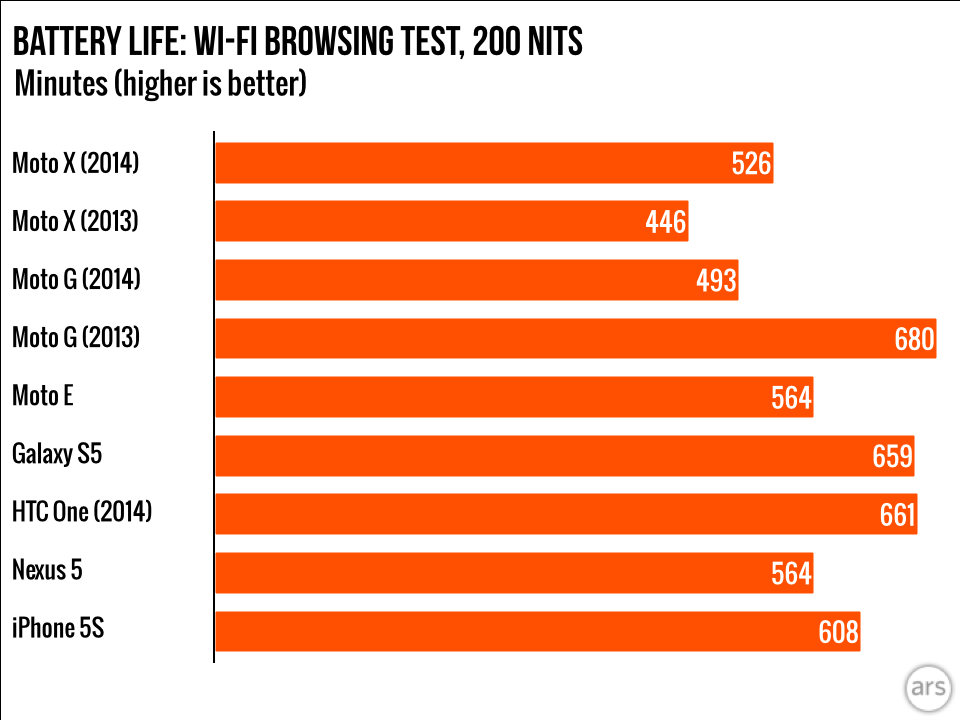
The original Moto G had a very impressive runtime, but the new one increases the size of the screen without increasing the size of the battery. Given that the phone’s other components are identical, that’s our best theory as to why the new Moto G only lasts for a little over eight hours in our light Wi-Fi browsing test, instead of the 11 hours and 20 minutes of the original. The new Moto G’s battery life still isn’t bad, but it’s no longer at the top of its class.

Not much progress, but still a standout

The new Moto G (left) and Moto X (right) are each excellent Android handsets.
The new Moto G (left) and Moto X (right) are each excellent Android handsets. Credit: Andrew Cunningham

Most people don’t upgrade their smartphones every year, though each year every smartphone OEM tries to make the case that its new models thoroughly surpass its old ones. The Moto G doesn’t pretend to do that. It’s not a phone made to entice people away from the first Moto G, because those buyers are price-conscious in the first place, and they’re not going to be looking to replace a phone they just bought.

That’s good, because among the bones we have to pick with the second-generation Moto G, the biggest is that it doesn’t do a whole lot to move the ball forward. It’s bigger, which is too bad if you thought the first Moto phones’ smaller size was part of their appeal (we did), but it probably makes good business sense—Android buyers (and those in emerging markets) tend to go for larger screens. But aside from that, you don’t get much more for your $179 than you did nine months ago.

That’s probably fine, though. Prominent Android players like Samsung, HTC, and LG have yet to field a response to the original Moto G, and so the phone still stands more or less alone as the best Android offering in this price range, big screen or not. It doesn’t do anything particularly badly, and it does most things pretty well. While no single aspect is special, the Moto G gives you the full smartphone experience. It’s not the best Android phone you can buy, but it remains the best one you can get for this kind of money.

The good

  • Great price.
  • 5-inch screen will please fans of larger phones.
  • Nice, sturdy build quality.
  • Replaceable back allows for easy personalization.
  • Snapdragon 400 and 1GB of RAM still run Android and apps pretty well.
  • Relatively clean, skin-free Android with at least one promised update.
  • Pre-loaded, non-Google apps are generally inoffensive and additive, and they can be continuously updated through Google Play.
  • Camera has improved to “serviceable” from “well, what did you expect for $179?”

The bad

  • No LTE or 42.2Mbps HSDPA cellular data rates and no separate LTE option (or CDMA option) as of this writing.
  • Limited internal storage space, especially in the 8GB version. SD card data management still mostly manual.
  • Removable back doesn’t allow for a removable battery.
  • Larger screen with same size battery leads to less battery life.
  • If you preferred the smaller size of the first Moto G, too bad.

The Ugly

  • This is basically a nine-month-old phone in a new wrapper.

Listing image: Andrew Cunningham

Photo of Andrew Cunningham
Andrew Cunningham Senior Technology Reporter
Andrew is a Senior Technology Reporter at Ars Technica, with a focus on consumer tech including computer hardware and in-depth reviews of operating systems like Windows and macOS. Andrew lives in Philadelphia and co-hosts a weekly book podcast called Overdue.
70 Comments