
Tabbed browsing has arguably had a significant impact on the way that people use the Web, but the feature hasn’t really scaled to accommodate the increasing complexity of the average surfing session. The existing tab management and overflow handling mechanisms that are present in modern browsers are dated and suffer from some fundamental limitations that significantly detract from user productivity.
As more software shifts into the cloud and users increase their reliance on the browser for daily computing tasks, browser tabs will have to evolve from a primitive mechanism for switching between documents into a full-blown task management system. The mainstream browser vendors have been slow to address this issue and haven’t applied much innovation to the problem over the past few years. Mozilla has stepped up to plate and is aiming to hit the ball out of the park with some unique and truly compelling improvements to the tab concept.
Mozilla’s experimental Tab Candy project, which is led by talented designer Aza Raskin, offers a simple and intuitive new twist on tab management. It allows users to visually manage tabs by organizing them into spatial groups. It’s far from being a complete solution to tab overflow, but it’s a very good step in the right direction.
Mozilla has made available some experimental prerelease builds of Firefox 4 that have the Tab Candy enabled. We tested this preview version ourselves to get a hands-on look at the new feature. On the surface, the only major noticeable difference is an icon with black squares that appears in the tab bar. When you click the icon, the Tab Candy mode will be activated. The browser will show you a thumbnail view of all of your tabs in rectangles that represent groups. You can drag a tab from one group to another or drag it out into the field to create a new group.
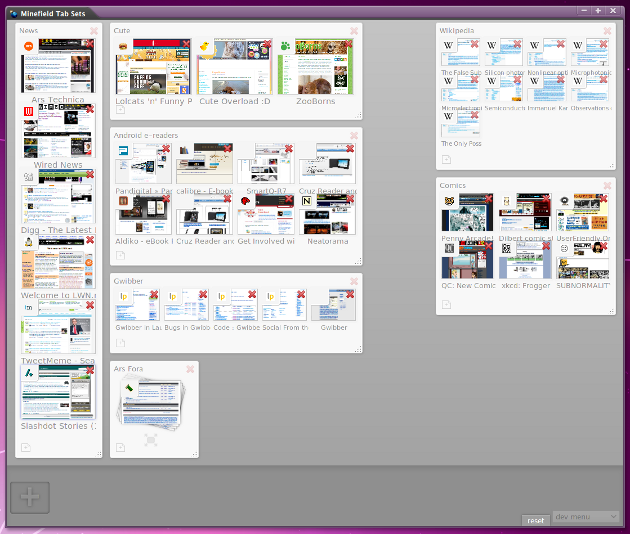
When you click a thumbnail, the browser will activate that tab and close the Tab Candy view. During regular browsing, the tab bar in the window will only show the tabs from the group that is currently active. This makes it easy to treat tab groups like projects and easily switch from one tab context to another.


 Loading comments...