Skip to content
Gaming

A new way to rock: Ars reviews Rock Band 3

Rock Band 3 adds new peripherals and new game modes, and it even teaches you …

Ben Kuchera | 71
Story text

Rock Band 3 is a major leap forward for what was already an innovative series, and once again Harmonix proves itself to be the leader in rhythm games. Rock Band 3 won’t just let you pretend to play instruments, it will teach you how to play them. The keyboard isn’t just a cute peripheral, it’s a working MIDI controller. The harmonies from Beatles: Rock Band are here and the rest of the track list is amazing; if you don’t find a number of songs you love included in this game, you simply don’t like music.

The user interface has also seen improvements, and the characters have more customization freedom. Anyone can jump in and out of a song at any time, although unlike the Guitar Hero series, you can’t have four guitars playing at once. This isn’t an arcade experience that allows for three drummers and a music-warrior-pig. This is a serious exploration of rock and pop, and you may even walk out the other side a musician.

Pro Mode

Rock Band 3 supports three new peripherals: the keyboard, the Pro Guitar, and the Pro Drums. If you have an existing set of drums, you’ll be able to buy the new cymbals as an upgrade, but the keyboard and guitar are brand new. Using these peripherals, and the new Pro Modes, you should be able to learn how to play an accurate representation of each song.

Pro Guitar

Due to supply constraints, we were told there were only 10 or so Pro Guitars to send to the press, and the outlets that did receive them to test were only able to play for a few days before sending them back. Sadly, we didn’t get one in time, so I can’t report on how well the guitars work. 
I do play (real) guitar myself, though, and the system for notes here seems odd to me. A bar shows you which strings to strum; it gives you the fret number for the lowest string, but finger placement on the higher strings is indicated only by the fatness of the bar. (A power 355xxx power chord would thus be represented by a bar covering three strings, the number 3, and then a “fat” bar over the next two strings.) It’s not intuitive in the slightest and, oddly enough, gamers who don’t have experience with the guitar may adapt easier. My advice: start off playing the tutorials, even if you’re an ace at the guitar.

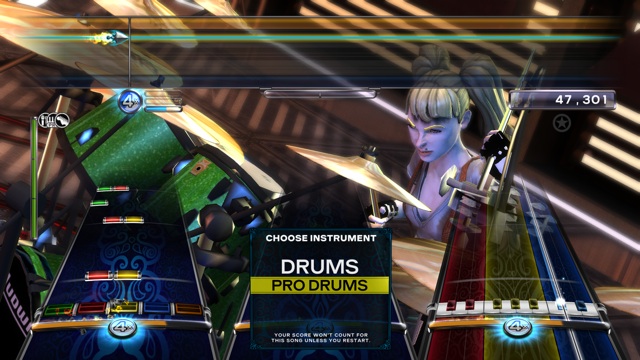
The Pro Drums mode is a little more of an evolution, but still cool. There are now different gems for cymbal and toms, and you can add a second pedal for the hi-hat. The drums were always quite close to reality in past games, and this just brings them closer.

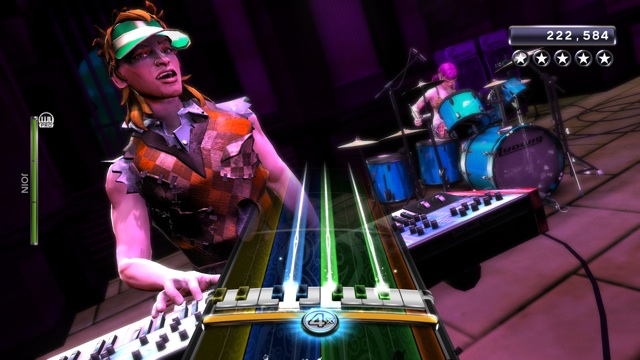
Playing the keyboard peripheral has been a great time. The keys are velocity sensitive, although they aren’t weighted, and it’s fun to play in the normal mode using the five standard lanes that we’re used to from the past games. In Pro Mode, you see the keyboard on the screen and you have to hit the actual notes, including the black keys. In Hard mode and above, the playable keys will even shift left and right on the screen, meaning you’ll have to keep track of the entirety of the 25 keys. It’s not easy, but it’s real, or close to it.

With the additions to the game’s UI and features, this is worth the money even if you’re using your legacy equipment. The game really comes alive with the new peripherals and Pro mode, however, so the experience will grow as you add peripherals and you may actually learn a thing or two about music. Which brings us to…

Will this teach me to play?

Nothing will be able to beat instruction from a living, breathing person. But, for a $60 video game, the lessons included in Rock Band 3 are pretty amazing. Without the Pro Guitar or Drums, we can’t test those lessons, but within minutes of starting the Pro Keys trainer, I was practicing my major scales and making notes on finger placement and a few tidbits of music theory. Music lessons can be boring for children (and everyone else), but these scale exercises are played with a rock’n’roll backing beat, including guitars, so it feels like you’re playing a song. Each lesson won’t finish until you’ve shown you can play it 100 percent a number of times.

While the lessons are fun and will help you with finger placement and muscle memory, the text can be a little dry. For instance, you’ll learn basic intervals in one early lesson, and the lesson tells you, “An interval is the distance in pitch between two notes. A major 3rd is two notes that are separated by four half steps, or two notes with three notes in between them.”

Got that? If you studied music, this is pretty basic stuff. If this is your first introduction to music theory, though, you may need a little more explanation. 

The lessons play at 100 percent speed with the full backing band when you start them, but if you find yourself having trouble, you can slow the notes down, which also turns off the rock track and replaces it with a simpler click-track. This makes it much easier to focus, and you’ll be able to increase the speed again and master the lesson.

The lessons progress into the natural minor scale, moving within chords, popular 3-note chords and arpeggios, and then on to popular 4-note chords and advanced techniques. There are 17 lessons altogether and, if you can master them all, you will have a wonderful working knowledge of scales, chords, finger placement, and how to play the songs included in the game. By taking this knowledge and playing the game itself in the Pro Keys mode, you will learn how to actually play the included songs. 

It’s pretty heady stuff—with a few weeks of practice you could easily take this knowledge and begin playing real piano.

You won’t learn how to read music here, but you’ll have the skills to be able to play the majority of the rock and pop music you hear on the radio. That is, of course, as long as it’s shown to you using this interface. If you play enough of these trainers that this is an issue, you’re more than ready for sheet music.

You’ll get the most out of the lessons if you pair them with a good beginner’s book on music theory or weekly lessons from an experienced teacher. It’s also important to note that you won’t just want to play the scales once and get them checked off; since repetition is important for learning, think of these as drills instead of tests. Test yourself often by picking up the keyboard without the game and practice the scales without being told the notes. Play the chords without the charts to make sure you’re learning the actual skills.

The game also features a “Learn a Song” mode that breaks the songs down into sections so you can practice the tricky parts and master sections that have been giving you problems. The game is as deep as you want to make it, but Harmonix also provided tools to help you tackle that challenge every step of the way.

The career mode is much wider

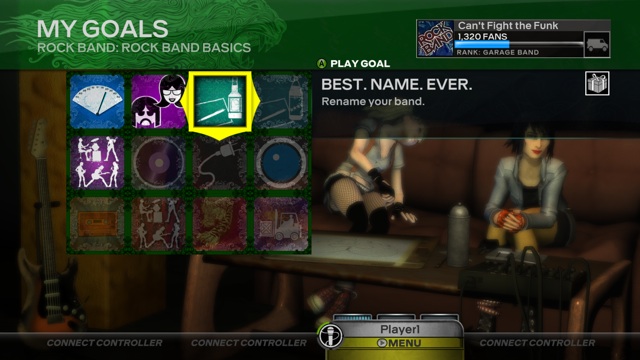
In Rock Band 3, the career mode is less structured than in previous games. You gain “fans” exclusively by completing achievement-like “goals.” Some of these goals are simple; you can pick up fans just by going into the online store once, for instance, or by creating a character. Other goals require you to get more than three stars on multiple songs. 

As you play, you’ll unlock new venues, modes of transportation, instruments, and clothes. In a very nice touch, each goal lists what songs you can play to complete it—some goals may require a longer commitment across multiple songs. You can also simply play songs and discover the goals while you play; I found myself gaining a good number of fans by simply enjoying myself in the different game modes.

The character creation screen now allows you to adjust the size and shape of your features to create an accurate-looking avatar, although clothes are now available as an outfit instead of piece by piece. There is no currency here; you’ll just unlock more options as you gain fans. You also no longer pick what kind of body language to give your character as he or she performs; this will simply be song-specific. Singers will also be song specific—no more goofy-looking dudes gently crooning/screaming female-sung songs. You can create your own stand-ins, though, so you can have good-looking male and female singers in your roster.

If you’d simply like to jump in and play, all 83 songs are available the first time you put in the disc, as is older DLC or imported tracks from past games. In a neat twist, every song will now support the Pro Drums mode due to how drums are authored in the games, but older songs won’t support the keyboard or Pro Guitar. 

There is a new section of filters if you want help finding songs, so you can take a look at only short songs, or only songs that support the keyboard. (For flexibility, if you own the keyboard and want to play a song that doesn’t support it, the keyboard can be used to play any guitar or bass line in the game.) Just for giggles, I asked the game to show me only songs from the ’90s that support 3-part vocal harmonies and a keyboard. Six songs fit that criteria, and I started playing “In the Meantime” by Spacehog, quite happily.

The overshell

The overshell is a goofy name for some very cool features. At the bottom of the screen, you’ll see slots for four players. Say you were playing the keyboard and want to switch to guitars: you can turn your guitar peripheral on, which brings up another slot on the overshell, and you can move your profile over to that instrument. It’s a much simpler way to organize the players for each song.

Players can also jump in and out of each song at any time, adjust the difficulty, or turn on no-fail mode… all from inside the track. Changing things mid-song may disable scoring, but it makes the party game aspect of Rock Band 3 much more inviting. Anyone can pick up an instrument and join a song at any point and, if you want to drop out, that works as well. Whenever a player enters or leaves, the song rewinds a second or two and plays back with no notes to give you time to adjust. It’s all very smooth and very usable. Profile management, numbers of players, and the instruments used for each song are now very simple to adjust whenever you’d like.

This is the new sound

Harmonix has done what it does best: raised the bar for what’s expected of music games. New instruments, the ability to pick up skills on drums, guitars, and keyboards, improvements in usability… the list goes on. The 83-song set list is likewise one of the best you’ll see in rhythm games, spanning decades and genres and bringing a wide variety of songs to suit any taste. The Doors are a nice touch, but they’re legends. Songs by Tegan and Sara, not to mention Rilo Kiley? Delightful. Check out the full list to see what you think.

This is the new state of the art for rhythm games, and it’s hard to find fault with what’s being offered. There are many different ways to play, and each one is a good time. There are also musical lessons to deepen your understanding of the instruments or get you started playing actual music. This is one of the best games of the year, and exceeded every one of our expectations.

The Good

  • The new UI updates make the game easier to navigate and play

  • Updated career mode encourages you to explore, while the Goals give you fans as you invest time with the game
  • The song list is exceptional, with 83 tracks included
  • The Pro mode will teach you real skills
  • It’s simple to navigate your song collection to find things you want to play
  • New peripherals add more layers to the game
  • All songs support Pro Drums, even older tracks
  • You can now customize your characters to a greater degree
  • The keyboard peripheral can also play guitar and bass lines

The Bad

  • Peripherals are expensive; to play every aspect of this game you’ll need to invest hundreds of dollars

  • There can be a rough learning curve on Pro Mode tracks
  • Won’t teach you how to read music
  • The way the guitar notes are shown in Pro Mode is hard to pick up
  • Not every song supports keyboards

The Ugly

  • Remember Power Gig? Anyone?

Verdict: Buy

71 Comments