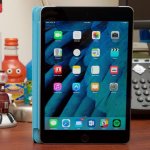
Apple isn’t shy about admitting it: the biggest feature of its newest iPad is the price. At $329, it’s $70 cheaper than the iPad Air 2 used to be, $270 cheaper than the smaller iPad Pro costs now, and $170 cheaper than the initial starting price of the iPad back in 2010. It’s a big shift, especially after a year-and-a-half where larger and more expensive iPads were Apple’s main focus.
That’s apparently where the users are. Apple told us that the iPad Air 2 was its most popular iPad, and it had been since its introduction in October of 2014. It was the most popular with enterprises, the most popular with small businesses, the most popular in schools, and the most popular with people who were new to the iPad altogether (more than half of all iPad Air 2 buyers were picking up their first iPad). And even after the introduction of the iPad Mini in 2012 and the big iPad Pro in 2015, the 9.7-inch screen size has remained the most popular of the three.
So one of the $329 iPad’s goals was to replace the aging iPad Air 2 for all of those audiences. Its second goal was to entice the tens of millions of people who bought one of the first four iPad generations or the first iPad Mini to buy an iPad again. Most of those tablets don’t even run iOS 10, and the one that does run iOS 10 lacks support for all of the iPad’s multitasking features and a bunch of other stuff.
But there’s also a third goal Apple didn’t talk with me about, the elephant in the room any time Apple does anything with the iPad: we’re now entering our third straight year of sales decline, both in terms of units sold and in revenue earned. The iPad Pro showed some signs of helping with the problem last year, but none of the iPads Apple has put out since 2014 has halted the product’s downward slide.



 Loading comments...