Skip to content
Tech

Review: Apple’s iPad Air is a big tablet without all the baggage

Apple’s new tablet is an embiggened version of the perfectly cromulent iPad mini.

Andrew Cunningham | 192
Credit: Andrew Cunningham
Story text

The above is the message that greeted me when I got home from Apple’s iPad announcement two weeks ago and turned on my fourth-generation iPad. iCloud backups happen automatically when your tablet is plugged in and connected to Wi-Fi. You plug your tablet in when the battery is low and you need to recharge it. You need to recharge the battery because you’ve been draining its power by using the tablet. And unless I’m actively testing something on it for a review, I rarely use my fourth-generation iPad.

There’s no one reason why this pretty, powerful tablet spends most of its time powered off and buried under a pile of other things, but I’d point to its relative size and weight as major contributing factors. Since the original Nexus 7 and iPad mini ushered in the era of actually-usable small tablets, I’ve come to prefer them for the things I use a tablet for. Reading Kindle books, Web browsing, and gaming are all just more comfortable on something smaller. This equation might differ for people who get more work done on their tablets, but when I’m on a tablet, I’m specifically looking to avoid work, and to my mind smaller and lighter tablets are simply better equipped to be content consumption devices.

The iPad Air is a “big” tablet remade in the iPad mini’s image. This isn’t just about what it looks like (though the Air and the Retina iPad mini look basically identical in pictures without other objects nearby for scale), but about how it feels.

Body and build quality

The iPad Air.
The iPad Air. Credit: Andrew Cunningham
Specs at a glance: Apple iPad Air
Screen 2048×1536 9.7-inch (264 PPI) touchscreen
OS iOS 7
CPU 1.4GHz Apple A7
RAM 1GB DDR3
GPU “Apple A7 GPU” (likely an Imagination Technologies 6-series variant)
Storage 16, 32, 64, or 128GB NAND flash
Networking 802.11a/b/g/n, Bluetooth 4.0
Camera 5MP rear camera, 1.2MP front camera
Ports Lightning connector, headphone jack
Size 9.4″ × 6.6″ × 0.29″ (240 × 169.5 × 7.5 mm)
Weight 1 pound (469 g) Wi-Fi, 1.05 pounds (478 g) with cellular
Battery 8827 mAh
Starting price $499
Other perks Charger, Lightning cable

You don’t need to hold an iPad Air to see that it’s very different from full-size iPads of years past. With its thinner profile and slimmer bezels, it resembles nothing so much as a big iPad mini. If you want to summarize the new tablet for a layperson, that’s the one-sentence explainer.

The Air’s styling has been updated to bring the full-size iPad into line with Apple’s other recent designs: the iPad mini, the iPhone 5 and 5S, and the fifth-generation iPod touch. That means an anodized aluminum body and chamfered edges, as well as boxier (but still curved) corners. It brings a consistency to Apple’s high-end iOS lineup that wasn’t there in the previous iPad’s almost Mac-like design.

Changes aside, the iPad Air is still an iPad. The buttons and ports are in the same places as they were before. It’s still a big aluminum-and-glass slab that’s mostly screen. The most significant change to the tablet is the first thing we noticed about the iPad Air in our hands-on time with it: its size and weight have been substantially reduced. Moving from 1.44 pounds to one pound makes the tablet easier to hold in one hand for extended periods of time, easy to shake around in landscape mode when you’re playing a game, and easier to prop on your chest for some bedtime Netflix viewing.

The iPad Air (right) has slimmer bezels than the fourth-generation iPad (left).
The iPad Air (right) has slimmer bezels than the fourth-generation iPad (left). Credit: Andrew Cunningham
In fact, the new Air looks quite a lot like the iPad mini (left).
In fact, the new Air looks quite a lot like the iPad mini (left). Credit: Andrew Cunningham
Our iPad Air (right) is the black fronted, “space gray” backed version, but it also comes in white and silver. The black color used in the iPhone 5 and first-generation iPad mini has been tossed out, possibly to reduce the visibility of scratches and chips.
Our iPad Air (right) is the black fronted, “space gray” backed version, but it also comes in white and silver. The black color used in the iPhone 5 and first-generation iPad mini has been tossed out, possibly to reduce the visibility of scratches and chips. Credit: Andrew Cunningham
The buttons and ports are in the same places as before, and the Air isn’t a drastic departure from past iPads. The iPad Air’s main draw is that it’s much thinner and lighter than the older Retina iPads.
The buttons and ports are in the same places as before, and the Air isn’t a drastic departure from past iPads. The iPad Air’s main draw is that it’s much thinner and lighter than the older Retina iPads. Credit: Andrew Cunningham

Let’s take something like the Infinity Blade series as an example. This game (and many other tablet games) are best played with one hand gripping the tablet and the other poking at the screen. With the full-size iPad, I usually can’t make it to the end of a battle without the hand that’s holding the tablet becoming fatigued, so playing with the tablet on a table or propped up with a Smart Cover is the only really enjoyable way to do it. With the iPad Air, it’s actually not out of the question to hold the tablet in your hands while you play. The iPad Air doesn’t change what you can do with your tablet (play Infinity Blade), but it can change how you do things and how pleasant and comfortable it is to do them.

The tablet’s dimensions shrink along with its weight. It’s about as tall as the older iPad, but 0.7 inches narrower and 0.08 inches thinner (these figures sound a little more impressive when expressed as percentages: 9.7 percent narrower and 21.6 percent thinner). Much of the reduction comes from chopping down the bezels, particularly those to the left and right of the screen. This leaves less space to rest your fingers or thumbs if you’re holding the tablet in your hand, but the reduction in weight means that you don’t need to grip the tablet as tightly to hold it steady. There’s an argument that thicker bezels can help to make a tablet more usable and easier to hold, but in the case of the iPad Air, things just about even out.

The iPad Air’s fit and finish is similar to what Apple established in the iPad mini: thin and light, but rigid and sturdy-feeling with no creaking and flexing. The iPad Air doesn’t have the more brick-like feeling of the older Retina iPads, so if you associate that heft with well-made consumer electronics you’ll be disappointed, but it feels rugged enough that I wouldn’t be scared to throw it in a bag with nothing but its (new, iPad mini-like) Smart Cover attached to the screen.

The iPad Air propped up by its new Smart Cover.
The iPad Air propped up by its new Smart Cover. Credit: Andrew Cunningham
The new cover (left) adopts the same hinge as the iPad mini version. The old hinge (right) would wiggle around independently of the cover, making it a little more irritating to remove and replace quickly.
The new cover (left) adopts the same hinge as the iPad mini version. The old hinge (right) would wiggle around independently of the cover, making it a little more irritating to remove and replace quickly. Credit: Andrew Cunningham
The new Smart Cover tilts the iPad Air (left) back a little more than the old one did.
The new Smart Cover tilts the iPad Air (left) back a little more than the old one did. Credit: Andrew Cunningham

For all the tablet’s new-ness, it notably lacks the new Touch ID fingerprint scanner introduced in the iPhone 5S. It’s possible that the fingerprint scanner is supply constrained and Apple needs all of the current supply for the iPhone. It’s also possible that Apple doesn’t think a fingerprint scanner is necessary on a tablet, which is often unlocked less frequently and compulsively than a smartphone. We would expect the iPads to pick the feature up next year when the technology behind Touch ID (and the manufacturing processes used to make the sensors) has had some time to mature and improve. As it is, the omission in this year’s tablets is disappointing but not crippling.

The screen

If you’ve used a Retina iPad before, you’ve seen this display already.
If you’ve used a Retina iPad before, you’ve seen this display already. Credit: Andrew Cunningham

The display itself is more or less identical to the one Apple has used in the first two Retina iPads. It’s the same 9.7-inch size, same 2048×1536 resolution, the same 264 PPI density, and the same color, contrast, and brightness. Side by side with our fourth-generation iPad, whites on the iPad Air were a bit warmer, but this kind of variation is normal between tablets based on the manufacturer of the display panel or even different batches of panels from the same manufacturer. The Retina iPads’ screens have been eclipsed in the density war by tablets like the Nexus 10 or the latest Galaxy Note 10.1, but the difference between an 264 PPI screen and a 300 PPI screen is largely academic. Text and Retina-optimized apps, icons, and images are all nice and sharp, and the shorter 4:3 aspect ratio makes the tablet usable in portrait and landscape modes where 16:9 and 16:10 tablets this size are better-suited to landscape use.

Up close with the Retina iPads’ 264 PPI screen. You can see individual pixels, but they’re very difficult to resolve at normal viewing distances.
Up close with the Retina iPads’ 264 PPI screen. You can see individual pixels, but they’re very difficult to resolve at normal viewing distances. Credit: Andrew Cunningham
The 300 PPI Nexus 10 up close. The density is a little better, but you’re still looking at visible-up-close, invisible-from-a-foot-away pixels, just like on the iPad.
The 300 PPI Nexus 10 up close. The density is a little better, but you’re still looking at visible-up-close, invisible-from-a-foot-away pixels, just like on the iPad. Credit: Andrew Cunningham

The only really bad thing about the display is the air gap that Apple has left between the LCD itself and the top layer of glass. This has the side-effect of making the screen easier to repair if that’s your thing, but compared to a device with a fused LCD and glass like the iPhone 5S or the Retina MacBook Pro the colors and contrast are a bit more muted. The problem gets worse in direct sunlight, which washes the iPad’s screen out more drastically than the iPhone’s or the MacBook’s.

The difference between a fused screen and an unfused one is more subtle than, say, the difference between a Retina display and a non-Retina display, or the difference between a TN LCD panel and an IPS LCD. Still, given both Apple’s push to make the full-size iPad thinner and lighter and the company’s push to fuse the LCD and glass layers in its other products, the Air’s, um, air gap is puzzling.

Sound

The iPad Air (bottom) has speakers similar to, but slightly better than, the iPad mini.
The iPad Air (bottom) has speakers similar to, but slightly better than, the iPad mini. Credit: Andrew Cunningham
They certainly beat the single speaker from the fourth-generation iPad (bottom).
They certainly beat the single speaker from the fourth-generation iPad (bottom). Credit: Andrew Cunningham

The iPad Air brings in two sound-related improvements, and they’re both about doubling what the Retina iPads had. First, like in the iPad mini, you now have a pair of speakers on the tablet on the bottom edge flanking the Lightning connector. There’s still not much bass there, but they produce much clearer and cleaner sound than the fourth-generation iPad, and they’re louder and less muffled-sounding than the iPad mini’s speakers or the still-pretty-good-for-a-tablet speakers of the 2013 Nexus 7. Edge-mounted speakers continue to be easy to cover up with your hands or whatever surface you’re resting the bottom of the tablet on—there’s no job that rear- or edge-mounted speakers can do that front-facing speakers couldn’t do better.

The iPad Air also gains a second microphone pinhole not far from the first, and like the ones used in most of the Mac lineup it’s supposed to cancel out background noise to make for clearer audio. It does seem to help for video chatting, though it doesn’t improve voice dictation accuracy much in a room with light ambient noise.

The fourth-gen iPad’s interpretation of the above sentence.
The fourth-gen iPad’s interpretation of the above sentence. Credit: Andrew Cunningham
And the iPad Air (or, as the tablet calls itself here, the “iPad Error”). It’s not really much better, just different.
And the iPad Air (or, as the tablet calls itself here, the “iPad Error”). It’s not really much better, just different. Credit: Andrew Cunningham

Camera

The iPad Air and iPad mini share very similar cameras.
The iPad Air and iPad mini share very similar cameras. Credit: Andrew Cunningham

I probably link to this Tumblr of people taking pictures with their tablets every time I talk about tablet cameras because I still find the practice a little silly—my phone’s camera is both superior in quality and less ostentatious. Not everyone with a tablet is guaranteed to have a smartphone, but your tablet isn’t likely to be your primary shooter.

Apple’s approach to the iPad’s cameras takes all of this into account. iPads don’t get the highest-end cameras reserved for the upper-end iPhones, but they don’t get the terrible perfunctory cameras reserved for bargain basement Android tablets either. The iPad Air’s 5MP camera exists somewhere between the camera in the iPhone 4 and the one in the 4S. Chipworks says that the 5MP, 1.4µm sensor is the exact same sensor as the one used in the latest iPod touch, while the five-element lens should be similar to the five-element lenses used in every other iPhone, iPad, and iPod touch that Apple sells (with one or two exceptions).

We’ve taken a few shots in good-to-low indoor lighting. The results are predictable: the pictures are a little noisy, but they’re usable for Facebook or Instagram or small prints, and they’re a little better than those produced by the most recent Nexus 7.

The iPad 4.
The iPad Air.
The iPad 4. OK color, but much softer and grainier overall.
The iPad Air follows suit, which makes sense since the two tablets have similar cameras.

Internals and performance: Apple’s A7, back for more

Back in the pre-Retina days, iPads and iPhones shared the same chip. The original iPad and the iPhone 4 used the same A4 SoC (with a differing amount of RAM), and the iPad 2 and iPhone 4S both use an Apple A5. The iPhones and iPads were different in size, but their screens were similar enough in resolution (960×640 for the phones, 1024×768 for the tablets) that the same chip could provide a good experience on both.

The Retina iPads needed a stronger GPU, and so for the last two generations they have used modified versions of iPhone chips: the A5X and A6X. These kept the same CPU cores as the A5 and A6, but roughly doubled the GPU’s speed and bumped the 64-bit memory interface to a 128-bit interface to provide more bandwidth.

With the iPad Air and Retina iPad mini, Apple is again using the same chip it uses in its flagship iPhone: the 64-bit A7. As we’ve covered elsewhere, the A7 in the iPhone 5S has a slightly lower clock speed and has to throttle itself more aggressively because the phone has a smaller battery and less room to dissipate heat, but at a hardware level, the chips are identical.

To recap what we covered in the iPhone 5S review, the A7 uses a dual-core CPU that incorporates Apple’s new “Cyclone” architecture, and Cyclone is notable in part because it’s the first 64-bit ARM chip to make it to market. In the long term, the move to 64-bit will pave the way to iOS devices with more than 4GB of memory. In the short term, the ARMv8 architecture that comes with the move to 64-bit is a more cleaned up and efficient upgrade to the older ARMv7 and ARMv7s architectures.

On the GPU side, the A7 includes an Imagination Technologies G6430 branded as an “Apple A7 GPU.” This is based on Imagination’s new “Rogue” architecture, where the A5 and A6 families used various iterations of the previous Series 5XT GPUs. In addition to being a more efficient and more scalable architecture, Rogue adds support for OpenGL ES 3.0, an updated graphics API also available to Android 4.3 devices with supported GPU hardware (and all desktop GPUs that support OpenGL 4.3, of which OpenGL ES 3.0 is a subset).

Finally, the CPU and GPU are paired with 1GB of DDR3 RAM via a 64-bit memory interface, the same as in the iPhone 5S—it would have been nice to see 2GB of RAM in the iPads this year given the fact that 64-bit versions of iOS use roughly 20 to 30 percent more RAM than the 32-bit versions while performing the same tasks. The only difference between the Air and the 5S is that the RAM is stacked on top of the main SoC in the iPhone 5S package-on-package (PoP) style, while the SoC and RAM chip are separated in the iPad Air. To make up for the missing memory bandwidth afforded by the 128-bit controllers of the A5X and A6X, the A7 includes 4MB of SRAM integrated into the die of the SoC. This small cache is used to prevent some trips out to the system memory, freeing up the memory controller for other tasks.

Apple promises that the A7 can deliver as much as double the CPU and GPU performance of the A6X in the fourth-generation iPads. To see where the Air stands, we’ve compared it to a wide range of past and present iOS and Android devices, including:

  • The iPad 4 and its 1.4GHz Apple A6X.
  • The iPad mini and its 1GHz Apple A5. The iPad mini’s hardware is identical to the iPad 2, and the numbers will be the same for both.
  • The iPhone 5S and its A7 SoC.
  • The 2013 Nexus 7 and its 1.5GHz Qualcomm Snapdragon S4 Pro, which is actually just a lower-clocked Snapdragon 600.
  • The Kindle Fire HDX and its 2.2GHz Qualcomm Snapdragon 800.
  • The Nexus 10 and its 1.7GHz Samsung Exynos 5 Dual.

Looking at the single-core numbers shows just how big an upgrade the A7 architecture is over the A6 and (especially) the A5 families. Memory interface speeds aren’t up much over the A6X, but the other numbers show Apple doubling the older chip’s performance everywhere else. The speeds are slightly higher than the iPhone 5S, but not by much. The two devices will perform similarly during short bursts of activity, though the iPhone will slow down sooner and more sharply than the iPad.

Compared to quad-core, Snapdragon-powered Android tablets, the dual-core A7 continues to hold its own. Apple has created a very impressive architecture with Cyclone, and it stacks up well compared to Qualcomm’s quad-core Snapdragon 800. That being said, bear in mind one thing we noticed when we looked at the A7 in the iPhone 5S—apps need to be recompiled for 64-bit before they can realize the full extent of Cyclone’s performance improvements. 32-bit apps running on the A7 are about 50 percent faster than they are on the A6, still a reasonably impressive improvement but not as drastic as the 100 percent improvement for 64-bit apps.

When Apple makes its bold “double the performance” claims on stage, it usually delivers. It’s true that the A7 can sometimes come close to doubling the A6X’s scores in some of these benchmarks (it comes closest in the onscreen version of the more stressful T-Rex HD benchmark), but more often the improvements aren’t as drastic. Looking at the offscreen benches (which compare how the different GPUs render the same scene at 1080p rather than the devices’ varying native screen resolutions), it doesn’t even look like the iPad’s A7 can outdo the one in the iPhone 5S, though as with CPU speeds, the extra thermal headroom in the iPad means that its GPU will probably be able to run faster for longer.

Compared to things on the Android side of the fence, the A7 and the Snapdragon 800 once again find themselves locked in a Star Trek-esque battle to the death. That’s probably not a coincidence—both Apple and Qualcomm are using 28nm processes, and they’re probably both pushing the boundaries of what is physically possible in today’s tablet form factors. The exciting news for Android fans is that Qualcomm’s Adreno GPUs have more or less closed the gap between GPU performance in iOS and Android devices. Apple had a sizable lead even two years ago, and while the A7 is in no danger of being considered “slow,” it’s not much quicker than the best chips from its competitors.

While under load (running the graphics benchmarks in a loop, for example), the tablet gets warm in much the same way as the other Retina iPads do. The hottest spot is on the right side of the tablet near where the SoC is. We wouldn’t say there’s any risk of injury to users or the device itself, and you really do have to be pushing the tablet hard to get it to warm up like this, but it’s worth noting that the Retina iPads continue to get toasty under full load.

We like benchmarks because they give us an easy way to quantify how fast a given chip compares to another given chip, but we really only use them as a way to inform the subjective experience of using the tablet—what we actually see and feel as we interact with it. On that score, we can say that there’s a drastic improvement in responsiveness and overall smoothness if you’re comparing the iPad Air to the A5 or A5X in the iPad 2, iPad mini, or third-generation iPad, but in current apps and games it’s more difficult to tell the difference between the A7 and the A6X in the fourth-generation iPad. There’s nowhere that the iPad 4 trips up (occasional dropped frames while looking at iOS 7’s still-obnoxious transition animations, for example) where the iPad Air doesn’t also occasionally trip up. You’ll notice the speed increases the most in CPU-heavy applications like iMovie, where the A7 exported a 60 second 1080p clip in about half the time it took the A6X, but if your usage is limited to browsing, reading, or even gaming, you aren’t going to see a big leap going from one generation to the next.

Networking: Not quite 802.11ac

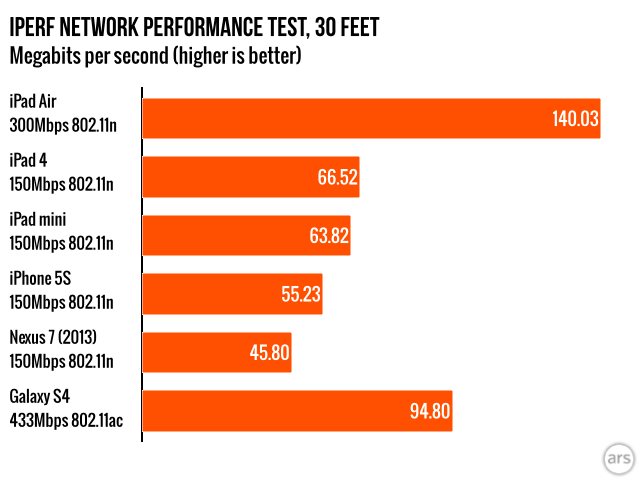
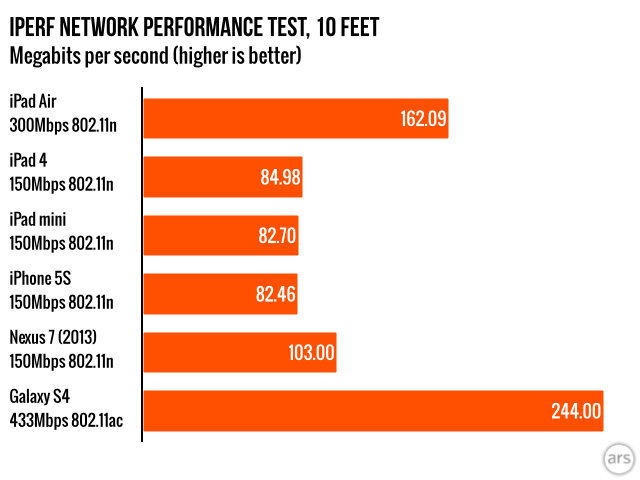
Finally, let’s talk briefly about networking performance. Apple has added a second antenna to the tablet’s dual-band 802.11n chip, increasing the maximum theoretical throughput from 150Mbps to 300Mbps. The iPads are playing catch-up here—the Nexus 10 and Kindle Fire HD 8.9 brought dual-antenna, dual-band 802.11n to this form factor last year, and many high-end Android phones and tablets are starting to add 802.11ac this year. Single-antenna 802.11ac implementations can bring speeds up to 433Mbps, while dual-antenna versions take them up to 867Mbps. Fewer people today will be using 802.11ac routers than 802.11n ones, but assuming a two-to-three-year replacement cycle, it’s too bad that iOS devices aren’t making the jump this year in the name of future-proofing.

We certainly won’t complain about the performance improvement. The iPad Air boasts a faster connection than the fourth-generation iPad or the iPad mini, and all of Apple’s tablets do a nice job of maintaining signal strength as you move away from the access point. As the Galaxy S4 shows, there’s no substitute for an 802.11ac device with a decent connection, but the iOS faithful will have to wait until next year at the earliest. Apple has been aggressive about upgrading its Macs to 802.11ac this year, so we’d be surprised not to see iOS devices with support for the standard appear in 2014.

Battery life: Holding steady

The size of the iPad Air’s battery has been reduced from 11560 mAh to 8827 mAh, still huge compared to the 1560 mAh battery in the iPhone 5S but smaller than it was before. Reducing the size of that battery was key to reducing the tablet’s size and weight, and it’s one reason why the iPad Air might be using an A7 rather than a beefier A7X—the A7 is a 102mm^2 chip where the A6X was 123mm^2, so you’re actually getting better performance out of a less power-hungry chip. The screen is still the single most power-hungry component, which is why the battery remains so much larger than the iPhone’s.

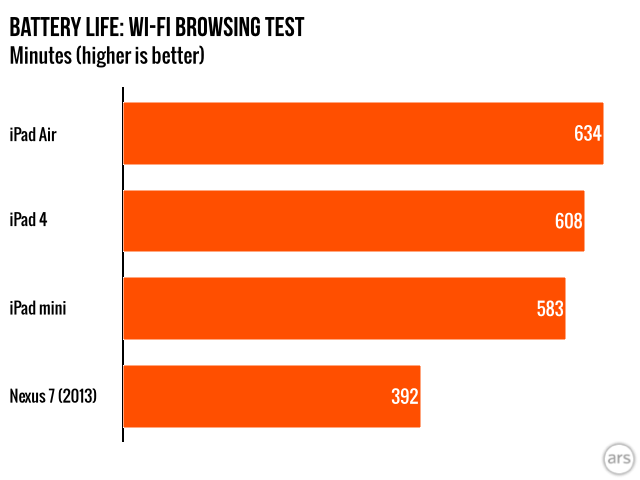
Apple promises ten hours of Wi-Fi Web browsing on the new iPad, the same number as the fourth-generation iPad and both iPad minis. In our Wi-Fi browsing test, which sets screen brightness at 50 percent and loops through a set of pages until the tablet dies, we got just over that, at 10 hours and 34 minutes.

One other benefit of the smaller battery: the iPad Air charges more quickly than the fourth-generation iPad. We didn’t time it to the second, but starting from a completely dead battery, the Air managed to charge to 70 percent in the amount of time it took the fourth-generation iPad to charge to 58 percent. A phone still charges more quickly, but the Retina iPads’ long charge times were one of their biggest weaknesses, so improvement on this front is nice to see.

A big mini

The iPad Air is a full-sized iPad that’s really, really jealous of the iPad mini.
The iPad Air is a full-sized iPad that’s really, really jealous of the iPad mini. Credit: Andrew Cunningham

The iPad Air is best summarized as either a big iPad mini or a fourth-generation iPad that decided to lose weight, get fit, and turn its life around. The reduced size and weight eliminate the biggest trade-off you’d need to make to choose a full-size iPad over the iPad mini, and as others have noted, it makes the big iPad and the small iPad feel like members of the same product family rather than tablets with Apple logos on them that happen to run the same operating system and applications. Especially for people who do a lot of work on their tablets (and those people do exist and will only become more numerous as tablets and their apps become more powerful and capable), you can now get a larger display and more comfortable onscreen keyboard without doubling the weight of the tablet you carry around. The performance upgrades (especially on the CPU side) are also welcome and keep the iPad competitive with contemporary Android offerings, but they’re not the main reason to consider the new tablet.

Should you upgrade? For iPad 2 owners, it’s an easy answer: the iPad Air is a substantial step up in every aspect but battery life (which stays roughly even among the various iPad models). The older Retina iPads had nicer screens and better specs, but they were noticeably thicker and heavier tablets than the iPad 2. The Air includes no such regressions. It’s an ideal replacement for the second-generation iPad unless you think you’d like a Retina iPad mini more.

The question is a little more difficult for Retina iPad owners. I would hedge closer to “yes” for third-generation iPad users, since you’re getting four times the CPU power and a little over three times the GPU power, plus a couple of iOS 7 features the third-gen iPad doesn’t support (AirDrop is one, the visual effects and transparency are others). Fourth-generation iPad owners can probably hold out for another year, unless weight is absolutely the thing you hate the most about your iPad and you can get a good price for your tablet on the second-hand market. Waiting another year likely won’t change the form factor much, but you’ll get a faster tablet that might also incorporate some extra hardware features like Touch ID or 802.11ac.

Finally, there’s the matter of price. The iPad Air holds the line at $499 for a 16GB entry-level model (of which around 12.2GB is actually available for use). This is higher than some other offerings in this price and performance category, but prices for 10-inch tablets haven’t cratered like prices for 7- and 8-inch tablets have. Last year’s Nexus 10 still retails for $399, and we’d expect its replacement to go for a similar price. Microsoft’s Surface 2 starts at $449, though it does give you a little more usable storage space. Samsung’s latest Galaxy Note 10.1 starts at $500 for 16GB. The iPad Air isn’t cheap, but similar tablets from other ecosystems aren’t so different.

The iPad Air throws the older Retina iPads’ compromises into harsh relief. The third- and fourth-generation iPads sacrificed quite a bit in service of their high-resolution screens: They weighed more than the iPad 2. They took so long to charge that Apple had to increase the standard iPad charger’s size from 10 W to 12 W just to take the edge off. Apple had to design and manufacture separate chips to make them run acceptably, even though the company normally goes out of its way to reuse components as a cost-cutting measure. Where the fourth-generation iPad was happy to improve performance and keep everything else the same, the iPad Air is a true successor to the third-generation iPad. Apple might not be able to sway those who have been wooed away by smaller tablets, but in the iPad Air the company has made a 10-inch tablet that’s a whole lot nicer to use.

The good

  • Thinner, smaller, and lighter body makes for a much more usable 10-inch tablet
  • The A7’s CPU performance continues to impress, delivering on Apple’s claims of doubled performance
  • Retina display, while unchanged, is still crisp and bright
  • Great battery life and reduced charge times
  • Improved sound input and output thanks to the dual mics and speakers
  • Better Wi-Fi performance, even if it isn’t 802.11ac
  • Cost is more or less competitive with other tablets in its size and performance class
  • iOS 7’s extensive tablet app and media ecosystems are difficult to argue with

The bad

  • The GPU can rarely actually double the performance of the A6X, counter to Apple’s claims
  • 16GB of storage is getting to be a bit small for an entry-level iPad, especially once you’ve downloaded all your free iLife and iWork apps
  • Air gap between glass and LCD panel might be good for repairability, but it makes for inferior color, contrast, and outdoor visibility
  • Whither Touch ID?

The ugly

  • 1GB of RAM may prove to be a liability, especially as 64-bit apps become more common

Listing image: Andrew Cunningham

Photo of Andrew Cunningham
Andrew Cunningham Senior Technology Reporter
Andrew is a Senior Technology Reporter at Ars Technica, with a focus on consumer tech including computer hardware and in-depth reviews of operating systems like Windows and macOS. Andrew lives in Philadelphia and co-hosts a weekly book podcast called Overdue.
192 Comments