Skip to content
Tech

App Store showdown: effects processors for the iPhone

No amp? No pedals? No problem. Ars takes a look at the two guitar effects …

Jeff Smykil | 34
Story text

Guitar effects processing software is nothing new. Effects processing software for the iPhone—which puts advanced effects processing power in your pocket—is a new phenomenon, however. Currently, there are two players: IK Multimedia, makers of the popular AmpliTube simulation software for Mac and PC, and indie developer Agile Partners, in partnership with Peavey.

Both companies make apps that use a combination of hardware and software to capture audio signals from a guitar and process them to produce a wide range of sounds, including amp simulation, distortion, and other effects. But which should you get? Read on to find out.

Hardware

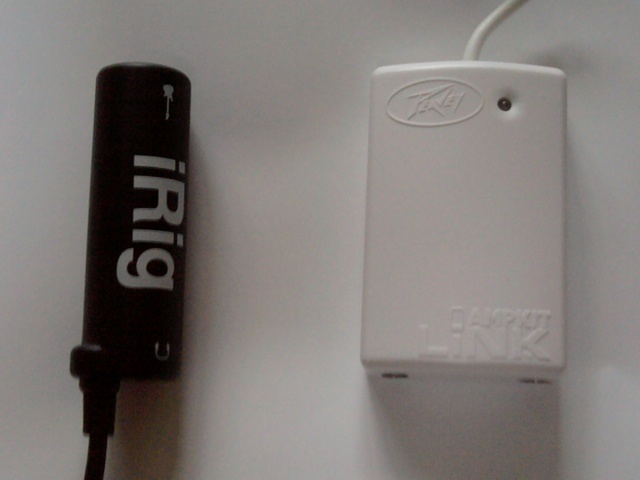
You might expect the best way to get audio onto an iPhone would be through the dock connector, but both companies use the 1/8-inch headphone jack instead. Their respective devices work primarily the same way: instead of connecting a guitar to an amplifier, the 1/4-inch cable plugs into the units. Each device has a tail (the AmpLiNK cable is a good deal longer than the iLink) that plugs into an iPhone, iPod touch (second-generation or later), or iPad’s headphone jack. Lastly, a pair of headphones needs to be plugged into the 1/8-inch jack on either device. Headphones are necessary, as neither application will output sound through the speaker while the headphone jack is occupied.
Hardware

Neither unit feels particularly rugged, but the Peavey unit looks and feels significantly cheaper than than its competitor. The only major difference, aside from build quality, is that the Peavey unit takes two AA batteries, which power a small headphone amp. The amp does affect the device’s performance, which we will get to later in the showdown. Each piece of hardware retails for $39.99, a price that does not include the cost of software.

Software

Each application involves four primary parts of the effects processing chain: the effects themselves, amplifiers, speaker cabinets, and microphones. A slight alteration to any of the four could lead to either a subtle or drastic change to the final sound. AmpliTube and AmpKit both offer free versions, which come with a minimum number of options and a number of à la carte equipment available for in-app purchase. Pieces of equipment range in cost from $0.99 to $6.99. The two applications also have $19.99 versions. IK Multimedia calls this version AmpliTube, while Agile Partners call its version AmpKit+. Additionally, IK Multimedia sells AmpliTube LE, which costs $2.99 and offers a small sampling above and beyond AmpliTube Free.
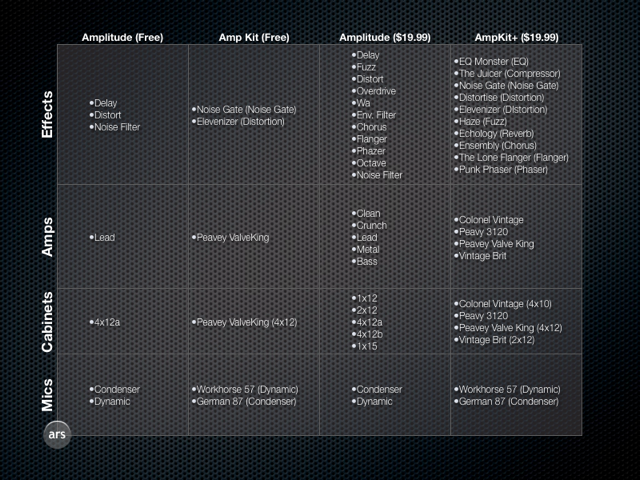
The vast majority of users will likely want to purchase the $19.99 version of both pieces of software. Buying the $19.99 packages makes more financial sense, even if there are one or two effects that aren’t your cup of tea (we created the chart below to illustrate what comes in the free and $19.99 versions). The full version of AmpliTube includes everything the application has to offer as far as effects are concerned. AmpKit’s $19.99 version, however, has additional pieces available for purchase; all told, you could spend as much as $97.49 more to buy all the available effects options.

effectschart1.png

In AmpliTube, items are named rather generically, while the AmpKit “gear” comes with more creative names. Whichever method you prefer, however, in many cases you’ll have to remember that the name typically refers to some well-known piece of equipment that can’t be named for trademark reasons.

For instance, the “Elevenizer” effect in AmpKit is modeled after the classic Ibanez Tube Screamer distortion pedal. The in-app purchase section of AmpKit tells the user what most of the gear is modeled after, which makes things easier, especially those familiar with that hardware.

Although AmpliTube doesn’t come out and say it, it’s fairly obvious that some of their equipment is modeled in a similar way. For instance, in AmpliTube, “Fuzz” also appears to be a Tube Screamer—as in AmpKit, the image of the pedal is the same signature shade of green that one would associate with the Ibanez unit. AmpKit is the only application of the two that has any brand-name gear at all, thanks to the partnership with Peavey.

Presets

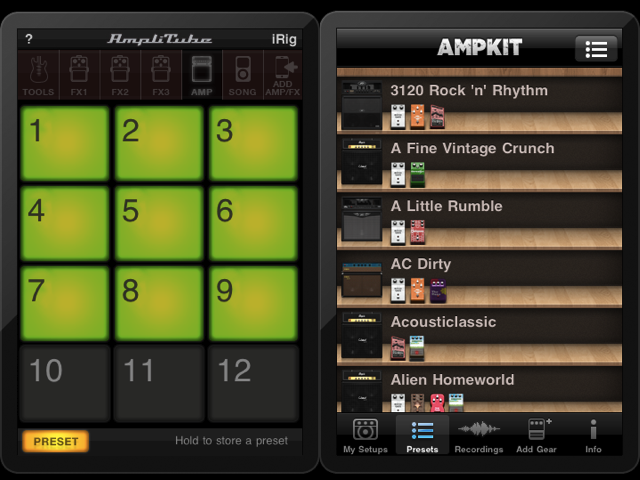
Both apps offer ways to save and access presets, but they do so in different ways. Each has its advantages in certain situations, but neither is perfect. Upon first use, AmpliTube’s way of representing presets is terrible, as each preset is represented by a number and nothing else. The numbers are laid out on a grid, and if you have a great memory the system makes it easier to switch between effects, as the need for scrolling is minimal.

AmpKit’s preset functionality is more user friendly. Each preset can be named, and there are small images of each piece of kit displayed under the name. It isn’t as easy to switch between presets due to the need to scroll, but finding the one you want is generally much easier by comparison.

rigs.png
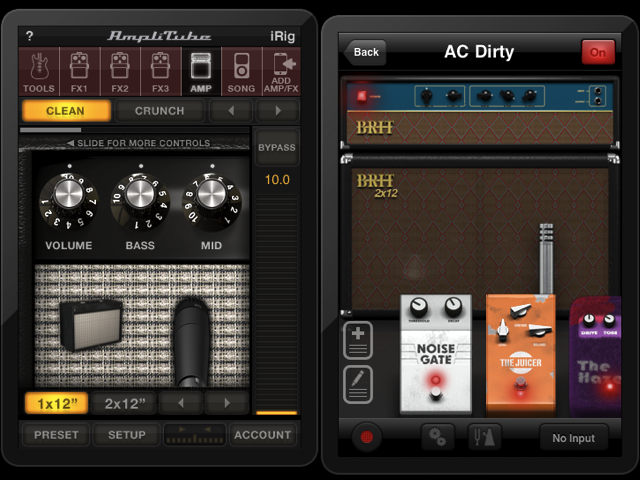
AmpliTube on the left, AmpKit on the right.

While both applications come with some presets already preprogrammed, AmpKit’s are locked. You can copy the original and then edit, but you can’t delete the original. AmpliTube’s custom presets are unlabeled and, compared to AmpKit, somewhat disappointing. We’ll call this one a toss-up.

User interface

During general usage, the two applications offer different solutions to the same problem. The iPhone screen is small, and only so much information can be displayed at one time. AmpliTube’s strategy is to show a single piece of equipment at a time. That may not seem ideal, but it does offer one major advantage: the parameters of the effect or amp can be altered without going to a secondary screen.

In AmpliTube for iPhone, the knobs and dials are interactive. You can turn them, and it offers somewhat of a realistic experience to virtual effects. The downfall, of course, is that you must navigate to other pedals using the application’s small interface elements.

rigs.png
AmpliTube on the left, AmpKit on the right.

AmpKit takes the opposite approach to the onscreen display. All gear is shown at once, though that means tweaking knobs has to be done on a secondary screen. Quick adjustments take a bit longer, but pedals are more accessible.

Unfortunately, there isn’t really a good solution for this that isn’t named “iPad.” Both applications offer different ways of dealing with the limited screen size of an iPhone or iPod touch, and both have their advantages and disadvantages.

Sound quality

Feedback happens—it’s a fact of guitar life. My observation is that feedback is about equally as common in either app. If you find yourself the victim of feedback in one of these apps, the best solution to avoiding prolonged exposure to the ear-splitting shrill is to either unplug the headphones or turn off the amplifier. The AmpLiNK hardware is supposed to cut back on feedback to some degree, but it is present and it sounds just like you remember from your traditional amp. Both apps have an anti-feedback setting, but in both instances, it has a negative effect on the sound.

The tonal quality of the apps is good enough through headphones, making choosing between the two based on this criteria somewhat of a toss-up. Personally, I keep going back and forth between what sounds better.

It’s worth noting that you can’t accomplish as many possible sounds with AmpliTube because there just aren’t as many options and, perhaps our biggest problem with the app, you can only use three pedals at a time. But beware of the noise gate in AmpKit, which is used on a lot of presets—it’s very exuberant and tends to clip notes a bit shorter than you intend.

Be warned, don’t crank the volume. There is feedback during this demo. Volume discrepancy is due to the hardware included with each application.

AmpKit versus AmpliTube

Real-world usage

The number-one scenario for both of these applications is noise-free practicing. While most amplifiers have a headphone jack, the minimal setup of the iPhone hardware is quite alluring. There’s also no need to break out a pedal board, a slew of pedals, or some sort of effects processor that takes AC power. Both apps should do well for this use.

AmpKit could also be used for recording sessions, as recordings can be exported from within it. If your computer has a line-in, the headphone amp on the AmpLiNK brings levels up nicely, making a 1/8-inch cable all you need for quality results using desktop recording software.

The combination of AmpliTube and the iLink doesn’t create a decent level by default, and any artificial boosting brings the noise to undesirable levels. Even using the app with the competition’s hardware didn’t quite work.

Using AmpKit and the AmpLiNK for live applications could be possible with the right adapters and plugs. Though AmpliTube’s interface makes it easier to make live adjustments to effects, we would be more willing to try AmpKit in a live setting than AmpliTube due to the aforementioned noise issue.

Conclusions

IK Multimedia has been doing amp and effects simulation for quite a while. They are pros, and they know what they are doing. That’s why I was so surprised to find that I preferred the AmpKit offering from Agile Partners. The tone created by both apps is so similar that it ultimately comes down to the small details.

We feel that Agile put in some serious time and effort to make an awesome product, while IK Multimedia more or less slapped its offering together with existing technology. AmpliTube for iPhone feels more like a gateway drug than a standalone product: the company wants you to move on to its more expensive software. Agile Partner’s better hardware, beautiful graphics, abundance of effects, and the ability to use more than three effects simultaneously makes that application a winner in our book.

IK Multimedia AmpliTube and iRig

Pros:

  • Can adjust parameters without going to a second screen
  • Ability to load songs to play along with
  • Relatively cheap for the whole package
  • Built-in tuner

Cons:

  • Only one effect device on screen at a time
  • Poor preset system
  • No first-generation iPod touch support
  • Poor levels

Agile Partners AmpKit and AmpLiNK in partnership with Peavey

Pros: 

  • Attractive interface
  • Nice factory-shipped presets
  • Ability to name custom presets 
  • Ability to record sessions and change the gear it was played through after
  • Better level outs
  • Longer cable
  • Lots of add-ons available
  • Information about what elements are modeled after

Cons:

  • Can get expensive
  • Multiple screens to tweak levels
  • No first-generation iPod touch support
34 Comments