Old-school icon designers and retro game houses alike will be delighted by the release of Sprite Something from Terrible Games. Whether you remember the days of creating icons in ResEdit, or prefer creating RPG characters with pixels instead of polygons, Sprite Something for the iPad will be right up your alley. Admittedly, the audience is small, but the nostalgia factor is too great for it to be ignored.
Painting applications are plentiful on the iPhone OS platform, but painting programs that allow you to manipulate individual pixels are not quite so common. With Sprite Something, you have no choice but to work on the minute scale. The maximum image size a user can create with the application is 512 x 512 pixels, with either a solid or transparent background. Still, at that size and on the relatively small screen of the iPad, pixels look pretty tiny.
Orienting the device in landscape mode often does make each individual pixel larger than when viewed in portrait (depending on the size of your canvas), and there is currently no way to zoom in or pan. This can be somewhat frustrating if you’re working on a larger sized canvas; we have been assured that the functionality is planned for the next release and is currently under development.
One way to deal with the lack of zoom is to use the application’s “frame” functionality. This allows you to split your canvas into smaller frames, which are viewed and edited one at a time. There is also a preview area that shows what the complete drawing looks like while you work on different frames. While zoom is not the main purpose for the frames, you can definitely cobble something together using this method.
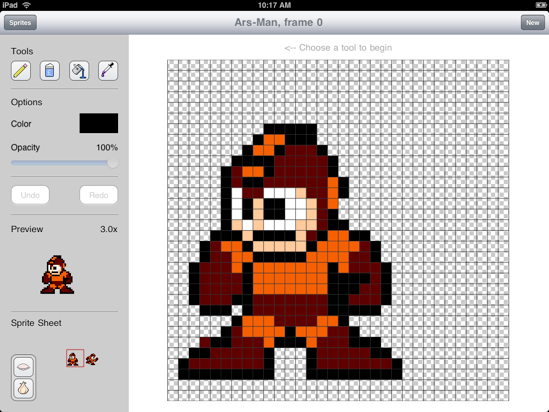
MegaMan is copyright of Capcom. ArsMan takes his lunch money.
The frame system is not only useful for working on large images, but also for creating sprite sheets. Sprite sheets often contain a single element in a game in different states of action, and the developer has added onion skinning to the application to make this process less painful. After you have finished drawing a single frame, you can start on a new one and select the previous to display semi-transparently underneath it. The onion skin can also be toggled on and off as needed. Unfortunately, as of 1.0, there is no ability to duplicate a frame, but it sounds like that may be in the works.
 Loading comments...