Penultimate, by Cocoa Box Design, aims to bring the analog act of note taking to the purely digital iPad. In recent days, the application has enjoyed the number one sales slot on the App Store, as well as a short time in the top 10 grossing apps. However, as we all know by now, not all that glitters is gold. Does Penultimate stack up to its lofty App Store success?
As long as you don’t look too closely, Penultimate is beautiful. The application takes its styling inspiration from a leather-bound notebook filled with your choice of white lined paper, graph paper, or blank white paper. The power of the app lies in allowing users to create as many separate notebooks as they desire, making the task of organizing notes somewhat trivial.
Once opened, the application displays a single closed notebook on the screen with the title of the notebook, the date it was last updated, and the number of pages. The first page of the notebook can be opened by touching the cover once. It can be opened and edited by double tapping. On this initial screen, you can swipe left or right to see other notebooks. This is nice visually, but if you are looking for a particular notebook in a sea of more than four or five, it can get frustrating.
Once you begin editing, your only tool for input is a pen (aka, your finger), as Penultimate currently cannot use keyboard input. You’re also limited to a black pen of one diameter and one type of tip. If you are a fan of those multicolor carousel pens that were so coveted in grade school, you may want to look elsewhere. That being said, the “ink” that the pen creates looks very nice. Numerous people have raved at the way the application renders your writing and drawings.
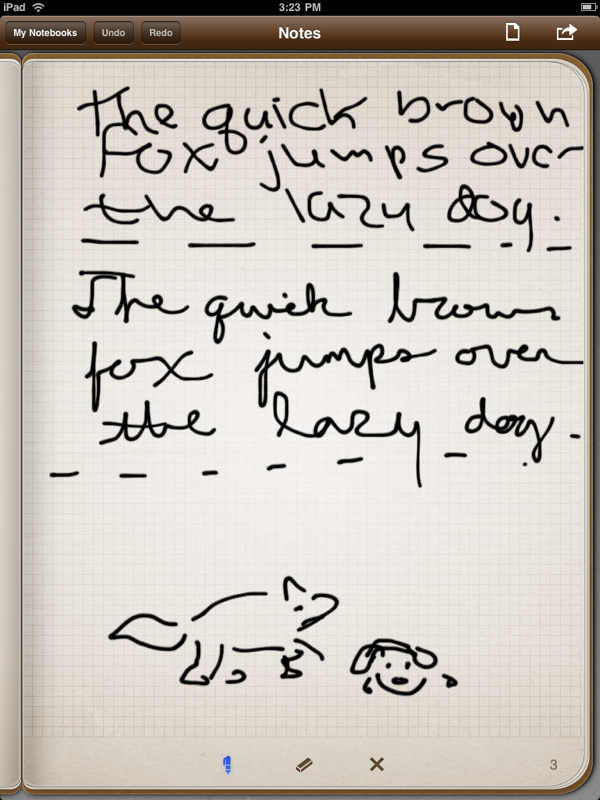
Pen/finger strokes are treated in a way similar to a calligraphy pen, except the line gets slightly thinner the faster you go instead of when you turn the pen. The effect is subtle, but does create an attractive finished product. Still, don’t look too close: if you do, you will see a slight blur around every stroke. This is likely not a deal breaker for most users, but it’s there. Also, you can’t zoom in or out on a page, so making fine strokes is rather difficult.
 Loading comments...