
You are using an out of date browser. It may not display this or other websites correctly.
You should upgrade or use an alternative browser.
You should upgrade or use an alternative browser.
OS X 10.8 Mountain Lion: the Ars Technica review
- Thread starter JournalBot
- Start date
I'm surprised there hasn't been more bitching about iCloud's limited storage.
There's 2 ways to look at it.
1) Apple gives you 5gig free (it's a bonus and not a feature of your device)
2) Your device includes 5gig of iCloud space for one $XXXX priced Apple device in which case you're getting stiffed by Apple if you buy more than 1 Apple device.
In other words, if I buy $600 iPhone, a $900 iPad3, a $1100 Air and $3000 MPB why do I only get 5Gig? I paid 4 times, shouldn't I get 20gig? Yea, I know I can create 4 Apple accounts but that's hardly useful for taking advantage of iCloud
There's 2 ways to look at it.
1) Apple gives you 5gig free (it's a bonus and not a feature of your device)
2) Your device includes 5gig of iCloud space for one $XXXX priced Apple device in which case you're getting stiffed by Apple if you buy more than 1 Apple device.
In other words, if I buy $600 iPhone, a $900 iPad3, a $1100 Air and $3000 MPB why do I only get 5Gig? I paid 4 times, shouldn't I get 20gig? Yea, I know I can create 4 Apple accounts but that's hardly useful for taking advantage of iCloud
Upvote
1
(1
/
0)
thenewperson
Smack-Fu Master, in training
greggman":2jeujyei said:I'm surprised there hasn't been more bitching about iCloud's limited storage.
There's 2 ways to look at it.
1) Apple gives you 5gig free (it's a bonus and not a feature of your device)
2) Your device includes 5gig of iCloud space for one $XXXX priced Apple device in which case you're getting stiffed by Apple if you buy more than 1 Apple device.
In other words, if I buy $600 iPhone, a $900 iPad3, a $1100 Air and $3000 MPB why do I only get 5Gig? I paid 4 times, shouldn't I get 20gig? Yea, I know I can create 4 Apple accounts but that's hardly useful for taking advantage of iCloud
So what are you storing that needs that much space? Are your documents *that* large?
Upvote
0
(0
/
0)
The review mentions that Carbon applications are left out of Retina displays, but is this really true? The HiDPI developer documentation mentions addition to the Carbon API and Quartz2D drawing and resolution independence have been available to Carbon applications for a long time now.
According to comments from Apple employees on the carbon-dev mailing list, HiDPI should not be a problem for Carbon applications as long as they use composited windows.
https://developer.apple.com/library/mac ... /APIs.html#//apple_ref/doc/uid/TP40012302-CH5-SW2
According to comments from Apple employees on the carbon-dev mailing list, HiDPI should not be a problem for Carbon applications as long as they use composited windows.
https://developer.apple.com/library/mac ... /APIs.html#//apple_ref/doc/uid/TP40012302-CH5-SW2
Upvote
0
(0
/
0)
thenewperson":184r7a03 said:Yes, there is an extension by Daniel Jalkut (Red Sweater Software). It mostly replicates the functionality lost, but opens in an RSS reader instead. http://red-sweater.com/temp/SubscribeToFeed.zip
Brilliant, thank you!
Upvote
0
(0
/
0)
Photo Stream, among other things. And some iOS apps tend to back up to iCloud by default, so if that’s a "file manager" app that stores your videos and screencasts, you can end up with 0 space in no time.thenewperson":rme2tzf5 said:So what are you storing that needs that much space? Are your documents *that* large?
Upvote
0
(0
/
0)
Very nice review, evidence of lots of thought.
But of course there will be disagreements.
My biggest complaint (so far): "there are still plenty of great RSS reader applications for the Mac and iOS. Apple is apparently leaving the RSS market in their capable hands." No, there aren't. I've been looking for the last couple of weeks, and they all fall into one of the following three, almost equally repellant categories: (1) give your RSS reading habits and content to Google (oh yeah), (2) read RSS news in Windows 8 tiles/menu bar pulldowns/screen crawls/various other crimes against user interface esthetics and user sanity, or (3) my personal bête noire, read RSS articles in a Mail.app-like, multicolumn interface when gee whiz, by golly, the articles are in HTML and are meant to be read in a Web browser. Apple had it half wrong (RSS in Mail.app????) and half right (RSS in Safari) before, now they have it all wrong.
Since most of the AppStore RSS newsreaders are somewhere between $0.99 and $9.99, I'll make it worth a dev's while: hack your way into Safari 6 and add RSS feeds back, and I'll pay you $12.99 for my copy.
But of course there will be disagreements.
My biggest complaint (so far): "there are still plenty of great RSS reader applications for the Mac and iOS. Apple is apparently leaving the RSS market in their capable hands." No, there aren't. I've been looking for the last couple of weeks, and they all fall into one of the following three, almost equally repellant categories: (1) give your RSS reading habits and content to Google (oh yeah), (2) read RSS news in Windows 8 tiles/menu bar pulldowns/screen crawls/various other crimes against user interface esthetics and user sanity, or (3) my personal bête noire, read RSS articles in a Mail.app-like, multicolumn interface when gee whiz, by golly, the articles are in HTML and are meant to be read in a Web browser. Apple had it half wrong (RSS in Mail.app????) and half right (RSS in Safari) before, now they have it all wrong.
Since most of the AppStore RSS newsreaders are somewhere between $0.99 and $9.99, I'll make it worth a dev's while: hack your way into Safari 6 and add RSS feeds back, and I'll pay you $12.99 for my copy.
Upvote
0
(0
/
0)
The lackluster integration of Google stuff is still so bad for me. There is still no way that I can get my Google Contacts. Furthermore I still can't use Google Mail settings in the system preferences to setup my Office Google Apps stuff.
Furthermore the trick with Exchange that works on iOS devices does of course not work here.
So the only way to sync your Contacts is by integrating them into the local contacts. No way to have them separated, etc. This annoys me the most.
Furthermore the trick with Exchange that works on iOS devices does of course not work here.
So the only way to sync your Contacts is by integrating them into the local contacts. No way to have them separated, etc. This annoys me the most.
Upvote
0
(0
/
0)
thenewperson
Smack-Fu Master, in training
smoofles":3iq1ew7p said:Photo Stream, among other things. And some iOS apps tend to back up to iCloud by default, so if that’s a "file manager" app that stores your videos and screencasts, you can end up with 0 space in no time.thenewperson":3iq1ew7p said:So what are you storing that needs that much space? Are your documents *that* large?
Photo Stream doesn't use storage. And who the hell would use iCloud to store videos and screencasts? You have on-board storage for that. Really, the only thing that does use up much space is backups, and I wonder how many people will use up 5 GB for that.
Upvote
0
(0
/
0)
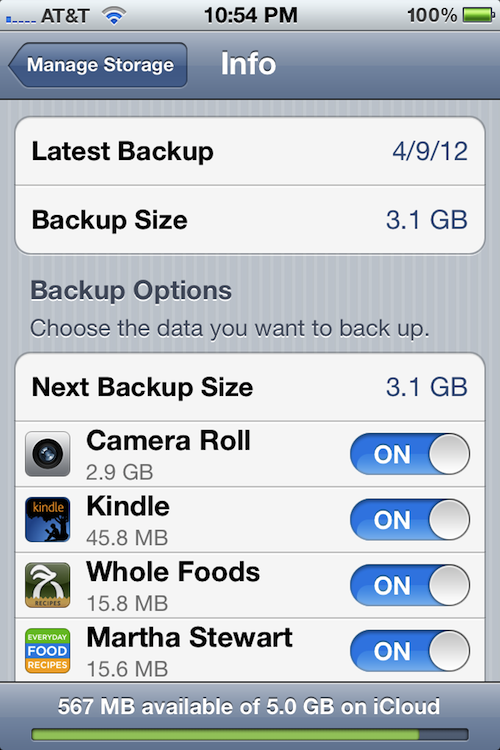
Sorry, Camera Roll is what I meant. Takes up 2,5 GB here. And videos and screencasts I don’t store on iCloud per se, but in a separate app (really only stuff that is iPad-viewing-on-train-only) and the app had iCloud backup turned on apparently, so the ~2 GB of screencasts I put on there were backed up as iOS "application data". But Camera Roll is iPhone only and 2,5 GB already after next to no picture-taking. So yeah, it’s certainly possible to bump against the 5GB limit now and then and having to manage it/delete stuff etc.thenewperson":kuew28mx said:smoofles":kuew28mx said:Photo Stream, among other things. And some iOS apps tend to back up to iCloud by default, so if that’s a "file manager" app that stores your videos and screencasts, you can end up with 0 space in no time.thenewperson":kuew28mx said:So what are you storing that needs that much space? Are your documents *that* large?
Photo Stream doesn't use storage. And who the hell would use iCloud to store videos and screencasts? You have on-board storage for that. Really, the only thing that does use up much space is backups, and I wonder how many people will use up 5 GB for that.
Upvote
0
(0
/
0)
Modernape":116pvhh5 said:I held off upgrading to Lion because of the desktop-refresh delay which happened when switching between desktops, unlike the smooth-as-silk switch between Spaces in Snow Leopard. I'd be interested to know if ML has fixed the desktop transition into something smoother?
Actually, you could always just use gestures instead of the keyboard. When swiping quickly enough, there was no noticeable delay. Sadly, they seem to have change this, the animation when using gestures know never gets faster then the animation when using the keyboard. Drives me nuts, make ML almost unbearable to use.
Upvote
0
(0
/
0)

Apple's been sandboxing their own apps.jnseward":5p0zlxv2 said:Pages, Numbers, Keynote, Safari, Mail, etc., will not be sandboxed.
Upvote
0
(0
/
0)
cargath":2ceu79xu said:A great review, as always. I'm not finished (i always spend a few days of fun with your reviews, simply not enough time to read everything at once), but i've already got a few remarks.
I have to disagree on how easy the installation process is. Everything works fine, except if you've used Disk Utility to create another partition. I've got a second partition running Ubuntu, because i need it for my diploma thesis, and the installer keeps telling me i can't install Mountain Lion on my main disk, because "OS X cannot start up from this disk". This is obnoxious. It should be able to install on a partitioned disk, it is not uncommon. Of course i could reinstall Ubuntu, but that would take a lot of time and effort.
Does this mean an existing bootcamp partition gets in the way of the installation ? Can hardly be possible...
Upvote
0
(0
/
0)
As has been the case for all non-server versions of the Mac operating system, Mountain Lion has no serial number, no product activation, and no DRM of any kind. The standard Mac App Store license terms allow customers to install a copy of the software on "each Apple-branded computer […] that you own or control," including two additional copies on each Mac inside virtual machines.
John, I'm asking this in a nice way, but you aren't really this dense, are you?
If you would like a first-hand demonstration of OS X DRM then here is all you have to do: find any x86 computer made on earth aside from the x86 Intel computers that are Apple-branded & rommed, it doesn't matter if they are AMD powered or Intel powered, and try, just try, to boot up OS X on one of them. You will not succeed and OS X DRM is what will stop you. OTOH, Windows has no such brand-specific DRM anywhere inside its code base. Such bald-faced fibbing does not become you. OS X is crammed to the gills with DRM.
Why, as well, when they should already know this, do Apple proponents who "still believe in the dream" but have eschewed reality--talk about the low, low price of OS X while forgetting the Elephant in the Room--the *Mac* that must be purchased as a dongle for OS X before OS X will even run? Windows does not require you to purchase a Microsoft-branded computer before it will run because Windows is deliberately engineered to run on everything whether made by Microsoft or not, even a Mac--while OS X is deliberately engineered to run on nothing *except* a Mac. And you say that OS X has no DRM and perpetually seem unable to understand Apple's abysmally low world-wide computer market share, year after year.
That's because "the dream" is done, John. Apple stuck an Apple-branded fork in it long ago. You'd best wake up and smell the coffee. Or, just stick to cell phones, I suppose, if Apple means that much to you.
Upvote
-1
(0
/
-1)
falku":3qd9wyd0 said:cargath":3qd9wyd0 said:A great review, as always. I'm not finished (i always spend a few days of fun with your reviews, simply not enough time to read everything at once), but i've already got a few remarks.
I have to disagree on how easy the installation process is. Everything works fine, except if you've used Disk Utility to create another partition. I've got a second partition running Ubuntu, because i need it for my diploma thesis, and the installer keeps telling me i can't install Mountain Lion on my main disk, because "OS X cannot start up from this disk". This is obnoxious. It should be able to install on a partitioned disk, it is not uncommon. Of course i could reinstall Ubuntu, but that would take a lot of time and effort.
Does this mean an existing bootcamp partition gets in the way of the installation ? Can hardly be possible...
Well, i used disk utility to create a second partition for Ubuntu, not Bootcamp. But both my Macs had the same problem and installed ML fine after deleting the second partition. I don't know if this is about the second partition or Linux' ext4 filesystem. Even if this is about OS X not being able to read ext4, then i don't get why it even needs to read it. Since partitioning is common and a feature build into OS X itself, this shouldn't be a problem.
Upvote
0
(0
/
0)
WaltC":1npcdt00 said:If you would like a first-hand demonstration of OS X DRM then here is all you have to do: find any x86 computer made on earth aside from the x86 Intel computers that are Apple-branded & rommed, it doesn't matter if they are AMD powered or Intel powered, and try, just try, to boot up OS X on one of them. You will not succeed and OS X DRM is what will stop you. OTOH, Windows has no such brand-specific DRM anywhere inside its code base. Such bald-faced fibbing does not become you. OS X is crammed to the gills with DRM.
I never toyed around with Hackintosh so I'm wondering if Apple has really added DRM or otherwise went out of its way to prevent running OS X on non Apple branded computers? Or did they just not add any support for environments they don't ship themselves (no EFI, only certain chipsets and GPUs, etc.)?
Upvote
0
(0
/
0)

That was one hell of a review!
End of transmission.
End of transmission.
Upvote
0
(0
/
0)
Very nice review. It's convinced me to try Mountain Lion maybe even this weekend, though for $20 I likely would have sometime soon!
Just on the surface, Windows 8 seems to be a tricky and janky merging of the failed Windows 7 Metro phone UI with the popular Windows 7 desktop, to help Microsoft promote mobile dominance. It's like if they force everyone getting a new PC to get used to Metro, they'll flock to it on the phones or something, though with their secure boot push, ugly tile conformation, and a dozen other little changes they're really insulting and disowning their geeky desktop user base to turn the PC into a dumbed down locked device.
Mountain Lion goes the other direction it seems, and really does try to bring the best of both worlds to desktop computing (i hope, though from your review I feel more assured), while not insulting users that it all has to be one OS. Despite MS marketing, there are so many nuances to Windows 8, Windows RT, Pro, Media and DVD support that they might as well have just clearly promoted different systems. The OS product line integration within Windows 8 is as janky as the meshing of Windows 7 phone with Windows 7 PCs, jarred transitions included, and its a shame they have deals to make "sales" on virtually every new "PC" to keep them afloat whether people like or hate it, reformat, etc.
At first I didn't like a few small things about Lion, and it seemed like Apple ignored a significant minority with new good hardware getting the freezing beach ball of death with Lion if they did not have Apple care. I would have like an automatic analysis of all PowerPC apps I was going to lose function from before the App store purchase, etc., but all in all I am getting to like Lion. Lion is not bad, but I sense even so, Mountain Lion is a significant improvement, much like Windows 7 was the service pack that completed and fixed Vista, Mountain Lion may just be the beautification and completion of Lion... I was especially worried about the Facebook integration, as Windows 8 appears to merge and "talk" a lot to these services and I hate Facebook's blatent disregard for privacy or user ownership of their own info, and I really would only go near it with a 10 foot pole. The knowledge that you can disable it and control your privacy settings repairs a concern I had with where Apple was going with this. Now that Apple registered Mountain Lion with the UNIX standard, I feel even better. I hate ignorant assumptions that Apple OSX is just for those that want easy, as somewhat of a power user, Linux geeky dabbler, UNIX Admin wannabe, IMO, Windows 8 is an insult except as a cheap restricted device you don't mind being touchy feely with Facebook and your info, but it seems like Mountain Lion still respects those that know what they want and what they're doing (or think they do , while really making every day tasks quicker and easier for geek and gent alike.
I rarely jump head first into a new OS so soon with my main system, but I don't see the reason to wait, so here I go
Just on the surface, Windows 8 seems to be a tricky and janky merging of the failed Windows 7 Metro phone UI with the popular Windows 7 desktop, to help Microsoft promote mobile dominance. It's like if they force everyone getting a new PC to get used to Metro, they'll flock to it on the phones or something, though with their secure boot push, ugly tile conformation, and a dozen other little changes they're really insulting and disowning their geeky desktop user base to turn the PC into a dumbed down locked device.
Mountain Lion goes the other direction it seems, and really does try to bring the best of both worlds to desktop computing (i hope, though from your review I feel more assured), while not insulting users that it all has to be one OS. Despite MS marketing, there are so many nuances to Windows 8, Windows RT, Pro, Media and DVD support that they might as well have just clearly promoted different systems. The OS product line integration within Windows 8 is as janky as the meshing of Windows 7 phone with Windows 7 PCs, jarred transitions included, and its a shame they have deals to make "sales" on virtually every new "PC" to keep them afloat whether people like or hate it, reformat, etc.
At first I didn't like a few small things about Lion, and it seemed like Apple ignored a significant minority with new good hardware getting the freezing beach ball of death with Lion if they did not have Apple care. I would have like an automatic analysis of all PowerPC apps I was going to lose function from before the App store purchase, etc., but all in all I am getting to like Lion. Lion is not bad, but I sense even so, Mountain Lion is a significant improvement, much like Windows 7 was the service pack that completed and fixed Vista, Mountain Lion may just be the beautification and completion of Lion... I was especially worried about the Facebook integration, as Windows 8 appears to merge and "talk" a lot to these services and I hate Facebook's blatent disregard for privacy or user ownership of their own info, and I really would only go near it with a 10 foot pole. The knowledge that you can disable it and control your privacy settings repairs a concern I had with where Apple was going with this. Now that Apple registered Mountain Lion with the UNIX standard, I feel even better. I hate ignorant assumptions that Apple OSX is just for those that want easy, as somewhat of a power user, Linux geeky dabbler, UNIX Admin wannabe, IMO, Windows 8 is an insult except as a cheap restricted device you don't mind being touchy feely with Facebook and your info, but it seems like Mountain Lion still respects those that know what they want and what they're doing (or think they do
, while really making every day tasks quicker and easier for geek and gent alike.I rarely jump head first into a new OS so soon with my main system, but I don't see the reason to wait, so here I go
Upvote
0
(0
/
0)

WaltC":h05lc1en said:As has been the case for all non-server versions of the Mac operating system, Mountain Lion has no serial number, no product activation, and no DRM of any kind. The standard Mac App Store license terms allow customers to install a copy of the software on "each Apple-branded computer […] that you own or control," including two additional copies on each Mac inside virtual machines.
John, I'm asking this in a nice way, but you aren't really this dense, are you?
If you would like a first-hand demonstration of OS X DRM then here is all you have to do: find any x86 computer made on earth aside from the x86 Intel computers that are Apple-branded & rommed, it doesn't matter if they are AMD powered or Intel powered, and try, just try, to boot up OS X on one of them. You will not succeed and OS X DRM is what will stop you. OTOH, Windows has no such brand-specific DRM anywhere inside its code base. Such bald-faced fibbing does not become you. OS X is crammed to the gills with DRM.
Why, as well, when they should already know this, do Apple proponents who "still believe in the dream" but have eschewed reality--talk about the low, low price of OS X while forgetting the Elephant in the Room--the *Mac* that must be purchased as a dongle for OS X before OS X will even run? Windows does not require you to purchase a Microsoft-branded computer before it will run because Windows is deliberately engineered to run on everything whether made by Microsoft or not, even a Mac--while OS X is deliberately engineered to run on nothing *except* a Mac. And you say that OS X has no DRM and perpetually seem unable to understand Apple's abysmally low world-wide computer market share, year after year.
That's because "the dream" is done, John. Apple stuck an Apple-branded fork in it long ago. You'd best wake up and smell the coffee. Or, just stick to cell phones, I suppose, if Apple means that much to you.
Wow, so an incomplete DSDT table is DRM? Given that the only thing that has to be done is to fill in the blanks (given reasonably appropriate hardware), it's about the most useless form of DRM in existence. BTW, gigabyte has a motherboard what will boot OS X no issues I believe.
Upvote
0
(0
/
0)

More than one, actually. Lack of active support for third-party hardware isn't the same as deliberate prevention. Apple hasn't been actively hostile to the hackintosh community, they've more or less ignored it.
*
Great review, as usual. I've been reading and enjoying these since the original OS X 10.0 Developer Preview review.
*
Great review, as usual. I've been reading and enjoying these since the original OS X 10.0 Developer Preview review.
Upvote
0
(0
/
0)
quite disappointed that there is no real kernel change/update in this release. but I am happy with the Time Machine enhancement alone that allows backing up to multiple volumes. my previous setup was two external hard drive raid together. however you cannot encrypt a raid set. now I just separate them into two time machine back up and they can be encrypted. and ML does feel speedy.
I prefer the old glass Dock look. the reflection on the new Metal Dock is just too fuzz.
I prefer the old glass Dock look. the reflection on the new Metal Dock is just too fuzz.
Upvote
0
(0
/
0)
robotic_tourist
Ars Tribunus Militum
Great review. This isn't just good reporting, or good tech reporting, it's great writing. I started reading tech news and reviews at Ars and thought everyone wrote like this, then I found out there are very few places on the web that are even close to this good.
Upvote
0
(0
/
0)
I guess if you want to nitpick, just about every piece of software has some form of controlled licensing requirement or restriction, or "DRM" as you are using the term.
If you want to go further, with the launch of Windows 8, Microsoft is pushing for secure boot, so on ARM devices you will be restricted from booting into a non-MS approved OS, even if the manufacturer is Samsung, Nokia or Toshiba. Microsoft wants other manufacturers to secure their devices to be restricted to Windows and prevent users from testing Android on other manufacturers' devices, which is a bit different than Microsoft or Apple just securing their own devices. On the i86 PC side, geeks will be able to disable secure boot or "sign" their own images, otherwise by default even those will only boot images approved by a "Microsoft recognized authority". If you buy a PC, for the most part you are "purchasing" or paying for Windows, even if you don't want it. If you reformat, you do not get a refund, nor do you get a right to transfer that purchase to another computer. If you create a virtual OS to play with, that's a license requiring purchase.
So yes, Apple has a form of licensing, in that the assumption and requirement is that you have a Mac system first, if you want the benefits of their amazing and cheap OS. From there, you can install it on as many Macs as you have, they even let you redownload and install it from the store from any of your Mac computers. You can create as many virtual systems as you want without "using up" your licenses. I'll take that model of buying an owning something I can reinstall, put on other computers or virtualize to my geeky heart's content rather than Windows phoning home all the time to see if you're using more than one instance of your license any day. Better yet, since I have to pay for it when I buy a PC from the store, I'd rather get a refund for the option of nuking it before I ever leave the store. People mackintosh PCs, but with the Mac, you just virtualize Windows or Linux or other copies of OSX (windows licensing permitting). Nobody "replaces" OSX with windows on a Mac, since if you shell out for that hardware you want the OS tuned for it and Linux on a Mac actually runs better than any PC I've ever installed it on. Even the Apple glass trackpad is great on Linux in Parallels.
If you want to go further, with the launch of Windows 8, Microsoft is pushing for secure boot, so on ARM devices you will be restricted from booting into a non-MS approved OS, even if the manufacturer is Samsung, Nokia or Toshiba. Microsoft wants other manufacturers to secure their devices to be restricted to Windows and prevent users from testing Android on other manufacturers' devices, which is a bit different than Microsoft or Apple just securing their own devices. On the i86 PC side, geeks will be able to disable secure boot or "sign" their own images, otherwise by default even those will only boot images approved by a "Microsoft recognized authority". If you buy a PC, for the most part you are "purchasing" or paying for Windows, even if you don't want it. If you reformat, you do not get a refund, nor do you get a right to transfer that purchase to another computer. If you create a virtual OS to play with, that's a license requiring purchase.
So yes, Apple has a form of licensing, in that the assumption and requirement is that you have a Mac system first, if you want the benefits of their amazing and cheap OS. From there, you can install it on as many Macs as you have, they even let you redownload and install it from the store from any of your Mac computers. You can create as many virtual systems as you want without "using up" your licenses. I'll take that model of buying an owning something I can reinstall, put on other computers or virtualize to my geeky heart's content rather than Windows phoning home all the time to see if you're using more than one instance of your license any day. Better yet, since I have to pay for it when I buy a PC from the store, I'd rather get a refund for the option of nuking it before I ever leave the store. People mackintosh PCs, but with the Mac, you just virtualize Windows or Linux or other copies of OSX (windows licensing permitting). Nobody "replaces" OSX with windows on a Mac, since if you shell out for that hardware you want the OS tuned for it and Linux on a Mac actually runs better than any PC I've ever installed it on. Even the Apple glass trackpad is great on Linux in Parallels.
Upvote
0
(0
/
0)
thenewperson":1p1c8s7e said:greggman":1p1c8s7e said:I'm surprised there hasn't been more bitching about iCloud's limited storage.
There's 2 ways to look at it.
1) Apple gives you 5gig free (it's a bonus and not a feature of your device)
2) Your device includes 5gig of iCloud space for one $XXXX priced Apple device in which case you're getting stiffed by Apple if you buy more than 1 Apple device.
In other words, if I buy $600 iPhone, a $900 iPad3, a $1100 Air and $3000 MPB why do I only get 5Gig? I paid 4 times, shouldn't I get 20gig? Yea, I know I can create 4 Apple accounts but that's hardly useful for taking advantage of iCloud
So what are you storing that needs that much space? Are your documents *that* large?
You have to be pretty disciplined to use 5 gigs only. If you enable photo stream, have iCloud backup enabled and are a bit of a PDF hoarder, the 5 gigs does get used quite heavily. A lot of games and apps (Mac and iOS) use iCloud storage too. It all adds up.
Upvote
0
(0
/
0)
Saving *was* broken. Computers do one thing really well; repetitive tasks. Saving is a repetitive task. Users shouldn't even think about saving unless they want to do something different, like make another copy. Oh I agree the duplicate/rename thing was stupid but saving should have been forcefully automated long ago.* I don't even particularly like OSX method, but it is better than what came before.Wolfcoyote_J":14uknicx said:<snip>
2) Saving. Why the heck did Apple attempt to "fix" the ye-olde process of saving documents when it wasn't broken? Consumer-level desktops have been available for about thirty-five years now. Surely one has learned (or can learn) the simple process of saving.
Both of these issues had me wanting to bang my head against the desk (I'm at home on vacation, I don't mean an office
One point that I think JS might not have mentioned - ML (according to the MAS) can be installed over SL. So Those of us who chose to skip Lion won't have to pay $30.00 and then pay the additional $20.00? If that's true, then great.
Was extremely disappointed that Apple hasn't implemented or even hinted at a COW filesystem and/or end-to-end checksumming ala ZFS et al. Pools, containers or whatever you want to call consolidated storage systems would be nice but it would be outside the purview of anyone other than enterprise & professionals. Don't get me wrong I'm all for consolidated storage but we hobbyists are doing fine with volume managers. Sure simplifying it would be even better, but our setups are complicated by choice.
Thanks Mr Siracusa for the nice review. Really looking forward to when Apple does another Snow Leopard update; that review was magical. Felt like the changes this time was about the applications & interactions so didn't really give you much with which to work.
* Autosaving in Windows apps doesn't seem to be as effective as OSX description. After checking through several .tmp files and autorecover files I've bemoaned that I can't step back through the changes made to fix an issue. Yes, I now know you can do it with 'track changes' & save every XXX minutes etc., but it isn't the same as what autosave should be. Not yet have had to retrieve a document in OSX, I don't know how complete it is either.
Upvote
0
(0
/
0)
Luis Sequeira
Seniorius Lurkius
The information about "Save As..." is incorrect.
In Mountain Lion, "Save As..." IS BACK.
In Mountain Lion, "Save As..." IS BACK.
Upvote
0
(0
/
0)
SuperNoob Deluxe*
Ars Praetorian
As a matter of fact, Photo Stream does not count against your iCloud storage. Apple lets us store 1000 of latest pictures for 30 days for free in Photo Stream.smoofles":20sns700 said:Photo Stream, among other things. And some iOS apps tend to back up to iCloud by default, so if that’s a "file manager" app that stores your videos and screencasts, you can end up with 0 space in no time.thenewperson":20sns700 said:So what are you storing that needs that much space? Are your documents *that* large?
iCloud: Photo Storage FAQ
You can also turn iCloud backup on/off for individual apps.
Upvote
0
(0
/
0)

Overall Mountain Lion is a good deal; but I really don't like these cartoony apps (Reminders, Notes, etc.); OS X has made progress for ages towards making everything uniform and familiar, yet almost all of Apple's own applications use custom GUI components!
Even on iOS the novelty of apps looking like "familiar" things wears off pretty quickly; I'd much rather have cleaner, more consistent interfaces. I don't mind a bit of a textured background in place of flat greys or gradients, but page-turning, rolodex styled interfaces though "fun", lose their novelty for me.
Ah well, that aside it's a nice update; iCloud is more like how it should have been in Lion, and the bunch of small changes add up into a good deal. It's still a buzzkill for users with multiple screens though, as Fullscreen mode is still useless; what's wrong with quick-swiping to switch apps, and slow (drag) swiping to move full-screen apps? Notification Centre is also stuck on the primary screen which is a bummer; I wonder if Growl will be able to pick up Notification Centre calls and display them instead?
Even on iOS the novelty of apps looking like "familiar" things wears off pretty quickly; I'd much rather have cleaner, more consistent interfaces. I don't mind a bit of a textured background in place of flat greys or gradients, but page-turning, rolodex styled interfaces though "fun", lose their novelty for me.
Ah well, that aside it's a nice update; iCloud is more like how it should have been in Lion, and the bunch of small changes add up into a good deal. It's still a buzzkill for users with multiple screens though, as Fullscreen mode is still useless; what's wrong with quick-swiping to switch apps, and slow (drag) swiping to move full-screen apps? Notification Centre is also stuck on the primary screen which is a bummer; I wonder if Growl will be able to pick up Notification Centre calls and display them instead?
Upvote
0
(0
/
0)
Zoolook":q1xwp8y5 said:thenewperson":q1xwp8y5 said:greggman":q1xwp8y5 said:I'm surprised there hasn't been more bitching about iCloud's limited storage.
There's 2 ways to look at it.
1) Apple gives you 5gig free (it's a bonus and not a feature of your device)
2) Your device includes 5gig of iCloud space for one $XXXX priced Apple device in which case you're getting stiffed by Apple if you buy more than 1 Apple device.
In other words, if I buy $600 iPhone, a $900 iPad3, a $1100 Air and $3000 MPB why do I only get 5Gig? I paid 4 times, shouldn't I get 20gig? Yea, I know I can create 4 Apple accounts but that's hardly useful for taking advantage of iCloud
So what are you storing that needs that much space? Are your documents *that* large?
You have to be pretty disciplined to use 5 gigs only. If you enable photo stream, have iCloud backup enabled and are a bit of a PDF hoarder, the 5 gigs does get used quite heavily. A lot of games and apps (Mac and iOS) use iCloud storage too. It all adds up.
I will agree with you that 5GB is nothing. I also think that the implementation of iCloud makes tings VERY difficult if you ever want to change apps. But Photo Stream does not take any space of iCloud.
Having said that, I fullfill my free storage needs with the 22 gigs I have free for dropbox, the 7 i have for livedrive, the 50 you get from Box if you log in from an iOS device and Now from Cubby, which syncs very similarly than DropBox.
My free iCloud 5 gigs are used for backing up my iOS devices and some of my class presentations in KeyNote... and SOME illustrations from SketchBook. I Do pay for iTunes match though, since amazon cloud is not available for purchase in my country and because 25 bucks for 25k songs is a rather good deal in my opinion.
Upvote
0
(0
/
0)

So definitely don't expect to see a 24+ page review of Windows 8 from John Siracusa. Maybe another Ars journalist will do it, but i'm 99% sure John wouldn't.
Funny you mention this - I actually emailed him asking the same thing, just because his OS X reviews are so good. But I'd assume Peter Bright will do the "equivalent" review for Windows 8 when it's released.
Upvote
0
(0
/
0)
The MAS sandboxing rules, and the eventual default to MAS only, which you predict, means that sophisticated, complex software will soon be effectively limited to selling only to the upper 1% of tech-savvy Mac users, who are willing to ignore Apple's scary warnings against non-MAS apps.
Sophisticated, complex software only sells to tech-savvy Mac users anyway. The only difference is that these users would have to flip one additional setting first before they can run their software - hardly an issue. And that's if Apple switches the default to MAS-only, which is only speculation at this point.
It's not like someone who would have otherwise bought Mathematica is going to forgo it - or buy it, but not understand how to run it - because they have to flip a preference setting first.
Upvote
0
(0
/
0)
Uncompetative
Ars Scholae Palatinae
"My guess is that the problem is deciding how window and application switching would interact with full-screen windows on multiple displays. Would a three-finger swipe to the left replace only the contents of the primary display? Would it push all full-screen windows to the left by one display? And if the displays are different sizes, would it resize the windows? There's probably no set of behaviors for this situation that would not surprise or annoy some portion of the user base. And so, Apple is sticking with the much simpler model… which also annoys some portion of the user base. No one said this stuff was easy."
I don't see any difficulty. Just stop joining multiple monitors at the hip like Siamese Twins.
Optionally press F3 for Mission Control, then swipe across the back of the Magic Mouse with two fingers. Whichever monitor you had your mouse pointer on would be the only one that changed. Rearranging spaces would always leave them uniquely numbered and the space numbering would ascend uniquely enumerating them from left to right in whatever Arrangement had been specified in System Preferences.
I don't see any difficulty. Just stop joining multiple monitors at the hip like Siamese Twins.
Optionally press F3 for Mission Control, then swipe across the back of the Magic Mouse with two fingers. Whichever monitor you had your mouse pointer on would be the only one that changed. Rearranging spaces would always leave them uniquely numbered and the space numbering would ascend uniquely enumerating them from left to right in whatever Arrangement had been specified in System Preferences.
Upvote
0
(0
/
0)
jeamland":3fvy0uid said:Why is it so hard to imagine a simple UI?
- 3 fingers up brings up mission control on both monitors.
- You get to see the "current" desktop on each monitor
- with the additional desktops/full screens in a row above it (exactly as with one screen now).
- The full screens are 100% monitor dependent, so on the left monitor you see only the full screens for the left monitor, on the right you see the ones for the right.
- When you hit the full screen button on a window, it opens full screen on the monitor that's currently active/in-focus. The inactive monitor stays right where it was.
- When you do a three fingers left or right swipe, the active monitor swipes through its list of desktops/full screens, and the other monitor does nothing.
I disagree that making this "simpler for non-power users" is a good idea, becuase non-power users DON'T HAVE MULTIPLE MONITORS IN THE FIRST PLACE.
Totally agreed. Just make each monitor have its "own" Mission Control - problem solved. And then for users who only have one monitor, it would work exactly the same as it already does now.
Upvote
0
(0
/
0)
The little thing about how you can ungroup applications in Mission Control should be trumpeted loud and clear:
What this actually does is restore Tiger's/Leopard's Exposé behavior! Windows are sized proportionally, and they are placed according to a formula that your brain can intuit — which make it much, much faster as a window switcher and manager! I wasn't planning to upgrade quickly, but just the hope of the possibility made me do it on my laptop this morning, and I'm glad I did.
What this actually does is restore Tiger's/Leopard's Exposé behavior! Windows are sized proportionally, and they are placed according to a formula that your brain can intuit — which make it much, much faster as a window switcher and manager! I wasn't planning to upgrade quickly, but just the hope of the possibility made me do it on my laptop this morning, and I'm glad I did.
Upvote
0
(0
/
0)
I agree with you as far as general performance goes, but I don't think you're right when it comes to the specific area of graphics. OS X still has a long ways to go as far as OpenGL and general drivers goes, and it seems as if Apple has started to give that a bit more attention (after ignoring it for years). It's not a big deal, but I do think a quick mention of improvements there, if any, would be of value. Although it's true you can probably leave that to other sites, Anandtech for example tends to do a certain amount of performance testing. Can't hit everythingJohn":3raj0jri said:Test hardware specs were much more relevant when Mac OS X was dog-slow in its early years. Today, any Mac Apple sells provides acceptable performance when running OS X. If Apple makes a performance-focused OS release in the future, I might include benchmarks and list hardware specs. But that hasn't the theme of an OS X release for a while now.Darter":3raj0jri said:So I was just wondering if you could detail the hardware that you tested Mountain Lion on. I am really curious why you do not do this any more. I am the one who nitpicked you about the same thing in your Snow Leopard Review
.
Upvote
0
(0
/
0)
openaperture
Ars Tribunus Militum
Didn't Peter Bright wuss out on the Win 7 review? Seem to remember this big talk and only one or two parts of the review being released.Uncompetative":2s11chre said:There's a high probability that the Windows 8 review will be longer because it is so different.
Upvote
0
(0
/
0)
openaperture
Ars Tribunus Militum
Yeah and downloading drivers (AMD Catalyst, Gigabyte audio drivers, etc...) every time you have to reinstall windows is such an unbridled joy.WaltC":mtxem6o0 said:If you would like a first-hand demonstration of OS X DRM then here is all you have to do: find any x86 computer made on earth aside from the x86 Intel computers that are Apple-branded & rommed...OS X is crammed to the gills with DRM.
Much fewer hardware targets makes everything easier. A fresh install of ML worked with every device attached to it without a problem.
If you would like a first-hand demonstration of microsoft DRM then here is all you have to do: try and install a single legitimate copy of Win 7 on more than one computer.
Upvote
0
(0
/
0)
Uncompetative
Ars Scholae Palatinae
Peter Bright does the Windows OS reviews, John Siracusa does the Apple OS reviews.Nightwish":17modh7z said:Didn't he wuss out on the Win 7 review? Seem to remember this big talk and only one or two parts of the review being released.Uncompetative":17modh7z said:There's a high probability that the Windows 8 review will be longer because it is so different.
I don't know who does Linux ones.
Upvote
0
(0
/
0)
- Status
- Not open for further replies.