LG teases a monstrous 34-inch, 5K, 21:9 monitor ahead of CES

Status
Not open for further replies.

Statistical

Ars Legatus Legionis
55,481
Any word on price because I want one but I am sure my bank account won't be as enthusiastic.

There’s a new 32-inch 4K monitor, too. The 32UK950 will also carry a Thunderbolt 3 port, which LG says will allow it to chain two 4K monitors at once—a detail not specified for the 5K model—

TB3 lacks the bandwidth for daisy chaining multiple 5K monitors however if you have a device with multiple TB3 ports (Macbook Pro) you could run multiple monitors independently. Then again you might need to invest in a bigger desk to do that.
 
Upvote
32 (32 / 0)
Post content hidden for low score. Show…

Z06 Vette

Ars Tribunus Militum
1,742
Subscriptor++
I find it very difficult to play solitaire on monitors that wide....

edit: I could probably use it. Our office standard is a multi monitor setup. I often remote into peoples desktops to help them with issues. Having there multi monitor view split over my multi monitor view is often painful (seams dont line up). So I might be able to use this
 
Upvote
16 (17 / -1)

Nowicki

Ars Tribunus Angusticlavius
7,567
"sitting a foot away from a screen that bright probably wouldn’t be much fun for your eyes"

ab73e4ac43836479ffca9b9962cd628b--programming-tutorial-html-css.jpg
 
Upvote
107 (108 / -1)
D

Deleted member 330960

Guest
Was just about to order an iMac pro and needed a second monitor for a customer

Bet she will like this!

Be wary of a 21:9 as a second screen. I think you're better off getting a 16:9 5K screen that matches like the LG ones that Apple sells. PS. The 5K LG monitors that Apple sells used to cause wifi drops but they have since been fixed.
 
Upvote
16 (20 / -4)

Fritzr

Ars Legatus Legionis
15,358
Huge? Right now I'm working on a 65" 4K monitor (okay they advertised it as a TV, but that's marketing :p )

I agree with larger screen sizes at higher resolution is wonderful...having the space to put 4 32" 1080p HD monitor screens up at once is great. Even better is not needing a magnifying glass to read the text without zooming in. My old 27" 1080P looks like a postcard sitting beside the new monitor.

HDR and other color enhancements are available in "TV"s, but I cheaped out since I am not doing video or photo editing.

Playing solitaire is easy ... just put it in a 1920x1200 window with the work you're avoiding in windows around it.
 
Upvote
-5 (13 / -18)

JiveTurkeyJerky

Ars Legatus Legionis
10,408
Subscriptor
Was just about to order an iMac pro and needed a second monitor for a customer

Bet she will like this!

Be wary of a 21:9 as a second screen. I think you're better off getting a 16:9 5K screen that matches like the LG ones that Apple sells. PS. The 5K LG monitors that Apple sells used to cause wifi drops but they have since been fixed.

Never be wary, 21:9 is amazing, I'll never go back.
 
Upvote
-1 (8 / -9)

Statistical

Ars Legatus Legionis
55,481
Was just about to order an iMac pro and needed a second monitor for a customer

Bet she will like this!

Be wary of a 21:9 as a second screen. I think you're better off getting a 16:9 5K screen that matches like the LG ones that Apple sells. PS. The 5K LG monitors that Apple sells used to cause wifi drops but they have since been fixed.

Never be wary, 21:9 is amazing, I'll never go back.

I like 21:9 but I got to agree with the prior post. Mixing a 16:9 and 21:9 monitors in a dual monitor setup would drive me crazy. If you want a second monitor for a imac pro you are better off getting one as close to the built in display as possible.

Dell UltraSharp 27 UP2715K
HP Z27q
LG 27MD5K
 
Upvote
16 (17 / -1)

mltdwn

Ars Tribunus Angusticlavius
6,097
"sitting a foot away from a screen that bright probably wouldn’t be much fun for your eyes"

ab73e4ac43836479ffca9b9962cd628b--programming-tutorial-html-css.jpg

Old wives tale, it’s actually more beneficial to sit close to the screen in a dark environment because it causes less eye strain as the eyes adjust to the predominant lighting of the environment. So if you are sitting at normal distance in a darkened room while say watching tv or playing a game your pupils are expanded because the environment and overall lighting is primarily dark thus causing bright light to be blasted into wide open pupils. It’s why bias lighting is a such a big deal on TVs.
 
Upvote
28 (28 / 0)

Chmilz

Ars Tribunus Militum
1,544
5K mo like . . . eh I got nothing. Seems like an anemic improvement is all.
Every single 4k content creator (of which there are many) love having having simultaneous native 4k and room for tools on-screen.

For productivity nerds, MS needs a Windows update that lets users snap 3 vertical windows on ultrawides.
 
Upvote
33 (33 / 0)

theJonTech

Ars Tribunus Militum
2,088
Was just about to order an iMac pro and needed a second monitor for a customer

Bet she will like this!

Be wary of a 21:9 as a second screen. I think you're better off getting a 16:9 5K screen that matches like the LG ones that Apple sells. PS. The 5K LG monitors that Apple sells used to cause wifi drops but they have since been fixed.

she currently has the thunderbolt display paired with a 5k iMAC, however, the aspect ration may be more in line for what she needs. I would prefer a matching 5k apple screen, but until they release one I'm looking for options
 
Upvote
-1 (1 / -2)

Chmilz

Ars Tribunus Militum
1,544
I've been using the 34UM95 34" QHD 21:9 monitor for two years now. It's awesome for productivity, but for gaming it's a bit frustrating. Lots of A-list titles still lack support for 21:9 resolutions, or their support is buggy.
I've got an Acer xr341ck. Follow the Ultrawide curator group on Steam to find titles that support it. I don't tend to play "AAA" console port trash, so I haven't ran into many issues. The games that really shine in ultrawide seem to support it - 4X games.
 
Upvote
-1 (3 / -4)

issor

Ars Praefectus
5,622
Subscriptor
Honestly, this monitor is at an odd place as far as PPI goes. It’s on the edge of uncomfortable to run natively, but would need an odd, performance hindering scaling to get to a good size. You don’t want text and buttons too small to use.

I usually like to be in the 110-130ppi range for native use and around double that to run with high performance scaling.
 
Upvote
4 (4 / 0)
Ultrasound are surprisingly functional once you get used to them. Great for side-by-side and tiled windows. Or pure, maximized Excel bliss.

It doesn't bother me if a game doesn't support ultrawide resolutions. I'll just pick a 16:9 or 16:10 format in the monitor's native vertical resolution. Heck, even 4:3 can look good in 1440P and higher. Big monitors are like projection screens -- It's plenty of screen real estate to throw whatever image aspect ratio you want on it.
 
Upvote
4 (5 / -1)
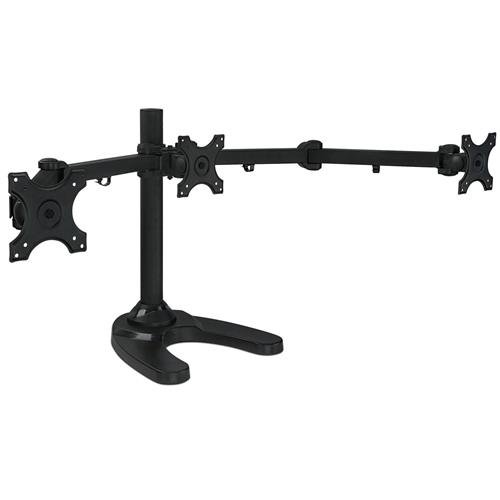
I have a 3 monitor stand similar to the thing below. I think it's way better having 3 smaller monitors than 1 giant one b/c you can move the other two around to get a straighter viewing angle on all 3 monitors. I can also turn off the other monitors when I want to focus on the main screen, which is a nice, if trivial, feature. I can't see the advantage of one gigantic monitor, over several small ones on a mount, for use as a workstation monitor system (on a wall or in a conference room is a different thing of course).

31kGBD1MIwL.jpg
 
Upvote
4 (7 / -3)

jdale

Ars Legatus Legionis
18,356
Subscriptor
Was just about to order an iMac pro and needed a second monitor for a customer

Bet she will like this!

Be wary of a 21:9 as a second screen. I think you're better off getting a 16:9 5K screen that matches like the LG ones that Apple sells. PS. The 5K LG monitors that Apple sells used to cause wifi drops but they have since been fixed.

Never be wary, 21:9 is amazing, I'll never go back.

I have a 34" 21:9 Dell monitor. I would never give up the width. But I wouldn't mind adding more height. :)
 
Upvote
4 (5 / -1)

Fritzr

Ars Legatus Legionis
15,358
massive 49-inch CHG90 monitor

...that's not a monitor. That's a TV.
Without a tuner it is simply a monitor that can be used as part of a TV set. Either video monitor only or if it has speakers, then both video monitor and audio monitor usable as part of a TV set.

In addition to the computer monitor and integrated TV set market there are TV monitors available (TVs without an integrated tuner) The Vizio E series for example which are sold as "Home Theatre Displays". (TV grade audio&video monitor w/out TV tuner)
(TVs were originally a basket of components, which is why the modern integrated versions are called sets)

49" diagonal 32:9 is equivalent to 2x27" 16:9 monitors side by side. For dual monitor office use, this is a space saver. Where space is not a constraint ... it is 2 4K UHD postcards side by side :p
 
Upvote
2 (3 / -1)

clarityoffline

Ars Scholae Palatinae
877
I have a 3 monitor stand similar to the thing below. I think it's way better having 3 smaller monitors than 1 giant one b/c you can move the other two around to get a straighter viewing angle on all 3 monitors. I can also turn off the other monitors when I want to focus on the main screen, which is a nice, if trivial, feature. I can't see the advantage of one gigantic monitor, over several small ones on a mount, for use as a workstation monitor system (on a wall or in a conference room is a different thing of course).

obviously everyone's usage is a bit different but I'm currently using a 43" 4k tv as my monitor and would never go back to multiple monitors. Having everything on one screen gives you more options as to where you want to place something, how large you want something to be, etc. I don't have to worry about a document being split between two monitors.
 
Upvote
14 (14 / 0)

[S]Replicant

Ars Scholae Palatinae
822
Never be wary, 21:9 is amazing, I'll never go back.

I like 21:9 but I got to agree with the prior post. Mixing a 16:9 and 21:9 monitors in a dual monitor setup would drive me crazy. If you want a second monitor for a imac pro you are better off getting one as close to the built in display as possible.

Dell UltraSharp 27 UP2715K
HP Z27q
LG 27MD5K

It's actually fine mixing 16:9 and 21:9 as long as you do it right. I've got a couple of 24" Dells that I use in portrait mode on either side of my LG 34" 1440p monitor.

My notion is still that nobody needs 5K. It'll just cost you a shit ton of extra money for a video card to drive it properly. Even 1440p is a stretch for lots of cards/games at this point in time.
 
Upvote
-3 (1 / -4)

Fritzr

Ars Legatus Legionis
15,358
I have a 3 monitor stand similar to the thing below. I think it's way better having 3 smaller monitors than 1 giant one b/c you can move the other two around to get a straighter viewing angle on all 3 monitors. I can also turn off the other monitors when I want to focus on the main screen, which is a nice, if trivial, feature. I can't see the advantage of one gigantic monitor, over several small ones on a mount, for use as a workstation monitor system (on a wall or in a conference room is a different thing of course).

obviously everyone's usage is a bit different but I'm currently using a 43" 4k tv as my monitor and would never go back to multiple monitors. Having everything on one screen gives you more options as to where you want to place something, how large you want something to be, etc. I don't have to worry about a document being split between two monitors.
I'm seeing the same benefit with a 4K UHD 65" main monitor and a 27" 1080p HD as a toolbar monitor.

I can mix and match windows without worrying about the seams between the 4 1080p sections of the main display. I keep the browser half screen, so the effect is that of a 1620x2160 display with whatever else I have going on positioned on the other half of the screen so I can view everything at once.
 
Upvote
3 (3 / 0)

Sarty

Ars Tribunus Angusticlavius
7,873
I have a 3 monitor stand similar to the thing below. I think it's way better having 3 smaller monitors than 1 giant one b/c you can move the other two around to get a straighter viewing angle on all 3 monitors. I can also turn off the other monitors when I want to focus on the main screen, which is a nice, if trivial, feature. I can't see the advantage of one gigantic monitor, over several small ones on a mount, for use as a workstation monitor system (on a wall or in a conference room is a different thing of course).

I was scrolling down to ask this myself. How many workflows really benefit from a single in excess of ~30", but don't benefit more from multiple displays of that size or smaller?

I guess a single FPS game instance is unsatisfying on several monitors, but really my 24"s at work and my 26"s at home pretty much fill up my entire focused field of view. More real estate is always welcome forever and ever Amen, but I really don't care if it's on the same sheet of LCD. Arguably it's better to split them, both for viewing angle reasons and for sheer portability.

So, sure, I'll take one if you give it to me, but who's the market?
 
Upvote
5 (5 / 0)

Fritzr

Ars Legatus Legionis
15,358
I'm seeing the same benefit with a 4K UHD 65" main monitor and a 27" 1080p HD as a toolbar monitor.

*Stares at single 65" monitor* "dammit, where can I fit the toolbar?!?"

"better get another one!" ??

lolz
It was more a matter of what to do with the old monitor, but I completely agree with the snark ... I was thinking the same thing as I typed that :p
 
Upvote
3 (3 / 0)

Fatesrider

Ars Legatus Legionis
25,171
Subscriptor
I have a 3 monitor stand similar to the thing below. I think it's way better having 3 smaller monitors than 1 giant one b/c you can move the other two around to get a straighter viewing angle on all 3 monitors. I can also turn off the other monitors when I want to focus on the main screen, which is a nice, if trivial, feature. I can't see the advantage of one gigantic monitor, over several small ones on a mount, for use as a workstation monitor system (on a wall or in a conference room is a different thing of course).

obviously everyone's usage is a bit different but I'm currently using a 43" 4k tv as my monitor and would never go back to multiple monitors. Having everything on one screen gives you more options as to where you want to place something, how large you want something to be, etc. I don't have to worry about a document being split between two monitors.
I can see for productivity applications why having a single large screen might be advantageous (never mind the stress of having that much need for multiple things plastered in front of your face like that). But for some programs, they tend to "take over" the screen in full mode and make it much more distracting to have other things in the background.

Gaming and video editing come to mind in that. One CAN do windowed stuff with them (some of them, my video editor seems to hate doing that), but that leaves a lot of screen real-estate unused, and distracting from the central program.

Personally, I run two screens at 1920X1080, with my second monitor landscaped to the left of my main monitor. This way, something can dominate one screen, but I have access to things without making it go away on the other. Since the other screen is used strictly for a limited number/type of programs (mostly browsers to look things up with, or applications I'm working between), it simplifies things for me having that physical separation.

Different strokes for different folks, I suppose.

I do know that a 43" anything on my 60" desk isn't even a remote possibility. There's really not a lot of room there for anything larger than what I have (they already cover up my paper organizers). Maybe when I'm rich and famous (and a lot more blind than I am now), I'll make another desk and go bigger. But the monitor mentioned here wouldn't have the real estate I have in my two screens at a resolution I can see.

And I'm gonna bet my monitors together cost a shit-ton less than this thing does. A price point wouldn't have hurt the information here. So I'll wait for the "more details" thing.
 
Upvote
2 (2 / 0)

Findecanor

Ars Scholae Palatinae
1,075
This monitor should have around 163 PPI. That is right in the middle between the native sweet spot (~110) and its doubled resolution, and Windows (and Linux) aren't very good at scaling to 1.5× size.

For gaming though... half that resolution could be perfect: 81.7 PPI, that is about the same as a 27" 1920×1080 "gaming monitor", just wider. Many graphics cards would be able to push that without straining too much.
 
Upvote
0 (1 / -1)

Statistical

Ars Legatus Legionis
55,481
Do they include DisplayPort so they can be used on something not a Mac? Or does DisplayPort to thunderbolt work?

If they are anything like LG's prior 5K monitors it will be TB3 only. Also I am pretty sure that there are no DP -> TB3 adapters. There are TB3 -> DP but not the reverse.
 
Upvote
1 (1 / 0)
Was just about to order an iMac pro and needed a second monitor for a customer

Bet she will like this!

Be wary of a 21:9 as a second screen. I think you're better off getting a 16:9 5K screen that matches like the LG ones that Apple sells. PS. The 5K LG monitors that Apple sells used to cause wifi drops but they have since been fixed.

Never be wary, 21:9 is amazing, I'll never go back.

I like 21:9 but I got to agree with the prior post. Mixing a 16:9 and 21:9 monitors in a dual monitor setup would drive me crazy. If you want a second monitor for a imac pro you are better off getting one as close to the built in display as possible.

Dell UltraSharp 27 UP2715K
HP Z27q
LG 27MD5K
I'm survivng just fine with 21:9 and 16:9 dual monitor setup, but 21:9 has to be primary. And ofcourse they have to be same height and same vertical resolution. Planning to add a third one though (another 16:9 to the other side).
 
Upvote
0 (0 / 0)

Statistical

Ars Legatus Legionis
55,481
Upvote
0 (0 / 0)
Status
Not open for further replies.