Skip to content
Science

Going boldly: Behind the scenes at NASA’s hallowed Mission Control Center

Apollo vet Sy Liebergot shows Ars how NASA got men safely to the Moon and back.

Lee Hutchinson | 99
"The Trench" — the front row of the restored Apollo Mission Operations Control Room Credit: Steven Michael
Story text

HOUSTON, TEXAS—Astronauts have been saying “Houston” into their radios since 1965. The callsign refers in general to the Johnson Space Center in Texas, and the people who answer to it sit in the Mission Control Center, located in Building 30 near the south end of the The Lyndon B. Johnson Space Center (JSC) campus. “Mission Control” has been the subject of movies, television shows, and documentaries for decades. It’s usually depicted as a bustling room filled with serious folks in short-sleeved white shirts and skinny black ties who shout dramatically about damaged spaceships while frantically pressing buttons on chunky 1960s control consoles. What is it really like, though, to sit at one of those consoles? What do all of those buttons do?

On a sunny morning in early October, I hopped in my car to find out. The Johnson Space Center is about a dozen miles from my home in League City, up the newly constructed NASA Bypass and down the historic NASA Road 1. After a short drive, my photographer and I were in line at JSC’s main gate. We were meeting contacts from NASA’s Public Affairs Office, and they were going to escort us further on-site to Building 30 for an Ars “Mission Control” tour. Our mission? Explain the technical details behind how the room operated—and what it was like to sit at a console and answer those calls from space.

The exterior of Building 30, which houses the rooms collectively known as “mission control.” The flag on the roof flies whenever there is at least one American in space.
The exterior of Building 30, which houses the rooms collectively known as “mission control.” The flag on the roof flies whenever there is at least one American in space. Credit: Photo by Steven Michael

One small step

This wasn’t my first time in Building 30. I visited JSC with some frequency during my time at Boeing, though not often enough for the feeling of wonder to wear off. Some people are awed when they go to St. Paul’s Basilica, others by visiting Disney World. To me, neither place holds a candle to the Johnson Space Center—this is the place where, 50 years ago, men and women helped execute the greatest engineering achievement in all of human history.

The original plan for my visit was simply to tour the one restored Apollo-era mission control room, to take plenty of pictures, and to give Ars readers a good technical understanding of how “Mission Control” worked during the Apollo era. NASA, however, upped the ante when it assigned my tour guide—none other than Sy Liebergot.

Sy Liebergot, Apollo EECOM, with his old desk in the background.
Sy Liebergot, Apollo EECOM, with his old desk in the background. Credit: Photo by Steven Michael

The name should be familiar if you’re a fan of manned space flight. Seymour Liebergot, a retired NASA Flight Controller, sat at the EECOM console for Apollo 8, 9, 10, 11, 12, 13, 14, and 15. He was one of the flight controllers responsible for ensuring the safe return of Apollo 13 following the explosion of one of its liquid oxygen tanks (in the film Apollo 13, he’s played by director Ron Howard’s brother, Clint). Liebergot was present for some of the most monumental moments in space flight, and he was going to walk me through the technical details of Mission Operations Control Room 2. It was like requesting a tour of the Bat Cave and having Alfred show you around the place personally.

JSC looks a lot like a college campus. Situated on 1,600 acres of wetlands between Houston and Galveston, it was constructed during 1962 and 1963, eventually becoming operational in time to shepherd Project Gemini into space. One hundred buildings sit scattered across the property, with the main cluster along NASA Road 1, interspersed with parking lots and neatly maintained green spaces. With the exception of a few recent additions, the buildings of JSC appear every bit the product of their era: 1960s modernist, most mixing terraced concrete and glass. The corridors look like they should exude the odor of decades of cigarette smoke, but the federal government’s “no smoking” policy has been in place long enough that most smell faintly of stale coffee instead.

Building 30, which was recently named the “Christopher C. Kraft Jr. Mission Control Center,” is a tall and mostly windowless structure, three stories in two wings, joined by a central lobby. Building 30 houses several different “mission control” rooms, which are officially called Flight Control Rooms (FCRs, pronounced “fickers”). When the building was first made operational in 1965 there were a pair of control rooms, then called Mission Operation Control Rooms (MOCRs, “mo-kers”).

The MOCRs served NASA through the Shuttle era. The room that housed MOCR 1 has been remodeled and repurposed several times; it is currently used as the International Space Station FCR. MOCR 2, which was used for almost every Gemini and Apollo flight, was restored to its 1960s-era appearance after retirement in 1992. It is now a registered historic landmark.

Security doors leading to Building 30’s Mission Operations Wing.
Security doors leading to Building 30’s Mission Operations Wing. Credit: Photo by Steven Michael

MOCR 2 is on the third floor of Building 30’s Mission Operations Wing. The other floors house the Shuttle and station FCRs, as well as FCR support rooms (called MPSRs, for Multi-Purpose Staff Rooms) and office space. The first floor used to house the Real Time Computing Complex, or RTCC, which during Apollo consisted of five IBM System/360 mainframes and their support equipment. As we’ll see, the RTCC was a vitally important part of the MOCR’s operations.

A portion of the Real Time Computing Complex on the first floor of Building 30. Today, this is all regular office space.
A portion of the Real Time Computing Complex on the first floor of Building 30. Today, this is all regular office space. Credit: PHO-FAM001 – Familiarization Manual, Mission Control Center Houston
Coffee nook, directly behind MOCR 2.
Coffee nook, directly behind MOCR 2. Credit: Photo by the author

After passing through the security doors, Liebergot and I rode an elevator up to the third floor. We walked through high-ceilinged corridors with raised floors covered in rubberized tiles, an arrangement which would be familiar to many IT workers. MOCR 2 occupies the central area of the floor, around some corners and past a low alcove containing lockers and a coffee machine. To enter, we walked up a side ramp much like you would find in a movie theater with stadium seating. MOCR 2 is indeed about the size of a small theater—in fact, the room is sometimes used by NASA to screen Apollo 13 and other space films for selected audiences.

The iconic Ford-Philco-designed consoles are arranged in four tiers stepping down from the rear of the room, separated by a glass wall from the visitor’s gallery and a pair of press booths. The room is dimly lit by recessed fluorescents, and Sy informed me the room was kept even darker. That way, it’s easier to see the console displays.

MOCR 2, from the top row next to the DoD console, looking across at the left front rear projection screens.
MOCR 2, from the top row next to the DoD console, looking across at the left front rear projection screens. Credit: Photo by Steven Michael

Once our NASA contact cleared out some picture takers and shut the doors, MOCR 2 was suddenly cloaked in silence. I could feel the ghosts. Here, in this very room, sitting at these sage-colored consoles, 30 years of manned space flight happened. It felt very much like standing in a cathedral—except that this room wasn’t just built to talk to the heavens, but to actually visit them.

The flight controller

The formalized Apollo-era flight controller system was most directly the brainchild of Dr. Christopher Kraft, in whose honor the building is named. During Project Mercury, Kraft was tasked with developing a system of resource management and communications protocols to use when directing space flights, which he based primarily on existing aircraft flight operations procedures. First tested during Project Mercury, the concept of “mission control” and the role of the flight controller evolved and matured through Project Gemini and the relocation of ground control facilities from Florida to Texas.

Each flight controller was responsible for some aspect of the mission. Some consoles were concerned with the performance of the spacecraft’s hardware, others for its software, and others for the performance of the distributed communication network that held the entire mission together. A dedicated console communicated with the spacecraft’s crew, while others were for management and space center directors to occupy. There’s even a console used by a Department of Defense representative, to help coordinate the recovery efforts of the spacecraft after splashdown.

MOCR 2 overview from the top left. Just visible at right is the red “Bat Phone” on the Department of Defense controller console.
MOCR 2 overview from the top left. Just visible at right is the red “Bat Phone” on the Department of Defense controller console. Credit: Photograph by Steven Michael

The flight controllers were only the most visible part of an entire dedicated organization. Each position was supported by a staff of specialists in a Staff Support Room, or SSR, commonly referred to as the console’s “back room.” The controllers were each required to monitor far more information than a single person could absorb, so every controller had a back room to keep additional eyes on their responsibilities. The back rooms handled deep troubleshooting while the controller continued watching the vehicle—in spite of the Hollywood image of mission control, the mission doesn’t stop when there’s a problem.

The back room staff were usually contractors, while the flight controllers were civil servants. Sy emphasized that the controller/back room relationship was that of a dedicated team and never adversarial. “We made sure, during simulations, if the back room caught a particular fault that the sim guys put in, we would always give them credit,” he explained. “If they screwed up, then I would take the blame.”

Controllers like Sy and their back room staff functioned as a team.
Controllers like Sy and their back room staff functioned as a team. Credit: Photo by Steven Michael

From air to ground and back again

The information on a flight controller’s console traveled a long and complex route to get from space to Houston. Voice and data signals from the spacecraft were received by the Manned Space Flight Network—MSFN, or “mis-fin,” a system of facilities and ships spread across the globe that NASA used to communicate with spacecraft and satellites. Signals went to NASA’s Goddard Space Flight Center in Maryland and were relayed to the Houston Mission Control Center’s Communications, Command, and Telemetry System. Everything coming in was recorded on reel-to-reel tapes for record-keeping. Telemetry and systems data from the spacecraft were then routed to the center’s five computers, one of which would be designated the mission’s primary computer, with another as a hot standby.

The data was processed by the mainframes, then made ready for on-screen display and stored for quick recall by controllers. Voice transmissions were played over one of two air-to-ground audio channels, called “loops,” to which all the flight controllers were constantly listening.

High-level overview of the air-to-ground communications process.
High-level overview of the air-to-ground communications process. Credit: PHO-FAM001 – Familiarization Manual, Mission Control Center Houston

The flight controllers’ consoles were “dumb”—they contained no computing elements and just displayed what came in from the mainframe. If a controller noticed an anomaly, they investigated by calling up additional information and conferring with their back room, and possibly by calling other controllers or outside engineering resources. It was their job to make a recommendation on what to do about the anomaly, and then present that recommendation to the flight director.

The flight director, sitting in the middle of all the consoles, held ultimate authority over the entire mission. The role is best summarized by legendary Flight Director Gene Kranz, who stated, “The flight director may take any action necessary for crew safety and mission success.” The buck stopped at the flight director’s desk, and controllers didn’t call him until they were ready to recommend some kind of action.

Although everyone was always listening to the air-to-ground loops to keep tabs on the crew, only one controller was allowed to speak to them: CAPCOM, the Capsule Communicator. This streamlined ground-to-air communications and, more importantly, limited the possibility of confusing or contrary directions being sent by different sources. The voice traffic went back to Goddard in Maryland, and from there to whichever MSFN transmission site was currently lined up with the spacecraft.

Locations of all the MSFN stations during Project Apollo.
Locations of all the MSFN stations during Project Apollo. Credit: PHO-FAM001 – Familiarization Manual, Mission Control Center Houston

In certain circumstances, flight controllers needed to transmit individual commands or larger programs to the spacecraft’s computers. Simple commands, called “real-time commands,” could be directly generated at controllers’ consoles and sent via MSFN to the spacecraft, which would execute the commands and send an acknowledgment back to the controller’s console, usually within seconds. Larger, more complex programs underwent multiple checks for errors before being queued for transmission, which usually happened at scheduled intervals.

The flight controller’s console

Each flight controller position had at least one console, which contained equipment bays of varying sizes where function-specific panels could be mounted. Unlike today, where controls might be software-configurable and easily reprogrammable, the MOCR consoles were all hard-wired for specific tasks. Changing a console’s function involved swapping panels and re-wiring things. Few of the consoles in the current restored layout are in their correct Apollo flight configuration: the room was used as a Shuttle FCR for longer than it was an Apollo MOCR, and as we walked around, Sy pointed out that most of the consoles are sporting at least one or two Shuttle control panels. The majority of the consoles contain a pair of Shuttle-era 14″ solid-state CRTs (the Apollo displays used vacuum tubes), dual communications panels, a Shuttle-era event indicator module, a manual select keyboard for dialing in different “channels” on the screens, and a status report module.

The right half of Public Affairs Office console is typical of most of the consoles today, with a PABX communications panel and a display selection panel below a pair of screens (the second screen is off-frame to the left).
The right half of Public Affairs Office console is typical of most of the consoles today, with a PABX communications panel and a display selection panel below a pair of screens (the second screen is off-frame to the left). Credit: Photo by Steven Michael

Several of the consoles, though, are absolutely brimming with authentic Apollo panels. Sy’s console in particular, the Electrical, Environmental, and Communications position, or “EECOM,” is one that approaches Apollo-era authenticity with its smorgasbord of buttons and lights. Being not made of stone myself, I leaned in and pressed buttons and controls as we walked, flicking back and forth the “ABORT REQUEST” toggle on the Flight Dynamics Officer’s panel and toggling non-functional displays. There are no touch-screens here—the buttons are heavy and take a couple of pounds of pressure to depress, and they bottom out with solid metallic “CHUNK” sound.

No man has the willpower to resist this button. I think I pressed it about a dozen times.
No man has the willpower to resist this button. I think I pressed it about a dozen times. Credit: Photo by Steven Michael

The popular dramatic depiction of the NASA flight controller that you might see in movies—particularly Apollo 13—differs considerably from reality. On TV and in films, flight controllers are often shown frantically pressing buttons, interacting with the consoles as one would with a modern-day computer. They seem to be in direct control of the distant spacecraft’s systems and able to execute a wide range of technical actions with a few snappy commands.

Reality was a different story. For the most part, the consoles of the Apollo era were passive display devices. The majority of the buttons on all of the consoles were used to cycle through different “channels” of information on the console screens. They triggered the recording of the screens to reel-to-reel tape, called up information from the RTCC’s random-access core and drum memory or from tape, and communicated with other flight controllers and back room staff. Some positions could also pass commands directly back and forth to the computers in the RTCC, and there were occasions where the MOCR controllers did load new programs and commands into the remote spacecraft’s computers. For the most part, though, flight controllers were concerned with monitoring information and passing instructions and recommendations—verbally or written—to the flight director.

Channels on a TV

A variety of information could be displayed on the screens at each controller position or projected up onto the room’s front displays. There were a large number of “channels” available for viewing on the two or three screens at each controller station, and each channel could be commanded to show different data displays. Each controller’s station had a dedicated set of channels over which it had control, and to which other stations could attach if they wanted to share content. For example, if EECOM wanted to view information about the spacecraft’s oxygen tank levels, the EECOM controller would command his console to display the desired “page” on one of the channels under his control. If EECOM then wanted another controller to see what was on his screen, the other controller would dial into the same channel EECOM was using, and his screen would mirror what EECOM was seeing. When EECOM changed the channel to display a different page, the other controller watching EECOM’s channel sees the new page as well. The controllers had a DSKY—NASA short-hand for “display keyboard”—pre-configured with relevant data pages for their console. They could also manually select channels through a second set of dials and switches.

A typical manual display selection panel. Controllers could select different display “channels” for their monitors using the black numerical rotary dials, and also change the displays on the MOCR’s large front screens.
A typical manual display selection panel. Controllers could select different display “channels” for their monitors using the black numerical rotary dials, and also change the displays on the MOCR’s large front screens. Credit: Photo by Steven Michael

How each channel was generated, though, is almost shockingly primitive by today’s standards. The computers downstairs in the RTCC were responsible for producing the actual data, which could be numbers, a series of plotted points, or a single projected moving point. The System/360 mainframes generated the requested data on a CRT screen using dedicated digital-to-television display generators; positioned over the CRT in turn was a video camera, watching the screen. For the oxygen status display example above, the mainframe would produce a series of numerical columns and print them on the CRT.

The numbers were just that, though. No column headings, no labels, no descriptive text, no formatting, no cell outlines, no nothing—bare, unadorned columns of numbers. In order to make them more understandable, an automated mechanical system would retrieve an actual physical slide containing printed column headings and other formatting reference information from a huge bank of such slides, and place the slide over a light source and project it through a series of lenses into the video camera positioned above the CRT. The mixed image, made up of the CRT’s bare columns and the slide containing the formatting, was then transmitted to the controller’s console screen as a single video stream.

This process was necessary to dress up and clarify the mainframes’ sparse output, since the modern concept of a single unified graphical display consisting of mixed static and dynamic elements was impossible with the era’s technology. The mainframe produced the naked numbers or the moving dot, the slide provided the formatting or the background image, and a video camera transmitted the two separate elements sandwiched together for display on the controllers’ console screens or for projection up on the big front 10’×20′ screen or one of its smaller flanking companions.

Diagram showing the process for projecting the orbital plot on the main 10’×20′ screen. Slightly different from how individual displays work, it nonetheless typifies the methodology—computer-generated dots over projected slides.
Diagram showing the process for projecting the orbital plot on the main 10’×20′ screen. Slightly different from how individual displays work, it nonetheless typifies the methodology—computer-generated dots over projected slides. Credit: PHO-FAM001 – Familiarization Manual, Mission Control Center Houston

By modern computing standards, this seems almost ludicrous; even at the time, the results weren’t terribly satisfactory. “We didn’t have much plot capability,” Sy lamented.

If graphs were needed—if, for example, a controller needed to see how a certain spacecraft parameter was varying over time—controllers could call up snapshots of data using a panel called a SMEK—a Summary Message Keyboard. A SMEK keypress would summon a column of data about a spacecraft subsystem onto the controller’s display. Additional keypresses would add additional columns of data for the subsystem, building a set of successive subsystem measurements in order, so that the controller could get a picture of how a parameter was changing over time. Even with the SMEK, though, there was nothing even vaguely resembling Excel with which to construct a graph. Controllers would write down the information on the screen and then pull out the slide rules and graph paper. Or they could summon a hard copy.

A Summary Message Keyboard, or SMEK, used to call up previously recorded data for various systems.
A Summary Message Keyboard, or SMEK, used to call up previously recorded data for various systems. Credit: Photo by Steven Michael
A different SMEK with different labels and functions.
A different SMEK with different labels and functions. Credit: Photo by Steven Michael

Tube technology

Even today, paper plays a huge role in office environments—the promise of a “paperless office” will likely never come to pass—but there are no printers attached to any of the MOCR controller consoles. If an individual flight controller wanted a paper printout of one of his console displays, like a SMEK-produced set of columns, he could depress the “Hard Copy Request” key on his control panel to signal the television subsystem’s video recording equipment to tune itself to his display’s current channel. The channel’s signal was then routed through a hardcopy recording device, which produced a copy of the video signal’s current image on thermal paper. The thermal printout was automatically stuffed into a carrier cylinder and shot through a pneumatic tube—much like the kind you’d find at a bank’s drive-through teller window—and delivered to the controller’s console.

A typical pneumatic tube (“p-tube”) station, showing carriers, hatch, and control panel.
A typical pneumatic tube (“p-tube”) station, showing carriers, hatch, and control panel. Credit: Photo by Steven Michael
Close-up of a p-tube control panel, showing the destinations a tube could be sent.
Close-up of a p-tube control panel, showing the destinations a tube could be sent. Credit: Steven Michael

The p-tubes weren’t just for summoning hard copies. The system was a complex series of tubes connected by a sophisticated central switching station and could be used to ferry papers and other lightweight objects between console stations or to other points within the Mission Operations Wing. Sometimes it was even employed to grant access to the MOCR during a mission. During flights, the MOCR was a highly restricted area, and not even the back room staff were allowed on the floor. Sy explained that the controllers had a supply of temporary MOCR access badges at their consoles, and if they needed to bring a back room person up to their console, they would whisk a badge directly to them via the p-tube.

Many voices

One type of control common to every single console is a large communications panel, called a PABX panel (for “Private Automatic Branch Exchange”—JSC’s internal phone system), which tied each flight controller into a complex hierarchical set of local MOCR-only communications channels called “voice loops,” along with the site-wide phone system, and also the public switched telephone system. An ordered system of communications was vital to the execution of complicated missions, and controllers observed strict communications discipline as they worked.

A typical PABX (Private Automatic Branch Exchange) communications panel. The labeling and layout on this panel is from the Shuttle era. Different buttons in the main control represent different communications loops or outside phone lines which could be monitored or spoken on.
A typical PABX (Private Automatic Branch Exchange) communications panel. The labeling and layout on this panel is from the Shuttle era. Different buttons in the main control represent different communications loops or outside phone lines which could be monitored or spoken on. Credit: Photo by Steven Michael

The PABX modules were central to each controller’s job. The ones in MOCR 2 today are mostly early Shuttle-era, but during Apollo they consisted of an array of paired buttons, with a yellow and a white button for each of the available communications loops. Pressing a loop’s yellow button allowed the controller to listen in on the loop, and pressing the loop’s white button raised its volume slightly and allowed the controller to speak on that loop as well.

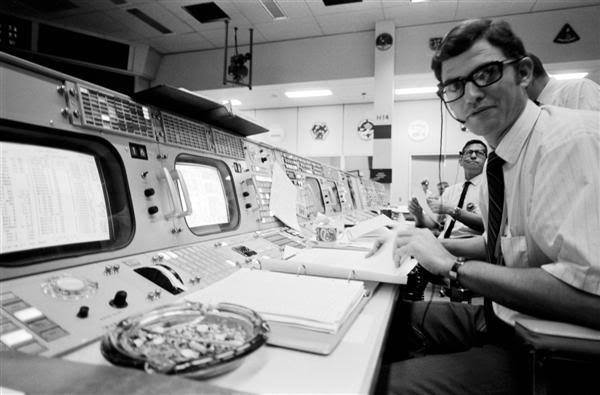
A close-up of Flight Director Gene Kranz’s console during Apollo 13, showing his PABX module at left. Yellow lights indicate loops which he is passively monitoring, and white indicate loops on which he can speak. Kranz has a lot of active channels in this picture.
A close-up of Flight Director Gene Kranz’s console during Apollo 13, showing his PABX module at left. Yellow lights indicate loops which he is passively monitoring, and white indicate loops on which he can speak. Kranz has a lot of active channels in this picture. Credit: Wikimedia Commons

I knew that controllers frequently had to listen to multiple audio loops at once, and I asked Sy about how many loops he would typically monitor. The answer surprised me: he would usually have eight audio loops playing into his headset at any given moment. Though they were usually only actively speaking on one loop at a time, controllers would be listening to a large number of things going on. The different loops might be carrying different simultaneous conversations, and the controllers would have to pick out the important bits from the overlapping flow of words and file the rest. “A lot of us probably have tinnitus…from having an earpiece stuck in your ear blasting away for twenty years,” he joked.

Above all else, every single controller listened continually to the air-to-ground loop being relayed from the mission spacecraft, paying attention to every word spoken by the spacecraft’s crew. If a controller needed to temporarily go offline, to conference with another controller or to take a bathroom break, he’d tell his back room to make sure they were monitoring air-to-ground before he turned his attention away. Crew communication was prioritized above all else.

I assumed that the flight director in his central role would have the biggest loop monitoring burden of all the controllers, but Sy said no. The flight director functioned more as the switching station, watching the entire mission, selectively monitoring a few loops at a time, and pulling controllers into one-on-one conferences at his console to clarify things as needed. When the flight director wanted more details on something, the controller responsible would usually pull the necessary documentation (each station had shelves of three-ring binders hanging behind them, which contained every conceivable bit of information about their particular systems) and step up to the flight director’s desk and talk directly, keeping the voice loops free of yet another conversation.

Flashing lights

Even when augmented by a back room staff, there was a tremendous amount of information for each controller to track. The primitive display technology prevented the controllers from being able to directly watch more than a few things at once, and so they employed a secondary system of event notification panels to light up when spacecraft parameters would go out of normal boundaries.

Event notification panels on TELMU and CONTROL consoles, which would light to indicate high or low parameter indications as needed. Note misaligned panel at left, covering the stop clock.
Event notification panels on TELMU and CONTROL consoles, which would light to indicate high or low parameter indications as needed. Note misaligned panel at left, covering the stop clock. Credit: Photo by Steven Michael

“We would set limits tighter than the fail limits, the upper and lower limits, of a parameter,” Sy explained, standing by his EECOM desk and pointing at the row of event notification lights atop the dual displays. “We’d set them a little bit tighter so we could be alerted to a change off the nominal. For example, the cabin pressure was 5.0 [PSI]; if it went to 5.5 or down to 4.7, we would get alerted.” This kind of a deviation would cause one of the limit sense lights to illuminate, showing the system and parameter which was misbehaving. The controller would then know which display page to call up on his console’s screens.

“We could go look up what that was and then we would look down on the display and we would have an asterisk next to that parameter,” he continued. Relying on the notification panel to direct them to problems saved the controllers from having to continually sweep through all of the different video pages on their displays manually. The system was refined further after Apollo 13. “What happened there was that so much failed nearly at the same time,” Sy continued, “that it was just a big cascading failure and you just couldn’t tell where it started.” In response to this, new critical systems monitoring panels were added which would light up if a critical parameter deviated and then remain lit, even if the system drifted back into normal range—prior to that, the limit sense lights would go dark if a system’s parameters returned to normal. This change was crucial, since until Apollo 14 when the changes were made, a transitory problem might go unnoticed if too many other things were happening at once.

Sy Liebergot demonstrates how to change the console displays using a telemetry input select and display panel. When alerted to trouble by the event notification panels, this control could quickly bring up preprogrammed pages on the displays.
Sy Liebergot demonstrates how to change the console displays using a telemetry input select and display panel. When alerted to trouble by the event notification panels, this control could quickly bring up preprogrammed pages on the displays. Credit: Photograph by Steven Michael

There wasn’t a single master computer program responsible for alerting each controller when his part of the spacecraft needed attention—the controllers themselves and their manually set limit sense directives filled a role that today would be handled mainly by software. The consoles alerted the operator when parameters edged up or down out of a band of allowed settings, and the operator had to determine exactly what the deviation meant. Worse, until the introduction of monitoring panels with indicators that would remain lit after a problem reading had returned to normal, controllers could only get a full sense of a problem’s scope by replaying the telemetry tapes. This could hamper a controller’s ability to see the whole picture and understand the root cause of a problem.

“We always worked backward,” he said, hinting at a troubleshooting methodology that will be familiar to most IT workers. “If there was a problem, if I saw it first, I’d alert my back room—I’d say, ‘EPS, did you see that?’” referring to one half of the EECOM console back room team, the half dealing with the electrical power systems of the Apollo Command and Service Modules. “And he’d say ‘I’m looking at it right now and I’ve got it on the strip-chart and we’re checking the trend on it.’ Or if they saw something, they would call me,” he continued, “and they would say ‘EECOM, this is EPS, looks like we’ve got a problem developing with fuel cell number two,’ and we’d discuss it.”

If it looked like the problem was an actual problem and not a temporary anomaly, the controller would loop in the flight director. “My report to the flight director up the line would be, ‘Looks like we’ve got a problem with the fuel cell two coolant'”—he noted here that he’s actually describing an incident which occurred during Apollo 10 when they lost a fuel cell on the Service Module—“‘so have the crew go to panel two-twenty-six and check circuit breaker twenty-five, phase A.’”

I interjected with a question: “Did you try not to report anything to FLIGHT unless you had at least a sketch of a solution in mind?”

“I had to tell him what action I needed,” Sy confirmed. “You don’t go to him and say, ‘Hey, I got a problem.’ You say, ‘I have a problem with fuel cell two, this is the action I need to take.’”

Follow the leader

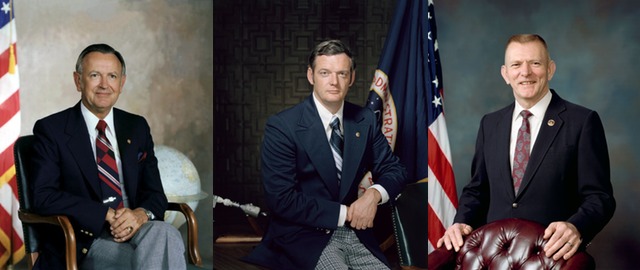
I asked Sy for a few words about the people who sat at the FLIGHT console, and we spoke about three famous flight directors as examples: Chris Kraft, Gene Kranz, and Glynn Lunney. Kraft, who held the title of flight director through the end of Project Gemini, defined the mold—smart, decisive, and sometimes abrasive. Sy describes Chris Kraft as being extremely intelligent; his most notable characteristic was an incredibly insightful ability to prioritize and sort through huge stacks of information and pick out the most important things, then act on them.

Three famous FLIGHTs: Chris Kraft, Glynn Lunney, Gene Kranz.

Glynn Lunney, who served as a flight director during Gemini and Apollo, was a protege of Kraft and if anything was even sharper. In his autobiography Flight, Kraft refers to Lunney as a “sponge” for information. Sy recalls that Lunney had an uncanny ability to absorb and understand technical information almost instantly and without apparent effort.

Gene Kranz, certainly the most famous Apollo-era flight director (in no small part thanks to Ed Harris‘s portrayal in Apollo 13), had been Chris Kraft’s assistant flight director since Mercury. He was “Mr. Cool,” according to Sy. While he might not have had Kraft or Lunney’s almost unsettling technical intuition, he more than made up for it through sheer force of will. “Lunney and Kraft would do things by inspiration; Kranz would do things by perspiration,” Sy said. “No less smart, just with those German genes. He was prepared for anything.” Kranz was relentless in his preparation for missions, devouring manuals and procedures. “He didn’t wait to learn it” on the spot, like Kraft or Lunney, Sy recalled. “He knew it all ahead of time.”

The mood

In the movies, a spacecraft launch is often accompanied by bombastic music and the seat-juddering bass of rockets thundering, with shots of flight controllers frantically mashing buttons intercut with shaky-cam special effects of the launch vehicle clawing its way skyward. I asked Sy about what a person actually experienced while sitting at a console during launch, and it turns out that reality, again, is a very different place from fiction.

When the launch countdown clock hit zero on an Apollo mission, the quiet MOCR remained quiet. “We’re looking up at the group display, the 10′-by-20′,” at the front of the control room, Sy said, “because the FDO [Flight Dynamics Officer] has put up the launch parameters to see that we are tracking the predicted trajectory. It’s quiet. We’re watching our data and making sure that we don’t miss anything in that time-compressed nine minutes”—the amount of time it took the Saturn V to reach orbit.

Discussing the mood inside the MOCR at launch.
Discussing the mood inside the MOCR at launch. Credit: Photo by Steven Michael

There was also a lot of writing going on. Many pictures exist of controllers scribbling in binders, and each controller kept a console log of the important events which happened during his shift, especially the flight director. The FLIGHT’s logbook was the most detailed of all—it was his responsibility to notate every single mission event of any significance, and the controller logbooks were part of the legal and historical record for the mission. The primitiveness of the computers made such manual recording a vital adjunct to the raw computer records kept on reel-to-reel tape. “I have a picture of Kranz, talking to some guys,” said Sy, “and his console log is open on the console.” The logbooks were three-ring binders. “And the page was curled over almost 360 degrees—he pressed that hard with his ball-point pen. He was very intense!”

When lightning strikes

Two incidents in particular serve as capsule examples of the role of the flight controller during crisis and specifically the EECOM position sat by Sy Liebergot. The first is the dual lightning strike suffered by Apollo 12 during launch, and the second is the much-dramatized oxygen tank explosion on Apollo 13.

The Apollo 12 incident is more easily described. Apollo 12 was slated to be the first precision Moon landing, improving on Neil Armstrong’s off-target touchdown on Apollo 11. The launch was a wet one, taking place during a rain storm. The mission rules in place suggested that launching during a storm should be avoided, “But what happened was that Rocco Petrone, who was the launch director down at the Cape, and Gerry Griffin, who was the flight director here, had never done a launch before, and they went!” Sy laughed. “So, we made lightning!”

Lightning strikes around the launch pad shortly after the liftoff of Apollo 12.
Lightning strikes around the launch pad shortly after the liftoff of Apollo 12. Credit: NASA Apollo Image Gallery

A bit over 36 seconds after liftoff, as the Saturn V powered skyward, the rocket triggered a burst of lightning which conducted all the way down to the launch tower via the rocket’s exhaust plume. Barely 20 seconds later, a second lightning strike again hit the vehicle. The Apollo 12 crew wasn’t aware that they had been hit by lightning, but they were aware that suddenly, a huge number of failures began lighting up their spacecraft’s warning panels.

“OK, we just lost the platform, gang. I don’t know what happened here; we had everything in the world drop out,” radioed Navy Captain and mission commander Pete Conrad, just 62 seconds after the launch. “I got three fuel cell lights, an AC bus light, a fuel cell disconnect, AC bus overload 1 and 2, Main Bus A and B out.” The fuel cells in the Service Module supplied electrical power to the Command Module’s computers, but had been knocked offline by the lightning. The strike also affected the electrical circuitry (the busses) which connected the spacecraft’s systems to their power supplies. The Command Module suddenly found itself on battery power. “We always launched with the entry batteries online, just in case, because we could recharge them later in-flight,” Sy explained, referring to the Command Module’s reentry batteries. They were intended to supply power for the few hours during the final phase of the mission, after the Command Module separated from the Service Module and went through atmospheric reentry and splashdown. The batteries being available to supply power in case of just such a fuel cell failure gave the crew and the ground controllers time to assess the situation.

On the ground, things were equally bad. Sy had been the prelaunch EECOM for the mission, responsible for the electrical components of the Apollo spacecraft, and though he had gone off-shift shortly before the launch, he had stuck around to watch. The EECOM desk was manned by John Aaron, famously known as NASA’s “steely eyed missile man” for his cool performance under pressure (“He was the super-EECOM,” Sy commented). When the launch vehicle was hit, all of the ground telemetry feeds displayed on the controllers’ consoles went scrambled. The responsibility to determine what happened fell squarely on EECOM’s shoulders.

EECOM John Aaron, Sy Liebergot’s counterpart. Credit: Photobucket user Naraht

“John just sat there,” said Sy, as we leaned against the back of the EECOM desk. “He never said a word. Never even asked his back room anything. He just stared at the data.” The reentry batteries still registered as functional in his telemetry feeds, but everything else was garbled or missing. The pattern of failures, though, seemed familiar. “He remembered seeing that [pattern] during a pad test, and it was obviously an instrumentation problem. When the lightning hit, it kicked the three fuel cell powerplants offline.” The spacecraft’s reverse-current sensor had disconnected the fuel cells to save them from being damaged by the lightning’s surge of current. “It appeared that the power supply for the Signal Conditioning Equipment… was gone.”

The Signal Conditioning Equipment (SCE) is a vital piece of hardware, because it takes all of the various raw signals from the spacecraft’s instruments and converts them to the correct format for transmission to the ground so that they can be understood by the computers in the RTCC. With the SCE not functioning, the spacecraft was effectively transmitting gibberish.

“But we had an auxiliary power supply,” for the SCE, explained Sy, and John Aaron knew that activating it should bring the SCE back online. That ought to restore the telemetry feeds and let them figure out what else had happened. “John asked for the [SCE] switch to be put… to the ‘aux’ position.”

Twenty-four seconds after Conrad’s last status report, the transcripts show Gerald Carr, the CAPCOM, radioing back to the spacecraft: “Apollo 12, Houston. Try SCE to auxiliary. Over.”

Conrad’s response is immediate: “Try FCE to Auxiliary? What the hell is that?”

Apollo Block II Command Module control panel layout, with SCE switch position highlighted. The SCE switch was in front of Apollo 12 Lunar Module Pilot Al Bean’s seat.
Apollo Block II Command Module control panel layout, with SCE switch position highlighted. The SCE switch was in front of Apollo 12 Lunar Module Pilot Al Bean’s seat. Credit: heroicrelics.org

Conrad had no idea what control CAPCOM was asking for, even repeating it back incorrectly. Sy shook his head as he recounted, “Most of the crews admitted they didn’t know crap about the comm systems—they were too complicated!” In spite of the system’s overall complexity, the seemingly endless amount of simulations done before the mission had given Aaron a deep familiarity with the electrical pathways of the spacecraft, and enabled him to make a split-second call that saved the mission. The crew sorted out where the switch was and toggled it, and within a few moments the telemetry data began to show up clearly again. “Gerry [Griffin] was back there ready to throw the ‘Abort Request’ switch… If John had said, ‘We gotta abort,’ they would have aborted.”

Once the telemetry was back, it became clear the fuel cells had gone offline; the controllers were able to direct the crew to put them back online, one by one, and then to recalibrate the Command Module’s guidance platform and prepare for their trip to the Moon. Without Aaron’s near-instant recall of an obscure panel switch, the mission would have been aborted before it really even started, with potentially profound implications for the rest of the Apollo program schedule.

(The incident is dramatized with an apparent high degree of accuracy in HBO’s 1998 miniseries, From the Earth to the Moon.)

Failure is, famously, not an option

The mission would become known as NASA’s “finest hour.” It started ignominiously enough, with no one really paying attention. Apollo 11 and 12 had successfully landed without anyone getting blown up or lost in space. Landing on the Moon had become routine in the eyes of the public, so the live television coverage of all aspects of the mission which had filled the previous two manned Apollo flights was absent. No one was watching.

The death of another Apollo crew… would likely have spelled an end to Project Apollo and potentially NASA’s entire manned program.

That changed about 56 hours into the mission, when a routine order to activate a stir-fan in one of the Service Module’s oxygen tanks resulted in a spacecraft-crippling explosion. During the long coast between the Earth and the Moon, the slush liquid oxygen in the tanks would separate into layers, and getting an accurate reading on the tank’s fill level became difficult. To get around this, the tanks each contained a small fan to agitate the contents back into a measurable state. The number-two oxygen tank had been damaged during its pre-launch inspection process. An attempt to empty it had resulted in the inside of the tank being subjected to extremely high temperatures, which in turn damaged the Teflon insulation on the wiring leading to its stir fan. When the time came during the mission to activate the fan and stir the tank contents for measuring, power passing through the damaged wires caused a spark, igniting the Teflon insulation, which burned rapidly in the oxygen-rich environment, which in turn pushed the pressure and temperature inside the tank quickly to and past its structural limits. The tank very quickly exploded.

In Ron Howard’s Apollo 13, the effect is immediate and dramatic, with the spacecraft shimmying around like a drunk Vegas dancer, but in reality the crew only heard a dull “bang” sound. It was several minutes before they realized the problem was serious, with the spacecraft’s oxygen supply slowly venting out into space. The world’s attention quickly focused on the mission, and the “routine” trip to the Moon became a spectacle. The death of another Apollo crew—just three years after the Apollo 1 fire which killed Ed White, Roger Chaffee, and Gus Grissom—would likely have spelled an end to Project Apollo and potentially NASA’s entire manned program.

The story has been told and retold in great detail—in fact, Sy recommends the IEEE’s three-part article, “Houston, We Have a Solution” as the most complete and accurate retelling of the entire Apollo 13 explosion and its aftermath. That piece sheds a lot of light on the process of troubleshooting the damaged spacecraft, and it also discusses how controllers looked for problems. The extensive mission simulations the controllers went through fixated them on finding issues within the vehicle’s instrumentation and how it reported back to ground, rather than physical damage, explosions, or holes. This fixation at first sent them down the wrong track for Apollo 13’s very physical problem. The initial assessment of the Apollo 13 incident mirrored that of Apollo 12’s lightning strike: something was clearly very, very wrong, but so many parameters were showing up off-nominal that it didn’t seem possible the failures could reflect an actual mechanical, physical problem.

Sy’s first call to Flight Director Gene Kranz was, “We may have an instrumentation problem, FLIGHT.” In the IEEE article, Sy is quoted as later reflecting that this call “… was the understatement of the manned space program. I never did live that down.”

However, those same simulations imparted an intimate knowledge of the Apollo spacecraft, down to its individual circuits. Sy described a typical “sim,” highlighting the deep level of systems knowledge a flight controller and his back room team were expected to have. “One of the things the sim guys like to do is fail a telemetry gate, which would be a solid state chip that would pass through five or six parameters. We had drawings of all of that, and so what they would do is fail one of those gates and we’d look for those five or six parameters and we’d say ‘Ah, it’s that one’, that particular gate, and we’d know what we’d lost.” The controllers had to have near-total familiarity with the schematics of the systems they controlled, down to understanding where each circuit went, and that level of familiarity can only come through long hours of drills and simulations. That familiarity is what let Sy articulate the steps necessary to stop its bleeding oxygen out into space, once the realization dawned on him that Apollo 13’s problems were manifestly physical.

The exploding oxygen tank had damaged the Service Module’s fuel cells, which generated electricity for the spacecraft by combining oxygen and hydrogen. The oxygen from the other tanks was leaking through the damaged fuels cells out into space. Isolating them from the oxygen supply would therefore stop the leak. In Ron Howard’s film, once controllers realize the scope of the problem, Sy Liebergot (again, played by Howard’s famously odd-looking brother, Clint) informs the flight director the only way to stop the leak is to close the valves on the connections between the hydrogen and oxygen tanks and the fuel cells—the “REAC valves.” Mission rules stated that the Apollo spacecraft needed at least two functioning fuel cells to generate the required amount of power to successfully accomplish the mission, so permanently disabling two fuel cells—“The whole smash,” Tom Hanks says, misquoting what Lovell says in the transcripts—meant Apollo 13 would not be landing on the Moon.

The moment is treated with a tremendous amount of gravity in the film, with much soulful acting on the part of Hanks as mission commander Jim Lovell. In order to clue the audience in that the valve closure meant the mission was over, he looks despairingly at his crew and quietly states, “We just lost the Moon.”

This plaque, featuring one of the mirrors from Apollo 13’s Lunar Module Aquarius, hangs on the wall in MOCR 2 today.
This plaque, featuring one of the mirrors from Apollo 13’s Lunar Module Aquarius, hangs on the wall in MOCR 2 today. Credit: Photo by the author

Sy points out that Ron Howard and Tom Hanks took tremendous liberties with the film, which Ron Howard has also acknowledged. “I only asked for one fuel cell,” Sy says, where in the film they immediately shut down two. “We didn’t allow ourselves to believe that both fuel cells were dead… My request was to close the reactant valves to fuel cell three, only.”

The request to disconnect fuel cell one didn’t come until nearly a half-hour later, when it became clear that the oxygen leak hadn’t been contained. This is reflected in the mission transcripts, with the order to disconnect the first fuel cell being transmitted at Mission Elapsed Time 02:08:57:27 (that is, two days, eight hours, 57 minutes and 27 seconds after launch), and the call to disconnect the second not arriving until almost 20 minutes later at MET 02:09:15:04. Entertainment often takes priority over historical accuracy, because history doesn’t usually fit the neat dramatic beats which storytelling requires.

The EECOM desk, manned by Sy Liebergot and John Aaron and others, was absolutely essential to the safe return of Apollo 13. Sy was quick to downplay his role in the Apollo 13 crisis: “I didn’t save anything—I just didn’t get up and run!” In spite of his modesty, his role in keeping the crew alive is very clear, and it highlights the importance of the flight controller process in general and EECOM specifically.

“It’s just not there”

Sy was involved after Apollo with the Shuttle program, and in 1979 he spent time participating in planning and design work on an early space station concept which would have functioned as a low Earth orbit transportation and construction node for manned missions to Mars and other destinations. The work was eventually supplanted by the ramp-up of Space Station Freedom, which itself was repeatedly scaled back and eventually given life as today’s International Space Station (though vastly reduced in size and scope from the original plans).

I’ve written before on NASA’s mission, and Sy spoke his mind freely as we neared the end of our interview. He sees the detrimental effect a lack of vision and program direction has had on the agency. “I do a lot of lecturing,” he notes, “And during Q&As people will say, ‘Well, you know, we’ve got… Orion, and we have the SLS,’” referring to Lockheed’s Orion spacecraft currently in development, and the Space Launch System heavy-lift rocket being designed to carry it (as well as large cargoes) into orbit.

“Yeah, so?” Sy shakes his head. “They’re two separate entities that could get canceled at any time. There’s no umbrella project or program to encompass that. We’re talking about a mission to Mars, and it’s just not there.”

As we drove away from the center back toward Building 110 to sign out, I asked Sy about what one does after something like Project Apollo. He painted a sketch of an agency in transition in the mid-to-late 1970s, shifting from a functional bureaucratic monster more and more toward a moribund bureaucratic monster. The career path within NASA for a flight controller wasn’t really clear; talk of promotions and raises, even for civil servants, wasn’t high on management’s radar. NASA’s rush to meet John Kennedy’s end-of-the-decade lunar challenge and the subsequent Project Apollo flights were all-consuming. Today, things are of course different. I’m friends with no small number of government employees, and career planning is a continual activity. The flight controllers of the Apollo era were caught up in the present, so much so that it was difficult to see the future.

Most of the Apollo flight controllers were in their early-to-mid thirties when they manned their consoles. Gene Kranz was 32 when he sat his first shift as FLIGHT in 1965; Sy Liebergot was exactly my age, two months past his 34th birthday, when Apollo 13’s oxygen tank exploded in 1970. The people who sat in MOCR 2 and guided Project Apollo to the lunar surface probably couldn’t conceive of a future where space would be as peripheral a concern as it is among today’s politicians and decision-makers. It is a heartbreaking thing to sit among the MOCR 2 consoles, which look almost prehistoric in their construction and ergonomics, and know that we once went so far with so little. Now, even though the laptop I brought into MOCR 2 with me has the processing power and memory of a thousand Apollo mainframes, no humans venture beyond low earth orbit, and MOCR 2 is a reminder of where we have been and where we are unlikely to ever go again.

Once, we dared. Now, we simply reminisce.

Listing image: Steven Michael

Photo of Lee Hutchinson
Lee Hutchinson Senior Technology Editor
Lee is the Senior Technology Editor, and oversees story development for the gadget, culture, IT, and video sections of Ars Technica. A long-time member of the Ars OpenForum with an extensive background in enterprise storage and security, he lives in Houston.
99 Comments