Skip to content
Biz & IT

Why Microsoft needs three—or more—operating systems

Microsoft may line things up behind the scenes, but for users they’ll stay different.

Ars Staff | 213
Story text

At the moment, Microsoft has a bunch of consumer-facing Windows-derived brands: Windows 8.1 for x86 and x64 PCs, Windows RT for ARM PCs, and Windows Phone for smartphones. According to research firm Canalys, that’s at least one too many, with Windows Phone and Windows RT specifically named as confusing “to both developers and consumers alike.” Both operating systems are used on “smart devices,” so why have two?

Canalys’s report shows the remarkable benefit of hindsight, as just last week Julie Larson-Green, head of Microsoft’s Devices and Studios Engineering Group, told the audience at a UBS investor event that Microsoft was “not going to have three” operating systems in the future. Larson-Green outlined a need for two operating systems: a locked down mobile-oriented one and a full-strength one for tasks that need full flexibility.

In some quarters, this is being interpreted with joy as confirmation that Windows RT will be killed off. Rumors reported by Mary Jo Foley would seem to confirm this: Windows Phone will be expanded, first in an 8.1 release in the first half of 2014 and then in a new operating system release in the first half of 2015. This expansion of Windows Phone will give it API parity with Windows RT, enabling applications to be compatible with both phones and tablets. As such, Windows RT will be squeezed out.

The ultimate conclusion is speculated to be a single operating system for more or less every role.

None of this is official, however. Microsoft has offered no particular guidance or roadmap.

Depending on how you slice it, Microsoft either doesn’t have three operating systems already or will always have three operating systems—perhaps even more.

A different CPU does not an operating system make

In some ways, talk of three operating systems is misleading. Microsoft doesn’t really have three consumer operating systems. It has three brands. Windows RT and (Intel-compatible) Windows are not really two different operating systems. They’re functionally one operating system—“Windows”—compiled for two different processor architectures.

ARM Windows is subject to stricter security constraints than x86 Windows. Officially, Windows on ARM only supports third-party software written using the new WinRT API. But as was swiftly discovered after Windows RT’s release, when the extra security constraints are defeated, the operating system itself can run all manner of Windows software using the Win32 API as long as it’s compiled for ARM. All the bits and pieces that make up Windows are there, as is the full Windows user interface. A few parts are just cordoned off.

The Windows RT branding as such carries two unrelated implications. The first is the use of an ARM processor. The second is a locked-by-default software environment. Neither of these things is going to go away. While a future in which Intel processors are abundant in smartphones is plausible in a way that it once wasn’t, thanks to the latest generation of Atom processors, ARM support is, for the time being, a non-negotiable feature for any smartphone or tablet operating system.

And with Larson-Green explicitly indicating that Microsoft would continue to have a locked-down environment for mobile platforms, the RT restrictions are likely to be a permanent fixture for the long term.

So even if the branding goes away, the implications won’t.

Support for the PowerPC architecture arrived in 1995 with version 3.51; version 4.0 was the last one to support that architecture.
Windows and Windows RT don’t represent the first time Microsoft has shipped one operating system compiled for multiple processor architectures. Windows NT at various times ran on the Alpha AXP, MIPS R4000, and PowerPC 604 processors. The different versions were not generally binary compatible: an executable for PowerPC would not run on an x86 system even if both were running Windows NT with one exception (x86 software could run on Alpha systems using an OS-integrated x86 emulator). But presumably due to the nature of the people buying (or, more often, not buying) these various Windows NT variations, Microsoft didn’t feel it was necessary to give each one its own brand name.

For a consumer operating system, expressing the compatibility constraints becomes more important, hence the application of different brands. Whether this attempt to make the differences clear has actually worked is an open question. Windows RT can’t run x86 programs even though it looks like it should be able to—since it looks just like x86 Windows to the extent of even having a desktop, Explorer, and Office. This is likely confusing to consumers in spite of the different branding.

So it might seem like splitting hairs, but in terms of development effort and trajectory, it really isn’t. Microsoft isn’t developing two competing, incompatible, inconsistent platforms in parallel with Windows and Windows RT. It’s developing one operating system and compiling it twice. Software that runs on Windows RT will run on Windows 8 at best unaltered (for software written using .NET or HTML/JavaScript) and at worst with a recompile (for software written using C++).

A completely different API? Now that’s a different OS

The operating system that is meaningfully different is Windows Phone. Windows Phone 7 used Windows CE (Microsoft’s lightweight, customizable, embedded operating system) as its kernel. At the time, Windows CE was Microsoft’s only ARM-compatible operating system, and the company had considerable experience using it on smartphones (as it was also used in Windows Mobile). This seemed like a sensible decision. Third-party applications were built using a modified version of Silverlight: a .NET environment with a few extra phone-specific bits and pieces.

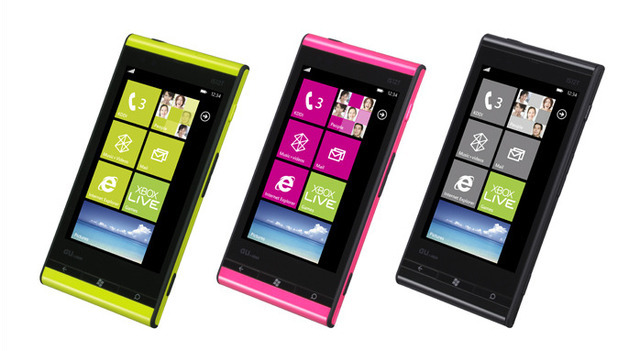
Fujitsu Toshiba IS12T handsets running Windows Phone 7.

For Windows Phone 8, Microsoft wanted to use the NT kernel. The NT kernel is more capable and is where most of Microsoft’s development effort is spent, so this made sense for the company (if not for end users). Since the development of Windows RT meant that the Windows software stack ran on ARM, there was no longer any reason to stick with Windows CE. Accordingly, Windows Phone 8 shares major parts with Windows 8, with low-level components such as the network stack and security infrastructure in common between the operating systems.

To support existing Windows Phone 7 apps, Windows Phone 8 included essentially the same Silverlight environment. New applications for Windows Phone 8, however, didn’t use the Silverlight environment. They have a couple of options: a new .NET environment similar to the old Silverlight one (though this time built on the full .NET runtime and notably missing the XNA 3D graphics API that the Silverlight system supported) and native code C++ with Direct3D.

Significantly, Windows Phone apps can’t use Windows’ Win32 API. Nor can they use most of the new WinRT API.

Developers wanting to share code between their phone and tablet software aren’t completely out of luck: it’s possible to write .NET code that conforms to a common subset of functionality that’s available on both Phone and regular Windows (producing what are called “Portable Class Libraries”). Windows Phone 8 also gives C++ developers access to a limited subset of the WinRT API (sometimes called WinPRT), and large parts of Direct3D. Sources speaking to Paul Thurrott claim that overall, there’s about a 33 percent commonality between the phone and non-phone operating systems.

This makes Windows Phone 8 a strange orphan operating system. Windows Phone 8 has few APIs in common with either Windows or Windows RT, so while iOS and Android phone apps can also be used on iOS and Android tablets, Windows Phone apps are strictly for the phone alone.

One OS coming soon?

Per Mary Jo Foley, this will change in future. Foley’s sources tell her that, for whatever reason, Windows Phone will be built up so that it can also run on devices with 7- to 10-inch screens, rather than taking Windows RT and cutting it down to run on devices with 3.5- to 7-inch screens. Either way, the goal will be greater API compatibility and, one day, some kind of software compatibility.

Microsoft has already taken some superficial baby steps down this path. At their launch, the Windows Store and Windows Phone Store were completely separate. Developers needed to sign up for both—and pay for both—to be able to submit apps to both. Those have now been merged, with devs only needing to sign up for one to target both stores.

Of all the burdens developers have to deal with, this is far and away the most trivial. The future will bring more meaningful integration: more and more code will be shareable between Windows Phone and Windows, and it would be reasonable to assume that it will one day be possible to even run “Phone” apps on tablets.

Whether this operating system is built up from Windows Phone or cut down from Windows RT doesn’t really seem to make a lot of difference. Ultimately, to give Windows Phone the same API set as Windows, more and more chunks of Windows need to be put into the phone OS. Though the WinRT API may be new, behind the scenes it uses the same old Win32 API that Windows developers have been using since time immemorial, so big chunks of legacy code are going to have to make their way to the phone platform eventually.

Long term, we can see how this should squeeze out the Windows RT brand name. With Windows Phone offering the full WinRT API, running on ARM, and being locked down, there’s no need for a separate “Windows RT.” At this point, the only thing that Windows RT will “offer” is access to the Windows desktop—but once Microsoft has a version of Office that runs on the WinRT API, even that can be discarded.

But you’ll still want the phone and tablet to be different

The APIs are only part of the story. Windows Phone and Windows do not currently share a user interface. There are elements in common, such as the live tile-based Start screens, but many more differences exist. Windows Phone currently has a plethora of hardware buttons (back, start, search, camera, volume); Windows on tablets only has start and volume. Windows on tablets leverages swiping from the screen edge for a wide range of tasks. Windows Phone doesn’t use swiping from the screen edge at all. Built-in applets like Mail and Settings are organized very differently.

The Windows Phone client is designed for small portrait-oriented screens.

Many of these differences feel more than skin deep. For example, on Windows Phone, settings for the built-in apps are centralized into a single Settings repository. Mail accounts, for example, are configured centrally rather than within the Mail app—a trait probably inspired by iOS, which has a similar central settings hub. On Windows, however, these account settings all belong to the Mail app and are configured from within that app. The operating system does have a global settings app, but it only configures global settings.

These differences will all have to be reconciled somehow, probably by picking one OS approach and declaring it the winner. This is likely to be Windows’ approach. It’s a bit more consistent (insofar as built-in apps work in the same manner as third-party ones) and a lot more fluid (swipe-based multitasking, in particular, is a lot more elegant than Windows Phone’s long-press of the back button). There are also rumors that Windows Phone 8.1 will do away with the hardware back button, which would seem to imply that the Windows way of doing things is the long-term bet.

But even with these variations elided, one would still want the phone operating system to be different from the tablet one. The phone operating system has to support small screens, and those screens will generally be in portrait orientation. The tablet operating system has much larger screens, and they’re generally in landscape orientation. These favor different application layouts.

The Windows 8.1 mail client, however, is designed for large landscape screens.

The phone also has UI concepts that make sense on, and are optimized for, these small screens, such as the “pivot” and “panorama” functions used to swipe through different views within single apps. These concepts haven’t been translated to the tablet and may not work as well there.

What does this mean in practice? It means that the Windows Phone e-mail client works well on Windows Phone but would be awful on a tablet. The Windows 8.1 Mail app works well on a tablet. It would be unusable on Windows Phone. There’s certainly scope to make the apps more similar in terms of design and capability, but they should never be the same. The same is true of other built-in apps, such as music, video, and settings. Internet Explorer, for example, justifies a different layout according to device type.

So the trinity will remain for the time being

A common operating system core, with common APIs and capabilities, is inevitable, and it is logical. Microsoft might even start to use common branding, most likely with Windows Phone becoming just “Windows.” But that doesn’t mean that it won’t actually have three operating systems. Windows on a phone will be different from Windows on a tablet—in much the same was as iOS on the iPhone is different from iOS on the iPad. The user interface will be tailored to the form factor, making the two close siblings but not identical.

Beyond that, for as long as x86/x64 and ARM remain significant, there will be a version of Windows for each. They could remain damn near identical save for their security options, as is the case today, or they might grow apart somewhat (for example, Microsoft may stop shipping all the desktop bits and pieces that are currently in Windows RT once Office no longer needs them). Either way, they’ll still be “two operating systems” to at least as great an extent as Windows RT and 8.1 are “two operating systems.”

This will result in Windows for ARM phones, Windows for ARM tablets, and Windows for x86/x64 systems. One might even make a case for a fourth to be added into the mix: Windows for x86 phones.

If we look at the Windows common core, that will be spread even further afield. Windows Server, of course, will continue to exist and is likely to remain an extremely close sibling to x86 Windows on the desktop.

More exotic is the Xbox One operating system. This has no (public) name or branding of its own, as it’s never decoupled from the Xbox One hardware. But under the hood it contains at least portions of Windows, and it has at least some APIs in common. Xbox One will probably always be more limited as an application platform than anything that’s actually branded as Windows, but it’s yet another Windows-derived platform with its own APIs and form factor-specific user interface.

But perhaps not forever

In the near term, keeping those Windows-branded operating systems distinct, particularly the phone and tablet versions, is probably the way to go. These platforms are still somewhat resource constrained, so you don’t want to have, for example, the baggage required to support both phone and tablet and desktop UIs all on your smartphone.

If one looks at a slightly longer time frame, however, the case for reducing the number of versions of Windows may be a little stronger. As useful as cloud-based syncing is, there’s still an argument to be made for having your apps and data locally available. It’s faster, cheaper, and at least in some ways, more reliable. A modern smartphone with a set of peripherals connected with Bluetooth, Miracast/Wi-Di, or perhaps even good old HDMI and USB, should give most people enough compute power to do whatever they like. If it doesn’t today,  it certainly will in a generation or two.

With this kind of smartphone, your tablet might not be a tablet any more. It could just be a dumb wireless screen with a battery that’s driven by the phone in your pocket. Your laptop, likewise, may be a clamshell keyboard, screen, and battery, again powered by the phone. Even your desktop PC may not be a PC. Drop the phone on a wireless charging pad and let it seamlessly reconnect to your Bluetooth mouse and keyboard and your Miracast big-screen monitor.

While there will still be a role for “conventional” systems, primarily driven by thermal and power constraints (a laptop or desktop PC can simply afford to burn much more power to get the job done than a smartphone), they’ll be needed by an ever-shrinking niche group of users. For everyone else, one compute device could power whatever form factor they cared to use, from a 4-inch phone to an 85-inch TV.

Should this kind of hardware materialize, having one OS that can do it all becomes important. If your compute device can be used in any form factor, it will need software to match. This means having software that’s equally at home presenting a phone interface on a phone, a tablet interface on a tablet, and most likely a more desktop-like interface when used with pixel-perfect pointers.

This would just leave a split between x86 and ARM. And who knows, by then Microsoft might finally see the light and allow ARM systems to be de-restricted without having to exploit security flaws to do so. That would open the door to having a single OS, merely compiled twice.

213 Comments