Skip to content
Gaming

Boxer review: Retro gaming on the Mac done right

DOSBox functionality plus a beautifully crafted UI equals an amazing app.

Lee Hutchinson | 67
Story text

Being a Mac gamer often means being disappointed. Triple-A titles don’t usually come to OS X at the same time that they come to Windows (if they come at all), mainly because the OS X market is so much smaller. And while Valve’s push to have all of its Source titles available via Steam for Mac is much appreciated, we’re still a long way away from parity with the PC side of the house. Fortunately, when it comes to retro gaming, OS X is shoulder to shoulder with Windows: there are console emulators of every flavor if you want to get your Mario on, and the two best DOS emulators, DOSBox and ScummVM, have long been available on OS X (and Linux, too, for that matter).

Both are fine applications if you want to fire up your favorite DOS-era games, though of the two, DOSBox has long been the more feature-complete and had the widest game support. However, unlocking DOSBox’s full potential can require no small amount of configuration file tweaking—the default options generally work just fine, but sometimes you need to tune games to run faster or slower, or change rendering modes because of an incompatibility, or fiddle with some of the more advanced sound options. Some things in DOSBox, like full working Roland MT-32 or Gravis Ultrasound support, are broken or require you to scour the Internet for additional files to get them fully operational.

DOSBox’s more esoteric options can be wrangled with one of many graphical front-ends on the PC, but for OS X, there is only one thing you need: Boxer.
Boxer is based on DOSBox’s DOS emulation code, but has evolved past the point of being merely a front-end and into a wholly standalone application. Its functionality is slick and seamless, and it defines everything that is good about well-made OS X applications: the UI is beautiful and functional while staying completely out of your way, enabling you instead of confusing you. It handles old fiddly DOS games with shocking ease, hiding the sharp pointy bits of configuring old games beneath a soft cloak of “it just works.” Finally, it’s beautiful and functional even when it’s not running, because of the way it lets you show off your retro gaming collection.

The library

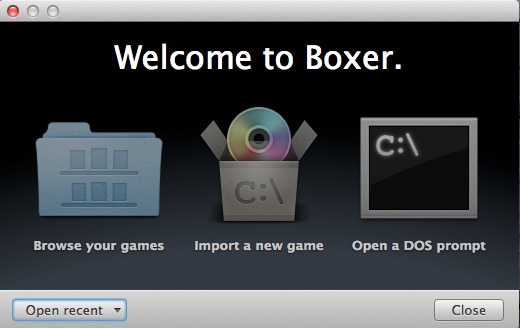
Boxer’s welcome screen is simple: you can browse through your games, import a new game into Boxer’s library, or browse at a DOS prompt.

Boxer’s startup screen.

If you don’t have any DOS games sitting around, fear not, as Boxer comes preloaded with four classic DOS titles to get you started—a full version of Commander Keen 4, and demo versions of Epic Pinball, Ultima Underworld, and X-COM: UFO Defense. Additionally, the Boxer site has a page where you can download four more demo titles: the original Star Wars: Dark Forces, System Shock, Tyrian 2000, and Ultima IV.

The first four titles should be immediately visible in your game library, which you can view right from the launch screen. Game management is one of the areas where Boxer shines, using a custom folder background to present an organized shelf-style view of your retro gaming library.

My Boxer gaming library, filled with titles from my old-school gaming repository.

Adding a game

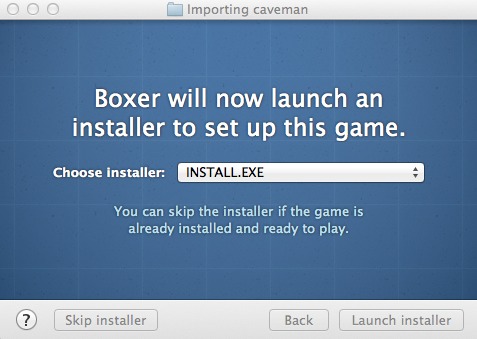
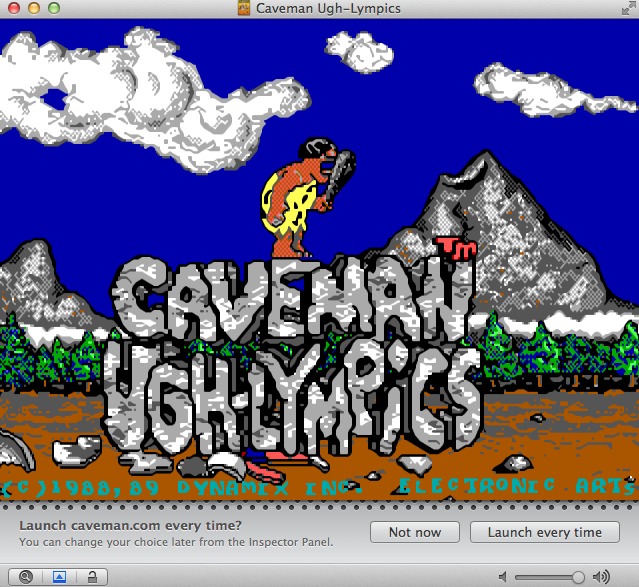
Getting a title into that library is ridiculously easy. Say, for example, that you have a burning desire to relive the glory days of beating the ever-loving crap out of your younger brother with your amazing skills in Electronic Arts’s 1989 title Caveman Ugh-Lympics, a Flintstones-flavored take on Activision’s Decathlon and other similar games. Assuming you have the original game still lying around (which, shockingly, I actually do!), you can copy the files from the floppies to a single directory, and then drag that directory into Boxer. Boxer will poke through the folder and determine if there’s anything resembling an installer, and if it sees one, you’ll be asked whether you want to launch it or skip it:

Picking the installer.

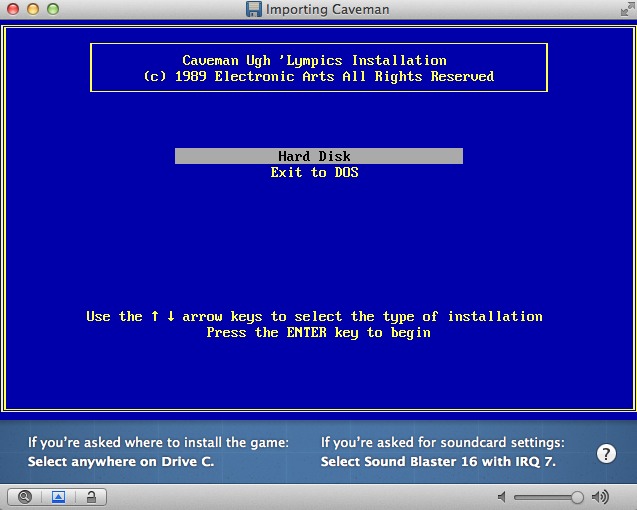
Since a lot of DOS games come with installers and setup programs, this is generally a good idea. Boxer will fire off the installer and you can step though the game’s setup. At this point, the setup utility is running in an encapsulated DOS virtual machine, with Boxer providing the disk, sound, and CPU resources. Helpfully, the bottom of the installer window provides a few helpful hints on what to pick if the game’s installer asks about a destination directory or sound card settings.

A DOS installer doing its thing. Boxer displays some helpful tips at the bottom of the window.

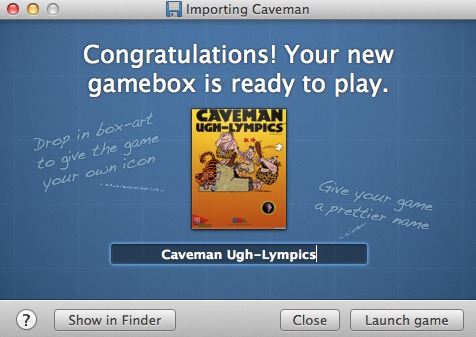
After the installer is done, Boxer will display the installer’s results in a DOS window, and will ask if there are other setup tasks to be done or if the import process can be completed. Clicking “Finish importing” takes you to a window where you can personalize the game’s appearance and title. For finding box art, I recommend a Google image search for the name of your game and “box,” which has gotten me correct box art for every title I’ve tried.

Prettifying your imported game.

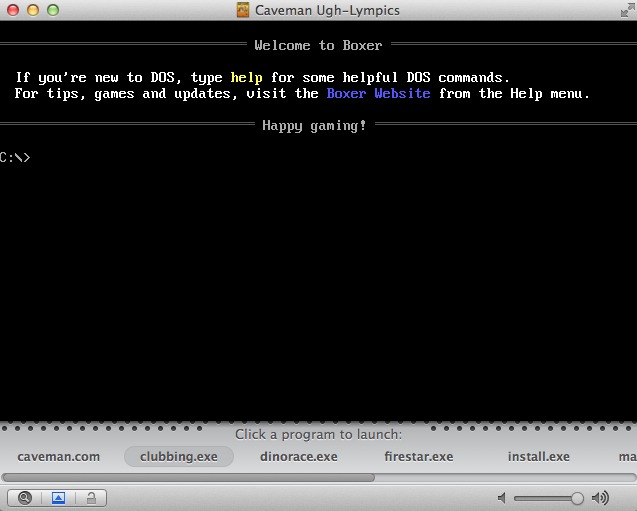
Once you’ve set the box art and named the game, you can click “Launch game” to start it up. Some games, like this one, have multiple executable files in the game directory; if Boxer can’t automatically figure out which one starts the game, it will ask you to pick one.

If there is more than one executable file in the game’s directory, Boxer will prompt you to pick the one it should launch, and will then remember that choice for next time.

When you’ve picked something, you’ll be asked whether or not you want the app to remember that choice, and from then on, simply double-clicking the game’s icon in the Boxer library will launch it directly.

This, my friends, is quality retro gaming entertainment!

Tuning and tweaks

Boxer will make several guesses about how fast or slow the game should run and what video hardware it should emulate in order to provide the optimal gaming experience. However, personal preferences, coupled with the sheer amount of DOS games, means that you’ll likely want to change some of its settings.

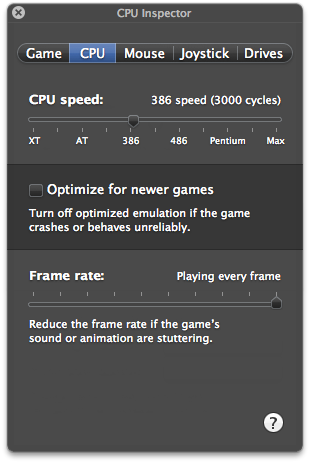
Speed and frame rate are the most obvious. Boxer’s DOSBox underpinnings let you play everything from ancient early-’80s DOS arcade titles like Flightmare and Sopwith all the way up to flagship titles from the twilight-era of DOS gaming like Privateer 2, but ensuring that the games play at the optimal frame rate is tricky. Boxer includes a slider which you can use to adjust the effective power of the emulated CPU running the game, equivalent to DOSBox’s CPU cycle adjustment hotkeys.

Speeding up or slowing down your emulation experience.

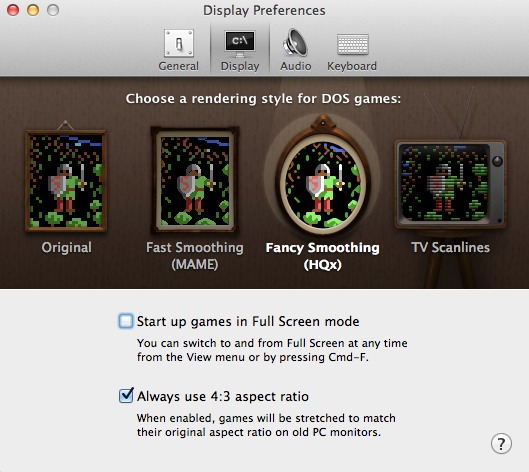
For video, Boxer will attempt to emulate whatever the current game tells it to emulate. Basic CGA, EGA, and VGA modes are supported, along with some VESA extended modes for super-VGA games. Boxer also supports several of the more popular graphical smoothing algorithms, to make your gaming a bit less pixelated. Games that were originally designed to be played at 320×200 on a 13″ or 14″ CRT do tend to look a bit blocky when run fullscreen on a modern 24″ or 30″ monitor, and so the option to smooth out the corners a bit is much appreciated. Purists can elect to disable smoothing entirely.

Changing the graphical interpolation algorithm.

Making beautiful music

One of the unique features of Boxer which is missing from the main build of DOSBox is built-in emulation of the Roland MT-32 external sound module. In the late 1980s and early 1990s the MT-32 was the DOS gaming peripheral to have. All of the hottest titles from the top vendors supported it, and as the gaming catalogs of the day made clear, if you weren’t playing your Sierra or LucasArts games with a Roland MT-32, you just weren’t getting the experience the developers intended. When I was young, I considered owning the $500 MT-32 to be roughly equivalent to owning a Ferrari or an F-14: an awe-inspiring impossibility that I would never in my wildest dreams get to experience. Well, listen up, nine-year-old Lee, because I am about to blow your mind.

The inclusion of MT-32 emulation in Boxer means that normal folks can experience what was once reserved for the more well-heeled gaming enthusiast. Though it sounds primitive by today’s standards and is easily outclassed by just about any cheap wavetable synth, the MT-32 certainly sounds better than the two- or four-voice FM synthesis you’d get out of Adlib or pre-AWE Soundblaster cards, and is well worth using.

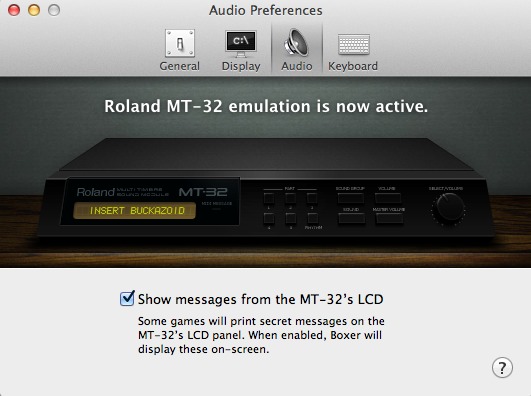
Enabling MT-32 emulation requires locating the copyrighted, proprietary ROM files used by the actual MT-32 hardware. Google is your friend here. With the ROMs in hand, you can drag them into Boxer’s audio configuration window and MT-32 support is activated.

Boxer with Roland MT-32 support enabled. Trust me, you want this.

Just about every DOS game has an MT-32-specific soundtrack that you probably haven’t heard before, and hearing it for the first time is like finding a hidden gem. To my (not that sophisticated) ears, the software emulation of the MT-32 sounds pretty darn close to the actual hardware, and it breathes remarkable new life into old games. By way of example, click here for a comparison of the FM synth score for Space Quest III to the Bob Siebenberg-composed canonical MT-32 version. Boxer even displays the messages that some games flashed up on the MT-32’s LED display. Little touches like this warm my cold, jaded heart.

Think of all the in-jokes you’ve missed by not being able to see the MT-32 display while playing DOS games!

One thing I wish was more obvious is Gravis Ultrasound support. The Gravis Ultrasound—GUS to its fans—was to many the pinnacle of DOS soundcards, with wavetable synthesis and a huge number of hardware audio channels. It was superior in every way to the Creative Labs Soundblaster offerings of the day, though its unfortunately high price kept it from gaining more than niche adoption. Many games do feature special GUS soundtracks, with extra sound effects and fancier music. DOSBox supports the GUS right off the bat, so it’s logical to assume that Boxer does as well, but I could never locate the correct options to activate it. Boxer’s page makes reference to GUS support, but even in games which support it (like LucasArts’s X-Wing), I couldn’t get it to function—Boxer’s Soundblaster compatibility seemed to keep squashing the option and taking over instead. This isn’t a huge problem, but it would have been nice to be able to explicitly force GUS support.

Controller support

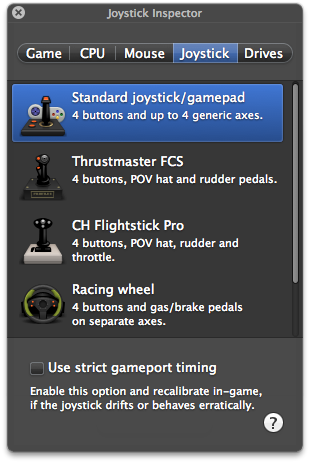
Though most DOS games work well with the keyboard, there’s a host of them that are better suited to gamepad or joystick support. Flight simulator games particularly will benefit from having a multi-button joystick available. Boxer supports any USB joystick or gamepad you happen to have lying around, and gives several options for how the device’s inputs should be translated to your DOS games.

Joystick emulation options with a connected USB controller.

I fiddled briefly with an Xbox 360 wired gamepad and the included Commander Keen title, and it worked without issue. Response was crisp and swift, with no noticeable input lag. Boxer also supports Joypad, an iOS-only app which emulates a joystick via WiFi. This worked shockingly well, actually—as I toggled through the supported joystick modes in Boxer, Joypad’s display on my iPhone updated to include each preset’s button layout. It even had a layout for a steering wheel/pedal combo, though I didn’t have any DOS racing games to test it out.

I also started up my old copy of Wing Commander II with a CH Combatstick attached in order to check how controller emulation worked with a more advanced joystick. Unfortunately, though the stick and fire buttons worked, the four-way hat and extra buttons didn’t perform their expected functions in-game (view changing and missile firing, among other things). I experimented a bit with the other joystick emulation methods, but couldn’t get perfect results.

This is likely to be a per-game problem to tackle, and games with re-definable joystick controls (unlike Wing Commander II) will likely fare better than others.

A labor of love

Boxer is an open source application, and if you don’t want to download the precompiled binary version, the project’s source code is available in a Github repository for perusal and forking. The project’s maintainer accepts donations, but there is no fancy corporate backing and the entire thing is available free of charge, just like DOSBox.

With that in mind, Boxer’s polish is even more noteworthy. The developer maintains a blog and the application is under active development, with new and improved features continually being rolled in, and Boxer is absolutely the kind of project that could stand some additional donations.

If you’re going to play DOS games on OS X, there is no better solution. This is absolutely the application to use, period.

The Good

  • Beautiful interface
  • Near-universal game support
  • Painless MT-32 emulation lets you rediscover new things in old games
  • Supernal example of OS X’s “it just works” design philosophy

The Bad

  • The ability to force certain display modes (like “always use CGA”) would be nice for uber-retro gaming
  • Couldn’t quite figure out how to make Gravis Ultrasound support work with the titles I had available to test

The Ugly

  • The only thing ugly about this app is not using it!
Photo of Lee Hutchinson
Lee Hutchinson Senior Technology Editor
Lee is the Senior Technology Editor, and oversees story development for the gadget, culture, IT, and video sections of Ars Technica. A long-time member of the Ars OpenForum with an extensive background in enterprise storage and security, he lives in Houston.
67 Comments