Skip to content
Gaming

Button-mashing comes to smartphones: Ars reviews the Xperia Play

The Xperia Play, a gaming phone with a slide-out set of PlayStation-style …

Casey Johnston | 57
Story text

The Xperia Play, an Android-powered, gaming-optimized phone designed by Sony Ericsson, tries to bridge the gap between PlayStation games and the mobile platform. The Xperia Play’s most significant feature is the inclusion of a slide-out DualShock controller-type set of controls, geared toward customers who find themselves carrying a handheld console along with their phone because they are disappointed by touchscreen-oriented mobile games and prefer the more precise experience of a controller.

In terms of external hardware, the Xperia Play could take the place of a gamer’s handheld and cell phone; unfortunately, the internal hardware and selection of games just aren’t enough. Sony is hard at work pushing more games, both original titles and ports of older ones, to the $199-with-two-year-contract Xperia Play. However, most of the available titles are retrofitted touch-oriented games that play just as well without button controls. While there are a couple of titles that make a compelling case for the inclusion of buttons, the current selection doesn’t instill a lot of confidence in what is to come for the phone.
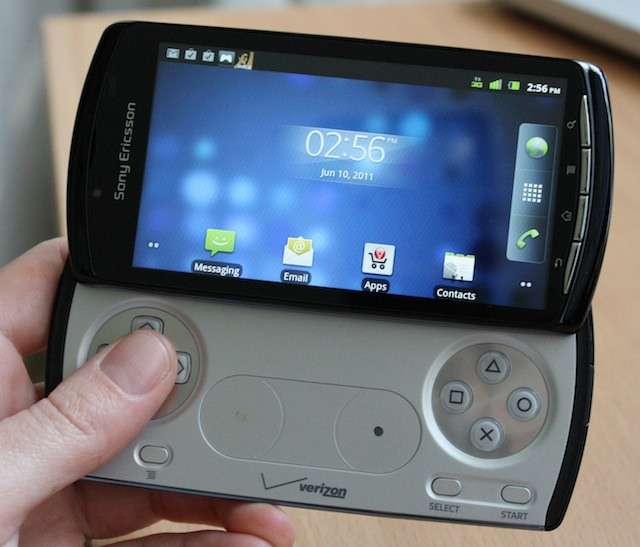
Button-mashing goes mobile
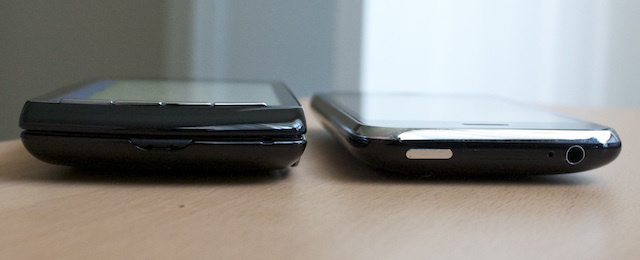
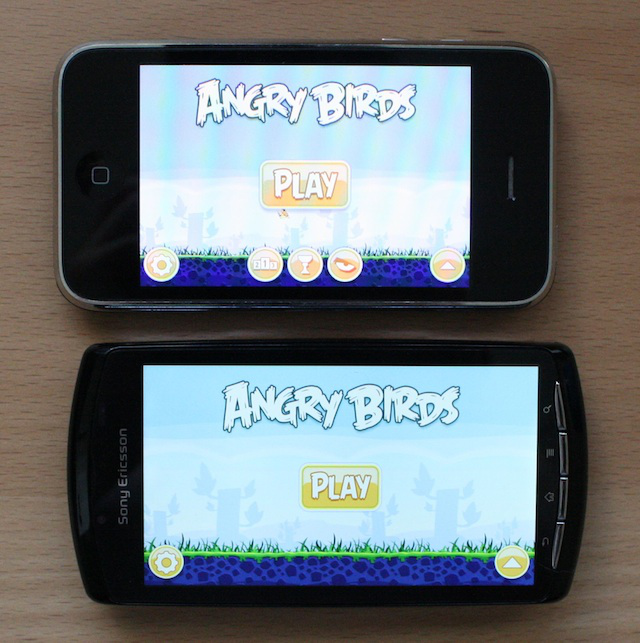
The Play next to an iPhone 3G

The Xperia Play is hefty for a phone (it’s 16 millimeters thick and weighs 175 grams) but on the thin side for a handheld gaming console. Both the front and back panels are curved plastic, making it quite comfortable to hold, and though it feels heavy in the hand, it’s not a chore to hold while playing a game.

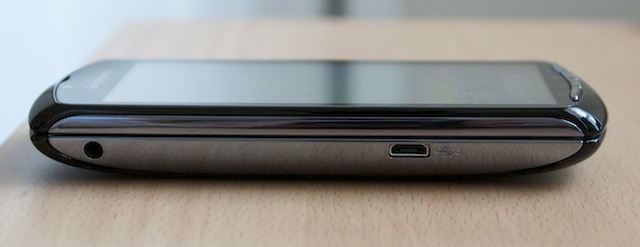
The left side of the Play features a headphone jack and micro-USB port. The sleep/power button is on the top right and also functions as a silent switch, while a volume rocker sits on the right side between the L and R buttons. A microphone is placed at the bottom center of the lower layer.
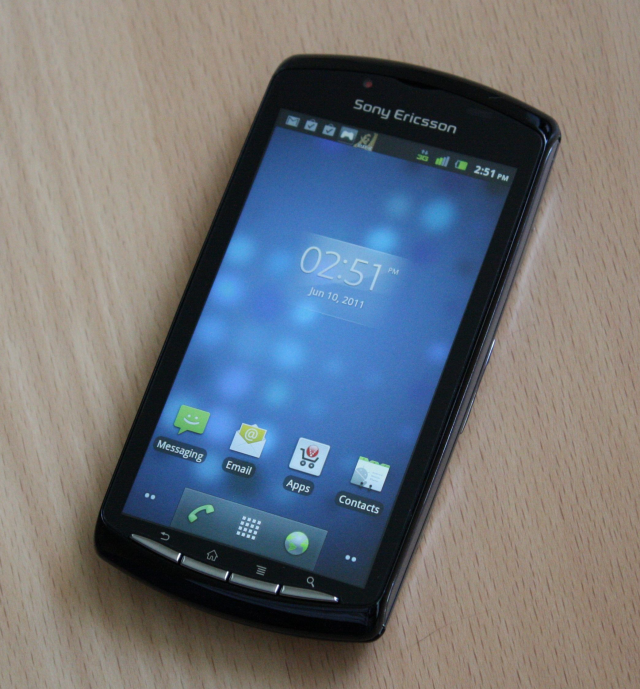
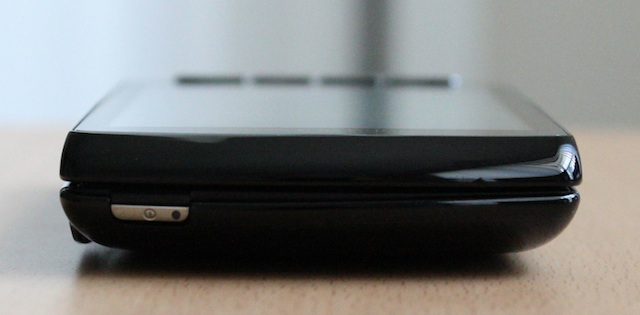
The power button and indicator light are on the top right of the phone.

The Xperia Play has a headphone jack and mini-USB port on one side.

The phone has no visible speakers; stereo sound emerges from between the two sliding layers. The audio quality is good and loud at top volume, though there’s not much depth and the lows lack punch.
The Play has the four standard keys required by Android OS: Back, Home, Menu, and Search, in that order from left to right. The phone’s two sliding halves are spring loaded; the mechanism feels solid, and sliding it closed makes a satisfying snappy sound. The open phone reveals a full complement of PlayStation controller buttons: a directional pad, two pads that stand in for analog sticks, four action buttons, Select and Start buttons, and a second Menu button under the D-pad. None of the buttons are backlit.

Though the layout resembles a real DualShock controller, the buttons have a distinct click to them when pressed that provides slightly more tactile feedback and resistance.

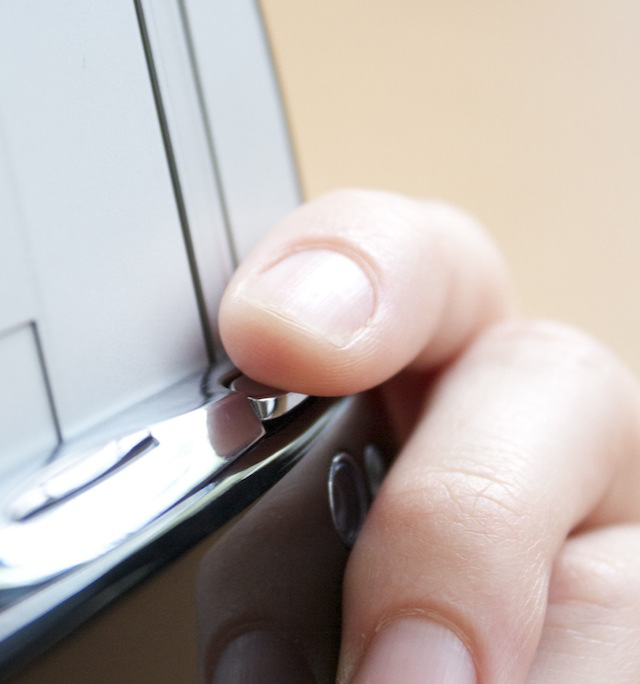
The L and R buttons would be less awkward to use if they were tilted down a bit more, instead of being almost at right angles with the phone’s screen and back.

The L and R buttons require less force than the other controller buttons, but resting your fingers on them is awkward, since the back of the phone is only so thick. L and R would be much more comfortable to use if their surfaces were tilted more toward the back of the phone, rather than sitting at almost a right angle to the screen.

One of the Xperia Play’s analog pads, with a small glassy sensor standing in for the analog stick.

The pads that stand in for the analog sticks, however, are a decent compromise between the need for a low profile and sensitivity. The surface of the controller portion of the phone is a brushed plastic that finger pads can glide over smoothly. Moving a character with the pads was a better experience than trying to aim a reticule, but we expect that comfort with the analog pads will vary with the quality of game design as well.

When guiding our fighter jet in Star Battalion, though, the analog pads were a poor substitute for the d-pad. Unless I tried to guide the plane with distinct swipes in the direction I wanted it to go, my gestures were too often interpreted as an instruction for the jet to dive downwards.

We generally liked using the controller with the included games (what few there were), but we’re not totally sold on the size/weight tradeoff needed to include that controller—especially when the Xperia Play will quickly fall behind its competitors on the hardware front and features a game selection that struggles to match offerings on other platforms.

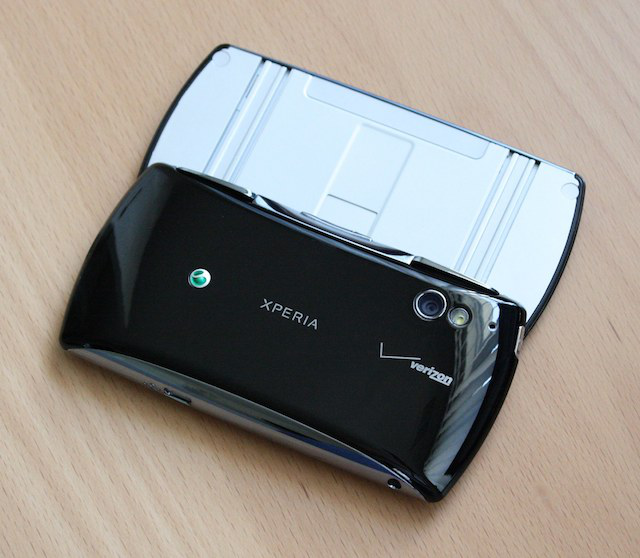
The back of the phone, with its camera, flash, and pinhole mic.

Hardware

The camera on the back of the Xperia Play is 5 megapixels and takes good shots; the color balance is a bit off, but the autofocus works well if the lighting is good (otherwise, it will have a hard time finding a subject, though there is an LED flash installed). As for video recording, the camera only takes WVGA-resolution videos, which are appropriately fuzzy-looking. The front camera is also WVGA resolution, so it’s suitable only for video-chatting. A pinhole microphone on the back records passable audio.

The Xperia Play comes with an 8GB microSD preinstalled and packs a battery rated at 1500 mAh and provides 6 hours 25 minutes of talk time on 3G. It sounds small, but we found the battery stood up fairly well even to processor-intensive games.

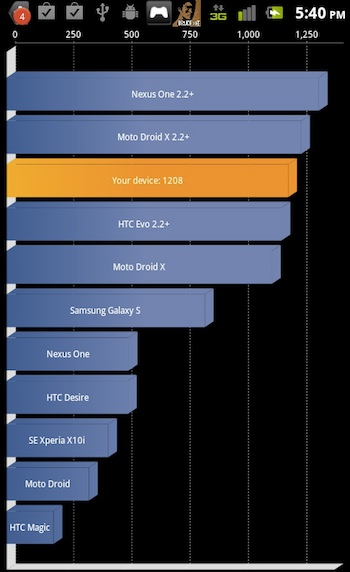
Still, the processor can only do so much: a setup with a single-core 1GHz Snapdragon processor and 400 usable megabytes of RAM isn’t especially competitive with even the current crop of non-gaming oriented phones, though the Adreno 205 GPU redeems it a little. (The Play can crank out 37.7MFLOPS in the Linpack benchmark.) A modern performance-oriented phone owes itself, at minimum, a full gigabyte of RAM.

Xperia Play’s Quadrant benchmark

With phones like the similarly priced HTC Thunderbolt, the Motorola Atrix, and the (as-yet unreleased in the US) Samsung Galaxy S II blowing their recent forebears out of the water in Quadrant and Linpack benchmarks, we’re a little disappointed to see the Xperia Play falling behind the Motorola Droid X and Google Nexus One. The Xperia Play does all right for itself now with the small crop of games it has, but the lack of punch from the hardware means that developers can’t push mobile gaming’s limits on a phone that, with its controller, is ideally suited to gaming.

The capacitive screen on the Play is a little dim, even at full brightness. The resolution of the screen (854 x 480 pixels) isn’t great either, and we’d expect a gaming phone to have at least a competitive pixel count. The screen reinforces the notion that Sony isn’t really expecting you to play new beautiful games so much as ports of old, polygon-happy PSone ports.

The Xperia Play’s screen is noticeably dimmer than the older iPhone 3GS. In person, the white lettering almost looks yellow by comparison.

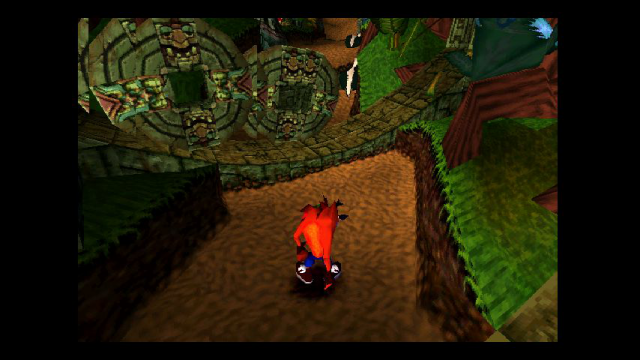
The colors on the screen are nice, though, rendering games like Crash Bandicoot in all their brightly colored glory. As for the touchscreen, we were also impressed with the responsiveness and accuracy that it lent to typing, hopefully an experience that will provide good gameplay with games designed to use the screen instead of the button controls.

Some news outlets have noted that Xperia Plays arrive with the plastic skin of a screen protector already installed. A screen protector adorned the review unit Ars received, too, likely because Sony chose not to use a harder, more scratch-resistant plastic like Gorilla Glass. When Ars asked Albert Aydin, analyst for Verizon Wireless, about the screen protector, he said that “a majority of our phones ship with a clear cling on the screen. Most of the clear clings have a tab to pull so you can remove them but not all do.”

The screen protector is definitely not meant to help with fingerprints and other greasy smears; we found the Xperia Play’s screen protector picked up prints much more easily than an iPhone 3GS or iPhone 4 (another vote for using the buttons instead of the touchscreen). Still, as we said, input to the touch screen is accurate, so the only possible harm the protector does is turn the phone into a fingerprint magnet.

The old standby, Crash Bandicoot. It appears the ported game doesn’t refresh much faster in the new version—there’s some between-frame changeover happening center screen.

Why touch when you can D-pad?

The Play runs Android 2.3 Gingerbread smoothly. We experienced a few minor hesitations or hangs here and there, so it wasn’t a flawless experience, but overall the non-gaming parts of the phone were as usable as the average Android phone on the market.

But the Play is about the games. Only a handful come preinstalled, all optimized for the controller: The Sims 3, Star Battalion, Madden 11, Crash Bandicoot, Bruce Lee, and Asphalt 6. This in itself isn’t a weakness, but the preinstalled games are more or less the only ones meant to use the buttons. A separate app titled “Xperia Play” suggests more games, many of which are widely available on other platforms, but if you aren’t a Sims 3 enthusiast or a Crash Bandicoot fan longing to play the original title again, there’s not much for you here that you can’t get on a run-of-the-mill touchscreen smartphone.

Switching between the touch and the button controls can sometimes confuse a game; we saw one instance where going from one to the other while playing Sims 3 made the game lock up for a short time.

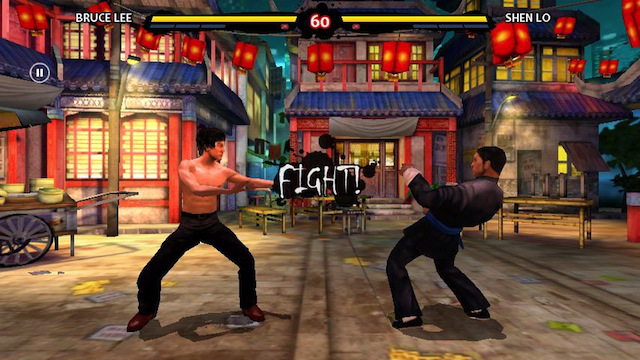
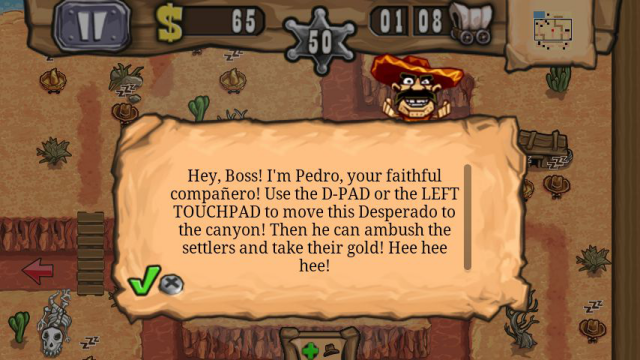
Bruce Lee: Dragon Warrior is one of the better games for the Xperia Play’s controls.

One of the games that plays best on the Play was Bruce Lee: Dragon Warrior, which was released on iOS a year ago. When it comes to fighting games, touchscreens have nothing on button control; mashing physical buttons remains the best way to move swiftly between moves, dodges, and circling your opponent.

At other times, even though the Xperia Play is meant to be a gaming phone, it seemed to be operating at its limits. During infeCCt, a puzzle game where you guide a growing vine in one of four directions, the graphics were choppy in places.

Personally, the game that most drew me to the Play was Minecraft Pocket Edition. While no dates have been announced for the game’s release, a playable demo at E3 last week showed the game taking serious advantage of the button controls and running very smoothly (though given Minecraft‘s old-school design, that’s not exactly a feat).

Still, only a very specific type of person would commit to a phone for two years to be able to play one specific game on the go a few months before it becomes more accessible (the upcoming handheld Sony Vita will also have Minecraft: Pocket Edition available).

Sony also announced at E3 this year that it has partnered with Gameloft to bring Tom Clancy’s Rainbow Six: Shadow Vanguard to the Xperia Play as an Android exclusive. This is a vote of confidence, but still not much of a boost to the Xperia Play’s selection.

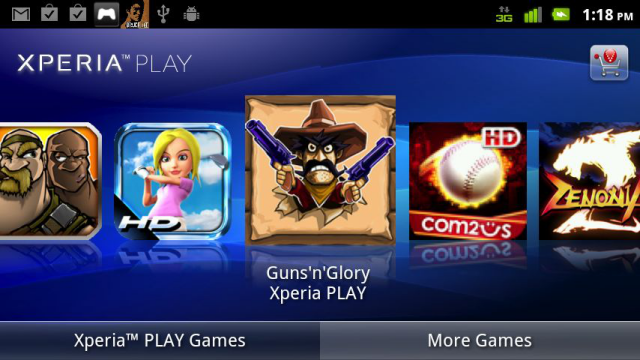
A special app displays purchased and purchasable games optimized for the Xperia Play controls.

The hunt for a button-pushing experience

The phone does its best to direct Xperia Play users’ purchases through Verizon’s VCast app store. You want to avoid this. In comparison with the Android Market or the iOS App Store, the VCast App store is terrible. It’s often unresponsive if you’re not operating on a WiFi network. We also struggled to have it show us any games at all when navigating from the Apps app, even while the Xperia Play-specific app displayed all games compatible with the phone in a nice scrollable interface.

But the Play-specific app won’t save you from such delays. Once we tapped a game’s icon, we were taken to a VCast page for the app that took a long time to load on 3G, and even small games took an eternity to download with fairly good reception. The entire process of buying games on this gaming phone through VCast is a bit of a mess.

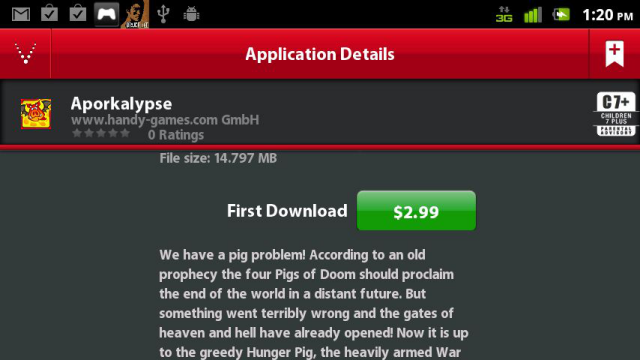
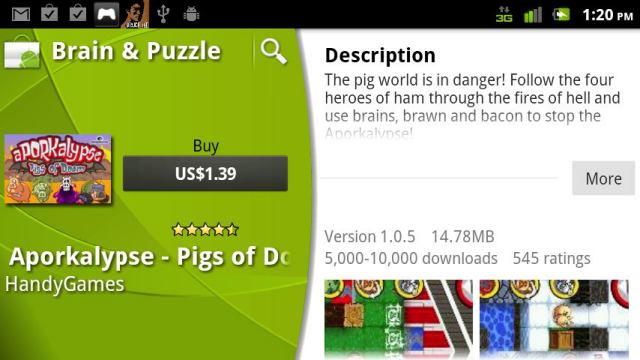
This experience drove us to seek out the Android Market, where we looked up the same titles suggested through the Xperia Play app. We found that that the versions offered through Android Market were less expensive than those offered through the VCast store: Guns ‘n’ Glory and infeCCt, for instance, are $1.39 through the Android Market, but $3.99 through the VCast app store.

Aporkalypse is $2.99 from VCast, the store we were pointed to from the Xperia Play app…

…But $1.39 for the same version in the Android Market.

The logical explanation for this would be that they are two different versions of the game, with the more expensive VCast version able to use the button controls. However, both the Android Market and VCast versions of those games instruct players to use the buttons controls, and the controls work identically in both versions.

We aren’t sure if there are more differences between the games that justify the price jack; Verizon did not reply to further requests for comment. Currently, it looks like Xperia Play owners can save a few dollars per game by avoiding the VCast store.

The cheaper Android Market version of Guns ‘n’ Glory instructs players to use Xperia controls, just like the more expensive VCast version.

Competence

After spending time with the Xperia Play, we’re close to calling this a gaming phone in name only. All the device has to offer in the way of gaming optimization is the addition of new physical controls, and only a smattering of games benefit significantly from them. Many of the games being billed as “Xperia Play-optimized” by Verizon originated on a touch platform and simply don’t need physical buttons to make the gameplay good.

Game selection doesn’t do much to sway us in the Xperia Play’s favor either. Are there a decent number of games you can play with the button controls on the phone? Yes. Can you play almost all of them just as well on other phones, without having to make tradeoffs in weight, processing power, or screen resolution? Yes.

In the near future, the best hope for prospective Xperia Play owners may be that games released for the upcoming PlayStation Vita will see their own mobile phone-optimized ports (though for obvious reasons they would need to be trimmed down quite a bit). Otherwise, Xperia Play owners will likely deal almost exclusively with ports of old console games or touch-optimized titles retrofitted to the new controls.

We’re being a bit hard on the Xperia Play—maybe all similarly specced Android phones stutter a bit on infeCCt‘s graphics, or hang on the Sims 3. But those phones aren’t pitched as gaming phones. A gaming phone shouldn’t try to compete with phones using these middling specs; it should rise above them.

The Play is a competent machine. If you want an Android phone with a D-pad, this may serve; but hardcore gamers and smartphone power users will probably look elsewhere.

The Good:

  • Feels solid for a sliding phone
  • Buttons afford much better control in certain types of games
  • Phone gives a new platform for old-school favorites like Crash Bandicoot
  • Analog pads are an innovative compromise

The Bad:

  • L and R buttons are a little awkward, making games like Battle Bears cumbersome to play
  • None of the buttons are backlit
  • Screen is on the dim side

The Ugly:

  • Performance not on par with other recently released phones
  • Sony Ericsson was stingy with the RAM
  • Selection of games is paltry, doesn’t inspire much confidence for the future
Photo of Casey Johnston
Casey Johnston Freelancer
Casey Johnston is the former Culture Editor at Ars Technica, and now does the occasional freelance story. She graduated from Columbia University with a degree in Applied Physics.
57 Comments