Skip to content
Tech

Third time’s a charm: Ars reviews the Zune HD

Microsoft's new media player won't appeal to everyone, but for those with an …

Nate Anderson | 199
Story text

When Microsoft first launched the Zune, the player was something of a kludge. The hardware design had been licensed wholesale from Toshiba, and the fact that it had WiFi and could “squirt” songs was little advantage in a world where few people bought the device. (Several years after its launch, I have yet to run across another person “in the wild” who owns a Zune.) As Microsoft’s first product that was meant to derail the iPod juggernaut, it served instead only as a sacrificial victim that the juggernaut overran without pity.

But with the second attempt, Microsoft went from competent to very good. Even today, these second-generation devices are a pleasure to use and feature a few neat tricks like WiFi sync. Industrial design was hugely improved versus the first generation, though plastic was still much in evidence, and Microsoft rolled out both flash and hard drive models along with its Zune Originals engraving program. With Zune 1’s “squirting” both useless and widely mocked, the company found new a way to capitalize on the second-gen Zune’s WiFi by providing access to streaming music directly from the Zune music store. Users who paid for the $14.99 monthly subscription could access millions of tracks, then stream or download them to the Zune player, all without hooking the device up to a computer.

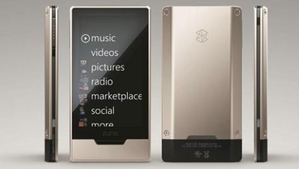
For its third hardware redesign, Microsoft has given up on the value segment of the market altogether. Instead, the company is rolling out a single flash-based model in 16GB ($220) and 32GB ($290) varieties and loading it up with a few premium features: a 3.3 inch OLED 480×272 screen, support for HD radio, the NVIDIA Tegra HD video playback engine, a touch screen, real metal on the front and back, downloadable apps, and a Web browser. While updated firmware is available for older Zunes as well, the decision to focus on a single model and end-of-life the other Zunes is a chance for Microsoft to reset the Zune line, focus on a single well-made machine with some new capabilities, and see if there is any traction to be had in the market.
Can it succeed? That depends on whether users buy into the Microsoft way of doing things—a way that includes paying for a monthly music subscription. Those who take the bait will find themselves hooked (in both senses) by one of the best portable music discovery experiences yet created. The full subscription experience on the Zune is now unbelievably compelling, offering something that feels like more than the sum of its parts—but consumers have so far shown little interest in subscription music services.

For everyone else, the new Zune HD is “merely” an excellent media player with a gorgeous screen, HD radio, and 720p output over an HDMI connection.

The device

The new Zune HD player is a big step forward for Microsoft’s design. It’s as thick as a USB flash drive in the middle, almost exactly as wide as a credit card, and unexpectedly light. The liberal use of metal keeps this “lightness” from feeling like “cheapness,” and the tolerances and build quality seem quite good.

ZuneHD_buttons.jpg

The effect is marred only when looking at the device from the side. While it is bounded by metal on top and largely covered with a metal plate on the bottom, both sides of the device squeeze in ribbon of black between the silver. The effect is a bit like an inverted Oreo and is not improved by the fact that each black ribbon is inexplicably indented for about half of its length. 

On the left side, a button (2) is mounted into the black ribbon, nearly flush with the edge of the unit—which often makes it difficult to push. Further down on the left side is Microsoft’s continued attempt at photocopying Apple’s packaging techniques; a lowercase strip of gray text says (as it has on all past Zunes), “hello from seattle.”

Hi, Seattle.

The top of the device has a flush-mounted power switch (1) that also turns off the screen, while the bottom offers a proprietary Zune connector and a standard 3.5mm headphone jack. The unit’s only other button is a thin rectangle located just below the screen, which functions as a “home” button (3) in the user interface. The internal battery is not user-replaceable.

The older Zune firmware had an attractive “twist” interface, but it has nothing on the new firmware. (While older Zunes did receive a firmware upgrade to 3.2, this did not give them the new Zune HD interface.) The design now is all swooping letters and zooms and fades; it’s quite attractive and totally smooth.

The new firmware also has an excellent new chooser interface that will please anyone with a massive music collection. In the past, the only way to access albums beginning with, say, the letter R was to scroll through the entire music collection. Because the scrolling sped up the longer a button was held down, it was nearly impossible to hit a particular letter in this fashion (much less an album or artist), and much scrolling back and forth was required to select a particular item. In the new interface, tapping any of the header letters brings up a set of boxes containing the letters of the alphabet. Press one and the Zune jumps instantly to that letter. It’s far faster and much more accurate than the old approach.

The Zune HD has also fixed an old problem that dogged the hard-drive-based Zunes; when browsing long lists of album art, the drive would spin and the interface would sputter as it tried to load the thumbnails (Cover Flow shows similar problems both on Macs and iPhones). No such problems remain now, and flying through long sets of album covers is quick and hitch-free.

Despite the software’s attractive design, it might also serve as a case study for just how hard it is to nail interface design on a first pass. Moving around in the interface takes a bit of getting used to; for instance, there’s no single way to back out of the menu hierarchy. When viewing the details of an album, backing up requires a press on a white arrow in the upper left corner of the screen. Clear enough. But when you bring up the special player-wide control screen (triggered by that button on the left side of the device) to adjust volume or to pause playback, backing out involves tapping the tiny word “exit” in the upper left. And in most other menu screens, backing out is only accomplished by tapping the bottom of the light grey words (“video” or “songs” or “albums”) that show previous menu selections. After being selected, the newly requested screen appears and the words fly up to and off the top of the screen; backing up means pressing a set of half-amputated letters that can be impossible to read. To get from the “quickplay” screen back to the home screen, one swipes from right to left. Do we need four slightly different ways to accomplish the same thing?

Player controls also don’t exist directly on any menu page; they pop up as an overlay, generally triggered by the button on the left side of the Zune HD (tapping the screen in certain views also brings them up). But this is an absolutely crucial feature, as it’s the only way to change the volume, skip to the next song, or even stop playback. There’s no way to do any of these things without pulling the device out, pressing the button, and manipulating the screen, and it doesn’t help that the left-side button is just a bit too difficult to hit. The more I used this, the more I hated it—a bad sign for something needed so often. When you find yourself rationalizing, “Sure, this song is too loud, but I like it that way,” or “Yes, I would prefer to skip ahead to the next track, but that would mean jabbing at the button,” you know that usability has taken a punch to the gut.

The screen

The OLED screen on the Zune HD is one of its key marketing points, and it’s certainly attractive. Colors pop from the screen, which is quite detailed for its size. The first two generations of Zunes had 320×240 screens, while the Zune HD is 480×272 (the iPod touch, for comparison, has a 480×320 screen, while the nano is 340×276). The screen is a pleasure to use, though unless you spend a lot of time watching videos on the Zune it’s not a make-or-break feature. It is very difficult to read in direct sunlight.

OLED screens do raise battery life concerns, and their power use is directly related to the content that’s displayed (all white screens use far more power than all black screens). Microsoft seems to acknowledge this when it says that the Zune “offers a premium viewing experience on the go while being respectful of battery life.” “Respectful,” but not “thrifty with.” Still, the company says that the Zune HD can last for 33 hours of music playing and 8.5 hours of video (both with wireless off), a claim we have not been able to verify.

Music

The music discovery experience on the Zune is something to behold. You can, for instance, be listening to the radio when a song that you like comes on. Press a button and the song is added to your Marketplace cart, where you can later download all the tagged songs—right from the device—and have them added to your collection.

ZuneHD_music.jpg

Or you can listen to an artist in your collection, then pull up the band’s complete discography—or a list of related artists. Entire albums can then be added to your cart and either streamed immediately to the device or downloaded for later listening when no WiFi connection is available.

Or you can “squirt” songs to your friends by entering a Zune tag or an e-mail address. The song will show up in their Zune software or their e-mail client and it can then be streamed or downloaded. This is an improvement over the proximity-based “squirting” feature of the first Zunes, where time-limited songs could only be shared with other Zune users in the immediate area, and it makes sharing new music with friends simple; those who don’t have a Zune can still receive e-mail notifications and can click on the provided link to hear 30-second samples of the songs.

Powerful stuff, and the fact that it all takes place on the device without the need to sync or connect to a PC makes it that much more useful. When you do connect to a PC, though, the Zune desktop software has one more music discovery trick up its very capable sleeve: Smart DJs. These function much like the Genius feature in iTunes, offering suggested mixes of songs from a user’s library. With the Zune, the feature goes a step further, incorporating suggestions from the entire Zune music store, which are then downloaded to the player for on-the-go listening.

All four of these scenarios require a Zune Pass subscription, and it’s now easy to see why the subscription model gets so much attention from Microsoft. While it has been slow to capture user attention, subscriptions do more than just provide access to music you know but don’t own; they supply a huge pool of new music that can be tapped through clever music discovery features. The tight integration between the online store, a user’s personal music collection, “squirting,” Smart DJs, and the radio makes the Zune HD an incredible way to discover new tunes. Without the Zune Pass, this integration provides little, though you can still listen to :30s samples of new songs and keep a list of good material heard on the radio.

And the subscription model comes with a huge downside for anyone who wants to own their music collection: stop paying the monthly fee and it all goes away. The Zune Pass does include 10 free non-subscription downloads a month, so Pass holders can still keep building their permanent collection slowly.

One neat new feature is built right into the home screen, where swiping the screen left to right brings up a quick list of the currently playing album, all recently accessed media and/or websites, and the most recent media additions to the device. In addition, you can “pin” albums or videos that you want easily accessible to this screen so they are always available without navigating the menu hierarchy. It’s a simple touch, but a nice one, and a great way to keep tabs on content that you’ve been watching or listening to lately.

The other terrific addition to the music interface is additional artist metadata that is pulled down for all artists, not just tracks purchased from the Zune store. This includes biographical information on bands, photos of the band members, and the already-mentioned discography and “related artists” sections. It’s something I’ve found myself checking repeatedly, even for bands I already know well.

The Zune HD has no speaker and no Bluetooth, so you’ll need a pair of wired headphones; black earbuds are included. The Zune HD supports WMA, WMA Pro, WMA Lossless, AAC files without Fairplay DRM, and MP3. We checked with Microsoft, and the device does not support FLAC lossless audio, though it can handle audiobooks from Audible and Overdrive.

Video

When reviewing the Zune’s video capabilities the last time around, I wondered about the existence of a secret Microsoft shotgun that was

…passed around ceremonially to the different divisions so each can shoot itself in the foot. The Xbox 360, for instance, has such incredible integration with Vista Media Center that I routinely find myself staring in the screen in disbelief (“Microsoft really made this?”) as I call up another high-def TV program recorded on my PC. The games are great, the wireless controllers rock, and the console is poised to really own the living room.

Except (and here’s where the shotgun comes into play) it’s loud. It is so loud that I’m embarrassed to demo it for friends who don’t already appreciate video games. “Does it always sound like that?” is a common question. I’m forced to tell them no, that’s it’s actually much worse when playing a game. Microsoft has built the perfect living room device, then given it the one feature that makes it machina non grata in the living room.

When the shotgun arrived at the Zune team HQ, it appears to have been directed squarely at one of the most promising new features the device has to offer: autosyncing of recorded TV content. This may sound like a minor feature, but it’s the sort of thing that could make up for the fact that Microsoft doesn’t have a video store. It offers an easy way to stock the Zune with video content, something that could be clumsy in the old version of the software.

My, how things changed. The Xbox 360 team, for instance, largely fixed the disc drive noise issue by eventually allowing game titles to be offloaded to and then played from the hard drive. The Zune got a video store (and further integration is coming when the Zune video store comes to the 360 this fall). But the integration with Windows Media Center… remains deeply shameful.

Media Center is a terrific DVR, and allowing easy autosyncing of recorded content would be a tremendous competitive advantage. While Apple wants you to buy TV episodes from the iTunes store for two bucks a pop, Microsoft is poised to make unlimited TV possible. For the price of an $80 tuner card (the DVR guide data is free in Media Center), users could keep their Zune HDs stacked with digitally recorded content that’s always fresh and always free.

Instead, like its predecessors, the Zune HD will sync only standard-def DVR content. It’s an odd restriction for a player with “HD” in its name, and it can’t be a question of copyright (Microsoft happily supports transferring the same shows if recorded in standard def, or if purchased in high def). It’s not even clear what the restriction means, since standard def shows that I have recorded from a digital signal on a Vista Media Center box don’t show up, either. The restriction really seems to be about analog content, which is ok, versus digital, which is not.

The Zune supports WMV, MPEG-4, and H.264 video, transcoding anything above 720p into a lower quality format before transferring it to the player. We checked with Microsoft, and neither Divx nor Xvid are supported. The player can output over either an HDMI or a composite connection, but both require users to shell out extra cash.

Video quality is excellent and highly watchable, though there’s just no getting around the screen size limitations of such devices. Watching TV shows, however, was an excellent experience and will certainly hold your attention at the gym or on an airplane. Videos all play in landscape view and can’t be rotated (not that you would want to), and an onscreen button will expand 4:3 video to fill the 16:9 screen, cutting off the top and bottom of the image.

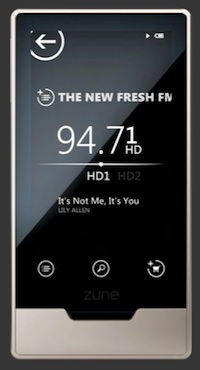
HD Radio

zune_HD-radio.jpg

Radio: it’s rarely thought of as a killer feature, but Microsoft continues to insist that its market research proves the feature’s value. This time around, Microsoft stuffed an HD radio tuner from SiPort into the Zune. The pros and cons of this decision are largely the same of those that affected the recent US-wide switch from analog to digital-only broadcast TV. When digital stations come in, they are static-free and excellent quality; radio stations also have the options of breaking their HD radio feed into substations, just as TV channels have done. The big drawback is the lack of graceful degradation; instead of a burst of static, signals will simply go silent.

There is no shortage of radio stations here in Chicago that broadcast in HD radio. Sound quality for those that do was excellent, but not jaw-dropping, and HD stations would cut out if the signal wasn’t strong. Fallback to the analog FM broadcast is seamless—unless you happen to be listening to one of the subchannels, which have no channel to fall back on.

One additional benefit of HD radio is that all stations broadcast information about currently playing songs (which the Zune displays); many analog stations do not.

FM/HD radio is supported, but AM radio is not. The “settings” menu also allows Zune users to tailor the device for US, European, or Japanese radio frequencies.

Web browser

The Internet—it works! Now, on to the criticisms.

To be fair, the built-in Web browser renders pages well, and it does a decent job of offering a software keyboard in limited screen real estate. Microsoft told us earlier that it would be a “cool browser for the finger.” 

But this is a Web browser meant for extremely casual use; it doesn’t support Flash, loads pages slowly, turns in some truly abominable Javascript performance, and does so on a screen that’s simply too small for extended reading.

Oh, and that keyboard I just praised? It works in either screen orientation but buries the common underscore character three keypresses deep (switch to the numerical/punctuation display, look in vain for an underscore, then stumble upon the shift key, which magically transforms the plus symbol into an underscore). This is so nonintuitive that a Microsoft spokesperson was unable to “squirt” me a demo song because he couldn’t find a way to enter my underscored e-mail address properly.

The browser operates as you might expect a modern multitouch browser to: double-tap to zoom in on a segment of text, pinch to zoom manually, and slide one finger to scroll. It’s not as speedy as one might hope, however, in part due to slow Javascript execution. 

We put the browser through the Sunspider Javascript benchmark suite and compared it with a pair of desktop browsers running on a 2.5GHz MacBook Pro, and with the iPhone 3G. The idea isn’t to make a detailed comparison, but to give a general sense of how the device will perform relative to a modern desktop browser and to one of the popular mobile browsers.

zune_bench.png

As a bonus added to a portable media player, the browser is certainly worth having; just don’t count on spending long periods of time with it.

One special comment on the accelerometer, the piece of hardware that detects movement and controls screen orientation. The Zune HD accelerometer is excellent—much faster and more accurate than an iPhone, and the screen rotation animation is at least twice as fast as on the iPhone. This is the right way to do automatic screen rotation.

Apps

The company that went nuts for “Developers! Developers! Developers!” is doing all Zune apps itself. We have confirmed with Microsoft that apps will be free, will all be written or overseen by Microsoft, and will include Twitter, Facebook, weather, a calculator, and 3D games. E-mail, rather curiously, is not on the announced list, though it would seem to be a natural fit for a WiFi-connected device like the Zune HD. (This may be wishful thinking; we were told earlier this year that “common e-mail services like Hotmail will be accessible via the browser.”)

No apps are yet available, though they are supposed to roll out over the coming weeks.

Not that devs are completely locked out from the new device. Microsoft has just announced the availability of its XNA Games Studio 3.1 Zune Extensions” for the XNA game creation studio. The new software allows for Zune HD development by adding a set of touch and accelerometer APIs, though it’s not clear that Microsoft has any plans on making it easy to widely distribute homebrew titles or to profit from them.

Yet.

Desktop software

The desktop Zune software has received an overhaul; it’s now at version 4.0. Its main interface looks much the same as the last major update, but it does add support for Smart DJs, “pinning” items to a quickplay menu, and better playback animation.

zune_desktop.jpg

For the first time, the desktop software includes a mini mode, if that’s your thing. It’s also enhanced for Windows 7 and features jump list support and playback controls that appear when hovering over the taskbar icon. Windows users who want to see how the software works can download it from Zune.net. If you don’t like it, though, you’re out of luck—Zune won’t work with Windows Media Player or third-party music managers.

In an apparent dig at iTunes, the new tagline for the desktop software is “Browse music, not spreadsheets,” and indeed the Zune software is highly visual, lacking a comprehensive grid-based list view.

Reader questions

Ars readers supplied a number of Zune-related questions that weren’t touched on above. Here are the answers, though if you’re pressed for time, we can tell you in advance that nearly every answer is a “no.”

  • Does the Zune have some sort of maps application? No, and one has not been announced.
  • Does it play FLAC/Divx/Xvid/Ogg Vorbis or Ogg Theora? No, no, no, no, and no.
  • Can it make you coffee? Who needs coffee when the blinding light from the screen will keep you awake?
  • Does the Tegra still show hesitation in bringing up certain menus or scrolling album covers? No, everything is completely smooth.
  • Is the last “e” in “Marketplace” cut off on the main screen? Yes, it is.
  • Quality of earbuds? They aren’t good, they aren’t bad, they’re just… earbuds. They appear to be the same kind that were included with the previous generation.
  • Is it too awkward for running? No, should be fine, though if you don’t have a pocket you’ll probably want some kind of action jacket or armband.
  • Are controls available on the headset? No.
  • Are the older Zunes still being made? No. If you want one, buy it now.
  • Does it have Bluetooth? No.
  • GPS? No.
  • Camera? No.
  • Can it stream Internet radio? There’s no app to do so yet, and we were unable to play audio through Pandora, NPR, or other Web outlets in the browser.
  • Does it run Flash? No.
  • Does it function as a USB Mass Storage drive? No, though previous models could be hacked using a Windows registry key edit that would enable limited functionality.
  • Does it have a stopwatch? No.
  • Does it support/allow access from a Mac or Linux machine? No, though it would be awesome.

The good: Excellent music discovery tools, artist metadata, useful WiFi features, clean design.

The bad: Flush-mounted buttons that perform common tasks, no Divx/FLAC support, limited DVR support.

The ugly: “Squirting” lives on as a verb.

Photo of Nate Anderson
Nate Anderson Deputy Editor
Nate is the deputy editor at Ars Technica. His most recent book is In Emergency, Break Glass: What Nietzsche Can Teach Us About Joyful Living in a Tech-Saturated World, which is much funnier than it sounds.
199 Comments