Skip to content
Tech

Lenovo Yoga 2 Pro review: You say you want resolution

Lenovo’s thin, powerful tab-top brings the PPI. Can Windows 8 keep up?

Sam Machkovech | 185
Credit: Sam Machkovech
Story text

The Yoga 2 Pro has a knack for bending and folding. The first thing you’ll notice about Lenovo’s latest Windows 8 tab-top is its 360-degree hinge, which enables a range of poses. Keep pushing the multi-touch monitor, and it will turn from a keyboard-and-touchpad laptop (stretch) to an upright, counter-sitting tablet (streeetch) to a completely flat tablet (streeeeeeetch, ooh).

Specs at a glance: Lenovo Yoga 2 Pro
SCREEN 3200×1800 at 13.3″ (276 ppi)
OS Windows 8.1 64-bit
CPU 1.6GHz Intel Core i5-4200U
RAM 4GB 1600MHz DDR3 (one slot, upgradeable to 8GB)
GPU Intel HD Graphics 4400 (integrated)
HDD 128GB solid-state drive
NETWORKING Dual-band 802.11agn, Bluetooth 4.0
PORTS 1x USB 3.0, 1x USB 2.0, mini-HDMI, card reader, headphone/microphone dual jack
SIZE 12.99 × 8.66 × 0.61″
WEIGHT 3.06 lbs
BATTERY 4-cell Li-polymer
WARRANTY 1 year
STARTING PRICE $999.99
OTHER PERKS Webcam, volume rocker, screen orientation lock button, system back-up button

That’s not just a reason to make jokes about “downward facing dog” (like the last model); this form-shifting functionality proves so useful, it now seems like a “duh” move for any multi-touch, keyboard-optional laptop. As such, Lenovo has gone to lengths to make sure the second iteration of the Yoga Pro line brings more to the portable party.

Most notably, the new Yoga has more pixels. The device now comes with a staggering 3200×1800 of those pixels, packed into the same 13.3-inch screen as the original model. Coupled with a slight reduction in chunkiness and a bump in specs, this could set this device up as the ultimate drool-inducing portable in the $1,000 range.

After extensive testing, the Yoga 2 Pro’s size and screen certainly earn it that river of drool. However, in spite of its best qualities (did we mention all of those pixels?), the biggest drawback is the operating system they’re tied to.

How to hold it, how to fold it

The Yoga 2 Pro’s chassis doesn’t stray far from the last model for better and for worse. It has the same rubberized texture on the inside and out, which feels weird at first touch but proves quite comfortable for lengthy typing stretches. The original Yoga’s chiclet keyboard has also seen no changes and fits my large hands pretty well; it lacks anything in the way of distracting design or key placement, and even better, the keys now come backlit.

The trackpad is seemingly unchanged, meaning its sensitivity and usefulness are a little funky. Unfortunately, it didn’t take much time for the trackpad to noticeably darken where our fingers pressed it the most.

Weight has gone down from 3.4 to 3.1 lbs, and our tape measure confirms a thickness of 0.61” on both ends (meaning the tapering cut in material on the front end is mostly illusion). The sides show a minor port shuffling, the only major differences being the HDMI-out port shrinking to mini and the addition of an odd, fingernail-sized button that brings up a system backup menu. Again, Lenovo has elected to include only one USB 3.0 port and to place a USB 2.0 port on the opposite side (seemingly to toy with Ars’ poor Andrew Cunningham, who wants every USB 2.0 port to be replaced as soon as humanly possible, thank you).

The all-important hinge returns, continuing to straddle the fine line between firmness and bendability. It stays mighty still when the Yoga 2 Pro is in “stand” mode, in which the keyboard side lays flat on a table while the touchscreen faces the user, as well as in “tent” mode, in which the screen and keyboard sides form a tent at a roughly 30 degree angle.

Both of these “poses” benefit from rubberized coating on the edges, which plant the device and reduce its wobble. The laptop arrangement results in a teensy bit of wobble, as the screen doesn’t completely lock into place at any upright angle, but you’ll really have to look to notice it.

Just like the last model, the screen is a beaut, even from very wide angles.

The tent and stand modes prove great ways to showcase this high-res, 16:9 screen, especially since the modes nix the eight inches of distance that would otherwise be occupied by the keyboard. I’ve quite enjoyed laying in bed with the Yoga 2 Pro propped up in stand mode on my chest so that I could comfortably watch “Super HD” content on Netflix within a few inches of my face. Emphasis on “comfortably.” I’ve engaged in plenty of acrobatics to make wonky tablet cases hold a screen up anywhere near as elegantly as this unit, and it’ll be hard to look back after watching late-night TV this way.

For portability’s sake, there’s no Blu-ray drive, so users will probably rely on streaming and downloaded video. While that content usually maxes out at 1080p, the Yoga 2 Pro does a solid enough job rendering and upsampling that resolution’s content without any glaring visual issues. As of right now, this is the best mix of resolution and screen size on the market to deliver eye-popping portable video quality, especially since the 16:9 ratio means less screen space wasted on black bars. Other videos, particularly those from Hulu Plus, don’t look quite as sexy. There’s only so much upsampling can do to convert from 720p (or less) to 1800p.

You can even enjoy remarkably high-res video content when you split the Yoga 2 Pro’s screen into multiple apps, all without taxing the laptop’s specs too much. Our review unit, currently priced at $999, came packed with a dual-core i5-4200U CPU clocked at 1.6 Ghz, along with 4GB of RAM, a 128GB SSD, and an embedded Intel HD 4400 graphics chip. We’ve already run some performance benchmarks on this particular chip in our review of Acer’s Aspire S7 Ultrabook, and we point you to that in order to see how it stacks up to other comparable CPUs.

Shoppers can add $200 to the MSRP to jump to an i7 CPU and a 256GB SSD. You’ll have to upgrade the RAM yourself by popping the keyboard open, which like last model, will only allow you to replace the default offering with a single 8GB stick. Update: According to several readers and Lenovo’s own support site, the Yoga 2 Pro’s RAM is soldered to the motherboard. You’ll have to buy the system with as much RAM as you need, since aftermarket upgrades won’t be possible.

We would love more RAM (that’s our bumper sticker, by the way), but pretty much every productivity app we loaded worked without a hitch or an incredible slowdown. While the system’s fans produce an audible hum, it was certainly meek and never proved noticeable while watching movies or TV.

This is no gaming system by any stretch, but knowing that even a Microsoft Surface Pro can handle a touch-friendly version of Civilization V, we tried booting it up. There were immediate errors. For one, the game would never boot into “full-screen” resolution unless we told the game to render 3200×1800, a move that resulted in an immediate crash. For another, even trying to open the game took 20 minutes of trial-and-error, thanks to Windows being unable to figure out how to register our clicks through the initial “click here to continue” prompt, both with mouse and with touch.

The touchscreen’s Windows button is no longer a protruding button, and as such, it sometimes takes an extra tap or two to register.

High PPI downsides

Really, almost every headache we encountered in our Yoga 2 Pro testing came from how Windows 8 handled such a high resolution. As 8.1 sees a wider-scale rollout to users in the near future, the OS may become better optimized for a 276 PPI future, but as of press time, it’s not up to snuff.

The Metro interface, found in the Start menu half of the OS, works wonderfully at such a resolution. Its every element—and compatible app—is set to render at a size befitting the screen’s inches, not its pixels. Tapping through apps like the default mail client, Skype, Evernote Touch, and more just plain worked.

But Windows 8’s most useful apps—namely, Web browsing and office productivity—are still locked to the desktop. That wouldn’t be so bad if the applications smartly treated that space as a pixel-quadrupled 1600×900 space, as they do on the Retina line of MacBooks.

Windows 8.1 offers plenty of scaling options, but sadly many Windows applications don’t. This means you’re often stuck with clickable elements like menu buttons that measure less than a quarter inch wide, even in Microsoft’s latest Internet Explorer and Office apps. Menu buttons in Microsoft Word, cells in Microsoft Excel, and general menu toggles in every major Web browser (Chrome, IE, Firefox) are all too small for comfort when scaled to 200 percent or above. This is even more problematic if you’re trying to touch these elements in tablet mode. Digging through display and accessibility menus, we were unable to grow any of the menu elements manually, with the exception of a “magnifier” in the “ease of access” center. Even that misses the point—the things you’ll regularly touch on the Yoga 2 Pro feel so out of reach.

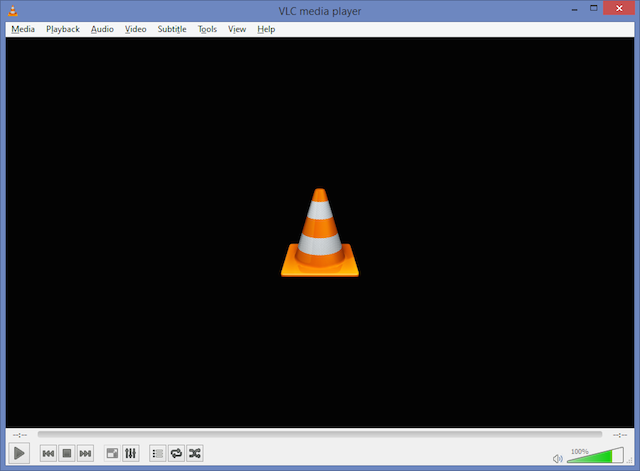
VLC at standard, 100 percent scaling. The title bar, menus, and playback controls are all similarly sized.
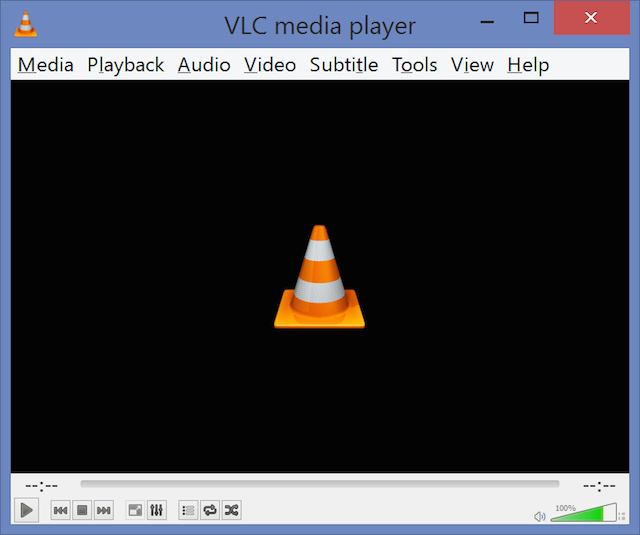
VLC at 200 percent. The title bar and the menus have scaled properly, but the playback controls are exactly the same size.
UI elements are also scaled inconsistently in Paint.NET and other programs.

This is where the annoying trackpad comes back into play. Just like last model’s, its sensitivity to your touch varies wildly, barely nudging one moment and zipping across the screen the next. That’s hard enough to deal with on a normal-res screen; double the PPI, and you’ll really scream when you can’t line up a simple mouse click.

Gestures are just as touchy, either not triggering at all when dragging from the touchpad’s edges, or unintentionally bringing up menus, like the right-side “charms” on the regular. You may hold out hope for Windows 8.1 eventually adjusting to a higher-res world, but don’t count on the trackpad to follow suit.

Just like the last model, the screen is a beaut, even from very wide angles.
Power, USB 3.0, mini-HDMI out, SD card reader.

8 isn’t enough

Lenovo tries to cut complaints off at the pass with a pre-loaded suite of Windows 8 apps, but most of those are bunk. For one, we could never get the Yoga Phone Companion to work. Touted as a way to manage phone calls and SMS by connecting your smartphone to your computer, the app doesn’t support iOS—or, strangely, Windows Phone 8. The Samsung Galaxy S3 I had on hand never managed to connect to the Yoga 2 Pro, with each side of the connection faintly recognizing the other, only to disconnect immediately.

The other Yoga-branded apps run the gamut of purpose and success. The “Camera Man” photo-booth app includes animated photo frames that stop animating once a photo is taken, rendering them pointless. “Yoga Picks” spams users with promoted suggestions for apps to install when switching between “poses.” The “Yoga Chef” app nearly succeeds in delivering a stunning take on touch-screen recipes.

I love propping a tablet up in the kitchen for hands-free cooking, and the combination of the Yoga 2 Pro’s stand mode and the construction of Lenovo’s app got me excited. As you scroll through a Yoga Chef recipe, each step is given a giant chunk of widescreen real estate while the ingredient list stays on the screen’s left edge at all times. Each step also includes a smaller-text hint of what’s to come next, saving me a few filthy-finger swipes.

However, my first recipe choice, the boringly-named “grilled chicken and vegetable salad,” included all-caps suggestions for Wish-Bone Italian dressing and Best Foods mayonnaise. You know, the luxury stuff. Nearly every recipe in the app included a sponsored product, and users can’t import their own recipes to make up for the deluge of advertising spam (or, in this case, actual Spam).

Worse, the giant-screen real estate doesn’t include photos or videos of what’s to come. Considering this ad-filled app seems squarely targeted at kitchen amateurs, it seems like a failure to connect. That’s a lot of rumination about a recipe app on a device meant to be an all-in-one solution, but it’s a perfect example in which positive Yoga 2 Pro possibilities come together in less-than-ideal fashion.

In tablet mode, the Yoga 2 Pro doesn’t fold into a perfectly solid mass, but it feels more comfortable in the hands than the gap shown here might otherwise suggest.

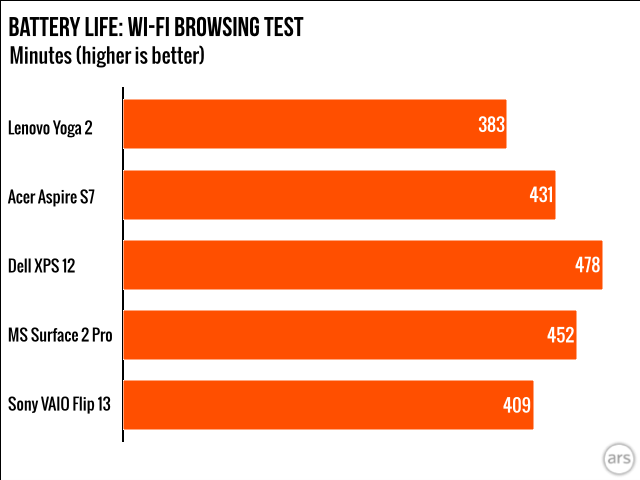
Promises of a nine-plus hour battery life didn’t pan out. Our battery test endlessly cycles webpages at 50 percent brightness on the display, and it came up with six hours and 23 minutes, a figure that doesn’t quite match up with what other lightweight, high-PPI laptops are pushing these days.

Still waiting for that resolution revolution

It’s worth repeating: Windows’ scaling problems mostly come down to third-party developers and not Windows itself. Microsoft provides the capability, it just can’t get developers to jump on board the way they have with Apple’s Retina Macs.​ Time will certainly change that factor, but early Yoga 2 Pro adopters will simply have to contend with the inconsistencies. After all, high-resolution Windows laptops are going to keep coming. The Yoga 2 Pro isn’t merely a lackadaisical proof of concept.

Tapping through high-res magazine and book content looked absolutely dreamy, and even at the base configuration, Lenovo has included enough horsepower to ensure that 1080p video can run on top of other active apps without any slowdown. That’s an indicator of the kind of desktop use this system could deliver for years (think touch-enhanced, super-sized textbook apps, for starters).

Furthermore, this is a solid, attractive, and comfortable piece of kit. With a slight reduction in weight since the last model, it’s even tolerable as a two-hand tablet so long as you don’t mind feeling an exposed keyboard on the bottom when it’s folded into tablet mode. (I got used to that weird feeling pretty fast, but your mileage will certainly vary).

If you seek a pristine, touch-screen multimedia portable, crossed with a capable notebook that (currently) works best using keyboard shortcuts, you’re the Yoga 2 Pro’s target audience. And if you don’t mind the current issues getting in the way of this souped-up alternative to the likes of the Surface 2 Pro, then the price and package combined may be worth a few, if significant, GUI complaints. Otherwise, keep your fingers off its Windows 8 screen, and instead cross them until software developers catch up with Lenovo’s otherwise impressive hardware.

The good

  • Full-screen multimedia looks stunning on the 13.3-inch, 1800p touchscreen.
  • CPU is up to the task of standard Windows 8 multitasking.
  • Yoga-inspired hinge stands up to repeated use for incredibly comfortable viewing.

The bad

  • Windows 8’s ecosystem hasn’t caught up to this screen’s resolution, making this laptop falter in desktop mode.
  • Anti-glare coating on monitor leaves a little to be desired.

The ugly

  • An all-in-one shouldn’t force power users to tow an extra mouse around.

Listing image: Sam Machkovech

185 Comments