Skip to content
Tech

Haswell to the rescue: Acer’s refreshed Aspire S7 Ultrabook reviewed

The keyboard and the price are the only remaining barriers to entry.

Andrew Cunningham | 85
Acer's refreshed Aspire S7 rights some (but not all) of the first version's wrongs. Credit: Andrew Cunningham
Story text

There’s nothing more frustrating than hardware that’s almost great. Whether it’s a phone with a sub par screen, a tablet with poor battery life, or a laptop with a lackluster keyboard, there is no disappointment quite like the product that does everything right—you know, if you ignore the one or two crucial things that it does poorly.

Acer’s Aspire S7 Ultrabook was one of those almost-great systems. For some time now, Acer has been trying to shed its image as a purveyor of bargain-basement laptops, and the well-built, attractively styled S7 was its most convincing effort yet. But two major shortcomings held the laptop back: a poor keyboard with a strange layout and shallow key travel, and a battery barely worthy of the name.

Now the S7 is back, and it’s packing Intel’s Haswell processors. The 2013 MacBook Air has already shown us what those chips can do for your battery life, but can they do the same thing for Acer’s Ultrabook? And does the Haswell version of the system have the same keyboard problems that the older version did?

Body, build quality, and screen

The Aspire S7 is the archetypal Ultrabook.
The Aspire S7 is the archetypal Ultrabook. Credit: Andrew Cunningham
Specs at a glance: Acer Aspire S7 (2013)
Screen 1920×1080 at 13.3″ (166 PPI)
OS Windows 8 64-bit
CPU 1.6GHz Intel Core i5-4200U (Turbo up to 2.6GHz)
RAM 8GB 1600MHz DDR3 (non-upgradeable)
GPU Intel HD Graphics 4400 (integrated)
HDD 128GB solid-state drive
Networking 802.11a/b/g/n, Bluetooth 4.0
Ports 2x USB 3.0, HDMI, mini DisplayPort, card reader, headphones
Size 12.7″ × 8.8″ × 0.51″ (322.6 mm × 223.5 mm × 12.95 mm)
Weight 2.87 lbs (1.30 kg)
Battery 6280 mAh
Warranty 1 year
Starting price $1,399.99
Price as reviewed $1,449.99
Other perks Webcam, backlit keyboard, stereo speakers

The Haswell S7 looks and feels pretty much the same as the Ivy Bridge version. That’s a good thing—PC designs are often changed for the sake of change, and it can be difficult to find a design you like one year that isn’t changed drastically a year or two down the road. The laptop is still very thin-and-light (2.87 pounds, compared to 2.97 pounds for Toshiba’s Kirabook and 2.96 for Apple’s 13-inch MacBook Air), so it’s no trouble at all to sling it in a shoulder bag and carry it around all day.

The computer is made primarily of three different materials: glass, which coats the screen and is used on the lid of the laptop; aluminum, which is used around the edge of the screen and for the palmrest and keyboard area; and plastic, which is used for the bottom of the computer. While it’s not quite as sturdy as the aluminum unibody construction of the MacBook Air—both the lid and the bottom of the laptop bend and flex under pressure—it’s still very good. In fact it’s good enough to make you forget about the cheap plasticky stuff that Acer (and, to be fair, every other PC OEM) put out at the low end of the market.

The laptop’s white glass lid is especially striking, and it’s unique among the mostly metal or plastic lids used by other similar laptops. The glass on both sides of the lid is Gorilla Glass 2, so it should stand up to scratches, cracks, and chips as well as most phone and tablet screens do. However, using glass for the lid still makes me just a little nervous—I’ve seen enough screens cracked from rough handling during air travel that a lid made of the same stuff gives me pause.

The laptop’s white glass lid, emblazoned with a lit-up Acer logo, is fetching but potentially fragile.
The laptop’s white glass lid, emblazoned with a lit-up Acer logo, is fetching but potentially fragile. Credit: Andrew Cunningham

Everything on the other side of the lid is pretty close to ideal. The S7’s screen is still a 13.3-inch, 1920×1080 IPS panel with 166 pixels-per-inch, and it’s bright and clear and colorful. The viewing angles are likewise excellent, and colors shift very little even when you’re looking at it from extreme horizontal or vertical angles. The bottom bezel is perhaps a bit thicker than it needs to be—Toshiba’s Kirabook crams a 13.3-inch screen into a laptop that is smaller in depth and width (12.44 by 8.15 inches for the Kirabook, compared to 12.7 by 8.8 for the S7)—but otherwise this is one of the nicest screens you can get in an Ultrabook.

The one potential issue with the screen has nothing to do with the screen itself but with Windows. At 13 inches, a 1080p screen is just dense enough that you’ll probably need to turn on Windows’ desktop scaling to make some items readable. As we’ve seen before, the results can be inconsistent (even in Windows 8.1). If you’re sticking to the Start screen and apps from the Windows store, scaling is more predictable and generally better-looking, though the paucity of apps in the Windows Store makes living entirely in that environment difficult (especially on a full-fledged laptop).

Density issues aside, the touchscreen is accurate and responsive, and the hinge is rigid enough that you don’t tilt the screen just by interacting with it. There’s no undue wobbling, but it’s still possible to lift the screen up without having to hold the base of the laptop down. The weight of the all-glass lid is enough to shut itself if it’s open at too shallow an angle, but in actual use this doesn’t really cause any problems. Like the Ivy Bridge version, this S7’s hinge will open to a 180-degree angle.

The port layout is altered slightly from the Ivy Bridge model, and the changes are all smart ones. The left side now houses the power jack, power button, one USB 3.0 port, and the SD card slot. The right side is home to a headphone jack, another USB 3.0 port, a full-size HDMI port, and mini DisplayPort.

On the left side, a power jack, a USB 3.0 port, and the SD card reader.
On the left side, a power jack, a USB 3.0 port, and the SD card reader. Credit: Andrew Cunningham
On the right, there’s a headphone jack, USB 3.0 port, full-size HDMI port, and mini DisplayPort.
On the right, there’s a headphone jack, USB 3.0 port, full-size HDMI port, and mini DisplayPort. Credit: Andrew Cunningham
The laptop’s fan vent is on the back edge.
The laptop’s fan vent is on the back edge. Credit: Andrew Cunningham
The polycarbonate bottom is all speakers and rubber feet.
The polycarbonate bottom is all speakers and rubber feet. Credit: Andrew Cunningham

This altered layout fixes three things we disliked about the last model. First, putting the edge-mounted power button closer to the hinge of the laptop makes it more difficult to bump the button accidentally. Second, having one USB port on each side rather than both on one side gives you access to at least one port even if one side of the laptop is blocked for some reason. Third, having both a full-size HDMI out and a mini DisplayPort out makes it much easier to connect the S7 to external displays than the previous model’s lone micro HDMI port. Micro HDMI is also rarer than either full HDMI or mini DisplayPort when it comes to cables and adapters.

Acer’s reviewers guide also says that the new S7 has a quieter fan, and the laptop does seem to stay relatively cool and quiet even under sustained load. In a room with light background noise, the laptop was basically inaudible while I was writing, Web browsing, and battery life testing. (You can still expect audible fan noise if you’re exporting video or gaming for hours at a stretch though.) The bottom of the laptop is largely unadorned—its flat, white polycarbonate is only broken up by its four rubber feet and its two Dolby-branded stereo speakers. These are acceptable for casual use but are tinny and lack bass, just like most other laptop speakers.

Keyboard and trackpad

The new S7 lacks the hokey “Professionally Tuned” label that the old one had above the keyboard. This implies that Acer either rethought the label, or it has fired its professional tuners.
The new S7 lacks the hokey “Professionally Tuned” label that the old one had above the keyboard. This implies that Acer either rethought the label, or it has fired its professional tuners. Credit: Andrew Cunningham

The S7’s keyboard was its worst aspect in the Ivy Bridge version, and while the situation is slightly better this time around, it’s still far from our favorite Ultrabook keyboard.

The first and largest problem is still the keyboard’s strange layout, with its lack of a dedicated row for function keys and its squished little caps lock key (seriously, when you spend a big chunk of your day in the Ars virtual office, you need quick and reliable access to your caps lock key at all times). It’s not for lack of space, either—there’s a wide swath of unused palmrest above the keyboard.

The S7 used to come in both 11-inch and 13-inch flavors that used this same keyboard. While the keyboard was obviously built to fit more snugly in the smaller 11-inch chassis, one could at least see the rationale for using the same keyboard in both models to reduce component costs. Acer tells me that it has no plans to release a Haswell version of the 11-inch model, so sticking with this same keyboard in a laptop that could easily fit a larger, better one is particularly befuddling.

In low-to-no light conditions, the backlight is usable, and the blue color is kind of alluring.
In low-to-no light conditions, the backlight is usable, and the blue color is kind of alluring. Credit: Andrew Cunningham
In dim lighting, though, the weakness of the backlight can actually make the keys look a bit fuzzier and harder to read.
In dim lighting, though, the weakness of the backlight can actually make the keys look a bit fuzzier and harder to read. Credit: Andrew Cunningham

A second, less pressing issue is the keyboard’s dim, bluish backlight. It’s better than nothing, but it’s still uneven just as it was in the Ivy Bridge version of the laptop. Even changing the backlight’s color from blue to white would help make the letters stand out a bit more from the silver plastic keys.

What does feel better is the key travel, which was very shallow and unsatisfying in the first version of the S7. It feels a bit better here (Acer says it increased the travel from 1.0mm to 1.3mm). It’s still a Chiclet keyboard, but once you get used to the layout quirks it actually doesn’t feel too bad to type on. I wrote a big chunk of this review on the S7’s keyboard, and after the couple of days it took for me to ramp up to my normal speed and accuracy, I actually found the keyboard to be decent. It does occasionally seem to miss letters, but that may be a problem with me and not with the keyboard. It’s not quite a keyboard I can love, but it’s one I can live with.

The trackpad is in a similar boat, even with the latest drivers from the Acer support site installed. It’s fairly accurate and not bad with things like two-finger scrolling and the Windows 8 trackpad gestures. It behaves less well when presented with other multitouch gestures—clicking and dragging, for example, can sometimes be problematic, and we occasionally had issues with palm rejection. These trackpad woes are all things that Windows users should (unfortunately) be used to by now.

Software

Perhaps tired of our constant complaints about bloatware, Acer shipped me the Microsoft Signature version of the Haswell S7 for review. As we’ve written, this means that the laptop comes with only Windows 8, all the drivers the laptop needs to work properly, and the Windows Essentials apps installed (there’s also an Acer tool installed to create factory install media, which can be dismissed or uninstalled by creating media or by uninstalling it). While there’s still an “Acer Picks” section of the Windows Store, downloading and installing any of it is left up to the user (as well it should be).

Raging about pre-installed bloatware is passe at this point, especially for our audience—many of you have the know-how you need to install a fresh copy of Windows yourself anyway. It’s way more of a treat than it should be to get a Windows laptop that just runs Windows when you take it out of the box, and it’s sort of ridiculous that you need to buy systems straight from Microsoft to get that from most of the OEMs. The PC makers could add a lot of value for their users if they’d just stop trying to add so much value.

Internals, performance, and battery life

The S7 performs similarly to last year’s model, but the battery life is much improved.
The S7 performs similarly to last year’s model, but the battery life is much improved. Credit: Andrew Cunningham

The keyboard tweaks are nice and all, but the real star of this refresh is Haswell. Intel’s fourth-generation Core processors offer slightly improved performance over last year’s Ivy Bridge processors, but their biggest selling point promises to fix the old S7’s biggest deficiency: battery life. We compared the third- and fourth-generation Core processors pretty extensively in our review of the 2013 MacBook Air, but it’s worth covering some of that ground again because the S7 (and other PC Ultrabooks) uses a slightly different type of Haswell processor than the Airs do.

There are two different types of U-series Ultrabook processors: those which include Intel’s faster HD 5000 integrated GPUs but have slightly lower base CPU clock speeds (those are the ones the Airs use) and those that use the slower HD 4400 GPU but have higher base clock speeds (those are what the S7 has). Our review unit includes a Core i5-4200U, which has a base clock speed of 1.6GHz and Turbo Boost speeds of 2.6 and 2.3GHz in single- and dual-core modes, respectively. The 1.8GHz i7-4500U is also available as an upgrade option, but both use the same Intel HD 4400 GPU.

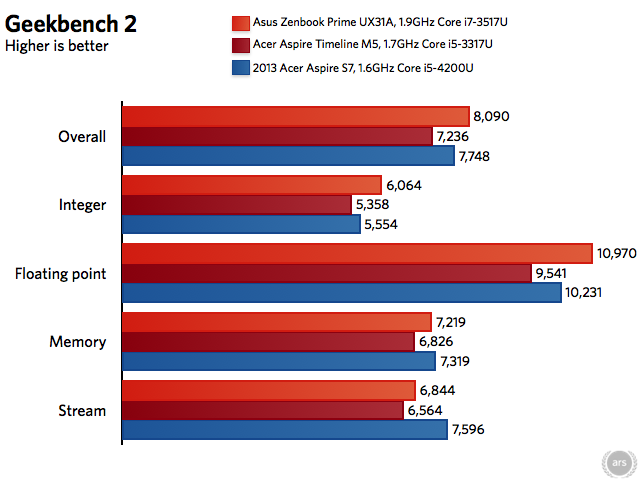
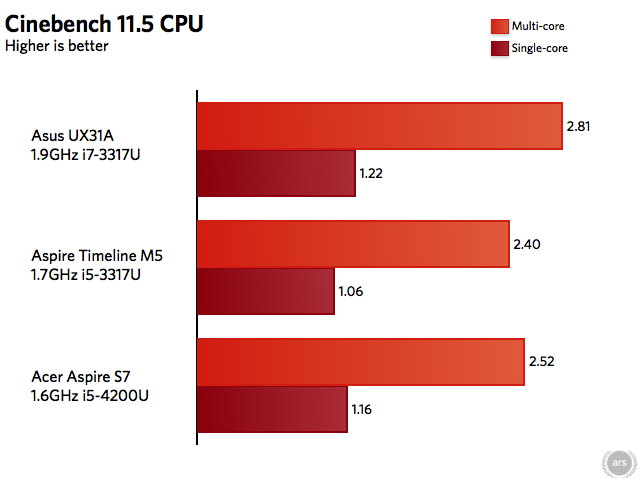
We’ve run just a few benchmarks to give you a general idea of where this particular Haswell processor stands compared to some of its Ivy Bridge predecessors and its HD 5000-toting cousins. We’ll compare the Aspire S7’s Geekbench and Cinebench scores to the Asus Zenbook Prime UX31A and Acer’s own Aspire Timeline M5, which use a 1.9GHz Core i7-3517U and a 1.7GHz i5.3317U respectively.

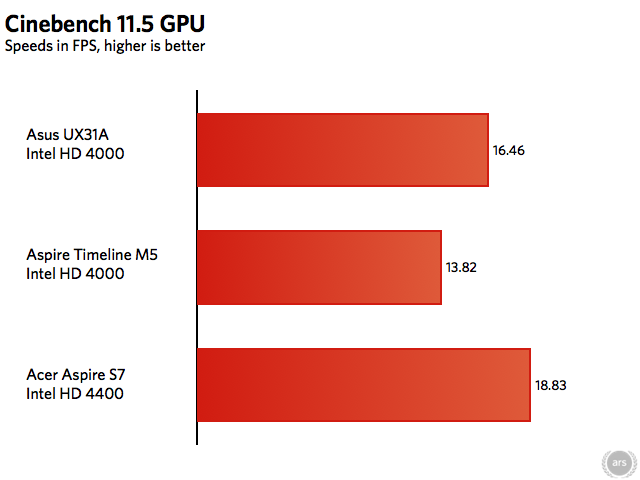
Looking at the CPU performance, a Core i5 based on Haswell generally performs somewhere in between an Ivy Bridge Core i5 and an Ivy Bridge Core i7. Haswell doesn’t move things forward much, but the architecture is more efficient than an Ivy Bridge CPU running at the same clock speed. In the Cinebench GPU test, the HD 4400 GPU beats both implementations of the HD 4000—the HD 4000 is clocked at 1.15GHz in the Core i7-3517U, while it’s clocked at a slightly lower 1.05GHz in the i5-3317U.

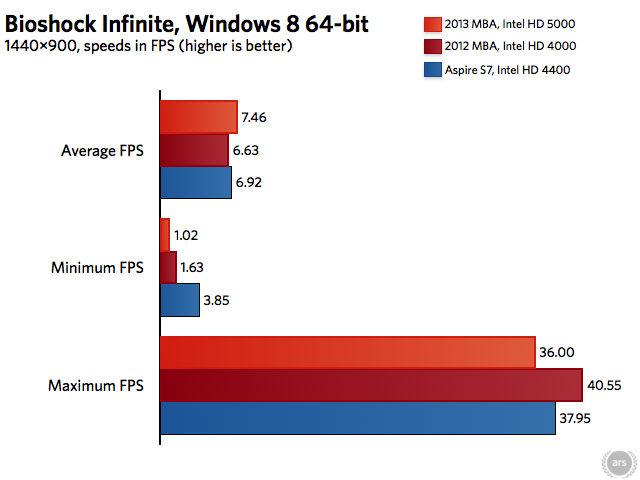
To compare the HD 4400 against the HD 5000, we’ll use an actual game—Bioshock Infinite. The 2012 MacBook Air, with its 1.8GHz Core i5-3427U and 1.15GHz Intel HD 4000 GPU, will represent the Ivy Bridge generation of Ultrabooks, while the 2013 Air, of course, uses the HD 5000. All three laptops are running the 64-bit version of Windows 8 with the same version of Intel’s graphics driver (version 15.31.9.64.3165) installed.

The HD 4400 is just barely a step up from the HD 4000—it would be mostly accurate to think of it as last year’s integrated GPU with slightly improved API support (the Haswell GPUs add Direct3D 11.1 support, and both the Ivy Bridge and Haswell GPUs support OpenGL 4.0 and OpenCL 1.2 with the latest drivers installed). Haswell uses the same 22nm manufacturing process that Ivy Bridge did. Especially in the body of a heat- and space-constrained Ultrabook, it’s difficult to increase performance by much without causing other problems.

The rest of the S7’s specs are identical to the previous model. It’s got dual-band 802.11n (its four antennas support two two-way streams for a theoretical maximum connection speed of 300Mbps), Bluetooth 4.0, and a serviceable front-facing webcam. The laptop’s soldered-on DDR3L RAM has been bumped from a workable 4GB to a more comfortable 8GB across all models, though it is still non-upgradeable. Finally, the strange but speedy solid-state drive that we discussed in our review of the last S7 is still here, and it boosts storage speeds beyond what would be possible with a more conventional SATA SSD. To summarize, the drive basically combines two full SSDs (complete with their own controllers, NAND, and cache) into a single card and arranges them in a RAID 0 array to boost performance.

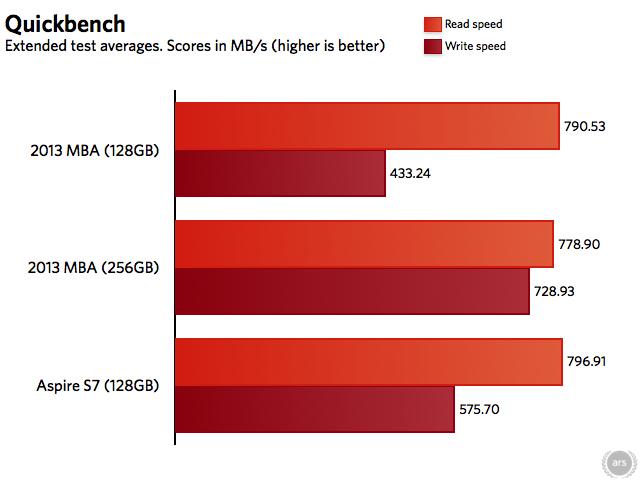
Our review unit appears to toss out the MyDigitalSSD-brand RAID drive in favor of one from Kingston (model number SMSR150S3128G). Kingston has a more established name in the SSD market, so we feel just a bit more comfortable with its drive than with the other one. In any case, there’s no arguing that the SSD is fast—the 128GB drive in our review unit has similar read speeds and faster write speeds than the PCI Express-based equivalent in the new MacBook Air. The 256GB drive in the Air can beat it, but it’s still much quicker than a standard SATA III drive.

Battery life

In Ultrabooks, the fact that Haswell doesn’t boost performance much is more than forgivable in light of the battery life improvements it ushers in. In this case, Haswell is also getting some help from a larger battery—Acer ships a 6280mAh battery in the new S7 instead of the 4680mAh battery in the old one.

Acer rated the old S7 at a thoroughly average six hours of battery life, but in our original testing we couldn’t even squeeze four hours out of it. We were testing battery life with the screen brightness maxed at the time, but other reviewers noted a similar battery life deficiency under more realistic conditions. Engadget could only get about four hours and 18 minutes with the screen brightness set to 65 percent, for example. Acer promises eight hours with the new Haswell-equipped S7, and thankfully their estimate is a bit closer to reality this time around.

We’re actively working to improve our battery life tests, and to that end programming wizard Lee Aylward whipped us up a script that would cycle through webpages at a set interval to simulate actual browsing usage (we used a similar test to test the 2013 MacBook Air’s battery). Cycling through pages at a 15 second interval with the screen brightness set to 50 percent, the new Aspire S7 lasted for 7 hours and 11 minutes. It’s slightly lower than Acer’s estimate but not too far off, either.

This is better

Credit: Andrew Cunningham

Intel’s Sandy Bridge and Ivy Bridge processors made it possible to shrink laptops to Ultrabook-level thickness without completely ruining performance compared to a thicker, more conventional laptop. As we saw when we reviewed the new MacBook Air and again in Acer’s new Aspire S7, Haswell allows PC makers to reach the same size, weight, and performance levels without sacrificing battery life. That’s great, because battery life was usually the worst thing about the first round or two of Ultrabooks.

Switching from Ivy Bridge to Haswell makes this refreshed Aspire S7 everything that the first model aspired to be (get it?). We still don’t like this keyboard very much, but otherwise the S7 offers most of what you could ask for of a non-convertible Ultrabook—a high-resolution, attractive touchscreen, respectable performance, good battery life, and solid build quality that people normally don’t associate with Acer. The new model addresses most of the complaints we had the last time around, and it should be sufficient to convince people who were on the fence about it before.

If there’s one non-keyboard-related thing to complain about, it may actually be the price. The S7 starts at a whopping $1,399.99, which will get you the Core i5-4200U, 128GB of storage, and 8GB of RAM. Stepping up to the faster Core i7-4500U and 256GB of storage will run you $1,649.99. By comparison, a 2013 MacBook Air with 128GB of storage and 8GB of RAM costs $1,199.99, and stepping up to a faster processor and 256GB of storage will run you $1,549.99 (if you just want the larger SSD and not the faster processor, that costs $1,399.99—there’s no way to get one without the other in the S7). Compared to the Air and some of its other Ultrabook contemporaries, there’s no denying that the asking price is steep.

The good

  • Attractively styled and well-built
  • Great 1080p IPS touchscreen
  • RAID 0 SSD makes for very quick storage speeds
  • Improved port layout and key travel
  • Battery life goes from bottom-of-the-barrel to not-half-bad

The bad

  • Keyboard still uses an odd layout that seems unnecessary given the unused space in the palmrest
  • Tweaky trackpad
  • Not much of a performance upgrade over last year’s model, though it’s still plenty fast for most general computing tasks

The ugly

  • More expensive than other, comparable Ultrabooks, including the MacBook Air

Listing image: Andrew Cunningham

Photo of Andrew Cunningham
Andrew Cunningham Senior Technology Reporter
Andrew is a Senior Technology Reporter at Ars Technica, with a focus on consumer tech including computer hardware and in-depth reviews of operating systems like Windows and macOS. Andrew lives in Philadelphia and co-hosts a weekly book podcast called Overdue.
85 Comments