Skip to content
Tech

Ars reviews iWork ’09: fourth time’s a charm?

Ars takes the latest version of Apple's popular iWork office suite out for a …

Iljitsch van Beijnum | 44
Story text

A year and 5 months after releasing iWork ’08, Apple finally updated its productivity suite to version ’09. Keynote 5.0, Pages 4.0, and Numbers 2.0 all sport some refinements, but this time around iWork isn’t joined by a new family member. Apple touts an enhanced template chooser and more ways to share for all three applications. Apart from that, Pages gains a full screen view, dynamic outlines, mail merge with Numbers, and MathType and Endnote for including mathematical equations and bibliographies. For Numbers, it’s easy formulas, formula list view, table categories, and advanced charts. Keynote gains magic move, more transitions, chart animations, and Keynote remote. Finally, there is iwork.com.

In this review, I’ll be looking primarily at what’s new in this latest version vs. iWork ’08. So if you’re unfamiliar with iWork, please read our Work ’08 review first for background information that isn’t replicated here. And although Microsoft Office is popular among Mac users, this review compares iWork mainly against its former self. Hopefully by the end of the review you’ll know whether you should upgrade to iWork ’09.

The new suite’s system requirements are relatively modest, and haven’t really increased from iWork’08:

  • Mac computer with an Intel, PowerPC G5, or PowerPC G4 (500MHz or faster) processor
  • 512MB of RAM; 1GB recommended
  • 32MB of video memory
  • Mac OS X v10.4.11 or Mac OS X v10.5.6 or later
  • QuickTime 7.5.5 or later
  • 1.2GB of available disk space
  • DVD drive required for installation

Test systems:

  • MacBook: 2.4GHz Core 2 Duo, 2GB RAM, NVIDIA GeForce 9400M, 256MB video memory (shared)
  • PowerBook: 1.25GHz PowerPC G4, 768MB RAM, ATI Mobility Radeon 9600, 64MB video memory

Installation

iWork ‘09’s installation procedure is as painless as you’d expect, and it leaves older versions of iWork in place. Any icons in the Dock also remain linked to the old versions, so you’ll have to manually replace those with the identical-looking new ones.

When upgrading from an older version of iWork, you may want to re-customize the toolbars for the three applications, as all of them gained a few toolbar icons that otherwise won’t appear. However, the toolbar settings seem to be shared by the different versions of the same application, so this will also modify the toolbar for your older iWork applications.

When each of the iWork ‘09 applications opens for the first time, you’re greeted with a window offering to play tutorial videos. These videos are pretty good, but (annoyingly) they load from the web. (If you want to access the tutorials before getting the product, have a look here.) The user guides for the iWork applications also reside on Apple’s web servers, so if you plan on getting some iWork done without connectivity, you may want to download them for offline reference.

Pages offers to play the video tutorials

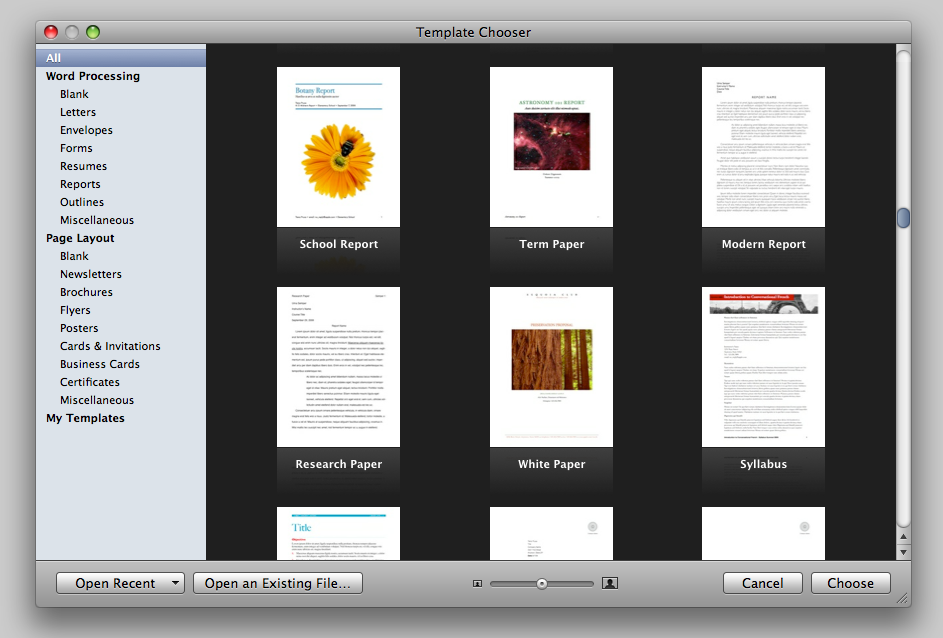
With the tutorials out of the way, the iWork applications bring up a template chooser, which has been slightly refined: moving the mouse over a template shows additional pages using the template. After selecting a template, there is a nice zoom animation as the document opens. Each application has gained new templates. Keynote now has 44, Numbers 30. Pages has a whopping 84 templates for word processing and 98 for page layout, but those include things like envelopes and business cards. Through no fault of their own, both the old and the new templates fail to appeal to me. But more choice is never a bad thing.

Some of Pages’ templates in the template chooser

Pages

In its 3.0 incarnation, Pages still lacks autosave (come on Apple, even TextEdit has had this for years!), and it still has no idea whether it wants to be a word processor or a layout program when it grows up. It also still can’t do footnotes and endnotes in the same document, so some of the annoyances that plagued previous versions haven’t gone away. But the new Pages version does have a killer new feature that makes the upgrade worth it for freelance writers around the world: a running word count at the bottom left of the document window. (2661 and counting! Too bad Ars doesn’t pay by the word.)

The Pages word counter

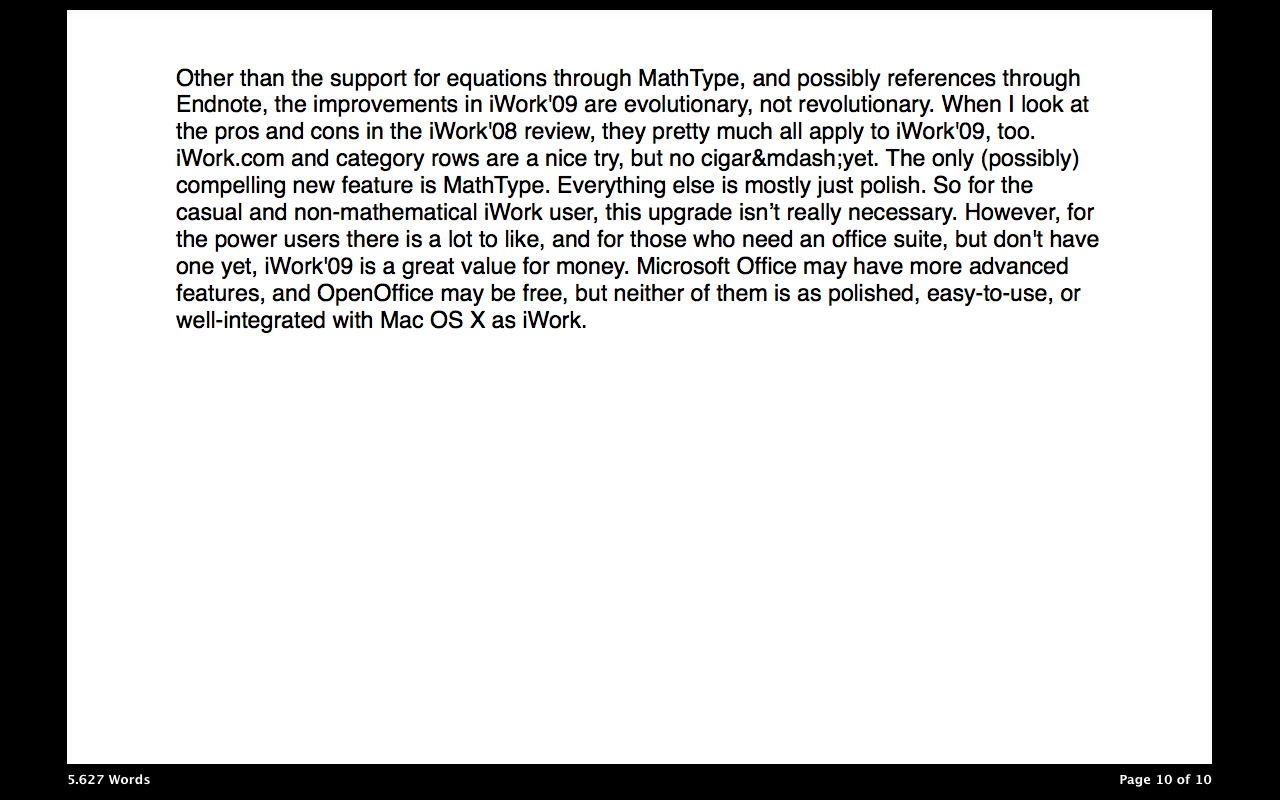
And for those who want to rack up a good word count quickly by removing all distractions, Pages now sports a full screen mode. In this mode, the screen turns black (the color is customizable) and the only thing that’s visible is the document, with the word count on the lower left and the current page number and page count on the lower right. But despite the “full screen mode” name, the document doesn’t actually fill the whole screen; there’s always some unused space on both sides of the document. By hovering the mouse pointer at the left border of the screen, thumbnails of the pages in the document appear; move the mouse over to the right edge of the document and the scroll bar shows up. With the mouse at the top, the menu and format bars make an appearance. Inspectors and the color and font pickers can be brought up as usual. (It’s probably my imagination, but Pages seems more responsive in full screen mode.)

Pages full screen mode

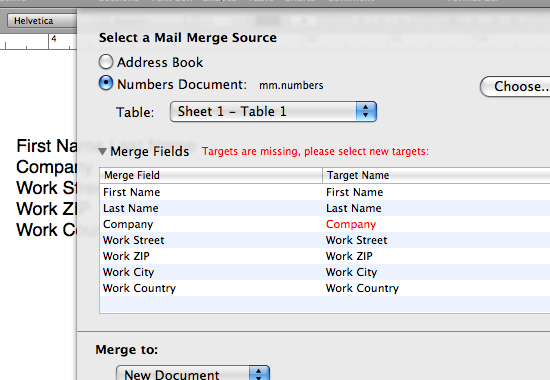
In the iWork ’08 Pages there was some support for mail merge, but it didn’t look like Apple was very serious about this at the time. In the new Pages this is much better—you can easily insert Address Book fields or links to columns from a Numbers spreadsheet. Just use column titles in Numbers that match the fields in Pages’ mail merge and you can send the same letter to a whole bunch of people without trouble. This is going to save me from having to manually add addresses to all of the change-of-address letters that I have to send out next week, so thanks, Apple.

Mail merge

A very nice touch is that the ? (pilcrow) menu, which houses the styles in a document, makes a decent guess about which styles to show. For instance, at first, the only heading in the drop down menu is heading 1. But after using the heading 1 style, the ? menu also displays the heading 2 style. This makes a lot of sense, as few people use second-level headings without first using first-level headings. It’s still possible to show all styles in a drawer on the right of the document with View > Show Styles Drawer.

Equations

For those of us with a scientific or engineering inclination, one of the problems with iWork was the lack of support for equations in Pages. Microsoft’s Word on the other hand, sports an equation editor. Apple didn’t replicate that functionality in Pages; rather, they added support for MathType to Pages and the other iWork applications.

MathType is the professional version of Word’s equation editor, and it makes really good equations. It’s also very easy to use, but the downside is that it’s sold for $97 by Design Science. Yes, that’s more than what iWork’09 itself goes for. However, there’s a 30-day trial, and after the trial the MathType plugin remains functional in “lite” mode, which is sufficient for those of us with only a superficial love for all things mathematical.

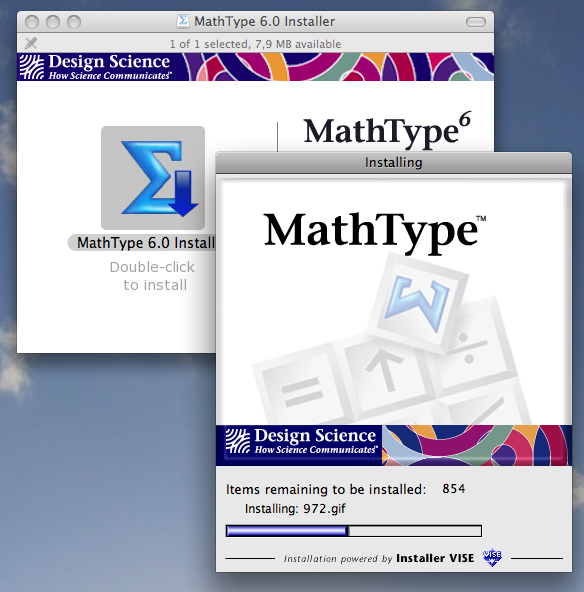
The MathType installer

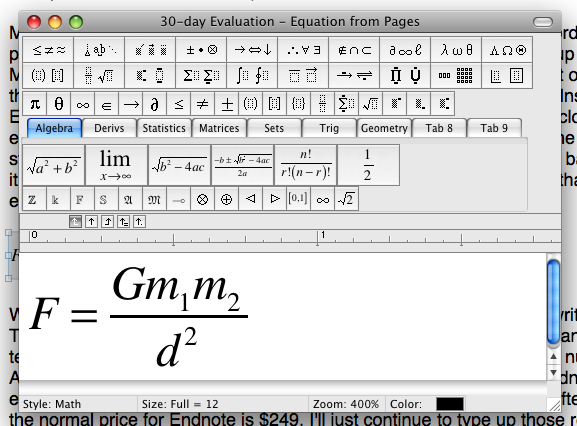
MathType sports a prehistoric installer that requires an admin password (as does iWork) and proceeds to quit all running applications before setting itself up to work with Microsoft Office. I’m not sure what happens if Office isn’t installed, but on my system, after the installation procedure the iWork applications gained the menu item, Insert > MathType Equation. Selecting this brings up the MathType equation editor, and closing the equation editor sends the equation back to the iWork app, where it resides in the document as a standard, picture-like object. Double clicking the equation brings back MathType, if it’s still installed on the system. If it isn’t, the equation can’t be edited. (Note that the formula editor refers to editing spreadsheet-like formulas.)

A MathType equation

Speaking of equations: Apple introduced a very strange bug in iWork. I wrote a paper with the previous version of Pages, where I included equations as normal text, like this mathematical proof for the existence of fish: ? ? ? . But when I opened this file with the new Pages, all the “exist” signs came out as underscores, and some other math symbols were incorrect as well. Strangely, inserting new symbols into the text from the Edit menu also resulted in the wrong ones. Then, adding insult to injury, Apple came out with updates for the iWork’08 applications, which added this incorrect behavior to the old programs, too.

Aside from equations, the next bane of the academic paper writer is references. There are a million ways to handle those, and Pages is no help with any of them. I even tend to number them by hand because Pages doesn’t support decent numbering formats. Apple again solves this problem with a plugin: Endnote. However, I didn’t even bother with the 30-day trial after finding out that the normal price for Endnote is $249. I’ll just continue to type up those references manually.

Numbers

Numbers now sports two additional number formats, the first of which is durations, which has a clever slider that makes it possible to format a cell to show an amount of time in weeks, days, hours, minutes, seconds, or milliseconds, or a combination that makes sense. The other newcomer is “numeral system,” which has nothing to do with Roman numerals, but allows the selection of a base for displaying numbers. The base can be anything from 2 (for binary representation) to 36. (Any Forth programmers in the house?) Negative numbers can be displayed with a minus sign or in two’s complement. It’s now also possible to create custom formats for numbers, date/time, and currencies. But alas, the inflexibility that I complained about in the iWork ’08 review is still there: decimal point or comma and day and month names are still exclusively determined by the settings in the system preferences. This is extremely annoying when sharing documents (including those exported to PDF) with others who have different system settings for these items, because then the documents don’t look the same.

Creating a custom cell format in Numbers

Another thing that I complained about in the iWork ’08 review was that it wasn’t possible to autofill cells by dragging a selection to the top or the left, only to the bottom or the right. (So 3, 4, and 5 could gain a 6 below but not a 2 above.) This has been fixed, and the new Fill > Up and Fill > Left menu items under Insert reflect this.

The formula list

The 3D charts can look very nice (try the “medium center” or “soft light” lighting styles), but be careful with exporting documents containing these charts to PDF. When exporting (now found under the Share menu item) to PDF, there is a choice between “good,” “better,” and “best” image quality. These settings matter for the 3D charts, since the charts are converted to bitmap images for PDF export, and with the lower settings these bitmaps are of a very low resolution. Even on-screen without magnification, the lower options look bad. But with “best” it’s necessary to zoom to 400% before pixelation starts showing. Of course, choosing the highest image quality means the files get larger, but not to an alarming degree: 184k rather than 60k in a simple example with one 3D pie chart.

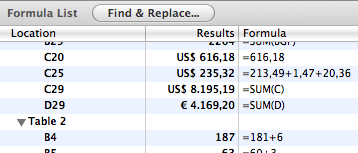
New in Numbers is the formula list. This is a list with all the formulas used throughout the document, with the cell that contains the formula, the value in the cell and, of course, the formula. It’s also the case that the number of available functions appears to have increased over the previous version.

There are a few other nice touches in the way that Numbers now handles cells. For instance, it’s now possible to change cell references from relative to absolute with a tiny drop down menu from inside a formula. And pasting a single cell or a small number of cells in a larger area now fills up the entire selected area with the pasted content.

Setting absolute cell referencing

To pivot or not to pivot

There are still no pivot tables in Numbers, but the app now sports a “reorganize table” function. Sorting an entire table on the contents of one column was already possible by selecting “sort” in the drop-down menu at the top of a column, but the reorganize function will also sort the selected part of a table.

The reorganize function

Numbers can now also add “category rows”—apparently this is what Apple thinks those who ask for pivot tables need. Maybe they’re right, but it would help if the reorganize panel wasn’t so confusing and hard to use. The new panel seems to work somewhat like smart folders in applications such as iTunes. However, smart folders are just a representation of the underlying data. Inserting category rows changes the table (or appears to do so) without the requisite “do it” and “cancel” buttons. The resulting category rows copy the value of the column they’re based on (like “Chicago” for a category row based on the column “city”) and empty cells for the remaining columns. A drop-down menu makes it possible to place a subtotal, average, minimum, maximum, or count in the cell, which works on all the rows that share the same value in the category row (so all rows where the city is Chicago). This selection is copied to all other category rows. Curiously, it’s not possible to put a custom function in the category row cells.

Keynote

Keynote is the oldest member of the iWork family, and version 4.0 in iWork’08 was already a very mature product. This maturity is probably why Keynote 5.0 received the fewest new features. Like Pages and Numbers, Keynote gains MathType equations and a new Share menu. Apple quietly removed the option to export to Adobe Flash, and even more quietly left the Send To > iDVD feature in the same deplorable state as in the previous version, where it creates terrible-looking DVDs (especially if they’re in PAL format).

With the disappointments out of the way and the main attractions still to come, let me share a very pleasant surprise that I encountered in the new Keynote: it’s now possible to control the size of shapes and other objects using the pinch gesture on Macs that sport the latest trackpads. (Why doesn’t Apple sell external trackpads for desktop Macs?) This is really cool—it’s a very effortless way to control the size of an object. Unlike dragging the anchors at corners, pinching and unpinching leaves the object’s center in the same location. Oh, and two-finger rotating also works. A three-finger gesture moves to the next or the previous slide—in Pages this scrolls up or down one screen worth of text.

Magic moves, transitions, and callouts

Keynote’s most notable new feature is the “magic move.” In iWork ’08, Keynote gained the ability to move objects in arbitrary ways. However, this was difficult to control, with hard-to-gauge lines and targets controlling the moves. With magic move, this is much easier: simply make a copy of the current slide, and move things around on the copy. Then, select “magic move” as the transition for the first slide. Keynote then moves all the common elements from their locations on the first slide to the locations on the second slide. Size, rotation, color, and opacity also transition smoothly from their settings on the first slide to those on the second. This is a very powerful feature.

Then there are the requisite new transitions. Apple added two new types of transitions: text transitions and object transitions. The anagram transition is one example of the former, in which letters move to a new place in the new slide. With the object transitions, objects or text from the old slide move out and those in the new slide move in, while the background remains stationary. This is a great feature, but it obviously looks less impressive on a solid-color background.

Keynote ’09 transitions

Keynote’s new transitions are nice, but unfortunately a number of old transitions are now missing in action, including two of my favorites, the color planes and the droplet. But after loading an old presentation with these transitions in them, they’re back! So apparently Keynote can still do them, but some user interface designer at Apple thought that the list of transitions was becoming too unwieldy and decided to prune it a bit. Not cool.

The callout

In the previous version of iWork, there was a “quote bubble” shape. This shape has now been generalized into the “callout.” (The quote bubble is also still available.) The callout is a rounded rectangle with a pointy part sticking out one side. Unlike the quote bubble, the callout’s pointy part has an anchor that can be dragged around to make it point in any direction, and as far out as necessary. It has another anchor to adjust the width of the base of the pointy part. Because the callout is otherwise a rounded rectangle, it can either be a rectangle (with the roundness anchor dragged all the way to the corner), a circle or oval (the roundness anchor dragged to the middle), or a rectangle with rounded corners (somewhere in between).

Toeing the yellow line

Keynote has always (if I remember correctly) had yellow guide lines that helped position objects on the slide. Unfortunately, these guides weren’t very precise: sometimes they would snap into multiple positions one or two pixels apart, making it very hard to create pixel-perfect alignment between objects. In the new Keynote, this feature is much improved, and the yellow lines seem to have gained full, pixel-level precision. On one or two occasions, I’ve even seen Keynote show the distance in pixels between two yellow guide lines.

Presenting

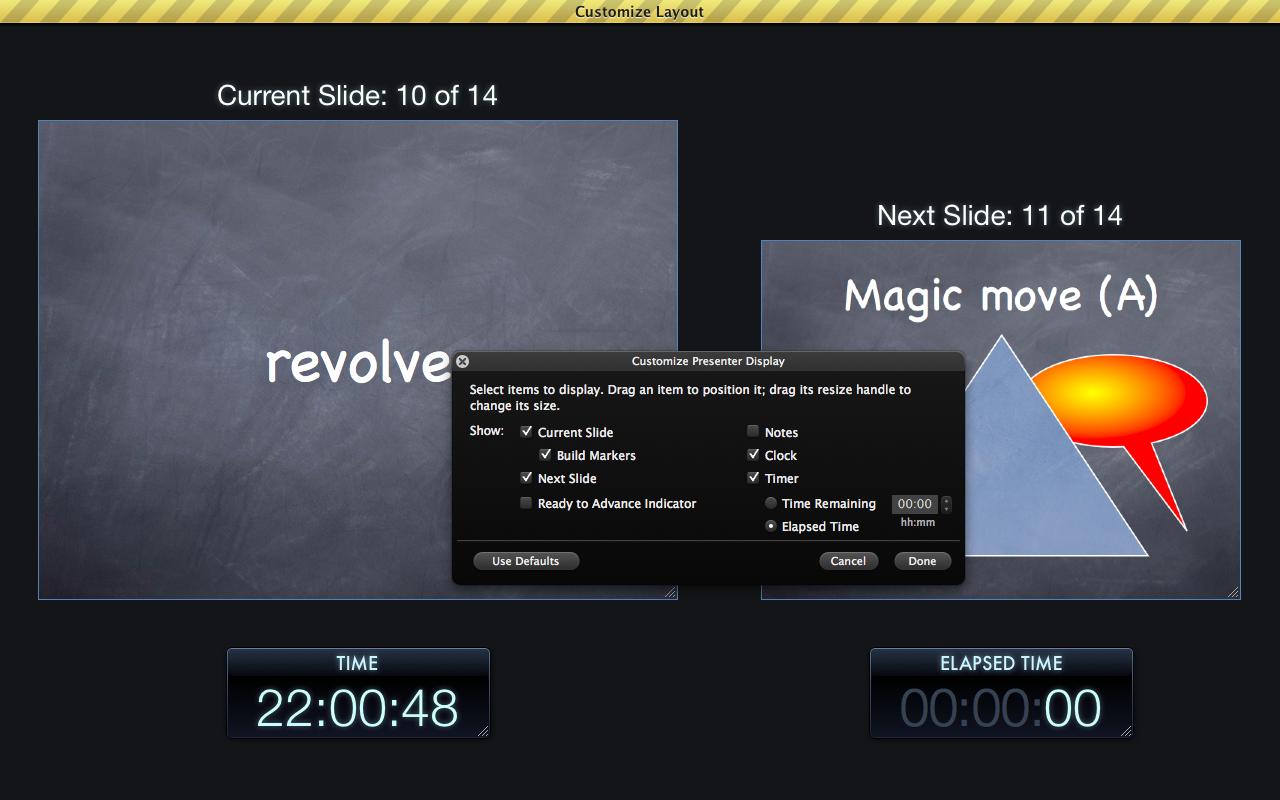
After working hard to create that great presentation, there usually comes a moment when it’s time to actually present it. Keynote has always made this part easy with its “presenter display,” and now that display looks better than ever. When your computer is connected to an external screen or projector for displaying the presentation, you can use the built-in screen for the presenter display, which can display the current slide, the next slide, the current time, a running timer, and presenter notes. All of this is highly configurable. The old presenter display was already very good, but the new one looks much slicker, and has one very nice new feature: if a slide has a number of build stages that are advanced manually, there will be blue dot under the current slide for each build. It lights up after the build stage has been completed. This way, you’re not surprised by advancing to the next slide when you thought there would be another build, or the other way around.

Customizing the presenter display

Alternatively, you can use your iPhone or iPod touch to control the presentation with the Keynote Remote application that’s available for $0.99 from the app store. This way, you can see the current slide and presenter notes or the current and next slides on your handheld. The main problem with the Remote app is that you need to swipe in order to advance the presentation. This is hard to do reliably without looking, and one of the key parts of a good presentation is eye contact with the audience. This is why I prefer to use my Apple Remote for this.

File formats

A new feature that all the iWork applications share is the ability to lock down files (even exported PDF files) with a password. Oh joy. That never leads to any trouble.

Did I mention that iWork still has no autosave? It also won’t save in iWork ’05 and iWork ’06 formats anymore. It still opens the older iWork documents, though, as well as AppleWorks files. It also opens Microsoft Office files—both the traditional .doc, .xls, and .ppt formats as well as the new XML formats with .docx, .xlsx, and .pptx extensions—but it only exports to the pre-XML Office formats. Unfortunately, iWork still has no support for the OpenDocument format or for SVG images.

The export and sharing functions are now grouped under the Share menu. When this menu first appeared in iLife ’08, I thought it was a gimmick, but in iWork ’09 it’s actually somewhat useful: when you want to e-mail someone a copy of an iWork document, simply select Share > Send via Mail and select the desired file type. The file will then be saved in the desired file format and be added as an attachment to a new message in Mail. If you’re like me, and always have a few dozen windows obscuring the view of your desktop, which is in turn littered with links to YouTube videos that you may get around to watching next year, then this is a real time saver over dragging and dropping.

iWork.com

The Share menu also makes it possible to send an iWork document to Apple’s iWork.com service. You’ll need a login and password to access the service, but you can use an existing Apple account, such as your iTunes Store account, for this purpose.

After you’re logged in, Keynote, Numbers, or Pages will allow you to select the file types you want to upload to iWork.com. The reason for this will become (somewhat) clearer below. By default, these files will be iWork ’09 and Microsoft Office formats and PDF, but under “advanced” it’s possible to also select iWork ’08.

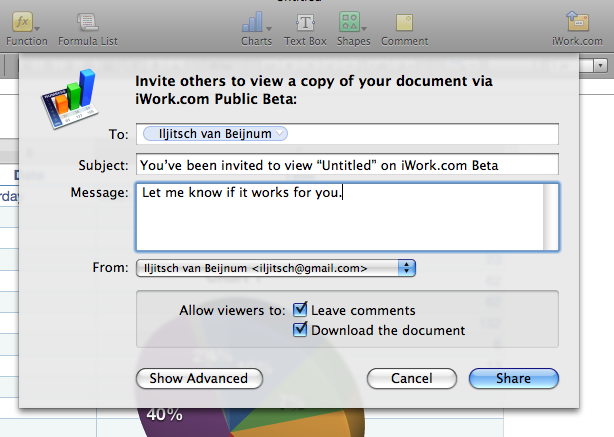
After selecting a mail account (as used with Apple’s Mail application) and one or more recipients so that the system can send out an invitation message, the file is exported to the selected formats and uploaded to iWork.com. During the export, it’s not possible to edit the document. Then the invitation message is sent out with the URL of the document. Interestingly, this is done locally through Mail, not from Apple’s iWork.com servers.

Inviting people to view a document on iWork.com

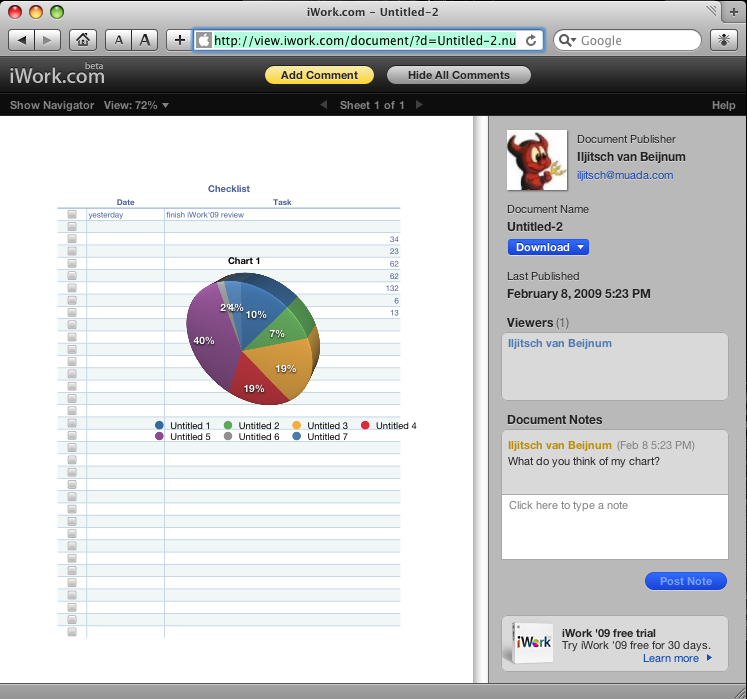
After the upload, you’re finally ready to see what iWork.com is all about… which is, unfortunately, not a whole lot at this point: viewing, commenting on, and downloading copies of uploaded docs in different formats. There is no editing, so comparisons to Google Docs are completely unjustified.

An iWork.com document in Safari

For the time being, it’s hard to see why people would even use iWork.com’s comment function, as comments don’t propagate back to the uploader; there isn’t even an e-mail notification when people leave comments. But if you download the document again in iWork’09 format, the comments are included in the downloaded document. The other, non-Apple file formats allow non-iWork users to join the party, but at the cost of reduced compatibility and features.

There are two different URLs that allow access to your iWork.com documents: a private URL, which requires logging in but then allows you to manage all your documents, and a public one. Have a look at this document to see how it works. Apple reserves a gigabyte of storage per user and documents are deleted after 120 days.

Ultimately, iWork.com looks ultra slick—Apple even managed to implement “sheets” that slide down from under the tool bar with warnings that iWork ’08 or Office versions may look different from the original. But beyond the eye candy, it’s really unclear to me what Apple’s intentions are with iWork.com, as it’s basically just a way to share documents with several people a little more easily than through e-mail. But there’s a “beta” label on the service, which in the case of Apple actually means something. So maybe document editing and other more useful features are coming.

Performance

To get a feel for any performance differences between iWork ’09 and its predecessor, we did a few informal, mostly subjective tests on the different applications in the suite.

Loading a 1.4MB comma-separated file with 80,000 records took many minutes with Numbers ’08, which only loaded the first 65,536 records. Numbers ’09 doesn’t really improve on that, because it simply doesn’t load the file at all, claiming that it’s too big. 64,000 records doesn’t work either, but 32,000 load in 35 seconds on the MacBook. Sorting on a column takes a few seconds. With this file loaded, Numbers uses 300MB of resident memory with about the same amount of memory left free, so no swapping memory to disk (of note). The Numbers ’08 with all updates applied takes a minute to load 32,000 records, using up 700MB of resident memory. Sorting the file takes two minutes.

In order to evaluate Keynote performance, I set up a presentation with 150 slides to progress automatically. This presentation ran in 15 seconds in both Keynote ’08 and Keynote ’09 on the MacBook, and around 32 seconds on the PowerBook.

Pages’ search-and-replace was as good as instantaneous with 213 occurrences in a 38-page document. In the original Pages ’08, this was two minutes on the PowerBook and 30 seconds on a 2.2 GHz MacBook Pro. However, with all the updates applied, Pages ’08 has no search-and-replace performance issues.

All in all, performance seems on par with the previous version of iWork, except where iWork ’08 performance was lacking. In those cases, iWork ’09 improves on iWork ’08. Also, unlike iLife ’09, it looks like iWork ’09 is fully functional on PowerPC systems.

Conclusions

Other than the support for equations through MathType, and possibly references through Endnote, the improvements in iWork ’09 are evolutionary, not revolutionary. When I look at the pros and cons in the iWork ’08 review, they pretty much all apply to iWork ’09, too. iWork.com and category rows are a nice try, but no cigar—yet. The only (possibly) compelling new feature is MathType. Everything else is mostly just polish.

So for the casual and non-mathematical iWork user, this upgrade isn’t really necessary. However, for the power users there is a lot to like, and for those who need an office suite, but don’t have one yet, iWork’09 is a great value for the money. Microsoft Office may have more advanced features, and OpenOffice may be free, but neither of them is as polished, easy-to-use, or well-integrated with Mac OS X as iWork.

Photo of Iljitsch van Beijnum
Iljitsch van Beijnum Associate Writer
Iljitsch is a contributing writer at Ars Technica, where he contributes articles about network protocols as well as Apple topics. He is currently finishing his Ph.D work at the telematics department at Universidad Carlos III de Madrid (UC3M) in Spain.
44 Comments